Instructions
Secrets of Google Search Console: Everything an SEO Specialist Needs to Know
 admin
30 Apr 2026
Updated: 01 May 2026
15 min read
4 views
admin
30 Apr 2026
Updated: 01 May 2026
15 min read
4 viewsFor effective website promotion in Google, a clear understanding of its interaction with the search engine is essential. Google Search Console, formerly known as Webmaster Tools, is the primary tool for obtaining this data. It provides information on indexing status, crawling issues, organic search traffic, and other critical metrics. Let’s take a closer look at the purpose of GSC, its usage principles, and specific benefits for SEO specialists aiming to improve website rankings.
Contents:
- Why Google Search Console is an Effective SEO Tool
- Google Analytics and Search Console: What’s the Difference
- How GSC Unlocks Website Potential
- Google Search Console: Do You Need It?
- How to Add a Website to Google Search Console
- Working with Reports in Google Search Console
- Date
- GSC Pages Report
- Video Report
- New Report — Statistics
- Links
- Troubleshooting for Better Rankings
- URL Inspection
- Sitemaps Report Analysis
- How Core Web Vitals Works
- Sections Indispensable for an SEO Specialist
- Performance
- Sitemaps
- Coverage
- Mobile Usability
- Enhancements
- Removals
Why Google Search Console is an Effective SEO Tool
Google Search Console is a free web service that helps track the performance of a resource in organic search results. Its role is in diagnostics and analytics. By using this tool, you will make your website as attractive and understandable as possible for search robots and users.
In addition to showing how your website performs in Google, Search Console helps you see which pages the search engine indexes, and also identify technical errors that negatively affect its operation. Now let’s consider the question: Google Search Console: what is it for business owners? The service helps in several areas:
- Understand how users find your site. The service shows what queries people use when they land on it, and at what positions in search it appears.
- See and fix errors. Technical problems that hinder indexing and ranking are shown.
- Control indexing. You will find out which pages of the site are indexed or not indexed by Google. Google Search Console Sitemap allows you to submit sitemaps and check the status of URLs.
- Track SEO effectiveness. Evaluate the results of your SEO specialist’s work. Make necessary changes to improve effectiveness.
- Receive notifications. Google will inform you about problems and important events, such as changes in indexing, security threats, or mass page removals.
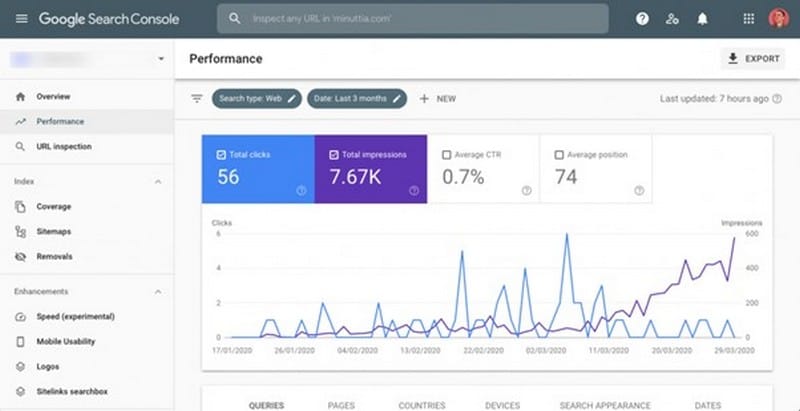
Additionally, with Google SEO Search Console, you can check links to your resource from other sources. This will allow you to see its authority.
Google Search Console is a powerful tool for increasing your website’s visibility in search results and attracting clients.
Google Analytics and Search Console: What’s the Difference
While both Google Search Console and Google Analytics help analyze platforms, they perform somewhat different roles. For an effective SEO strategy, it’s important to understand their key differences, functions, and modes of operation.
Google Search Console is designed exclusively for SEO analytics. It tracks search visibility, indexes, checks URLs and Sitemaps, identifies errors and problems, and provides reports. GSC answers questions like: How does Google find my site? What queries do users see it for? Are there technical issues preventing Google from indexing content? Search Console helps to quickly react and correct errors. It is essential for improving rankings.
Google Analytics conducts analysis across various platforms. It shows user behavior on the site, meaning it tracks what actions they perform: viewing pages, filling out forms, making purchases, subscribing, etc. The tool allows you to obtain data on traffic sources, audience, number of visitors, popularity of certain pages, and more. Google Analytics answers questions like: What do users do on the site? Where do they come from? How much time do they spend on pages? What is the conversion rate?
If you want to evaluate search engine performance, Search Console will be useful. But for successful digital marketing, both tools will be needed.
How GSC Unlocks Website Potential
The service performs several important functions. It reports on:
- Resource performance — allows analyzing clicks, average position in search results, and other important data.
- Coverage — shows which pages Google indexes.
- Search queries — provides the ability to see which keywords users use to land on the website.
- Links — identifies sources linking to you.
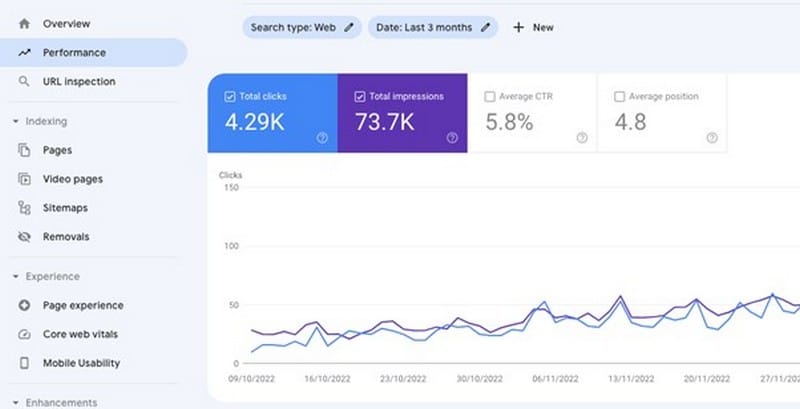
In addition, Google Search Console Site allows you to obtain metrics on traffic from different countries and device types, monitor Sitemap files, remove irrelevant URLs, and more.
Without Google Search Console, you will be working blindly, without a clear understanding of how your site interacts with the world’s most popular search engine.
Google Search Console: Do You Need It?
The Console is an excellent assistant for several categories of specialists:
- Website owners. To control the basic health of their resource and understand how it is presented in search.
- SEO specialists. For in-depth analysis, problem identification, optimization, and tracking the effectiveness of SEO strategies.
- Web developers. For auditing technical correctness, eliminating crawling and indexing errors.
- Marketers. For analyzing search queries, understanding audience behavior, adjusting content strategy, and effective marketing.
- Editors and media journalists. For analyzing the display of articles and news in search and Google Discover feed, as well as understanding which materials specifically interest the audience.
How to Add a Website to Google Search Console
Adding a resource is a way to make it visible and improve its positions in Google search results. Step-by-step instructions for connecting Google Search Console:
- Log in to Search Console using your existing account or create a new one.
- Click Add Property, select the property type: Domain (subdomains, protocols) or URL Prefix (for verifying a specific URL).
- Add the URL and verify it by uploading an HTML file, using a tag, DNS record, Google Analytics, and Tag Manager.
- Familiarize yourself with the main sections and functions of Google Search Console.
- Add a sitemap in the Sitemap section.
- Set up notifications for desired events to stay informed about changes.
- Conduct an audit. Analyze data by reviewing Google reports.
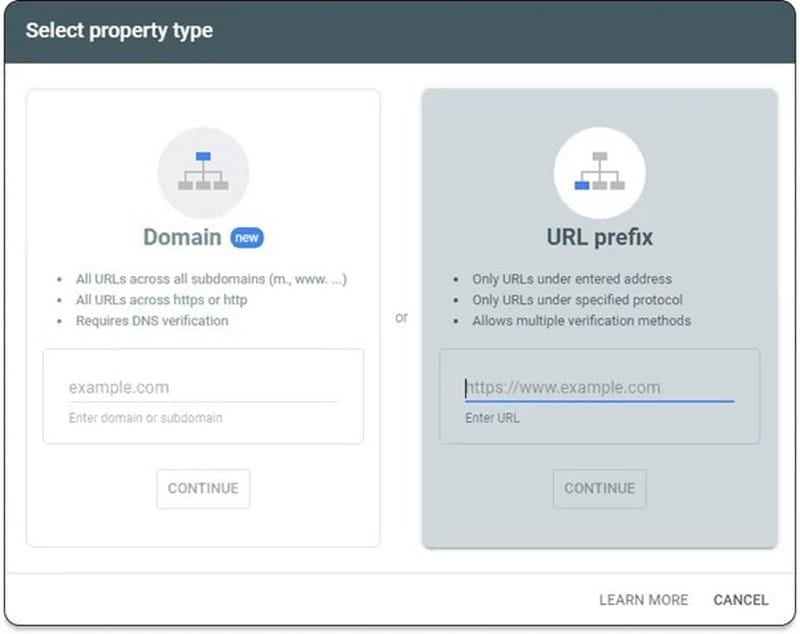
Google Search Console is used for monitoring all online stores, blogs, and other platforms that work with organic traffic.
We have covered how to register Search Console. Now let’s see how it delivers search results.
Working with Reports in Google Search Console
Effective SEO optimization is impossible without in-depth data analysis, and Search Console is a key source of this information. It allows you not just to collect data, but to transform it into actionable strategies for improving resource visibility and traffic. Google Search Console provides several reports.
Date
The user can process information for a single day, specific selected dates, or a certain period of time. This function will be useful if the website experienced a traffic surge on a particular day. Next to the date range filter, you can click the “New” button to create another filter. Other options include viewing time intervals with the highest visitor flow and analyzing pages with the highest CTR.
GSC Pages Report
This section contains the page indexing report. It indicates which pages are indexed and which are not, along with the reasons. Google encourages paying attention primarily to canonical pages. Those that redirect to another URL are not indexed. If a drop in the number of indexed pages is noticed, the cause must be identified and subsequently resolved.
The section explains the reason for the lack of indexing in the “Resource” column and may point to the website itself. Such a mark means that the problem is not with Google, but with the resource itself. If the problem is resolved, you need to inform the search engine. To do this, send a validation request.
Video Report
The filter indicates the number of indexed pages with videos. Situations may arise where certain materials are not displayed. The report will point to the cause, which should be corrected. There are many possibilities for working with these filters. It will take time to familiarize yourself with them and learn how to use them.
New Report — Statistics
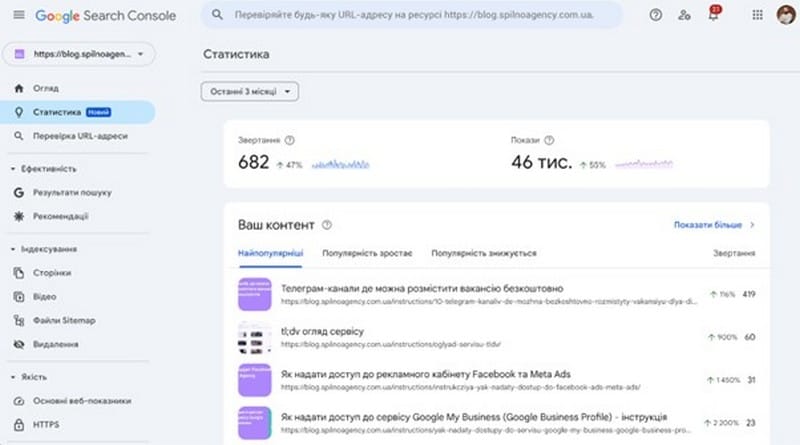
Recently, a new convenient way to view performance statistics appeared in Google Search Console. In it, you will find metrics and changes in traffic. This allows the resource owner to evaluate their effectiveness in search results. The report will help in making content decisions. Statistics are systematized by key performance indicators:
- CTR (clickability);
- content;
- queries;
- countries;
- traffic sources.
An extended data analysis is provided, consisting of about 20 elements. There is filtering by the most interesting points. All this will help you audit your resource, comprehensively analyze current trends, compare indicators over different time intervals, and better understand the signs of effectiveness.
Links
A very useful option for SEO, as it allows you to see which pages are most linked and find out which domains frequently link to your platform. Both external and internal pages are analyzed.
To maximize the information from Google Search Console reports, it is important to understand the specifics of working with each, their structure, and key indicators.
Troubleshooting for Better Rankings
To significantly improve rankings, it is necessary to timely identify and eliminate malfunctions. Failure to do so can lead to a significant drop in search results.
URL Inspection
You will find out whether a site or a specific web page has been indexed and displayed in search results. The tool is suitable for analyzing mobile versions and updated content. It checks the following parameters:
- resource adaptability status for mobile devices;
- date when the page was last crawled;
- how Google found the URL;
- presence of micro-markup issues.
If the page has been indexed, a confirmation window will appear. If not, you will see a message with the necessary information. A request to GSC is sent using a special button.
Sitemaps Report Analysis
The tool provides complete information about the sitemap and its status. It shows how many URLs have been submitted and which ones are indexed. If errors occurred during the check, they will also be reported. When sitemaps are updated, they can be resubmitted. The Sitemaps Report has been improved. Now, new functionality allows for automatic error notifications. It is now possible to receive individual reports for a specific sitemap.
How Core Web Vitals Works
Google uses Core Web Vitals to evaluate user experience based on a set of specific metrics. Some key metrics:
- LCP — evaluates the loading time of the largest content element. An optimal value is considered to be no more than 2.5 seconds. The lower the loading speed of website elements, the higher the ranking.
- FID — time to first interaction between the user and the browser. An optimal value is no more than 100 milliseconds.
- CLS — degree of layout shift during loading. An optimal value is no higher than 0.1.
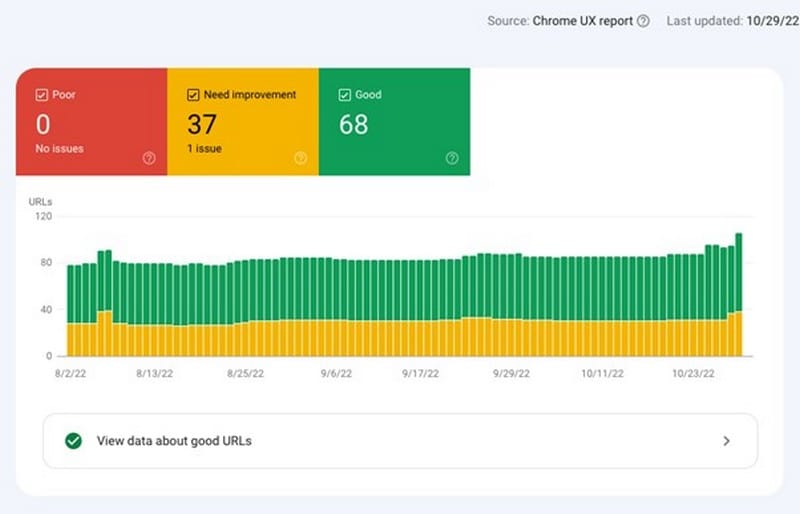
Thanks to the Core Web Vitals report, problematic pages can be identified. Recommendations for correction are provided. The dynamics of metrics can be tracked in real-time, and optimization recommendations can be received.
Sections Indispensable for an SEO Specialist
Google Search Console is a direct line of communication with the search engine. The Console provides insights that allow you to understand how it sees and interacts with your site. There are several key sections for scanning Google Search Console. Without regular work with them, an effective SEO strategy is simply impossible. Let’s look at these sections and their features.
Performance
The chart shows the dynamics of metrics such as clicks, impressions, CTR, and average position. This section helps to obtain important information for an SEO specialist. Each parameter is highlighted in a separate color, and it’s easy to switch between them. The time interval can be set in the filter panel.
Using statistical metrics, you can check:
- Search queries. Find out which keywords make your site visible and receive clicks. This is important for expanding the semantic core, evaluating relevance, and finding new growth points.
- Pages. Identify the most effective ones or, conversely, those that need optimization.
- Countries and devices. Get an understanding of the geography and device types of your audience.
All this will allow you to optimize queries and find URLs with low CTR.
Sitemaps
Sitemaps help Google better understand the structure of your resource and index new pages faster. These files provide search engines with data about the type and location of content. They contain information about images and videos, and update frequency. This section will be especially useful if the portal consists of many pages.
Coverage
This section is critically important for understanding how Google crawls and indexes your site. Search Console Coverage is a report on the “health” of the resource. It shows:
- indexed pages;
- excluded (duplicates, 404, blocked);
- errors.
Mobile Usability
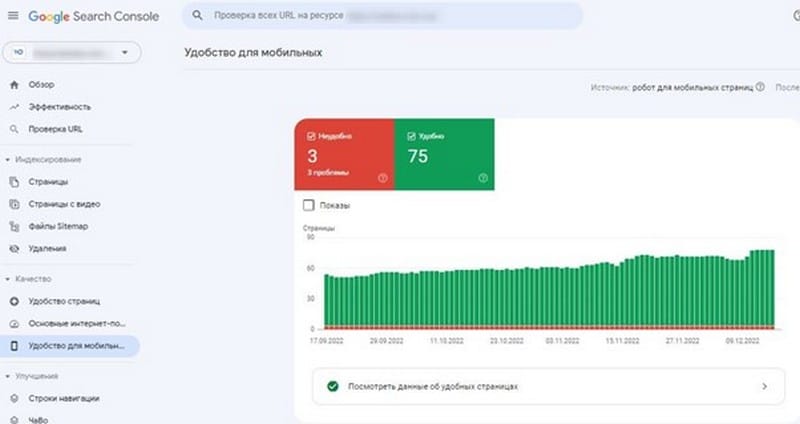
It helps identify problems that may prevent users from comfortably interacting with your site on smartphones. This section shows a list of pages that have difficulties with mobile adaptation. Common errors include text that is too small to read, closely spaced elements, and content wider than the screen. For an SEO specialist, this tool is important because any problems with mobile adaptation can significantly worsen the ranking of an online resource.
Enhancements
Structured data helps a web resource stand out in search results by improving the appearance of information. For example, thanks to them, Google can display rich snippets for product listings, events, recipes, ratings, as well as company logos, and much more.
What you see in this section depends on the specifics of your site. Google automatically populates “Enhancements” based on data found during crawling. Therefore, the set of options may differ from examples or screenshots, as it is adapted to specific schema types.
Removals
Allows you to remove URLs from Google’s index for 6 months if you don’t want them to appear in search results. When you submit a removal request, choose one of two options:
- Temporarily — will not appear in search for half a year.
- From cache — removal of the cached version, but keeping the URL in search results.
Additionally, you can review previous removal requests.
Google Search Console is an effective tool, and it should be used to optimize your site. If you need help, contact the digital marketing agency Spilno Agency. We provide professional promotion services. Send a request for a consultation, and collaborate with specialists to achieve better business results.
Консультація з маркетингу
Frequently Asked Questions
Why Google Search Console is an Effective SEO Tool?
Google Search Console is a free web service that helps track the performance of a resource in organic search results. Its role is in diagnostics and analytics. By using this tool, you will make your website as attractive and understandable as possible for search robots and users.
What is google Analytics and Search Console: What’s the Difference?
While both Google Search Console and Google Analytics help analyze platforms, they perform somewhat different roles. For an effective SEO strategy, it’s important to understand their key differences, functions, and modes of operation.
How GSC Unlocks Website Potential?
The service performs several important functions. It reports on:
What is google Search Console: Do You Need It?
The Console is an excellent assistant for several categories of specialists:
How to Add a Website to Google Search Console?
Adding a resource is a way to make it visible and improve its positions in Google search results. Step-by-step instructions for connecting Google Search Console:
