Instructions
Secrets of Google Search Console: Everything an SEO Specialist Needs to Know
 admin
30 Apr 2026
Updated: 01 May 2026
9 min read
5 views
admin
30 Apr 2026
Updated: 01 May 2026
9 min read
5 viewsFor effective website promotion in Google, a clear understanding of its interaction with the search engine is crucial. Google Search Console, formerly known as Webmaster Tools, is the primary tool for obtaining this data. It provides information on indexing status, indexing issues, organic search traffic, and other critical metrics. Let’s take a closer look at the purpose of GSC, its usage principles, and the specific benefits for SEO specialists aiming to improve a website’s ranking.
Table of Contents:
- Why Google Search Console is an effective SEO tool
- Google Analytics and Search Console: What’s the difference
- How GSC unlocks website potential
- Google Search Console: Do you need it?
- How to add a website to Google Search Console
- Working with reports in Google Search Console
- Data
- GSC Pages Report
- Video Report
- New Report — Statistics
- Links
- Troubleshooting for better rankings
- URL Inspection
- Sitemaps Report Analysis
- How Core Web Vitals works
- Essential sections for an SEO specialist
- Performance
- Sitemaps
- Indexing
- Mobile Usability
- Enhancements
- Removals
Why Google Search Console is an effective SEO tool
Google Search Console is a free web service that helps track the performance of a resource in organic search results. Its role is diagnostic and analytical. By using this tool, you can make your website as attractive and understandable as possible for search engine robots and users.
In addition to showing how your site performs in Google, Search Console helps you see which pages are indexed by the search engine, and also identify technical errors that negatively affect its operation. Now let’s consider the question: Google Search Console: what is it for business owners? The service helps in several areas:
- Understand how users find your site. The service shows what queries people use when they land on it, and at what positions in the search engine it appears.
- See and fix errors. Technical problems that hinder indexing and ranking are shown.
- Control indexing. You will find out which pages of the site are indexed or not indexed by Google. Google Search Console Sitemap allows you to submit sitemaps and check the status of URLs.
- Track SEO effectiveness. Evaluate the results of your SEO specialist’s work. Make necessary changes to improve effectiveness.
- Receive notifications. Google will inform you about problems and important events, such as changes in indexing, security threats, or mass page removals.
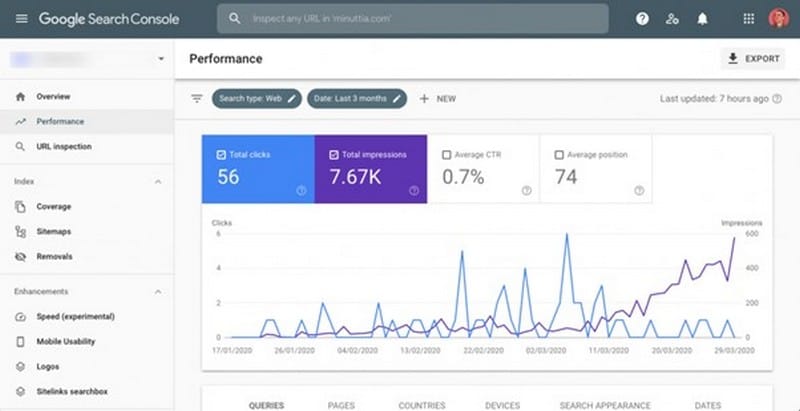
Additionally, with Google SEO Search Console, you can check links to your resource from other sources. This will allow you to see its authority.
Google Search Console is a powerful tool for increasing your site’s visibility in search results and attracting customers.
Google Analytics and Search Console: What’s the difference
Although both Google Search Console and Google Analytics help analyze platforms, they serve slightly different roles. For an effective SEO strategy, it is important to understand their key differences, functions, and modes of operation.
Google Search Console is designed exclusively for SEO analytics. It tracks search engine visibility, indexes, checks URLs and sitemaps, identifies errors and problems, and provides reports. GSC answers questions such as: How does Google find my site? For what queries do users see it? Are there technical problems preventing Google from indexing content? Search Console helps to quickly react and correct errors. It is essential for improving rankings.
Google Analytics performs analysis across various platforms. It shows user behavior on the site, meaning it tracks what actions they perform: viewing pages, filling out forms, making purchases, subscribing, etc. The tool allows you to get data on traffic sources, audience, number of visitors, popularity of certain pages, and much more. Google Analytics answers questions such as: What do users do on the site? Where do they come from? How much time do they spend on pages? What is the conversion rate?
If you want to evaluate search engine performance, Search Console will be useful. But for effective digital marketing, both tools will be needed.
How GSC unlocks website potential
The service performs several important functions. It reports on:
- Resource performance — allows you to analyze clicks, average position in search results, and other important data.
- Indexing — shows which pages Google indexes.
- Search queries — allows you to check what keywords users use to get to the site.
- Links — identifies sources linking to you.
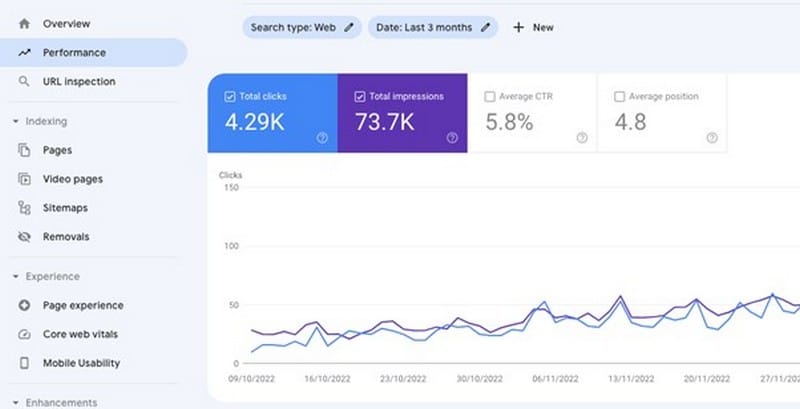
In addition, Google Search Console Site allows you to get metrics on traffic from different countries and device types, monitor Sitemaps, remove irrelevant URLs, and much more.
Without Google Search Console, you will be operating blindly, without a clear understanding of how your site interacts with the world’s most popular search engine.
Google Search Console: Do you need it?
The Console is an excellent assistant for several categories of specialists:
- Website owners. To control the basic state of their resource and understand how it is presented in the search engine.
- SEO specialists. For in-depth analysis, problem identification, optimization, and tracking the effectiveness of SEO strategies.
- Website developers. For auditing technical correctness, eliminating indexing and crawling errors.
- Marketers. To analyze search queries, understand audience behavior, adjust content strategies, and effective marketing.
- Editors and media journalists. To analyze the display of articles and news in the search engine and Google Discover feed, and to understand which materials particularly interest the audience.
How to add a website to Google Search Console
Adding a resource is a way to make it visible and improve its position in Google search results. Step-by-step instructions for connecting Google Search Console:
- Log in to Search Console, using an existing account or create a new one.
- Click Add property, select the property type: Domain (subdomains, protocols) or URL prefix (to verify a specific URL).
- Add the URL and verify it by uploading an HTML file, using a tag, DNS record, Google Analytics, and Tag Manager.
- Familiarize yourself with the main sections and functions of Google Search Console.
- Add a sitemap in the Sitemaps section.
- Configure notifications for desired events to stay up-to-date with changes.
- Conduct an audit. Analyze data by reviewing Google reports.
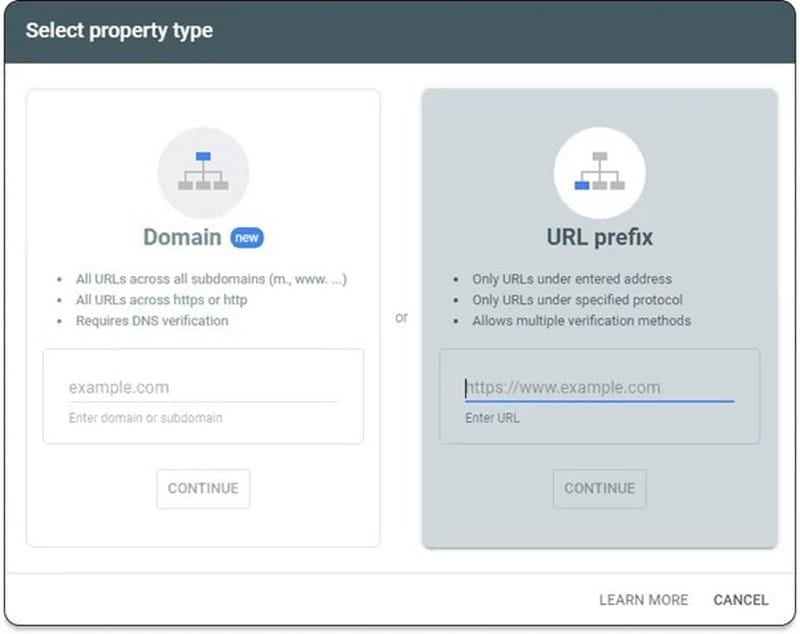
Google Search Console is used to monitor all online stores, blogs, and other platforms that work with organic traffic.
We have discussed how to register Search Console. Now let’s see how it delivers search results.
Working with reports in Google Search Console
Effective SEO optimization is impossible without in-depth data analysis, and Search Console is a key source of this information. It allows not only to collect data but to transform it into concrete strategies for improving resource visibility and traffic. Google Search Console provides several reports.
Data
The user can process information for a single day, specific selected dates, or a defined period of time. This function will be useful if the website experienced a sudden surge in traffic on a specific day. Next to the date range filter, you can click the
Frequently Asked Questions
Why Google Search Console is an effective SEO tool?
Google Search Console is a free web service that helps track the performance of a resource in organic search results. Its role is diagnostic and analytical. By using this tool, you can make your website as attractive and understandable as possible for search engine robots and users.
What is google Analytics and Search Console: What’s the difference?
Although both Google Search Console and Google Analytics help analyze platforms, they serve slightly different roles. For an effective SEO strategy, it is important to understand their key differences, functions, and modes of operation.
How GSC unlocks website potential?
The service performs several important functions. It reports on:
What is google Search Console: Do you need it?
The Console is an excellent assistant for several categories of specialists:
How to add a website to Google Search Console?
Adding a resource is a way to make it visible and improve its position in Google search results. Step-by-step instructions for connecting Google Search Console:
