Canonical Tag: What It Is and How It Affects SEO in 2026

The canonical tag is one of the most powerful — and most misunderstood — tools in technical SEO. It lets you explicitly tell search engines which URL is the “primary” version of a given piece of content. Without proper canonical implementation, Google decides on its own which page to index — and it often picks the wrong one. In 2026, with AI-generated content and complex CMS setups multiplying duplicate URLs at scale, the canonical tag has become a non-negotiable element of every well-structured website.
The canonical tag is not an optional nice-to-have — it is a mandatory technical SEO element for any site with more than 50 pages.
What Is a Canonical Tag?
The canonical tag (official name: rel="canonical") is an HTML element placed in the <head> section of a page. It tells search engines which URL is the “canonical” (primary, authoritative) version of a given piece of content.
Syntax:
<link rel="canonical" href="https://yourdomain.com/primary-page/" />
Google, Bing, and other search engines use this signal to decide which page to index, rank, and display in search results. If the canonical is missing or incorrect, the search engine makes this decision on its own — often with results you did not intend.
Why Canonical Tags Matter for SEO
The core problem canonical solves is duplicate content. It occurs when the same content is accessible via multiple URLs. Without canonical, each URL competes against itself for rankings, causing:
- Diluted link equity — backlinks are split across copies instead of concentrating on one page
- Ranking instability — Google alternates between showing one URL or another
- Crawl budget waste — bots spend resources crawling duplicates instead of new pages
- Diluted authority — behavioral signals (time on page, CTR) are divided between versions
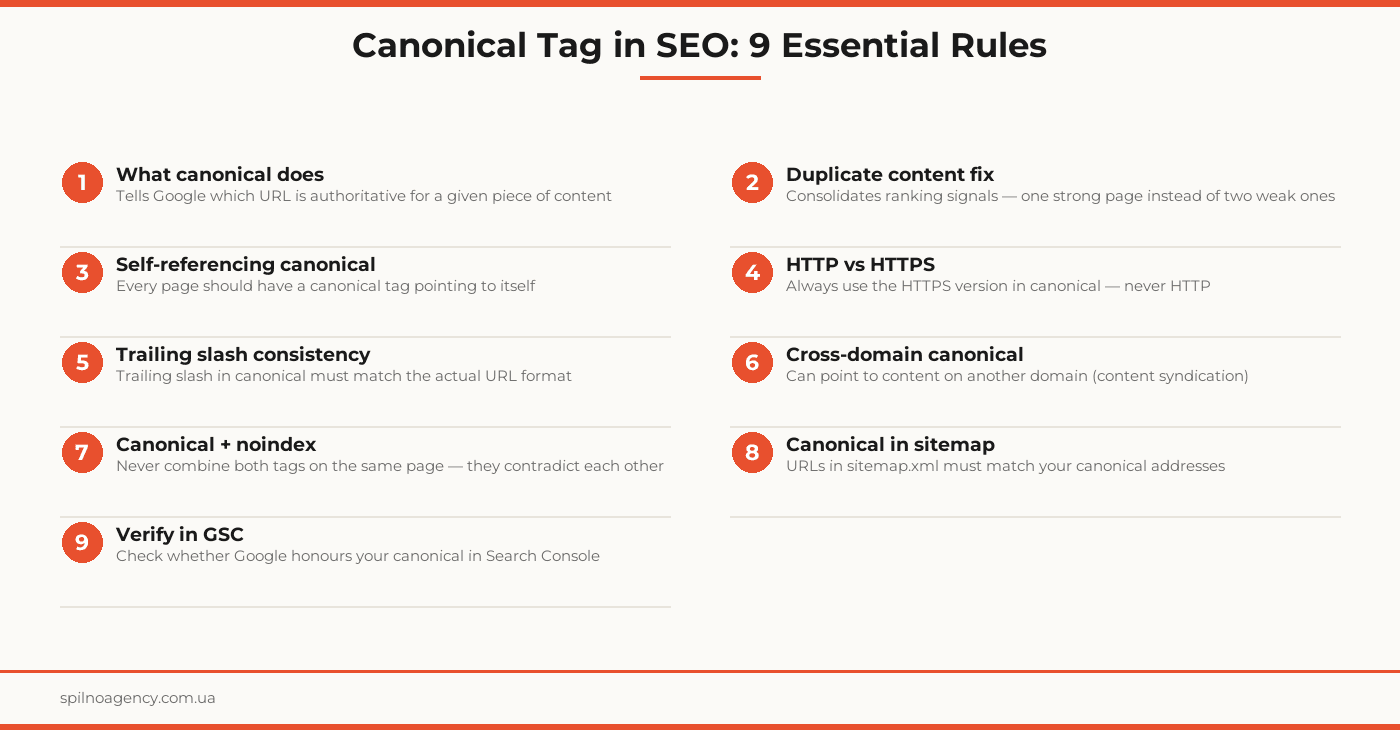
Canonical consolidates all of these signals onto a single URL — the canonical one. The result: one strong page with concentrated authority instead of several weak duplicates.
Types of Canonical Implementation
HTML tag in <head>
The most common and reliable method. The <link rel="canonical" href="..."> tag is placed in the <head> section of every page. Supported by all major search engines.
HTTP Link header
For pages where you cannot edit HTML (PDFs, JavaScript-rendered apps): Link: <https://yourdomain.com/canonical/>; rel="canonical". Delivered in the server response header.
Sitemap.xml
URLs in sitemap.xml should match your canonical addresses. While a weaker signal than the HTML tag, it reinforces the consistency of your canonical strategy.
Hreflang + canonical
On multilingual sites, hreflang tags must point to the canonical URL of each language version. Never place hreflang on a non-canonical URL.
How to Use Canonical Tags Correctly
Self-referencing canonical
Every page on your site should carry a canonical tag pointing to itself. This prevents issues where CMS systems, plugins, or UTM parameters alter the URL without an explicit canonical. For example:
<link rel="canonical" href="https://yourdomain.com/blog/post-name/" /> — on the /blog/post-name/ page.
Canonical for URL parameter pages
Pages with tracking parameters (?utm_source=), sorting parameters (?sort=price), or session data (?session_id=) should carry a canonical pointing to the clean base URL without parameters.
Cross-domain canonical
If your content is syndicated on other sites (e.g., articles published both on your site and a partner platform), the canonical on the third-party site can point back to your original. This prevents the two versions from competing against each other.
Canonical and pagination
Paginated pages (/blog/page/2/) should not have a canonical pointing to the first page — this would block all pages except the first from being indexed. Each pagination page should carry a self-referencing canonical.
Common Canonical Mistakes
- Canonical pointing to a noindex page — if the canonical URL is blocked via noindex, Google will disregard the canonical and may index the duplicate instead
- Canonical + noindex on the same page — conflicting signals: noindex says “don’t index this,” canonical says “this is the primary page” — search engines resolve this unpredictably
- Relative canonical URLs — always use absolute URLs (
https://), never relative paths (/blog/) - Canonical chains — A → B → C: page A has a canonical to B, which has a canonical to C. Google dislikes chains — point directly to the final URL
- Canonical mismatching sitemap — inconsistency between canonical and sitemap reduces trust in both signals
Canonical vs 301 Redirect
| Criterion | rel=canonical | 301 Redirect |
|---|---|---|
| Page remains accessible | Yes | No (redirected away) |
| Link equity passed | ~80–99% | ~90–99% |
| User experience impact | Minimal | Visible (page redirect) |
| When to use | Both URLs need to exist for users | The duplicate is not needed at all |
| Flexibility | High (easy to change) | Requires server access |
The key principle: if the duplicate page has no independent value to users — use a 301 redirect. If both pages serve a purpose (different presentation of the same content) — use canonical.
How to Check Canonical Tags
Google Search Console
Use the URL Inspection tool → look for the “Google-selected canonical” field. If Google chose a different URL than your declared canonical, there is a problem. Common causes: canonical points to a blocked page, canonical is part of a chain, or Google considers a different URL more authoritative.
Screaming Frog SEO Spider
Go to the Canonicals tab → review all canonicals on the site in one list. Use filters: “Non-Indexable Canonicals,” “Canonical Chain,” “Missing,” “Multiple.”
Manually in browser
Ctrl+U (or View Page Source) → Ctrl+F → type canonical. Verify that the URL in the tag matches the current page address or your intended canonical.
Canonical Tag Implementation Checklist
- Self-referencing canonical added to all pages on the site
- URL parameter pages have canonical pointing to the clean base URL
- HTTP version and www/non-www variants have canonical pointing to the primary version
- Duplicate pages (categories + filters) have canonical pointing to the main category page
- Canonical always uses absolute HTTPS URLs
- No canonical chains (A → B → C)
- Canonical does not point to noindex pages
- Canonical and noindex are not used simultaneously on the same page
- URLs in sitemap.xml match canonical addresses
- Hreflang tags point to canonical URLs of each language version
- Cross-domain canonical set for syndicated content
- Google Search Console verified: “Google-selected canonical” matches your declared canonical
- Screaming Frog or equivalent has audited all canonicals for issues
Frequently Asked Questions
What is a canonical tag and what does it do?
A canonical tag (rel=canonical) is an HTML element placed in the
section that tells search engines which URL is the “canonical” (primary) version of a piece of content. It solves the duplicate content problem: when the same content is accessible via multiple URLs, the canonical tag signals which one should be indexed and ranked.When should I use canonical instead of a 301 redirect?
Use canonical when both pages need to remain accessible to users but you want to consolidate ranking signals onto one of them — for example, a category page and its filtered version. Use a 301 redirect when the duplicate page is no longer needed at all: it physically redirects users and crawlers to the primary page.
Does the canonical tag pass link equity (PageRank)?
Yes, the canonical tag passes most of the link equity to the canonical page, though not 100% like a 301 redirect. Google consolidates ranking signals — backlinks, behavioral factors, and the authority of duplicate pages all flow toward the canonical URL.
What is a self-referencing canonical and why is it needed?
A self-referencing canonical is a canonical tag where the page’s URL points to itself. For example, on https://site.com/blog/ the tag reads:. It prevents third-party plugins, CMS templates, or scripts from accidentally overriding your canonical, and normalizes URL parameter variants (utm_source, ?ref=).
How do I check if Google is following my canonical?
Check in Google Search Console: use the URL Inspection tool → look for the “Google-selected canonical” field. If it differs from your declared canonical, Google has overridden it. You can also use Screaming Frog, or inspect the tag manually via View Page Source (Ctrl+U) and search for rel=”canonical”.
Need help with canonical tags and technical SEO? Spilno Agency audits your site, identifies duplication issues, and delivers a prioritized fix plan.

Read also

How to Control an SEO Specialist: The 5-Stage SEO KPI Funnel
SEO KPIs form a chain of five metrics that show, step by step, whether your SEO is actually…

Best CMS for an Online Store: Cloud vs Self-Hosted Platforms in 2026
Compare Shopify, WooCommerce, PrestaShop, OpenCart and Magento for your online store. Pros, cons, and a step-by-step CMS selection…

LinkedIn Ads Library: How to Find Your Competitors’ LinkedIn Ads (2026 Guide)
How to use the LinkedIn Ads Library to see any competitor's sponsored content for free — step by…