Core Web Vitals: What They Are and How They Affect SEO in 2026

Core Web Vitals are Google’s official set of metrics for measuring real-world user experience on your site. They track loading performance, visual stability, and interactivity responsiveness. Since 2021, these metrics have been an official Google ranking signal — and in 2026, their influence on search rankings continues to grow. Sites with excellent Core Web Vitals scores gain a measurable edge in competitive SERPs, even when content quality and backlinks are equal.
Core Web Vitals are not just technical metrics. They are Google’s direct signal of how usable your site is for real users. In 2026, ignoring them means voluntarily surrendering rankings to competitors who don’t.
What Are Core Web Vitals?
Core Web Vitals are three specific metrics Google has designated as the most critical indicators of real-world user experience on a web page. Crucially, they are based on field data — the Chrome User Experience Report (CrUX) — not just synthetic lab tests. This means they reflect actual user experience across real devices and network conditions.
Since August 2021, Google has incorporated Core Web Vitals into its ranking algorithm as part of the Page Experience signal. This makes them a direct ranking factor, operating alongside content relevance, E-E-A-T, and backlink authority.
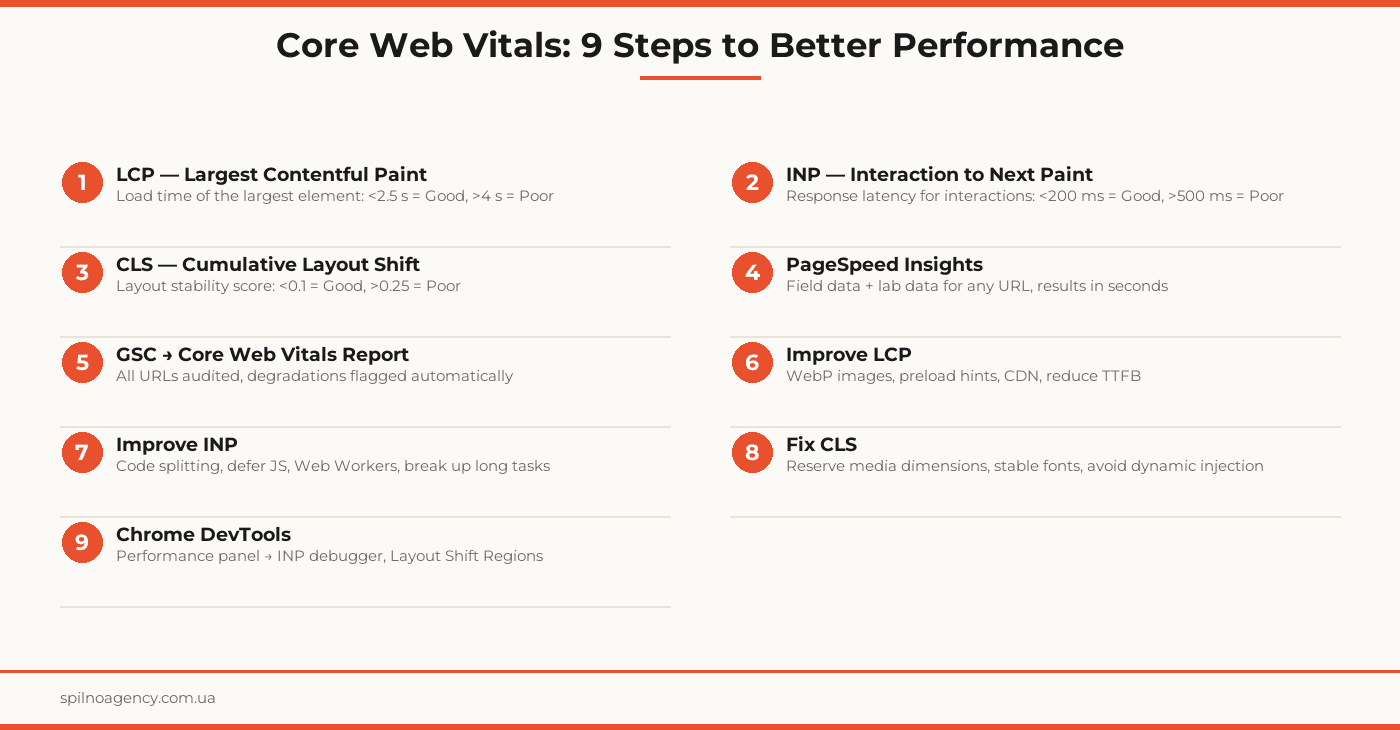
LCP — Largest Contentful Paint
LCP measures the time from when a page starts loading to when the largest visible element in the viewport has fully rendered. This could be a hero image, a large text block, or a video poster.
LCP Thresholds
- Good: under 2.5 seconds
- Needs improvement: 2.5 to 4 seconds
- Poor: over 4 seconds
Common Causes of Poor LCP
- Slow server response time (TTFB > 600 ms)
- Unoptimized images (missing WebP conversion, missing lazy loading for off-screen images)
- Render-blocking JavaScript or CSS that delays paint
- No CDN for static assets
INP — Interaction to Next Paint
INP measures the delay between a user interaction (click, tap, key press) and the next visual update on screen. Unlike its predecessor FID, INP tracks all interactions throughout the session and reports the worst one.
Key 2024 change: In March 2024, Google officially replaced FID with INP as the interactivity Core Web Vital. INP is a significantly stricter standard — it covers the entire session, not just the first interaction.
INP Thresholds
- Good: under 200 milliseconds
- Needs improvement: 200 to 500 milliseconds
- Poor: over 500 milliseconds
Common Causes of Poor INP
- Long JavaScript tasks blocking the main thread
- Complex event handlers without debounce or throttle
- Excessive third-party scripts (chatbots, analytics, advertising)
- Unoptimized component rendering in React, Vue, or Angular
CLS — Cumulative Layout Shift
CLS measures the cumulative layout instability — how much visible elements unexpectedly shift on the page during loading without user input. Every unexpected shift increases the CLS score.
CLS Thresholds
- Good: under 0.1
- Needs improvement: 0.1 to 0.25
- Poor: over 0.25
Common Causes of Poor CLS
- Images without explicit width and height attributes
- Ad banners or embeds without reserved space
- Dynamically injected content that pushes existing elements down
- Web fonts causing FOUT (Flash of Unstyled Text)
Why Core Web Vitals Affect SEO Rankings
Google first announced the Page Experience Update in 2020 and rolled it out in 2021. Since then, Core Web Vitals have been a confirmed ranking factor. Here is why they matter for SEO:
- Direct ranking signal: when relevance and authority are equal, the site with better CWV ranks higher
- Impact on CTR: Google may surface UX signals in search results, affecting click-through rates
- Behavioral signals: poor CWV drives higher bounce rates, which send negative engagement signals to the algorithm
- Mobile-first indexing: Google applies stricter CWV thresholds for mobile results
How to Measure Core Web Vitals
Google PageSpeed Insights
The simplest tool. Visit pagespeed.web.dev and enter a URL. You will receive:
- Field data (CrUX) — real user measurements from the past 28 days
- Lab data (Lighthouse) — a synthetic test under controlled conditions
- Specific recommendations for each issue with an estimated performance gain
Google Search Console
In GSC, navigate to Experience → Core Web Vitals. You will see the status of all URLs on your site — Good, Needs Improvement, or Poor — split between mobile and desktop. This is the best tool for site-wide monitoring and alerting.
Chrome DevTools
Open DevTools → Performance tab. Record a page load and interactions. You will see: Layout Shift Regions (highlighted layout shifts), INP Debugger (which interactions are slow and why), and Long Tasks (which scripts are blocking the main thread).
How to Improve LCP
- Reduce TTFB: optimize your server or add a CDN. Target: TTFB under 200 ms
- Preload the LCP resource: add
<link rel="preload">for the hero image or critical font - Convert images to WebP/AVIF: file size reductions of 30–70% are common
- Remove render-blocking resources: defer non-critical scripts, inline critical CSS
- Never lazy-load the LCP candidate: the LCP image must load immediately, not deferred
How to Improve INP
- Break up long tasks: use
scheduler.yield()orsetTimeoutto split tasks over 50 ms - Defer non-critical JavaScript: load third-party scripts asynchronously
- Code splitting: ship only the JavaScript needed for the current page
- Web Workers: offload heavy computation away from the main thread
- Audit third-party scripts: remove or defer chatbots, ad networks, and trackers that inflate main thread time
How to Fix CLS
- Set image dimensions: always include
widthandheightattributes on<img>tags - Reserve space for ads: set a minimum height on ad containers before the ad loads
- Use font-display: optional or swap: control font substitution to prevent text shifts
- Avoid inserting content above existing elements: do not inject banners or notifications without pre-reserving space
- Use CSS containment: apply
content-visibility: autoto off-screen containers
Core Web Vitals Optimization Checklist
- PageSpeed Insights checked: LCP, INP, CLS verified for top pages
- GSC → Core Web Vitals: no URLs in “Poor” status
- TTFB reduced to under 200 ms (or improvement plan in place)
- LCP image loaded via preload hint
- All images converted to WebP or AVIF
- Width and height attributes added to all img tags
- Third-party scripts load with defer or async
- Long JavaScript tasks (> 50 ms) identified and broken up
- Ad containers have reserved height before ad loads
- Fonts use font-display: swap or optional
- Chrome DevTools: Layout Shift Regions reviewed
- CWV monitoring set up in GSC with alerting
Frequently Asked Questions
What are Core Web Vitals and why do they matter?
Core Web Vitals are three official Google metrics: LCP (time to render the largest visible element), INP (response latency across all interactions), and CLS (cumulative layout instability during load). They measure real user experience and have been a ranking factor since 2021. Sites with strong Core Web Vitals scores gain an advantage in Google Search, especially on mobile where Google applies stricter thresholds.
Are Core Web Vitals a direct Google ranking factor?
Yes. Since August 2021, Core Web Vitals are part of the Page Experience signal that Google uses in ranking. They are not the single most important factor — content relevance and authority still dominate — but all else being equal, the site with better CWV will rank higher. In 2024–2026, Google has continued tightening CWV thresholds, especially on mobile.
How is INP different from FID, which it replaced?
FID (First Input Delay) measured only the delay before the browser began processing the first user interaction. INP (Interaction to Next Paint), which fully replaced FID in March 2024, measures the response latency for all interactions throughout the session — clicks, taps, and key presses. INP is a far stricter metric: it captures the slowest interaction, giving a much more accurate picture of perceived responsiveness.
How do I check Core Web Vitals for my site?
The fastest method is Google PageSpeed Insights (pagespeed.web.dev): enter a URL to get CrUX field data plus a full Lighthouse lab analysis. Google Search Console → Core Web Vitals shows the health of every page on your site, split by mobile and desktop. Chrome DevTools → Performance provides a detailed recording with exact bottlenecks. The Lighthouse Chrome extension lets you test pages locally before deploying.
How long does it take to see SEO improvement after fixing Core Web Vitals?
Google updates field CrUX data monthly using a 28-day rolling window. Improvements to field data appear roughly 4–6 weeks after you deploy fixes. Ranking changes take longer — allow 6–12 weeks. Lab data (PageSpeed Insights, Lighthouse) changes immediately after deployment but does not directly influence rankings.
Struggling with Core Web Vitals scores? Spilno Agency performs technical SEO audits, identifies the root causes of poor CWV, and delivers a prioritized fix plan.

Read also

How to Control an SEO Specialist: The 5-Stage SEO KPI Funnel
SEO KPIs form a chain of five metrics that show, step by step, whether your SEO is actually…

Best CMS for an Online Store: Cloud vs Self-Hosted Platforms in 2026
Compare Shopify, WooCommerce, PrestaShop, OpenCart and Magento for your online store. Pros, cons, and a step-by-step CMS selection…

LinkedIn Ads Library: How to Find Your Competitors’ LinkedIn Ads (2026 Guide)
How to use the LinkedIn Ads Library to see any competitor's sponsored content for free — step by…