Hreflang Tag: What It Is and How to Implement It Correctly in 2026

Hreflang is an HTML attribute that tells Google which language and region a page is intended for. Without it, search engines have no reliable way to serve the right language version to users in different countries. The result: wrong locale appearing in search results, multilingual pages treated as duplicate content, and lost organic traffic across all your regional versions. In 2026, with AI Overviews and multilingual search expanding globally, correct hreflang implementation is non-negotiable for any international website.
Hreflang is one of those technical signals Google actively uses to decide which page version to serve to which user. A single misconfigured tag can derail rankings for an entire language section of your site.
What Is Hreflang?
Hreflang is an HTML attribute on the <link> tag, standardized by Google in 2011. It tells the search engine which language and/or region each URL on your site is intended for. In plain terms: hreflang is a language map of your website for the search crawler.
Without hreflang, Google tries to infer a page’s language from its content. But when similar versions exist (for example, en-US and en-GB), the algorithm often gets it wrong — or serves the same URL to all audiences, ignoring your localized versions entirely.
How Google Processes Hreflang
When Google finds correctly configured hreflang, it:
- Groups all language versions of a page into one cluster
- Determines which version to show based on the user’s browser language settings and geolocation
- Shares ranking signals across all versions in the cluster (duplicates are not penalized)
When Do You Need Hreflang?
Hreflang is required if your site is:
- Multilingual — the same content exists in multiple languages (en, uk, pl, de…)
- Multiregional — content in one language but targeting different regions (en-US, en-GB, en-AU)
- Both — different languages for different countries
Hreflang is not needed if: the site is single-language with no regional variations, or differences between versions are minimal (only date or price).
Hreflang Implementation Methods
Method 1: HTML <head>
The most common approach. In the <head> section of each page, add links to all language versions:
<link rel="alternate" hreflang="en" href="https://example.com/en/page/" />
<link rel="alternate" hreflang="uk" href="https://example.com/uk/storinka/" />
<link rel="alternate" hreflang="pl" href="https://example.com/pl/strona/" />
<link rel="alternate" hreflang="x-default" href="https://example.com/" />
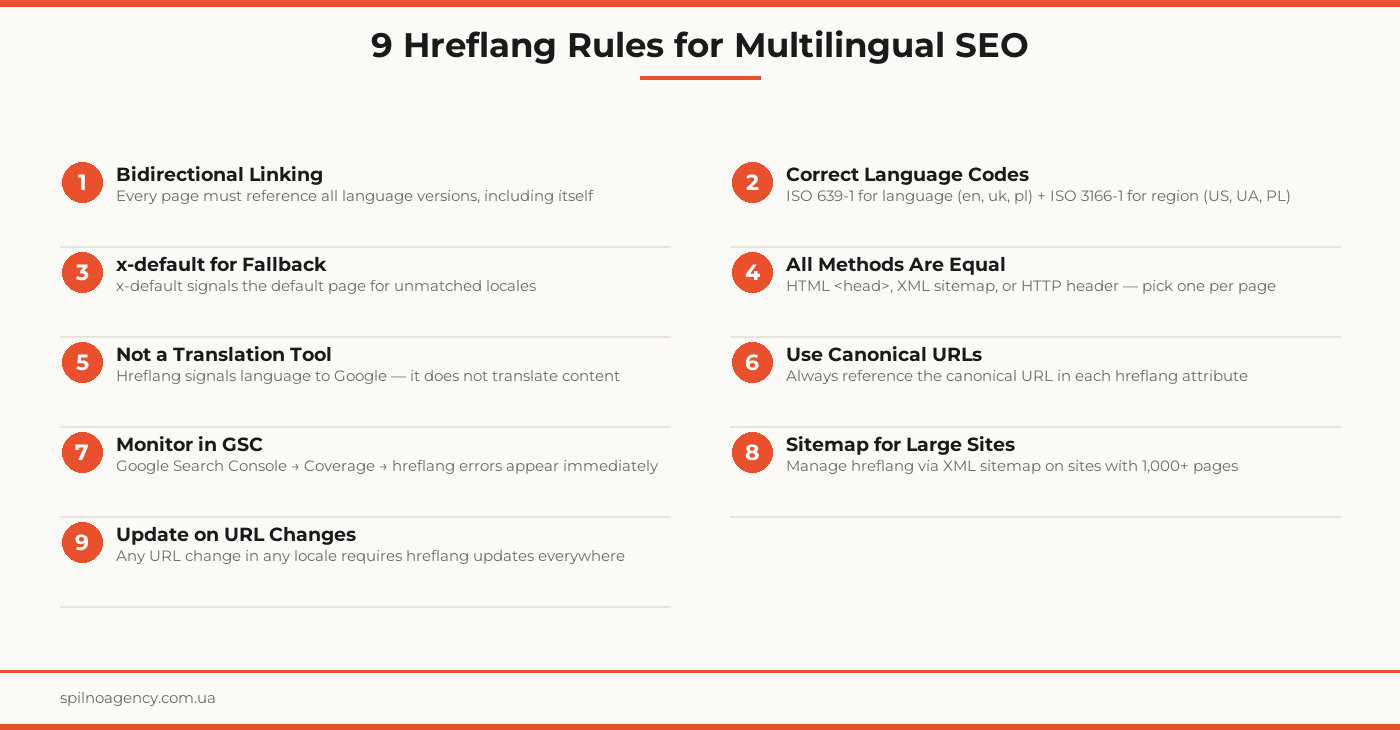
Critical rule: each of the pages (en, uk, pl) must contain the full set of hreflang tags, including a self-referencing tag pointing back to itself.
Method 2: XML Sitemap
Ideal for large sites. In sitemap.xml, add xhtml:link attributes:
<url>
  <loc>https://example.com/en/page/</loc>
  <xhtml:link rel="alternate" hreflang="en" href="https://example.com/en/page/"/>
  <xhtml:link rel="alternate" hreflang="uk" href="https://example.com/uk/storinka/"/>
  <xhtml:link rel="alternate" hreflang="x-default" href="https://example.com/"/>
</url>
Method 3: HTTP Headers
Used only for non-HTML resources (PDF, DOCX). The Link header is added at the server level:
Link: <https://example.com/uk/doc.pdf>; rel="alternate"; hreflang="uk"Language and Region Codes
Hreflang uses ISO standards:
- Language — ISO 639-1:
en(English),uk(Ukrainian),pl(Polish),de(German) - Region — ISO 3166-1 alpha-2:
US(United States),GB(United Kingdom),UA(Ukraine),PL(Poland) - Combined — language-region:
en-US,en-GB,pt-BR
Codes are case-insensitive, but the convention is lowercase language and uppercase region: en-US, not EN-us.
The x-default Attribute
x-default is a special hreflang value that designates the fallback page for users whose language does not match any of your available locales.
Common use cases:
- A homepage with no specific language (
https://example.com/) - A language/region selection page
- The English version as the global default language
Common Hreflang Mistakes
- Missing reciprocal links — Page A points to B, but B does not point back to A. Google ignores such hreflang.
- Wrong language code —
uainstead ofuk,chinstead ofde. Always verify against ISO 639-1. - Non-canonical URLs in hreflang — URLs with tracking parameters (?utm=…) instead of clean canonical URLs.
- Missing x-default — without it, Google may show an unexpected version to users with unrecognized locales.
- Mixing methods — simultaneously using HTML head and sitemap for the same page.
- Hreflang on noindex pages — if a page is blocked from indexing, hreflang pointing to it is ignored.
- Relative URLs — hreflang always requires full absolute URLs with protocol.
- Outdated hreflang after migration — when URLs or site structure change, hreflang must be updated across all language versions.
How to Validate Hreflang
Google Search Console
The most authoritative method. In GSC, go to the Coverage or Pages section — hreflang errors (wrong codes, missing reciprocal links) appear in the dedicated report. You can also use URL Inspection for individual pages.
Hreflang Validators
Online tools let you check hreflang correctness for any URL: they verify bidirectional links, language code validity, and completeness of the tag set.
Screaming Frog / Sitebulb
Crawlers scan the entire site and produce a report on all hreflang: duplicates, missing reciprocal links, incorrect codes, pages without hreflang.
Hreflang Implementation Checklist
- All language and regional versions of the site have been identified
- One implementation method has been chosen (HTML / sitemap / HTTP)
- Every page references all language versions, including itself
- All hreflang links use canonical absolute URLs
- x-default has been added for the fallback page
- ISO 639-1 and ISO 3166-1 codes are correctly applied
- No noindex pages are targeted by hreflang
- Bidirectional linking verified for all locale pairs
- Tested in Google Search Console (0 hreflang errors)
- Follow-up check scheduled 4 weeks after publication
Frequently Asked Questions
What is hreflang and why does it matter for SEO?
Hreflang is an HTML attribute on the tag that tells Google what language a page is written in and which region it targets. Without it, Google may serve the wrong language version to users or treat multilingual copies as duplicate content. Hreflang is essential for any multilingual or multiregional website that wants to rank correctly in multiple countries.
How do you write hreflang tags correctly?
Basic syntax:. For regional targeting: hreflang=”en-US” (English for the US), hreflang=”en-GB” (English for the UK). Add x-default for the fallback page: hreflang=”x-default”. Every page must link to all language versions, including itself — this bidirectional requirement is the most commonly missed rule.
What is x-default in hreflang?
x-default is a special hreflang value that designates the fallback page for users whose language does not match any of your available locales. It is typically the homepage or a language/region selection page. Google serves this page when no matching localized version exists for the user’s language or region.
Where should hreflang be placed: HTML head or XML sitemap?
Both methods are equally valid for Google. HTML
is straightforward for small sites (under 1,000 pages). XML sitemaps are better for large sites — all hreflang data lives in one file and keeps your HTML clean. HTTP headers are used for non-HTML resources (PDFs, documents). Choose one method per page and do not mix methods for the same page.How long does Google take to process hreflang changes?
Google typically processes new or updated hreflang tags within 2–4 weeks after recrawling the affected pages. You can speed this up in Google Search Console by requesting indexing for your key pages. To verify processing status, check the Coverage report in GSC — hreflang errors and warnings appear there once Google has crawled the pages.
Running a multilingual site and unsure if your hreflang is correctly set up? Spilno Agency provides technical SEO audits, identifies hreflang errors, and fixes them right.

Read also

How to Control an SEO Specialist: The 5-Stage SEO KPI Funnel
SEO KPIs form a chain of five metrics that show, step by step, whether your SEO is actually…

Best CMS for an Online Store: Cloud vs Self-Hosted Platforms in 2026
Compare Shopify, WooCommerce, PrestaShop, OpenCart and Magento for your online store. Pros, cons, and a step-by-step CMS selection…

LinkedIn Ads Library: How to Find Your Competitors’ LinkedIn Ads (2026 Guide)
How to use the LinkedIn Ads Library to see any competitor's sponsored content for free — step by…