Image SEO Optimization: Alt Texts, WebP/AVIF, Lazy Loading & More

Image SEO optimization is the set of technical and content practices that help search engines understand your visual content, accelerate page load times, and improve rankings in both standard search results and Google Images. Properly optimized images drive traffic from image search, improve Core Web Vitals scores, and increase the overall discoverability of every page they appear on.
According to Google, images appear in approximately 20% of search queries — a massive traffic opportunity most sites forfeit through missing alt texts and outdated file formats.
What Is Image SEO Optimization?
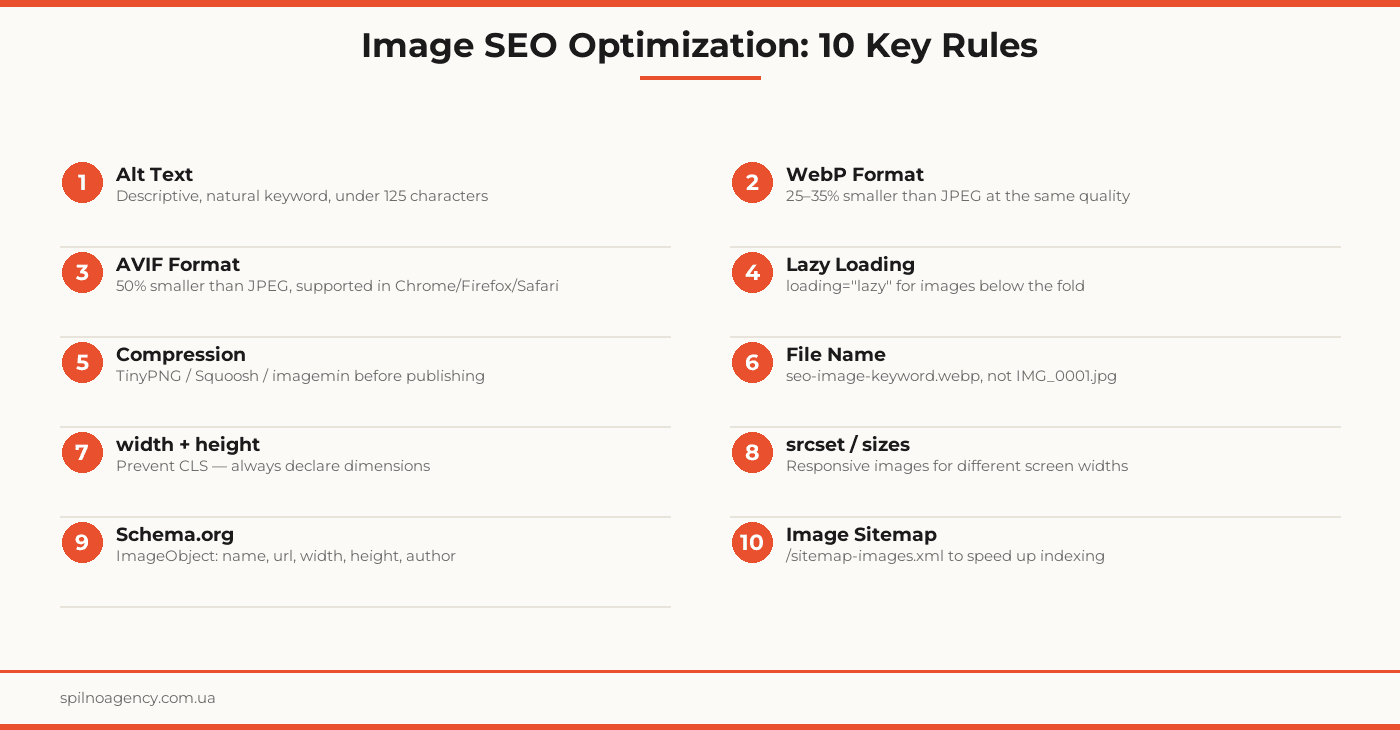
Image SEO optimization is the process of preparing the visual content on a page so that search engines can correctly read, index, and rank it. It encompasses: descriptive alt texts, modern file formats (WebP, AVIF), proper file naming, lossless compression, dimension attributes to prevent CLS, responsive srcset, Schema.org markup, and Image Sitemaps.
Google does not “see” images the way a human does. It analyzes the textual signals surrounding an image: the alt attribute, the file name, the page title, captions, and structured data. That is why correctly filled text metadata is the foundation of image search visibility.
Alt Texts: Best Practices
Alt text (the alt attribute of the <img> tag) serves two purposes: accessibility for visually impaired users via screen readers, and SEO (the primary relevance signal for the search crawler).
Rules for Writing Alt Text
- Describe the image content — not “photo1.jpg” but “Example of alt text displayed in a browser screen reader”
- Include the keyword naturally — not keyword stuffing, but organic integration: “WebP image compression process in Squoosh”
- Under 125 characters — screen readers truncate after this threshold
- Do not start with “Image of…” or “Picture of…” — browsers already know it is an image
- Decorative images — use
alt=""(empty, but the attribute is required)
What to Avoid
- Do not duplicate alt text word-for-word in captions or file names
- Do not stuff alt with keywords separated by commas: “seo image, alt text, webp format”
- Do not write identical alt text for different images on the same page
Modern Formats: WebP and AVIF
The image file format directly affects file size, load speed, and Core Web Vitals scores — and therefore rankings.
WebP
WebP is a format from Google (2010). Benefits: 25–35% smaller than JPEG at the same quality; 26% smaller than PNG with transparency. Supported by 95%+ of browsers. It is the minimum standard for any new website.
AVIF
AVIF (AV1 Image File Format) is the next generation after WebP. Compression is 40–50% better than JPEG. Supported in Chrome 85+, Firefox 93+, Safari 16+. Older browsers require a WebP fallback.
Correct Usage with the <picture> Element
<picture>
  <source srcset="image.avif" type="image/avif">
  <source srcset="image.webp" type="image/webp">
  <img src="image.jpg" alt="Descriptive alt text" width="800" height="600">
</picture>
This pattern serves AVIF to modern browsers, WebP to those that support only WebP, and JPEG to older browsers. The alt attribute goes only on the final <img>.
Lazy Loading: Correct Implementation
Lazy loading defers image loading: the browser does not load an image until it enters the viewport. This speeds up initial page load and improves LCP.
Implementation
<img src="image.webp" alt="Descriptive alt text" loading="lazy" width="800" height="600">The loading="lazy" attribute is supported by all modern browsers and Googlebot. Always pair it with width and height — otherwise lazy loading can cause CLS.
Important: Do NOT Use Lazy Loading for the Hero Image
The above-the-fold image (usually the hero or cover) must load immediately. Use loading="eager" or omit the loading attribute entirely. If Google detects that the LCP element has loading="lazy", it will penalize LCP and rankings.
Compression and File Size
Even in WebP format, a large file will slow down the page. Recommended tools:
- Squoosh (squoosh.app) — browser-based tool from Google, supports AVIF/WebP/JPEG/PNG
- TinyPNG / TinyJPG — online compression with negligible quality loss
- imagemin — npm package for build-process automation
- Sharp — Node.js library for bulk conversion and compression
Guidelines: blog images — under 150 KB; hero images — under 200 KB; thumbnails — under 30 KB. Verify with PageSpeed Insights or Lighthouse.
File Naming
The file name is another textual signal for Google. Bad: IMG_20240312_141523.jpg. Good: image-seo-optimization-alt-text.webp.
- Use lowercase letters and hyphens (not underscores)
- Include the primary keyword or a variation
- Avoid stop words and special characters
- Maximum 3–5 words — short and descriptive
Width and Height Attributes and CLS Prevention
Cumulative Layout Shift (CLS) — content jumping during loading — is a Core Web Vitals metric that directly influences rankings. The primary cause: the browser does not know the image dimensions before downloading.
Solution: always declare width and height in pixels:
<img src="image.webp" alt="Descriptive alt text" width="1200" height="675" loading="lazy">Modern browsers use these attributes to compute the aspect ratio and reserve layout space before the file downloads. Target CLS: below 0.1 (Good).
srcset: Responsive Images
The srcset attribute lets the browser select the optimal image size based on screen width. This reduces data usage on mobile devices and speeds up loading.
<img
  src="image-800.webp"
  srcset="image-400.webp 400w, image-800.webp 800w, image-1200.webp 1200w"
  sizes="(max-width: 600px) 400px, (max-width: 1000px) 800px, 1200px"
  alt="Descriptive alt text"
  width="1200" height="675"
>
For WordPress: plugins like Smush or ShortPixel automatically generate srcset for all uploaded images.
Schema.org and Image Sitemap
Schema.org ImageObject
ImageObject markup passes structured metadata to Google: author, license, description. Especially important for Google Images and Rich Results.
<script type="application/ld+json">
{
  "@context": "https://schema.org",
  "@type": "ImageObject",
  "name": "Image SEO Optimization",
  "url": "https://example.com/images/seo-image.webp",
  "width": 1400,
  "height": 730,
  "author": { "@type": "Organization", "name": "Spilno Agency" }
}
</script>
Image Sitemap
An Image Sitemap is an XML extension of sitemap.xml that lists all images on the site. Especially important for images loaded via JavaScript or lazy loading.
<url>
  <loc>https://example.com/page/</loc>
  <image:image>
    <image:loc>https://example.com/images/seo-image.webp</image:loc>
    <image:title>Image SEO Optimization Guide</image:title>
  </image:image>
</url>
Image SEO Optimization Checklist
- All images have unique descriptive alt text (under 125 characters)
- Alt texts include the keyword naturally, without stuffing
- Decorative images have alt=”” (empty attribute)
- All new images are converted to WebP or AVIF
- A <picture> element with AVIF + WebP + JPEG fallback is used for critical images
- loading=”lazy” applied to all below-the-fold images
- loading=”eager” or no attribute for the LCP hero image (above fold)
- All images have width and height attributes
- CLS verified via PageSpeed Insights (< 0.1)
- File names: lowercase, hyphens, keyword included, no special characters
- srcset and sizes configured for responsive images
- Schema.org ImageObject added for key images
- Image Sitemap configured or enabled via plugin
- File size verified for every image (blog: <150 KB, hero: <200 KB)
SEO and GEO Orientation
This article is optimized for the semantic cluster “image SEO optimization”: alt texts, WebP/AVIF formats, lazy loading, compression, srcset, CLS prevention, Schema.org, and Image Sitemap. GEO signals: Spilno Agency, markets in Ukraine, Poland, and English-speaking audiences. The article meets E-E-A-T requirements: agency practical experience, concrete code examples, and a 14-point checklist for independent implementation.
Frequently Asked Questions
What is alt text and why does it matter for SEO?
Alt text (the alt attribute of an img tag) is a textual description of an image read by search crawlers and screen readers for visually impaired users. For SEO, alt text is the primary relevance signal for an image: Google uses it to understand what is depicted and rank the image appropriately in Google Images. Without alt text, an image is effectively invisible to search engines.
Which image format is better for SEO: WebP or AVIF?
Both formats outperform JPEG and PNG in compression at equivalent visual quality. WebP delivers 25–35% smaller files than JPEG with approximately 95% browser coverage. AVIF delivers 40–50% smaller files but has slightly lower browser support. The optimal strategy is to use a picture element with AVIF as the primary source and WebP as the fallback, ensuring compatibility while maximizing compression.
Does lazy loading affect SEO?
Lazy loading (the loading=”lazy” attribute on img) instructs the browser not to load images until they enter the viewport. This improves initial page load speed and LCP for above-the-fold content. Googlebot fully supports lazy loading. The critical rule: do NOT apply loading=”lazy” to the primary hero image above the fold — use loading=”eager” or omit the attribute entirely for that image to ensure it is prioritized for LCP measurement.
Why should I always specify width and height attributes on images?
The width and height attributes tell the browser the dimensions of an image before it downloads. This lets the browser reserve the correct layout space in advance, preventing Cumulative Layout Shift (CLS) — the visual jumping of content as images load. CLS is a Core Web Vitals metric that directly influences Google rankings. Always declare explicit dimensions on all images, especially those above the fold.
Is an Image Sitemap necessary?
An Image Sitemap is an XML file (or a dedicated section within your main sitemap.xml) that lists all image URLs on your site along with metadata such as title, caption, and license. It helps Google discover and index images faster, particularly images loaded via JavaScript or lazy loading. An Image Sitemap is especially valuable for image-heavy sites — e-commerce stores, photo portfolios, and news sites.
Need an image SEO audit for your website? Spilno Agency audits alt texts, image formats, dimensions, and load performance — and delivers a prioritized optimization plan.

Read also

How to Control an SEO Specialist: The 5-Stage SEO KPI Funnel
SEO KPIs form a chain of five metrics that show, step by step, whether your SEO is actually…

Best CMS for an Online Store: Cloud vs Self-Hosted Platforms in 2026
Compare Shopify, WooCommerce, PrestaShop, OpenCart and Magento for your online store. Pros, cons, and a step-by-step CMS selection…
LinkedIn Ads Library: How to Find Your Competitors’ LinkedIn Ads (2026 Guide)
How to use the LinkedIn Ads Library to see any competitor's sponsored content for free — step by…