Internal Linking: What It Is and How It Affects SEO in 2026

Internal Linking: What It Is and How It Affects SEO in 2026
Internal linking is the practice of connecting pages within the same website through hyperlinks. It may seem like a minor technical detail, but it’s one of the most powerful levers in SEO: it distributes PageRank, guides crawlers through your content, and signals to Google which pages matter most. In 2026 — the era of AI-powered search and SGE — a well-structured internal link architecture has become more critical than ever for site visibility.
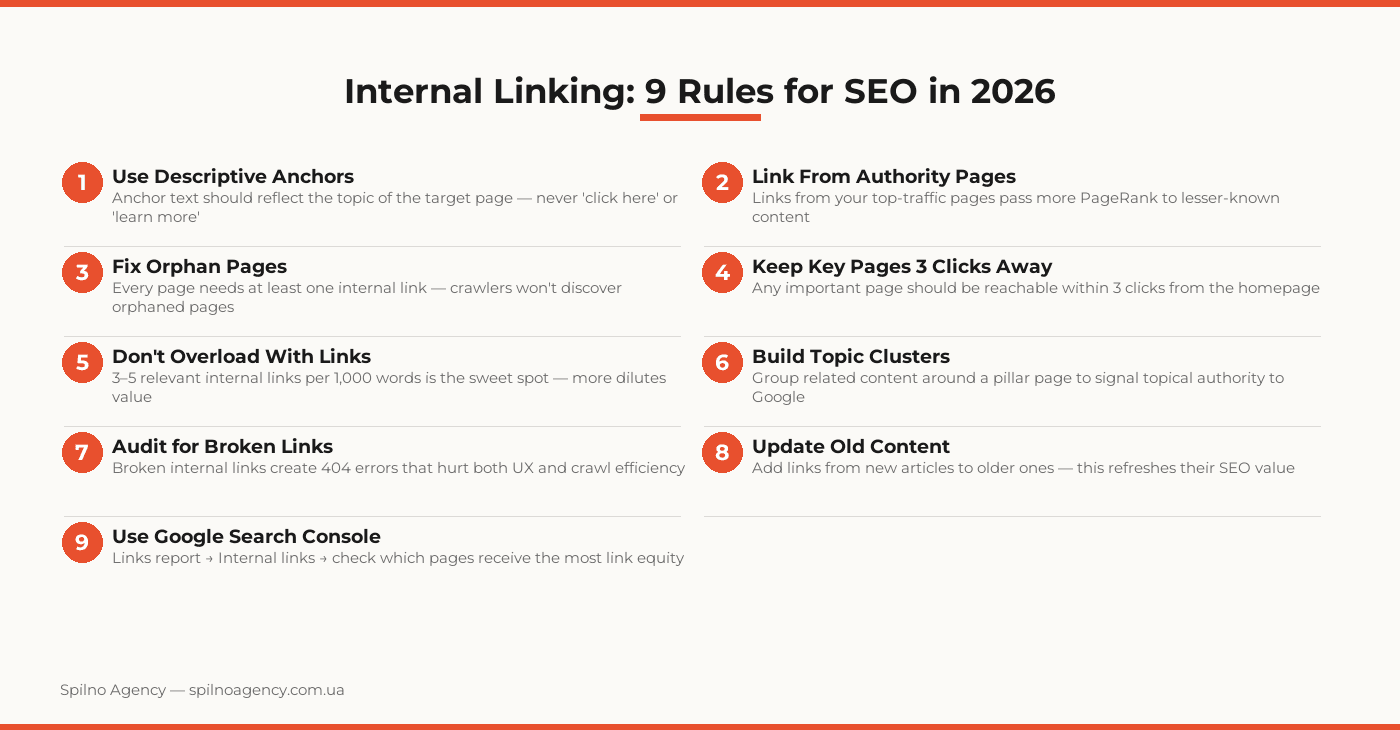
According to Ahrefs data, pages with a stronger internal linking profile rank on average 40% higher in search results compared to orphan pages with equivalent content quality.
What Is Internal Linking
Internal linking is the practice of connecting pages within the same domain through hyperlinks. Unlike external backlinks from other websites, internal links are entirely within your control — making them one of the few SEO factors you can optimize independently, without relying on third parties.
Every internal link serves three functions simultaneously:
- Navigation — helps users move between related content
- Crawling — enables search engine bots to discover and re-crawl your pages
- Authority — passes PageRank (link equity) from one page to another
Why Internal Linking Matters for SEO in 2026
In 2026, search engines assess not just the quality of individual pages but the content architecture of your entire site. Google uses internal linking as a signal of topical authority: if most pages within a topic cluster link to one central page, it signals that this page is the most authoritative resource on the subject.
With the rise of AI Overviews (SGE) and Generative Search, internal linking has taken on new significance. Well-connected content clusters appear more frequently in AI-generated answers because they demonstrate depth, breadth, and systematic expertise — exactly what E-E-A-T signals to Google.
How PageRank Flows Through Internal Links
PageRank is Google’s algorithm for evaluating page authority based on the number and quality of links pointing to it. Internal links are the “pipes” through which authority flows across your site. A page receiving many internal links from high-authority pages earns more internal PageRank — and consequently, higher rankings.
How to Build Internal Linking Correctly
1. Topic Clusters
The most effective internal linking strategy in 2026 is the topic cluster model. It works as follows:
- Pillar page — a comprehensive overview of a broad topic (e.g., “SEO Optimization”)
- Cluster pages — articles covering narrower subtopics (e.g., “Technical SEO”, “On-Page Optimization”, “Internal Linking”)
- All cluster pages link back to the pillar, and the pillar links to each cluster page
This architecture sends Google a clear signal: your site has deep and systematic expertise in the subject area.
2. Anchor Text
Anchor text is the visible, clickable part of a link. For SEO purposes, the anchor should describe the topic of the target page. Best practices:
- Use keywords or their natural variations as anchor text
- Avoid generic phrases: “here”, “click”, “learn more”, “this page”
- Vary your anchors: don’t repeat the same text for all links pointing to one page
3. Click Depth
Every important page should be reachable from the homepage within a maximum of 3 clicks. If key content is “buried” 5–6 levels deep, Google assigns it lower crawl priority and ranking potential.
Types of Internal Links
| Type | Location | SEO Impact |
|---|---|---|
| Navigational | Menu, header, footer | Site structure, crawlability |
| Contextual | Within article body | Highest — passes PageRank and topical relevance |
| Breadcrumbs | Navigation path | Hierarchy, UX, structured data |
| Related posts | “Read also” block | Reduces bounce rate, content clustering |
| CTA links | Calls to action | Conversions, passes authority to commercial pages |
Common Internal Linking Mistakes
- Orphan pages — pages with no incoming internal links
- Over-linking — too many links on a single page dilutes the value of each
- Irrelevant linking — linking between topically unrelated pages provides no SEO value
- Broken links — links to 404 pages harm UX and waste crawl budget
- Excessive nofollow — blocking internal PageRank on strategically important links
- Identical anchors — using the same anchor text for all links to one page
Internal Linking Optimization Checklist
- Audit your current internal linking structure using GSC or Screaming Frog
- Identify all orphan pages — pages with zero internal links pointing to them
- Review anchor text — replace ‘here’, ‘learn more’ with descriptive keyword phrases
- Check click depth: key pages should be reachable within 3 clicks from the homepage
- Fix all broken internal links (404 errors)
- Build topic clusters: pillar page + cluster articles with bidirectional linking
- Add internal links from high-traffic pages to new or strategically important content
- Check link density: 3–5 per 1,000 words, under 100 total per page
- Confirm that nofollow is not applied to strategically important internal links
- Set up monthly monitoring: check internal links report in Google Search Console
Frequently Asked Questions
What is internal linking in SEO?
Internal linking refers to hyperlinks that point from one page to another page on the same domain. They help search engine crawlers discover and index content, pass PageRank between pages, and improve user navigation. A well-built internal link structure communicates your site’s hierarchy and content priorities to Google.
How many internal links should a page have?
There’s no hard limit, but a common recommendation is 3–5 relevant internal links per 1,000 words. Each link should be contextually relevant and genuinely useful to readers. Excessive linking dilutes the value passed through each link and may appear manipulative to search engines.
Does internal linking affect rankings?
Yes, directly. Internal links pass PageRank from one page to another. Pages with more internal links pointing to them gain more authority in Google’s eyes. Proper internal linking also speeds up indexation of new pages and ensures crawlers can access all content on your site.
What are orphan pages and why are they bad for SEO?
Orphan pages are pages with no internal links pointing to them. Google’s crawler cannot discover them during regular crawls unless they appear in a sitemap. Even if indexed, they receive zero internal PageRank, severely limiting their chances of ranking — even if the content itself is high quality.
How should I choose anchor text for internal links?
Anchor text should describe the topic of the target page — use keywords or natural variations embedded organically in your content. Avoid generic phrases like ‘here’, ‘this article’, or ‘click to learn more’. Aim for anchor diversity: exact-match keywords, partial-match phrases, branded names, and natural descriptive text.
Want to build an effective internal linking strategy for your website? Spilno Agency performs SEO audits, identifies orphan pages, and develops a linking architecture tailored to your content structure.

Read also

How to Control an SEO Specialist: The 5-Stage SEO KPI Funnel
SEO KPIs form a chain of five metrics that show, step by step, whether your SEO is actually…

Best CMS for an Online Store: Cloud vs Self-Hosted Platforms in 2026
Compare Shopify, WooCommerce, PrestaShop, OpenCart and Magento for your online store. Pros, cons, and a step-by-step CMS selection…
LinkedIn Ads Library: How to Find Your Competitors’ LinkedIn Ads (2026 Guide)
How to use the LinkedIn Ads Library to see any competitor's sponsored content for free — step by…