Schema Markup: What It Is and How It Affects SEO in 2026

Schema markup is a structured data language that helps search engines better understand your website’s content. In 2026, schema markup seo has become a must-have tool for any website aiming for rich snippets in Google. Without it, your pages are essentially invisible to the AI algorithms powering Google’s AI Overviews and voice search answers.
Schema.org is a collaborative project launched in 2011 by Google, Microsoft, Yahoo, and Yandex to create a shared vocabulary for structured data on the web. Today it defines over 800 types and is the de-facto standard for semantic markup.
What Is Schema Markup
Schema markup is a collection of vocabularies (types and properties) that describe real-world objects: articles, products, recipes, events, organizations, and more. It “translates” your page content into a language that search engine crawlers can understand unambiguously.
When Google encounters FAQPage markup on a page, it knows this page contains questions and answers — and may display them directly in the SERP. That’s a rich snippet: an enhanced search result with additional visual elements that stand out in the results.
Why Schema Markup Matters in 2026
In 2026, search has changed. Google AI Overviews, voice search, and zero-click searches have transformed how websites compete for visibility. Structured data has become the key to:
- Appearing in AI Overviews — Google’s AI-generated answers sourced from structured-data-marked content
- Earning rich snippets — stars, prices, FAQ dropdowns, breadcrumbs in search results
- Increasing CTR by 20–30% compared to plain snippets
- Being indexed for voice search — Google Assistant and Siri read structured data to form spoken answers
Types of Schema Markup: Which to Use for Your Site
There are over 800 schema.org types, but Google only supports rich results for a specific subset. Here are the most important ones:
- Article / BlogPosting — for articles and news. Shows publication date and author.
- FAQPage — expands questions and answers directly in the SERP.
- HowTo — step-by-step instructions with step icons in search results.
- Product — price, availability, and rating displayed below the link.
- Review / AggregateRating — star ratings visible in search results.
- LocalBusiness — address, hours, phone number in Google Maps and SERP.
- BreadcrumbList — breadcrumb trail instead of URL in the snippet.
- Event — date, venue, and ticket price for events.
- VideoObject — video thumbnail with duration in search results.
- Recipe — cooking time, calories, and rating for recipes.
JSON-LD vs Microdata vs RDFa: Which to Choose
There are three main schema markup formats. Google supports all three, but JSON-LD is the officially recommended format:
| Format | Placement | Complexity | Recommendation |
|---|---|---|---|
| JSON-LD | <script> tag, separate from HTML | Easy | ✅ Google-recommended |
| Microdata | Attributes inside HTML tags | Moderate | ⚠️ Supported, but harder to manage |
| RDFa | Attributes inside HTML tags | Complex | ❌ Not recommended for new projects |
JSON-LD is a JavaScript object inserted into a <script type="application/ld+json"> tag. It stays separate from your HTML and is easy to edit without risking layout breakage.
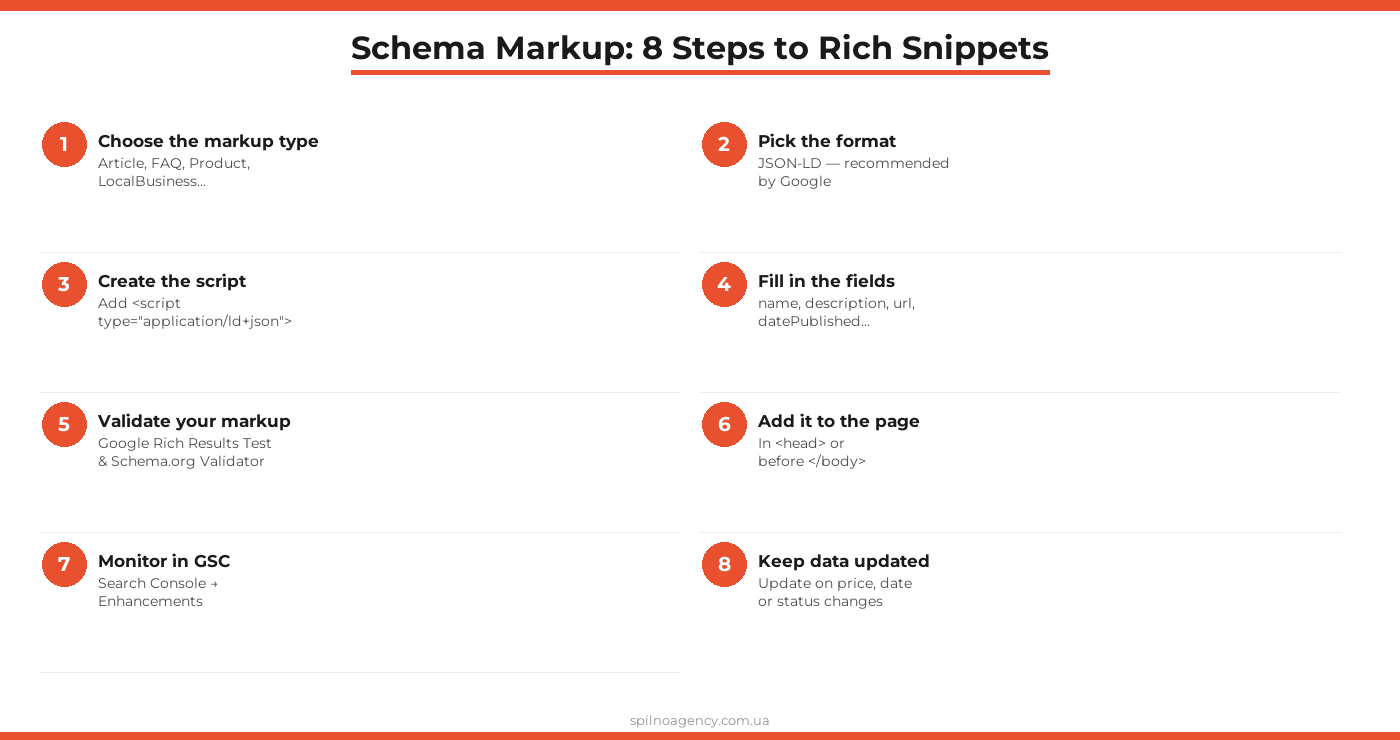
Step-by-Step: How to Implement Schema Markup
Here’s how to add schema markup correctly to any website — from a blog to an online store.
Step 1. Identify the right markup type
Analyze the content type of each key page. Article → Article, services page → Service, contact page → LocalBusiness, FAQ section → FAQPage. A single page can have multiple markup types simultaneously.
Step 2. Choose JSON-LD format
Always use JSON-LD as your primary format. Here’s a basic template for an article:
{
  "@context": "https://schema.org",
  "@type": "Article",
  "headline": "Article title",
  "datePublished": "2026-05-13",
  "author": {
    "@type": "Organization",
    "name": "Spilno Agency"
  }
}
Step 3. Fill in required fields
Each markup type has required and recommended properties. For Product, required fields include name and offers; for FAQPage, a mainEntity array with question objects is required. Review requirements on Google Search Central.
Step 4. Add the script to your page
Place the JSON-LD script in the <head> section or just before the closing </body> tag. For WordPress, use plugins like Yoast SEO, Rank Math, or Schema Pro to generate markup automatically.
Step 5. Validate the markup
Use two tools:
• Google Rich Results Test — shows if your page is eligible for a rich snippet
• Schema.org Validator — checks JSON-LD syntax
Step 6. Monitor results in GSC
After publishing, go to Google Search Console → Enhancements. Here you’ll see errors, warnings, and markup status for each type. Google typically begins recognizing new markup within 1–2 weeks.
Step 7. Update markup when content changes
If a product price, event date, or availability status changes — update the markup simultaneously with the content. Outdated markup can lead to rich snippets being removed or even a manual action for misleading users.
Step 8. Scale across the entire site
After successful testing on a few pages, roll out markup to all relevant page types via CMS templates. This lets you cover the entire site without manually editing each page.
Most Common Schema Markup Mistakes
Even experienced SEO specialists make these mistakes when implementing schema markup:
- Markup doesn’t match visible content — the most common cause of Google manual penalties. If the markup says $29 but the page shows $49, that’s a violation.
- Missing required fields — e.g.,
FAQPagewithout amainEntityarray, orProductwithoutoffers. GSC will show an error and the rich snippet won’t appear. - Duplicate markup — conflict between manually added markup and markup generated by an SEO plugin. Always check the page before publishing.
- Invalid JSON — a missing comma or quotation mark breaks the entire script. Always validate before deploying.
- Ignoring Google updates — Google regularly changes requirements for specific markup types. Subscribe to the Google Search Central Blog for updates.
Schema Markup Implementation Checklist
- ☐ Markup types identified for each page type
- ☐ JSON-LD format selected
- ☐ Valid JSON-LD script written
- ☐ All required fields populated for each type
- ☐ Markup matches visible content on the page
- ☐ Passed Google Rich Results Test
- ☐ Passed Schema.org Validator
- ☐ Script added to
<head>or before</body> - ☐ No conflicts with SEO plugin
- ☐ Monitoring set up in Google Search Console
- ☐ Update procedure defined for content changes
- ☐ Markup deployed to all relevant page types
- ☐ All types and fields documented for the team
FAQ: Schema Markup and SEO
What is schema markup in simple terms?
Schema markup is a special code (most commonly in JSON-LD format) that you add to a page to tell Google: ‘This page is a recipe’, ‘There’s an FAQ here’, or ‘This is a product priced at $29’. The search engine reads these signals and may display an enhanced rich snippet — with stars, prices, or questions — directly in search results.
Does schema markup directly improve Google rankings?
Not directly. Schema markup is not a direct ranking factor. However, it significantly boosts CTR (click-through rate) via rich snippets, which indirectly improves SEO performance. In 2026, Google also uses structured data to populate AI Overviews and featured snippets, making schema markup increasingly important for visibility.
Which schema markup format does Google recommend?
Google officially recommends JSON-LD as the preferred schema markup format. It’s added inside a

Read also

How to Control an SEO Specialist: The 5-Stage SEO KPI Funnel
SEO KPIs form a chain of five metrics that show, step by step, whether your SEO is actually…

Best CMS for an Online Store: Cloud vs Self-Hosted Platforms in 2026
Compare Shopify, WooCommerce, PrestaShop, OpenCart and Magento for your online store. Pros, cons, and a step-by-step CMS selection…
LinkedIn Ads Library: How to Find Your Competitors’ LinkedIn Ads (2026 Guide)
How to use the LinkedIn Ads Library to see any competitor's sponsored content for free — step by…