Keyword Cannibalization: What It Is and How to Fix It

Keyword cannibalization happens when two or more pages on your site compete for the same search query. Instead of reinforcing each other, they split authority, confuse search engines, and drag both pages down in rankings. It’s one of the most overlooked causes of organic traffic stagnation — and one of the most fixable once you know where to look.
Keyword cannibalization is one of the most common hidden reasons why rankings plateau at positions 5–15 despite strong content and backlinks.
What Is Keyword Cannibalization?
Keyword cannibalization occurs when multiple pages on the same website target the same or closely related search queries. The search algorithm receives conflicting signals — it cannot decide which page deserves the top spot — so it depresses the rankings of both.
Instead of one strong page ranking in positions 1–3, you end up with two mediocre pages stuck at 8–15. CTR drops, traffic is diluted, and behavioral signals deteriorate across both pages.
Types of Keyword Cannibalization
Keyword-level Cannibalization
The most common type. Two or more pages share the same primary keyword in their title, H1, URL, and body content. Google sees them as equivalent candidates and alternates between them in search results.
URL-level Cannibalization
Multiple URLs return the same or very similar content without a canonical tag. Typical sources: category filters, sorting parameters (?sort=price), AMP versions, print-friendly versions.
Content-type Cannibalization
A blog article and a service landing page are both optimized for the same query. Or a blog post and a product page compete for the same commercial keyword.
How to Identify Keyword Cannibalization
Google Search Console
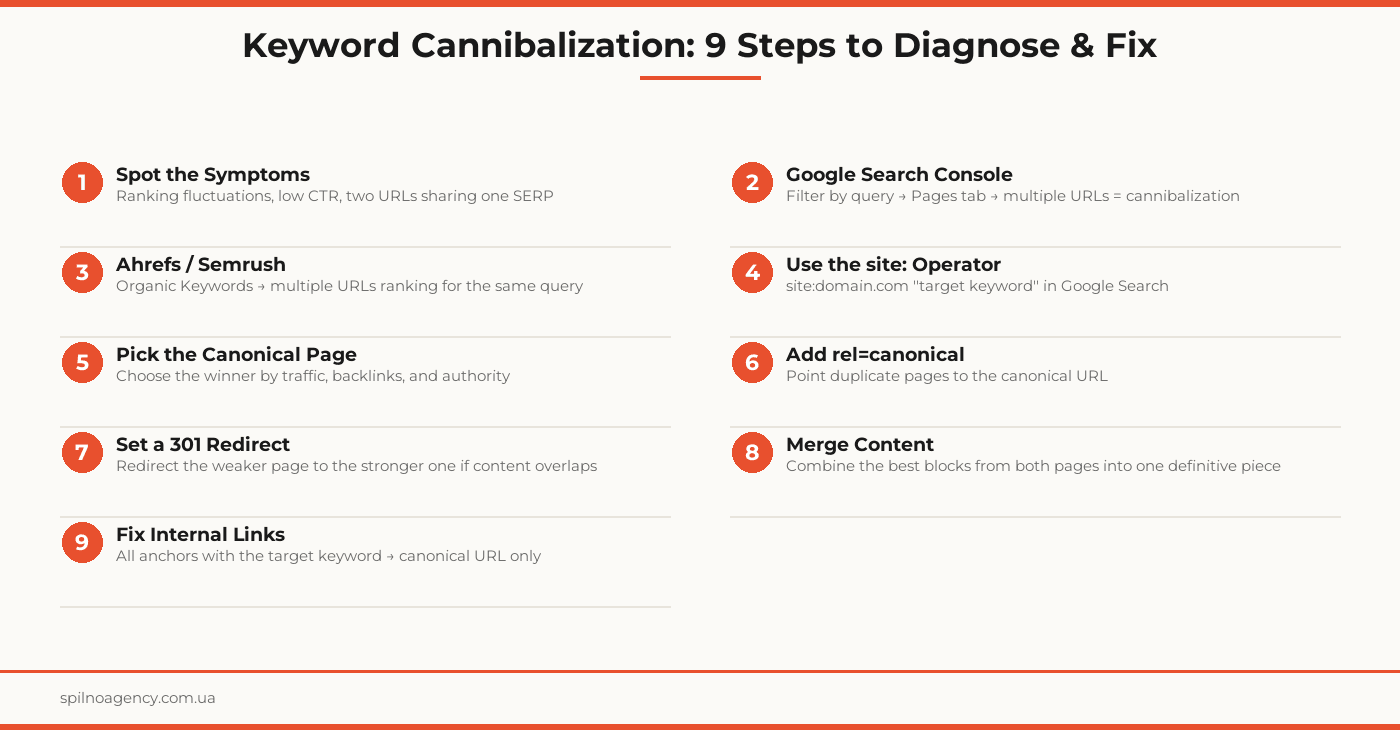
The fastest free method. In the Performance report, select a specific target query, click on it, and switch to the Pages tab. If you see two or more URLs — cannibalization confirmed.
The site: Operator in Google
Search Google for: site:yourdomain.com "target keyword". If two or more of your own pages appear — they are competing against each other.
Ahrefs / Semrush
In Ahrefs: Site Explorer → Organic Keywords → filter by the keyword. If the same keyword shows two ranking positions with different URLs — that is cannibalization. Semrush has a dedicated Cannibalization Report under Position Tracking.
Main Causes of Keyword Cannibalization
- No semantic planning — content is published without checking existing coverage
- Site growth without audits — topic clusters overlap over time
- Template duplication — auto-generated pages (categories, tags, filters) often share similar title and H1 patterns
- Redesigns or migrations — the old URL stays live alongside the new one
- Misaligned anchor text — internal links with the same anchor text pointing to different URLs
How to Fix Keyword Cannibalization
1. Canonical Tag (rel=canonical)
The least invasive fix. Add <link rel="canonical" href="https://yourdomain.com/primary-page/" /> to all duplicate pages. Google consolidates ranking signals onto the canonical URL.
When to use: both pages still serve a purpose (e.g., a category page and a price-filtered version), but one is the primary.
2. 301 Redirect
Permanently redirect the weaker URL to the stronger one. Passes 90–99% of link equity. Configure via .htaccess, nginx, or a WordPress plugin.
When to use: the duplicate page is no longer needed and its content is fully covered by the primary page.
3. Content Merge
The most labor-intensive but most effective fix for blog articles. The process:
- Identify the “winner” (higher position, more traffic, more backlinks)
- Copy the unique, valuable sections from the “loser” into the “winner”
- Set a 301 redirect from the “loser” to the “winner”
- Update all internal links that pointed to the “loser”
- Update the article’s publication date and submit the URL for re-indexing via GSC
4. Noindex
Add <meta name="robots" content="noindex, follow" /> to the weaker page. Google removes it from the index while link equity continues to flow through it. Best for tag pages, filter pages, and parametric URLs.
5. Internal Linking Restructure
Audit all internal links on your site. If the anchor text “keyword cannibalization” (or your target term) points to multiple different URLs — consolidate all anchors to the canonical URL. This reinforces Google’s understanding of which page is the authority.
Prevention Strategies
- Semantic review before publishing — check every new article against existing keyword clusters
- Content inventory — a spreadsheet: URL / primary keyword / status. Update on every new publication
- Quarterly audits — regular GSC and Ahrefs checks for new cannibalization instances
- One keyword cluster, one page — the golden rule of content strategy
- Rules for filters and tags — apply canonical or noindex to all parametric URLs from day one
Keyword Cannibalization Fix Checklist
- Google Search Console checked: queries with multiple ranking URLs identified
- site: operator run for top 10 priority keywords
- Organic Keywords audit completed in Ahrefs or Semrush
- Spreadsheet created: URL / competing keyword / chosen fix method
- “Winner” page selected for each competing pair
- Canonical tags added to all duplicate pages (where applicable)
- 301 redirects set from weak URLs to strong URLs (where applicable)
- Content merge completed (where applicable)
- Noindex added to parametric/filtered URLs
- Internal links updated: all anchors pointing to canonical URL only
- sitemap.xml updated (outdated URLs removed or replaced)
- Canonical URLs submitted for re-indexing via GSC
- Position monitoring scheduled for weeks 2, 4, and 8
Frequently Asked Questions
What is keyword cannibalization in SEO?
Keyword cannibalization occurs when multiple pages on the same website target the same or very similar keywords. Search engines struggle to determine which page to rank, so they split authority between the competing pages — often ranking both lower than a single consolidated page would have ranked.
How do I find keyword cannibalization on my site?
The fastest method is Google Search Console: open the Performance report, select a specific query, and switch to the Pages tab. If two or more URLs appear for the same query, cannibalization is likely. You can also run site:yourdomain.com “target keyword” in Google, or use the Organic Keywords report in Ahrefs or Semrush.
What is the difference between a canonical tag and a 301 redirect?
A canonical tag signals to Google which page is preferred while keeping both URLs accessible to users. A 301 redirect permanently sends both users and crawlers from one URL to another. Use canonical when both pages still serve a purpose but share keyword overlap. Use 301 when the duplicate page has no independent value.
Should I merge cannibalizing pages?
Yes, content merging is often the most effective fix. Move the best content from both pages into one authoritative page, set a 301 redirect from the retired URL, and update all internal links. The merged page inherits the combined link equity and behavioral signals of both predecessors.
How long does it take to see results after fixing keyword cannibalization?
Technical fixes like canonicals, 301 redirects, and noindex tags are typically processed by Google within 2–6 weeks after recrawling. For content merges and internal linking restructures, allow 4–12 weeks for rankings to stabilize, depending on your domain authority and crawl frequency.
Suspect keyword cannibalization on your site? Spilno Agency performs SEO audits, identifies competing pages, and delivers a prioritized fix plan.

Read also

How to Control an SEO Specialist: The 5-Stage SEO KPI Funnel
SEO KPIs form a chain of five metrics that show, step by step, whether your SEO is actually…

Best CMS for an Online Store: Cloud vs Self-Hosted Platforms in 2026
Compare Shopify, WooCommerce, PrestaShop, OpenCart and Magento for your online store. Pros, cons, and a step-by-step CMS selection…
LinkedIn Ads Library: How to Find Your Competitors’ LinkedIn Ads (2026 Guide)
How to use the LinkedIn Ads Library to see any competitor's sponsored content for free — step by…