The Perfect SEO URL: Structure, Rules & Checklist

A URL is the first thing both Google and users see before they ever land on your page. How you structure it determines whether search engines understand the page’s topic, whether users click in the SERP, and whether the full link equity from internal and external links is properly transferred. A well-structured URL is an SEO signal, a UX decision, and a technical foundation — all in one.
A well-structured URL can increase CTR in the SERP by 10–20% — before Google even evaluates the page’s content.
What Is a URL and Why Does It Matter for SEO?
A URL (Uniform Resource Locator) is the unique address of a resource on the internet. For search engines, a URL carries several signals: the page’s topic (through keywords in the slug), the site’s hierarchy (through the path structure), trustworthiness (through HTTPS), and uniqueness (through the absence of duplicates).
For users, a URL is a preview: seeing the address in the browser bar or search results, people decide whether they trust the resource and whether they’ll find what they’re looking for. An unclear or suspicious-looking URL reduces click probability.
Anatomy of the Perfect SEO URL
The ideal URL consists of four parts, each carrying SEO value:
- Protocol —
https://(not http://) — mandatory for security and Google’s trust signals - Domain — short, memorable name without unnecessary words (
site.com) - Path — logical category hierarchy:
/blog/,/services/seo/ - Slug — unique page identifier with the keyword:
seo-site-audit
Example of an ideal URL: https://site.com/blog/seo-site-audit
9 Rules for the Perfect SEO URL
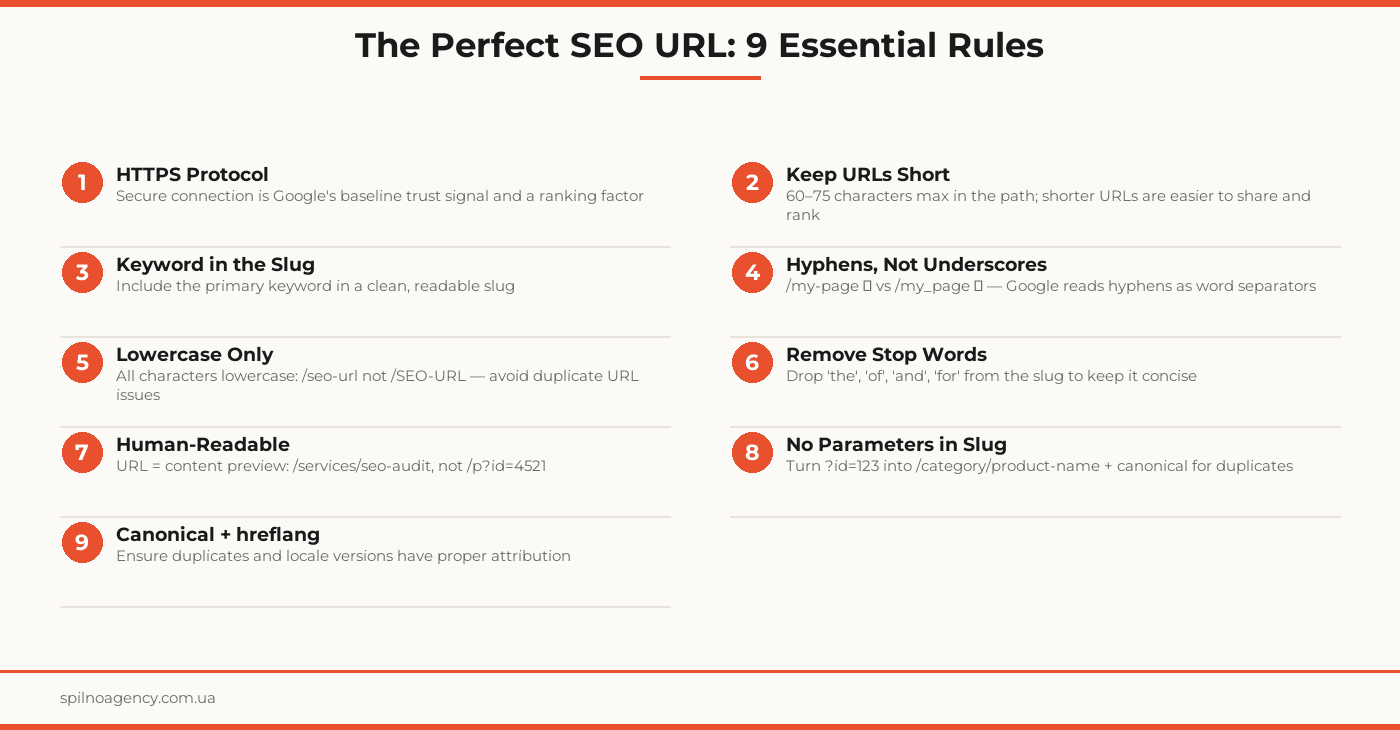
1. HTTPS Protocol — Non-Negotiable
Google has used HTTPS as a ranking signal since 2014. Sites without an SSL certificate are marked as “Not secure” by Chrome — instantly reducing user trust and CTR. Ensure all site URLs start with https://, with a 301 redirect from http:// to https://.
2. Short and Descriptive
Backlinko research shows that shorter URLs tend to rank higher than long ones. Optimal slug length is up to 60–75 characters. Compare:
- ❌
/blog/how-to-perform-a-complete-seo-audit-for-small-businesses-step-by-step-guide - ✅
/blog/seo-site-audit
3. Keyword in the Slug
Include the primary keyword in the slug — once and naturally. Don’t repeat the keyword in every path segment. Example:
- ❌
/seo/seo-services/seo-audit-seo— over-optimization - ✅
/services/seo-audit— clean and relevant
4. Hyphens Instead of Underscores
Google has officially recommended hyphens as word separators since the Matt Cutts era. Hyphen (-) = word separator (like a space). Underscore (_) = word connector. Google treats “seo-url” as two words; “seo_url” as one. Always use /my-page, never /my_page.
5. Lowercase Only
URLs are case-sensitive on most servers. /SEO-Audit and /seo-audit are two different pages that can become duplicates. Configure your server to automatically lowercase all URLs, with uppercase → 301 redirect to lowercase.
6. Remove Stop Words
Remove prepositions, articles, and conjunctions that carry no SEO value: “the”, “of”, “and”, “for”, “in”, “on”, “a”. They only increase URL length without adding relevance.
7. Human-Readable URLs
A good URL tells users what the page is about before they click. Compare what appears in the SERP:
- ❌
site.com/p?id=4521&cat=12&ref=google - ✅
site.com/blog/how-to-speed-up-website
The second version increases trust and CTR — which improves behavioral signals for Google.
8. No Dynamic Parameters in the Slug
Sorting, filtering, and session parameters (?sort=price&page=2) create thousands of duplicate URLs. Solutions: implement clean URLs + canonical tags for parametric versions + Google Search Console parameter exclusion rules.
9. Canonical and hreflang
For pages with parameters, add <link rel="canonical" href="https://site.com/canonical-url/" />. For multilingual sites, mandatory hreflang attributes for each locale ensure Google shows the right version in the right country.
Common URL Mistakes — Errors and Fixes
- ❌
/page?id=1234→ ✅/blog/article-name - ❌
/Blog/Post_Title→ ✅/blog/post-title - ❌
/us/seo-us-audit-us-optimization→ ✅/us/seo-audit - ❌
/2023/04/15/my-article→ ✅/blog/my-article - ❌
/category/subcategory/sub-subcategory/post-name→ ✅/category/post-name
URL and UX: What the User Sees
URLs appear in three places where they directly influence user decisions:
- SERP snippet — Google displays the URL below the title. A short, clear address increases CTR
- Browser address bar — while browsing, the URL confirms the user is “where they should be”
- Sharing — URLs are copied to messengers, social media, email. Shorter URL = more clicks
Technical Aspects: HTTPS, Redirects, Canonical
Technical URL optimization covers three critical areas:
- HTTPS everywhere — all HTTP traffic automatically → HTTPS via 301. Verify via GSC: Security & Manual Actions → HTTPS
- Trailing slash consistency — decide on one standard:
/page/or/page(not both). Inconsistency creates URL duplicates - Canonical for parameters — filter, sort, and pagination pages must have canonical tags pointing to the clean URL without parameters
Subdomain vs Subfolder: Which to Choose for SEO
One of the most common architectural questions is whether to put a separate section or language version on a subdomain or keep everything under the main domain as a subfolder. The right answer depends on the specific use case.
Blog: blog.site.com or site.com/blog/?
If you run a blog to support your main site’s growth — a subfolder is almost always better for SEO. The reason is straightforward: all the authority your blog accumulates (backlinks, traffic, behavioral signals) stays on the main domain and strengthens the entire site’s rankings.
With a subdomain (blog.site.com), Google treats it as a separate website. Your blog effectively starts from scratch — without the main domain’s authority. Links earned by the blog don’t pass equity to the main domain, and vice versa.
- ✅ Subfolder
site.com/blog/— shared domain, unified authority pool, better for SEO in 95% of cases - ❌ Subdomain
blog.site.com— SEO authority splits, harder to rank, only justified if the blog is an independent product with its own monetization or team
When a subdomain for a blog is justified: the blog runs on a different CMS (e.g., main site on React, blog on WordPress), a subfolder is technically impossible, or the blog is an independent media project.
Multilingual Sites: en.site.com or site.com/en/?
Google officially supports all three multilingual URL structures — ccTLD (site.de), subdomain (en.site.com), and subfolder (site.com/en/). But they are not equal in terms of effectiveness.
-
✅ Subfolder
site.com/en/— easiest to set up, all domain authority flows across all language versions. Recommended strategy for most sites -
⚖️ Subdomain
en.site.com— Google treats it as a separate site, so authority doesn’t transfer automatically between languages. Requires independent link-building for each version. Viable if your platform doesn’t support subfolders or if the content differs significantly by topic -
⚖️ ccTLD
site.de,site.pl— strongest geo-targeting signal, but highest cost: separate domains, separate SEO strategy, separate authority. Only justified for large companies with strong local teams
Conclusion: if you’re building a multilingual site without technical constraints — choose subfolders: site.com/uk/, site.com/en/, site.com/pl/. This is the same approach Spilno Agency uses for its blog: one domain, language versions in subfolders, shared authority pool.
SEO URL Checklist
- All site URLs start with https:// ✓
- HTTP → HTTPS configured via 301 redirect ✓
- Slug contains the primary keyword (once) ✓
- Slug is all lowercase with no spaces ✓
- Word separator is hyphen (-), not underscore (_) ✓
- Stop words removed from slug ✓
- Slug length is under 60–75 characters ✓
- URL is human-readable (no ?id= parameters) ✓
- Canonical configured for all parametric URLs ✓
- hreflang set for all language versions ✓
- Trailing slash standard is consistent across the site ✓
- No date in blog article URLs ✓
Frequently Asked Questions
Does URL structure affect Google rankings?
Yes, but moderately. URL is a weak ranking signal: Google considers keyword presence in the URL and the overall site structure. The bigger impact is on CTR — a clear, descriptive URL increases clicks in the SERP, which in turn signals quality to Google and indirectly improves rankings.
How long should an SEO URL be?
The technical limit is 2,048 characters, but for optimal SEO, keep the slug (the part after the domain) to 60–75 characters. Long URLs are hard to copy, remember, and may be truncated in search results. The ideal slug contains 3–5 meaningful words.
Should I use hyphens or underscores in URLs?
Always hyphens (-). Google treats a hyphen as a word separator (like a space), while an underscore (_) is treated as a connector. So ‘seo-url’ is parsed as two words (‘seo’ and ‘url’), while ‘seo_url’ is parsed as one word (‘seourl’). For SEO and readability, the hyphen is the only correct separator.
Should I include keywords in the URL?
It’s recommended but not mandatory. Including the primary keyword in the slug provides a weak positive ranking signal and can improve CTR (users see a relevant address). However, keyword stuffing across every URL segment or repeating the same keyword in the domain and slug is over-optimization that Google ignores.
Should blog post URLs include the date?
No, especially if you update content regularly. A date in the URL (/2023/01/post) makes the page look outdated to users even after a refresh, reduces CTR, and complicates internal linking. A cleaner structure is /blog/post-name/ with no date.
Need a URL structure audit for your site? Spilno Agency analyzes your URL architecture, identifies duplicates and errors, and delivers an optimization roadmap.

Read also

How to Control an SEO Specialist: The 5-Stage SEO KPI Funnel
SEO KPIs form a chain of five metrics that show, step by step, whether your SEO is actually…

Best CMS for an Online Store: Cloud vs Self-Hosted Platforms in 2026
Compare Shopify, WooCommerce, PrestaShop, OpenCart and Magento for your online store. Pros, cons, and a step-by-step CMS selection…
LinkedIn Ads Library: How to Find Your Competitors’ LinkedIn Ads (2026 Guide)
How to use the LinkedIn Ads Library to see any competitor's sponsored content for free — step by…