Title, Description, and H1–H6: A Complete Tag Guide

Title tags, meta descriptions, and heading tags H1–H6 are the foundation of on-page SEO. They define how your page appears in search results, how search engines understand its structure, and whether users click your snippet. Most sites make the same mistakes: duplicating title and H1, writing 300-character descriptions, or ignoring heading hierarchy. This guide covers how to work with each tag correctly and what to avoid.
A properly written title and H1 matter as much as quality content: these tags decide whether users even see your page in search results — and whether they click.
What Are Title, Description, and H1–H6 Tags?
In plain terms: these are the service labels attached to a page.
Some are seen only by the search engine, some by a person scanning Google results, and some by the reader already on the page. Together they explain what the page is about.
Why this matters to your business: this is the cheapest change in SEO. Rewriting them takes an hour, and they affect click numbers immediately — no developers, no budget.
All of these tags fall under on-page SEO — optimization applied directly to the page. They split into two groups:
- Meta tags (
<title>,<meta description>) — live in the<head>section, invisible on the page itself, but shown in search results and browser tabs - Heading tags (
<h1>–<h6>) — visible content elements that structure the page text
Google analyzes all of these tags to understand a page’s topic, hierarchy, and relevance to a query. Filling them in correctly is a prerequisite for effective SEO.
The <title> Tag: Role, Rules, and Examples
The title is the blue line a person clicks in Google. It also shows on the browser tab. In effect it is your page’s headline for the outside world.
Why this matters to your business: a page can hold a decent position, but if that line does not explain the benefit, people click the competitor next to it. You have already paid for the position with work, and someone else takes the click.
The <title> tag defines the page name. It appears in three places: browser tabs, the headline in search results (SERP), and the link anchor when the page is shared on social media.
From an SEO standpoint, title is one of the most important on-page factors. Google uses it to understand the page topic and partially to compose the search snippet.
Optimal Title Tag Length
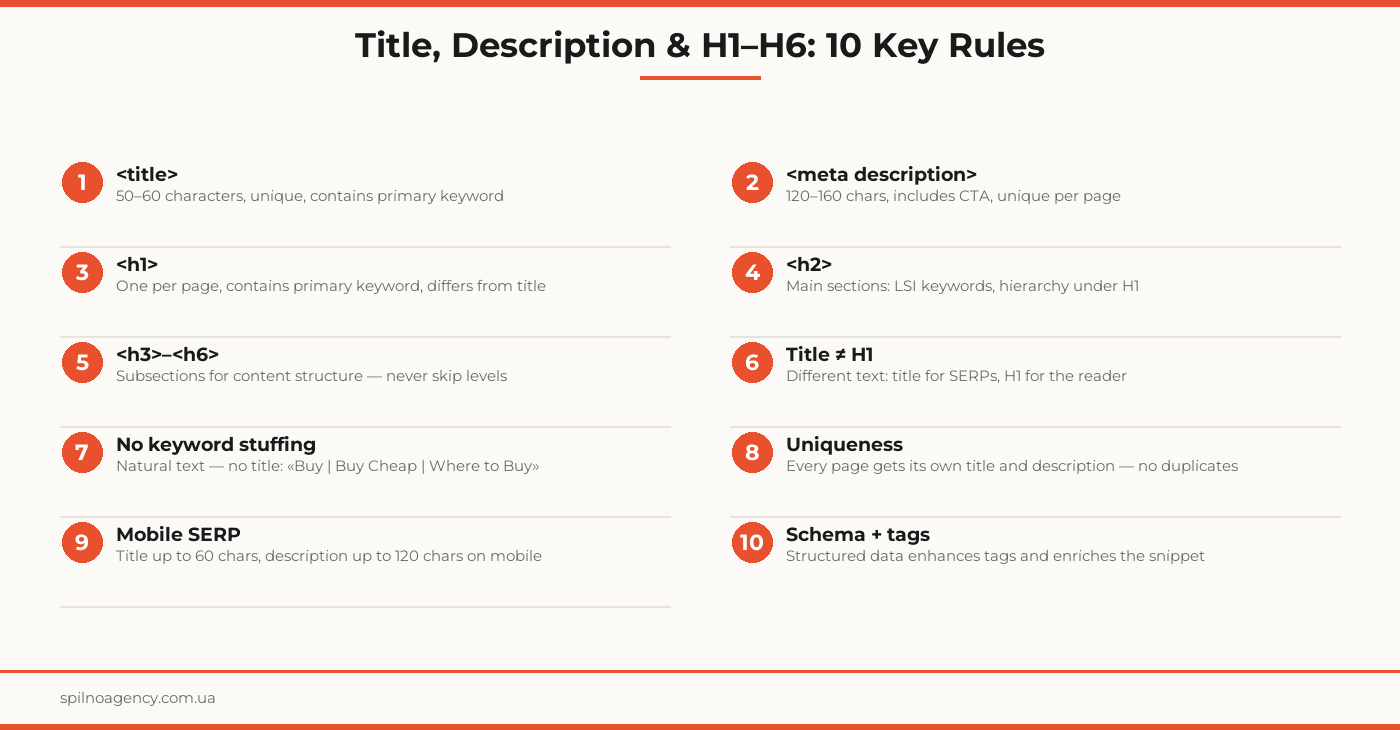
Google truncates titles at approximately 600 pixels wide, which translates to roughly 50–60 characters. Recommendations:
- Desktop: up to 60 characters
- Mobile SERP: up to 50 characters (less display space)
- A title 2–3 characters longer won’t be penalized — Google may shorten it but won’t rank the page lower
Title and SEO: What Matters
- Target keyword near the beginning. Google weighs words at the start of the title more heavily
- Unique per page. Duplicate titles are a serious problem: two pages sharing a title compete against each other
- Don’t repeat the brand name on every title. «| Site Name» at the end is standard but not obligatory everywhere
- Readability over keyword density. Google will rewrite your title if it looks spammy
Common Title Tag Mistakes
- Duplicate titles across multiple pages
- Title = H1 (word for word) — you lose the chance to cover two different search intents
- Title too short (under 30 characters) — insufficient signals for search engines
- Keyword stuffing: «Buy Sofa | Sofas | Sofas London | Cheap Sofas»
- Missing title entirely (Google will substitute arbitrary text)
The <meta description> Tag: Why It Matters and How to Write It
The description is the short text under the headline in search results. It does not directly affect position, but it does affect whether you get chosen among ten similar results.
Why this matters to your business: it is essentially a free ad. And very often it is either missing entirely or mechanically filled with the first two sentences of the article.
Meta description is a short page summary displayed below the title in search results. Technically it is not a direct Google ranking factor, but it directly affects CTR — the number of clicks on your snippet.
A good description explains what the user will find on the page and includes a call to action. A bad one is either empty or contains an unreadable list of keywords.
Meta Description Length
Google displays approximately 120–160 characters of description on desktop and up to 120 on mobile. Longer descriptions are truncated. Recommendations:
- Desktop: 140–160 characters
- Mobile: 115–125 characters
- Minimum: no shorter than 70 characters — too short is uninformative
How to Write a Strong Meta Description
- Answer “what’s here” — briefly and clearly
- Include a CTA: “Learn”, “Read step-by-step”, “Check”, “Download”
- Use the target keyword naturally — Google bolds it in the snippet
- Don’t duplicate the title — description complements, not repeats
- Unique per page — mass-duplicated descriptions are a technical issue
The <h1> Tag: The Main Page Heading
H1 is the first and most important visible heading on the page. It tells both users and crawlers what the page is about. Together with the title and the first paragraph, H1 forms the primary topical signal for Google.
H1 Rules
- One H1 per page — multiple H1s dilute topical focus
- Contains the primary keyword — naturally, not forcefully
- Usually shorter than a full article title — the reader sees it immediately, so it must be concise
- Describes the content that follows — not a generic phrase like “Welcome”
H1 vs Title: The Key Differences
This is where most confusion happens. Key distinctions:
- title — in
<head>, invisible on the page, shown in SERP and browser tab, optimized for search clicks - H1 — in the page body, the first text visitors see, optimized for the reader
Example: an article about title tags. Title: «Title Tag: Length, Rules & Mistakes | Spilno Blog». H1: «How to Write a Title Tag: The Complete Guide». Both cover the same topic but are phrased differently.
The <h2>–<h6> Tags: Content Hierarchy
H2–H6 tags structure the page content. They help:
- Crawlers understand the page’s subtopics
- Readers quickly scan text and navigate to the relevant section
- Google form extended snippets (featured snippets) and tables of contents
H2 and SEO
H2 tags are the main section headings under H1. They should:
- Logically break the topic into subtopics
- Naturally include LSI keywords (related terms and synonyms)
- Be informative — “How to Detect Errors” beats “Section 2”
H3–H6: When and How to Use Them
H3 tags are subsections within H2. H4–H6 provide even deeper nesting (rarely needed in practice). Rules:
- Respect hierarchy: don’t jump from H2 directly to H4 — H3 must come first
- H3–H6 have less direct SEO impact compared to H1–H2, but improve structure and UX
- Don’t use H3–H6 for visual styling — use CSS for that. Heading tags are for structure only
Title, Description & H1–H6 Verification Checklist
<title>tag present on all pages- Title is unique per page (no duplicates)
- Title length: 50–60 characters
- Primary keyword in title (near the beginning)
- Meta description filled in on all important pages
- Description is unique per page
- Description length: 120–160 characters
- Description includes CTA and naturally uses the target keyword
- One H1 per page
- H1 differs from title (not a word-for-word copy)
- H1 contains the primary keyword
- Heading hierarchy maintained: H1 → H2 → H3 (no level skipping)
- H2–H3 headings include LSI keywords and subtopics naturally
Frequently Asked Questions
What is the optimal length for a title tag?
Google displays title tags up to approximately 600 pixels wide, which translates to roughly 50–60 characters. Titles longer than that are truncated in SERPs with an ellipsis. Target 50–60 characters for desktop and under 50 for mobile.
Does the meta description affect rankings?
Meta description is not a direct Google ranking factor. However, it significantly influences CTR (click-through rate): a well-written description with a clear CTA increases clicks. More clicks generate better behavioral signals, which can indirectly improve rankings.
Can a page have multiple H1 tags?
Technically, multiple H1s are valid HTML5 and won’t trigger a Google penalty. However, SEO best practice recommends one H1 per page: it is the primary topic signal for crawlers. Multiple H1s dilute that signal and make content hierarchy harder to parse.
What is the difference between title and H1?
The title tag is the page name shown in browser tabs and SERPs — it is invisible on the page itself. The H1 is the visible main heading on the page. They can share the same keyword but should use different wording: title is concise and search-focused; H1 is engaging and reader-focused.
What happens if I don’t fill in the meta description?
If no meta description is provided, Google automatically generates a snippet from the page text — usually the first paragraph or a fragment around the query keyword. Auto-generated snippets rarely optimize for CTR, so it is strongly recommended to write a custom description for every important page.
Should title and description be unique on technical pages?
Technical pages fall into two categories. Pages excluded from indexing (robots.txt, /wp-admin, /login, standard 404/503 pages, etc.) — title and description uniqueness is not a priority there: Google won’t see them. For technical pages that remain indexed (custom 404, site search results, tag archives) — a unique and descriptive title is recommended. A duplicate title on an indexed technical page signals to Google that the pages are identical, which can trigger keyword cannibalization or weaken both URLs.
Are title and description length limits requirements or recommendations? Is it an SEO mistake to have a very short or very long title/description?
These are recommendations, not hard technical requirements. Google does not penalize for going over or under the suggested lengths. However, there are practical consequences: a too-long title gets truncated in SERPs and users don’t see the end; a too-short title (under 20–25 characters) is often rewritten by Google with its own version. A too-long description gets clipped; a too-short one gets replaced with auto-generated text. The real SEO issue is not ‘too long or too short’ — it is ’empty or duplicated’: a missing title tag or the same title across multiple pages is what Google evaluates negatively.
Need a tag audit for your website? Spilno Agency reviews title, description, and H1–H6 across all pages and delivers actionable fix recommendations.

Read also

How to Control an SEO Specialist: The 5-Stage SEO KPI Funnel
SEO KPIs form a chain of five metrics that show, step by step, whether your SEO is actually…

Best CMS for an Online Store: Cloud vs Self-Hosted Platforms in 2026
Compare Shopify, WooCommerce, PrestaShop, OpenCart and Magento for your online store. Pros, cons, and a step-by-step CMS selection…
LinkedIn Ads Library: How to Find Your Competitors’ LinkedIn Ads (2026 Guide)
How to use the LinkedIn Ads Library to see any competitor's sponsored content for free — step by…