Google Ads keyword match types: a guide for first-time advertisers (2026)

If you’re running Google Ads for the first time, the first thing that will trip you up is keyword match types. They look like a small detail — quotes, brackets, plus signs. But it’s exactly those characters that decide whether 100 of the right people see your ad or 100,000 random ones. That’s the difference between a profitable campaign and a burned budget in the first 24 hours.
In 2026 Google Ads has rewritten the rules again: broad match now works hand-in-hand with Smart Bidding and AI Max, phrase match has absorbed the legacy broad match modifier, exact match is no longer all that exact, and negative keywords remain the only tool fully under your control. This guide — no fluff, with examples and screenshots — breaks down how each type works, how to measure it, and where in the funnel to use it.
What is a match type and why does it exist
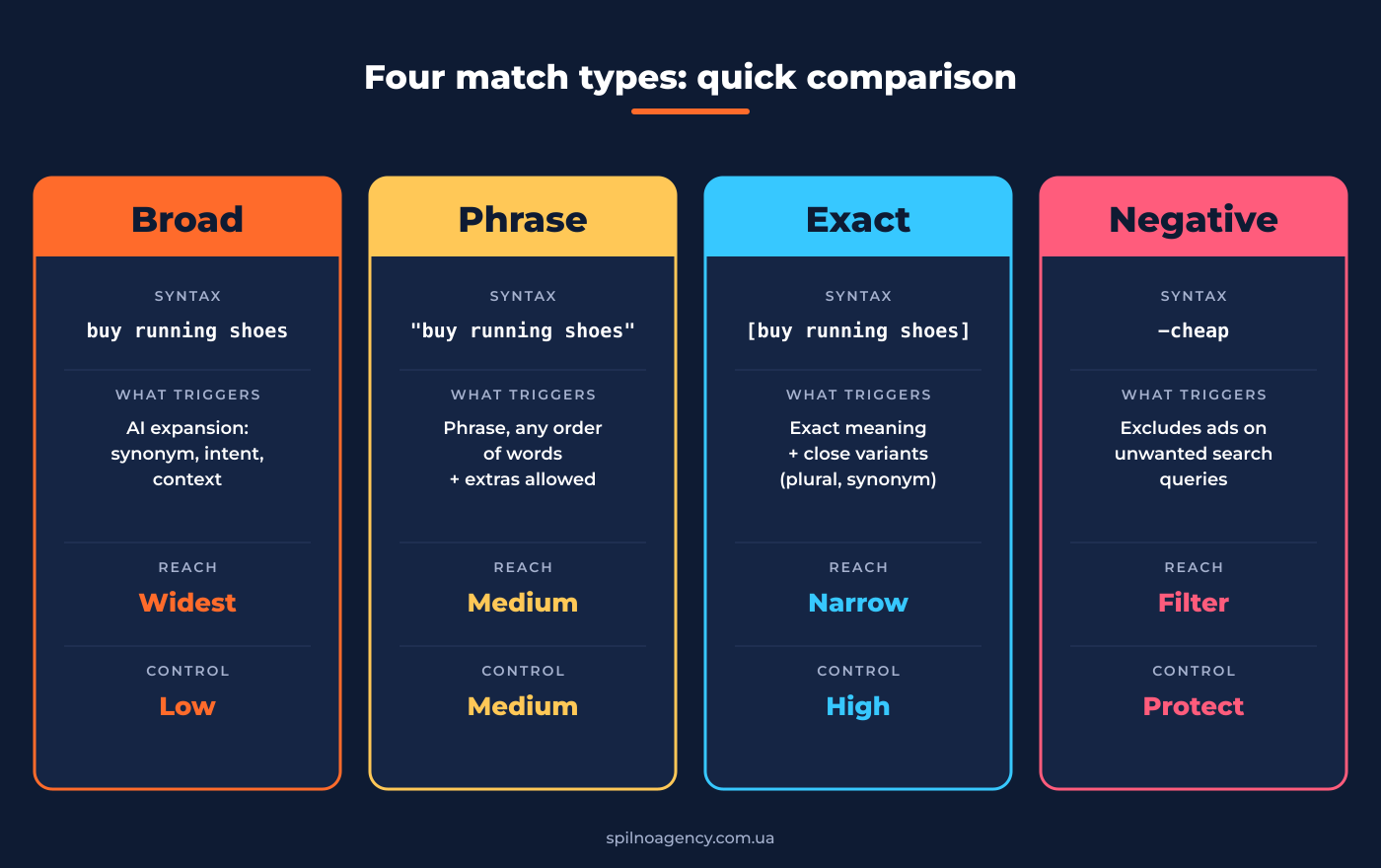
A match type is the rule Google uses to decide when to show your ad for a given search query. Think of your keyword as a door: the match type sets how wide the door is open.
- Broad match — door wide open: we let everyone in whose intent is even close.
- Phrase match — door open with a doorman who checks intent.
- Exact match — door with a face-control: only people who asked for almost exactly what we sell.
- Negative keywords — the no-entry list, no exceptions.
Every type is a trade-off between reach (how many people see your ad) and precision (how many of those are your buyers). Broader = more traffic, lower conversion. Narrower = fewer impressions, higher CPC.
Broad match
How it looks in the UI
In the keyword editor you simply type buy running shoes — no quotes, no brackets, no plus signs. Anything entered as raw text is treated as broad.
How it works in 2026
Broad match is the smartest and the riskiest type. It’s not just “match anything similar”: Google uses signals to guess intent:
- Your landing page content — what the page is about, what products are in the catalog.
- Other keywords already running in your account — Google figures out what your business is about.
- User behavior: previous searches, location, device, time of day.
- The active bid strategy: do you have conversion data, is Smart Bidding running.
So the keyword buy running shoes in broad mode can trigger queries like “running gear“, “Nike sneakers store“, “sports footwear with delivery“, “where to buy Air Max” — dozens of variants that aren’t obvious lexically.
When to use it
- ✅ You have conversion data and Smart Bidding running (tCPA, tROAS, Max conversions). Google recommends this combo — on average +25% conversions in tCPA and +12% conversion value in tROAS vs phrase.
- ✅ You want to discover new query clusters outside your existing semantic core.
- ✅ You work with a large product catalog (e-commerce) where collecting every keyword manually is impossible.
- ❌ Budget below ~100 conversions/month — Smart Bidding never trains.
- ❌ Narrow B2B niche with 5 clients per month.
How to measure broad
- Search Terms Report — every 3–5 days look at the actual queries that triggered ads. The single most important broad-match control tool.
- CPC and CTR — broad CPC is usually lower, CTR is lower too (queries are less relevant). If CTR < 2% — time to add negatives.
- Conversion rate by query — zero-conversion, high-spend queries go straight into Negative.
- Quality Score — broad gives a lower QS than exact. Track the group average.
What changes in September 2026
Per Google’s official announcement, starting September 2026 all campaigns using the campaign-level broad match setting will be automatically upgraded to AI Max — a new hybrid mode where Google decides which match type and which audience to use on every individual auction. Translation: broad becomes even less “lexical” and even more “intent-based”. Control shifts from keywords to the quality of your signals (feeds, conversion goals, audiences).
Phrase match
How it looks in the UI
Keyword in double quotes: "buy running shoes". The quotes signal to Google: “show my ad for queries that carry the meaning of this phrase”.
How it works in 2026
Phrase match has gone through the biggest transformation of any match type in the last five years. In 2021 Google “absorbed” the legacy broad match modifier (BMM) — the +buy +running +shoes mode — into phrase. Today phrase works like this:
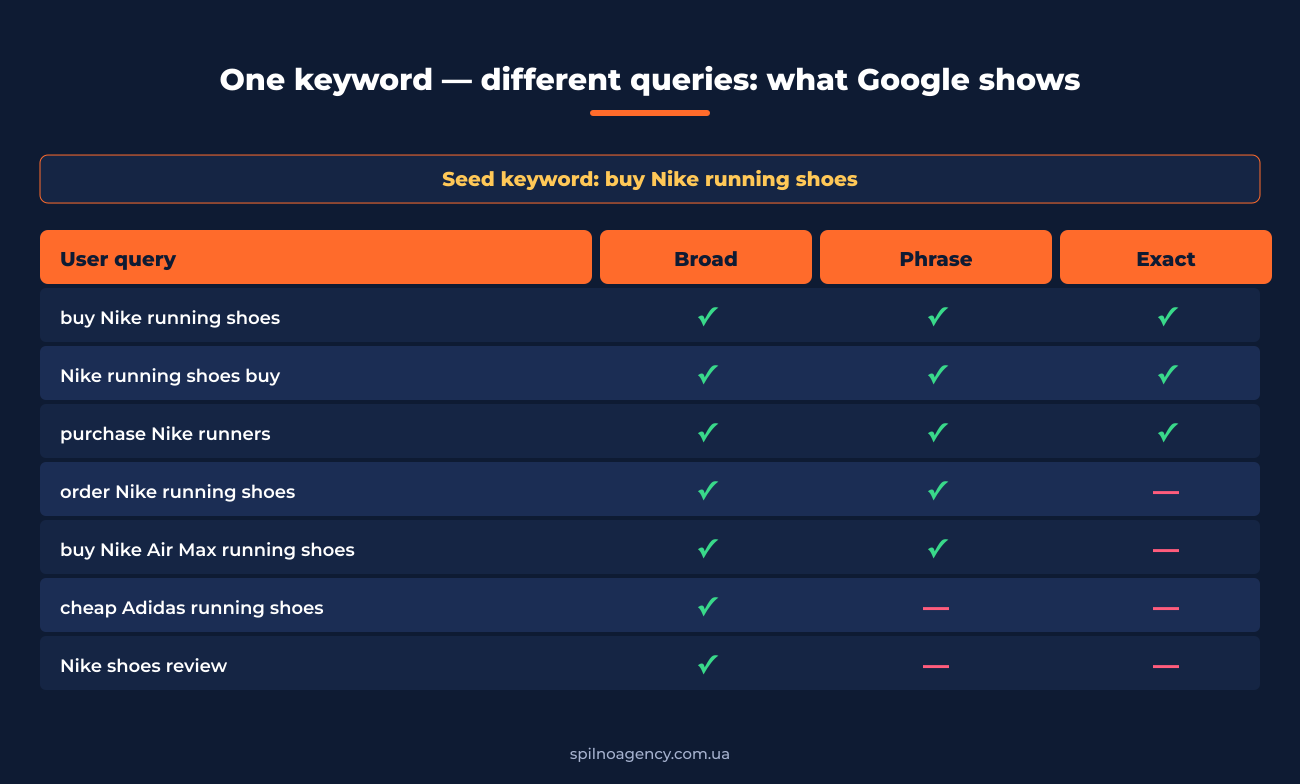
- Word order can change if intent is preserved.
"buy running shoes"matches “running shoes buy”, “buy Nike running shoes”, “buy running shoes in NYC”. - Close variants: plural/singular, synonyms, paraphrasing with the same meaning.
"buy running shoes"triggers “purchase running shoes”, “order running shoes”. - Extra words before or after the phrase are allowed. “best running shoes for marathon buy online” still matches.
- What it does NOT trigger: queries with different meaning. “Adidas running shoes” will not match
"buy Nike running shoes".
When to use phrase
- ✅ Category-level queries for e-commerce: “buy running shoes”, “women’s coats”, “SEO services”.
- ✅ Limited budget campaigns where broad is too costly and exact too narrow.
- ✅ A new campaign launch without enough data for Smart Bidding + broad.
- ✅ When you want more control than broad but more reach than exact.
How to measure phrase
- Match Type column in Search Terms — shows exactly which query triggered which keyword.
- CTR — category-level phrase typically delivers 3–6%, a healthy benchmark.
- Conversion Rate — 2–5% for e-commerce on average; B2B services 5–10%.
- Impression Share — below 30%? Check bids and ad quality.
Exact match
How it looks in the UI
Keyword in square brackets: [buy running shoes]. The narrowest and most controllable match type.
How it works in 2026
Pre-2017 exact meant literal character-for-character match. Now it means “same intent”:
- The query carries the same intent as the keyword.
- Close variants are allowed: typos, plural/singular, reordering with preserved meaning, paraphrasing with the same meaning.
- “buy running shoes in NYC” will not match exact
[buy running shoes]— a new constraint (city) was added.
When to use exact
- ✅ Branded queries: protect your trademark —
[Spilno Agency],[Nike Air Max 90]. - ✅ High-intent commercial: “buy”, “order”, “price”, “delivery”.
- ✅ Low-budget campaigns where every impression must count.
- ✅ Competitor queries: competitor brand + your unique offer.
- ❌ Avoid exact for generic informational queries — too low volume.
How to measure exact
- CTR: branded — 10–25%, commercial exact — 5–10%.
- Conversion Rate: branded — 15–30%, commercial — 5–15%.
- CPC: the highest across all types — biggest competition.
- Quality Score: aim for 8–10 — can cut CPC by up to 50%.
Negative keywords
How they look in the UI
A dedicated “Negative keywords” tab at the group / campaign / account level. Words are added with a minus sign:
-free— negative broad (default).-"free shipping"— negative phrase.-[download free]— negative exact.
How they work
Negative keywords are the only tool entirely under your control. Google doesn’t expand them by intent, doesn’t add synonyms, doesn’t guess — a negative blocks exactly what you’ve specified (subject to its own match type).
Three levels of negatives
- Account-level — sitewide blocks: “jobs”, “free”, “torrent”, “PDF”.
- Campaign-level — funnel-specific.
- Ad group-level — finest grain: keep product groups from cannibalizing each other.
Starter negative-keywords checklist (English)
- Informational: “what is”, “how to”, “review”, “reviews”, “compare”, “DIY”.
- Free: “free”, “torrent”, “download”.
- Jobs and education: “jobs”, “careers”, “course”, “tutorial”, “thesis”.
- Low budget: “cheap”, “affordable”, “used”, “second-hand”.
- Geography: cities/states you don’t ship to.
- Competitors (if you don’t want to bid on their brand).
Which type to pick: a decision tree for beginners
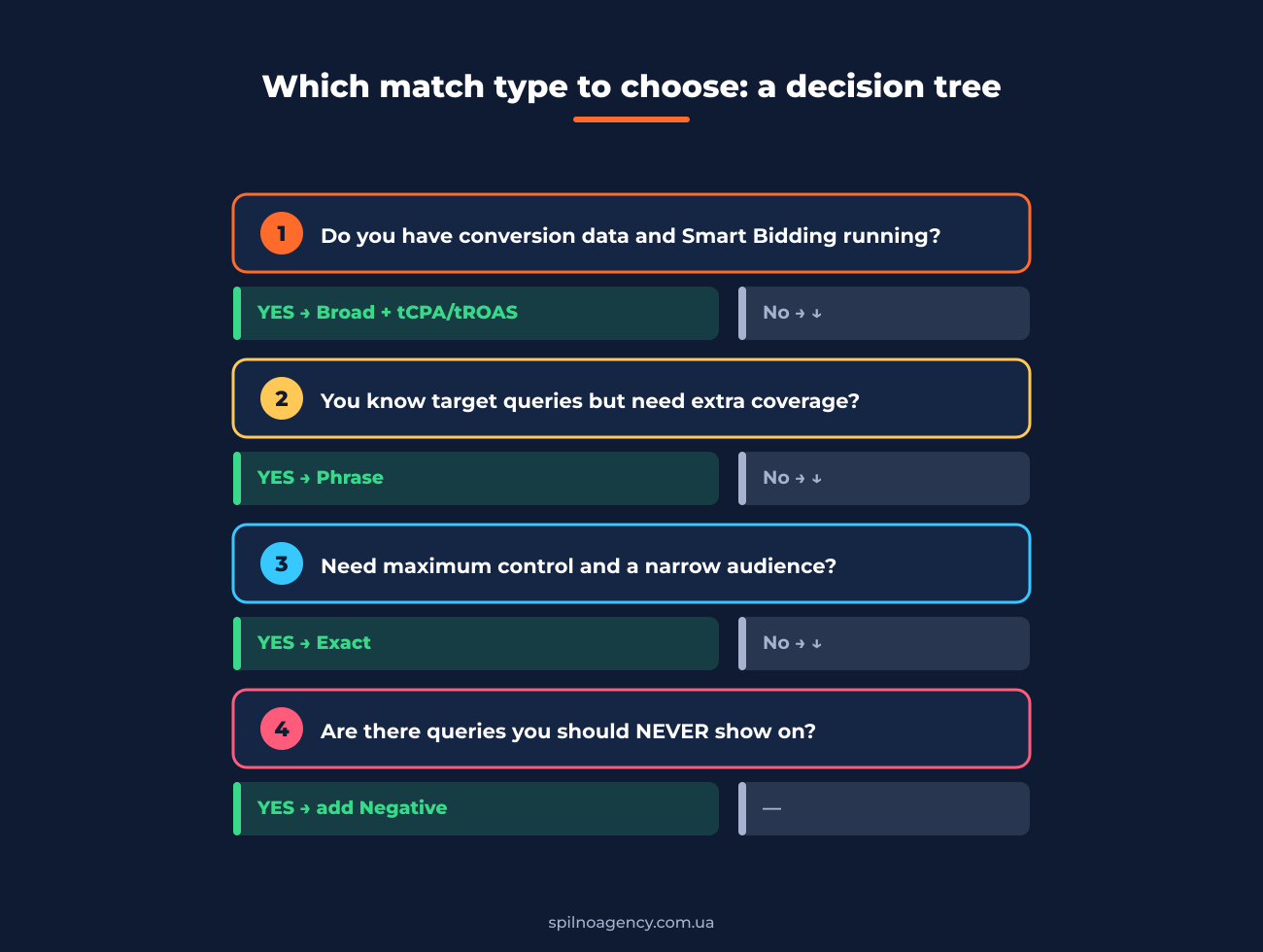
- Do you have conversion data and Smart Bidding running?
Yes → Broad + tCPA / tROAS — the Google-recommended setup for 2026.
No → step 2. - You know your target queries but need wider coverage than exact?
Yes → Phrase. Balanced option for categories.
No → step 3. - Need maximum control and a narrow audience?
Yes → Exact. Brand, high-intent, low-budget. - Are there queries you should NEVER show on?
Yes — add Negative keywords. Without them campaigns waste 20–40% of budget.
Match types and the marketing funnel
The classic marketing funnel splits into 4 stages: TOFU → MOFU → BOFU → Retention. At each one the user has a different intent, so a different match type works best.
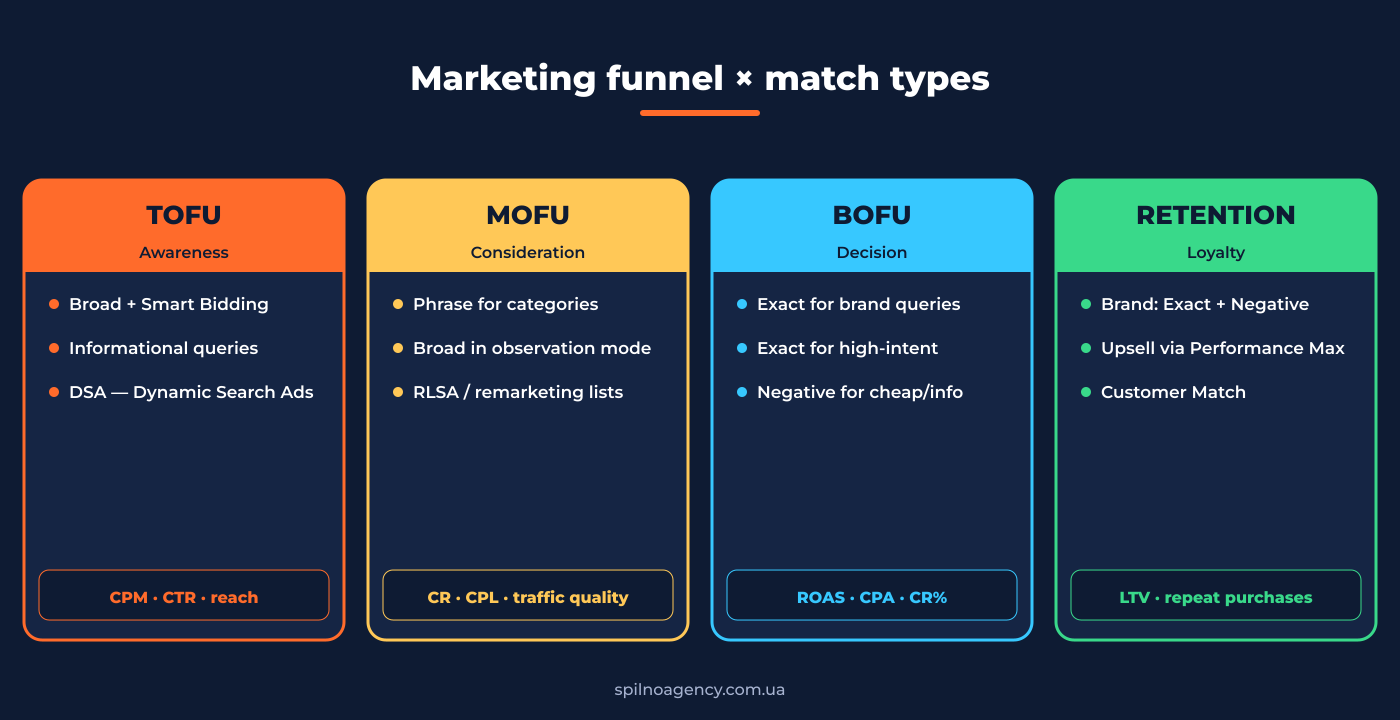
TOFU — Awareness
- Match types: Broad + Smart Bidding (Max conversions), DSA, Performance Max.
- Tools: Google Ads Editor, Keyword Planner, Search Terms Report.
- KPIs: CPM, CTR, reach, impression share.
- Budget: 30–50%.
MOFU — Consideration
- Match types: Phrase for categories, Broad on observation, RLSA.
- Tools: Audience Manager, Comparison Shopping, GA4.
- KPIs: on-site CR, CPL, traffic quality.
- Budget: 25–35%.
BOFU — Decision
- Match types: Exact for brand and high-intent, Negative for “cheap”, “free”, info.
- Tools: GTM + GA4, Shopping Ads, Performance Max.
- KPIs: ROAS (3–5× minimum), CPA, CR 3–8%.
- Budget: 20–30%.
Retention — Loyalty
- Match types: Exact on brand + strong Negative list, Performance Max + Customer Match.
- Tools: Customer Match, email (Klaviyo, GetResponse), CRM segments.
- KPIs: LTV, repeat-purchase frequency, returning-customer %.
- Budget: 10–20%.
5 typical beginner mistakes
- Broad without negatives and without Smart Bidding. 80% of budget on junk by day three. Fix: switch to phrase, or add 50+ negatives and turn on tCPA.
- Everything in exact. Looks “more controlled” but too few impressions — Smart Bidding never optimizes.
- One match type for every group. Correct structure is mixed: exact for brand, phrase for categories, broad for discovery.
- Ignoring the Search Terms Report. The main lever for managing broad/phrase. Every 3–5 days.
- Duplicating keywords across types. If a keyword sits in broad, phrase and exact across different groups, Google picks the one with the higher bid. Better — put exact in its own campaign.
Top 7 tools for the digital marketer
- Google Keyword Planner — free seed-keyword, volume and competition tool.
- Google Ads Editor — desktop app for bulk keyword/group/ad management.
- Search Terms Report — actual queries that triggered your broad/phrase keywords.
- Ahrefs / Serpstat / Semrush — semantic expansion, competitor analysis, keyword difficulty.
- SpyFu / iSpionage — competitor PPC monitoring.
- Optmyzr / Adalysis — third-party Google Ads optimization platforms.
- GA4 + Google Tag Manager — the foundation Smart Bidding depends on.
Launch checklist for your first campaign
- ☐ Collected 30–100 keywords via Keyword Planner + Ahrefs/Serpstat.
- ☐ Split into 3 groups: brand (exact), categories (phrase), discovery (broad).
- ☐ Conversions configured in Google Ads + GA4 via GTM.
- ☐ 50+ negative keywords ready at launch — info, “free”, competitors.
- ☐ Smart Bidding tCPA on phrase/broad, manual CPC on brand-exact.
- ☐ Calendar reminder: every 3 days — review Search Terms, add negatives.
- ☐ Day 14 — first match-type performance review.
Conclusion
Match types in Google Ads aren’t a textbook abstraction — they’re the single biggest lever for controlling your budget. In 2026 the choice between broad / phrase / exact / negative is effectively a choice between trusting Google’s algorithm and exerting your own expert control. The right approach is a mix: exact for brand, phrase for categories, broad + Smart Bidding for discovery, and Negative — to stop paying for accidental visitors.
And, most importantly — don’t try to set up a campaign once and forget. Match types are a continuous process: weekly Search Terms review, new negatives, promoting good queries into exact. Marketers who do this consistently get 5–10× ROAS; the ones who set-and-forget burn through budget in a week.
Need help with Google Ads? Spilno Agency has been running PPC campaigns since 2014 — from the first keyword to a 7-figure ROAS strategy. Get in touch — we’ll help.

Read also

Is an SEO specialist responsible for leads and sales? Our position
A LinkedIn discussion: should an SEO specialist be responsible for leads and sales from the SEO channel. Spilno…

How to Control an SEO Specialist: The 5-Stage SEO KPI Funnel
SEO KPIs form a chain of five metrics that show, step by step, whether your SEO is actually…

Best CMS for an Online Store: Cloud vs Self-Hosted Platforms in 2026
Compare Shopify, WooCommerce, PrestaShop, OpenCart and Magento for your online store. Pros, cons, and a step-by-step CMS selection…