How Google Shopping campaigns work in Google Ads: a first-time advertiser’s guide

A Google Shopping campaign in Google Ads is an ad format where your product cards (image, price, name, store) appear before the user clicks a search result. The campaign runs as a three-part chain: a product feed in Google Merchant Center, the campaign itself in Google Ads (Standard Shopping or Performance Max), and a bidding strategy (Max Conversion Value or Target ROAS). A marketer influences the funnel through feed quality (Awareness), titles and images (Consideration), product page and bid (Decision), and remarketing audiences (Retention).
🛒 TL;DR — how a Shopping campaign works in 60 seconds
- Product feed in Merchant Center Next → Google knows what you sell
- Google Ads pulls products from the feed and enters them into the product auction
- Winning the auction is determined by Ad Rank = bid × feed quality × relevance
- The user sees the product card (Awareness) → clicks (Consideration) → buys (Decision)
- You pay only per click (CPC) or per conversion (Smart Bidding)
- The key metric of success is ROAS (return on ad spend)
Full guide with every metric decoded ↓
What is a Google Shopping campaign and how it differs from regular ads
Google Shopping is not a separate product but an e-commerce-focused ad format inside Google Ads. Unlike text search ads where you write headlines and descriptions manually, in Shopping Google builds the ad itself from your product feed: it takes the image, title, price, brand, and availability.
This is a fundamentally different mechanic:
- Text ads: you target a keyword (“buy sneakers”), write copy, pay per click.
- Shopping ads: you give Google your catalog, Google decides which product card to show for which query and serves it together with price and image in the Shopping block.
So in Shopping the feed replaces the keyword. If you have 5,000 SKUs, you effectively have 5,000 separate ads, each competing in the auction on its own.
Where the user sees your products
Shopping cards appear in 6 places across Google’s ecosystem:
- Google Search — in the Shopping block at the top and on the right side
- Shopping tab (google.com/shopping) — a dedicated product vertical
- YouTube — overlays and Shopping Shorts
- Gmail — Promotions tab
- Google Discover — mobile feed
- Google Lens / Images — when the user searches by photo
Since 2024–2026 Google has been actively integrating product cards into AI Overviews — the AI-generated block at the top of search. It’s an extra free-impression channel for those with a well-optimized feed.
How the Google Shopping auction works under the hood
Every time a user types a query relevant to your product, Google runs an instant auction. The winner is the product with the highest Ad Rank:
Ad Rank = Max CPC × Quality Score × Expected relevance × Display context
In practice your bid is only one of four levers. A card with an ideal feed and a high CTR can outrank a competitor who bids more.
What Google considers when ranking Shopping
| Factor | What it means in practice | How the marketer influences |
|---|---|---|
| Title quality | Whether the title contains brand, model, key attributes (size, color, material) | Optimize the title feed field |
| Image quality | White background, high resolution, no watermark, product in frame | Prepare images to Google’s spec |
| Price | Google compares your price with competitors in the Shopping Graph | Pricing strategy, promos, codes |
| Site speed and UX | Core Web Vitals, mobile adaptability | Technical landing-page optimization |
| Account history | Past conversions, domain reputation, complaints | Time + quality of service |
| Audience signals | Whether a similar user bought from a similar seller | Customer Match, GA4 audiences |
Three types of Google Shopping campaigns in 2026
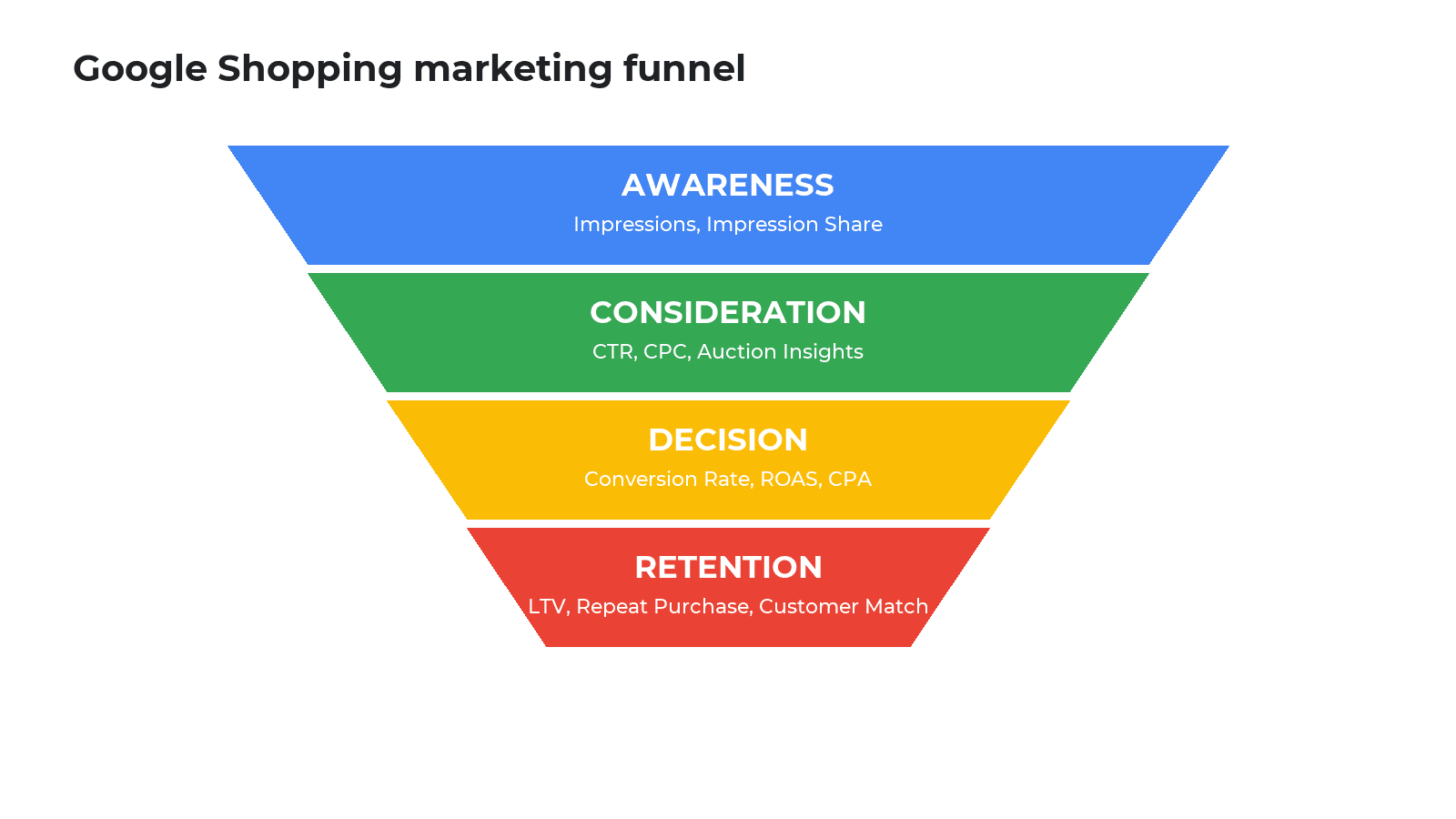
When you open Google Ads and start a Shopping campaign, you’re offered a choice. Let’s break it down:
1. Standard Shopping — manual control
The classic format where you see per-product data, set bids on product groups, and exclude queries with negative keywords. Shown only in Google Search and the Shopping tab.
When to choose it:
- Under 30 conversions per month — not enough data for Smart Bidding;
- A store with a narrow category where margins must be protected;
- Test launches for new product categories;
- Brand traffic (protecting your own brand from competitors).
2. Performance Max — the AI campaign
Performance Max (PMax) is an AI-driven campaign where Google distributes budget across Search, Shopping, YouTube, Gmail, Discover, and Display. You provide: feed + assets (headlines, descriptions, images, videos) + goal (Max Conv Value or Target ROAS), Google does the rest.
Per Google Marketing Live 2026, PMax delivers on average 10–20% higher ROAS than Standard Shopping — provided you have 50+ conversions/month and a clean feed.
When to choose it:
- 50+ conversions/month (below that AI cannot learn);
- A wide catalog where you’re willing to hand decisions to Google;
- You want to scale via YouTube/Discover without separate campaigns;
- Quality conversion tracking with value (not just “purchased” but “purchased for $59”).
3. Demand Gen — pre-purchase demand
Demand Gen targets the top of the funnel. It shows products in Discover, YouTube Shorts, and Gmail while users are not actively searching but signal interest (watching a video, reading an article). The metric here is not direct conversion but view-through conversion — a purchase within 30 days of the impression.
The marketing funnel and Google Shopping: how each stage works
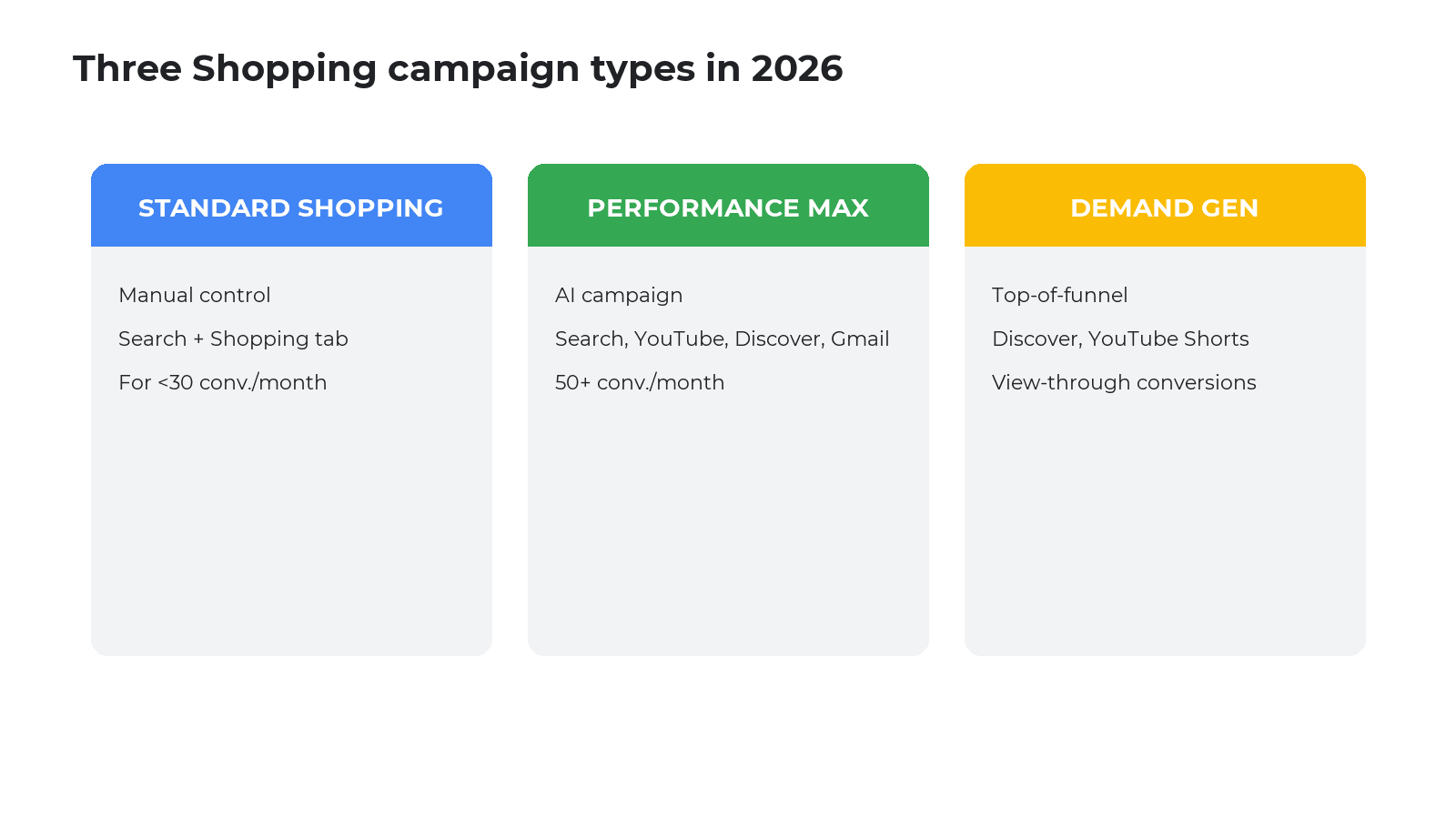
The classic marketing funnel is the path from first impression to repeat customer. In Google Shopping each of the 4 stages is measured by its own metrics and requires different tools of influence.
Stage 1. Awareness
What happens: the user sees your product card (impression). They have not clicked yet, but already registered the brand, image, and price.
Key metrics:
| Metric | How it’s measured | What it means |
|---|---|---|
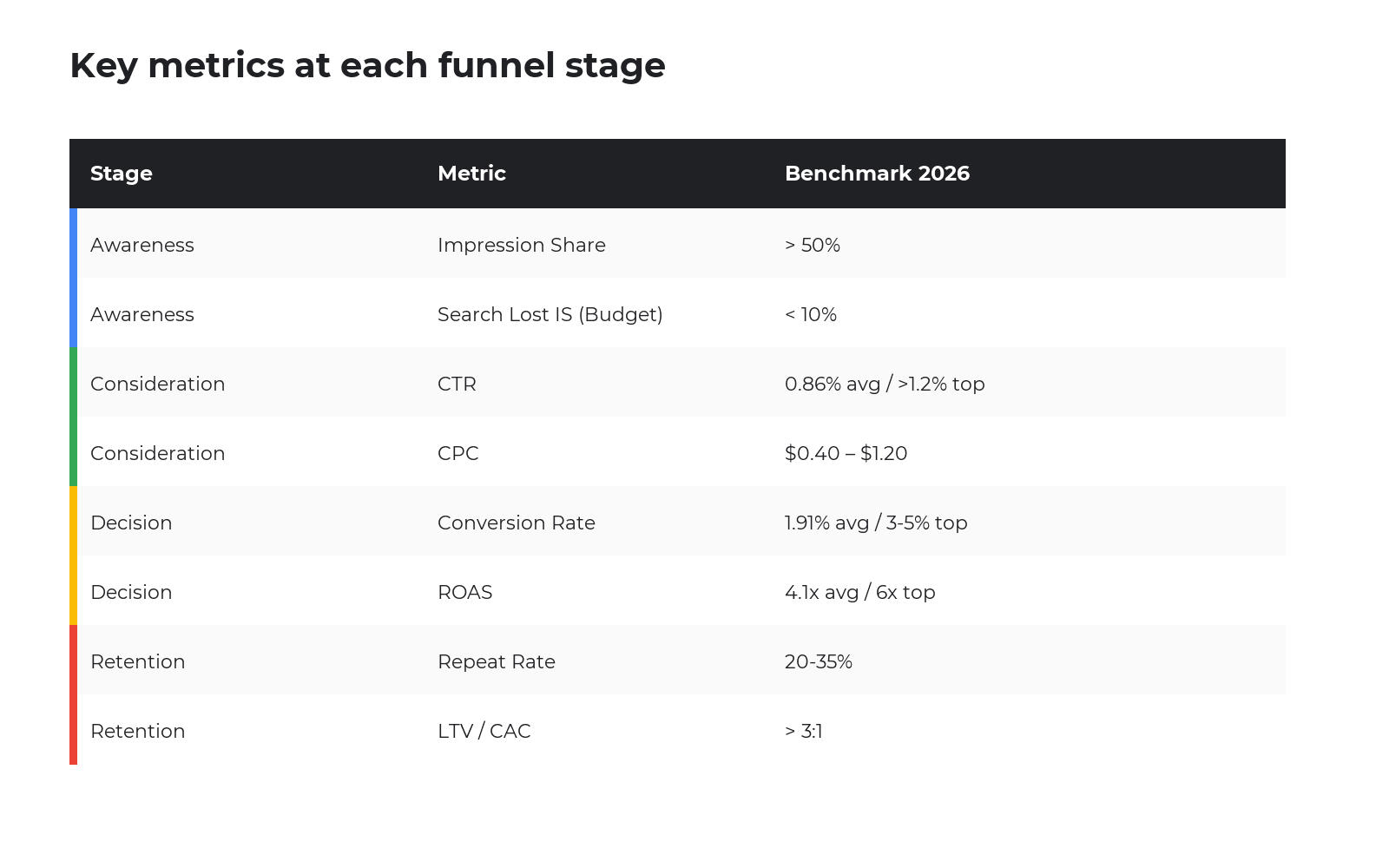
| Impressions | Number of times your card appeared on screen | How many people “noticed” the product |
| Impression Share | Your impressions ÷ total possible impressions for your products | The share of auctions you win. 100% = you win all |
| Search Lost IS (Budget) | % of impressions lost due to budget | If >10% — scale budget |
| Search Lost IS (Rank) | % of impressions lost due to low Ad Rank | Improve feed, bid, landing quality |
| Top of Page Rate | % of impressions that landed at the top | Premium positions cost more |
What the marketer controls: title quality (the biggest lever for CTR and reach), images (white background, no logos), feed attributes (brand, GTIN, MPN, color, size), google_product_category, campaign budget.
Stage 2. Consideration
What happens: the user clicks. They compare you with competitors, read descriptions, check reviews. Budget begins to spend.
Key metrics:
| Metric | Formula | Benchmark 2026 (Shopping) |
|---|---|---|
| CTR (Click-Through Rate) | Clicks ÷ Impressions × 100% | ≈ 0.86% avg; > 1.2% strong |
| CPC (Cost Per Click) | Spend ÷ Clicks | $0.40–$1.20 (depends on niche) |
| Auction Insights | Competitive overlap report | Overlap Rate, Outranking Share |
| Engaged Sessions (GA4) | Sessions > 10s or with conversion | > 60% — quality traffic |
| Bounce Rate | Bounces from product page | < 50% for e-commerce |
What the marketer controls: product description, page speed (LCP < 2.5s), image quality, reviews, price vs. market, in-stock, clear “Buy” CTA.
Stage 3. Decision
What happens: the user adds to cart and checks out. Or abandons. This stage decides campaign ROI.
Key metrics:
| Metric | Formula | Benchmark 2026 |
|---|---|---|
| Conversion Rate (CR) | Conversions ÷ Clicks × 100% | ≈ 1.91% (Shopping global) |
| Conversions | Number of purchases | Depends on niche and traffic |
| Conversion Value | Total revenue from conversions | Passed to Ads from GA4 / tag |
| CPA | Spend ÷ Conversions | Must be < product margin |
| ROAS | Conversion Value ÷ Spend | Top 25% = 6.0×; avg = 4.1× |
| AOV | Revenue ÷ Number of orders | Depends on assortment |
| break-even ROAS | 1 ÷ Gross margin | 40% margin → 2.5× = break-even |
How to calculate a “sufficient” ROAS. If your gross margin is 40%, break-even ROAS = 1 ÷ 0.4 = 2.5×. That’s when you break even on the ad alone. The real target should be higher because you still cover ops, returns, and shipping.
What the marketer controls: cart UX, number of checkout steps, payment methods, shipping, guarantees, abandoned-cart remarketing via GA4 audiences.
Stage 4. Retention
What happens: the buyer returns. The cheapest and most profitable traffic.
Key metrics:
- Repeat Purchase Rate — % of buyers who bought ≥ 2 times;
- Customer Lifetime Value (LTV) — the total a customer brings over time;
- New vs Returning Customer in Google Ads (passed from Merchant Center).
What the marketer controls: remarketing audiences, Customer Match (uploading an email list to Ads), AOV segmentation, email marketing, loyalty programs.
Bidding strategies: where you actually save or lose money
A bidding strategy is the algorithm Google uses to decide how much to pay for your click. In Shopping there are 5 main strategies. The wrong choice is the most common beginner mistake.
Manual CPC
You set the maximum bid per product group yourself. Full control, low efficiency — you don’t react to Google’s real-time signals. Use only for the first days of testing until you’ve gathered baseline data.
Maximize Clicks
Google spends to buy the maximum clicks. Dangerous for e-commerce — it optimizes for traffic, not revenue. Use only briefly for data collection, no longer than 2 weeks.
Maximize Conversion Value ⭐
Google optimizes for maximum revenue within budget. This is the default launch strategy — Google and major agencies recommend it. Keep it for 4–6 weeks until Smart Bidding accumulates ≥30 conversions.
Target ROAS
You set the desired revenue-to-spend ratio (e.g., 400%). Google bids to hold this. Switch only when you have 30+ conversions/month. Start tROAS at 20% below your final target to give the algorithm room to maneuver.
Target CPA
Rarely used in Shopping because it ignores purchase value. Fits when products have a similar margin.
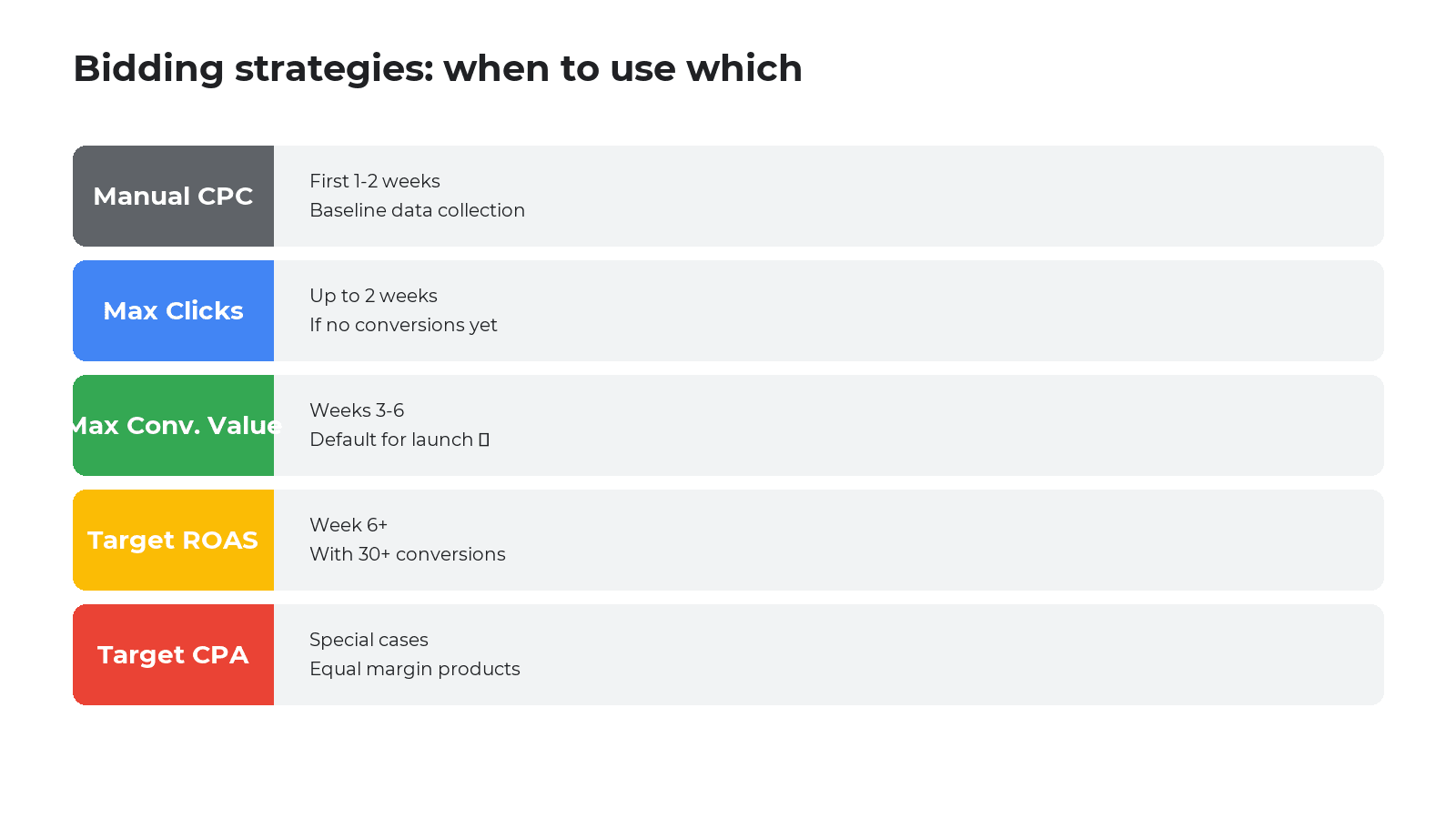
Migration path between strategies
- Week 1–2: Manual CPC or Max Clicks — gather baseline CTR/CPC data.
- Week 3–6: Max Conversion Value — teach AI what a “good conversion” looks like.
- Week 6+: If 30+ conversions/month — move to Target ROAS at –20% from target.
- Week 8–10: Gradually raise tROAS to target (by 5–10% per week).
Build your first Shopping campaign — a step-by-step guide
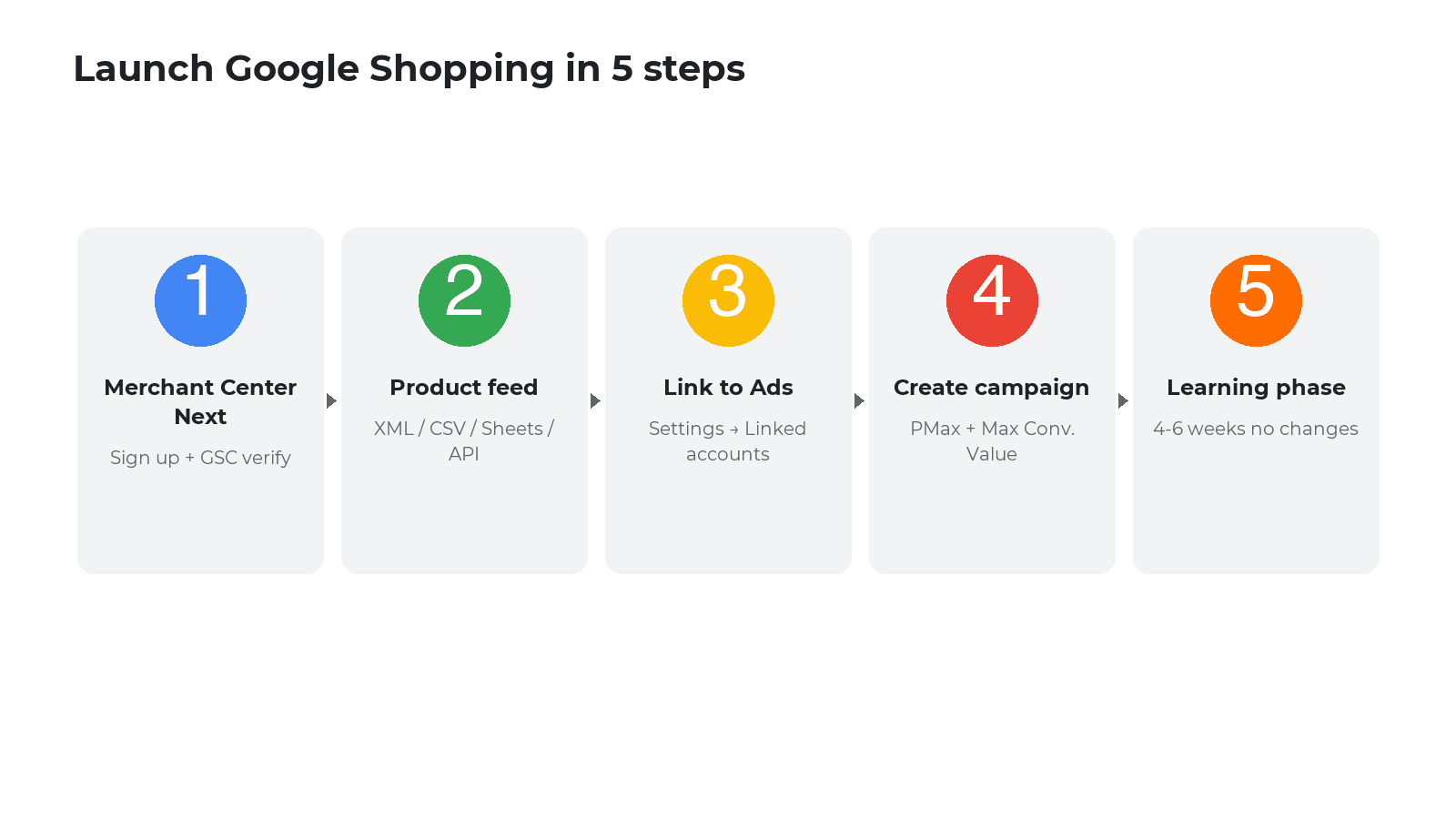
Step 1. Lay the foundation
- Register Google Merchant Center Next at merchants.google.com;
- Verify domain ownership via Google Search Console;
- Create a Google Ads account;
- Set up GA4 + Google Tag with
purchaseconversions and thevalueparameter.
Step 2. Upload the product feed
Feed delivery options:
- Automatic site scan (new 2024–2026 method, Google reads products) — fastest;
- XML feed from CMS (Shopify, WooCommerce, OpenCart, PrestaShop, Magento) — most accurate;
- Google Sheets — for small catalogs up to 200 items;
- Content API for Shopping — for large stores with frequent updates.
Required fields: id, title, description, link, image_link, availability, price, brand, gtin or mpn, google_product_category, condition.
Step 3. Link Merchant Center to Google Ads
In Merchant Center → Settings → Linked accounts → Google Ads → Link.
Step 4. Create the campaign
- Google Ads → New campaign → Goal: Sales → Type: Performance Max (or Shopping for a test launch);
- Pick Merchant Center and country of sale;
- Set budget — for PMax: daily budget ≈ 50× target CPA;
- Bidding strategy: Maximize Conversion Value (no tROAS yet);
- Add assets: 5+ headlines, 5+ descriptions, 4+ images, 1+ video;
- Audience signals: upload existing customers via Customer Match (optional, speeds learning).
Step 5. Launch and learning phase
Do not touch the campaign for the first 2 weeks. PMax learns 4–6 weeks. Any change >20% to budget, bid, or assets resets the learning cycle.
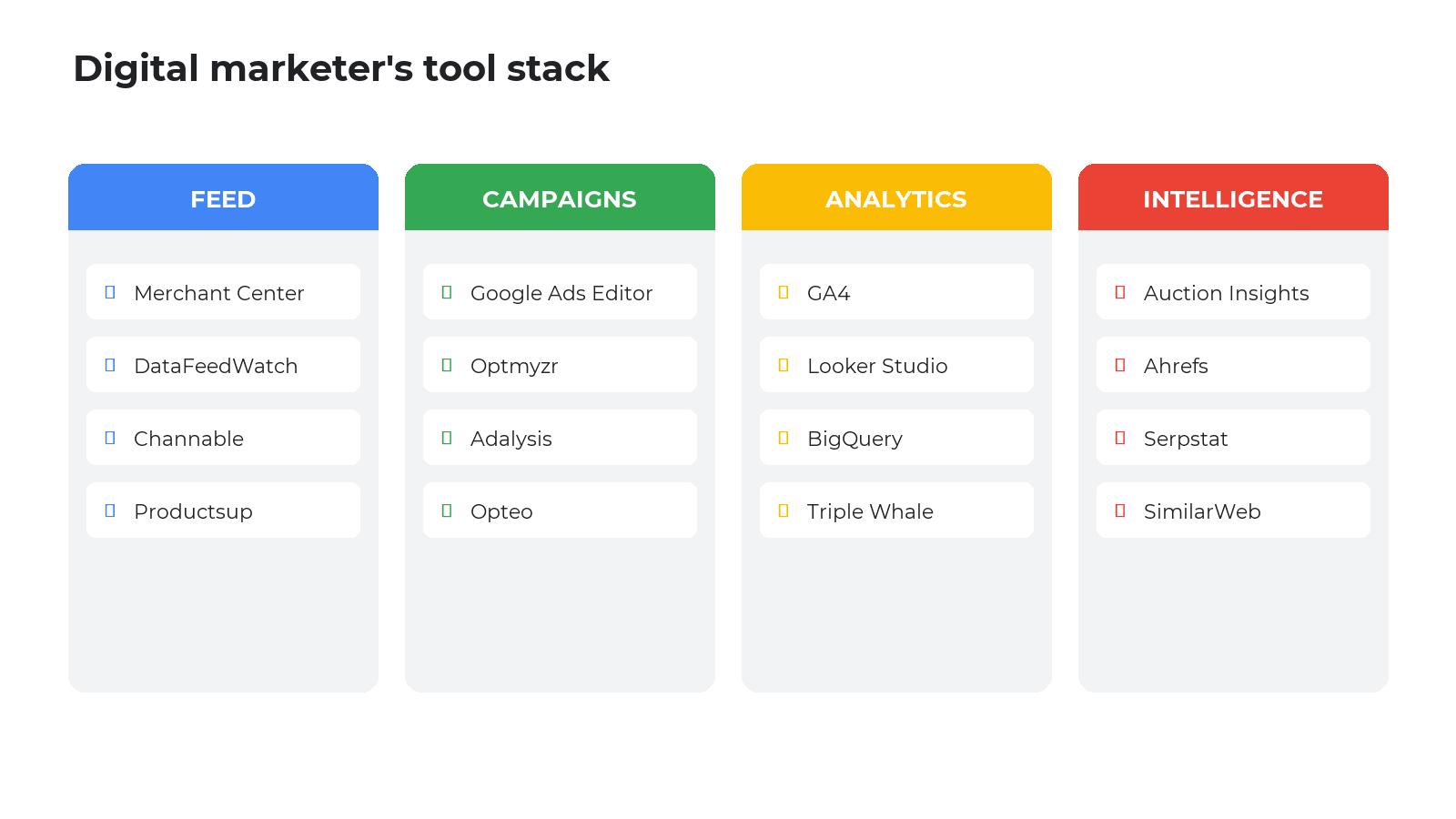
Tools a digital marketer uses
1. Feed management
- Google Merchant Center Next — foundation, free;
- DataFeedWatch / Channable / Productsup — feed optimization (rename fields, dedupe, A/B titles);
- Shopify Google & YouTube App / WooCommerce Google Listings — native CMS sync.
2. Campaign management
- Google Ads Editor — desktop bulk-edit app;
- Optmyzr, Adalysis, Opteo — automation, bid scripts;
- Google Ads Scripts — custom JS automation.
3. Analytics and attribution
- Google Analytics 4 — user behavior, audiences, conversions;
- Looker Studio — dashboards on ROAS, AOV, by product group;
- BigQuery + GA4 Export — for big stores and custom attribution;
- Triple Whale / Northbeam — multichannel attribution.
4. Competitive intelligence
- Auction Insights — who you compete with;
- Ahrefs + Serpstat — organic and paid intelligence;
- SimilarWeb — traffic volume estimates;
- Price2Spy, Prisync — competitor price monitoring.
Google Shopping benchmarks for 2026
| Metric | Avg | Top 25% | Notes |
|---|---|---|---|
| CTR | 0.86% | > 1.5% | Home & Garden: 1.41%, +11% YoY |
| CPC | $0.66 | $0.30–$0.50 | Electronics: $1.20+ |
| Conversion Rate | 1.91% | 3.5–5% | Desktop +24% vs mobile |
| ROAS | 4.1× | 6.0×+ | PMax 10–20% above Standard |
| Mobile impression share | ~60% | ~70% | Mobile-first feed required |
10 common beginner mistakes
- Weak title. “Nike sneakers” vs. “Nike Air Max 90 Men’s White Size 9” — worse CTR, lower rank.
- Images with watermark or price tag. Google may reject or down-rank.
- Launching PMax with <10 conversions/month. AI can’t learn, budget burns.
- Changing bidding strategy weekly. Each change resets 6–8 weeks of learning.
- No
conversion valuein the tag. Google can’t optimize without value. - One feed for 5,000 products with no segmentation. Hits and losers mixed, budget bleeds.
- Equal budget across categories. Seasonal and core SKUs have different logic.
- Ignoring
Auction Insights. Blind to competitors. - No remarketing. 70% of users come back in 2–7 days.
- Budget < 50× CPA. Algorithm starved of signal.
Pre-launch checklist
Feed and Merchant Center:
- ☐ All required fields filled
- ☐ Title contains brand + model + key attribute
- ☐ White-background images, no overlays
- ☐ Site price = feed price
- ☐ Site verified in GSC, HTTPS
- ☐
google_product_categoryfor all items
Google Ads:
- ☐ GA4 → Ads link active
- ☐
purchaseconversion withvaluefiring - ☐ Budget ≥ 50× target CPA
- ☐ Strategy = Maximize Conversion Value
- ☐ Customer Match audience added
- ☐ Brand keywords excluded from PMax
Analytics:
- ☐ Enhanced Conversions enabled
- ☐ GA4 audiences: All Visitors, Cart Abandoners, Purchasers
- ☐ Looker Studio dashboard with ROAS, CR, AOV
FAQ
How much does launching Google Shopping cost?
Setup itself is free. Ad budget depends on niche: $200–500/mo for a test, $1,000+/mo for a full PMax with enough learning signal. Rule of thumb: daily budget ≈ 50× target CPA.
How does Performance Max differ from Standard Shopping?
Standard Shopping shows only on Search and the Shopping tab with manual control. PMax is an AI campaign that adds YouTube, Discover, Gmail, and Display. PMax averages 10–20% higher ROAS but needs 50+ conv/month and offers less transparency.
What is ROAS and what counts as good?
ROAS = revenue ÷ ad spend. At 40% margin, break-even ROAS = 2.5×. Industry avg is 4.1×, top-25% brands hit 6×.
How fast will Shopping bring sales?
First impressions in hours, first conversions in 1–3 days, stable predictable ROAS in 4–6 weeks of Smart Bidding learning. Don’t change budgets >20% during learning.
What if I have fewer than 30 conversions per month?
Stay on Standard Shopping with manual/semi-manual control. Smart Bidding is unstable at low volume. Focus on feed quality and core keywords. Move to PMax when you stably hit 30–50 conversions/month.
What is Impression Share and why watch it?
It’s the % of auctions you won vs. eligible ones. Lost IS (Budget) = lost to budget; Lost IS (Rank) = lost to Ad Rank. It’s the primary indicator of scaling potential.
Sources used in this article
Conclusion
Google Shopping isn’t “set and forget”. It’s a constant loop: feed → auction → ROAS → optimize. The single biggest lever isn’t your bid but feed quality (especially title and image) and passing full conversion value into Google Ads. A marketer who understands how Google’s AI uses these signals consistently earns 30–50% higher ROAS than someone who just launches PMax and waits.
If you’re new: start with Standard Shopping and Max Conversion Value, accumulate 30–50 conversions, move to Performance Max with tROAS 20% below your target, and gradually raise it. By month 4 you should have a stable predictable ROAS — that’s the line between a pro launch and an experiment.

Read also

Is an SEO specialist responsible for leads and sales? Our position
A LinkedIn discussion: should an SEO specialist be responsible for leads and sales from the SEO channel. Spilno…

How to Control an SEO Specialist: The 5-Stage SEO KPI Funnel
SEO KPIs form a chain of five metrics that show, step by step, whether your SEO is actually…

Best CMS for an Online Store: Cloud vs Self-Hosted Platforms in 2026
Compare Shopify, WooCommerce, PrestaShop, OpenCart and Magento for your online store. Pros, cons, and a step-by-step CMS selection…