SEO During Website Development: What to Do at the Build Stage to Avoid Paying Twice

About 70% of websites get their first SEO audit only after launch — and walk away with 50–100 critical fixes, each one 1.5–2× more expensive to implement than it would have been during development. Fundamental issues like the wrong URL structure, missing hreflang, weak architecture, or an SEO-unfriendly platform often can only be solved through a full rebuild. This article is a practical checklist for business owners, project managers, and developers: what to bake into the brief and design phase so that the site starts ranking the moment it launches — instead of demanding $2,000–$12,000 in retrofits.
Why SEO Must Be Built In During Development
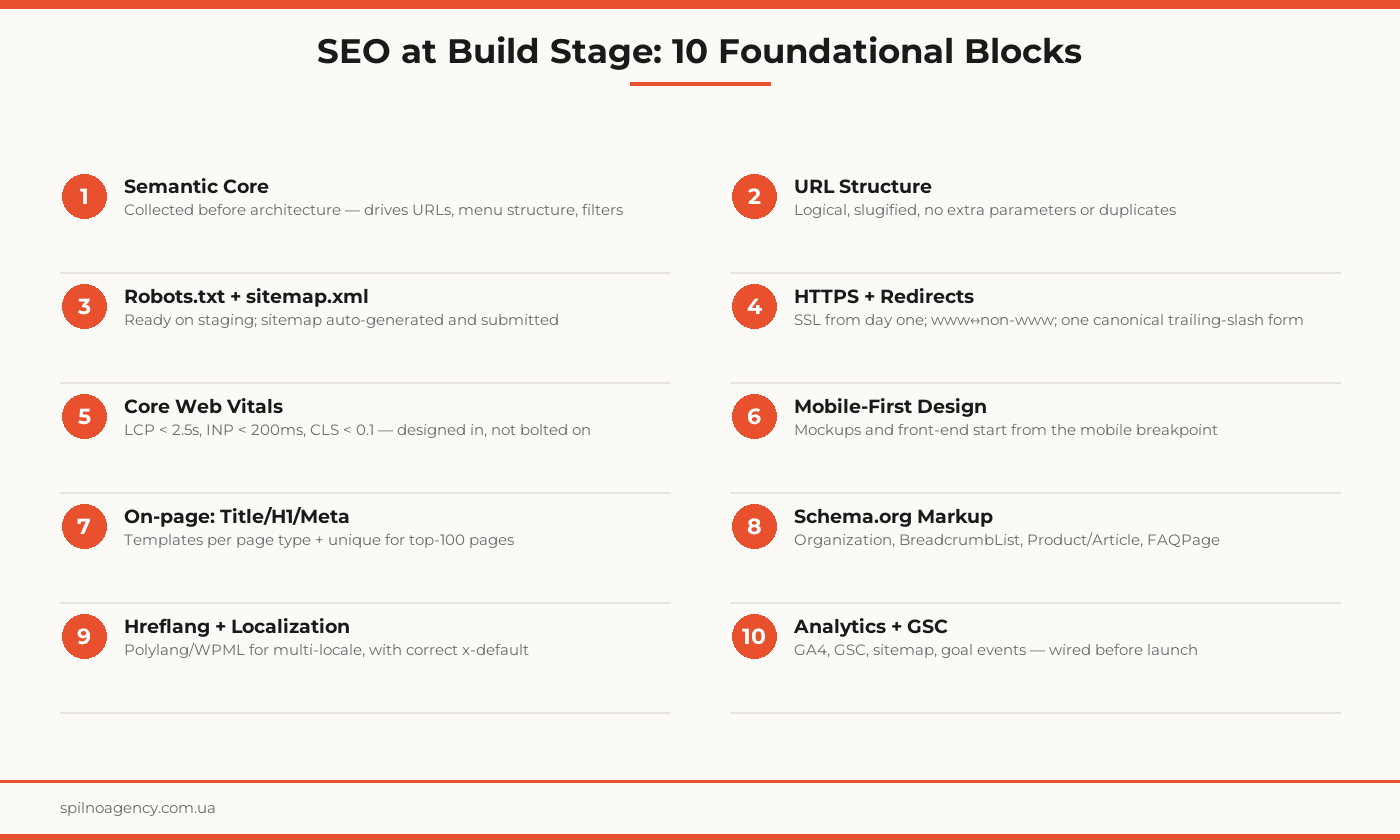
A website is an engineering structure where SEO is the foundation. If the foundation is laid crooked, you can repaint the facade endlessly — the building still leans. In SEO terms, the ‘foundation’ is: the semantic core that drives the sitemap; the URL structure; the technical layer (robots, sitemap, HTTPS, redirects); the page-template architecture (title/H1/meta rules); the switch to mobile-first; Core Web Vitals; schema markup; hreflang for multilingual; and analytics from day one.
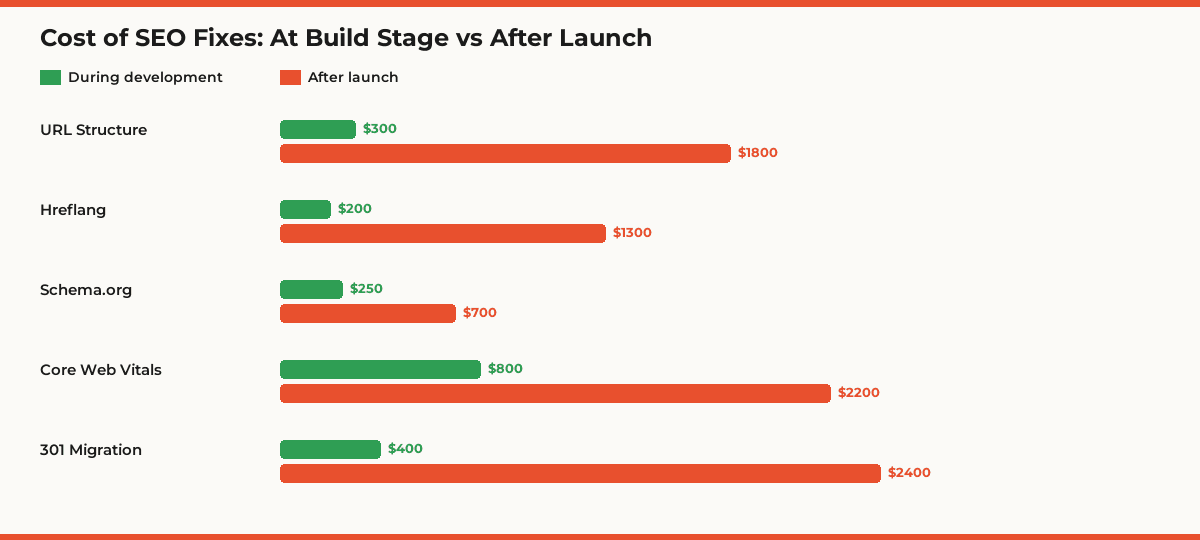
Miss any one of these blocks at the build stage and you launch a site that either won’t get indexed or won’t rank even if it does. Each block costs 1.5–2× more to bolt on after launch — and that’s before the second cost: during the fix-up phase the site loses visibility, so the business pays twice (for the fix and for the lost traffic).
It hurts most when SEO is ignored during migration from an existing site. Without correct 301 redirects, metadata transfer, and indexing checks — the old traffic just disappears. We’ve seen post-redesign projects where organic traffic dropped 60–80% and didn’t recover for 6–18 months.
What Happens If You Skip SEO at the Build Stage
The real damage isn’t the lost rankings — it’s compounding: no SEO at launch → no traffic → no analytics data → no improvement hypotheses → no growth. The site sits dead for 6–12 months until the owner sees the scale of the problem and hires an SEO agency that starts with an audit that finds 50–100 fixes, each requiring rework.
Classic outcomes of a launch without SEO: site not indexed (robots.txt error or staging noindex carried into production); garbage gets indexed (filters, tags, technical URLs); page duplicates (with/without trailing slash, with/without www, with GET parameters); low Core Web Vitals (Google demotes you in mobile search); no rich snippets (competitors with schema.org overtake you in SERP); loss of legacy rankings after migration (no 301 → 404 → drop from index).
When to Start SEO — and Whether to Do It Yourself or Hire an Agency
The ‘DIY vs hire an agency’ decision depends on three factors: site complexity (landing page or e-commerce with filters), niche competitiveness (local business or top-3 SaaS race), and time and skills available in your team.
DIY works for: a 5–10 page landing or business card with simple structure; a WordPress blog with ready SEO plugins; a small catalog without filters. Basic tasks (title/meta, sitemap, schema, speed) can be mastered in 2–4 weeks of reading and practice.
Bring in a specialist for: e-commerce with categories and filters; multilingual sites (4+ languages); projects with generated pages (catalogs, aggregators); sites being migrated from a legacy domain; B2B sites in competitive niches. Here the cost of a build-stage mistake runs to tens of thousands of dollars and months of lost traffic.
Red flags you definitely need an SEO specialist: the dev spec has no ‘SEO requirements’ section; the designer shows you a menu that wasn’t aligned with the semantic core; the developer asks ‘what URL should this page have?’; you’re migrating from a domain with existing traffic; you have 4+ language versions. Each is a sign you’ll lose money without professional oversight.
Checklist: 40+ SEO Tasks at the Website Build Stage
Semantic Core & Structure
- Keyword research completed (300–3,000+ queries depending on site scale)
- Queries clustered: one cluster → one landing page
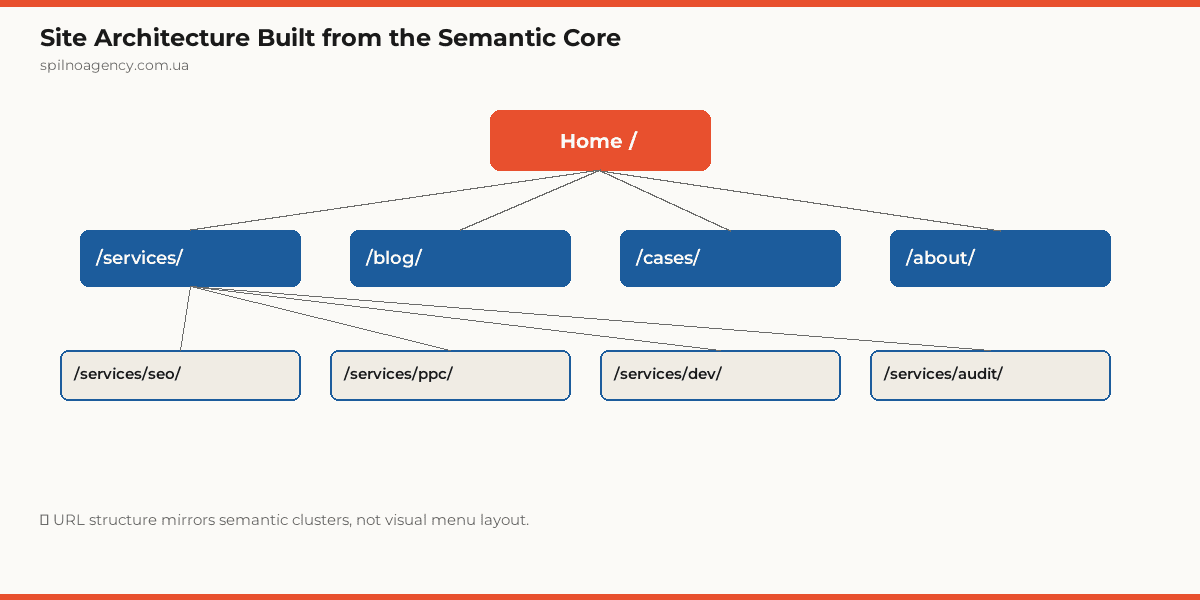
- Sitemap (for the designer) drafted from the semantic core
- Page types defined: categories, product cards, tags, filters, articles
- Title / H1 / meta description template defined per page type
URL Structure & Architecture
- URLs derived from the semantic core (slugified, transliterated if needed)
- Max 3–4 levels deep from the homepage
- No duplicates: one page, one URL (no /page/ + /page/index.html)
- Parametric URLs (?sort, ?filter) controlled by canonical or noindex
- Breadcrumbs implemented on every internal page
Technical Foundation
- Robots.txt: open for indexing; CSS/JS allowed; staging blocked
- Sitemap.xml: auto-generated, refreshed on publish, ≤ 50,000 URLs per file
- HTTPS from day one (SSL certificate, HTTP→HTTPS redirect)
- Canonical URL form: pick one — www↔non-www, trailing slash, lowercase
- 404 and 500 pages designed and return the correct HTTP status codes
Speed & Core Web Vitals
- LCP (Largest Contentful Paint) < 2.5s on mobile
- INP (Interaction to Next Paint) < 200ms
- CLS (Cumulative Layout Shift) < 0.1 — width/height set on images and iframes
- Images in WebP/AVIF with lazy loading
- JS and CSS minified; critical CSS inlined
- Third-party scripts (chat, analytics) loaded async/defer
Mobile-First
- Design starts from the mobile mockup, then scales to desktop
- Body font ≥ 16px, touch targets ≥ 48px
- Viewport meta tag configured:
<meta name="viewport" content="width=device-width, initial-scale=1"> - Tested in Google Mobile-Friendly Test and PageSpeed Insights (mobile tab)
On-page SEO
- Title unique per page, 50–60 chars, with the primary keyword
- Meta description 120–155 chars, with USP and keyword
- Single H1 per page, matches topic, contains the primary keyword
- H2/H3 form a logical hierarchy reflecting the query cluster
- Image alt text filled in (unique for the top-100 pages)
- Internal linking: contextual links, not just menu links
Schema.org Markup
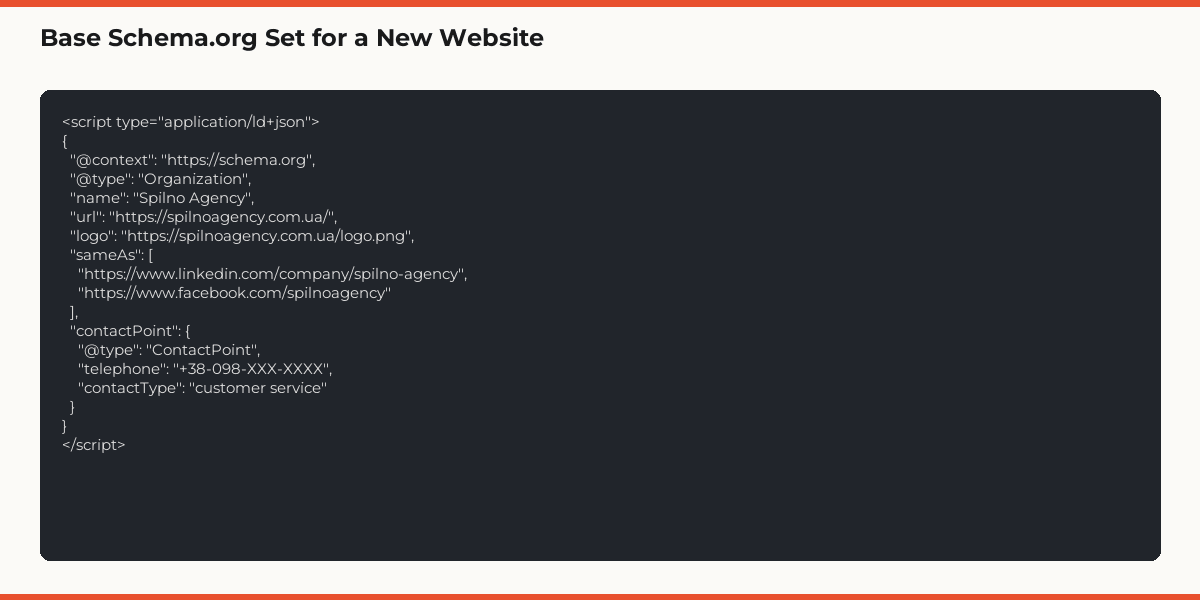
- Organization + WebSite on the homepage
- BreadcrumbList on every internal page
- Article / NewsArticle / BlogPosting for articles
- Product + Offer + AggregateRating for product cards
- FAQPage for sections with FAQs
- LocalBusiness — for businesses with a physical address
- Validated with Google Rich Results Test
Analytics & Tracking
- Google Analytics 4 installed (via GTM)
- Google Search Console verified, sitemap submitted
- Key events configured (form submit, phone click, purchase, scroll 75%)
- Verified through GA4 DebugView before launch
- AI visibility tools (Microsoft Clarity, Bing Webmaster) connected
Localization (for multilingual sites)
- One URL per language: /en/, /pl/, /ru/ or a subdomain
- Hreflang tags in or sitemap.xml for every language version
- x-default set to the primary language
- No silent geo/IP redirects without a manual switch
- Content translated by humans (no machine translation for top pages)
Security & Legal
- GDPR / CCPA cookie banner installed
- Privacy Policy and Terms of Service pages ready
- WAF or at least baseline bot protection
- Regular backups configured

10 Common Mistakes Developers Make Without SEO
- Platform chosen without checking SEO capabilities. Builders like Wix or old CMSs may not support editing robots.txt, SSL, canonicals, or schema.org — discovered only after launch.
- Design approved without SEO review. Designer created a 4-category menu, but the semantic core required 7. The structure has to be rebuilt.
- URLs invented on the fly. Developer named pages /page1, /page2, /page3. Post-launch: mass 301 redirects to slugified URLs.
- Images uploaded at original size. 4 MB hero banner → 6-second LCP → Google demotes you.
- Missing or stale sitemap.xml. Google fails to discover new pages for months.
- Staging open for indexing. The test domain ends up in the index, generating duplicates with production.
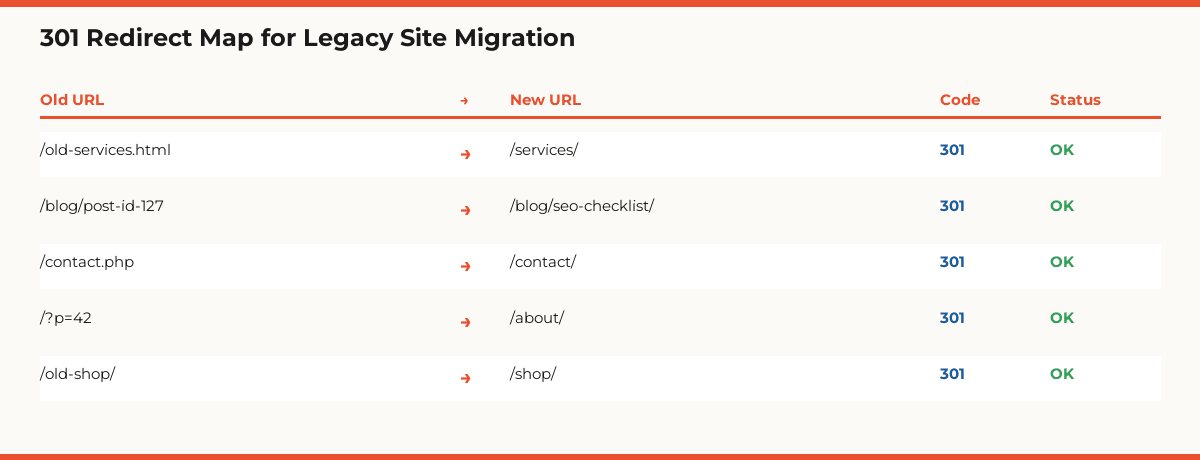
- No 301 redirects on migration. Old URLs return 404, killing rankings and link equity.
- Schema.org pushed to ‘someday’. Your site misses rich snippets — competitors take them.
- No hreflang on multilingual site. Google shows the Russian version to British users, the English to Ukrainian.
- GA4 added a week after launch. A week of data is lost forever — no baseline.
Role Split: SEO, Designer, Developer, Content Lead
- SEO Specialist: Spec for developers, keyword research, URL map, metadata, schema, hreflang, design audit
- Designer (UI/UX): Mobile-first mockups, UX that supports Core Web Vitals, adherence to SEO structure
- Developer: Technical implementation: robots.txt, sitemap.xml, redirects, schema.org, performance, CMS configuration
- Content Lead: Populating pages from SEO templates, alt text, copy aligned with the SEO brief
- Project Manager: Timeline control, SEO checkpoints at the brief → design → build → launch phases
Budget: Early SEO vs Late SEO — Real Cost Comparison
Real numbers from our practice (Spilno Agency, 2024–2025): SEO oversight for a small corporate site (15–30 pages) costs $1,500–$3,000 and adds 2–3 weeks to the timeline. The same work after launch: $2,000–$3,500 and 6–10 weeks with traffic dropping during the fixes.
For a mid-sized e-commerce site (500–5,000 SKUs): SEO at build stage $5,000–$12,000, +4–6 weeks on the project. Post-launch retrofitting: $8,000–$18,000, +3–6 months, during which the store gets no organic traffic.
The most underestimated cost is lost revenue during the fix period. If your site could be generating $6,000/month from SEO but only generates $2,000 while you fix issues over 4 months — you lost $16,000 (4,000 × 4) in foregone revenue alone. Early SEO at $3,000 pays back in the first month after launch.
Final Pre-Launch Checklist: 25 Points
Before launch, run a final SEO checkup. It’s 1–2 days of work that saves months of fixes.
- Sitemap.xml submitted to Google Search Console
- Robots.txt open for indexing (no Disallow: /)
- HTTPS works; HTTP redirects to HTTPS
- One canonical form (www/non-www, trailing slash)
- PageSpeed Insights ≥ 90 (mobile)
- Core Web Vitals: all three metrics green
- Schema.org validates in Rich Results Test
- GA4 records test events
- GSC shows pages in the index (within 24–72 hours)
- 404 page returns HTTP 404 (not 200)
- Every page has a unique title and meta description
- Single H1 per page
- Image alt text filled
- Hreflang tags (for multilingual) validate
- Internal linking from content, not just from menu
- Breadcrumbs on every internal page
- Cookie banner configured (GDPR)
- Privacy Policy and Terms of Service published
- GTM tags load correctly
- Passes Google Mobile-Friendly Test
- 301 redirects from legacy site configured and verified
- Staging locked (basic auth or noindex)
- Pre-launch backup taken
- Contact form works and emails are delivered
- Site verified in Bing Webmaster Tools
Frequently Asked Questions
When during website development should I start SEO?
SEO starts before the design brief is even written. Step one is keyword research and topic clustering. The semantic core drives the sitemap given to the designer, the URL structure, the page types, and the need for filter and tag pages. If an SEO specialist joins after the design is approved, the structure ends up shaped by visuals instead of search demand — the most expensive class of mistakes.
Is it cheaper to do SEO during development or after launch?
Early-stage SEO costs 1.5–2× less on average. Restructuring URLs after launch means bulk 301 redirects, partial link-equity loss, and 4–12 weeks of organic traffic drops. Migrating CMS after launch is basically a rebuild. Adding hreflang to a multilingual site that wasn’t planned for it from day one is also more expensive than doing it right initially.
Can I handle SEO myself or do I need an agency?
If you’re building a 5–10 page landing page or business card, basic SEO tasks can be handled with a checklist (title/meta, sitemap, schema, speed). For an e-commerce store, multilingual portal, or site with faceted navigation and generated pages — bring an SEO specialist in from day one. The consultant fee is usually 5–10× smaller than the cost of post-launch fixes.
What happens if I launch a website without SEO at the build stage?
Common outcomes: (1) the site doesn’t get indexed or gets partially indexed due to robots.txt errors; (2) duplicate pages from missing canonicals and parametric URLs; (3) low rankings from slow loads and failed Core Web Vitals; (4) loss of legacy site rankings after migration without 301 redirects; (5) keyword cannibalization from illogical architecture; (6) zero organic traffic for the first 6–12 months.
Who on the team owns SEO during development?
Role split: SEO specialist writes the brief (keywords, URLs, meta, schema, hreflang); designer enforces mobile-first and Core Web Vitals–friendly UX; developer implements the technical layer (robots, sitemap, redirects, schema, performance); content lead populates pages from SEO templates. Without a clear split, tasks fall through the cracks.
How much extra time and budget should I plan for SEO during development?
About +15–25% on top of the development budget and +2–4 weeks on the timeline — and it pays back within 3–6 months after launch. For a small corporate site this is roughly $1,500–$3,000; for an e-commerce store, $5,000–$15,000. Skip this investment and you pay 1.5–2× more fixing the same issues post-launch.
Launching a new website? Spilno Agency provides SEO oversight during development — from technical specs for your dev team to design reviews, structure audits, and a full pre-launch SEO checklist.

Read also

Is an SEO specialist responsible for leads and sales? Our position
A LinkedIn discussion: should an SEO specialist be responsible for leads and sales from the SEO channel. Spilno…

How to Control an SEO Specialist: The 5-Stage SEO KPI Funnel
SEO KPIs form a chain of five metrics that show, step by step, whether your SEO is actually…

Best CMS for an Online Store: Cloud vs Self-Hosted Platforms in 2026
Compare Shopify, WooCommerce, PrestaShop, OpenCart and Magento for your online store. Pros, cons, and a step-by-step CMS selection…