sitemap.xml — What It Is and Why You Need It

A sitemap.xml is a file that tells search engines about the structure of your website: which pages exist, when they were last updated, and how important they are. It is one of the foundational technical SEO tools that speeds up indexing of new content and helps Google discover pages that have no direct internal links pointing to them.
A sitemap.xml is your website’s roadmap for search engine crawlers. A well-configured file reduces the time it takes for new pages to appear in search results.
What Is a sitemap.xml
In plain terms: sitemap.xml is a service file listing all the pages of your website, which you hand to the search engine.
It is essentially a table of contents given to Google: here is everything I have, and here is when each page was last updated.
Why this matters to your business: without it Google will still find the site, but more slowly and not necessarily in full. New pages suffer most — exactly the ones you have just paid to produce.
A sitemap.xml (or XML Sitemap) is a standardized XML file listing the URLs of a website. It follows the Sitemap 0.90 protocol, supported by Google, Bing, Yahoo, and other major search engines.
The file lives in the root directory of the site and is accessible at https://yoursite.com/sitemap.xml. Search engine crawlers periodically download this file to learn about new or updated pages.
Why You Need a sitemap.xml
Google finds pages by following links. If no link inside your site points to a given page, it can stay invisible to search for years.
A sitemap solves this: the page is listed explicitly, even when nothing inside the site links to it.
Why this matters to your business: this is especially critical for online stores, where part of the catalogue is reachable only through filters and has no direct links from the menu.
Search engines discover pages in two ways: through internal links (crawling) and through the sitemap. Without a sitemap, a crawler may miss:
- New pages that do not yet have any internal links pointing to them
- Deeply nested pages (more than 3–4 levels from the homepage)
- Orphan pages with no navigation links
- Frequently updated content (blog posts, product listings)
A sitemap.xml lets you explicitly inform Google about the existence and freshness of each page — especially important for large sites (500+ pages), brand-new sites without backlinks, and multilingual sites using hreflang.
Types of Sitemaps
There is rarely just one sitemap. Separate files are made for regular pages, for images, for video or news. A large site usually has several such files plus one index file that points to them.
Why this matters to your business: split files let you see in Google’s reports which part of the site indexes badly — products, articles or categories. Without that split you only see one combined number that tells you nothing.
Several types of sitemap files exist depending on content type:
- XML Sitemap — the standard file for regular web pages. The most common type
- HTML Sitemap — a webpage listing all sections, intended for human visitors
- News Sitemap — for news publishers; indexes articles published within the last 48 hours
- Image Sitemap — helps Google find images loaded via JavaScript or CSS
- Video Sitemap — for video-heavy sites; passes metadata (title, description, duration)
- Sitemap Index — an index file pointing to multiple sitemaps (required when a site exceeds 50,000 URLs)
Structure of a sitemap.xml File
The basic structure of an XML Sitemap looks like this:
<?xml version="1.0" encoding="UTF-8"?>
<urlset xmlns="http://www.sitemaps.org/schemas/sitemap/0.9">
  <url>
    <loc>https://example.com/page/</loc>
    <lastmod>2026-05-01</lastmod>
    <changefreq>weekly</changefreq>
    <priority>0.8</priority>
  </url>
</urlset>
Sitemap Element Reference
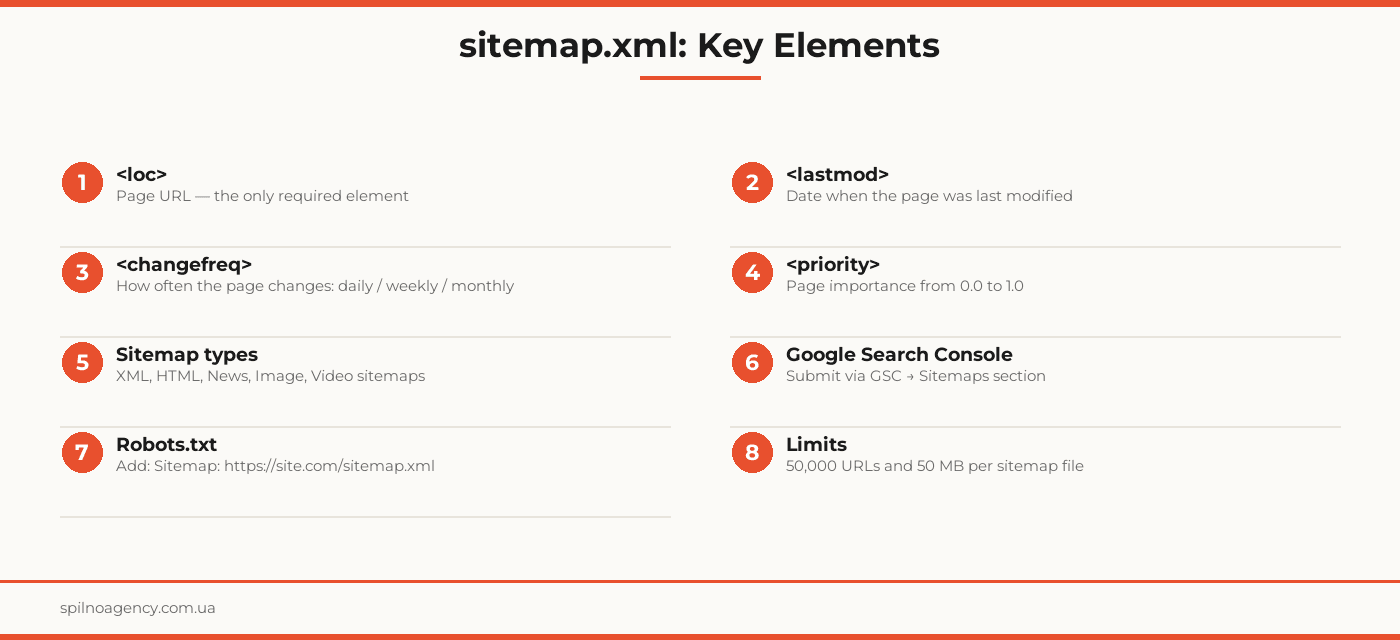
- <urlset> — root element; declares the XML namespace (xmlns)
- <url> — container for one URL entry; repeated for every page
- <loc> — full page URL. The only required element. Must begin with http:// or https://
- <lastmod> — last modification date in ISO 8601 format (YYYY-MM-DD). Optional but recommended
- <changefreq> — hint to the crawler about update frequency: always, hourly, daily, weekly, monthly, yearly, never. Optional; Google often ignores this
- <priority> — relative priority from 0.0 to 1.0 (default 0.5). Google largely ignores this value too
The only required element in a sitemap is <loc>. Everything else is optional, but <lastmod> is genuinely used by Google to decide whether a page needs re-crawling.
How to Create a sitemap.xml
There are three main approaches to generating a sitemap:
1. CMS Plugins
- WordPress: Yoast SEO, Rank Math, All in One SEO — auto-generate and update sitemaps
- Shopify: sitemap is generated automatically at /sitemap.xml
- Wix: built-in sitemap generator
- Squarespace: sitemap auto-generated, accessible at /sitemap.xml
2. Online Generators
- XML-Sitemaps.com — free up to 500 pages
- Screaming Frog SEO Spider — for large sites, free up to 500 pages
- Sitebulb — visual crawl with sitemap export
3. Custom Scripts
For custom platforms, the sitemap is generated programmatically — via a server-side script (Python, PHP, Node.js) that queries the database and builds the XML file. The file is usually generated dynamically or regenerated when new content is published.
sitemap.xml in Google Search Console
Submitting your sitemap to Google Search Console (GSC) is a recommended step after creating the file. It allows you to:
- Notify Google about the sitemap without waiting for automatic discovery
- Monitor indexing status: how many URLs were submitted vs indexed
- Receive alerts about sitemap errors (invalid XML, unreachable URLs, redirect errors)
- Track indexing trends after site updates
Step-by-step: Submitting a sitemap to GSC
- Open Google Search Console (search.google.com/search-console)
- Select your property (website)
- In the left menu, go to Indexing → Sitemaps
- In the “Add a new sitemap” field, enter the relative or full URL:
sitemap.xmlorhttps://yoursite.com/sitemap.xml - Click “Submit”
- GSC will validate the file and show a status report: number of URLs found and indexed
Submitting a sitemap does not guarantee immediate indexing — it is a request for Google to check the file. Actual crawling follows Google’s own schedule, influenced by domain authority and content freshness.
GSC Sitemap Status Meanings
- Success — Google read the file without errors
- Fetch error — file is unreachable (check the URL, robots.txt, server)
- Processing error — invalid XML (check syntax)
- Not submitted — Google discovered the sitemap via robots.txt or auto-discovery, but you did not submit it manually
Sitemap and Bing Webmaster Tools
Bing also supports sitemap.xml. To submit your file to Bing Webmaster Tools:
- Open Bing Webmaster Tools (bing.com/webmasters)
- Go to Sitemaps in the left menu
- Click Submit Sitemap and enter your sitemap URL
Alternatively, Bing discovers sitemaps automatically through the robots.txt Sitemap directive.
sitemap.xml for Different Site Types
E-commerce
For e-commerce sites, include category and product pages in the sitemap. Split into multiple files: one for categories, one for products, one for the blog. Exclude: cart, account, search results, and filter parameter pages.
Blog or News Site
Use a dedicated News Sitemap for fresh articles (within 48 hours). The main sitemap holds all articles. Always update <lastmod> when refreshing articles — it signals Google to re-crawl the content.
Corporate Site
Include all landing pages for services, case studies, About, and Contact pages. Exclude technical pages: admin login, order confirmation, 404 pages. Set homepage priority to 1.0, service pages to 0.8, blog to 0.6.
Multilingual Site
Multilingual sites need an hreflang sitemap — it explicitly tells Google which version of a page is for which language/region. This reduces the risk of cannibalization between language versions and improves visibility in each country’s local search results.
Best Practices and Common Mistakes
Do’s
- Include only canonical URLs (no parameters, no duplicates)
- Set an accurate <lastmod> every time a page is updated
- Reference the sitemap in robots.txt
- Submit the sitemap via GSC after launch or major updates
- Split large sites into multiple sitemap files using a sitemap index
- Auto-generate and update the sitemap when new content is published
Common Mistakes
- Including blocked pages — URLs with noindex, 301/302 redirects, or 404 errors must not appear in the sitemap
- Including duplicates — pages with parameters (?sort=, ?page=2) duplicate content and should be excluded
- Fake <lastmod> dates — setting today’s date for all pages without real updates distorts the signal for Google
- Inaccessible sitemap — sitemap.xml blocked by robots.txt or returning 404
- Invalid XML — syntax errors (unclosed tags, unescaped special characters) prevent the file from being processed
sitemap.xml Checklist
- sitemap.xml exists and is accessible at /sitemap.xml
- File contains only indexable URLs (no noindex, redirects, or 404s)
- No duplicate URLs (no parameters, canonical URLs only)
- <lastmod> is accurate and matches the real last-update date
- Sitemap submitted to Google Search Console
- Sitemap URL referenced in robots.txt
- Large sites use a sitemap index file
- Multilingual sites have hreflang sitemap configured
- Sitemap auto-updates when new content is published
- No XML errors (validated with a validator)
GEO Optimization and Multilingual Sitemaps
For sites targeting multiple languages or countries, the sitemap plays a key role in GEO optimization. Google uses hreflang attributes to determine which page version to show to a specific user. These attributes can be delivered in three ways: via HTML <link rel=”alternate”> tags, HTTP headers, or directly in sitemap.xml.
Declaring hreflang in the sitemap is the cleanest approach for large sites where editing every page individually is impractical. It provides a centralized place to manage language relationships between pages.
Frequently Asked Questions
What is a sitemap.xml?
A sitemap.xml is an XML file listing a website’s URLs along with metadata: last modified date, change frequency, and priority. It helps search engine crawlers discover and index content faster.
Is a sitemap.xml required?
Technically no, but it significantly speeds up indexing of new pages and helps search engines find content without internal links. For large or frequently updated sites, it is practically essential.
How do I submit a sitemap to Google Search Console?
Open Google Search Console → select your property → click ‘Sitemaps’ in the left menu → enter your sitemap URL (e.g. sitemap.xml) → click ‘Submit’. Google will validate and start crawling.
How many URLs can a sitemap contain?
One sitemap.xml file can contain up to 50,000 URLs and must not exceed 50 MB. For larger sites, use a sitemap index file that links to multiple individual sitemap files.
Should I add my sitemap to robots.txt?
Yes, it is a recommended best practice. Add the line Sitemap: https://yoursite.com/sitemap.xml to your robots.txt file. This lets crawlers discover your sitemap automatically without needing a Search Console submission.
Need technical SEO help for your website? Spilno Agency provides site audits, sitemap setup, robots.txt configuration and structured data implementation.

Read also

How to Control an SEO Specialist: The 5-Stage SEO KPI Funnel
SEO KPIs form a chain of five metrics that show, step by step, whether your SEO is actually…

Best CMS for an Online Store: Cloud vs Self-Hosted Platforms in 2026
Compare Shopify, WooCommerce, PrestaShop, OpenCart and Magento for your online store. Pros, cons, and a step-by-step CMS selection…

LinkedIn Ads Library: How to Find Your Competitors’ LinkedIn Ads (2026 Guide)
How to use the LinkedIn Ads Library to see any competitor's sponsored content for free — step by…