What Is robots.txt? A Complete SEO Guide

robots.txt is a plain text file placed at the root of a website that tells search engine crawlers which pages or sections they are allowed — or not allowed — to visit. It is not mandatory, but for any site with more than a handful of pages, it is a fundamental tool for managing crawl budget and preventing unwanted content from appearing in search results.
A correctly configured robots.txt is the first line of crawl budget defence. It does not replace noindex, but together they give you complete control over what reaches the search index.
What Is robots.txt?
robots.txt is a text file that implements the Robots Exclusion Protocol (REP), a standard introduced in 1994. It must be placed at the root of the domain: https://site.com/robots.txt. Every crawler checks this file before it begins spidering the site.
The file contains sets of rules targeting specific bots — Googlebot, Bingbot, AhrefsBot, and others. You can write separate rule blocks for each bot or a single catch-all block using User-agent: *.
A minimal robots.txt example
User-agent: *
Disallow: /wp-admin/
Allow: /wp-admin/admin-ajax.php
Sitemap: https://site.com/sitemap_index.xml
Why Does robots.txt Matter for SEO?
There are several core reasons:
- Protect admin and utility pages. Login pages, admin panels, cart, checkout, and user account areas should never appear in search results
- Preserve crawl budget. Google allocates a finite amount of crawl time per site. If bots waste it on filter pages or duplicates, priority pages get crawled less frequently
- Prevent duplicate content. Parametric URLs (e.g.,
?sort=price&order=asc) can generate hundreds of near-identical pages. Blocking them via robots.txt or canonical tags prevents duplication - Point crawlers to your sitemap. The Sitemap directive speeds up the discovery of new and updated pages
robots.txt Syntax and Directives
robots.txt uses a straightforward line-by-line syntax. Each line is one directive. Blank lines separate rule blocks for different bots.
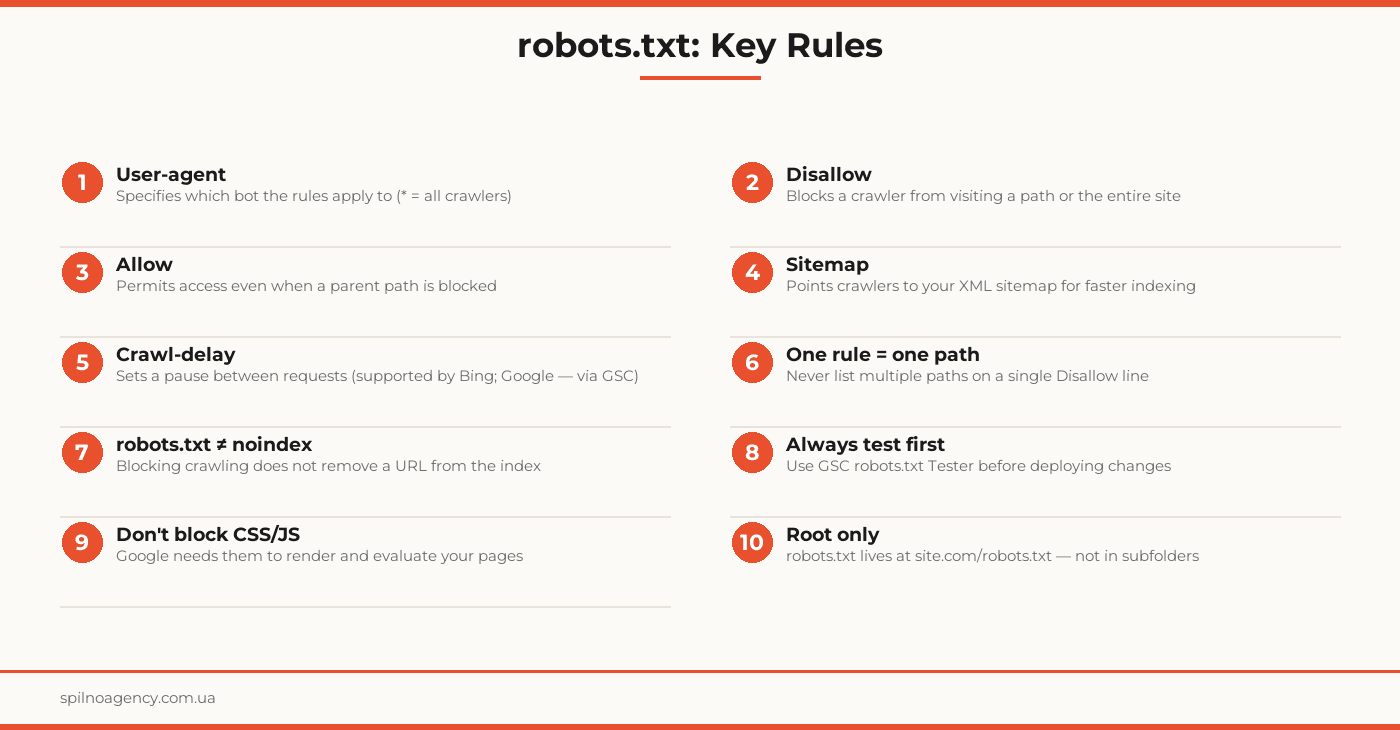
User-agent
Defines which crawler the rules below apply to. Use * to target all bots.
User-agent: Googlebot
User-agent: *
Disallow
Tells the crawler it may not visit the specified path. An empty value (Disallow:) means no paths are blocked.
Disallow: /wp-admin/
Disallow: /checkout/
Disallow: /private/
Allow
Explicitly permits a specific path even when its parent directory is blocked by a Disallow rule.
Disallow: /wp-admin/
Allow: /wp-admin/admin-ajax.php
Sitemap
Provides the URL of your XML sitemap. You can include multiple Sitemap lines.
Sitemap: https://site.com/sitemap_index.xmlCrawl-delay
Sets a pause (in seconds) between a bot’s requests. Supported by Bing — not by Googlebot (use GSC crawl rate settings instead).
User-agent: Bingbot
Crawl-delay: 2
Real robots.txt Examples
WordPress Site
User-agent: *
Disallow: /wp-admin/
Disallow: /wp-login.php
Disallow: /xmlrpc.php
Disallow: /?s=
Disallow: /feed/
Allow: /wp-admin/admin-ajax.php

Sitemap: https://site.com/sitemap_index.xml
E-commerce Site
User-agent: *
Disallow: /cart/
Disallow: /checkout/
Disallow: /my-account/
Disallow: /wp-admin/
Disallow: /?orderby=
Disallow: /?filter_
Allow: /wp-admin/admin-ajax.php

Sitemap: https://shop.com/sitemap_index.xml
Corporate Site (fully open)
User-agent: *
Disallow:

Sitemap: https://company.com/sitemap.xml
How to Test Your robots.txt
Testing is mandatory before and after every change to robots.txt.
- Google Search Console. Go to Settings → robots.txt Tester. Enter any URL to see whether crawling is permitted and which rule applies
- Direct URL check. Open
https://yoursite.com/robots.txtin a browser — confirm the file is accessible and contains the expected rules - Terminal check.
curl -s https://yoursite.com/robots.txt— fast content inspection - Screaming Frog or Google Rich Results Test. For checking whether CSS, JS, and image resources are accessible to crawlers
robots.txt vs. noindex: What Is the Difference?
These are two separate mechanisms with different consequences — and confusing them is a common SEO mistake.
- robots.txt Disallow — prevents the crawler from visiting the URL. But if the page is already indexed, or external links point to it, the URL can remain in search results even with no content crawled
- noindex (meta tag or X-Robots-Tag header) — allows the bot to visit the page but instructs it not to include the page in the index. This is the reliable way to remove a page from search results
- Important: if a page is blocked in robots.txt and also has a noindex tag, the bot cannot read the noindex instruction — it will never see it. Open the page to crawling so the noindex signal can be processed
Common robots.txt Mistakes
- Accidentally blocking the entire site.
Disallow: /for all user agents is the most catastrophic mistake. The site disappears from search - Blocking CSS and JavaScript. Google needs access to stylesheets and scripts to render pages. Blocked CSS means Google sees a broken site, which hurts rankings
- robots.txt conflicting with noindex. A blocked page cannot deliver its noindex signal — the bot simply never reads it
- Multiple paths on one line.
Disallow: /admin/ /checkout/is invalid syntax. Each path needs its own Disallow line - Case sensitivity issues. Directive names (
User-agent,Disallow) are case-sensitive for the first letter - robots.txt not at the root. A file at
/blog/robots.txtwill not be read by Googlebot
robots.txt Checklist
- robots.txt is placed at the domain root (site.com/robots.txt)
- Each User-agent block targets a specific bot or *
- Admin and utility paths are blocked: /wp-admin/, /checkout/, /my-account/
- CSS and JavaScript are NOT blocked
- The Sitemap directive points to your current XML sitemap
- robots.txt does not contain
Disallow: /for Googlebot or * - File has been tested in Google Search Console
- Pages that need noindex are open to crawling
- Crawl-delay is set for Bing if needed
- All changes documented and tested in a dev environment first
Frequently Asked Questions
Is robots.txt required for SEO?
No, robots.txt is not required. Without it, crawlers will scan every publicly accessible page. However, for sites with admin areas, cart pages, or user account sections, robots.txt is essential to prevent those pages from being crawled and potentially indexed.
Does robots.txt block pages from Google’s index?
No. The Disallow directive only prevents crawling — it does not remove a page from the index. If the blocked URL has external links pointing to it, Google may still index the URL without visiting the page content. To fully exclude a page from search results, use a noindex meta tag or X-Robots-Tag header.
How do I test my robots.txt file?
Use Google Search Console → Settings → robots.txt Tester. Enter any URL to see whether crawling is allowed or blocked. You can also run a quick check from the terminal: curl -s https://yoursite.com/robots.txt
Do I need a custom robots.txt for WordPress?
WordPress generates a default robots.txt via its virtual API. For full control — blocking wp-admin, exposing specific plugin assets, or adding your Sitemap URL — replace it with a physical file or configure it through Yoast SEO or Rank Math.
What is the difference between robots.txt and noindex?
robots.txt controls crawling: it tells bots whether they may visit a URL. noindex controls indexing: it lets a bot visit the page but instructs it not to add the page to the search index. Blocking crawling via robots.txt does not guarantee a URL stays out of the index if it is already there.
Get a Free robots.txt Audit
Need a robots.txt audit or full technical SEO review? Spilno Agency will analyze your crawl setup, fix configuration errors, and optimize your file for maximum crawl efficiency.

Read also

How to Control an SEO Specialist: The 5-Stage SEO KPI Funnel
SEO KPIs form a chain of five metrics that show, step by step, whether your SEO is actually…

Best CMS for an Online Store: Cloud vs Self-Hosted Platforms in 2026
Compare Shopify, WooCommerce, PrestaShop, OpenCart and Magento for your online store. Pros, cons, and a step-by-step CMS selection…
LinkedIn Ads Library: How to Find Your Competitors’ LinkedIn Ads (2026 Guide)
How to use the LinkedIn Ads Library to see any competitor's sponsored content for free — step by…