Google Merchant Center — an effective tool for online shopping

Google Merchant Center (GMC) is a free Google service where online stores upload a product feed to launch Shopping campaigns, free listings, and show up in Google Search, Maps and AI Overviews. In 2024–2025 GMC was fully migrated to Merchant Center Next — a simplified interface with automatic product discovery from the site and AI-powered analytics.
If you run an online store and want millions of people to see your products on Google — you can’t skip Merchant Center. It’s not «just another dashboard», it’s the central hub through which your catalogue data flows into Search, the Shopping tab, Google Maps and the new AI blocks. This guide is updated for 2026: Merchant Center Next, free listings, Performance Max integration and products appearing inside AI Overviews.
Table of Contents
- What is Google Merchant Center in 2026
- What’s new in 2025–2026
- How GMC works: pipeline
- Business benefits
- Merchant Center Next: step-by-step setup
- Website requirements
- Product feed: attributes & formats
- Connecting Google Ads and Performance Max
- Free listings + Shopping Graph + AI Overviews
- 8 common mistakes and disapprovals
- Restricted products
- Reports and KPIs
- FAQ
What is Google Merchant Center in 2026
Google Merchant Center is a free platform that accepts your store’s product feed (XML, CSV or via Content API), validates it, then distributes approved products across every Google surface: the Shopping tab, organic search free listings, Google Images, Maps, AI Overviews, and Performance Max campaigns in Google Ads.
In plain English, GMC is an «adapter» between your product database and Google. Without it you can’t appear in Shopping, you don’t get the free product blocks in search, and you can’t launch a serious PMax campaign for e-commerce.
In 2024–2025 Google completed the migration of every account to Merchant Center Next. The old «Classic» interface is gone. Sign in today — you get Next.
Google Merchant Help, 2025
What’s new in Google Merchant Center in 2025–2026
This isn’t a cosmetic redesign — the product logic itself has changed.
1. Merchant Center Next: new interface
Instead of dozens of nested menus, you now get four big tabs: Overview, Products, Promotions, Performance. The classic «Feeds» section is buried — Google tries to detect products from your site via structured data (schema.org/Product) and fill the catalogue automatically.
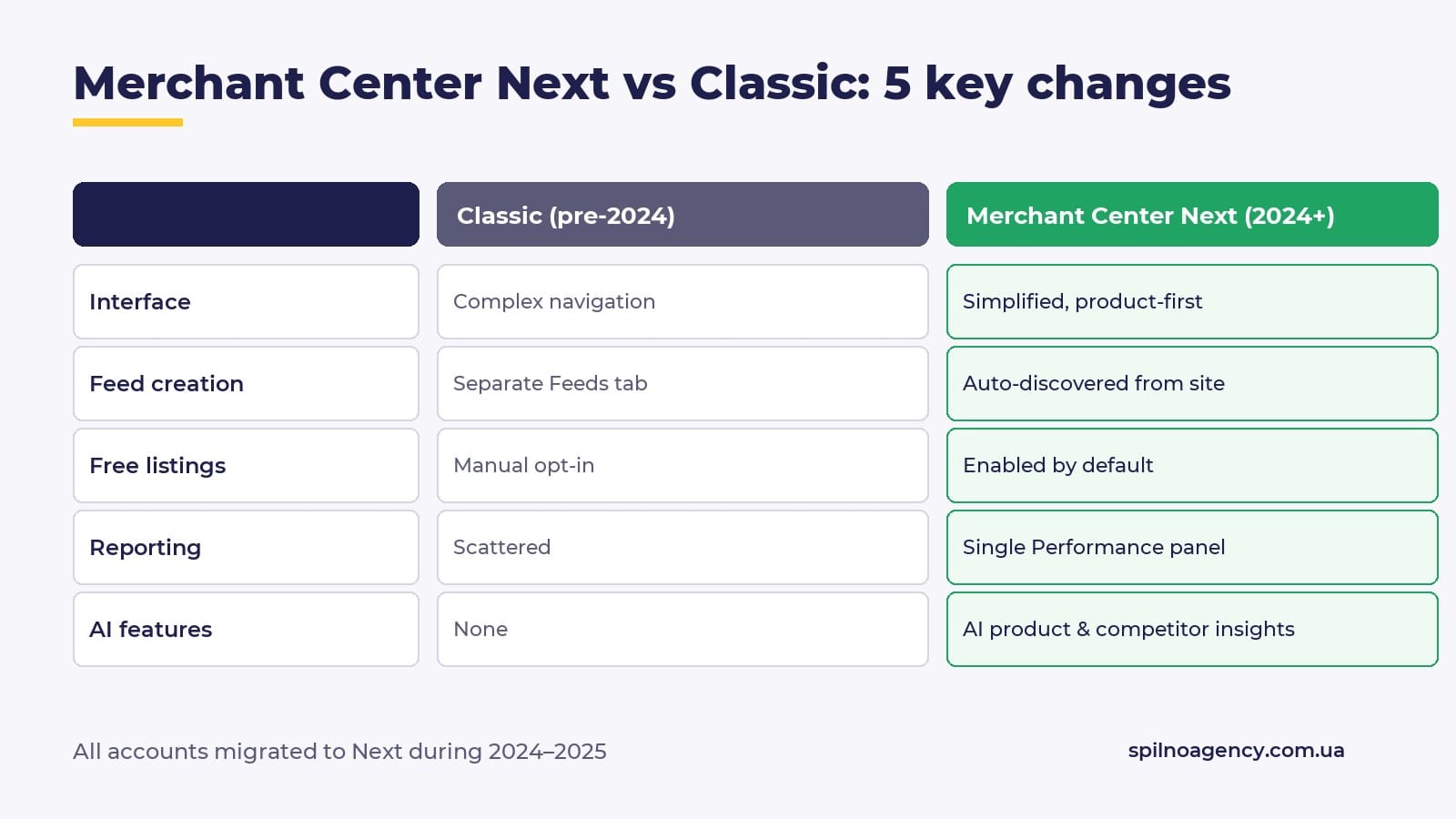
2. Automatic product discovery
If your site exposes schema.org/Product with the required fields (price, availability, image), Google can create a «virtual» feed without your input. XML feeds are still recommended for full control, but the entry barrier is now near zero.
3. Free listings on by default
Every approved product automatically lands in free product listings (the Shopping tab, product blocks in organic search, AI Overviews). There’s no separate «opt-in» anymore.
4. Products inside AI Overviews and Shopping Graph
AI Overviews are powered by Shopping Graph — a massive product database built from millions of sites and GMC feeds. If your feed is clean, GTINs are valid and descriptions are rich, your products can be cited inside the AI block. A new free traffic channel that didn’t exist before 2024.
5. Performance Max and Demand Gen
Classic Shopping campaigns are fading away. Performance Max (full automation, AI bid splits across Search/Display/YouTube/Discover/Gmail/Maps) and Demand Gen (visual demand creation) are the default in 2026.
How GMC works: the pipeline
Simplified: site → feed → Merchant Center → validation → distribution across Google surfaces → shopper.
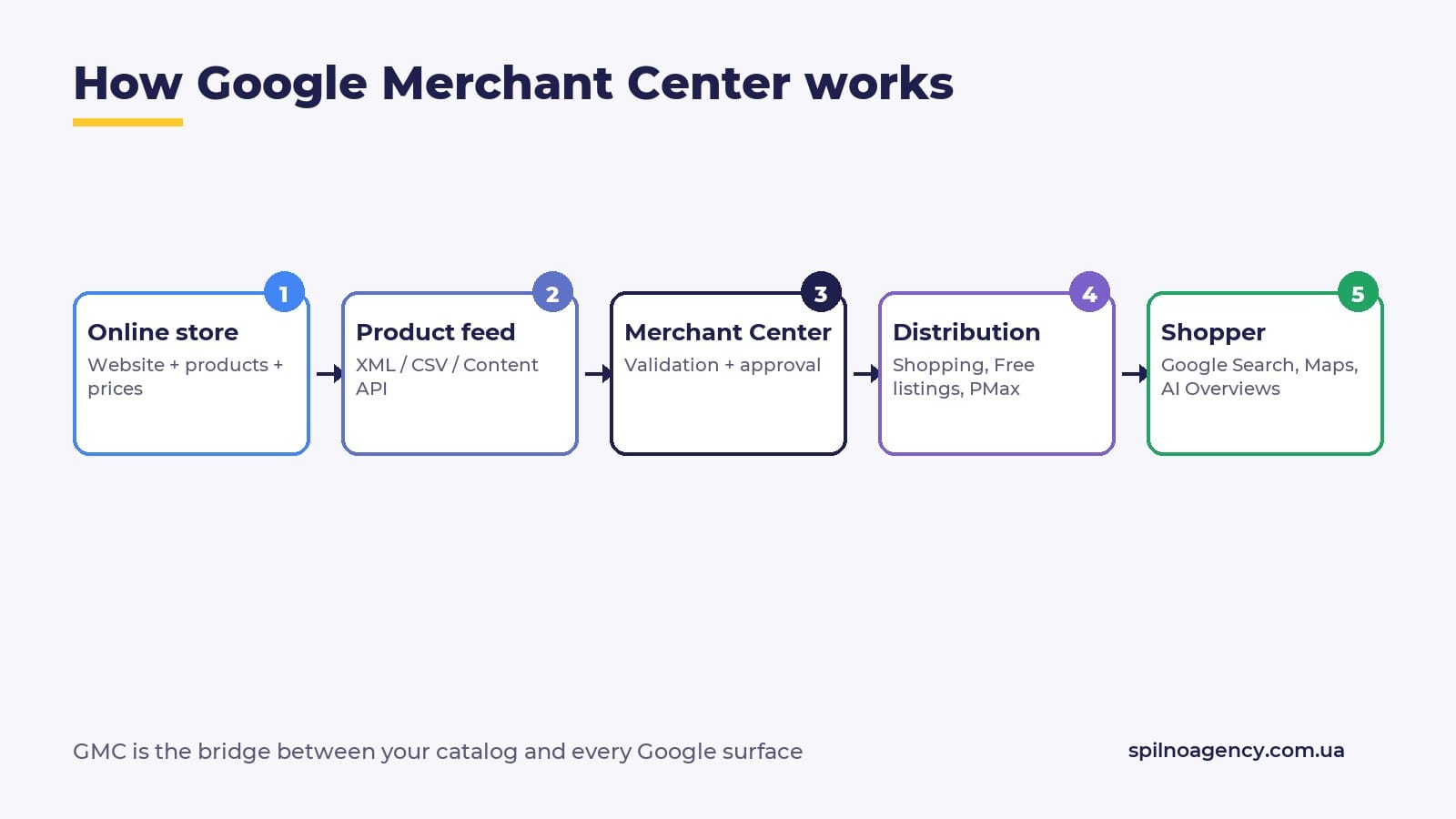
If any single step has an error (invalid GTIN, price mismatch with the site, no return policy) — the product becomes Disapproved and disappears from every Google surface at once.
Business benefits
- Free traffic — products show in the Shopping tab, AI Overviews and Google Images at zero ad spend.
- Direct channel into Search — a product card with photo, price and merchant, not just a blue link.
- Performance Max — PMax for e-commerce won’t work without GMC.
- SKU-level analytics — clicks, impressions and competition for each item, not just for a page.
- Local advertising — Google Maps integration and Local Inventory Ads show store-level availability.
- AI catalogue insights — Merchant Center Next highlights underpriced products, weak descriptions and missing items competitors carry.
Merchant Center Next: step-by-step setup
Setup in 2026 takes 10–15 minutes (it used to be 30–40) and follows 6 steps.
- Create account. Go to merchants.google.com and sign in with a company Google account (not a personal one — to avoid losing access when an employee leaves).
- Business info. Store name as it appears on the site, selling country, time zone, primary market currency.
- Website verification. Via GSC (if already verified), meta-tag in
<head>, server-side file or Google Tag Manager. - Shipping setup. Zones, rates, delivery times. Import from your carrier API or set manually.
- Tax setup. Required for the US, optional for some EU countries.
- Add products. Either automatic discovery via schema.org, or XML/CSV upload, or Content API integration.
Pro tip: verify the site via Google Search Console rather than meta-tag. If someone reinstalls a WordPress theme and drops the tag — GMC gets disconnected. GSC verification survives template changes.
Spilno Agency
Website requirements
- HTTPS — SSL on every page.
- Clear contact info — phone, email, legal address.
- Return policy — dedicated page, terms, refund window.
- Privacy policy — GDPR-compliant, with cookie disclosure.
- Shipping terms — dedicated page with rates and timelines.
- Guest checkout — Google penalises forced registration.
- Authentic reviews — fake reviews trigger account suspension.
Product feed: attributes & formats
The product feed is the heart of GMC. Supported formats: XML (most common), CSV, TSV, Google Sheets, or Content API (for large stores and real-time inventory).
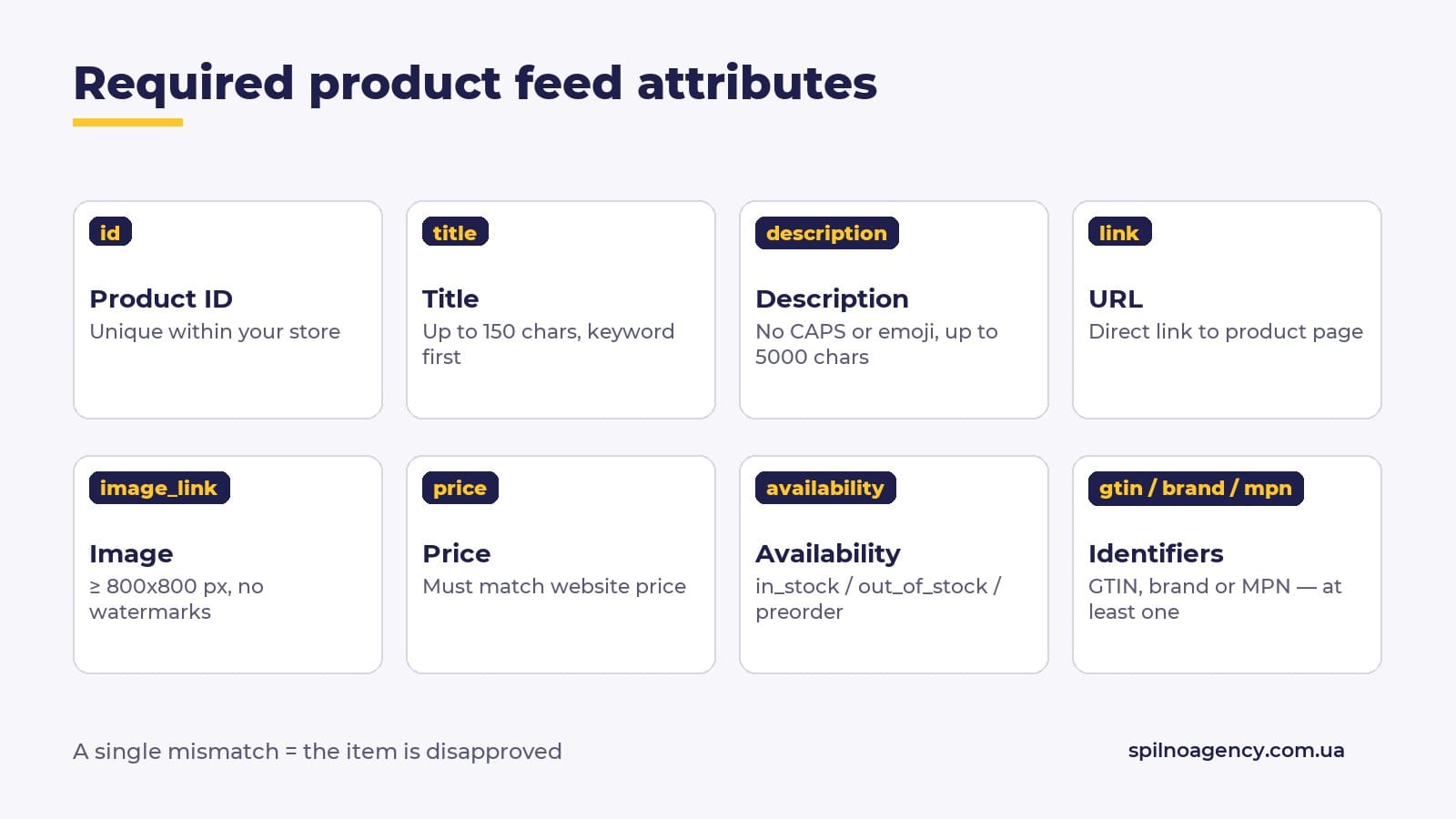
Required attributes
id— unique within your store.title— up to 150 characters, primary keyword first.description— up to 5000 characters, no CAPS or emoji.link— direct product URL, no redirects.image_link— main image, ≥ 100×100 px (recommended 800×800+), no watermarks.availability—in_stock/out_of_stock/preorder/backorder.price— must match the website price exactly.brand/gtin/mpn— at least one identifier. GTIN is critical for branded products.condition—new/refurbished/used.
Recommended attributes
sale_price+sale_price_effective_datefor promotions.additional_image_link— up to 10 extra images.color,size,gender,age_group— critical for apparel.shipping— per-item shipping if it differs from account defaults.custom_label_0..4— internal segmentation for PMax (bestsellers, margin tiers, new arrivals).product_highlight— up to 4 bullets shown on the product card.
XML snippet example
<item>
  <g:id>SKU-12345</g:id>
  <g:title>Nike Air Max 90 Black Sneakers</g:title>
  <g:description>Classic Air Max cushioning, leather upper...</g:description>
  <g:link>https://shop.com/nike-air-max-90-black</g:link>
  <g:image_link>https://shop.com/img/nike-90-black.jpg</g:image_link>
  <g:availability>in_stock</g:availability>
  <g:price>120.00 USD</g:price>
  <g:brand>Nike</g:brand>
  <g:gtin>0883412345678</g:gtin>
  <g:condition>new</g:condition>
</item>
Connecting Google Ads and Performance Max
Once products are Approved in GMC, you can launch ads. In 2026 it’s almost always Performance Max.
- In Merchant Center Next: Settings → Linked accounts → Google Ads.
- Enter the Google Ads Customer ID (10-digit XXX-XXX-XXXX).
- Confirm the link in Google Ads: Tools → Linked accounts → Merchant Center.
- In Google Ads create a Performance Max campaign with the «Online sales with a product feed» goal.
- Pick the feed, set a daily budget ($10–20 minimum), keep Smart Bidding (Maximize conversion value).
- Upload up to 20 creatives (images, video, headlines, descriptions) — PMax distributes them across surfaces.
Free listings, Shopping Graph and AI Overviews
Free product listings are the same product blocks you see in organic Google Search and the Shopping tab — but with zero ad spend. In Merchant Center Next they’re on by default for every approved product.
Shopping Graph is Google’s database of billions of product entries. It’s built from GMC feeds plus structured data scraped from websites — and it’s what powers AI Overviews. When a user searches «best wireless headphones under $200», Gemini generates an answer and pulls products from Shopping Graph.
How to improve your chances of landing inside AI Overviews:
- Valid GTIN — without it your product is anonymous in Shopping Graph.
- Rich
description— at least 200 characters of unique copy. product_highlightattribute with 3–4 key benefits.- Real reviews via
Product Ratings(Google Customer Reviews or Trustpilot). - Stable availability — products that flip in_stock / out_of_stock often are skipped by AI.
8 common mistakes and disapprovals
A disapproval means a product is rejected. Google can reject a single item — or suspend the whole account. Here are the top 8 reasons we see in client work.
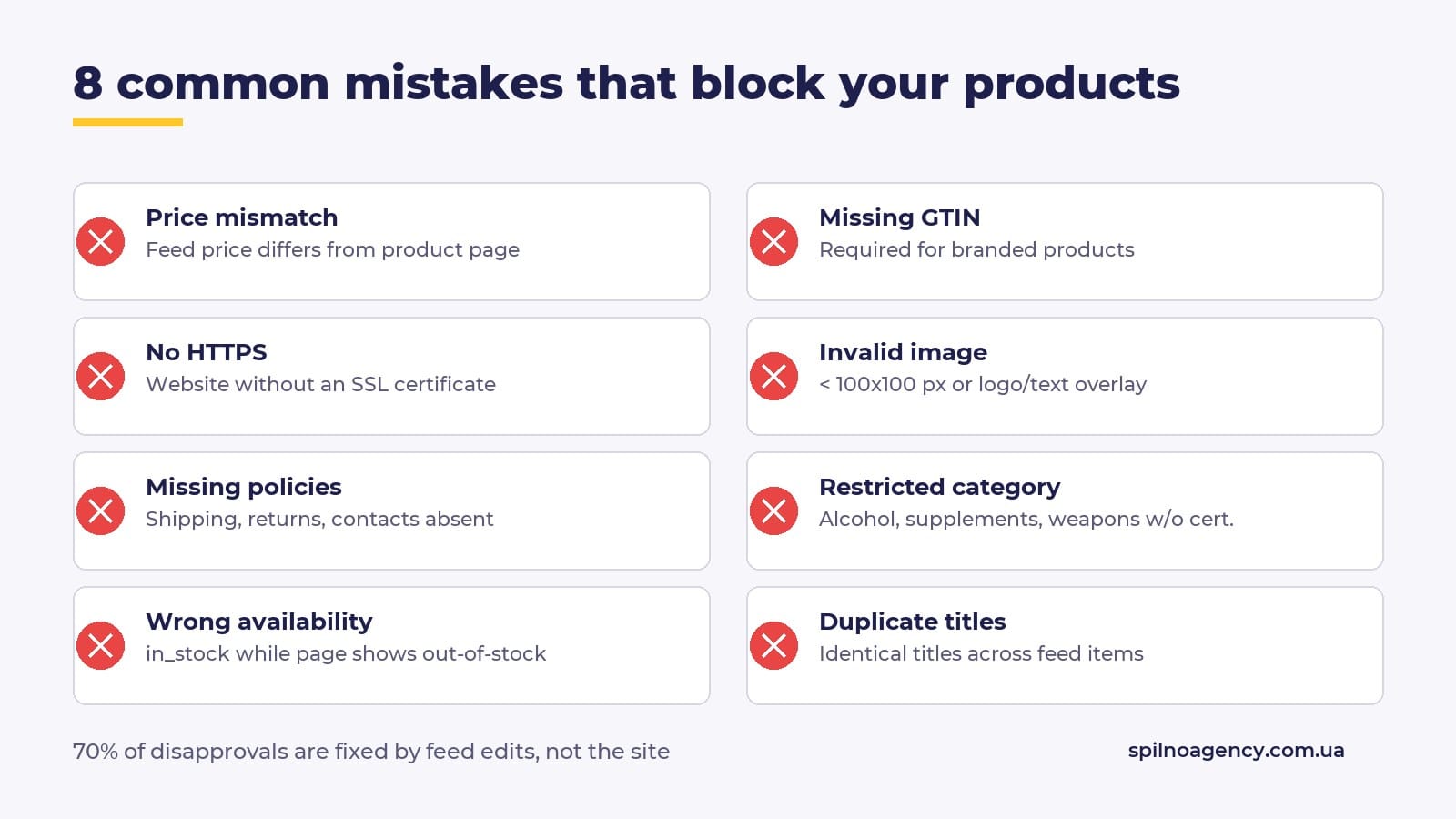
The worst case is account suspension — full freeze due to «misrepresentation», «policy violation» or «account suspended due to website issues». Reinstatement takes 2–6 weeks and a well-written appeal.
Products you cannot advertise via GMC
- Alcohol and tobacco (exceptions exist, but extra certifications required).
- Weapons, knives, ammunition.
- Drugs, psychoactive substances, supplements with unproven actives.
- Counterfeit, replicas of luxury brands.
- Financial services without a licence (loans, FX).
- Adult content and 18+ goods.
- Abortion services, contraception (country-restricted).
- Wildlife products, endangered species parts.
Reports and KPIs in Merchant Center
Merchant Center Next consolidated everything inside the Performance tab. Weekly metrics to track:
- Impressions — how often the product showed up.
- Clicks — clicks on the product card.
- CTR — aim for 1.5%+ in PMax, 3%+ in free listings.
- Price competitiveness — how your price compares to competitors. 30%+ pricier means you’ll be outranked.
- Best sellers — top items in your category market-wide. Hints what to add to the catalogue.
- Disapprovals — count of rejected items. Above 5% means a feed-level systemic issue.
FAQ
Is Google Merchant Center free?
Yes, the platform itself is fully free. You only pay for ads (Performance Max, Demand Gen). Free listings are also free.
How long does product approval take?
In Merchant Center Next: from a few hours up to 3 days. New accounts or sensitive categories — up to 7 days.
What if my products are disapproved?
Go to Products → Disapprovals, read the specific reason for each item, fix the feed (in 70% of cases the problem is in the feed, not on the site), and re-submit.
What is Merchant Center Next?
The new simplified GMC interface Google moved everyone to in 2024. Instead of dozens of menus — 4 big tabs + automatic product discovery from the site.
Can I use GMC without Google Ads?
Yes. Free listings and Shopping Graph / AI Overviews don’t require any ad budget. You pay only when you launch Performance Max.
How much do GMC ads cost?
Budget is set in Google Ads, not GMC. A realistic minimum to test PMax in the US is $20–30/day; a real campaign — from $50/day.
Does GMC support multi-currency?
Yes — you can target multiple countries via Multi-country feeds or sub-accounts, each with its own currency.
How is Merchant Center different from Google Shopping?
Merchant Center is the feed platform. Google Shopping is the surface that displays products from the feed. No Merchant Center — no Shopping. Without Shopping, MC products still appear in Search, AI Overviews and Maps.
Conclusion
Google Merchant Center in 2026 isn’t an «option for PPC people» — it’s mandatory infrastructure for any online store that wants free Google traffic and a working Performance Max channel. Merchant Center Next dropped setup time to 10–15 minutes, and the new surfaces (AI Overviews, Shopping Graph) unlock free traffic channels that didn’t exist six months ago.
If you need help with GMC setup, a clean feed, Content API integration or account reinstatement — get in touch. Spilno Agency specialises in e-commerce SEO + PPC.

Read also
Google Ads Coupon 2026: Who Can Get the Promo Code and What Are the Conditions
A Google Ads coupon (also called a promo code, voucher or bonus) is an advertising credit that Google…
ARIA Labels: What They Are and Do They Affect SEO?
ARIA labels (from WAI-ARIA — Accessible Rich Internet Applications) are special HTML attributes such as aria-label, aria-labelledby and…
WebMCP: What It Is and How It Works
WebMCP (Web Model Context Protocol) is a new standard that lets a website hand AI agents ready-made “tools”…