Pagination SEO for E-Commerce: canonical, noindex, crawl budget [2026 Guide]

Pagination — /category/page/2, /page/3… — is a top-3 cause of poor crawl budget in e-commerce. Without optimization it creates duplicate content, drains crawl budget, and dilutes PageRank. This Spilno Agency guide covers 5 key pagination SEO problems, 3 strategies (canonical/noindex/load-more), and a full audit checklist with a free Google Sheets template.
What is pagination and why it matters for SEO
Pagination is the splitting of a large list (products, articles, reviews) into multiple pages: /category/, /category/page/2, /category/page/3… This is standard practice in e-commerce — no store shows 500 products on one page. But without proper SEO optimization, every pagination page becomes a potential problem.
Google treats /category/page/2 as a separate page. If it has the same Title, H1, and category description — it’s a duplicate. If you have 20, 50, 100 such pages — the bot wastes all its crawl budget on them instead of reaching your new products.
Pagination is a top-3 cause of crawl budget problems in e-commerce stores. — Google Search Central Blog
5 Pagination SEO Problems in E-Commerce
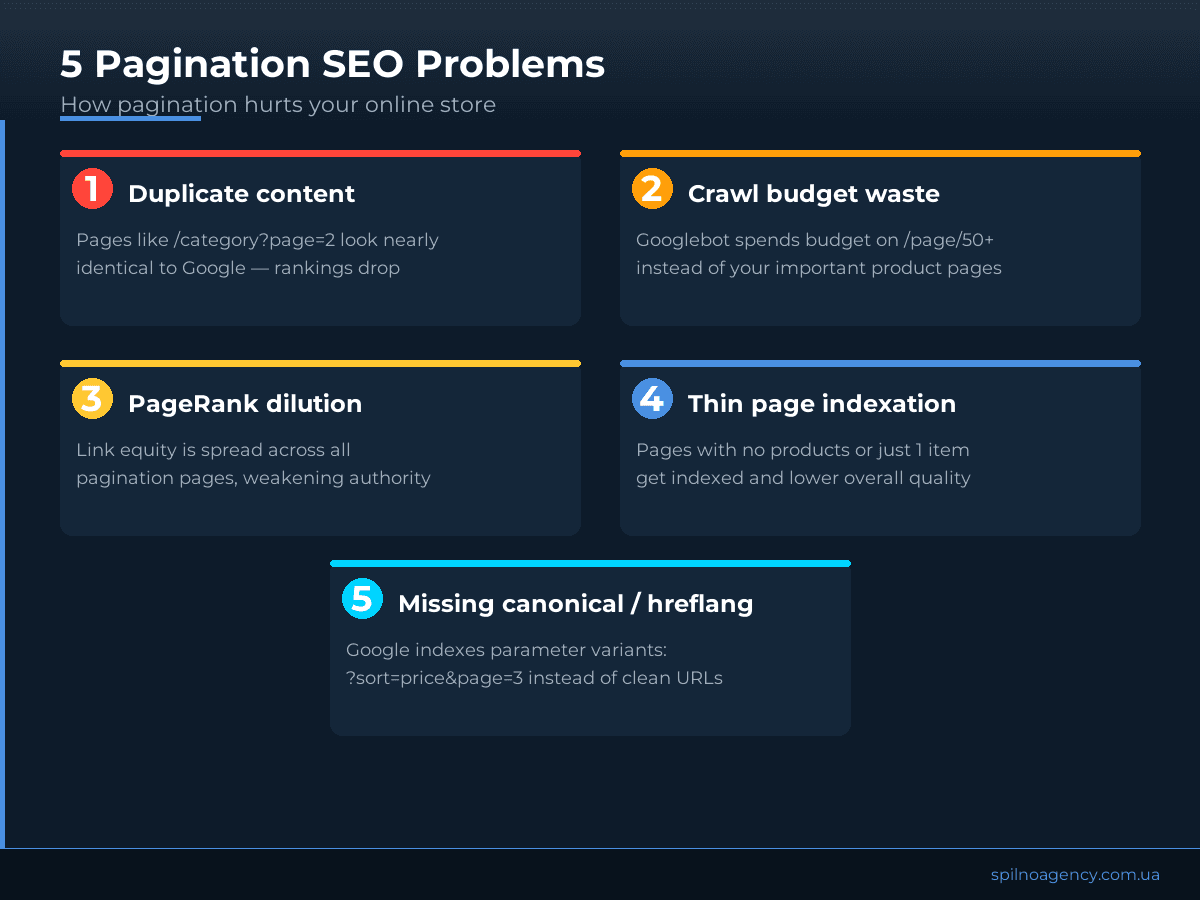
- Duplicate content. Pages /page/2..N have the same Title, H1, and boilerplate category description. Google may merge or demote them.
- Crawl budget waste. Googlebot has a limited daily crawl allocation. If 60% goes to empty pagination pages — new products don’t get indexed on time.
- PageRank dilution. When links flow to /category/ then to /page/2, /page/3… — link equity disperses across all subpages.
- Thin page indexation. The last pagination page may have just 1-3 products — thin content that lowers overall site quality.
- Parameter URLs without canonical. Filters and sorting generate URLs like
?sort=price&page=3&color=red— multiplying duplicate variants exponentially.
Why Google dropped rel=next/prev
In 2019, Google officially announced it no longer supports rel="next" and rel="prev" as ranking signals. If your developer or an old plugin still adds them — it doesn’t hurt, but it doesn’t help either. Instead, Google recommends standard signals: canonical, noindex, sitemap.
<link rel="next" href="/category/page/3" />
<link rel="prev" href="/category/page/1" />
<!-- Google no longer processes these (since 2019). Use canonical or noindex instead -->
3 Pagination Optimization Strategies
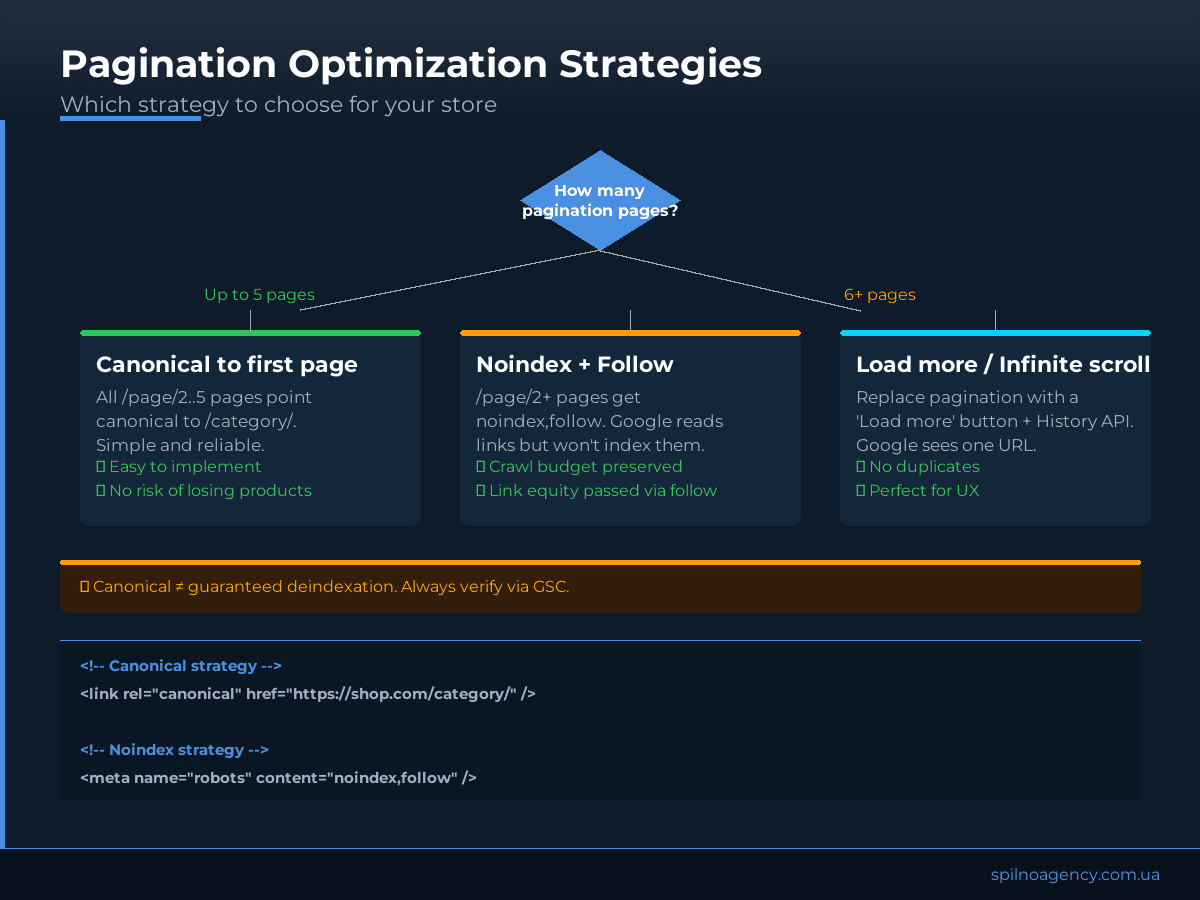
Strategy 1: Canonical to first category page
The simplest and most common approach. All /page/2..N pages point canonical to /category/. Google ignores them as duplicates and consolidates authority on the main page.
- When to use: small catalog, up to 5 pagination pages per category
- Risk: canonical is a hint, not a directive — Google may occasionally ignore it
- Advantage: easy to implement via Yoast / Rank Math / WooCommerce
<!-- On /category/page/2, /page/3... -->
<link rel="canonical" href="https://shop.com/category/" />
Strategy 2: Noindex + Follow
For large catalogs (10+ pagination pages) — adding noindex,follow to /page/2+ is more effective. Google doesn’t index these pages but still follows links, passing PageRank to product pages.
- When to use: 6+ pagination pages, large e-commerce, crawl budget is critical
- Advantage: guaranteed deindexation, full control, equity passed via follow
- Important: don’t combine noindex with Disallow in robots.txt on the same URLs
<meta name="robots" content="noindex,follow" />
<!-- Or via HTTP header -->
X-Robots-Tag: noindex, follow
Strategy 3: Load more / Infinite scroll with History API
The progressive alternative: replace classic pagination with a ‘Load more’ button. Products load via AJAX, while the URL updates through History API (pushState). Google sees a single canonical category URL — no duplicates at all.
- When to use: new store or full redesign
- Advantage: zero pagination pages, better UX, zero duplicate issues
- Complexity: requires custom development or a dedicated plugin
Load more with proper History API is the cleanest SEO solution for e-commerce. But canonical + noindex is sufficient for 90% of stores.
Crawl budget: how pagination drains it
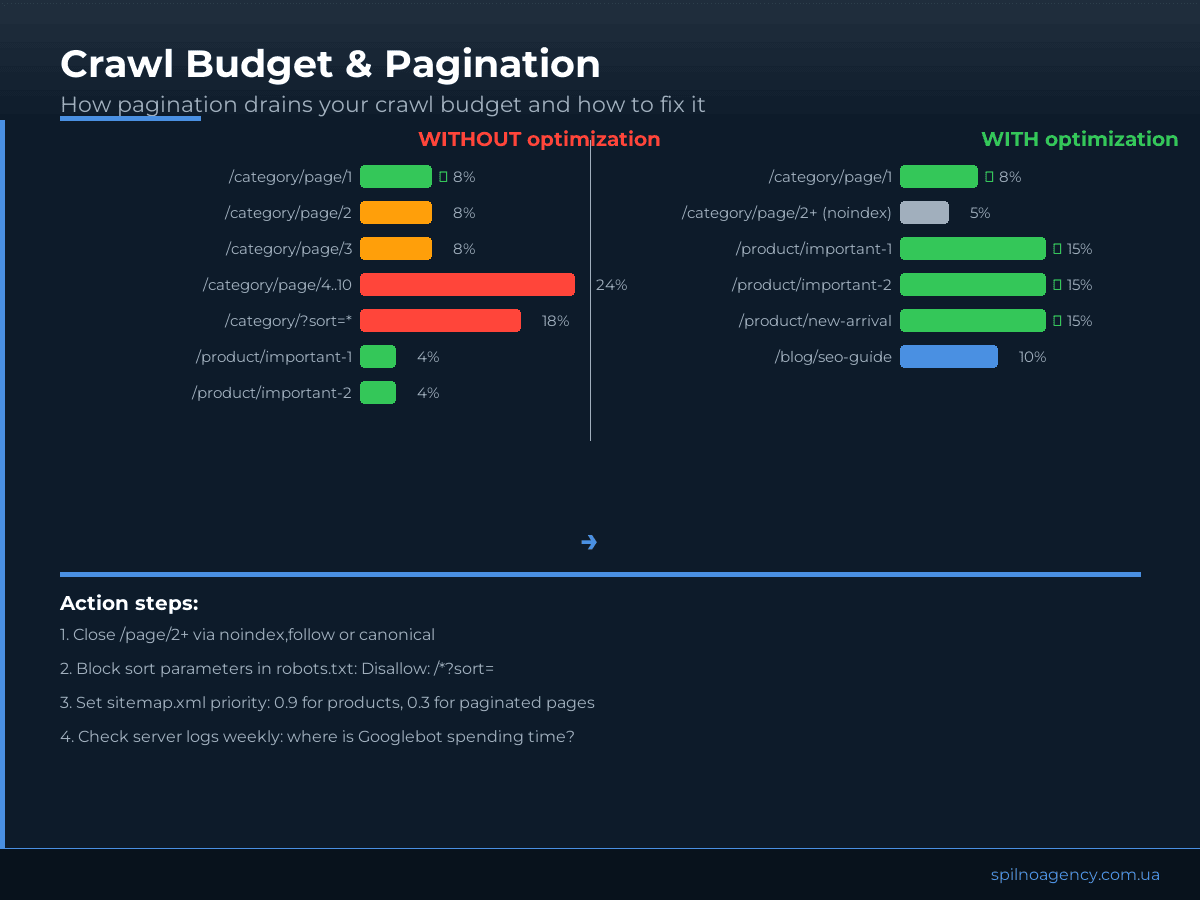
Crawl budget is the number of URLs Googlebot is willing to scan per crawl cycle. Google determines it based on domain authority and server response speed. For most e-commerce stores with 5,000–50,000 products, budget is a real constraint.
- Close
/page/2+via noindex,follow or canonical - Block sort parameters in robots.txt:
Disallow: /*?sort= - Block filter parameters:
Disallow: /*?color=,Disallow: /*?size= - Set sitemap.xml priorities: 0.9 for products, 0.5 for categories, 0.1 for pagination (if kept)
- Check server logs weekly — where Googlebot spends its time
Pagination SEO Audit Checklist
Use this checklist every time you audit a new store or review the current state of pagination. The Google Sheets template below includes all items with status, comment, and priority fields.
- Open GSC → Coverage → check how many pagination pages are indexed
- Check Title and Meta for each /page/N: are they unique or duplicates of the first page?
- Verify canonical on each pagination page (and where it points)
- Verify noindex on /page/2+ (if that strategy was chosen)
- Check robots.txt: are sort and filter parameters blocked?
- Check sitemap.xml: does it include pagination pages (and should it)?
- Check if URL parameters create new duplicate variants (
?sort=&page=3) - Check loading speed of the first and 10th page (Core Web Vitals)
- Check internal linking: do categories link directly to products (not only to /page/N)?
- Record results in the template and re-check 30 days after implementing changes
Common Mistakes in Pagination Optimization
- Canonical + noindex at the same time. Redundant and contradictory. Choose one strategy.
- Disallow + noindex. If the URL is blocked in robots.txt, the bot can’t visit it and won’t see the noindex tag — the page stays indexed via links.
- Self-canonical on pagination. /page/2 pointing canonical to /page/2 — this doesn’t protect against duplicates.
- Blocking JavaScript pagination. If products load via JS — don’t block JS in robots.txt, or Google sees no products at all.
- rel=next/prev without canonical. Google dropped these tags (2019). If your plugin still adds them, ensure canonical is also properly set.
FAQ
Does pagination hurt SEO?
Yes, if unoptimized. Pagination without canonical or noindex creates duplicate content and wastes crawl budget. Properly configured, it neither hurts nor directly helps — but it frees up bot resources for important pages.
Canonical or noindex for pagination?
For small catalogs (up to 5 pages) — canonical is more convenient. For large catalogs and active stores — noindex,follow is more effective: it guarantees pages are not indexed and preserves crawl budget.
Is rel=next/prev still needed?
No. Google officially dropped support for rel=next/prev in 2019. They no longer affect rankings. Use canonical or noindex instead.
How to verify pagination optimization results?
Via Google Search Console → Coverage: compare indexed page counts before and after. Also review server logs 2-4 weeks post-change — Googlebot should spend less time on pagination and more on product pages.
Does pagination affect mobile SEO?
Indirectly. Google uses Mobile-First Indexing — it scans the mobile version. If your mobile pagination differs from desktop (fewer products, different URLs) — ensure canonical and noindex are correctly set on both versions.
Need a pagination audit?
Spilno Agency runs technical SEO audits for European e-commerce stores, including pagination, crawl budget, and URL structure. First audit is free.

Read also

Google Ads Investment Strategy: How More Budget Affects Leads and Sales
Google Ads can now forecast how many extra leads or sales a bigger budget will bring. Here's how…

Is an SEO specialist responsible for leads and sales? Our position
A LinkedIn discussion: should an SEO specialist be responsible for leads and sales from the SEO channel. Spilno…

How to Control an SEO Specialist: The 5-Stage SEO KPI Funnel
SEO KPIs form a chain of five metrics that show, step by step, whether your SEO is actually…