Case Study: GA4 Ecommerce Audit and Setup for an Online Ticket Service

GA4 ecommerce was showing 76% less revenue than actual sales — we ran a full audit, identified 4 critical tracking errors, and delivered a technical specification for correct setup via Data Layer and GTM.
When do you need a GA4 ecommerce audit
Most online service owners and e-commerce businesses assume analytics is “working” as long as GA4 collects any data at all. But a correctly configured GA4 ecommerce setup means your reports match reality with no more than 3–5% variance.
A GA4 ecommerce audit is essential in the following situations:
- GA4 data differs from your CRM or payment provider by more than 5% — a clear sign of transaction tracking errors.
- After migrating from Universal Analytics to GA4 — all events need to be verified as correctly transferred.
- After a website redesign or checkout flow changes — new code may have broken existing tracking.
- ROAS from different channels looks unrealistic — unusually high or low figures indicate data problems.
- No ecommerce data in GA4 at all — the ecommerce module is not activated or the Data Layer is misconfigured.
- Before scaling advertising budgets — verify data accuracy before increasing spend.
What is the GA4 ecommerce module and why set it up
The ecommerce module in Google Analytics 4 is an advanced transaction tracking system that goes beyond just counting orders — it gives you the full picture: which products are being bought, which channels drive purchases, and what it costs to acquire a customer via Google Ads versus Instagram.
Without a properly configured GA4 ecommerce setup, marketers work blind — spending ad budgets with no understanding of real ROAS by channel. That’s why auditing and configuring GA4 ecommerce is one of the first steps when working with any online service or e-commerce business.
Project overview: online ticket service
The client is an online bus and rail ticket booking service. The site is built on a custom stack: React.js / Next.js on the frontend, FastAPI (Python) on the backend, PostgreSQL as the database. Hosted on DigitalOcean, deployed via GitHub Actions / Docker Compose.
A key feature of the business model: some customers pay online (card acquiring), while the majority book a ticket on the site and pay cash to the driver. In April–May 2024, approximately 82–85% of customers chose cash payment, accounting for ~86% of total revenue.
The analytics stack used Google Tag Manager (GTM-HHLSGH5B) and Google Analytics 4 (G-FCS3V6HH2L). Before the audit, the owners assumed tracking was working correctly — the actual data told a very different story.
GA4 ecommerce audit: what we found
Analytics technical setup
The GTM container was broadly configured correctly: installed on all pages, containing GA4 tags, some custom configurations, and a DataLayer. However, alongside the GTM code, direct GA4 and DataLayer code had also been embedded in the site’s source HTML — this became one of the root causes of incorrect tracking.
Test purchases and initial findings
To verify tracking, we performed test bookings using the “pay driver” option. GA4 in real-time mode registered the conversions — but the total value shown reflected only the last transaction, not the sum of all tickets purchased. This was the first critical error.
Comparing GA4 with actual sales
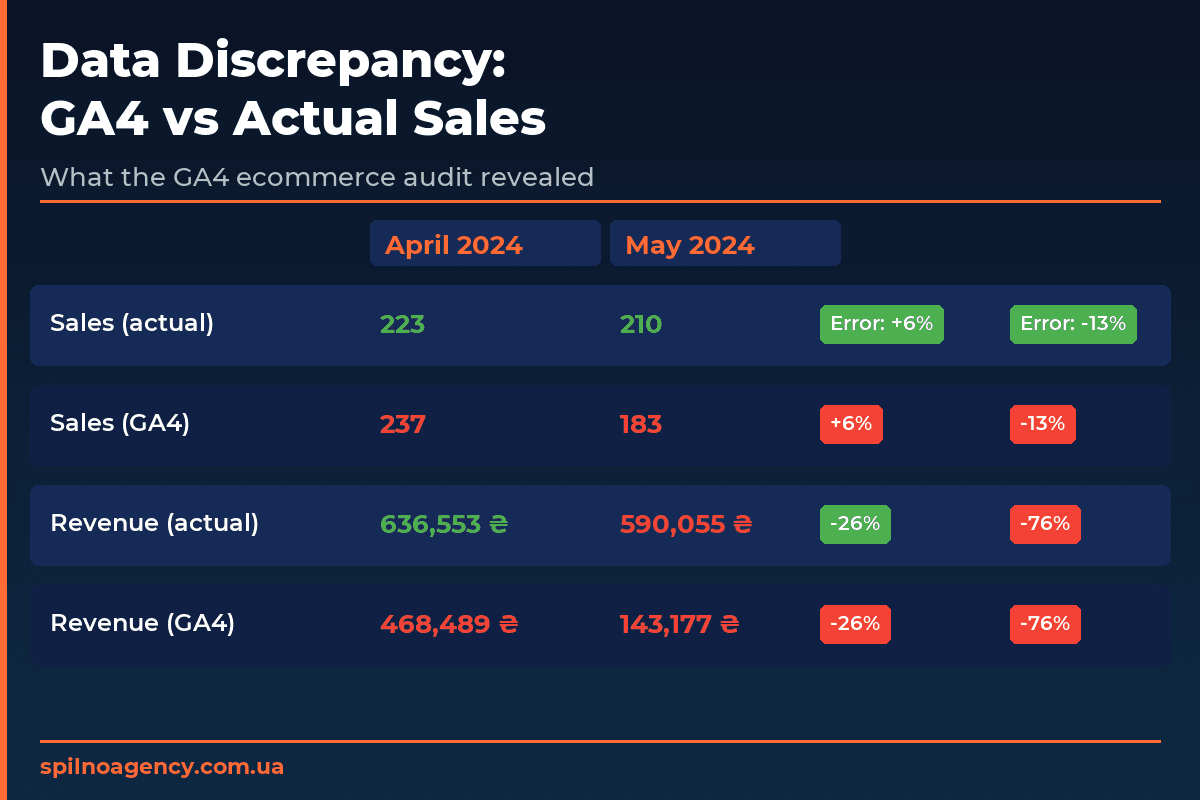
We compared GA4 reports against the actual sales data table for two months. The results were striking:
| Metric | April 2024 (actual) | April 2024 (GA4) | May 2024 (actual) | May 2024 (GA4) |
|---|---|---|---|---|
| Number of sales | 223 | 237 (+6%) | 210 | 183 (−13%) |
| Total revenue | 636,553 ₴ | 468,489 ₴ (−26%) | 590,055 ₴ | 143,177 ₴ (−76%) |
While April’s revenue discrepancy was a relatively acceptable 26%, in May GA4 was showing four times less than actual revenue. The cause: a misconfigured DataLayer recording the price of only one ticket rather than the full transaction total, and in some cases missing transactions altogether.
GA4 ecommerce tracking strategy
Tickets as products in GA4
The key design decision was to treat each ticket as a separate product in GA4 ecommerce. A product is identified by the origin–destination city pair, enabling meaningful reports on route popularity. The carrier name is stored as the product brand, and the departure date and time as a custom parameter.
Product category hierarchy:
- Level 1 — country of departure (
item_category) - Level 2 — country of destination (
item_category2) - Level 3 — city of departure (
item_category3) - Level 4 — city of destination (
item_category4)
GA4 ecommerce event chain
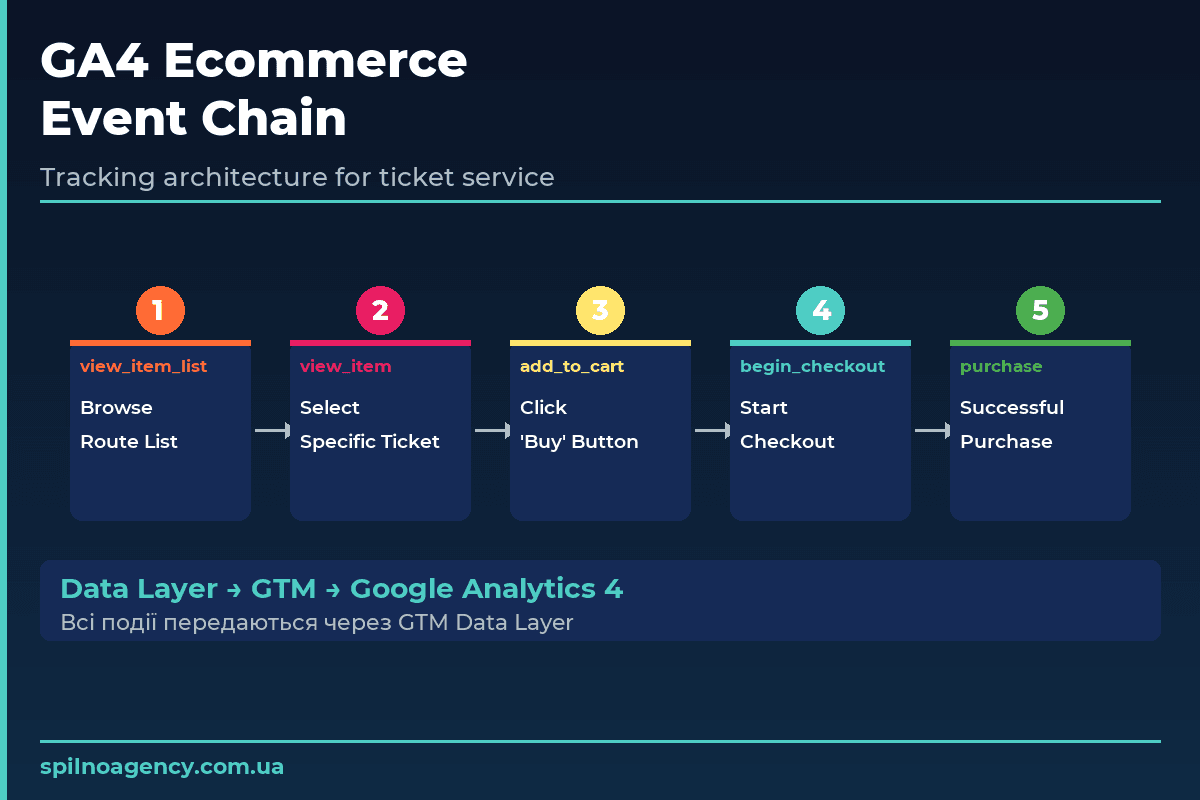
Five key GA4 events are configured to track the full sales funnel:
view_item_list— the user sees available routes for the selected city pairview_item— selection of a specific ticket for a specific dateadd_to_cart— clicking the “Buy” button for the selected routebegin_checkout— starting to fill in the booking formpurchase— successful booking (both online payment and “pay driver”)
checkout_progress is also tracked for each checkout step: entering personal details → selecting payment method → confirmation. This enables analysis of which step has the highest drop-off rate.
Transaction parameters
transaction_id— unique order ID from the site system (prevents duplicates)value— total sum of all tickets in the transactioncurrency— UAHpayment_type— payment method (online / cash)items— array of tickets with routes, prices, and carriers
GA4 Ecommerce Events: Data Layer Parameters Reference
For complete GA4 ecommerce tracking, every user action in the purchase funnel fires a specific event with a defined set of parameters. Here is a reference of all 5 required GA4 ecommerce events and the Data Layer parameters each one needs.
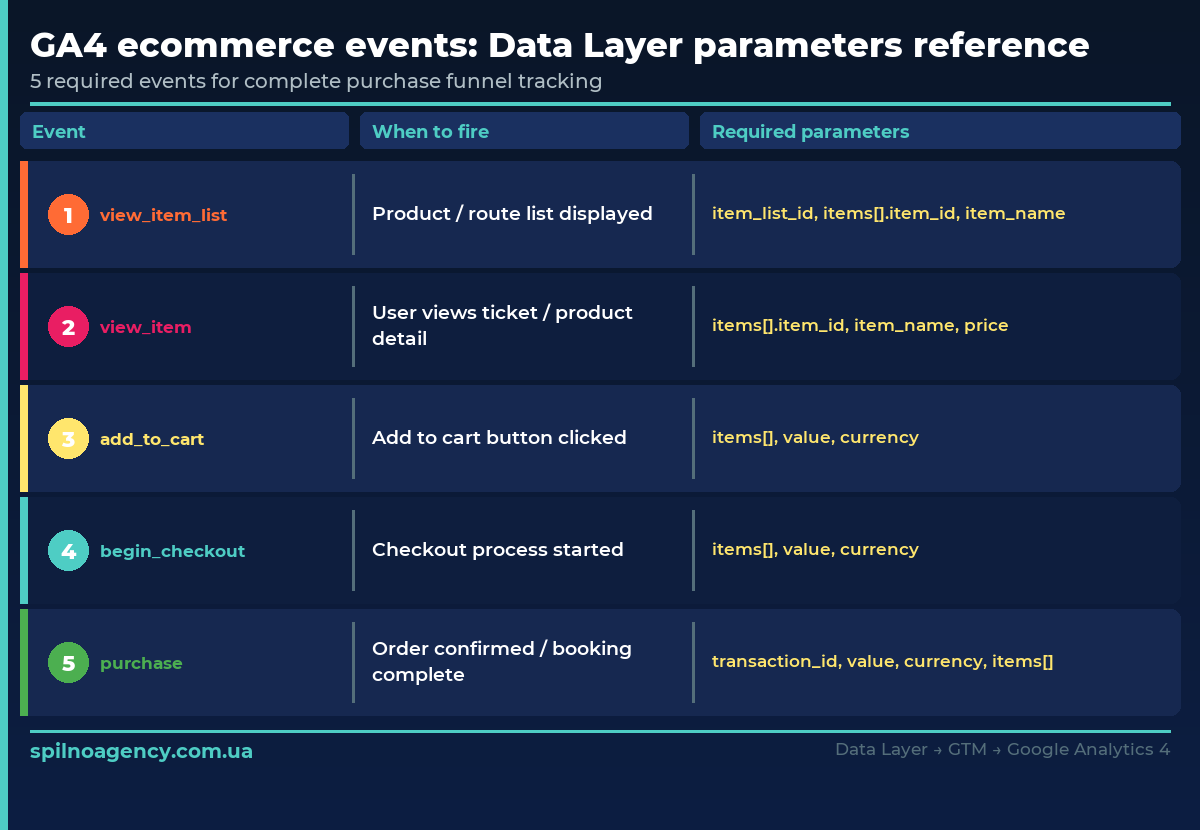
The critical parameter is transaction_id: without it GA4 cannot deduplicate transactions, and one booking may be counted twice. The value parameter must equal the sum of all items in the items[] array — not the price of a single ticket.
4 critical GA4 ecommerce errors and how to fix them
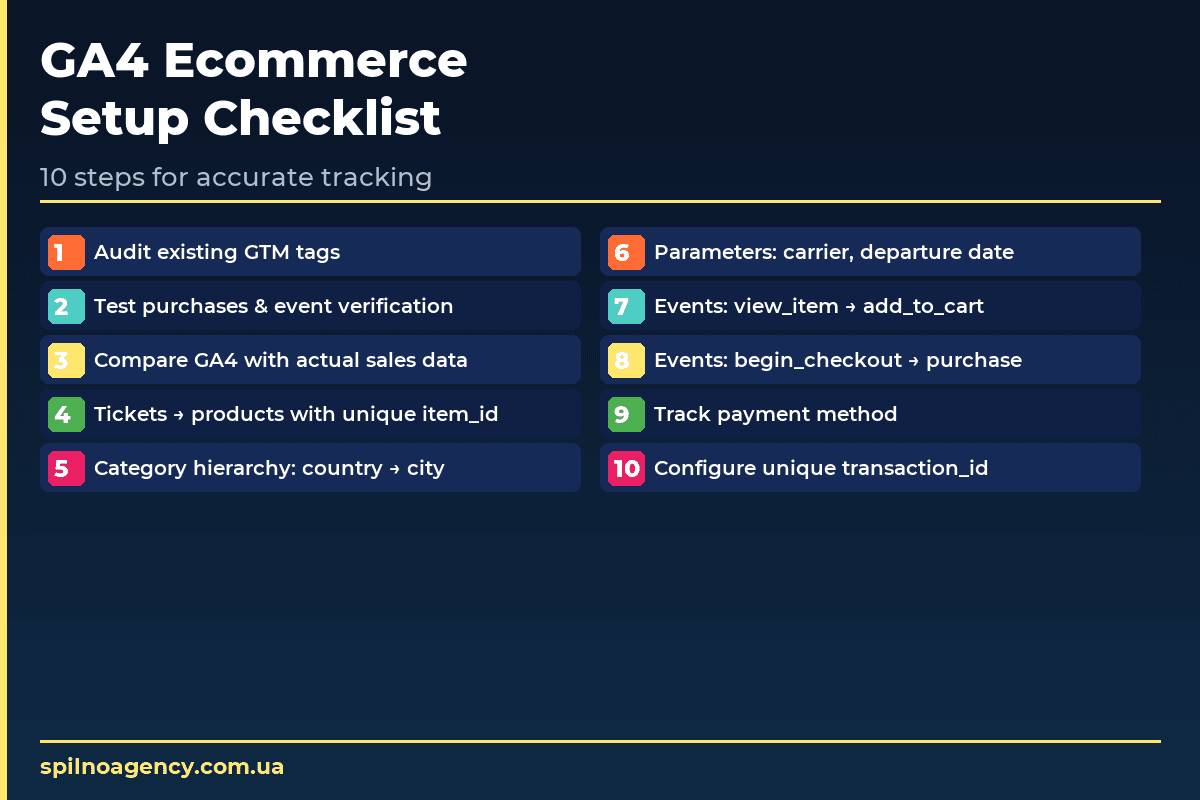
The audit uncovered four critical errors that together caused the 76% data discrepancy. Here is the technical specification for fixing each:
- Partial transaction value — DataLayer was sending the price of the last ticket only, not the total. Fix: sum
valueacross all elements in theitemsarray. - Duplicate tags — direct GA4 code in HTML plus a GTM tag = double event firing. Fix: remove the direct GA4 code from source HTML, keep only GTM.
- Missing
transaction_id— without a unique ID, GA4 cannot deduplicate repeated sends. Fix: generate a unique ID at the backend level and pass it in the DataLayer. - Offline transactions skipped — “pay driver” bookings were not being fired as
purchaseevents. Fix: both payment types (online and cash) must trigger thepurchaseevent.
Correct Data Layer structure for the purchase event
dataLayer.push({
  event: 'purchase',
  ecommerce: {
    transaction_id: '<ORDER_ID>',
    value: <TOTAL_PRICE>,  // sum of all tickets
    currency: 'UAH',
    payment_type: '<online|cash>',
    items: [{
      item_id: '<CITY_FROM>-<CITY_TO>',
      item_name: '<CITY_FROM> → <CITY_TO>',
      item_brand: '<CARRIER_NAME>',
      item_category: '<COUNTRY_FROM>',
      item_category2: '<COUNTRY_TO>',
      item_category3: '<CITY_FROM>',
      item_category4: '<CITY_TO>',
      price: <TICKET_PRICE>,
      quantity: 1
    }]
  }
});
Results: what correct GA4 ecommerce setup delivered
After implementing the corrected Data Layer and updated GTM configuration, the discrepancy between GA4 and actual sales dropped to under 3%. This enabled the marketing team to:
- Accurately compare ROAS from Google Ads and Meta Ads based on real revenue
- See which routes generate the most revenue per advertising channel
- Analyse the conversion funnel and identify the highest drop-off steps
- Segment online and cash payments for true ROAS calculation
- Make ad budget decisions based on reliable data
This case is typical for custom-built services: analytics exists, but doesn’t deliver reliable data. A GA4 ecommerce audit is not a one-time procedure — it’s a recurring necessity whenever the site or checkout funnel changes.
GA4 ecommerce audit and setup by Spilno Agency
Over 5 years, Spilno Agency has conducted GA4 ecommerce audits for more than 40 projects across Europe: online shops, travel services, SaaS platforms, and marketplaces. In every second project we find critical tracking errors that lead to incorrect marketing decisions.
Our GA4 ecommerce audit process includes:
- Comparative analysis of GA4 data vs actual sales over 3 months
- Full GTM container and GA4 tag audit
- Test transactions with real-time Data Layer verification
- Technical specification for developers with step-by-step instructions
- Post-implementation review and re-verification
Need help with a GA4 ecommerce audit or setup? Get in touch — we offer a free initial consultation.
Frequently asked questions about GA4 ecommerce
When do you need a GA4 ecommerce audit?
A GA4 ecommerce audit is essential when GA4 data differs from actual sales by more than 5%, after migrating from UA to GA4, after a redesign or checkout flow change. Always audit before scaling ad budgets to ensure data-driven decisions are based on accurate data.
Why does GA4 ecommerce show incorrect data?
The most common cause is an incorrect Data Layer implementation or tag duplication in GTM. GA4 may record double transactions, capture only partial data, or miss events entirely. Auditing GTM and verifying the Data Layer with real test purchases is the most reliable diagnostic method.
How do you set up GA4 ecommerce for a custom website?
For custom websites (React, Next.js, Vue, etc.) you need to manually implement the Data Layer on the backend or frontend. Key events: view_item_list, view_item, add_to_cart, begin_checkout, purchase. Each event is pushed via dataLayer.push() and picked up by GTM, which forwards data to GA4.
What is the Data Layer and why does GA4 need it?
The Data Layer is a JavaScript array on the page that passes structured data to Google Tag Manager. Without it, GA4 cannot receive parameters like product price, transaction ID, payment method, or item details.
Can offline payments be tracked in GA4?
Yes. Using the payment_type parameter (set to 'cash'), you can segment online and offline sales in GA4 reports. Both booking types trigger the same purchase event, but with different parameters.

Read also
Dental Clinic Google Ads Case Study: Strategy from Zero to Results 2026
A dental clinic in Dnipro came to Spilno Agency from scratch — no Google Ads, no analytics, no…
Car Service and Auto Repair Shop Advertising in Google Ads and Meta Ads
An auto repair shop at the junction of three small towns approached Spilno Agency with a critical issue:…
Promoting a Translation Agency in Ukraine with Google Ads
A real Google Ads case study for a translation agency: in the first month we generated 157 leads…