Dental Clinic Google Ads Case Study: Strategy from Zero to Results 2026

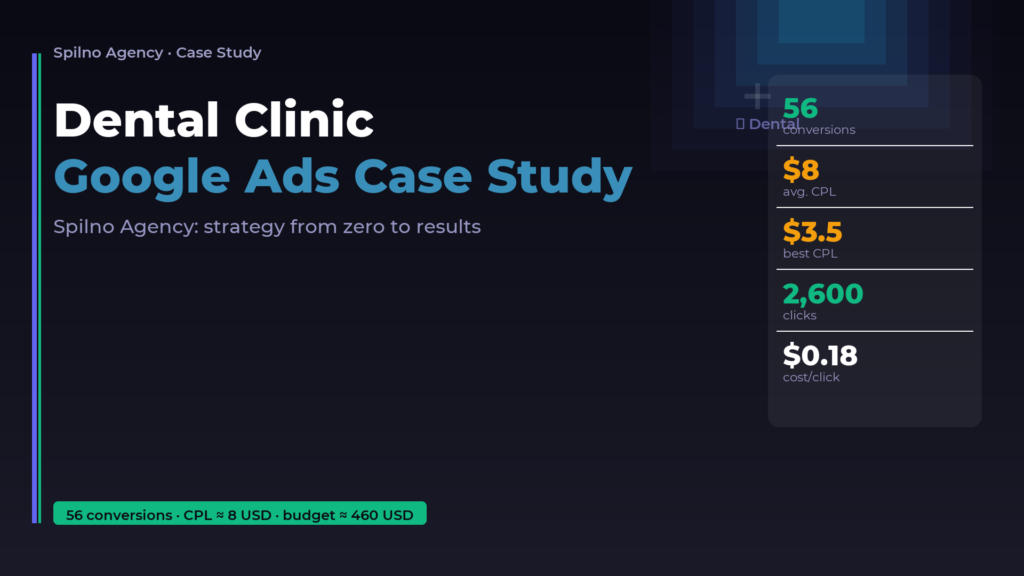
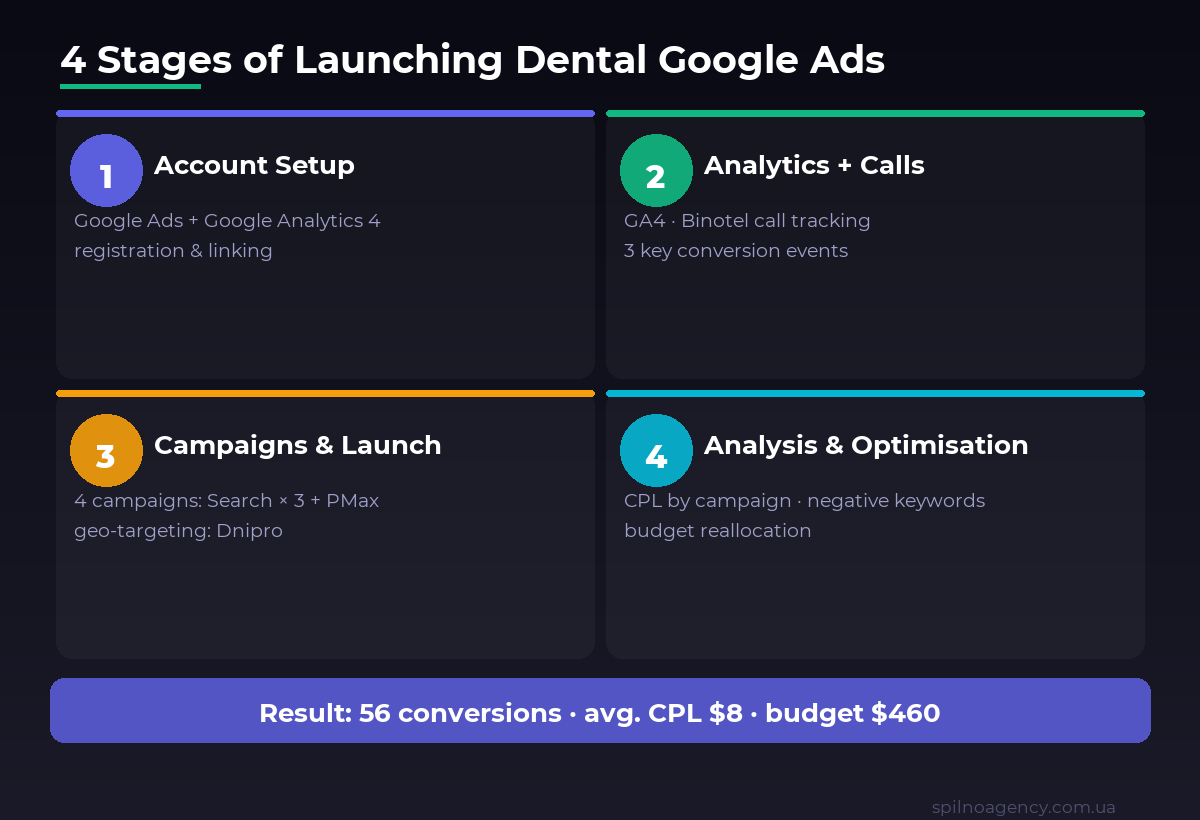
A dental clinic in Dnipro came to Spilno Agency from scratch — no Google Ads, no analytics, no call tracking. Within the first month of working together, we achieved 56 conversions at an average CPL of 333 UAH (~$8) on a total budget of 18,721 UAH (~$460). In this case study I walk through every step: from account registration to per-campaign results analysis.
About the Client and the Starting Point
The client is a full-service dental clinic in Dnipro, Ukraine, offering general dentistry, extractions, prosthetics, veneers and implants. Before we started, there was no paid advertising — the clinic relied entirely on word of mouth and social media.
The brief: launch Google Ads and generate the first patient enquiries. Budget was limited, so conversion tracking had to be set up correctly from day one — otherwise spend goes blind.
Key Results: Campaign Data
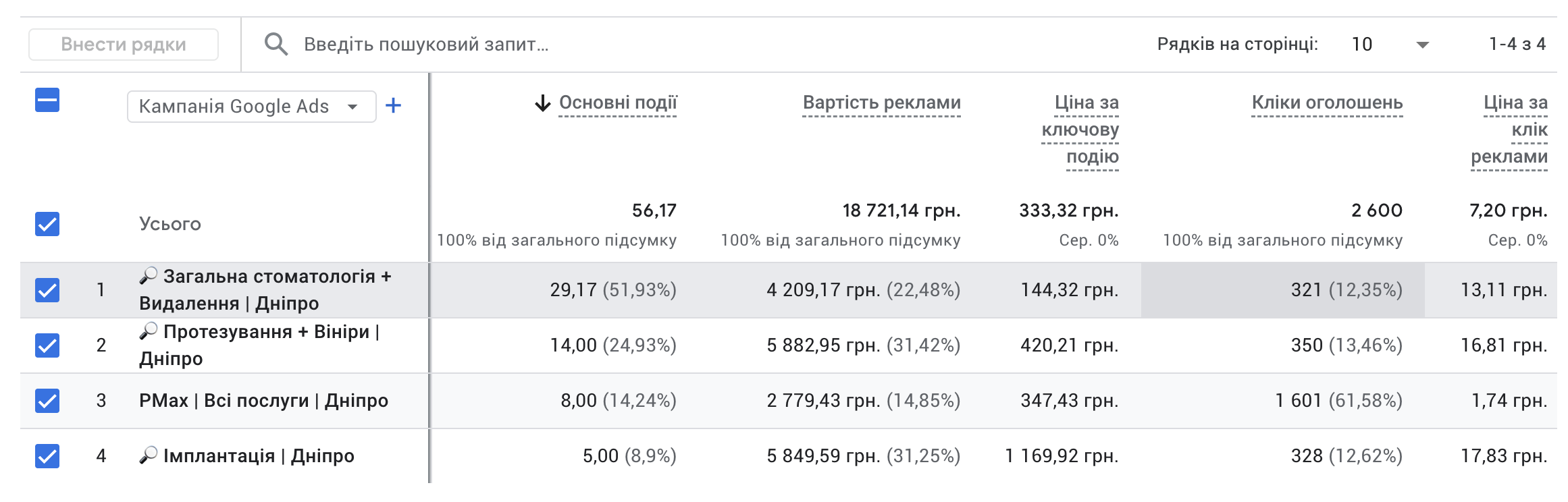
Before diving into the step-by-step breakdown, here are the final numbers from the client’s actual Google Ads account:
| Campaign | Conversions | Budget | CPL | Clicks | Cost/Click |
|---|---|---|---|---|---|
| General Dentistry + Extractions | 29.17 (52%) | 4,209 UAH | 144 UAH | 321 | 13.11 UAH |
| Prosthetics + Veneers | 14.00 (25%) | 5,883 UAH | 420 UAH | 350 | 16.81 UAH |
| PMax | All Services | 8.00 (14%) | 2,779 UAH | 347 UAH | 1,601 | 1.74 UAH |
| Implants | 5.00 (9%) | 5,850 UAH | 1,170 UAH | 328 | 17.83 UAH |
| Total | 56.17 | 18,721 UAH | 333 UAH | 2,600 | 7.20 UAH |
Stage 1. Setting Up Google Ads and Google Analytics 4
Everything starts with the technical foundation. Without properly configured accounts, no strategy will work.
Google Ads: Initial Configuration
- Register or gain access to the client’s Google Ads account (via MCC or direct access).
- Select account type: “Expert mode” — gives more control over settings.
- Set time zone (Kyiv, UTC+2/UTC+3) and currency (UAH).
- Connect the client’s billing profile.
- Link Google Ads to GA4 via “Linked accounts”.
Important: never launch a campaign before GA4 is connected and conversion tracking is configured. Advertising without analytics is burning money.
Google Analytics 4: Initial Setup
- Create a GA4 property — select “Web”.
- Install the base tracking code on the website (via GTM or directly in the source code).
- Verify that data flows in real-time.
- Enable Google Signals — for better remarketing audiences.
- Add the GA4 property in “Linked accounts” inside Google Ads.
For dental clinics, correctly tracking appointment form submissions and phone calls is critical — these are the primary lead sources. Without it, Google Ads has no idea which campaign drives patients and which one simply burns budget.
Stage 2. GA4 Setup and Call Tracking (Binotel)
For a dental clinic there are three key lead sources: phone calls, appointment form submissions and online bookings/payments. We configured all three as key events in GA4.
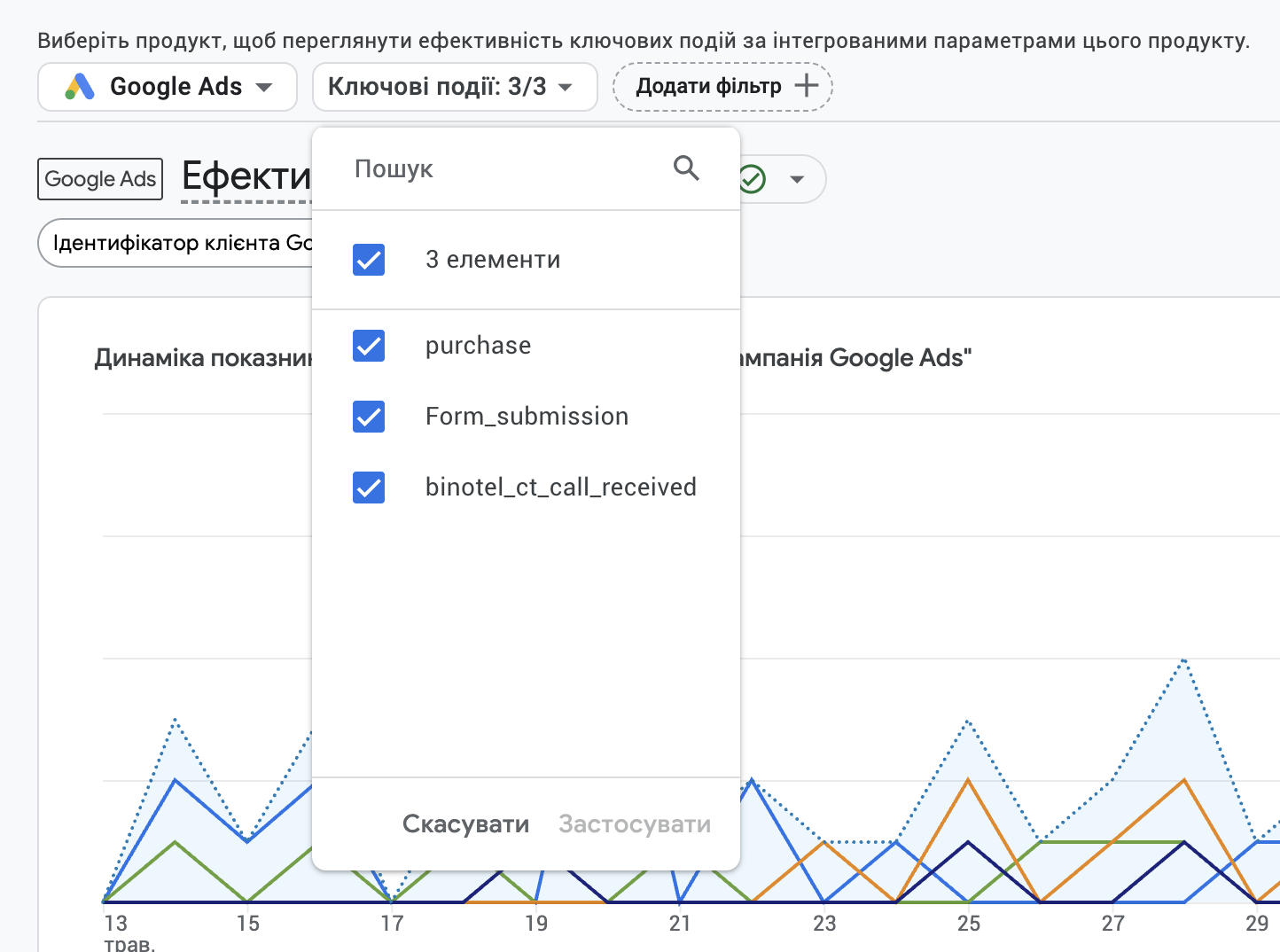
Three Key GA4 Events for a Dental Clinic
binotel_ct_call_received— tracks inbound calls via Binotel call tracking. Every inbound call to a dynamic number is recorded as a conversion in GA4 and Google Ads.Form_submission— appointment form submission. Configured via GTM or natively in GA4 with confirmation step.
How We Connected Binotel
- Register a Binotel account and obtain dynamic numbers for each traffic source.
- Install the Binotel script on the client’s website.
- Enable Google Analytics integration in Binotel settings.
- Verify that
binotel_ct_call_receivedappears in GA4 DebugView. - Mark all three events as “Key events” in GA4.
- Import conversions from GA4 into Google Ads.
My experience: without call tracking, dental clinics typically undercount conversions by 2–3×. Most patients call rather than fill in a form. That’s why binotel_ct_call_received was the most important event in this case.
Stage 3. Campaign Structure and Launch
For this dental clinic we chose a service-segmentation strategy — each service or service group gets its own campaign. This allows precise budget control and per-direction CPL visibility.
Structure of 4 Campaigns
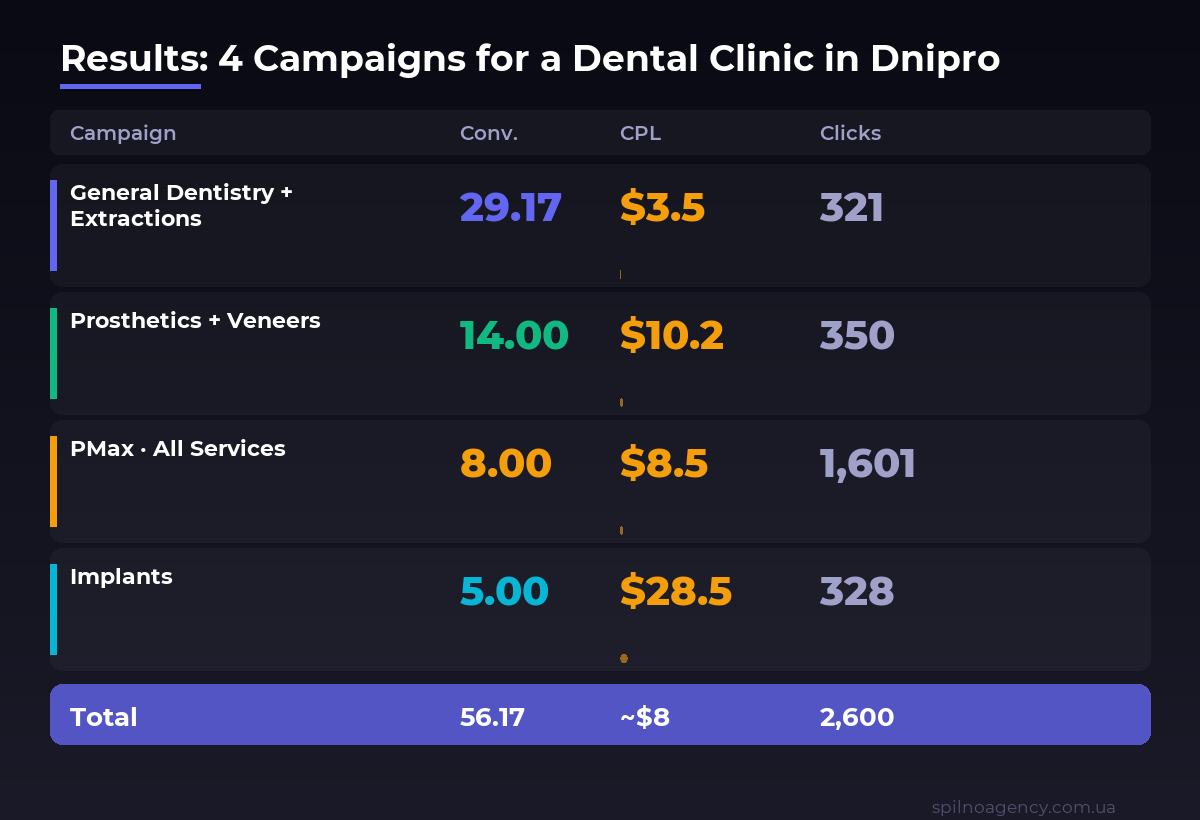
- General Dentistry + Extractions | Dnipro (Search) — high-frequency queries: “dentist Dnipro”, “tooth treatment Dnipro”, “tooth extraction price Dnipro”. Result: 29 conversions, CPL 144 UAH — best result.
- Prosthetics + Veneers | Dnipro (Search) — mid-frequency: “dental prosthetics Dnipro”, “veneers Dnipro price”. Result: 14 conversions, CPL 420 UAH.
- PMax | All Services | Dnipro (Performance Max) — automated coverage across all Google channels. Result: 8 conversions, 1,601 clicks (61% of all traffic), CPL 347 UAH, CPC 1.74 UAH.
- Implants | Dnipro (Search) — low-frequency, high-intent: “dental implant Dnipro”, “implant price Dnipro”. Result: 5 conversions, CPL 1,170 UAH — highest CPL, but justified by service margin.
Geo-Targeting Setup
All campaigns use geo-targeting: Dnipro city + 7 km radius. Setting: “People physically located in this area” — not “People interested in this area”. This one detail prevents calls from patients in other cities — a common mistake that wastes significant budget.
Negative Keywords for Dental Campaigns
Add as negatives: DIY, video, free, training, courses, jobs, essay, names of other cities (if geo-targeting Dnipro only). For the Implants campaign, additionally: forum reviews, what is an implant, how does the surgery work — informational traffic with no purchase intent.
Stage 4. Results Analysis and Optimisation
Analysis starts after the first week — when enough data has accumulated for conclusions. We look at three key metrics: CPL per campaign, conversion share and cost per click.
What the Analysis Revealed
- General dentistry delivers 52% of conversions on 22% of budget — most efficient direction. First action: increase budget for this campaign.
- PMax drives 62% of clicks but only 14% of conversions — cheap clicks (1.74 UAH) but lower conversion rate. Keep PMax for reach and branding, but don’t rely on it as the primary lead source.
- Implants: CPL 1,170 UAH — sounds expensive, but the average implant costs 20,000–40,000 UAH. CPL of 1,170 UAH with >50% margin is a sound result. The key: ensure leads are genuinely interested, not informational.
- Prosthetics + Veneers: CPL 420 UAH — acceptable for premium services. Optimise ad copy, add price and offer extensions.
Optimisations in Month One
- Add new negative keywords — review the search terms report weekly.
- Test new ad variations — headlines with specific prices, promotions, guarantees.
- Reallocate budget: more to general dentistry, less to PMax.
- Review lead quality with the client — are the callers genuine prospective patients?
- Set up remarketing — Google Display Ads for visitors who didn’t convert.
Conclusions: What Worked and What I Learnt
This case reinforced several lessons that apply to any dental advertising:
- Call tracking is non-negotiable. Without Binotel we’d have seen only 30–40% of actual conversions. Most patients call, they don’t fill in forms.
- Service segmentation is decisive. A single “general” campaign would have burned budget on implants (highest CPL) and shown no results at launch.
- PMax ≠ primary campaign. For dental, PMax provides great reach and cheap clicks, but the bulk of conversions come from Search.
- Evaluate CPL against margin. CPL of 1,170 UAH for implants is fine. CPL of 1,170 UAH for a check-up is a disaster. Always factor in service value.


Read also
How to Track Revenue, Transactions and Purchases in Google Analytics 4 from WordPress WooCommerce
Introduction WooCommerce store owners are often convinced that Google Analytics 4 already shows them revenue, transaction counts and…
How Claude Helps Spilno Agency: Google Merchant Coverage in Google Ads
An online store lists 1,375 products in Google Merchant — but how many of them are actually running…
Google Ads for a Local Auto Service: Fewer Impressions, More Customers (Case Study)
A local auto service was spending its ad budget on tens of thousands of cheap impressions that barely…