Meta Ads Event Deduplication: What It Is and How to Improve It in 2026

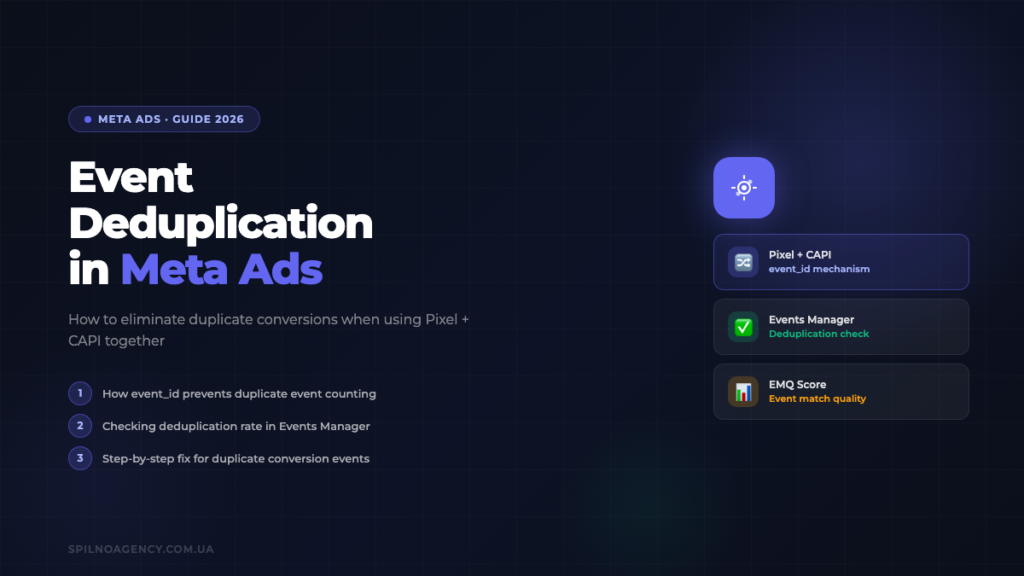
When you run Meta Pixel and the Conversions API simultaneously, every conversion fires twice — once from the browser and once from the server. Without a shared event_id, Meta counts both, inflating your reported conversions and corrupting campaign optimisation. This guide explains exactly how deduplication works in 2026, how to diagnose problems in Events Manager, and how to implement a reliable fix using GTM.
What Is Event Deduplication in Meta Ads?
Event deduplication is Meta’s mechanism for identifying and discarding duplicate conversion events before they are counted in your campaign reporting. In practical terms, it is the answer to a very common problem: when you use both the Meta Pixel (browser-side tracking) and the Meta Conversions API (server-side tracking) at the same time, the same user action — a purchase, a lead form submission, a registration — triggers two separate event signals travelling to Meta’s servers via two different channels. Without deduplication, Meta records two conversions where only one occurred.
The consequences extend far beyond inflated numbers on a dashboard. Meta’s delivery algorithm uses conversion data as its primary training signal. When it receives two Purchase events for every actual sale, it believes your campaign is performing twice as well as it actually is. This corrupts bid optimisation, skews ROAS calculations, and can cause the algorithm to target audiences that appear to convert well on paper but do not in reality. Advertisers across Europe running Performance+ or Advantage+ campaigns are particularly exposed, because these formats rely almost entirely on Meta’s automated signals.
Deduplication became a central concern when Meta began strongly encouraging — and, in effect, requiring — a dual-source setup after Apple’s App Tracking Transparency rollout in 2021. Because iOS users could no longer be tracked reliably through the browser, CAPI became necessary to recover lost signal. The result was that nearly every advertiser running Meta Pixel suddenly needed to think about what happens when the same event arrives from two directions at once.
By 2026, the dual-source Pixel + CAPI setup is the industry standard for any advertiser serious about attribution accuracy. Deduplication is not an optional refinement — it is a foundational requirement of that setup.
Why Duplicate Events Occur: Running Pixel + CAPI Together
To understand why duplicates happen, it helps to trace the journey of a single purchase event through a properly instrumented but not-yet-deduplicated setup.
A user clicks your Meta ad, lands on your website, and completes a checkout. At the moment the order confirmation page loads, two things happen near-simultaneously. First, the Meta Pixel JavaScript tag fires in the user’s browser, calling fbq('track', 'Purchase', {...}) and sending the event directly to Meta’s collection endpoint from the client side. Second, your e-commerce platform or backend records the completed order and fires a server-to-server request to Meta’s Conversions API, also reporting a Purchase event for the same transaction.
Meta now has two incoming events: one from the browser, one from the server, both describing a purchase by what appears to be the same user. Without a shared identifier, Meta has no reliable way to know these two events describe the same transaction. It records both. Your conversion count increases by two for what was a single sale.
Several factors make this worse in practice. Browser ad blockers and tracking prevention features — common among the privacy-conscious European audiences you are targeting — can suppress the Pixel event while allowing the CAPI event through. This means your deduplication logic needs to be robust enough to handle cases where only one source fires. Network latency can also cause the two events to arrive seconds or even minutes apart, which means any deduplication logic must account for a time window, not just exact simultaneous matches.
Additionally, some platforms fire CAPI events asynchronously through queuing systems, meaning a server event for a purchase completed on Monday might arrive at Meta on Tuesday, long after the browser Pixel event was already processed. Meta’s 48-hour deduplication window addresses this, but it requires correct implementation on your end to take advantage of it.
How Event Deduplication Works: The event_id Mechanism
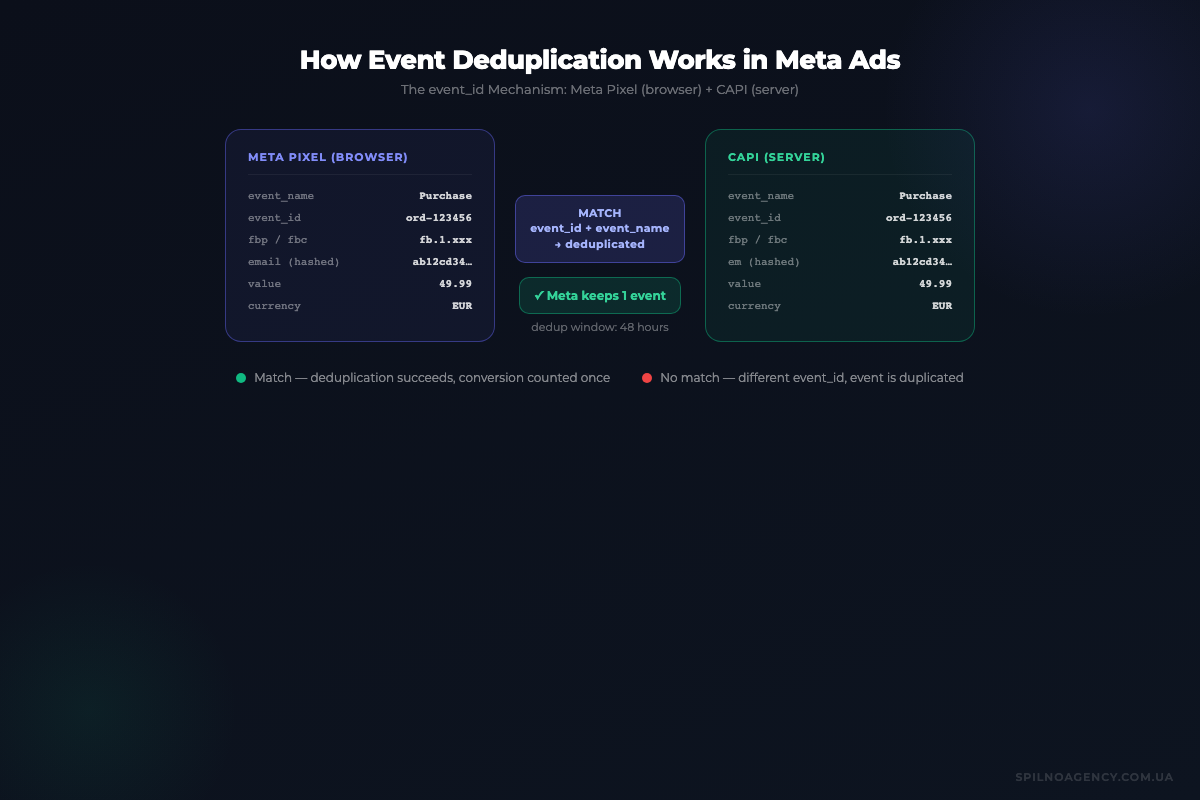
Meta’s deduplication system revolves entirely around a single parameter: event_id. When you send an event from the browser via Pixel and the same event from the server via CAPI, both payloads must include the same event_id value. Meta then uses the combination of event_name + event_id to identify the pair as duplicates and retain only the first one received.
The event_id value itself can be any unique string — a UUID, an order ID, a database record identifier, or a concatenation of user ID and timestamp. What matters is three things: it must be unique per event (two different purchases must have different IDs), it must be identical in both the Pixel call and the CAPI payload for the same event, and it must be generated at the moment the event occurs, not retrieved from a different system at a different time.
In a Pixel implementation, event_id is passed as a property of the custom data object in the fbq() call:
fbq('track', 'Purchase', {
  value: 89.99,
  currency: 'EUR',
  order_id: 'ORD-20260609-4821'
}, {
  eventID: 'ORD-20260609-4821'
});
In the CAPI server payload, the same value is passed as the event_id field at the top level of the event object:
{
  "data": [
    {
      "event_name": "Purchase",
      "event_id": "ORD-20260609-4821",
      "event_time": 1749470400,
      "action_source": "website",
      "user_data": {
        "em": [""],
        "ph": [""]
      },
      "custom_data": {
        "value": 89.99,
        "currency": "EUR",
        "order_id": "ORD-20260609-4821"
      }
    }
  ]
}
When Meta receives these two events with matching event_name (Purchase) and matching event_id (ORD-20260609-4821) within 48 hours, it merges them into a single deduplicated event. The combined event benefits from data available in both signals — browser-side context such as browser fingerprint and URL, and server-side data such as hashed email and phone number — which also improves Event Match Quality.
How to Check Your Deduplication Rate in Events Manager
Meta provides direct visibility into your deduplication performance inside Events Manager. Here is exactly where to look and what each figure means.
Navigate to Meta Business Suite → Events Manager and select your pixel. On the Overview tab, you will see a list of all active events with their source breakdown (browser vs. server). Click on a specific event — for example, Purchase — to open its detail view.
In the detail view, look for the Received column versus the Deduplicated column. The Received count shows the total raw events arriving from all sources before deduplication. The Deduplicated count shows how many were recognised as duplicates and removed. The difference between these two numbers is the final count used in reporting and optimisation.
The Diagnostics tab is where specific deduplication warnings appear. Common alerts include:
- “No event_id found” — your Pixel or CAPI events are missing the
event_idparameter entirely. Deduplication is impossible. - “Duplicate events detected” — Meta is seeing matching events but cannot confirm they share an
event_id, or the IDs differ. - “High event volume from a single source” — an unusual spike suggesting events are firing multiple times per action on the browser side.
A healthy dual-source setup will show a deduplication rate of roughly 40–70% for a Purchase event — meaning approximately half of all received events are identified as duplicates and correctly discarded. A rate near zero suggests event_id is not being passed or is not matching. A rate near 100% would suggest something unusual — possibly events are only being counted once regardless, or Pixel-only events are not reaching Meta at all.
The Test Events tool in Events Manager is invaluable for debugging. By entering your website URL and completing a test conversion, you can watch real-time event arrivals in the test panel and verify that each browser event and server event carry the same event_id.
Step-by-Step Guide to Fix Duplicate Events
If your Events Manager diagnostics show missing or mismatched event_id values, work through these steps in order.
- Identify the source of your event_id. Choose a value that is available at the moment the conversion occurs and is the same whether accessed from browser JavaScript or your server backend. For e-commerce, the order ID is ideal. For lead generation, use a UUID generated at form submission and stored in a hidden field or session variable. Never use a random value generated independently on both sides — they will never match.
- Pass event_id in your Pixel tag. Ensure the
eventIDproperty is included in the options object (the fourth parameter) of every trackedfbq()call — not in the custom data object. The correct syntax is shown in the code example above. Verify this in your browser’s network tab by inspecting requests tofacebook.com/trand confirming theeidparameter is present. - Pass the identical event_id in your CAPI payload. Your server must retrieve the same identifier used on the browser side. For order-based events, this is straightforward: read the order ID from your database. For events that occur before an order exists (such as
AddToCartorInitiateCheckout), generate a UUID on the client side, store it in a cookie or session, and read that value on the server when constructing the CAPI payload. - Verify the event_name matches exactly. Deduplication requires that
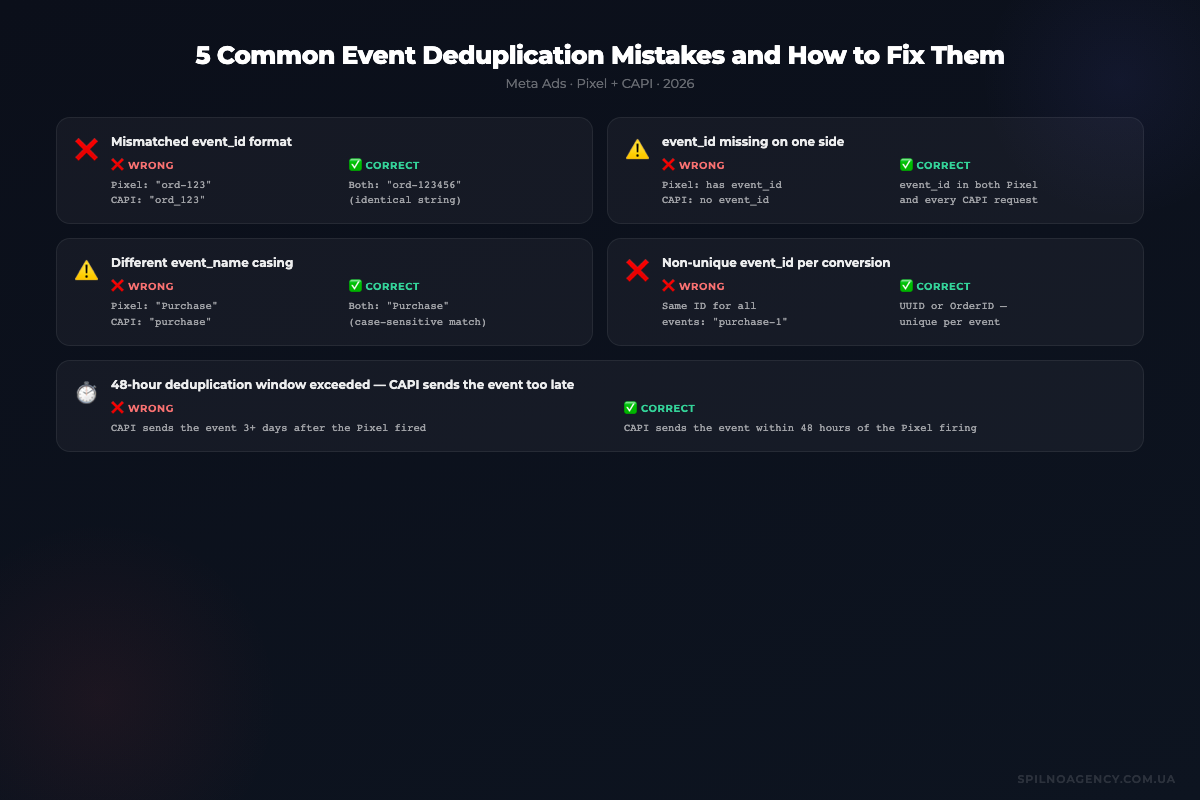
event_nameis identical in both sources.Purchaseandpurchaseare treated as different events. Use consistent capitalisation everywhere. - Check your CAPI delivery timing. If your server sends CAPI events with a significant delay — for example, batched nightly — events may fall outside the 48-hour deduplication window relative to the Pixel event. Aim to send CAPI events within minutes of the user action. Batching is acceptable if the delay stays well under 48 hours.
- Use the Test Events tool to confirm. After deploying your changes, open Events Manager → Test Events, trigger a conversion on your website, and inspect the incoming events. You should see one browser event and one server event with matching
event_idvalues, and the panel should indicate they were successfully deduplicated into a single counted event. - Monitor for 48–72 hours after deployment. Deduplication rates in Events Manager are not updated in real time. Allow at least two days of live traffic before drawing conclusions from the Diagnostics tab metrics.
Common Event Deduplication Mistakes to Avoid
Even teams with solid technical expertise regularly make the same deduplication errors. Understanding these failure patterns helps you audit your own setup more effectively.
Generating event_id independently on browser and server
The most destructive mistake is using a randomly generated UUID on the browser side and a separately generated UUID on the server side. Both calls produce valid-looking event_id parameters, but because they are different strings, Meta sees two unique events and counts both. This is worse than having no event_id at all, because it gives the appearance of correct implementation while still producing duplicates.
Using non-unique event_id values
Using a static string such as "purchase" or a timestamp rounded to the nearest minute as your event_id causes a different problem: multiple distinct conversions receive the same ID. Meta will deduplicate them against each other, and you will under-report conversions. Each event instance must have a globally unique identifier.
Sending CAPI without event_id when Pixel also fires
Some CAPI integrations — particularly platform-native integrations for WooCommerce, Shopify, or similar tools — send events without an event_id field. If your Pixel tag is also active, you will have zero deduplication between the two channels. Always verify that platform integrations support and are configured to send event_id.
Mismatched event_name casing
As noted above, Purchase and purchase are treated as separate event types. Meta’s standard event names use PascalCase (Purchase, Lead, AddToCart). Ensure your CAPI and Pixel implementations use identical casing for every event name.
Configuring deduplication only for Purchase but not for other events
Teams often focus exclusively on Purchase events, overlooking Lead, CompleteRegistration, InitiateCheckout, and AddToCart. If your campaigns optimise towards any of these events — common for lead-generation campaigns across European markets — each needs its own event_id strategy.
Assuming CAPI replaces Pixel rather than complementing it
Some advertisers disable Pixel entirely once CAPI is running, reasoning that server-side tracking is more reliable. This removes browser-side data — viewport information, click paths, session data — that CAPI cannot capture and that contributes to Event Match Quality. The correct setup is both channels running simultaneously with deduplication, not one replacing the other.
Event Deduplication in GTM: Practical Approach
Google Tag Manager is the most common way to deploy Meta Pixel on European websites, and it requires a specific approach to pass event_id correctly. The challenge is that GTM’s Pixel tags need to receive the event_id value from somewhere — and that value must be the same one your server will use.
The recommended pattern is to push the event_id into the GTM dataLayer from your website’s backend at the moment the conversion occurs, then read it in your GTM Pixel tag via a Data Layer Variable.
On your order confirmation page, add a dataLayer push like this:
window.dataLayer = window.dataLayer || [];
window.dataLayer.push({
  'event': 'purchase_complete',
  'transactionId': 'ORD-20260609-4821',
  'metaEventId': 'ORD-20260609-4821',
  'transactionTotal': 89.99,
  'transactionCurrency': 'EUR'
});
In GTM, create a Data Layer Variable named DLV - Meta Event ID with the key metaEventId. Then, in your Meta Pixel — Purchase tag, configure the event options to include the eventID field mapped to this variable.
Your tag’s custom JavaScript for the Purchase event should look like this:
fbq('track', 'Purchase', {
  value: {{DLV - Transaction Total}},
  currency: {{DLV - Transaction Currency}},
  order_id: {{DLV - Transaction ID}}
}, {
  eventID: {{DLV - Meta Event ID}}
});
On the server side, your backend reads the same order ID from your database when processing the CAPI request. Since both the dataLayer push and the CAPI payload use the same order ID as the event_id / metaEventId, the values will always match.
For events that occur before an order exists — such as AddToCart or InitiateCheckout — generate a UUID in JavaScript at the moment of the event and push it to the dataLayer immediately. Store the same UUID in a first-party cookie so your server can retrieve it when processing any subsequent server-side tracking for that session.
// Generate UUID for pre-purchase events
function generateEventId() {
  return 'evt-' + Date.now() + '-' + Math.random().toString(36).substr(2, 9);
}

var eventId = generateEventId();
document.cookie = 'meta_event_id=' + eventId + '; path=/; max-age=3600';

window.dataLayer.push({
  'event': 'add_to_cart',
  'metaEventId': eventId
});
This approach works whether you are using a custom GTM server-side container, a direct CAPI integration, or a third-party CAPI middleware. The principle is always the same: one source of truth for the event_id, shared between browser and server.
For a complete implementation walkthrough, see the guides on Meta Pixel setup and Meta Conversions API.
How Deduplication Affects Event Match Quality (EMQ)
Event Match Quality is Meta’s score (0–10) reflecting how accurately the events you send can be matched to real Meta users. A higher EMQ means Meta can attribute more of your conversions to the right people, improve lookalike audience modelling, and optimise bidding more precisely. Poor deduplication indirectly damages your EMQ — and understanding why helps prioritise the fix.
When deduplication is broken and Meta receives two separate events for the same conversion, it processes each event independently for matching purposes. The browser-side Pixel event typically carries strong browser-context signals — the fbp cookie, the user agent, the source URL — but often lacks hashed customer identifiers like email or phone number if the user is not logged in. The server-side CAPI event typically carries hashed em (email), ph (phone), and potentially external_id — but lacks browser context.
When deduplication works correctly, Meta merges these two events into one rich signal that contains both browser context and customer identifiers. This merged event scores significantly higher on EMQ than either source alone. A combined Pixel + CAPI event with proper deduplication can score 7–9 out of 10, compared to 4–6 for Pixel-only or basic CAPI-only events.
The practical implication is that fixing deduplication is not just about correcting your conversion counts — it also improves the quality of every signal Meta uses to run your campaigns. Higher EMQ leads to better audience matching, more efficient automated bidding, and ultimately lower cost per acquisition. For advertisers managing Meta Ads campaigns at scale across European markets, this quality improvement compounds over time as the algorithm accumulates better training data.
To maximise EMQ in a deduplicated setup, ensure that both your Pixel and CAPI events pass as many customer data parameters as are available. On the Pixel side, use the fbq('init', 'PIXEL_ID', {...}) call to pre-populate the pixel with hashed user data when a logged-in user visits your site. On the CAPI side, always include em, ph, fn (first name), ln (last name), ct (city), country, and external_id wherever available. Hashing must follow Meta’s SHA-256 normalisation rules — lowercase, trimmed, no whitespace before hashing.
Frequently Asked Questions About Meta Ads Event Deduplication
What is event deduplication in Meta Ads?
Event deduplication is the process by which Meta’s servers identify and discard duplicate conversion events sent from multiple sources — most commonly from both the Meta Pixel (browser-side) and the Conversions API (server-side) at the same time. Without deduplication, the same purchase would be counted twice, inflating your reported conversions and distorting campaign optimisation.
What is event_id and why does it matter?
event_id is a unique string you assign to each conversion event. The same value must be sent in both the Pixel fbq() call and the CAPI payload for the same user action. When Meta receives two events with matching event_name, event_id, and a close timestamp (within 48 hours), it keeps only one. Without a matching event_id, both events are recorded and you get duplicates.
How do I check whether my events are being deduplicated correctly?
Go to Meta Events Manager, open your pixel, and click the Diagnostics tab. Look for the “Deduplicated events” metric — it shows the percentage of events successfully deduplicated. You can also open individual event rows to see how many came from browser versus server and how many were merged. Use the Test Events tool to verify in real time that matching event_id values are being sent.
Can I use event_id with Google Tag Manager?
Yes. The recommended approach is to push a unique event_id into the GTM dataLayer as part of your conversion trigger — for example, on the thank-you page or after a form submit. Your Meta Pixel tag then reads this variable via a Data Layer Variable and passes it to fbq(). Your server-side CAPI implementation must use the same ID from the same source — typically the order ID or a UUID generated at checkout and stored in a first-party cookie.
What happens if event_id values do not match between Pixel and CAPI?
If the event_id values differ, Meta treats the two events as separate conversions and counts both. This leads to double-counting, inflated ROAS figures, misguided campaign optimisation decisions, and potential budget waste as the algorithm receives incorrect signals. It is functionally equivalent to having no deduplication configured at all.
Does event deduplication affect Event Match Quality (EMQ)?
Deduplication itself does not lower EMQ, but the setup process that ensures correct deduplication — passing hashed customer data such as email, phone, and external_id consistently from both Pixel and CAPI — directly improves EMQ. A well-configured dual-source setup with proper event_id handling typically results in EMQ scores of 7–9 out of 10, significantly higher than either source alone.
Is deduplication necessary if I only use CAPI without Pixel?
If you send events exclusively via CAPI and have no Pixel tag firing for the same events, deduplication is not required. However, removing Pixel entirely also removes valuable browser-context signals that contribute to EMQ and attribution accuracy. The recommended approach remains dual-source with deduplication. If you ever add or re-enable Pixel tracking, event_id matching must be implemented immediately.
How long does Meta’s deduplication window last?
Meta deduplicates events within a 48-hour window. If two events with the same event_id and event_name arrive within 48 hours of each other, only the first one received is retained. Events arriving after this window are treated as new, distinct events regardless of the event_id. For most e-commerce setups, CAPI events should be sent within minutes of the browser event to stay comfortably within this window.
Need help setting up event deduplication?
Spilno Agency configures the Meta Pixel + Conversions API pairing for European businesses: a single shared event_id, correct event delivery across both channels, and verification in Events Manager so conversions aren’t double-counted and your Meta campaigns optimise on clean data.

Read also
Google Tag Manager Workspaces: Why You Need Them and How to Use Them in 2026
A workspace in Google Tag Manager is a “draft” of a container — a place to safely edit…
How to Track Revenue, Transactions and Purchases in Google Analytics 4 from WordPress WooCommerce
Introduction WooCommerce store owners are often convinced that Google Analytics 4 already shows them revenue, transaction counts and…
How to Analyze Hourly Statistics in Google Analytics 4
Google Analytics 4 has no dedicated “hourly statistics” menu item, but you can get that exact breakdown in…