Product Page SEO for Online Stores: Complete 2026 Guide

Product page SEO is where rankings translate directly into revenue. This guide covers every on-page element — URL, title, schema, images, internal links — that European e-commerce stores need to optimise to outrank competitors and convert more organic visitors into buyers.
What Is Product Page SEO and Why It Matters
Product pages are the commercial backbone of any online store. Unlike category pages or blog posts, they target buyers at the bottom of the funnel — people who already know what they want and are deciding where to purchase it. Getting product page SEO right means capturing this high-intent traffic before a competitor does.
The challenge is scale. A mid-sized e-commerce catalogue can contain thousands of product pages, each competing for its own slice of search visibility. Small mistakes — duplicate meta descriptions, missing schema, uncompressed images — multiply across the entire catalogue and erode rankings site-wide.
Well-optimised product pages deliver three compounding benefits: higher rankings for transactional queries, better click-through rates from rich results in SERPs, and stronger conversion rates because the page content matches exactly what the searcher was looking for.
1. Product Page URL
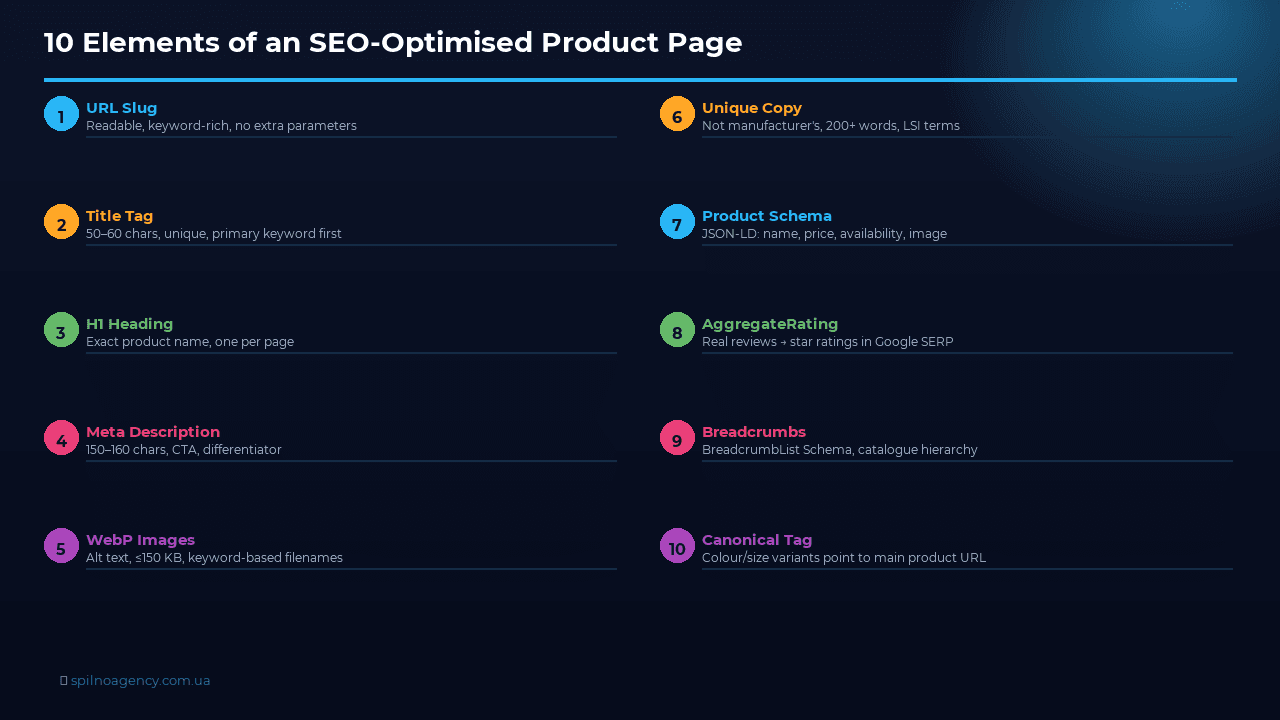
A clean, descriptive URL is the foundation of product page SEO. Search engines read URLs to understand page context, and users scan them in SERPs before clicking.
- Keep URLs short and descriptive:
/trainers/nike-air-max-90-whitebeats/product?id=4821&cat=7 - Use hyphens between words, never underscores or spaces
- Include the primary keyword naturally — do not stuff multiple keywords
- Avoid session IDs, tracking parameters, or auto-generated numeric strings in canonical URLs
- Once a URL is indexed and receiving traffic, do not change it without a 301 redirect — losing the URL means losing its backlink equity
For product variants (colours, sizes), keep the canonical URL pointing to the main product and use URL parameters for variants — more on this in the technical section.
2. Title Tag and H1
The title tag is the single most impactful on-page SEO element. It is displayed as the clickable headline in Google’s search results and carries significant ranking weight.
A reliable formula for product pages: Product Name | Key Feature | Brand. For example: Nike Air Max 90 — White Leather — Men’s Running Trainers. This structure frontloads the most important keyword, adds a differentiating attribute, and reinforces brand trust.
- Keep the title tag between 50 and 60 characters to avoid truncation in SERPs
- Every product page must have a unique title — identical titles across variants confuse both users and search engines
- The H1 heading on the page should match or closely mirror the title tag, but it can be slightly longer and more descriptive
- Avoid using the same H1 as your category pages — this creates keyword cannibalisation
3. Meta Description
The meta description does not directly affect rankings, but it has a significant impact on click-through rate. Google displays it below the title in search results, and a compelling description can be the deciding factor between a user clicking your listing or a competitor’s.
- Write between 150 and 160 characters — longer descriptions are truncated mid-sentence
- Include the primary keyword naturally — Google bolds matched terms in the snippet
- Add a clear call to action: “Shop now”, “Free delivery across Europe”, “In stock — ships within 24 hours”
- Mention a key differentiator: free returns, warranty period, exclusive colour
- Never duplicate meta descriptions across pages — write unique ones even for product variants
4. Images: Files, Alt Text, Compression
Product images are a conversion asset, but they are also an SEO opportunity that most stores underutilise. Google Images drives meaningful referral traffic for visual product categories, and image metadata feeds into both standard and rich search results.
- File names: rename images before uploading —
nike-air-max-90-white-mens.jpgsignals context;IMG_4821.jpgdoes not - Alt text: describe the image accurately using the product name and primary keyword. Example:
Nike Air Max 90 in white leather — men's running trainers, side view - Format: use WebP for all product images — it delivers 25–35% smaller file sizes than JPEG at equivalent visual quality
- Compression: uncompressed images are one of the leading causes of poor Core Web Vitals scores. Keep the main product image under 150 KB
- Dimensions: serve images at the display size — avoid loading a 3000px image to display it at 400px; always specify
widthandheightto prevent CLS
5. Unique Product Descriptions
Copying manufacturer descriptions is one of the most common SEO mistakes in e-commerce. If dozens of retailers use the same supplier text, Google has no basis to prefer one store over another — and may suppress all of them in favour of the manufacturer’s own page.
A unique product description does three things simultaneously: it helps Google understand what is distinctive about this page, it gives users information they cannot find elsewhere, and it establishes your store as an authority rather than a reseller clone.
- Rewrite all supplier descriptions in your own voice before publication
- Include the primary keyword in the first paragraph, naturally
- Address the buyer’s real questions: who is this product for, what problem does it solve, why buy it here?
- Add specifics the manufacturer omits: sizing notes, material care instructions, compatibility details
- Aim for at least 200–300 words per product — thin pages rank poorly for competitive queries
6. Price, Availability and Specifications
Accurate, up-to-date product data is both a user experience requirement and an SEO signal. Google can crawl product pages repeatedly to verify that structured data matches what is displayed on the page. Discrepancies — a schema markup showing “InStock” while the page says “Out of stock” — result in rich result penalties.
- Keep price and availability status synchronised between your product database and the rendered HTML
- Display specifications in a consistent format — a structured table outperforms a bulleted list for complex technical products
- If a product is temporarily out of stock, use
OutOfStockin schema rather than removing the page — the page retains its ranking equity - Product specifications in tabular format improve dwell time and reduce bounce rate, both positive engagement signals
7. Product Schema Markup
Product schema (structured data in JSON-LD format) tells Google precisely what type of page this is and enables rich results: star ratings, price, availability, and shipping information displayed directly in SERPs. Rich results consistently achieve higher click-through rates than standard blue links.
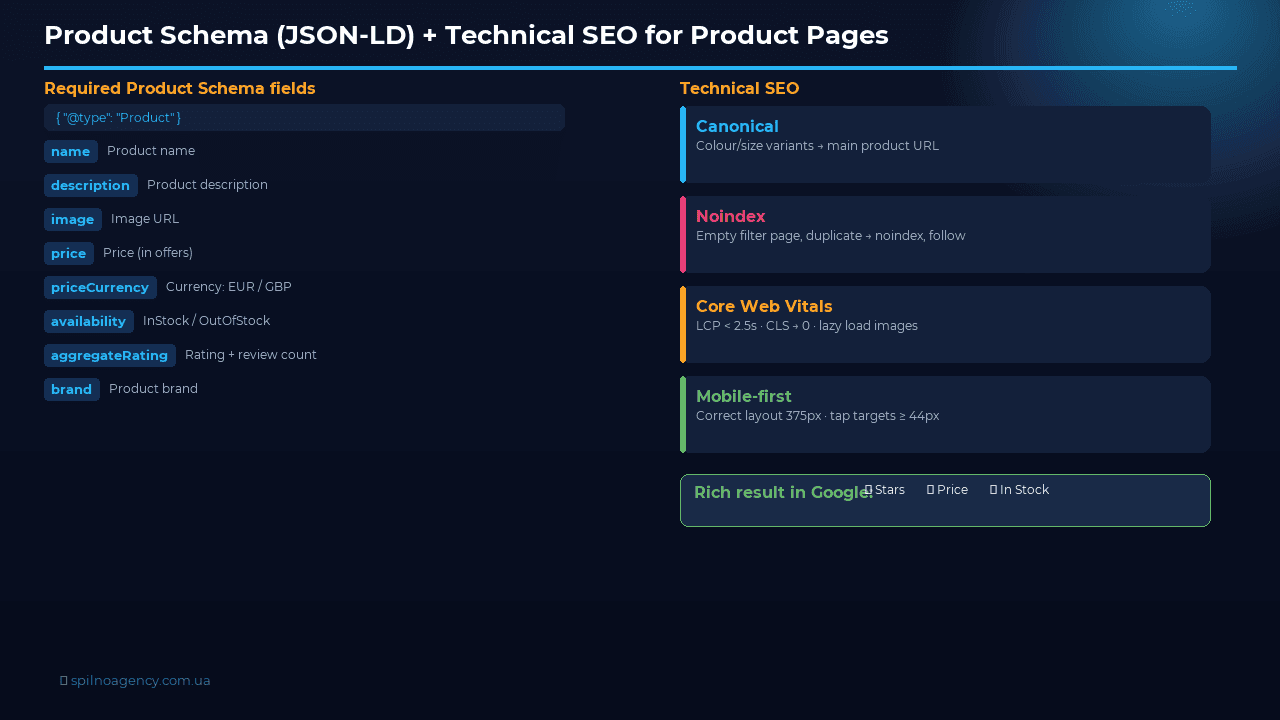
The minimum required fields for a valid Product schema are: name, description, image, offers (containing price, priceCurrency, and availability). Adding brand, sku, gtin, and aggregateRating unlocks additional rich result features.
{
  "@context": "https://schema.org/",
  "@type": "Product",
  "name": "Nike Air Max 90 — White Leather",
  "description": "Men's running trainers in premium white leather. Lightweight sole, padded ankle collar, available in sizes EU 40–47.",
  "image": [
    "https://example.com/images/nike-air-max-90-white-side.webp",
    "https://example.com/images/nike-air-max-90-white-top.webp"
  ],
  "brand": {
    "@type": "Brand",
    "name": "Nike"
  },
  "sku": "AM90-WHT-001",
  "gtin13": "0012345678905",
  "offers": {
    "@type": "Offer",
    "url": "https://example.com/trainers/nike-air-max-90-white",
    "priceCurrency": "EUR",
    "price": "129.99",
    "priceValidUntil": "2026-12-31",
    "itemCondition": "https://schema.org/NewCondition",
    "availability": "https://schema.org/InStock"
  },
  "aggregateRating": {
    "@type": "AggregateRating",
    "ratingValue": "4.7",
    "reviewCount": "238"
  }
}
Place the JSON-LD block in the <head> or at the end of the <body>. Validate using Google’s Rich Results Test after implementation.
8. Reviews and Ratings
Customer reviews serve a dual purpose: they are the highest-trust conversion element on a product page, and when marked up with AggregateRating schema, they generate the star rating display in SERPs — one of the most visible and click-rate-boosting rich result features available.
- Actively invite post-purchase reviews via email — user-generated content also adds fresh, keyword-rich text to the page
- Display the overall rating and review count prominently near the product title
- Respond to negative reviews publicly — this demonstrates trustworthiness to Google’s E-E-A-T assessment
- Never fake reviews or import them from third-party platforms and mark them as site reviews — this violates Google’s guidelines
- The
aggregateRatingmust reflect actual on-page reviews — do not include it in schema if the page has fewer than 3 reviews
9. Internal Linking
Internal links distribute PageRank across the site and guide users through the purchase journey. Product pages are often deep in the site architecture — without deliberate internal linking, they are difficult for both crawlers and users to find.
- Breadcrumbs: implement structured breadcrumbs (
BreadcrumbListschema) on every product page — they provide navigation context and appear in SERPs - Category to product: ensure every product is linked from at least one category page — orphan products receive no crawl budget
- Related products: “You may also like” sections create horizontal internal links that spread authority and increase average session depth
- Blog to product: link relevant how-to or review articles directly to corresponding product pages
- Anchor text: use descriptive anchor text matching the target product’s primary keyword — avoid generic “click here” or “see more” anchors
10. Technical Aspects
Technical SEO on product pages is largely about managing duplicate content created by filtering, sorting, and variant parameters — a common source of wasted crawl budget and cannibalisation.
- Canonical tags: for colour and size variants, set
rel="canonical"pointing to the main product URL, unless the variant has sufficient unique content and search volume to justify its own canonical - Faceted navigation: URL parameters generated by filtering should either be canonicalised or blocked via
robots.txt— letting Google crawl thousands of filter combinations wastes crawl budget - Noindex for empty results: if a filtered page returns zero products, set it to
noindex, follow - Core Web Vitals: product pages often fail on LCP due to large hero images. Use
loading="eager"andfetchpriority="high"on the primary product image
SEO for Product Variants: Colour, Size and Material
One of the most common questions in e-commerce SEO: if trainers come in eight colours, should you create eight separate pages or one? The answer depends on search demand and technical implementation.
When variants stay on a single page
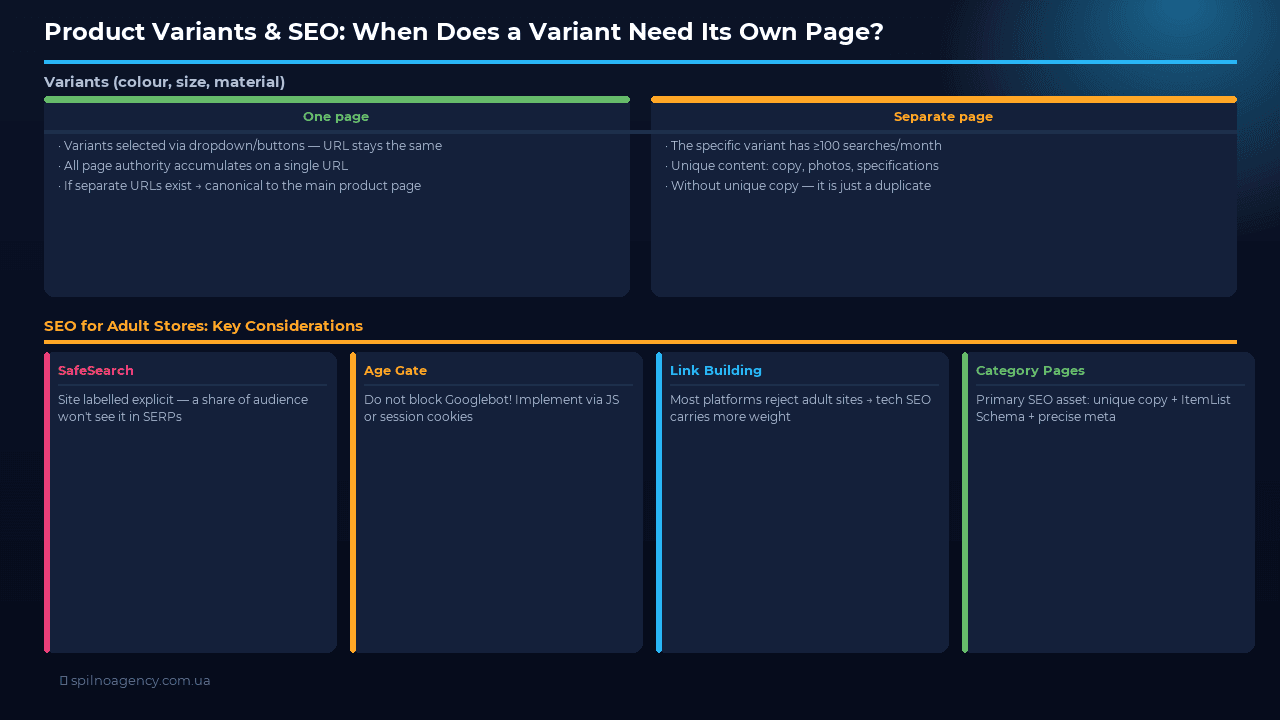
This is the standard approach for most stores. The customer selects colour or size via a dropdown or button group — the URL does not change. Advantages: a single page accumulates all SEO authority, there is no duplicate content risk, and technical maintenance is simpler.
If variants technically generate separate URLs (e.g. ?color=red or /trainers-red/), always set rel="canonical" pointing to the main product page. This tells Google that all variants are versions of the same product and prevents authority dilution across multiple URLs.
When a variant deserves its own page
A dedicated page is justified only when a specific variant has its own measurable search demand. Check in Ahrefs or Google Keyword Planner: do shoppers search for “red Nike trainers” separately from “Nike trainers”? If the colour-specific keyword generates 100–200+ monthly searches, a targeted URL with matching Title and H1 can deliver meaningful results.
Criteria for creating a separate variant page:
- Measurable standalone search volume (100+ searches/month)
- The variant has meaningfully different content: distinct images, description, specifications
- Different target audience (e.g. “children’s bike blue” vs “children’s bike pink”)
- Capacity to write unique copy for each variant — without this, a separate page is just a duplicate
Schema markup for variants
When all variants share one page, use a single Product Schema with aggregate data. Express price as a range ("priceRange": "£49–£89") or use multiple Offer objects within the offers field. When variants have separate URLs, each page requires its own complete Schema with the relevant variant data.
SEO for Adult Product Stores: What to Consider
Google indexes adult product stores (sex shops, 18+ goods) and shows them in search results — but with a number of constraints and platform-level behaviours that directly affect visibility and traffic.
SafeSearch and search result filtering
Google automatically identifies adult content and labels a site as “explicit”. For such sites, SafeSearch — which is enabled by default for many users — hides results entirely. A significant portion of your potential audience will simply never see your store in search results, regardless of how well your SEO is executed. You cannot disable SafeSearch for your own site — the setting is controlled by the user. Factor this in when interpreting traffic estimates from SEO tools: real reach will be lower than the numbers suggest.
Technical SEO and age verification
If your site includes an age-gate page, ensure it does not block crawling. Googlebot does not interact with JavaScript confirmation dialogs or click-through pages. If the age gate is protected by noindex or blocked in robots.txt, all pages behind it may become invisible to the crawler. The correct implementation: age verification is handled via JavaScript or session cookies, with no technical barriers preventing Googlebot from reaching product and category pages.
Link building limitations
Most guest posting platforms, content marketplaces and general web directories reject adult-category sites. Traditional link building is significantly constrained. Alternative strategies: niche-specific directories, affiliate partnerships with complementary publishers, PR in industry media. As a result, technical SEO and internal linking carry disproportionately more weight for adult stores — they are the levers you control entirely.
Category pages matter more than in standard e-commerce
Individual product names in the adult category are often highly specialised with low individual search volume. Category-level queries, however — “vibrators buy”, “adult toys online shop” — carry stable, consistent demand. A well-optimised category page with unique copy, correct ItemList Schema and precise meta tags is the primary SEO asset for this type of store.
E-E-A-T and content quality standards
Google places adult product stores under heightened E-E-A-T scrutiny. Demonstrate expertise through informational content (articles on health, relationships, product safety), be transparent about the company, display real customer reviews and clear contact information. Google Ads and Meta Ads impose strict limitations or outright bans on 18+ product advertising. For paid traffic, explore specialist platforms: TrafficJunky (Pornhub network), ExoClick and JuicyAds — these are built for 18+ audiences and offer geo, device and content-category targeting.
Product Page SEO Checklist
- URL is short, descriptive, uses hyphens, contains the primary keyword
- Title tag follows the Product Name | Feature | Brand formula and is under 60 characters
- Every product page has a unique title tag — no duplicates across variants
- Meta description is 150–160 characters, includes a keyword and a CTA
- H1 matches or closely mirrors the title tag and appears once on the page
- Product images are in WebP format, compressed, and have descriptive file names
- Every product image has a unique, keyword-relevant alt text
- Product description is original (not copied from the manufacturer) and at least 200 words
- Product schema (JSON-LD) includes name, description, image, price, currency, and availability
- Schema availability status matches what is shown on the page
- AggregateRating is present in schema only if real on-page reviews exist
- Breadcrumb navigation is implemented with BreadcrumbList schema
- Canonical tag is set correctly — variants point to the main product URL
- Faceted navigation parameters are either canonicalised or blocked from indexing
- Core Web Vitals pass for mobile — primary product image uses
fetchpriority="high"
FAQ
How long should a product description be for SEO?
There is no fixed minimum, but pages with fewer than 200 words of unique content rarely rank competitively for commercial queries. For high-margin or high-competition products, aim for 300–500 words. Avoid padding — search engines reward relevance, not word count for its own sake.
Should out-of-stock product pages be deleted or set to noindex?
Neither — unless the product is permanently discontinued. Deleting or noindexing an out-of-stock page removes its accumulated ranking equity. Mark the product as OutOfStock in schema, display an estimated restock date or a “notify me” form, and keep the page live. If the product is permanently gone, 301 redirect to the most relevant category or replacement product.
Do product page URLs need to include the category path?
Including the category in the URL adds contextual signals and mirrors the site architecture. However, deep nesting creates unnecessarily long URLs. Two levels beyond the root domain is generally optimal for product pages.
Is it necessary to have schema markup on every product page?
Yes — at minimum the Product and Offer types. Rich results for product pages are only possible with structured data. Stores that do not implement schema are invisible in these enhanced placements. The implementation cost via a CMS plugin or template-level JSON-LD is low relative to the ongoing benefit.
How do I handle SEO for product colour and size variants?
The standard approach is to have one canonical product page per product, with variants selected via URL parameters or JavaScript. Set the canonical tag on all variant URLs to point to the primary product URL. The exception: if a specific variant has its own significant search demand, it may justify its own canonical URL with a variant-specific title and description.
How can Spilno Agency help with product page SEO?
Spilno Agency works with e-commerce businesses across Europe on technical and on-page SEO, including large-scale product catalogue optimisation, schema markup implementation, international SEO structure, and Core Web Vitals improvement. If your store is underperforming in organic search despite having good products, the issue is almost always fixable at the page level. Get in touch with our team to discuss your catalogue and growth objectives.

Read also
BANT Lead Qualification Methodology: What It Is and How It Works
BANT is a lead qualification framework built on four criteria: Budget, Authority, Need, Timeline. What it is, example…
Best Claude Skills for Threads (2026)
Claude skills and MCPs for Threads: posts and threads, captions, carousel design, cross-posting from Instagram, the official Threads…
Best Claude Skills for X (Twitter) (2026)
Claude skills and MCPs for X (Twitter): tweets and threads, content planning, X Ads, analytics, outreach. Official X…