SEO Internal Linking: Why You Need It and What Strategies Work

Internal linking is one of the most underestimated SEO tactics available to European businesses. A well-structured internal link system accelerates indexation of new pages, distributes authority across your entire site, and signals to Google the topical depth of your content. This guide from Spilno Agency covers five proven strategies, technical rules, and a practical checklist for auditing your internal links.
What Is SEO Internal Linking
Internal linking refers to the system of hyperlinks that connect one page on your website to another page on the same domain. Unlike external backlinks, internal links are entirely under your control — you decide which pages to connect, with what anchor text, and how much emphasis each link carries.
Google uses internal links for several distinct purposes. First, they act as navigation routes for crawlers: Googlebot follows links to discover new pages. A page with no internal links pointing to it becomes an “orphan page” and may never be crawled or indexed. Second, links pass PageRank — a numerical measure of authority. Pages with many inbound internal links receive more weight and tend to rank higher. Third, anchor text signals the topic of the destination page, helping Google understand relevance.
The PageRank concept was introduced by Brin and Page in 1998, and while the algorithm has grown enormously complex since then, the core principle holds: internal links matter. Google’s own documentation confirms that internal links influence PageRank distribution. A site with deliberate internal linking architecture outperforms a competitor with identical content but disorganised link structure.
How Internal Linking Affects SEO
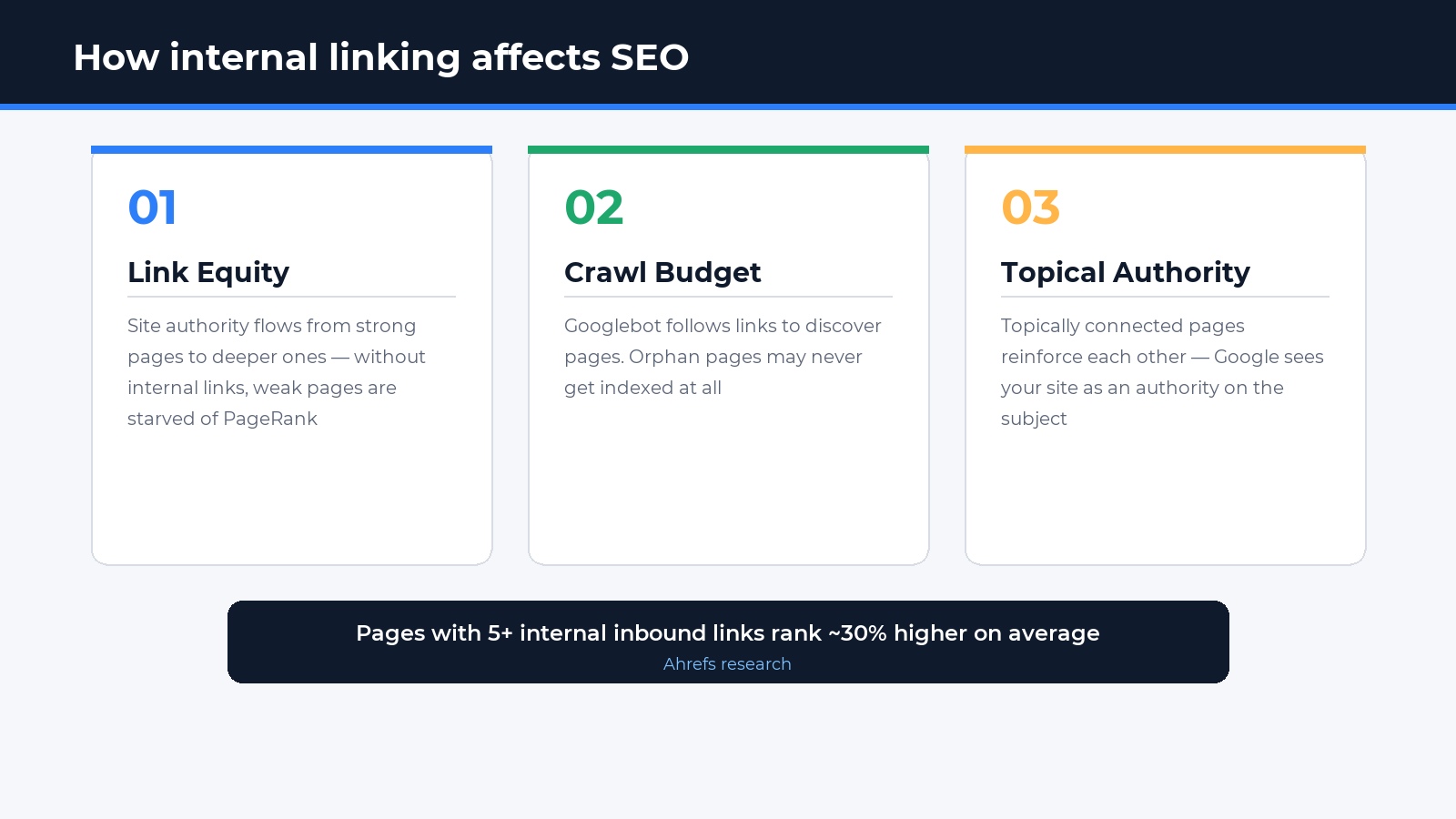
1. Link equity distribution. Authority enters your site through external backlinks and tends to accumulate on a handful of powerful pages — typically the homepage and main category pages. Internal links redistribute this authority to deeper pages. Without them, pages at depth 4–5 clicks receive dramatically less link equity than pages at depth 1–2. Research from Ahrefs found that pages with zero internal links pointing to them rank on average 30% lower than pages with comparable content but 5+ internal inbound links.
2. Crawl budget optimisation. Large sites with thousands of pages face a limited crawl budget — Googlebot won’t endlessly revisit every URL. A clear internal link hierarchy helps the crawler allocate its budget efficiently: important pages are crawled frequently, low-value pages less so. Without this structure, Googlebot may waste budget on paginated filters and duplicate parameter URLs instead of your most important content.
3. Topical authority signals. When a cluster of pages is tightly interlinked and all cover the same subject, Google interprets this as evidence of deep topical expertise. This increases the site’s chances of ranking for broader, more competitive keywords. An agency blog where all Google Ads articles link to each other and point back to the core service page looks significantly more authoritative than a loose collection of disconnected posts.
5 Internal Linking Strategies
There is no single “correct” strategy — the right choice depends on your site type, page count, and SEO goals. Here are five proven approaches used by Spilno Agency across European client projects.
Topical Clusters (Pillar + Cluster)
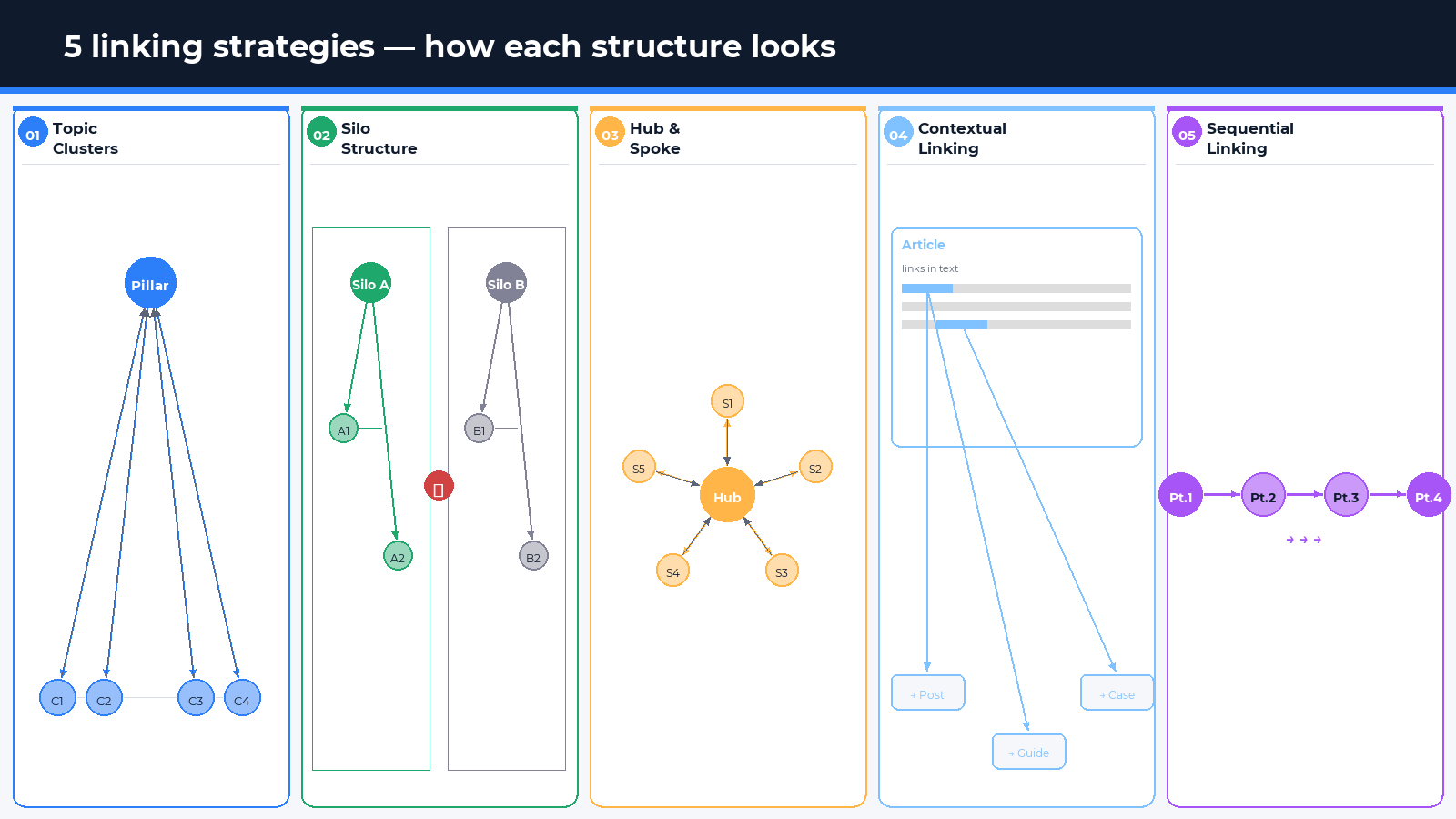
The pillar-cluster model is the most widely adopted strategy for blogs and content marketing. The concept: one comprehensive “pillar” page covers a broad topic in depth. Around it, multiple “cluster” articles each explore a specific sub-topic. Every cluster article links back to the pillar, and the pillar links out to all cluster articles.
Example: a pillar page on “Google Ads for e-commerce” links to cluster articles covering “How to set up Performance Max”, “Smart Bidding strategies”, and “Google Shopping campaigns” — and each cluster article links back to the pillar. Google sees a dense topical group and elevates the authority of the entire theme.
Silo Structure
A silo is a strict separation of your site into isolated thematic sections. Within each silo, links flow freely. Between silos, cross-links are minimal or absent. The goal is to concentrate topical authority inside each silo without “diluting” it across unrelated topics.
This works particularly well for large e-commerce sites, where a “Smartphones” section and a “Refrigerators” section are entirely different topics. Cross-links between them could confuse the crawler and weaken topical signals. A silo keeps each category focused and coherent in Google’s eyes.
Hub-and-Spoke Model
A hub is a central page from which “spokes” radiate outward to subsidiary pages. This differs from the pillar-cluster model in that the hub is typically a navigational or overview page (a category page or service landing), rather than a long-form content piece.
Typical use case: an “SEO Optimisation” service page (hub) links to sub-pages covering “Technical SEO”, “Content Optimisation”, and “Link Building” — with each sub-page linking back to the hub. This efficiently distributes authority while creating a clear user navigation path.
Contextual Linking
Contextual links are placed directly within body content, woven naturally into the text. From an SEO perspective, these are the most valuable type of internal link: they are surrounded by relevant text, the anchor describes the destination, and Google assigns them more weight than navigational links in menus or footers.
The rule: whenever an article mentions a term or concept that has its own dedicated page on your site, add a link. For example, if this article references “crawl budget” or “PageRank” — those terms would ideally link to dedicated explainer articles. This helps both users and search engines navigate related content.
Sequential (Chain) Linking
Sequential linking suits series of articles or step-by-step guides. Each article in the series links to the previous and next piece. This keeps readers on site longer, reduces bounce rates, and helps Google understand the sequence and relationship between articles.
Example: a “Google Ads from scratch” series — Part 1 → Part 2 → Part 3, with each part featuring a navigation block: “Previous article / Next article”. This approach is especially effective for tutorials, onboarding sequences, and how-to content series.
Technical Rules for Effective Internal Linking
Strategy is half the work. The other half is technical execution. Here are the key rules to follow.
- Use descriptive anchor text, not generic phrases. Avoid “here”, “read more”, “click this”. Instead: “Google Shopping campaign strategies 2026”, “how to configure Performance Max”. Descriptive anchors are topical signals for Google.
- Keep links per page under 100–150. Google processes a limited number of links per page. Beyond this threshold, additional links receive minimal weight. Navigational blocks, footers, and tag clouds often consume the available slots.
- Maintain click depth of 3–4 maximum. Every page on your site should be reachable within 3–4 clicks from the homepage. Pages at depth 5+ are rarely crawled efficiently and receive minimal link equity.
- Default to dofollow for internal links. Internal links are dofollow by default and pass authority. Using
rel="nofollow"on internal links is rarely justified. Exceptions: login pages, catalogue filter URLs, duplicate pages (better handled withcanonical). - Fix broken internal links regularly. Links pointing to 404 pages waste authority and create poor user experience. Regular audits using Screaming Frog, Ahrefs Site Audit, or Google Search Console (Coverage report) are essential.
- Vary anchor text naturally. Multiple internal links to the same page should not all carry identical anchor text — this appears manipulative. Vary the phrasing while keeping it relevant and descriptive.
Internal Linking Checklist: 10 Essential Points
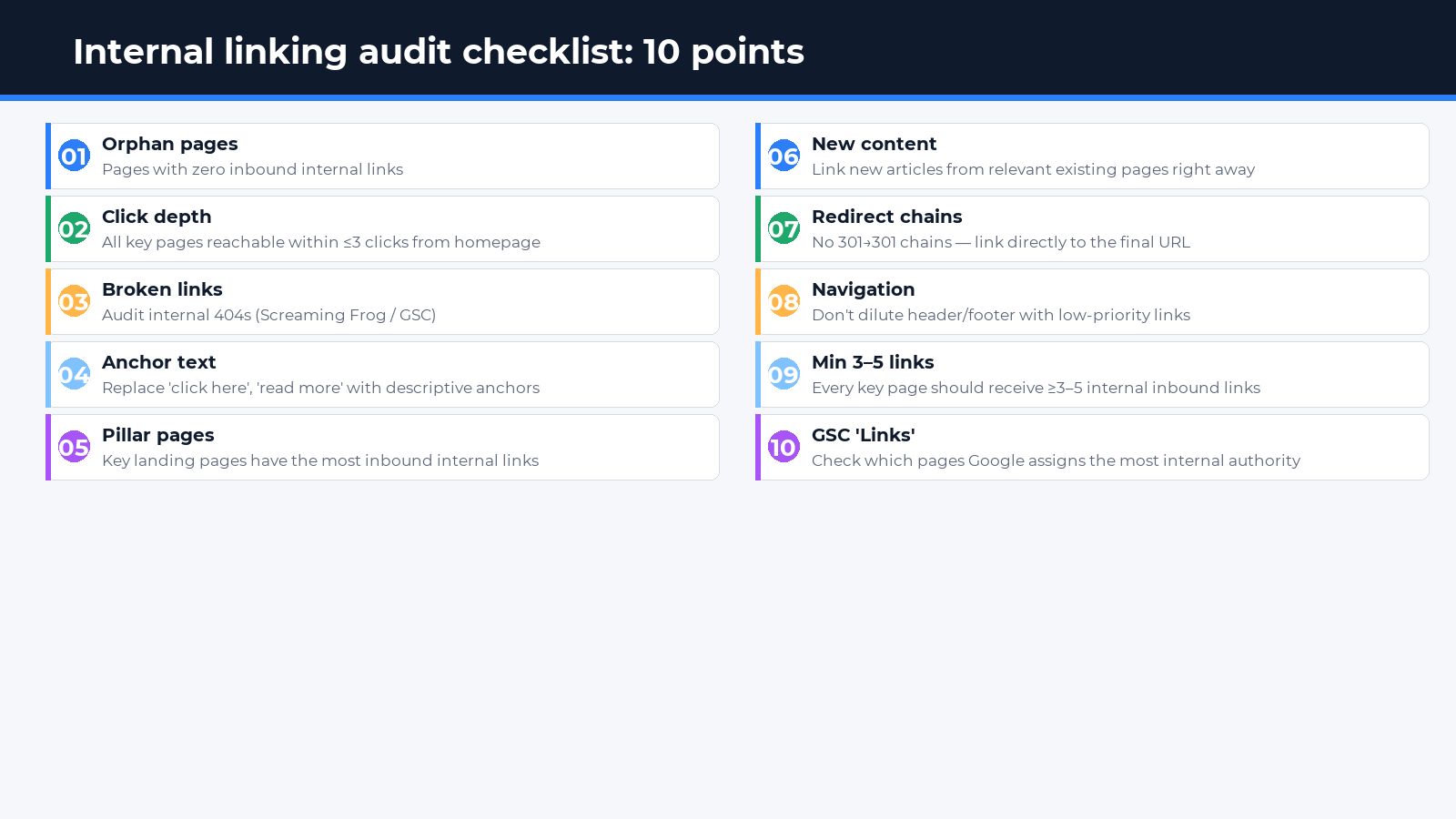
- Identify orphan pages — pages with no internal links pointing to them (use Google Search Console Coverage report or Screaming Frog).
- Confirm all important pages are reachable within 3 clicks from the homepage.
- Find and fix all broken internal links returning 404 errors.
- Audit anchor text: replace generic anchors (“here”, “read more”) with descriptive keyword-relevant phrases.
- Verify that pillar pages (categories, service pages) receive the highest number of inbound internal links.
- Ensure new blog posts immediately receive links from relevant existing content.
- Check for redirect chains: internal links should not pass through multiple 301 redirects before reaching the final URL.
- Verify the navigation menu does not waste too many link slots on low-priority pages.
- Ensure every key landing page has at least 3–5 inbound internal links from relevant content.
- Review the “Links” report in Google Search Console — which page receives the most internal link authority, and does this match your SEO priorities?
Common Internal Linking Mistakes
- Orphan pages. A new article is published but no existing pages link to it. Google discovers it only via the sitemap, indexes it slowly, and assigns minimal authority.
- Footer link overload. A footer duplicated across thousands of pages and packed with links dilutes authority across low-value destinations.
- Redirect chains. A link → 301 → 301 → final URL loses a portion of passed authority at each hop and slows down the crawler.
- Outdated links after redesign. After restructuring URLs, old in-text links point to 404 pages. A full internal link audit after any structural change is non-negotiable.
- Forgetting to update old content when publishing new posts. New articles should trigger a review of existing content — relevant older posts should be updated with links to the new page.
- Over-uniform anchor text. Twenty internal links to the same page all using the exact same anchor text looks manipulative and may send a negative signal.
FAQ: Internal Linking SEO
How many internal links should a page have?
There is no strict limit, but Google recommends keeping the number of links “reasonable” — roughly under 100–150 per page. Quality matters more than quantity: every link should be relevant and genuinely useful to the reader, not inserted purely for authority transfer.
Do links in navigation menus and footers pass PageRank?
Yes, but with less weight than contextual links in body content. Google distinguishes between navigational and editorial links. Excessive footer links duplicated across thousands of pages dilute authority and rarely produce measurable SEO impact.
Should pages in different language versions link to each other?
Language version relationships should be declared through hreflang — not through standard text links. Hreflang tells Google which page serves which audience. Text links between language versions (e.g., “Read in Polish”) are acceptable but must be justified for the user, and they do not replace hreflang.
How does internal linking affect indexation speed?
The effect is direct and significant. A new page that receives links from already-authoritative pages on the site gets indexed far faster. Googlebot follows links from known pages to discover new URLs. An orphan page may wait weeks to be indexed, while a page with 5+ inbound internal links from established content typically appears in the index within 1–3 days.
When is nofollow appropriate on internal links?
The attribute rel="nofollow" on an internal link tells Googlebot not to pass PageRank to the destination. This is appropriate for: login and registration pages, catalogue filter URLs (to prevent duplicate indexation), and legal or terms-of-service pages. For standard content pages and service pages, nofollow is unnecessary and may actually be counterproductive.
Conclusion
Internal linking is not a one-time task — it is an ongoing discipline. Every new blog post requires a check: does it receive links from relevant existing content, and does it link forward to related resources? A systematic approach to internal linking delivers measurable results: faster indexation, balanced authority distribution, and stronger visibility in Google search results across European markets.
If you want to audit your site’s internal linking structure or build a strategy from the ground up, Spilno Agency is ready to help. We analyse site architecture, identify orphan pages and redirect chains, and build a linking system that delivers real ranking impact.

Read also
BANT Lead Qualification Methodology: What It Is and How It Works
BANT is a lead qualification framework built on four criteria: Budget, Authority, Need, Timeline. What it is, example…
Best Claude Skills for Threads (2026)
Claude skills and MCPs for Threads: posts and threads, captions, carousel design, cross-posting from Instagram, the official Threads…
Best Claude Skills for X (Twitter) (2026)
Claude skills and MCPs for X (Twitter): tweets and threads, content planning, X Ads, analytics, outreach. Official X…