Google Analytics 4 Setup Checklist: A Detailed Guide with Problem Examples and Explanations

Why it’s Important to Set Up GA4 Before Promoting Your Website
Google Analytics 4 is a central tool for collecting data about your website visitors, their behavior, traffic sources, conversions, and other key metrics. If this tool is configured incorrectly, all analytics will be distorted. This means that advertising campaigns will be optimized based on incorrect data, and SEO specialists or marketers may make erroneous decisions.
As a result, you might:
- Fail to see the effectiveness of certain traffic channels
- Lose data on transactions or events
- Fail to build remarketing audiences
- Poorly track the effectiveness of SEO or paid campaigns
That’s why setting up GA4 using this checklist is an essential technical foundation before starting website promotion.
0. Get Admin-Level Access to GA4
Before starting the setup, ensure you have administrative access to the GA4 account. Without it, you won’t be able to make most changes.
1. Property
1.1. Property Details
1.1.1. Set the correct time zone (for Ukraine GTM +3)
→ If the time is incorrect, statistics will be confused with other reports, especially important when reconciling with CRM.
1.1.2. Set the correct Currency (for an online store)
→ Otherwise, revenue analytics will be inaccurate, especially if Google Ads imports events from GA4.

2. Data Collection and Modification
2.1. Data Streams
2.1.1. Verify that the data stream is enabled with the “https://” protocol
→ If http is used, there may be security issues and incorrect traffic display.

2.1.2. Verify that enhanced measurement is enabled and all items within this setting are turned on
→ This provides more information about clicks, scrolls, video interactions, etc.
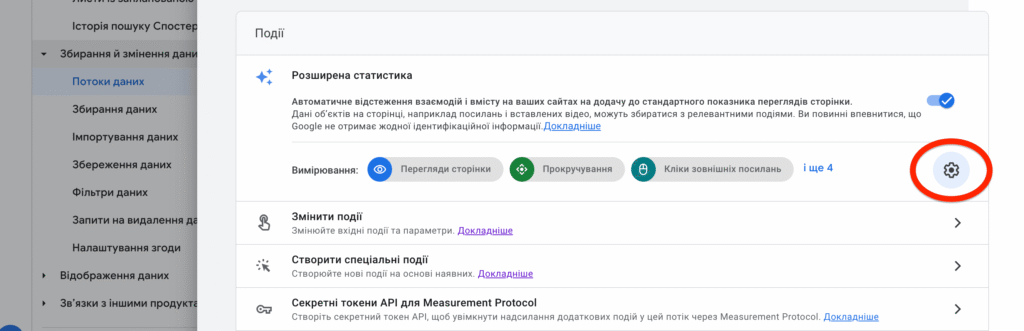
2.1.3. Tag Settings
2.1.3.1. Manage automatic event tracking → enable all tracking
→ If not enabled, important interactions such as page views or button clicks will not be collected.
2.1.3.2. Create a list of unwanted referrals → add all billing systems
→ If this is not done, GA4 will count payments as new sessions from billing sites (e.g., pay.monobank.ua), which distorts the revenue source.

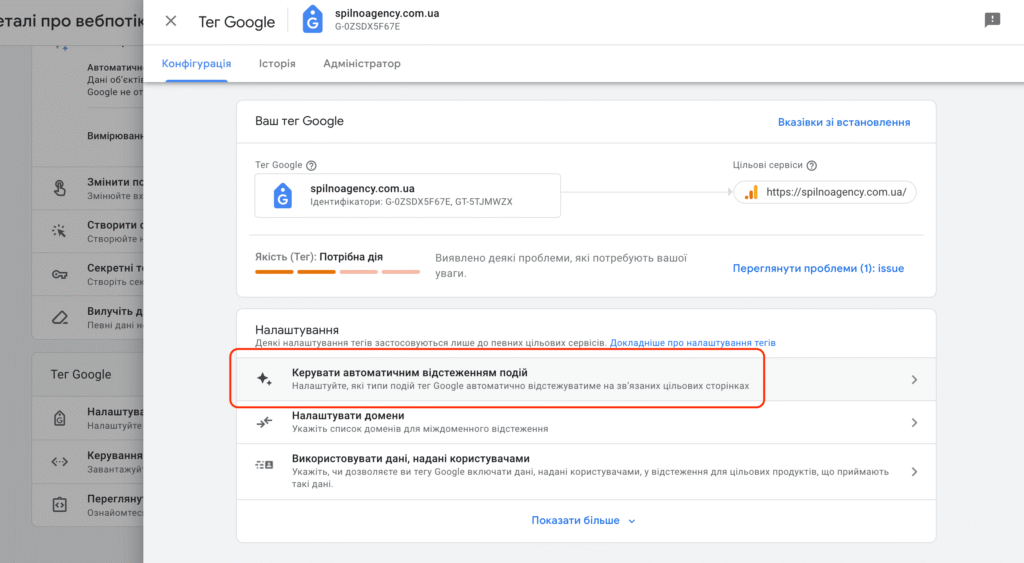

2.1.4. Check for Tag Issues
→ If the tag is highlighted in red, it is likely installed incorrectly. This can lead to a complete loss of analytics. Be sure to inform the PM about this.


3. Data Collection and Modification
(Enable all possible checkboxes)

3.1. Google Signals Data Collection
→ Allows tracking users across devices, increasing audience accuracy.

3.2. User-ID and User-Provided Data Collection
3.2.1–3.2.5 → Allows identifying users even if they access from different devices. This is critical for accurate e-commerce analysis.

3.3. Data Retention
3.3.1–3.3.2. Set to “14 months”
→ If the period is limited, user data will be deleted, and you will lose the ability to build long-term audiences.

4. Data Display
4.1. Events
4.1.1. Configure events → add all key business-critical events (e.g., product view, add to cart, purchase, etc.)
4.2. Configure conversion events → One or several of the most important and equally valuable events. To be able to track them in reports and use them in Google Ads.

4.3. Attribution Settings
4.3.1. Attribution model → Data-driven → This model considers all user interactions with advertising, not just the last click.
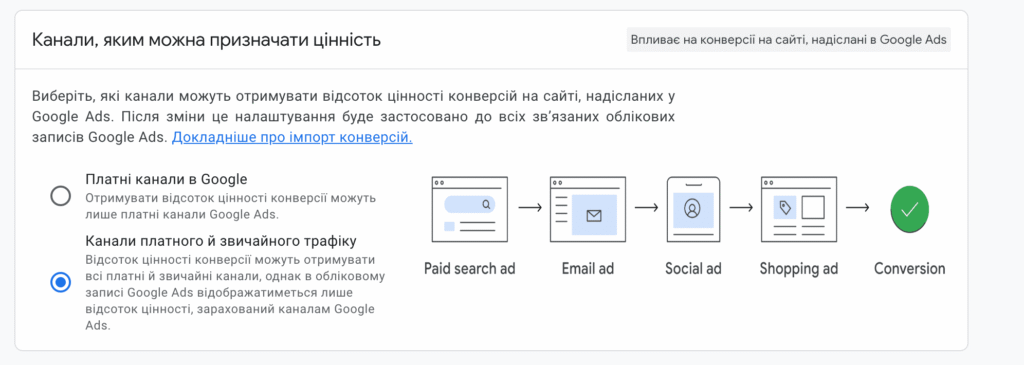
4.3.2. Channels that can be assigned value → Enable paid and organic traffic
4.3.3. Lookback window → 30 days for all key events → This ensures correct attribution, even if the user doesn’t purchase immediately.



5. Product Links
5.1. Link to Google Ads
5.1.1. Configure import of main events → For example, purchase, generate_lead, etc. → Otherwise, advertising won’t know which campaigns are yielding results.
5.2. Link to Google Merchant
→ Required for Google Shopping.
5.3. Link to Google Search Console
→ Provides data on search queries, positions, CTR, etc.

6. Standard Report Configuration
6.1. In the Report Library, enable the following reports:
- Lifecycle
- User
- Search Console
→ These reports are necessary for understanding engagement, retention, and conversion dynamics. Without them, analytics functionality is minimal.

Summary:
This checklist is the technical foundation of any digital strategy. Without proper analytics, you won’t be able to effectively scale your business or make informed decisions. Dedicate time to setting up GA4 — and analytics will become your reliable ally in promotion.
Checklist as a File
Available via this link.
Request for marketing consultation
Frequently Asked Questions
Why it’s Important to Set Up GA4 Before Promoting Your Website?
Google Analytics 4 is a central tool for collecting data about your website visitors, their behavior, traffic sources, conversions, and other key metrics. If this tool is configured incorrectly, all analytics will be distorted. This means that advertising campaigns will be optimized based on…
What is 0. Get Admin-Level Access to GA4?
Before starting the setup, ensure you have administrative access to the GA4 account. Without it, you won’t be able to make most changes.
What is 1. Property?
1.1.1. Set the correct time zone (for Ukraine GTM +3)→ If the time is incorrect, statistics will be confused with other reports, especially important when reconciling with CRM.
What is 2. Data Collection and Modification?
2.1.1. Verify that the data stream is enabled with the “https://” protocol→ If http is used, there may be security issues and incorrect traffic display.
What is 3. Data Collection and Modification?
→ Allows tracking users across devices, increasing audience accuracy.

Read also
Google Tag Manager Workspaces: Why You Need Them and How to Use Them in 2026
A workspace in Google Tag Manager is a “draft” of a container — a place to safely edit…
How to Track Revenue, Transactions and Purchases in Google Analytics 4 from WordPress WooCommerce
Introduction WooCommerce store owners are often convinced that Google Analytics 4 already shows them revenue, transaction counts and…
How to Analyze Hourly Statistics in Google Analytics 4
Google Analytics 4 has no dedicated “hourly statistics” menu item, but you can get that exact breakdown in…