LinkedIn Advertising in 2026: 10+ Ad Formats and Full Guide

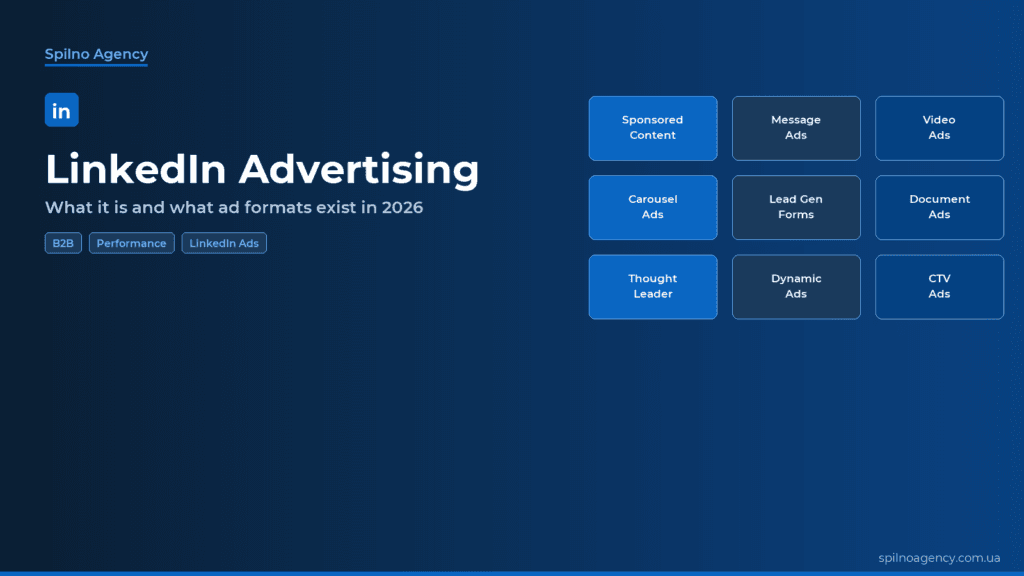
LinkedIn advertising is paid promotion on the world’s largest professional network (900M+ users). In 2026 LinkedIn Ads offers more than 10 formats — from Sponsored Content and Message Ads to Document Ads, Thought Leader Ads, and the new Connected TV campaigns powered by Accelerate AI. This Spilno Agency guide breaks down every format, targeting option, CPC/CPM benchmarks and a step-by-step launch.
What are LinkedIn Ads
LinkedIn Ads is a media buying platform that lets you reach professionals — executives, marketers, IT specialists, HR, finance leaders and business owners. Unlike Meta or TikTok, where targeting is interest-based, LinkedIn lets you filter people by Job Title, Company, Industry, Skills, Seniority and Years of Experience.
LinkedIn Ads is the primary channel for B2B marketing, ABM (Account-Based Marketing) programs, SaaS promotion, recruiting and event marketing. In 2026 the platform added consumer-facing formats too: Connected TV campaigns, Video Ads up to 30 minutes and AI-driven budget optimisation through Accelerate.
Why LinkedIn works for B2B
- Most precise B2B targeting. Show ads to a list of specific companies (Matched Audiences) or by job titles inside an organisation.
- High decision-maker mix. 4 in 5 LinkedIn members drive business decisions.
- Higher-quality leads. Average deal size from LinkedIn is 6–8× higher than from Meta Ads.
- Account-level transparency. You see which companies were exposed — the foundation of ABM.
- Native CRM integration. Lead Gen data flows into HubSpot, Salesforce, Pipedrive without extra plumbing.
10+ LinkedIn ad formats in 2026
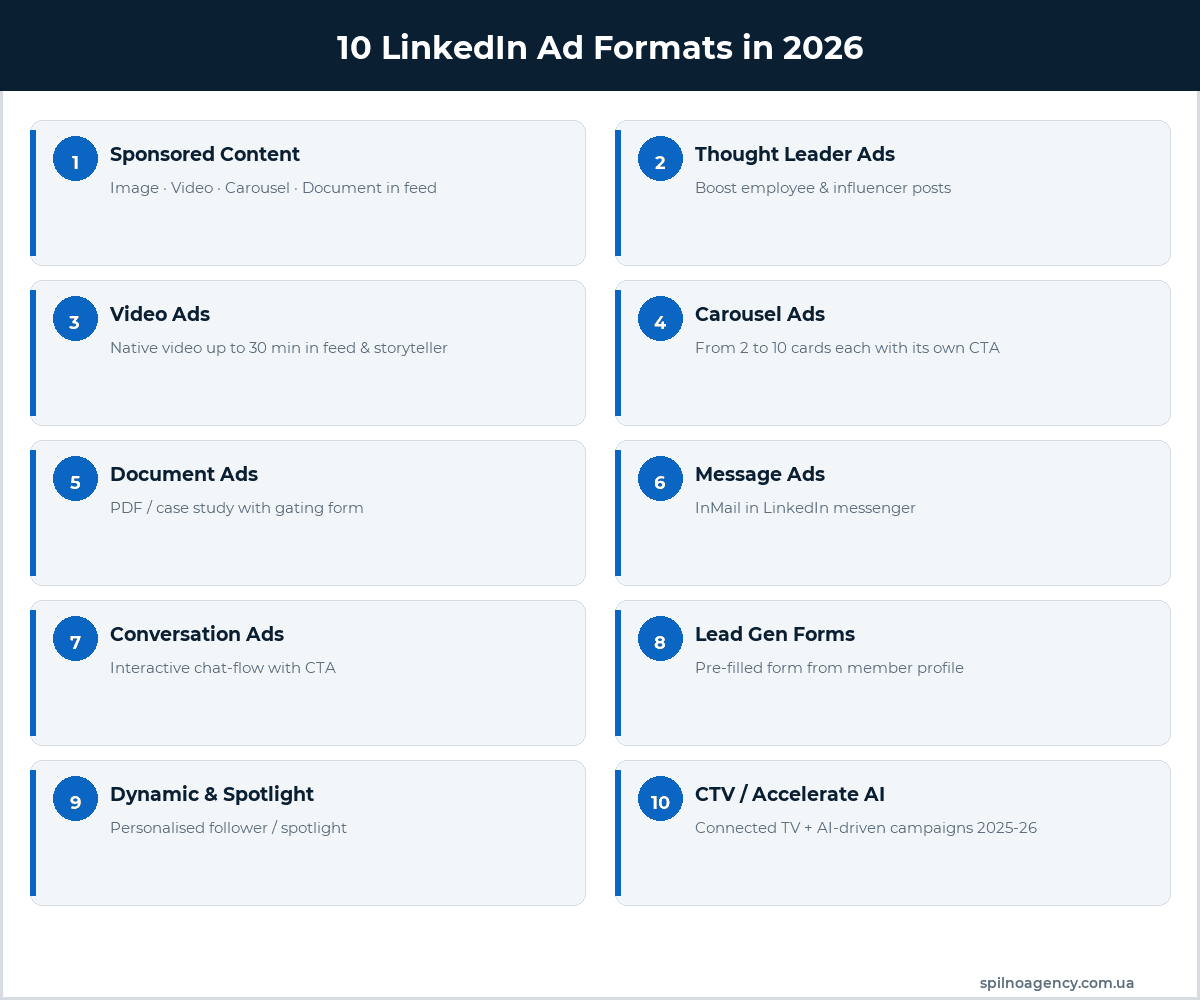
LinkedIn Ads covers the full marketing funnel — from awareness to conversion. Let’s walk through every format available in 2026.
1. Sponsored Content (in-feed posts)
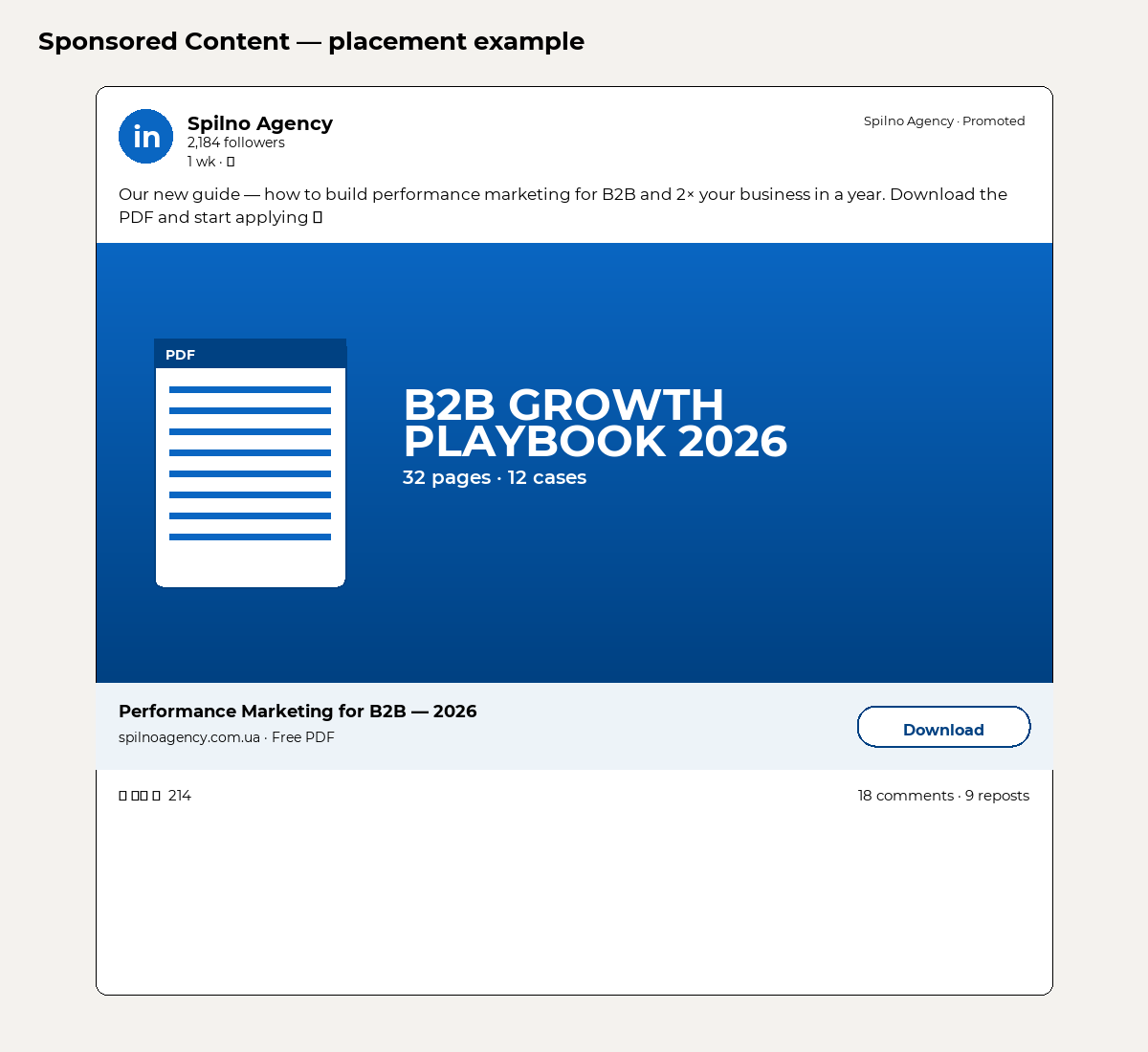
The core format that shows up directly in the LinkedIn feed. Four sub-formats:
- Single Image Ad — one 1200×627 image + headline up to 70 chars + description up to 150 chars.
- Video Ad — native video from 3 seconds to 30 minutes.
- Carousel Ad — 2 to 10 cards, each with its own headline, image and CTA.
- Document Ad — for gated content: PDFs, decks, case studies, white papers. Lead exchange for the doc.
2. Thought Leader Ads
Promote posts from real people (CEO, experts, influencers), not just from Company Pages. This is the biggest trend of 2025–2026: CTR is 1.5–2× higher than classic Sponsored Content, because people trust people more than brands.
3. Message Ads (formerly Sponsored InMail)
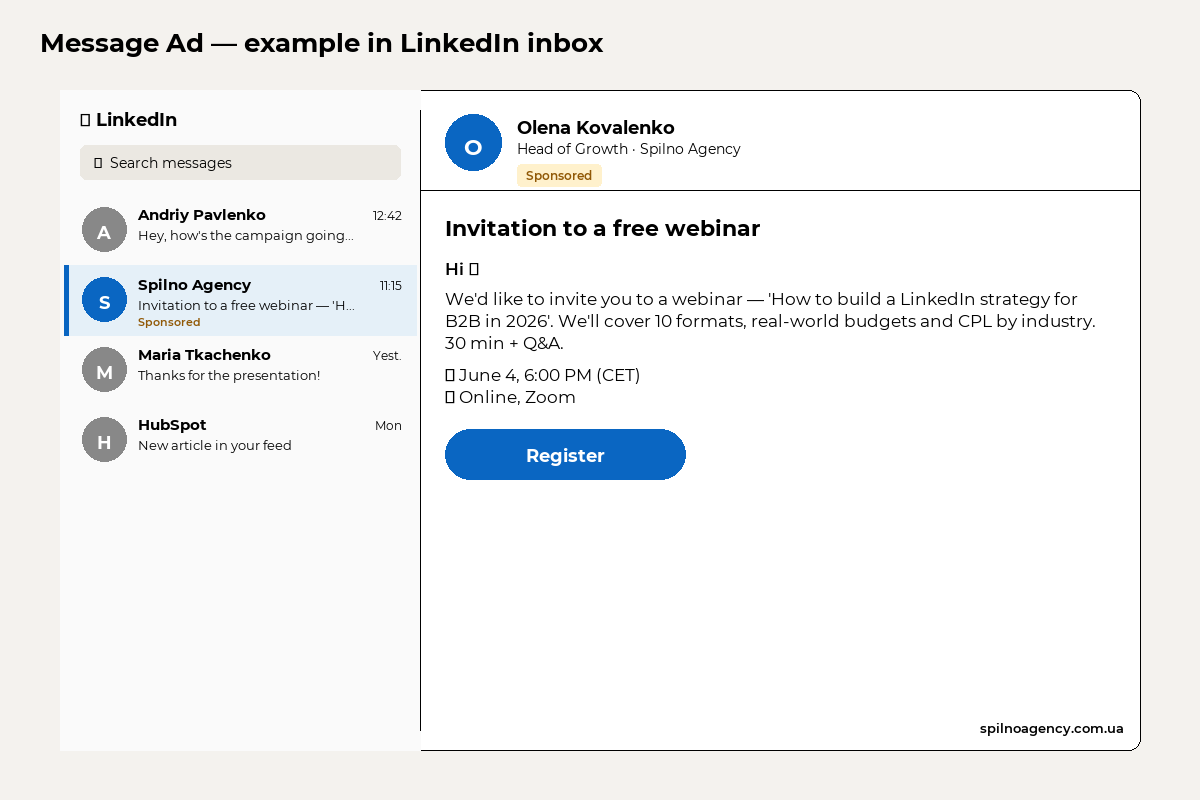
A personalised message delivered to the user’s LinkedIn inbox. One CTA button. Great for webinar invites, demo sessions and event registrations. Constraint: LinkedIn only delivers Message Ads to users active in the past week, and no more than once every 45 days from the same sender.
4. Conversation Ads
An evolution of Message Ads — an interactive chat-flow with multiple branches. The user chooses what they’re interested in (demo / case / pricing) and gets the relevant content. Lifts conversion 2–3× vs linear Message Ads.
5. Lead Gen Forms
The form opens inside LinkedIn — no jump to a landing page. Fields auto-fill from the user’s profile (name, email, job title, company). This drops CPL by 30–40% vs sending traffic to a landing page, because friction disappears.
Lead Gen Forms can be attached to almost any format: Sponsored Content, Message Ads, Conversation Ads. Data flows to CRM via integration or CSV export.
6. Text Ads
A small block in the right rail of desktop LinkedIn with a 50×50 thumbnail, 25-char headline and 75-char description. Cheap format for hypothesis testing. Desktop only, which caps reach.
7. Dynamic Ads — Spotlight & Follower
Spotlight Ads — personalised right-rail ads that auto-insert the user’s name and profile picture. CTA drives to your site or landing page.
Follower Ads — designed to grow Company Page followers. Shows the user a personalised invite with a Follow button.
8. Event Ads
Format for promoting LinkedIn Events (webinars, conferences, AMAs). One-click RSVP — LinkedIn adds it to the user’s calendar and pings them before start. Only works if the event is created as a LinkedIn Event.
9. CTV Ads (Connected TV) — new in 2025
LinkedIn rolled out video campaigns on Connected TV (Roku, Samsung TV+, Disney+ ad-supported) with the same B2B targeting as in-feed. Perfect for top-of-funnel awareness (reaching executives at home) and retargeting.
10. Accelerate AI campaigns
LinkedIn Accelerate is an AI campaign mode (similar to Google’s Performance Max). You give a URL + objective + budget, and the AI:
- Generates creatives (image, video, copy) based on the site content.
- Defines targeting (lookalikes of current customers, predictive audiences).
- Optimises budget across formats and placements.
- Tests variants and scales the winners.
LinkedIn reports Accelerate campaigns deliver 15–20% lower CPL than manual setup — thanks to real-time AI optimisation.
Targeting on LinkedIn Ads
LinkedIn’s edge is its professional targeting depth. Parameter groups available:
- Job Title / Function / Seniority — title, function (Marketing, Sales, Engineering), seniority (Manager, Director, VP, C-level).
- Company Name / Industry / Size — specific companies, industry, headcount band (1-10, 11-50, 51-200, 201-500, 501-1000, 1001-5000, 5001-10000, 10000+).
- Skills — skills listed on the profile (Python, Google Ads, Negotiation etc.).
- Education — school, degree, field of study.
- Years of Experience — total work tenure.
- Matched Audiences — custom audiences: uploaded lists of emails/companies, website retargeting, video viewers.
- Predictive Audiences — AI-built lookalikes of past converters (new in 2025).
Important: the minimum audience size is 300 members, but you should keep it above 50,000 — otherwise impressions stay too low and CPM jumps.
How to launch LinkedIn Ads — 6 steps
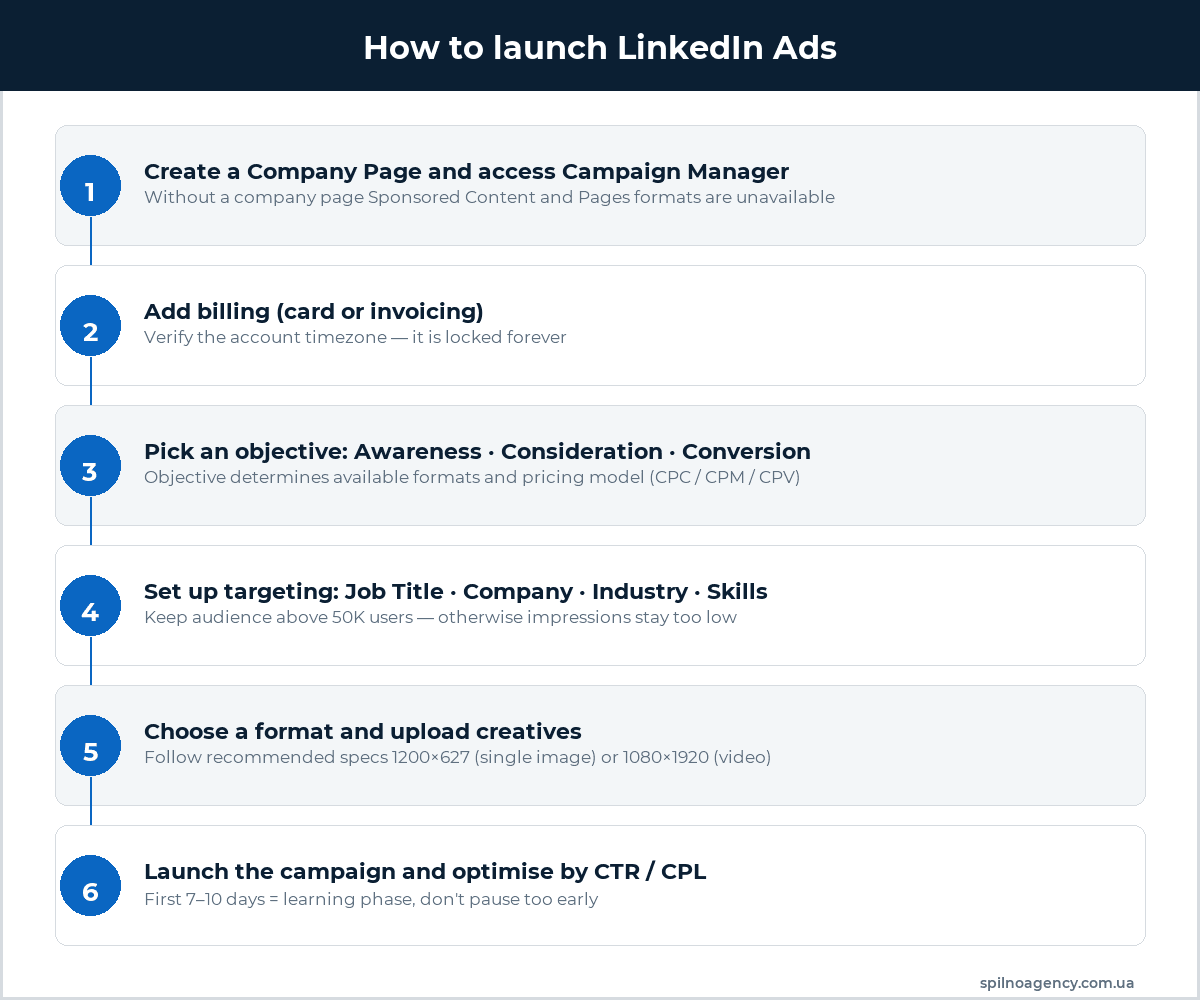
Step 1. Prepare a Company Page
Without a Company Page, Sponsored Content and Pages formats are unavailable. Fill in the description, add a 300×300 logo and a 1128×191 cover. The page must have at least one organic post — otherwise CTR drops noticeably.
Step 2. Open Campaign Manager and configure your account
Go to linkedin.com/campaignmanager/ and create an ad account. The timezone is locked forever — pick the one matching your team. Add a credit card or set up invoicing (available to accounts with history).
Step 3. Pick a campaign objective
LinkedIn offers three objective groups:
- Awareness — Brand awareness (CPM billing).
- Consideration — Website visits, Engagement, Video views (CPC or CPV).
- Conversion — Lead generation, Website conversions, Job applicants, Talent leads (CPC or optimised CPM).
The objective controls which formats are available and which pricing model you use. Lead Gen Forms, for example, are only available under the Lead Generation objective.
Step 4. Define targeting
Select language, location (country / region / city), demographics (Job Title, Industry, Seniority, Skills). LinkedIn shows Forecasted Results — audience size, projected impressions and CPL. If audience < 50K, broaden criteria or remove an AND narrowing.
Step 5. Choose a format and upload creatives
Stick to the specs:
- Single Image: 1200×627 px, up to 5 MB, JPG/PNG/GIF.
- Video: 1920×1080 or 1080×1920 (vertical), up to 75 seconds for best practice, up to 30 min technically.
- Carousel: 1080×1080 per card, 2–10 cards.
- Document Ad: PDF up to 100 MB.
Always test 3–4 creative variants inside one ad set — LinkedIn auto-shifts delivery to the best performer.
Step 6. Launch and monitor
The first 7–10 days = learning phase. Don’t kill the campaign on early bad numbers — let the AI gather data. After stabilisation, watch CTR (benchmark 0.4–0.7%) and CPL — cut budget on weak ad sets, scale the strongest.
How much do LinkedIn Ads cost in 2026 — benchmarks
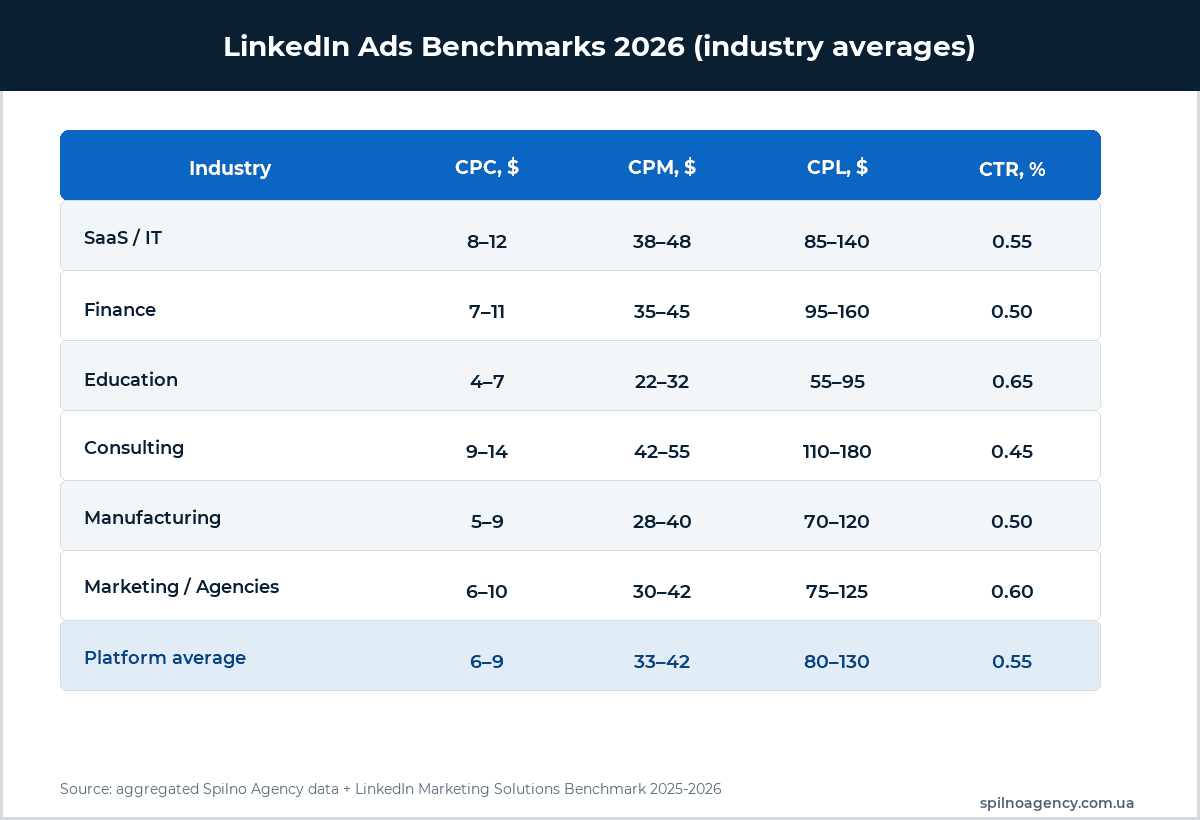
LinkedIn is one of the priciest channels by CPC and CPM, but one of the best by CPL and deal LTV. Benchmarks for 2026:
- Average CPC: $6–9 (Sponsored Content), higher for Message Ads.
- Average CPM: $33–42 (Sponsored Content), $50–80 (Message Ads given guaranteed delivery).
- Average CPL: $80–130 for standard Lead Gen Forms; $150–250 in SaaS and finance.
- CTR: 0.4–0.7% baseline for Sponsored Content; 1.5–3% for Conversation Ads.
- Minimum daily budget: $10 per campaign (LinkedIn recommends $25+).
Exact numbers depend on industry, geo and auction competition. SaaS and finance are the most expensive; education and manufacturing the cheapest.
Common LinkedIn Ads mistakes
- Audience narrowed below 20K users. CPM jumps 2–3× due to thin auction competition.
- Expecting Meta-level CPL. $5 CPL on LinkedIn is unrealistic. Model unit economics on LTV/CAC, not CPL alone.
- Skipping Matched Audiences. Uploading a company list or email list of prospects is the cheapest ABM experiment.
- Killing the campaign after 3–5 days. Too early — the learning phase isn’t over.
- Not testing Thought Leader Ads. Currently the best CTR/CPL format, especially for B2B.
- Ignoring mobile. 60%+ of LinkedIn impressions are mobile. 1200×627 Single Image is fine, but test vertical 1080×1920 video for upper funnel.
When LinkedIn Ads is not the right channel
- Mass B2C with low AOV (FMCG, accessories). Meta and TikTok will be 5–10× cheaper.
- Hyper-local businesses (cafés, salons) — LinkedIn lacks 5 km radius geofencing.
- Tiny budget (< $500/month) — not enough for learning phase plus statistically valid data.
For B2B, recruiting, education, SaaS, consulting and premium B2C — LinkedIn remains the #1 channel by audience quality.
How to fit LinkedIn into the marketing funnel
- Awareness (TOFU): Video Ads + CTV Ads + Thought Leader posts → reach.
- Consideration (MOFU): Document Ads (white papers, cases) + Carousel + site retargeting.
- Conversion (BOFU): Lead Gen Forms + Message Ads + Conversation Ads → demos, applications.
- Retention: Spotlight Ads to current customers for upsell + Follower Ads to grow Company Page.
Read more on funnel structure in our marketing funnel guide, and on the metrics that matter in our digital marketing KPIs article.
FAQ
Can European businesses run LinkedIn Ads in 2026?
Yes. LinkedIn Ads works fully across EU accounts, billed in EUR or USD via VISA/Mastercard or invoicing. Set your account timezone to your business region — it locks forever.
What’s the minimum budget to test LinkedIn Ads?
Realistically — $500–1000 per month per hypothesis. Less than that won’t produce statistically valid data: at 0.5% CTR and $40 CPM, $200 yields only 5,000 impressions and ~25 clicks — too few to conclude anything.
What’s better — Sponsored Content or Message Ads?
Sponsored Content is for upper/mid funnel (reach, lead gen via Lead Gen Forms). Message Ads is for lower funnel (inviting warm contacts to demos/webinars) and ABM. A typical media plan uses both.
How do I measure ROI from LinkedIn Ads?
1) Install the LinkedIn Insight Tag. 2) Enable Conversion Tracking. 3) Sync Lead Gen Forms with your CRM. 4) Track CAC, LTV and payback — LinkedIn typically pays back in 6–18 months given long B2B sales cycles.
Can I show LinkedIn Ads across multiple countries at once?
Yes, a single campaign can target several countries. But it’s better to run separate campaigns per region for clean A/B tests and independent budgets. Localise creatives every time.
How does Accelerate AI work — is it worth trying?
Accelerate fits if you have a clear conversion-driven site, a configured Insight Tag and a goal (lead / sale). The AI needs at least 50 conversions per month to learn properly. When those conditions are met, Accelerate delivers a 15–20% lower CPL than manual setup.
Takeaways
In 2026 LinkedIn Ads is a full-fledged performance platform with 10+ formats, Accelerate AI campaigns, new Connected TV placements and the most precise B2B targeting on the market. It’s pricier than Meta or Google but stronger on CPL and LTV in B2B verticals. If you sell SaaS, services, premium products, recruit talent or promote conferences — LinkedIn belongs in your media plan.
Spilno Agency launches LinkedIn Ads for Ukrainian and European B2B brands. If you’d like to discuss a campaign launch or audit your current account — reach out.

Read also
BANT Lead Qualification Methodology: What It Is and How It Works
BANT is a lead qualification framework built on four criteria: Budget, Authority, Need, Timeline. What it is, example…
Best Claude Skills for Threads (2026)
Claude skills and MCPs for Threads: posts and threads, captions, carousel design, cross-posting from Instagram, the official Threads…
Best Claude Skills for X (Twitter) (2026)
Claude skills and MCPs for X (Twitter): tweets and threads, content planning, X Ads, analytics, outreach. Official X…