SEO Optimisation of E-Commerce Filters: Faceted Navigation Guide

Faceted navigation SEO is one of the most complex technical challenges in e-commerce. Poor filter configuration leads to thousands of duplicate pages, wasted crawl budget, and lost rankings. This guide covers step-by-step solutions, answers the subdomain vs subdirectory question, and explains whether you need separate locales for the US and UK.
What Is Faceted Navigation and Why It’s an SEO Risk
Faceted navigation is the filter system in an online store that lets users narrow down products by multiple parameters simultaneously: brand, price, size, colour, material. Each filter combination generates a unique URL.
The problem: even a mid-sized store with 1,000 products and 10 filters with 5 values each can generate millions of unique URLs. For Google, that’s millions of pages to crawl — most of them containing nearly identical content.
Three Core SEO Problems Caused by Filters
- Duplicate content — “Nike Trainers > Red > Size 9” and “Nike Trainers > Size 9 > Red” have the same content but different URLs. Google doesn’t know which to rank.
- Crawl budget waste — Googlebot spends its allocated crawl budget on meaningless filter combinations instead of your important product and category pages.
- PageRank dilution — Internal links pointing to filtered URLs split PageRank across duplicates instead of concentrating it on main category pages.
Three Approaches to Filter SEO Optimisation
There are three strategies for managing filtered URLs. The right choice depends on the filter type and its SEO potential.
Approach 1: noindex + follow
For filters with no SEO potential (sort by price, colour, material, rating) — add the noindex, follow meta tag in the <head> of filtered pages.
<meta name="robots" content="noindex, follow">When to use: colour, size, season, material filters — combinations that people don’t search for on Google. The follow directive lets the bot follow links and pass link equity without indexing the page itself.
Approach 2: Canonical to the Parent Category
For filters with moderate SEO potential — add a canonical pointing to the parent category or main filter page.
<link rel="canonical" href="https://example.com/category/trainers/">When to use: when a filtered page duplicates the main category (e.g., /trainers/?brand=all) but you want to preserve link equity without duplicating content.
Approach 3: Dedicated Landing Page for the Filter
For filters with high SEO potential — create a standalone optimised page with a unique URL, content, and meta tags.
Examples of queries that deserve their own page:
- “buy Nike trainers” → /category/trainers/brand/nike/
- “laptops under £500” → /category/laptops/under-500/
- “women’s winter jackets” → /category/jackets/women/winter/
Signs a filter deserves its own page: there’s search demand (at least 100+ searches/month), the filter combination forms a commercially valuable category, and you can write unique content (heading, description, FAQ).
Configuring robots.txt for Filters
If your filters use URL parameters (GET parameters), you can block them from crawling via robots.txt. But be careful: Disallow in robots.txt does not prevent indexing — Google can index a URL it finds via a link, even if it’s blocked in robots.txt.
# Block filter URL parameters
User-agent: *
Disallow: /*?colour=
Disallow: /*?size=
Disallow: /*?sort=
Disallow: /*?page=
Recommendation: for parametric URLs, use noindex in <head> combined with robots.txt blocking. For path-based URLs (/category/brand/nike/), use canonical or a dedicated page.
Filter URL Structure: Parameters or Path-Based?
There are two approaches to forming filter URLs:
- URL parameters (GET):
/trainers/?brand=nike&colour=red&size=9 - Path-based URLs:
/trainers/nike/red/size-9/
For SEO, path-based URLs are unambiguously better for filters with SEO potential, while GET parameters work well for filters without potential (colour, sorting). Path-based URLs are easier to optimise, add canonicals to, and manage indexation of.
Question 1: Separate Domain, Subdomain, or Subdirectory for Different Countries?
This is one of the most common questions in international SEO. The answer depends on your resources, but Google has given clear guidance.
Three Options for International Site Structure
- ccTLD (country-code Top Level Domain): example.de, example.pl, example.co.uk — separate domains per country.
- Subdomain: de.example.com, pl.example.com, uk.example.com.
- Subdirectory: example.com/de/, example.com/pl/, example.com/uk/.
What Google Recommends
John Mueller and the Google Search Central team have repeatedly confirmed: from an SEO standpoint, all three structures are equivalent — Google handles all three equally well when hreflang is correctly implemented.
But in practice there are significant differences:
ccTLD — the strongest geo signal
Pros: strongest country-targeting signal; local user trust; independent authority per domain.
Cons: must build link equity separately for each domain; higher maintenance cost; harder to manage; if your main domain is strong, you’re splitting authority across multiple domains.
Subdomain — treated as a separate site by Google
Pros: technically simpler than ccTLD; can be hosted on a separate server.
Cons: Google predominantly treats subdomains as separate sites — link equity and authority from the main domain don’t transfer automatically. You’ll need to build the subdomain’s SEO authority from scratch.
Subdirectory — the best choice for most businesses
Pros: all language versions inherit the main domain’s authority; single crawl budget; simpler management; no need to build separate link profiles per locale.
Cons: weaker geo signal than ccTLD (offset by hreflang and Google Search Console geo-targeting).
Our recommendation: for most e-commerce projects, subdirectory structure (example.com/uk/, example.com/de/) is the optimal choice. It preserves domain authority, simplifies management, and is the recommended structure in the absence of specific requirements.
Exception: if you’re entering France, Germany, or Poland as a primary market with a strong SEO budget — a ccTLD will provide a better local signal. But for startups and mid-market e-commerce, subdirectory is always the right first step.
Question 2: Do You Need Separate Locales for the US and UK?
The answer: yes, if both markets are priorities. Here’s why.
One Language, Two Different Markets
If your site is in English and you’re targeting both the US and UK — for Google these are two distinct markets with different SERPs. Without proper hreflang, Google may serve the US version to British users and vice versa.
You need to implement:
<link rel="alternate" hreflang="en-US" href="https://example.com/en-us/page/" />
<link rel="alternate" hreflang="en-GB" href="https://example.com/en-gb/page/" />
<link rel="alternate" hreflang="x-default" href="https://example.com/en/page/" />
What Differs Between US and UK Versions
- Spelling: color/colour, optimize/optimise, tire/tyre — differences matter for user trust.
- Currency and pricing: $ vs £ — always localise.
- Units of measurement: feet/miles vs metres/kilometres.
- Keywords: “sneakers” (US) vs “trainers” (UK); “apartment” vs “flat” — different search volumes and competition levels.
- Legal requirements: UK GDPR post-Brexit, different consumer rights, return policies.
If Your Budget Is Limited
If you don’t have the resources for two fully localised versions — start with en (or en-US) as your primary and add x-default. Once UK traffic grows, build a dedicated UK version.
Important: if you’re not separating US and UK — use neutral international English and avoid specifically American or British expressions.
Practical Checklist: SEO Audit of E-Commerce Filters
- Identify what URLs your filters generate — parametric or path-based.
- Analyse crawl budget in Google Search Console (Crawl Stats).
- Identify filters with no SEO potential → add
noindex, follow. - Identify filters with SEO potential → create dedicated landing pages.
- Set up canonical tags for category duplicates.
- Block no-potential parameters in robots.txt or via GSC URL Parameters.
- Add hreflang for all language/regional versions.
- Verify reciprocal hreflang — each page must link to all other versions.
- Check that important filters aren’t blocked by JavaScript rendering.
- Monitor Coverage Report in GSC after changes.
Common Mistakes When Optimising Filters
- Blocking crawl via robots.txt without noindex — if a URL is blocked in robots.txt but has no noindex, Google may still index it (it sees a link to it but can’t check the meta tags).
- noindex on high-value filters — blocking the “Nike trainers” page that gets thousands of monthly searches is a costly mistake.
- Self-referencing canonical instead of parent category — a canonical pointing to itself doesn’t resolve the duplicate content issue.
- Ignoring JavaScript filters — if filters are implemented via JS without URL changes, Google may not see filtered results at all.
- Missing pagination hreflang — if filtered pages have pagination, hreflang must be implemented on every pagination page.
FAQ: E-Commerce Filter SEO
Do I need to block all filters from indexing?
No. Only block filters with no SEO potential. Filters with search demand (brand, product type, key attribute) should remain indexable or have dedicated landing pages created for them.
How long does crawl budget recover after filter optimisation?
Usually 2–4 weeks after implementing changes. Google gradually re-crawls the site. Monitor Crawl Stats in Google Search Console — you’ll see the number of requests to previously problematic URLs decrease.
What’s better for filtered pages — noindex or canonical?
It depends. noindex more reliably removes a page from the index. canonical is better when you want to pass link equity to the main category. For most filters without SEO potential, we recommend noindex, follow.
How do I know if a filter has SEO potential?
Check search demand using Ahrefs, Semrush, or Google Keyword Planner. Enter the combination the filter creates (e.g., “buy Nike Air Force 1 size 10”) and check search volume. If there are 100+ monthly searches — there’s potential.
Do filters affect site speed?
Yes, if filters are implemented via JavaScript with database queries. Each filter selection triggers an AJAX request. Query caching, database optimisation, and lazy-loading results will significantly improve Core Web Vitals scores.
How do I set up hreflang for filtered pages?
If a filtered page is indexable and translated into other languages — hreflang is required. If the filtered page is closed via noindex — hreflang is not needed (Google won’t index it).
What about filters on Shopify, WooCommerce, or Magento?
Each platform has its own nuances. Shopify generates parametric URLs for filters by default — most should be closed via noindex. WooCommerce uses WooCommerce Product Filter or YITH plugins — noindex/canonical settings depend on the plugin. Magento has built-in layered navigation — check the indexation settings in the module configuration.
Need an SEO audit of your e-commerce store’s filters? Contact Spilno Agency — we’ll analyse your filter structure, identify crawl budget issues, and build an optimisation plan.

Read also
Google Ads Investment Strategy: How More Budget Affects Leads and Sales
Google Ads can now forecast how many extra leads or sales a bigger budget will bring. Here's how…

Is an SEO specialist responsible for leads and sales? Our position
A LinkedIn discussion: should an SEO specialist be responsible for leads and sales from the SEO channel. Spilno…
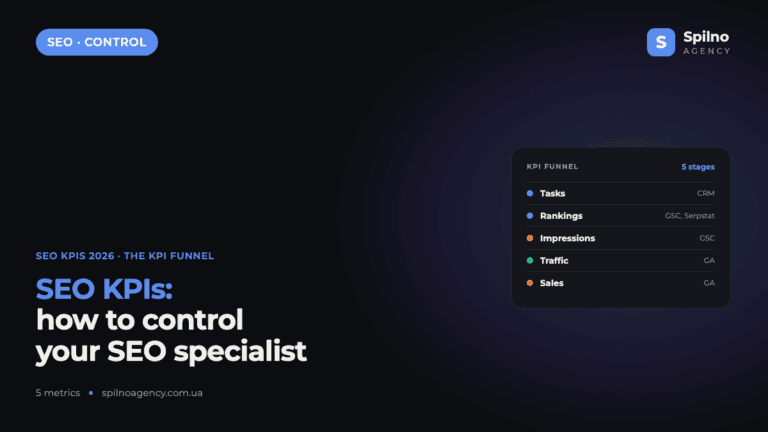
How to Control an SEO Specialist: The 5-Stage SEO KPI Funnel
SEO KPIs form a chain of five metrics that show, step by step, whether your SEO is actually…