Website Deindexation: What It Is and What It Affects

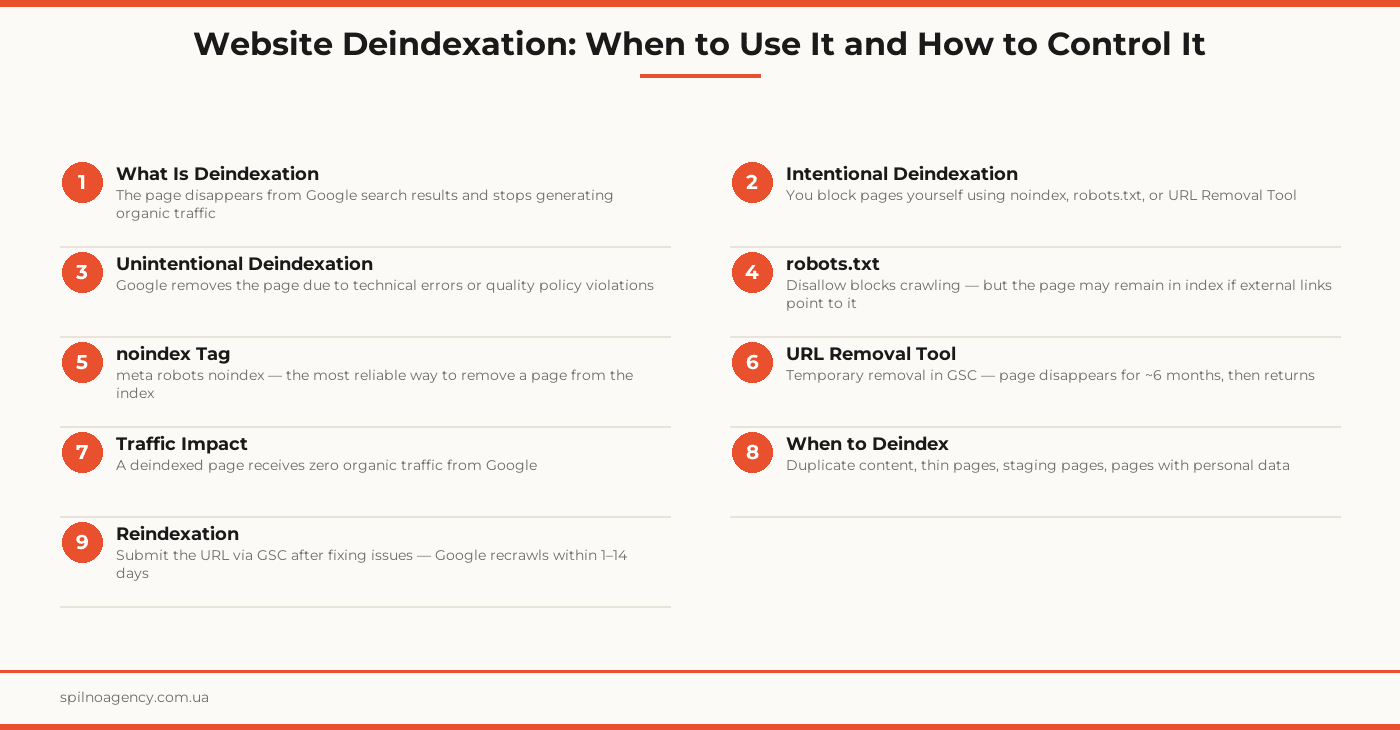
Website deindexation is the process by which a search engine — most commonly Google — removes one or more pages from its index. An indexed page appears in search results; a deindexed page disappears from them entirely. Deindexation can be intentional (you deliberately block pages from search) or unintentional (Google removes them due to technical issues, quality violations, or misconfigurations on your site).
A deindexed page generates zero organic traffic from Google — regardless of the quality of its content or the number of backlinks pointing to it.
What Is Website Deindexation?
The search index is the database of all pages that Google has visited, analyzed, and deemed worthy of showing in search results. When a page enters the index, it can rank for relevant queries. When it leaves the index — it disappears from search entirely.
Deindexation applies to specific URLs, not entire domains (unless you block the whole site). A website can have thousands of indexed pages and a handful of deindexed ones — this is perfectly normal for large sites.
Intentional Deindexation: When and Why
Site owners intentionally deindex pages in the following situations:
- Duplicate content — filter pages, sort parameters, tags, categories with minimal unique content
- Test and administrative pages — staging environments, admin panel pages, temporary landing pages
- Thin content pages — under 300 words, no unique value for the user
- Personal and legal data — pages containing personal information that should not be public
- Outdated or incorrect content — articles whose facts are outdated and not worth updating
- Post-migration pages — old URLs after a redesign that already have a 301 redirect in place
Unintentional Deindexation: Common Causes
Unintentional deindexation is one of the most dangerous technical SEO incidents, because it often goes unnoticed for weeks.
- robots.txt error —
Disallow: /or an incorrect path that blocks the entire site or key sections - Accidentally added noindex — a caching plugin, template, or CMS update added the meta tag to all pages
- Server errors — if a page returns 5xx or 404 for several consecutive weeks, Google drops it from the index
- Google Manual Actions — a penalty for violating webmaster guidelines (thin content, spam links, cloaking)
- Algorithmic filter removal — after algorithm updates (Panda, HCU), weak pages may be mass-deindexed
- Expired hosting or domain — the site returns an error, Google stops crawling and eventually deindexes
What Should Be in robots.txt
The robots.txt file is a text file in the root of your website that tells crawlers which pages to visit and which to skip. It does not guarantee deindexation, but it controls crawl budget allocation.
Required Directives in robots.txt
- User-agent — specifies which bot the rule applies to.
User-agent: *means all bots;User-agent: Googlebottargets Google specifically - Disallow — paths blocked from crawling. Example:
Disallow: /admin/ - Allow — exceptions within a blocked directory. For example, if
/admin/is blocked but/admin/public-pageshould be accessible - Sitemap — a link to your XML sitemap. Example:
Sitemap: https://yourdomain.com/sitemap.xml
A Correct robots.txt Example
User-agent: *
Disallow: /wp-admin/
Disallow: /cart/
Disallow: /checkout/
Disallow: /my-account/
Disallow: /search/
Allow: /wp-admin/admin-ajax.php

User-agent: Googlebot-Image
Disallow: /wp-content/uploads/private/

Sitemap: https://yourdomain.com/sitemap.xml
What NOT to Block via robots.txt
- CSS and JS files — Google needs them for rendering and evaluating pages
- Product or article images — they drive traffic from Google Images
- Homepage and key landing pages — obvious, but it does happen
- Category and tag pages — blocking them collapses visibility if they receive traffic
Important: robots.txt vs noindex
If your goal is to remove a page from the index, use the noindex tag rather than Disallow in robots.txt. The reason: if a page is blocked by Disallow but has external links pointing to it, Google may keep the URL in the index (without a snippet) — simply because it sees links but cannot verify the content. The noindex tag is read during crawling and guarantees removal.
Deindexation Methods: Comparison
1. The noindex Tag (Recommended)
Add to the page’s <head>: <meta name="robots" content="noindex, follow">
Or via HTTP header: X-Robots-Tag: noindex (suitable for PDFs and other non-HTML resources)
- Reliably removes the page from the index after the next crawl
- Preserves link equity (if
followis used) - Googlebot still visits the page — does not save crawl budget
2. Disallow in robots.txt
Blocks crawling but does not guarantee deindexation. If external links point to the page, Google may keep the URL in the index without its content.
Use for: saving crawl budget, blocking admin sections that have no external links.
3. URL Removal Tool in Google Search Console
A temporary solution. The page disappears from the index for approximately 6 months, then reappears (if noindex is not added). Useful for urgent removal of sensitive data.
Path: Google Search Console → Removals → Temporary Removals.
4. Canonical Tag (Indirect Deindexation)
Point rel="canonical" from the duplicate page to the primary one. Google will gradually consolidate ranking signals onto the canonical URL and stop showing the duplicate in search.
The Impact of Deindexation on SEO
Deindexing individual pages is a routine procedure for site health. But mass or unintentional deindexation can cause:
- Sudden traffic drop — all search queries for deindexed pages disappear from search results
- Domain authority decline — if pages with backlinks are deindexed
- Worsening index coverage — the GSC Coverage report shows new errors
- Rankings loss — even after reindexation, rankings may take 2–12 weeks to recover
How to Check for Deindexation
Google Search Console
The “Page Indexing” report (formerly “Coverage”) is the most comprehensive tool. It divides all site URLs into: indexed, excluded, with errors, and with warnings. A sudden spike in “Excluded” is the first signal of unintentional deindexation.
The site: Search Operator
Search Google for: site:yourdomain.com. It shows the number of indexed pages. A sharp drop compared to the previous week warrants a detailed audit.
URL Inspection Tool in GSC
Enter a specific URL and get its status: “Page is indexed” or “Page is not indexed” with an explanation of the reason.
How to Recover a Deindexed Page
- Identify the cause — check GSC, robots.txt, noindex meta tags, and the page’s HTTP status code
- Fix the cause — remove noindex, correct robots.txt, restore a 200 status code
- Request reindexation — via the URL Inspection tool in GSC → “Request Indexing”
- Check back in 1–14 days — the page should appear in the index and gradually recover its rankings
Prevention of Unintentional Deindexation
- Check robots.txt after every CMS or plugin update
- Set up GSC alerts for indexing errors
- Monitor the number of indexed pages weekly (Screaming Frog, GSC)
- Test staging environments with a blocked robots.txt and confirm it does not reach production
- Verify noindex tags after every site deployment
Website Indexation Control Checklist
- robots.txt checked: no unwanted Disallow rules for important pages
- noindex tags verified on all key pages (title, content, H1)
- GSC: “Indexing” report reviewed, no anomalous spike in exclusions
- Number of indexed pages matches the expected count
- For pages that need deindexation: noindex or canonical added
- Admin sections (/admin/, /cart/, /checkout/) blocked in robots.txt
- sitemap.xml contains only indexed pages (no noindex URLs)
- GSC alerts configured for new indexing errors
- Status codes verified: all important pages return 200
- robots.txt and noindex tags checked after every deployment
Frequently Asked Questions About Deindexation
What is website deindexation?
Deindexation is the removal of a page or an entire website from a search engine’s index. A deindexed page does not appear in Google search results and cannot attract organic traffic. Deindexation can be intentional (configured by the site owner) or unintentional (caused by technical issues or quality policy violations).
What is the difference between robots.txt and the noindex tag?
robots.txt blocks crawling — Googlebot does not visit the page and cannot read its content. However, the page may stay in the index (as a URL without a description) if external links point to it. The noindex tag allows Googlebot to crawl the page but instructs it not to include the page in the index. For reliable removal from search results, use noindex rather than robots.txt Disallow.
How long does deindexation take after adding noindex?
Google typically processes the noindex tag within 1–14 days after the next crawl of the page. To speed this up, submit the URL for re-crawling via Google Search Console (URL Inspection tool → Request Indexing). For urgent removal, use the URL Removal Tool in GSC — the page disappears within a few hours.
What happens to SEO after a page is deindexed?
A deindexed page loses all organic traffic from Google. Internal links pointing to it become ‘dead’ from an authority-passing perspective. For SEO health: either set up a 301 redirect to a relevant page (if the content has moved), or block the page with noindex (if the content serves no one).
How do I check whether a page is indexed?
The simplest method is to search Google for: site:yourdomain.com/your-page. If the page appears in results — it is indexed. For a detailed analysis, use Google Search Console: the Coverage report or the URL Inspection tool (click any URL and check its indexing status).
Accidentally deindexed important pages, or need to correctly block unnecessary ones? Spilno Agency performs technical SEO audits and configures proper indexation for your site.

Read also
Advertising on ChatGPT: Who Can Access It and How to Launch in 2026
Advertising on ChatGPT means ads that OpenAI shows inside ChatGPT conversations through its own Ads Manager (beta). As…

What to Do When a Freelancer or Agency Won’t Hand Over Your Google Ads Account
A Google Ads account belongs to the advertiser — the business whose website is promoted in it —…
Low-, Mid-, and High-Frequency Keywords: What They Are and How to Use Them
Low-frequency, mid-frequency, and high-frequency queries (also known as long-tail, mid-tail, and short-tail keywords) are a way of grouping…