Cloudflare for SEO: How to Configure It to Improve Search Performance in 2026


Cloudflare works as a proxy and CDN between the visitor and your website, and it can noticeably affect SEO: page speed, Core Web Vitals, HTTPS, site availability, and how correctly Googlebot crawls the site. Correctly configured SSL/TLS, caching, compression, and HTTP/3 improve your metrics; wrongly enabled Rocket Loader, aggressive caching, “Under Attack Mode”, or an over-strict security level hurt them. This guide explains which Cloudflare features to enable, which to disable, and how not to break SEO.
⚠️ An important warning before you start
Cloudflare configuration should be handled by an experienced specialist who understands exactly what they are doing and what the consequences will be. Many Cloudflare options change how the site is served to users and search bots at the same time. A wrong cache, security, or optimisation setting can make Googlebot receive empty pages, challenge screens instead of content, or a stale version of the site — directly damaging indexing and rankings. A single incorrect option can reduce traffic more than all the other settings improve it.
Separately: these actions can conflict with other site settings and hosting modules — above all with cache plugins such as LiteSpeed Cache (LSCache), WP Rocket, W3 Total Cache, as well as server-side CDNs (QUIC.cloud) and hosting optimisation modules. For example, double caching or double CSS/JS minification by two systems at once breaks layout and scripts. So the specialist configuring Cloudflare must know what is already configured in these modules and reconcile the setup, rather than enabling the same feature in two places. Conflicts are covered in a dedicated section below.
What Cloudflare is and how it affects SEO
Cloudflare is a cloud service that sits “in front of” your website. When you move DNS records to Cloudflare and enable proxying (the orange cloud), all traffic to the site passes through Cloudflare’s network: it caches static files on servers worldwide (CDN), filters malicious requests, issues an HTTPS certificate, and speeds up connections. The site itself physically stays on your hosting — Cloudflare is only the intermediary.
Cloudflare affects SEO across several fronts at once:
- Speed and Core Web Vitals. CDN, compression, and caching cut load time — and LCP and INP are ranking factors.
- HTTPS. Cloudflare provides a free SSL — and a secure connection is a confirmed Google ranking signal.
- Availability (uptime). Always Online and a stable network reduce the 5xx errors Googlebot sees.
- Crawling and rendering. Here lies the main risk: overly strict security or aggressive optimisation can block or break what the search bot sees.
Cloudflare features and their SEO impact
SSL/TLS — the encryption mode
Always use Full (Strict) if a valid certificate is installed on the hosting. The Flexible mode encrypts only between the user and Cloudflare, while traffic to the server goes as unencrypted HTTP — causing mixed content, redirect loops, and problems indexing the HTTPS version. For SEO: Full (Strict) + Always Use HTTPS + Automatic HTTPS Rewrites.
CDN and caching
Cloudflare caches static files (images, CSS, JS, fonts) on servers closer to the user. This is the main speed benefit. By default HTML is not cached — which is correct for dynamic sites. Be careful with the “Cache Everything” rule: if you cache HTML without exceptions, visitors (and Googlebot) may get a stale or someone else’s personalised page. For WordPress, HTML caching is better handled by a dedicated solution (APO or a cache plugin) than by raw Cache Everything.
Brotli compression and HTTP/3
Enable Brotli (more efficient compression than gzip) and HTTP/3 (QUIC) — both speed up data transfer with no SEO risk. These are “safe” improvements worth enabling almost always.
Rocket Loader — enable with care
Rocket Loader asynchronously defers JavaScript loading to speed up the first render. The problem: it can break scripts, analytics, sliders and, worst of all, interfere with correct page rendering for Googlebot. Only enable it after testing in Google Rich Results Test / URL Inspection. When in doubt, keep it off.
Auto Minify (deprecated)
Cloudflare removed built-in Auto Minify for HTML/CSS/JS in 2024 — minification is now done at the site level (a cache plugin or the build). Do not try to restore it by workarounds: minification must be done by only one system, otherwise double processing breaks the files.
APO — Automatic Platform Optimization for WordPress
APO is a paid Cloudflare option that caches a WordPress site’s HTML in Cloudflare’s network and correctly purges the cache when content changes (via the official Cloudflare plugin). It is the safest way to cache HTML on Cloudflare for WordPress. Important: APO and a local plugin’s HTML cache (LiteSpeed, WP Rocket) must not be duplicated — pick one.
Image optimisation (Polish, Mirage)
Polish (compression and conversion to WebP/AVIF) and Mirage (responsive images) are paid features that reduce image weight and improve LCP. Useful for SEO, but again they must not conflict with image optimisation at the site level.
Security: Security Level, Bot Fight Mode, “Under Attack Mode”
This is the most SEO-dangerous group of settings. “I’m Under Attack Mode” shows every visitor a 5-second JavaScript challenge — and Googlebot sees an empty check instead of the page, wrecking crawling. Enable it only during a real DDoS attack and turn it off immediately. Bot Fight Mode and a high Security Level can mistakenly block or challenge search bots. Make sure known bots (Verified Bots) are not blocked and Googlebot has unobstructed access.
WAF, firewall rules, and robots
The Web Application Firewall protects against attacks, but overly broad rules (for example, blocking by country or User-Agent) can cut off Googlebot or tools like Screaming Frog. Always add an allow exception for verified search bots.
Always Online and Early Hints
Always Online serves a cached version of the page when your server is down — reducing 5xx errors for Googlebot. Early Hints (103) lets the browser start loading resources earlier — improving LCP. Both features are safe and useful for SEO.
Redirects, Page Rules, and Bulk Redirects
Cloudflare lets you set up redirects at the network level (Bulk Redirects, Redirect Rules, Page Rules) — handy for migrations, consolidating www/non-www, http→https, and trailing slashes. Important for SEO: use 301 (permanent) for address changes and make sure no redirect chains or loops appear. Do not duplicate the same redirects in both Cloudflare and WordPress/server.
What to enable and what to disable: a quick map
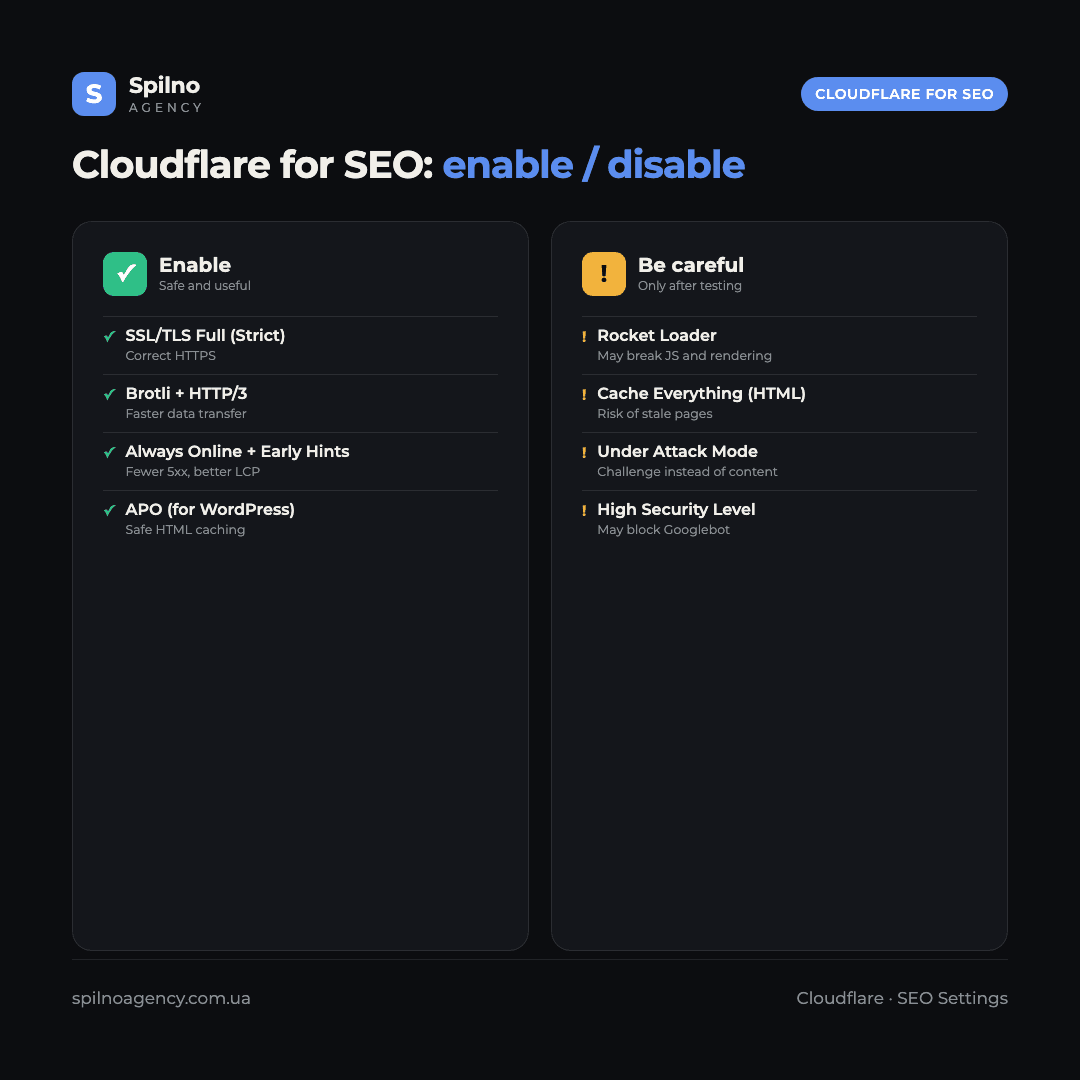
| Feature | Action | Why it matters for SEO |
|---|---|---|
| SSL/TLS: Full (Strict) | Enable | Correct HTTPS — a ranking signal |
| Always Use HTTPS | Enable | No redirect loops or mixed content |
| Brotli + HTTP/3 | Enable | Speed with no risk |
| Always Online + Early Hints | Enable | Fewer 5xx, better LCP |
| APO (for WordPress) | Enable (instead of duplicate cache) | Safe HTML caching |
| Rocket Loader | Only after a render test | Can break JS and rendering for Googlebot |
| Cache Everything (HTML) | Careful / avoid | Risk of stale pages |
| Bot Fight Mode / high Security Level | Verify bot exceptions | Can block Googlebot |
| “Under Attack Mode” | Only during an attack | Shows a challenge instead of content |
Conflicts with LiteSpeed Cache and hosting modules
This is the most important section in practice. Cloudflare is not the only optimisation system on the site. If you run WordPress on LiteSpeed hosting, LiteSpeed Cache (LSCache) is almost certainly already active, and often the QUIC.cloud server-side CDN too. Enabling the same features in Cloudflare on top of them creates conflicts.
- Double HTML caching. If HTML is cached by both LSCache and Cloudflare APO/Cache Everything, purging one does not update the other — users and Googlebot see stale content. Choose a single HTML cache source.
- Double minification and combining of CSS/JS. If both LiteSpeed Cache and Cloudflare minify/combine, files are processed twice, breaking layout and scripts. Keep code optimisation in one system only.
- Rocket Loader vs JS deferral in LSCache. Both manipulate JavaScript loading. Enabling both usually breaks scripts and rendering. Use only one.
- Cloudflare CDN vs QUIC.cloud CDN. Two CDNs on one site create confusion with cache and certificates. Decide which CDN is primary.
- Image optimisation. Polish (Cloudflare) and WebP/lazy-load generation in LSCache/hosting must not be duplicated.
- Redirects and HTTPS. HTTPS/redirect rules must live in one place — either Cloudflare or LiteSpeed/server — otherwise loops occur.
The key takeaway: before enabling optimisation in Cloudflare, the specialist must open the LiteSpeed Cache settings (or a similar module) and the hosting settings and see what is already on. Each feature (HTML cache, minify, CDN, image optimisation, JS deferral) should stay active in one place only. Otherwise the two systems fight each other, and instead of a speed boost the site gets broken layout and indexing problems.
What is useful to an SEO specialist in Cloudflare

- Speed without changing hosting. CDN, Brotli, HTTP/3, Early Hints improve Core Web Vitals — measure before/after in PageSpeed Insights.
- Redirect management during migration. Bulk Redirects let you set up 301s in bulk when changing URL structure or moving a domain.
- Crawl control. WAF/rules let you manage bot access, and Cloudflare analytics shows Googlebot activity and 4xx/5xx spikes.
- Cloudflare Web Analytics. Lightweight, cookie-free analytics — a source of real speed data (RUM) and traffic.
- Edge-level edits. Via Transform Rules / Workers you can add headers, hreflang, canonical, or modify responses without site code access — a powerful but risky tool for the experienced.
Cloudflare API and working with Claude
Does Cloudflare support an API?
Yes. Cloudflare has a full REST API (version 4, base path https://api.cloudflare.com/client/v4/) — over 2,500 endpoints for managing DNS, caching, WAF, redirects, Workers, R2, Zero Trust, and other products. There is also a GraphQL API for analytics, official SDKs (Python, TypeScript, Go), a Terraform provider, and the Wrangler CLI. Almost any dashboard setting can be automated via the API.
This is convenient for SEO: a script can bulk-set 301 redirects during a migration, automatically purge the cache after a content update, manage WAF rules, or export logs to analyse Googlebot crawling. The API lets you embed Cloudflare into your own deploy and monitoring processes.
Can Claude work with Cloudflare?
Yes. Cloudflare provides official remote MCP servers (Model Context Protocol) that the Claude AI assistant (in Claude.ai, Claude Desktop, or Claude Code) connects to via OAuth. In particular, the Cloudflare API MCP server exposes the entire Cloudflare API through search and execute tools — so, with your permission, Claude can read a zone’s configuration, manage DNS, caching, and WAF, analyse logs, or prepare changes. Cloudflare and Anthropic have an official collaboration on MCP support.
But the same caveat as at the start of this article applies: automation via an API or an AI assistant does not remove the need to understand the consequences. Changes to DNS, caching, or security should be made under the supervision of an experienced specialist — otherwise even a “smart” script can break indexing just like a manual mistake.
Key official Cloudflare MCP servers (connect in Claude via OAuth) — useful for an SEO specialist:
- Cloudflare API (access to the entire API) —
mcp.cloudflare.com/mcp - Documentation (Cloudflare docs) —
docs.mcp.cloudflare.com/mcp - Observability (monitoring) —
observability.mcp.cloudflare.com/mcp - Logpush (logs) —
logs.mcp.cloudflare.com/mcp - DNS Analytics —
dns-analytics.mcp.cloudflare.com/mcp - GraphQL Analytics (traffic analytics) —
graphql.mcp.cloudflare.com/mcp
Sources: Cloudflare API Reference, Cloudflare MCP servers.
Best practices for configuring Cloudflare for SEO
- Change one option at a time and measure. After each change, check rendering in Google URL Inspection and speed in PageSpeed Insights.
- Inventory first. Record what is already enabled in the cache plugin and on the hosting, and only then touch Cloudflare.
- One feature, one system. HTML cache, minify, CDN, image optimisation — active in one place only.
- Do not block search bots. Verify that Verified Bots and Googlebot have access and the Security Level is not too aggressive.
- Test Rocket Loader and Cache Everything separately — they are the most common causes of rendering and stale-content problems.
- Keep a change log. Record what you enabled and when — so you can quickly roll back if rankings drop.
Conclusion
Cloudflare can substantially improve SEO metrics — speed, Core Web Vitals, HTTPS, and site stability — but only with competent configuration. Safe improvements (Full Strict SSL, Brotli, HTTP/3, Always Online, Early Hints) are worth enabling almost always; risky options (Rocket Loader, Cache Everything, aggressive security, Under Attack Mode) need testing or should stay off. Most importantly, reconcile Cloudflare with the cache plugin (LiteSpeed Cache) and hosting modules so the systems do not conflict.
Because the cost of a mistake in these settings is high, entrust them to an experienced specialist. If you need help configuring Cloudflare, auditing speed, or diagnosing caching conflicts, the Spilno Agency team is ready to help European businesses.
Frequently asked questions about Cloudflare and SEO
Does Cloudflare affect SEO?
Yes. It affects speed and Core Web Vitals, HTTPS, site availability, and Googlebot crawling. Correct configuration improves SEO, while a wrong one — with aggressive caching or over-strict security — can harm indexing.
What are the best Cloudflare settings for SEO?
Safe: Full (Strict) SSL, Always Use HTTPS, Brotli, HTTP/3, Always Online, Early Hints, and for WordPress, APO. Careful and after testing: Rocket Loader and Cache Everything. Avoid: Under Attack Mode and an over-high security level.
Can Cloudflare block Googlebot?
Yes, with aggressive security settings (Bot Fight Mode, high Security Level, Under Attack Mode). Make sure Verified Bots and Googlebot have access, and add exceptions in the WAF rules.
Does Cloudflare conflict with LiteSpeed Cache?
It can, if the same features are enabled twice: double HTML cache, double minify, Rocket Loader together with JS deferral in LSCache, two CDNs. Keep each feature in one system only and know what is already configured in LiteSpeed Cache.
Should I enable Rocket Loader for SEO?
Only after testing — it can break scripts and rendering for Googlebot. Check the page in URL Inspection and Rich Results Test; when in doubt, keep it off.
Which SSL mode should I choose in Cloudflare?
Full (Strict) if there is a valid certificate on the hosting. Flexible causes mixed content and redirect loops. Additionally enable Always Use HTTPS and Automatic HTTPS Rewrites.

Read also
cPanel SEO: How to Optimize Your Hosting for Search in 2026 (Enable & Disable)
cPanel is a hosting control panel that packs dozens of features with a direct impact on SEO: HTTPS…

How Spilno Agency Does On-Page SEO Optimization with Claude
Spilno Agency runs on-page SEO optimization together with the AI agent Claude — following one document standard that…

How Much Does a Google Ads Specialist Earn in 2026 — Salary Research
A Google Ads specialist (PPC expert) in 2026 earns anywhere from $500/mo as a Junior in Central and…