WCAG 2.1: The International Web Accessibility Standard — What It Is and Why Implement It in 2026


WCAG 2.1 is an international standard from the W3C consortium that defines what web content needs to look like so people with visual, hearing, motor, or cognitive impairments can use it. In 2026, the standard is turning from a recommendation into a legal requirement more and more often: the European Accessibility Act has applied to the private sector across the EU since June 2025. In this guide, we explain the four WCAG principles, show the concrete changes we made on spilnoagency.com.ua to meet the standard, and independently check whether accessibility actually affects Google rankings.
What WCAG 2.1 is
WCAG (Web Content Accessibility Guidelines) is a set of recommendations from the international W3C consortium that defines the technical criteria for web page accessibility. Version 2.1 was released in June 2018 and remains the baseline reference for most legal requirements worldwide — it’s what the European EN 301 549 standard is built on, even though a newer version, 2.2, was released in 2023.
The standard isn’t about building “a special version of the site for people with disabilities” — it’s about one and the same site that works correctly with a mouse, a keyboard, a screen reader, and on a small screen in bad lighting alike. WCAG is built on four principles, known by the acronym POUR.

| Principle | What it means | Example requirement |
|---|---|---|
| Perceivable | Content can be perceived through at least one sense, even if another one isn’t available | Alt text for images, video captions, text contrast of at least 4.5:1 |
| Operable | The interface can be controlled in more than one way, not just with a mouse | Every action is reachable by keyboard, users get enough time to complete a form, no content that triggers seizures through flashing |
| Understandable | Content and navigation are predictable and clear | Consistent menu structure across every page, clear form error messages |
| Robust | Content works correctly with assistive technologies now and in the future | Valid semantic HTML, correct ARIA attributes for screen readers |
Within each principle, criteria are split into three conformance levels. Level A is the minimum, without which part of your users simply cannot use the site. Level AA is the standard working benchmark — it’s what the vast majority of laws and regulations require, including the European Accessibility Act. Level AAA is the highest level, which isn’t officially required in full even for government sites, since some criteria (like sign-language interpretation for every single video) aren’t economically realistic for every type of content.
In 2023, the W3C released WCAG 2.2 — it doesn’t replace version 2.1, it builds on top of it, adding a handful of new criteria (a minimum 24×24 pixel touch target size, a rule that a focused element must not be obscured by other content). A site that meets WCAG 2.2 AA automatically meets WCAG 2.1 AA as well. We deliberately targeted 2.2 AA directly when implementing accessibility on our own site — more on that below.
Why implement WCAG in 2026
A few years ago, site accessibility was treated as a “nice-to-have” reserved for big corporations. In 2026, it’s a combination of legal risk, a real and growing user base, and a direct effect on business reputation.
- A legal requirement in the EU. Since 28 June 2025, the European Accessibility Act has applied to the private sector: online stores, banking and payment services, e-books, and ticket sales. These services must meet the EN 301 549 standard, which is built on WCAG 2.1 AA. For any business serving European customers, or running a dedicated EN version of its site, this is no longer a suggestion — it’s a legal requirement with possible penalties, and 2026 is an active enforcement phase.
- A growing, sizeable user base. The World Health Organization estimates that accessibility affects the interests of over a billion people worldwide with some form of impairment. That’s not a niche audience — it’s a growing group that an inaccessible site simply cuts off from making a purchase or submitting a form.
- Situational accessibility benefits everyone. Keyboard navigation helps not only someone with a permanent motor impairment but also someone with a temporarily injured hand. High text contrast helps not only people with vision impairments but anyone looking at a screen in bright sunlight. Most WCAG fixes improve overall UX, not just accessibility for a narrow audience.
- Brand reputation and trust. A site that part of your visitors simply cannot use sends a message that the company doesn’t care about its customers. For an agency selling digital marketing services, it’s also a matter of credibility: it’s hard to convincingly advise clients on UX and conversion without applying basic accessibility principles to your own site first.
A real example: what we changed on spilnoagency.com.ua
In September 2026, we ran a full accessibility audit of spilnoagency.com.ua — an automated axe-core and Lighthouse scan across nine page types, plus manual keyboard and screen-reader checks — and shipped the first stages of our plan to bring the site to WCAG 2.2 AA across all four locales. Here are the concrete changes, not an abstract “we improved accessibility.”
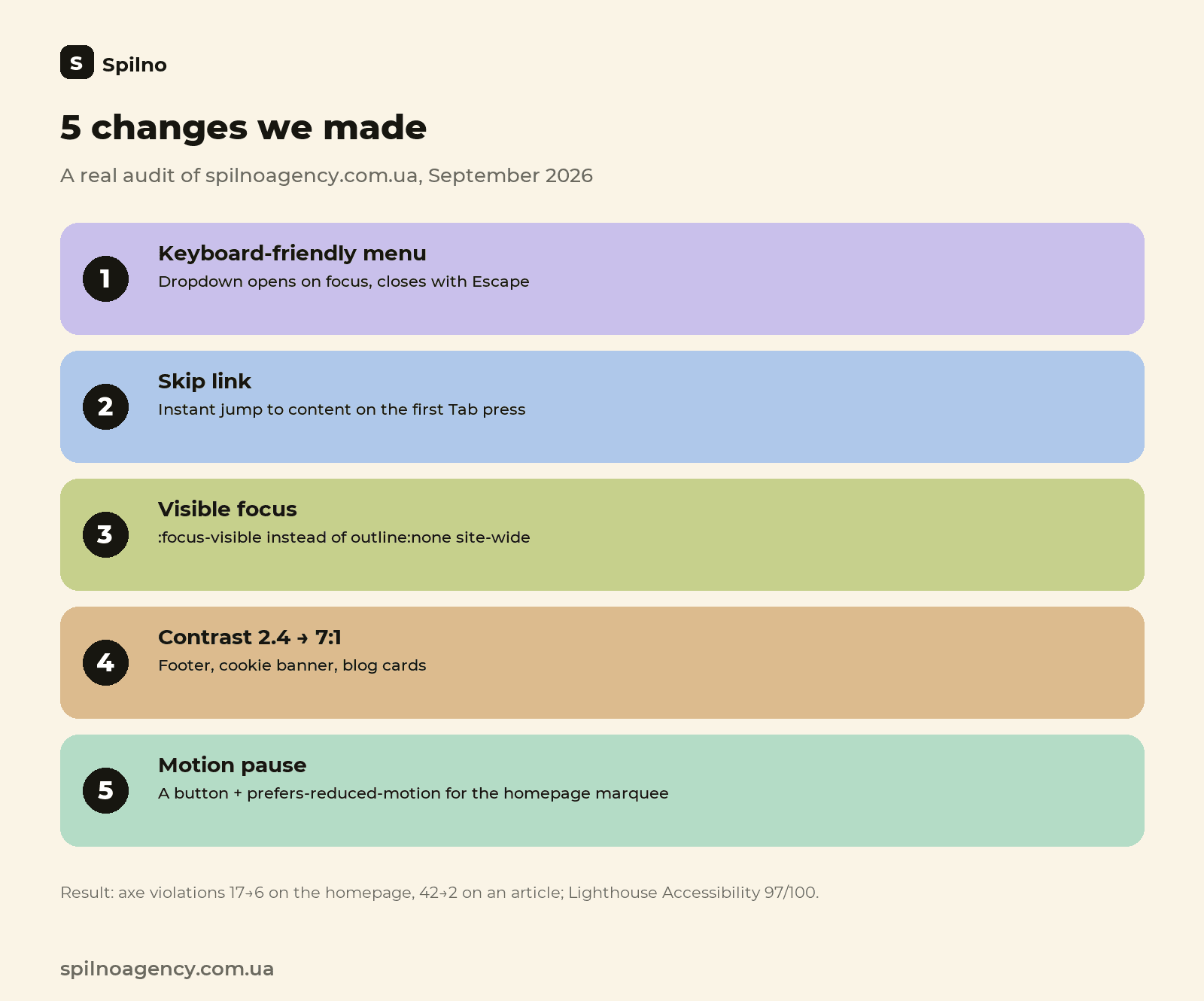
- Keyboard navigation in the menu. The header’s dropdown items used to open only on mouse hover — someone navigating by keyboard couldn’t reach them at all. We added focus-based opening, closing on Escape and outside clicks, and a correct
aria-expandedattribute so screen readers announce whether the menu is open or collapsed. - A “skip to content” link. Someone tabbing through the site used to have to pass through every single menu item on every page before reaching the main content. We added a hidden link that appears on the first Tab press and jumps focus straight to the page content.
- Visible focus instead of
outline:none. A few elements on the site (form fields, mobile menu buttons) had focus completely removed via a CSSoutline:nonerule with no replacement — someone navigating by keyboard couldn’t see where they were on the page at all. We added one consistent, visible focus style across the whole site. - Text contrast. Several elements had contrast that was too low between text and background — the numbers below show by how much:
WCAG AA’s minimum requirement for regular text is 4.5:1, so several elements were well below the threshold.Element Contrast before Contrast after Footer links and copyright text ≈2.4:1 ≈7:1 Cookie banner (two elements) 3.7:1 and 4.47:1 8.3:1 and 6.3:1 Badges and captions on dark blog cards 2.8–3.1:1 5.9–7.2:1 - A pause control for moving content. The client-logo marquee on the homepage used to have no pause button and ignored the system’s “reduce motion” setting. This isn’t just an issue for people with vestibular disorders — a constantly moving element makes the page harder for anyone to read. We added a pause button and automatic animation stop when a visitor has
prefers-reduced-motionenabled. - Localized screen-reader labels. The EN, PL, and RU versions of the site had Ukrainian
aria-label="Меню"andaria-label="Мова сайту"attributes — a screen reader would announce them in Ukrainian even to a visitor browsing, say, the Polish version of the site. We translated the labels separately for each locale. - Keyboard-scrollable tables and code blocks. Wide tables and code blocks in our guides could be scrolled horizontally with a mouse, but not with a keyboard. We added
tabindex="0" role="region"to those blocks. - A public accessibility statement in all four languages. The /accessibility page already existed, but had no link pointing to it from anywhere on the site — effectively an orphan page no one could find. We added a link in the footer on every locale and updated the statement itself with a current list of what’s been done.
Here’s one of the fixes in practice — the basic skip link we added to the site header across all four locales:
<a class="sp-skip" href="#main">Skip to main content</a>

.sp-skip{position:absolute;left:-9999px;top:0}
.sp-skip:focus{left:1rem;top:1rem;z-index:9999;background:#fff;padding:.75rem 1.25rem}
The results after shipping the first stages: axe-core violations on the homepage dropped from 17 to 6, on an article page from 42 to 2, and the mobile Lighthouse Accessibility score on the audited templates rose to 97 out of 100. To be transparent: the work isn’t finished — a handful of elements on individual landing pages still have low contrast, and a full manual VoiceOver screen-reader test is planned as a separate stage.
Does website accessibility affect SEO?
This is the question clients ask us most often, so we’re giving an honest answer rather than the convenient “of course it does, implement it now.” Google’s official position is that accessibility is not a direct ranking factor. Google’s Search Advocate John Mueller has explained that it’s hard for the company to objectively and consistently measure accessibility across millions of websites, so Google doesn’t use it as a standalone signal in its ranking formula — though he hasn’t ruled out that changing in the future.
At the same time, an independent study by SEMrush and AccessibilityChecker.org across 10,000 websites found a measurable indirect effect: WCAG-compliant sites got 23% more organic traffic on average and ranked for 27% more keywords than non-compliant sites. Those same sites showed a 22% lower bounce rate and 27% longer session duration — engagement metrics that Google indirectly factors in through its page-quality signals.
The explanation for this effect is fairly down to earth: what a screen reader needs is almost always exactly what a search bot needs too. A semantic h1–h6 heading hierarchy, instead of visual bold-text formatting, helps a visually impaired visitor understand the page structure and helps Google understand what the main content actually is. Alt text added for a screen reader is the same text Google uses to understand an image for image search. Descriptive link text (“read the dental clinic promotion case study” instead of three identical “Learn more” links) equally helps keyboard navigation and helps a crawler judge the relevance of the page it links to.
Our conclusion after digging into this ourselves: website accessibility isn’t a ranking hack, and it doesn’t replace classic SEO work on semantics and links. But it isn’t wasted effort from an SEO standpoint either: the improvements to content structure, navigation clarity, and engagement metrics that come with a WCAG rollout work on the same signals Google already factors into ranking — just indirectly, through overall site quality.
A quick-start checklist for your own site
- Run an automated audit. The free axe DevTools browser extension or the built-in Lighthouse in Chrome DevTools will surface the main contrast, image-caption, and heading-structure issues within seconds.
- Navigate your site using only the keyboard. Put the mouse away and try to Tab your way to the main actions on your site — submitting a form, opening a menu, finding an article. Automated tools miss this, and it’s the most common real-world problem.
- Check text contrast. A minimum of 4.5:1 for regular text and 3:1 for large headline text — the WebAIM Contrast Checker calculates this instantly from two hex color values.
- Add a skip link. One line of HTML and a few lines of CSS save a keyboard user from tabbing through the entire menu on every single page.
- Never remove focus without replacing it. If your CSS has
outline:none, make sure there’s a visible:focus-visiblestyle in its place. - Check image alt text. Meaningful images need a descriptive caption; purely decorative images need an empty
alt=""so screen readers skip them. - Keep a proper heading hierarchy. One
h1per page, thenh2,h3in order — don’t skip levels just to get a particular visual font size. - Account for
prefers-reduced-motion. Any animation that moves on its own for more than a few seconds needs either a pause button or to stop entirely for users with this system setting enabled. - Publish an accessibility statement. A description of your current conformance status plus a feedback contact is a baseline requirement under most regulations, and a transparency signal to visitors.
- Re-audit regularly. Accessibility isn’t a one-off project — it’s part of the development process. A new block or form can break accessibility just as easily as it can break any other part of the site.
Frequently asked questions about WCAG 2.1
What is WCAG 2.1 in simple terms?
An international W3C standard that defines the technical criteria for web page accessibility for people with visual, hearing, motor, or cognitive impairments — contrast, keyboard navigation, alternative text, and a clear content structure.
What’s the difference between levels A, AA and AAA?
A is the minimum, AA is the standard working benchmark required by laws and regulations, AAA is the highest level, rarely required in full for an entire site.
How is WCAG 2.1 different from WCAG 2.2?
WCAG 2.2 (2023) builds on top of WCAG 2.1 (2018) by adding new criteria, not replacing existing ones. Meeting 2.2 AA automatically means meeting 2.1 AA too. Most regulations in force in 2026 still reference version 2.1 AA specifically.
Is WCAG a legal requirement for businesses in Europe in 2026?
Since 28 June 2025, the European Accessibility Act has applied to the private sector (e-commerce, banking, e-books) through the EN 301 549 standard, which is built on WCAG 2.1 AA.
Does website accessibility affect Google rankings?
Not directly — Google officially doesn’t treat it as a separate ranking factor. But a study across 10,000 sites found a measurable indirect effect: WCAG-compliant sites saw +23% organic traffic and +27% ranking keywords, driven by the overlap between accessibility requirements and well-structured content plus stronger engagement metrics.
Where should you start implementing WCAG on your own site?
With a free automated audit (axe DevTools, Lighthouse), then a manual keyboard-only check, prioritizing global elements (header, footer, article template) that fix the same issue across every page on the site at once.

Read also

What Is an API: What It Means and How to Work With It in 2026
An API (Application Programming Interface) is a set of rules that lets one program request data or an…

Site Kit by Google: Overview and Setup Guide for WordPress
Site Kit by Google is the official WordPress plugin that brings Search Console, Analytics 4, PageSpeed Insights, Ads,…

Lawyer Lead Cost in 2026: Why Prices Vary So Much
How much does a lead really cost for law firms running Google Ads and Meta Ads in 2026?…