Technical SEO Audit: What It Is and What It Includes

A technical SEO audit is a systematic review of your website’s technical health from a search engine optimization perspective. It uncovers barriers that prevent search engine crawlers from properly crawling, indexing, and ranking your pages. Without a technical audit, even great content and strong backlinks will underperform — because the search engine simply cannot fully access your site.
A technical SEO audit is the foundation of any search marketing strategy. Without it, you are building on unstable ground: content may be excellent, but if the site has technical issues, Google will never grant it full visibility.
What Is a Technical SEO Audit?
A technical SEO audit is a detailed analysis of a website’s infrastructure covering every factor that affects how search engine crawlers discover and process pages. It surfaces problems invisible at the content or design layer but with a critical impact on search performance.
The key distinction from on-page SEO: a technical audit does not examine what is written on a page — it examines how the site is built and how search robots interact with it.
Why You Need a Technical SEO Audit
Even exceptional content and strong backlinks will underperform if the site has technical problems:
- Pages blocked from indexing — Google simply cannot see them
- Slow load times — Core Web Vitals directly influence rankings since 2021
- Mobile issues — Google uses mobile-first indexing for all sites
- Missing HTTPS — a trust signal for users and a confirmed ranking factor
- Duplicate content — dilutes authority across competing pages
A technical audit reveals these hidden barriers before they cause lasting damage to your organic traffic.
What a Technical SEO Audit Includes
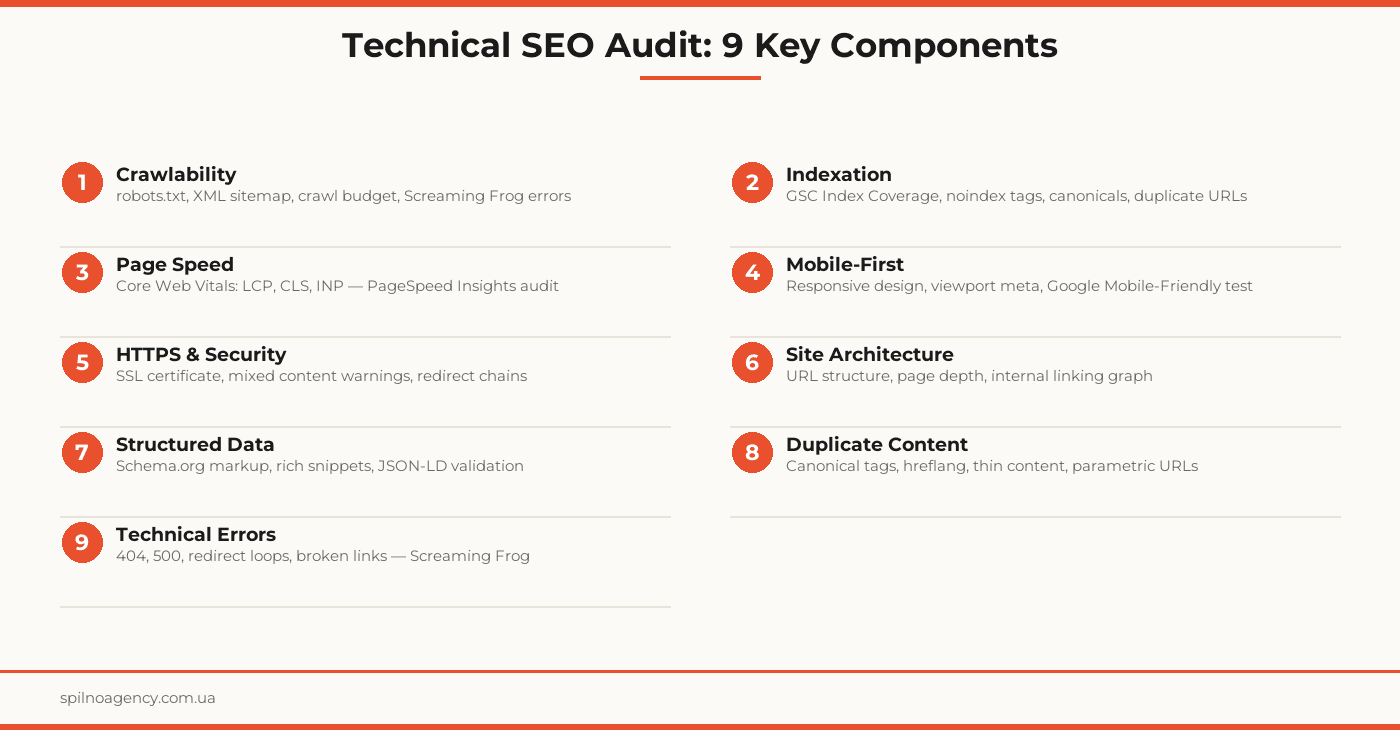
1. Crawlability
The first and most critical component. If a search crawler cannot reach your pages, nothing else matters.
What is checked:
- robots.txt — ensure important sections and resources (CSS, JS) are not blocked
- XML sitemap — presence, freshness, correct format. Only indexable URLs should appear
- Crawl budget — for large sites (10,000+ pages), analyze which pages Google crawls and how efficiently
- Crawl errors — errors in the GSC Coverage report and Screaming Frog crawl log
2. Indexation
Crawling and indexing are separate processes. A page can be crawled but not indexed for several reasons.
What is checked:
- Google Search Console → Coverage — number of indexed pages, exclusion reasons
- Noindex tags — important pages accidentally tagged with meta robots noindex
- Canonical tags — correct canonical URLs, absence of self-referencing errors
- URL variants — www/non-www, http/https, trailing slash — each variant must 301 redirect to the single canonical
3. Page Speed and Core Web Vitals
Since 2021, Core Web Vitals are an official Google ranking factor. The three main metrics:
- LCP (Largest Contentful Paint) — load time of the largest visible element. Target: <2.5 s
- CLS (Cumulative Layout Shift) — layout stability during loading. Target: <0.1
- INP (Interaction to Next Paint) — response time to user interaction. Target: <200 ms
Tools: Google PageSpeed Insights, Lighthouse, Chrome UX Report (CrUX), Web Vitals extension.
4. Mobile-First Optimization
Google indexes sites in mobile-first mode: the mobile version is evaluated first. If it differs from the desktop version, rankings are based on the mobile experience.
What is checked:
- Presence of the viewport meta tag
- Responsive design or a separate mobile version
- Google Mobile-Friendly test in Search Console
- Tap targets: buttons and links must be large enough to tap on mobile
5. HTTPS and Security
HTTPS is a baseline requirement. But even a present certificate does not guarantee the absence of problems.
What is checked:
- SSL certificate — presence, expiration date, correct configuration
- Mixed content — HTTP resources on HTTPS pages (images, scripts, fonts)
- Redirect chains — HTTP → HTTPS → www → non-www. Each extra step slows loading and leaks PageRank
- HSTS (HTTP Strict Transport Security) — presence of the header to enforce HTTPS
6. Site Architecture
URL structure and page hierarchy influence PageRank distribution and crawl efficiency.
What is checked:
- Page depth — important pages should be reachable within 3–4 clicks from the homepage
- URL structure — readable URLs without dynamic parameters or session IDs
- Internal linking — absence of orphan pages (pages with no internal links pointing to them)
- Breadcrumbs — for correct hierarchy signals to Google
7. Structured Data
Schema.org markup helps Google better understand content and display rich snippets in search results.
What is checked:
- Presence and correctness of markup (FAQ, HowTo, Article, Product, LocalBusiness, etc.)
- Validation via Schema Markup Validator
- No errors in the Google Search Console Enhancements report
- Alignment between markup and visible page content
8. Duplicate Content
Duplicates dilute ranking signals and force Google to choose between competing versions of the same page.
What is checked:
- Canonical tags — correct pointer to the primary page version
- Hreflang — for multilingual sites, to rank correctly across regions
- Thin content — pages with minimal or empty content
- Parametric URLs — ?sort=price, ?color=red — canonical or noindex
9. Technical Errors
Technical errors directly destroy user experience and ranking signals.
What is checked:
- 404 errors — broken internal links, deleted pages without redirects
- 500 errors — server errors blocking page access
- Redirect loops — A → B → A. Block crawlers and confuse users
- Redirect chains — A → B → C → D. Each extra step leaks PageRank
10. Configuration Files
robots.txt, sitemap.xml, and .htaccess (or nginx.conf) are the nerve centers of technical SEO.
What is checked:
- Correct robots.txt syntax. CSS and JS resources not blocked
- sitemap.xml: only 200 OK pages, no noindex URLs, no redirect URLs
- Redirect rules correctly configured at the server level
- No headers interfering with caching
Key Tools for a Technical SEO Audit
- Google Search Console — official Google data: Coverage, Core Web Vitals, Mobile Usability, Schema
- Screaming Frog SEO Spider — full site crawl, finding 404s, redirect chains, duplicates, orphan pages
- Google PageSpeed Insights / Lighthouse — Core Web Vitals with actionable improvement recommendations
- Ahrefs or Semrush — backlink analysis, organic keywords, overall SEO analytics
- Schema Markup Validator — Schema.org markup correctness check
For smaller sites (under 500 pages): GSC + Screaming Frog (free version up to 500 URLs) cover the majority of critical issues.
How Often to Run a Technical SEO Audit
- Quarterly (every 3 months) — baseline audit for most websites
- After every major update — redesign, migration, CMS change, new sections
- After significant traffic drops — technical issues are often behind sudden organic declines
- Continuous monitoring — GSC and automated tools (e.g., Ahrefs Site Audit) for real-time visibility
Technical SEO Audit Checklist
Use this checklist for an independent audit or record your findings in the PDF or Excel file below.
Download Checklist
57 items · 9 categories · PDF, Excel or Google Sheets