Auto-posting Services: What Are They and Why Do You Need Them?

A social media scheduler lets you plan, queue, and auto-publish content across all platforms in one place — saving hours of manual work weekly. This guide covers how autoposting services work, what features matter most, and which tools best suit European businesses in 2026.
What Is Autoposting and How Does It Work
Autoposting is the process of scheduling social media content in advance so that it publishes automatically at a predetermined time — without requiring you to be online or manually click “post.” A social media scheduler sits between your content calendar and your social media profiles, acting as a publishing engine that fires posts when you tell it to.
The workflow is straightforward: you connect your social accounts to the platform, create or upload your content (text, image, video, link), set the date and time for each post, and the tool handles the rest. Most modern autoposting services also support bulk scheduling, content libraries, and RSS-based automation — meaning posts can be queued from external sources without any manual input.
Under the hood, schedulers use official platform APIs (Application Programming Interfaces) to publish on your behalf. Every major network — Meta, LinkedIn, TikTok, X, Pinterest, Google Business Profile — provides an API that third-party tools connect to with your authorisation. This is why you go through an OAuth login flow when adding accounts to a scheduler: you are granting that tool permission to publish on your behalf.
One important distinction: not all platforms allow fully automated direct publishing. Instagram, for instance, has historically required a notification-based flow for personal profiles, though Business and Creator accounts now support direct scheduling via the API. Always verify that your chosen tool supports native publishing (not just reminders) for each network you use.
Why Your Business Needs a Social Media Scheduler
Managing social media manually is a significant time sink. For a business active on four platforms — say Instagram, Facebook, LinkedIn, and X — posting once per day means crafting, formatting, and publishing at least 28 individual pieces of content per week. Without a scheduler, someone on your team must be available at optimal posting times, which rarely align with standard working hours.
Autoposting services solve this by decoupling creation time from publishing time. Your team can batch-create a full week of content on Monday morning and let the scheduler distribute it throughout the week at peak engagement windows. This alone can reclaim 5–10 hours per week for mid-sized marketing teams.
Consistency is the other major factor. Algorithms on every major platform reward accounts that post regularly. A scheduler removes the human bottleneck — holidays, sick days, and workload spikes no longer cause posting gaps. For European businesses operating across multiple time zones — from Warsaw to Lisbon to Helsinki — a scheduler ensures content reaches each audience at the right local time without requiring anyone to work outside business hours.
There is also a strategic benefit. When you plan content in a visual calendar view, patterns become obvious: too many promotional posts in a row, a gap in educational content, or a missed product launch window. Schedulers make your editorial strategy visible and easy to adjust before content goes live.
Who Benefits from Autoposting Services
The honest answer is: almost any organisation with an active social media presence. But the value differs by use case.
Digital marketing agencies gain the most operationally. Managing 10, 20, or 50 client accounts manually is simply not viable. Autoposting platforms with multi-workspace or sub-account features — like Hootsuite or Publer — allow agencies to keep client content isolated, assign team roles, and run approval workflows before anything goes live. White-label options let agencies present the scheduler under their own brand to clients.
E-commerce businesses benefit from campaign scheduling aligned to product launches, seasonal sales, and restocks. Scheduling a full Black Friday campaign two weeks ahead means the marketing team can focus on performance monitoring rather than manual publishing during the busiest sales period of the year.
B2B companies with a presence on LinkedIn find schedulers especially valuable. LinkedIn content performs best when published on weekday mornings — a window that does not always match when content is ready. Schedulers bridge that gap reliably.
Content creators and personal brands managing their own platforms use schedulers to maintain posting frequency during periods when they are travelling, filming, or in back-to-back meetings. Tools like Buffer and Later are particularly popular in this segment because of their clean interfaces and affordable entry pricing.
Small and medium businesses across Europe — from a Berlin café to a Kraków law firm to a Madrid boutique — use schedulers to punch above their weight. A two-person team can maintain a consistent, polished social presence that looks like it requires a dedicated social media department.
Key Features to Look for in Social Media Schedulers
Not all autoposting services are created equal. When evaluating tools, focus on the features that directly affect your day-to-day workflow and your team’s ability to scale.
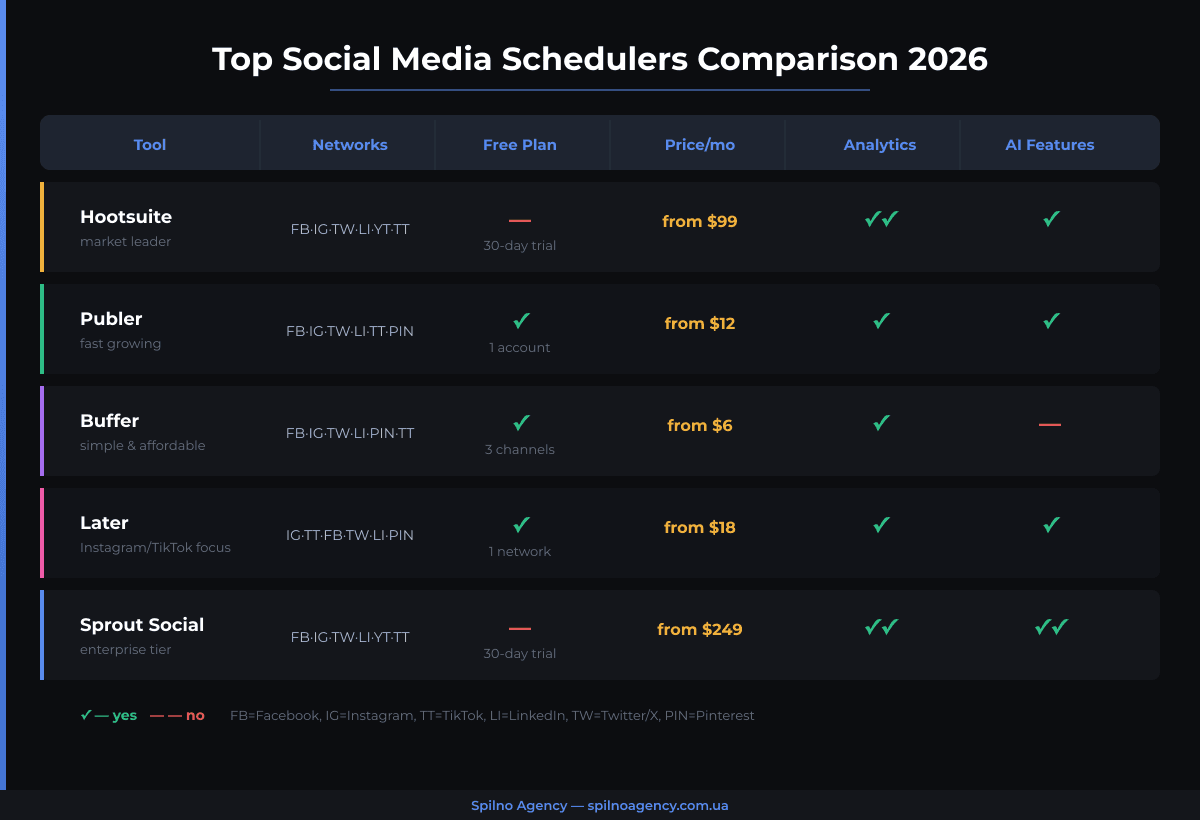
Supported Networks
Verify that the tool supports every platform you actively use — and check how it supports them. Direct publishing (automatic posting) is far more useful than a notification-based reminder that still requires manual action. For video-heavy strategies, confirm that TikTok, Reels, and YouTube Shorts direct publishing are included, since these are often restricted or added as premium features.
Content Calendar and Bulk Scheduling
A visual drag-and-drop calendar is the core of any scheduler. Beyond that, look for CSV bulk upload (to import hundreds of posts at once), recurring post options for evergreen content, and the ability to clone posts across different platforms while adjusting format-specific details.
Analytics and Reporting
Scheduling without measuring is planning in the dark. Good schedulers provide post-level performance data (reach, engagement rate, clicks) and aggregate analytics by platform or date range. Enterprise-tier tools like Sprout Social offer custom reporting dashboards; entry-level tools like Buffer provide platform-linked basic metrics. Match the depth of analytics to your reporting needs.
Team Collaboration and Approval Workflows
For teams larger than two people or for agencies, an approval flow is non-negotiable. You need the ability to draft content, assign it for review, and only allow publishing once a designated approver signs off. Role-based access (admin, editor, viewer) prevents accidental publishing and keeps client content secure.
AI Writing and Content Assistance
In 2026, most schedulers have integrated AI caption generators, hashtag suggesters, and optimal-time-to-post recommendations. These features are genuinely useful for speeding up first drafts, though they vary significantly in quality. Publer’s AI Assist and Hootsuite’s OwlyWriter AI are among the more capable implementations currently available.
Pricing and Seat Structure
Pay close attention to how tools charge. Some price per social profile (common), others per user seat, and some by a combination. An agency managing 30 client profiles on a per-profile pricing model can face unexpectedly high bills. Always calculate total cost based on your actual profile count and team size before committing.
Best Autoposting Services in 2026
Hootsuite
Hootsuite remains the market leader in social media management globally, and its footprint across European enterprises is substantial. The platform supports over 35 social networks, includes a robust content calendar, and offers some of the deepest analytics available at this price tier. Its OwlyWriter AI generates platform-optimised captions and repurposes long-form content into social snippets. The main drawback is pricing — Hootsuite is one of the more expensive options, and the free plan was discontinued in 2023. It is best suited for mid-market and enterprise teams that need comprehensive reporting and can justify the monthly spend.
Publer
Publer has been growing rapidly, particularly among European agencies and freelancers, thanks to its competitive pricing and feature density relative to cost. The platform covers all major networks including TikTok, YouTube, and Google Business Profile, and its AI Assist tool handles caption writing, hashtag suggestions, and content repurposing. Publer’s workspace structure makes it genuinely agency-friendly: each client workspace is isolated with its own billing and permissions. A limited but functional free plan is available, and paid plans start at a price point well below Hootsuite. If you are looking for the best balance of features-per-euro in 2026, Publer is worth serious consideration.
Buffer
Buffer is the go-to choice for individuals, creators, and small businesses that want a clean, no-friction scheduling experience. The interface is arguably the simplest in the market, and the free plan — three social channels, unlimited posts — is genuinely useful rather than artificially restricted. Buffer lacks the deep analytics and team features of Hootsuite or Sprout Social, but for a solo operator or a small team that needs reliable scheduling without a learning curve, it delivers exactly what is needed. Buffer’s Analyze add-on provides more detailed reporting for those who need it.
Later
Later built its reputation on Instagram and Pinterest scheduling, and it remains one of the strongest visual planners for these platforms. The drag-and-drop media library and visual Instagram grid preview are distinctive features that help brands with strong visual identities plan their feed aesthetics in advance. Later has since expanded to TikTok, Facebook, X, and LinkedIn, though its Instagram and TikTok workflows remain the most polished. The Link in Bio feature — a customisable landing page tied to your Instagram bio link — is a useful conversion tool for e-commerce brands.
Sprout Social
Sprout Social occupies the enterprise end of the market. Its analytics suite is among the most comprehensive available, with customisable reports, social listening tools, competitor benchmarking, and CRM integrations. The collaboration features — including approval workflows, task assignment, and message tagging — are built for large teams. The price reflects all of this: Sprout Social is one of the most expensive options in the market, and it is primarily justified for businesses where social media is a core revenue channel and detailed reporting is a regular stakeholder requirement.
SMMplanner
SMMplanner is particularly popular in Eastern European markets and among Russian-speaking audiences across Europe. It supports a wide range of networks including VKontakte and Odnoklassniki alongside the global platforms, which makes it relevant for businesses targeting specific diaspora communities. The interface is available in multiple languages, pricing is competitive, and the feature set — scheduling, basic analytics, team access — covers most SMB needs. For agencies operating in Eastern European markets specifically, SMMplanner offers localisation and network coverage that Western tools do not.
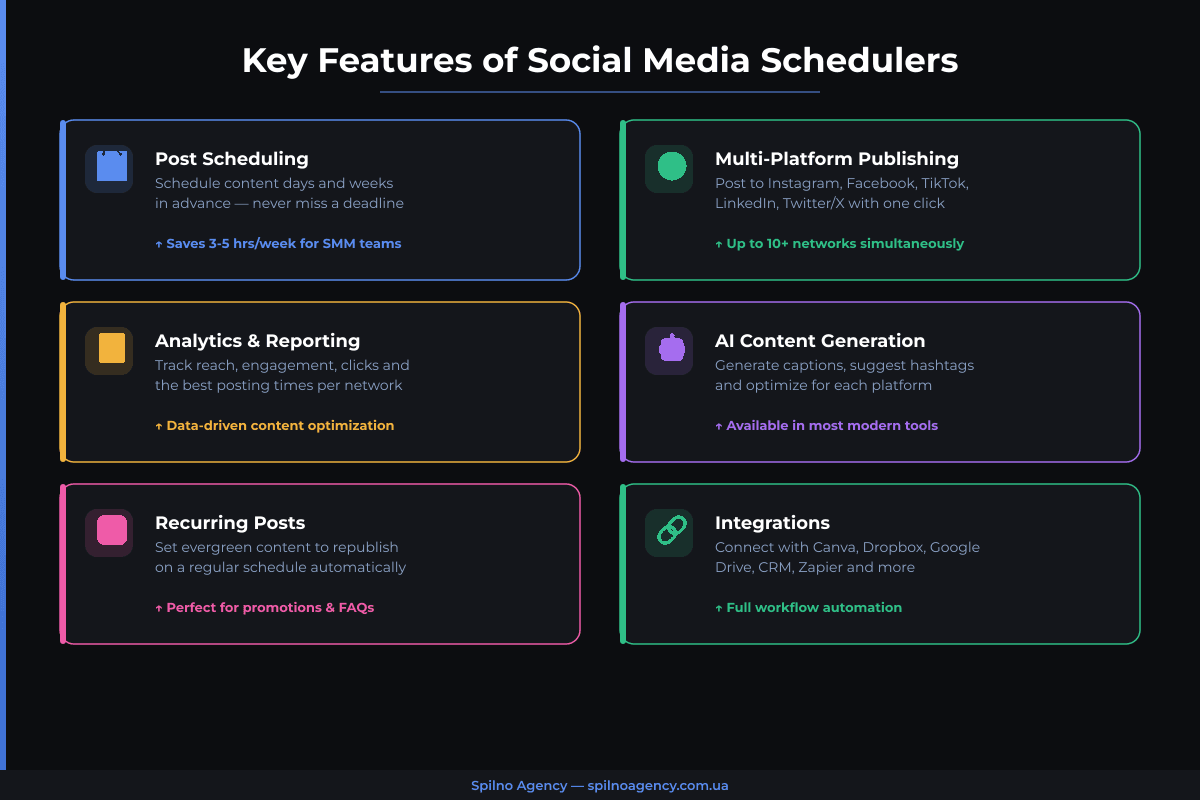
Comparison Table: Top Social Media Schedulers
| Tool | Networks | Free Plan | Price/mo (from) | Analytics | AI Features |
|---|---|---|---|---|---|
| Hootsuite | 35+ | No | €99 | Advanced | OwlyWriter AI |
| Publer | 15+ | Yes (limited) | €12 | Good | AI Assist |
| Buffer | 8+ | Yes (3 channels) | €6/channel | Basic | AI Assistant |
| Later | 7+ | Yes (14 posts/mo) | €18 | Medium | Caption writer |
| Sprout Social | 10+ | No (30-day trial) | €199 | Enterprise | AI suggestions |
| SMMplanner | 12+ (incl. VK) | Yes (limited) | €9 | Basic | Limited |
How to Choose the Right Autoposting Tool
With a dozen credible options on the market, the choice comes down to four factors: team size, network mix, budget, and reporting depth.
Solo operators and freelancers should start with Buffer or Publer’s free tier. Both offer enough functionality to manage 3–5 profiles without spending anything. Once you need more profiles or richer analytics, Publer’s entry-level paid plan offers exceptional value.
Small agencies (5–15 clients) will find Publer or Later well-suited to their needs. Publer’s workspace model scales cleanly with agency growth, and Later’s visual tools are a genuine differentiator for clients in fashion, food, hospitality, or lifestyle sectors.
Mid-market marketing teams managing their own brand across multiple markets should look at Hootsuite. The platform’s content calendar, multi-profile management, and reporting depth justify the higher price when social media is a primary channel driving measurable business outcomes.
Enterprise teams with social listening requirements, cross-departmental collaboration needs, or investor-facing reporting should evaluate Sprout Social. Its CRM-adjacent features and benchmarking tools serve use cases that simpler schedulers cannot address.
Businesses targeting Eastern European audiences — particularly those running campaigns targeting Ukrainian, Polish, or Russian-speaking communities across Europe — should assess SMMplanner for its localised platform support and language options.
One practical recommendation: most tools offer a 14 or 30-day free trial. Run two tools in parallel for two weeks with your real content before committing. The friction (or lack of it) you feel during daily use is a better signal than any feature checklist.
Pros and Cons of Social Media Scheduling
Advantages
- Time efficiency. Batch creation and scheduling frees your team from daily publishing tasks, concentrating creative work into dedicated sessions.
- Consistency. Regular posting cadence is maintained regardless of holidays, workload spikes, or team absences.
- Optimal timing. Posts can be scheduled for peak engagement windows on each platform, even if those windows fall outside your working hours or across different European time zones.
- Strategic oversight. A visual calendar reveals content balance issues — too many promotional posts, missing content types, or overlapping campaign messages — before they go live.
- Multi-platform management. One interface for all networks reduces context-switching and the risk of publishing the wrong content to the wrong platform.
- Collaboration and accountability. Approval workflows ensure brand compliance and give managers visibility into what is being published before it reaches the public.
Limitations and Risks
- Reduced spontaneity. Heavily scheduled feeds can feel formulaic. Social media also rewards reactive content — trending topics, timely responses, real-time events — which schedulers cannot handle by design.
- API dependency. Schedulers rely on platform APIs that can change, break, or restrict capabilities without notice. A platform update can temporarily disable direct publishing until the scheduler updates its integration.
- Cost at scale. Pricing models based on profile count can become expensive for agencies with many clients. Always calculate total cost before signing annual contracts.
- False sense of activity. Scheduled posts are not the same as community management. A brand that auto-publishes but does not monitor comments, DMs, and mentions will appear unresponsive and damage trust.
- Content-context mismatch. A post scheduled weeks in advance can inadvertently clash with breaking news or cultural events. Build in a review step for content scheduled more than two weeks out.
Frequently Asked Questions
What is the best free social media scheduler?
Buffer’s free plan is the most generous entry point — three social channels and unlimited posts, with no time limit on the trial. Publer also offers a free tier with access to most core features. For individuals and small businesses just getting started, either tool provides enough functionality to build a consistent posting routine without any upfront investment.
Does scheduling posts hurt reach on social media platforms?
No, not in any meaningful or consistent way. This is a persistent myth. All major platforms — Meta, LinkedIn, X, TikTok — officially support third-party scheduling via their APIs and do not penalise posts published through these authorised tools. What does affect reach is content quality, posting frequency, and engagement signals — factors unrelated to whether a post was manually published or scheduled.
Can I schedule Instagram Reels and TikTok videos with autoposting tools?
Yes, but with caveats. Direct publishing for short-form video (Reels, TikTok) is supported by most major schedulers — Hootsuite, Later, Publer, and Buffer all offer this — but the feature set may be more limited than for static posts. Some tools support video upload and scheduling but not all native editing features (sounds, templates, effects) that exist inside the native app. For content that relies heavily on in-app creative tools, you may need to create within the native app and use the scheduler for timing only.
How far in advance should I schedule social media posts?
Most marketing teams work 1–2 weeks ahead as a practical sweet spot. This allows enough lead time for content creation and approval without scheduling so far in advance that posts become contextually outdated. For campaign content tied to specific dates (product launches, events, seasonal campaigns), scheduling 3–4 weeks ahead is common and appropriate. For evergreen content — tips, guides, testimonials — scheduling several months ahead is fine.
Is Publer or Hootsuite better for a digital agency?
For most small-to-mid-sized European agencies, Publer offers better value. Its workspace-based model, client-level permissions, and competitive pricing make it well-suited to agency workflows. Hootsuite becomes the stronger choice when clients require enterprise-grade reporting, social listening, or integrations with CRM and paid media platforms — use cases that typically arise at larger accounts. Evaluate both on trial before committing.
Do social media schedulers support Google Business Profile?
Several do, including Publer, Hootsuite, and Buffer. Scheduling Google Business Profile posts (updates, offers, events) through a scheduler is especially useful for local businesses managing multiple locations. Not every tool includes GBP in its base plan — verify this before selecting a tool if GBP is part of your local SEO strategy.

Read also
Spilno Agency’s Experience: How We Verify Events Before Starting Work
Before launching a campaign in Google Ads or Meta Ads, or starting SEO work, Spilno Agency always checks…
GA4 DebugView: How to Verify Google Analytics Events in Real Time
DebugView is the section of Google Analytics 4 that shows your site’s events in real time, seconds after…

Top Claude Skills for TikTok Ads Specialists (2026)
9 verified Claude skills and MCP servers for TikTok Ads: Pixel/Smart+ audits, Spark Ads hook/hold rate, creator sourcing,…