The Most Popular Claude Skills for Google Analytics: An Analyst’s Toolkit

Agent Skills and MCP servers turn Claude into a Google Analytics 4 analyst: it connects to your GA4, builds reports on traffic, channels and conversions, and formats them into Excel or PDF — all in plain language. This is a round-up of 8 of the most useful skills and tools: what each does, where to get it, and how to connect GA4 to Claude.
What Claude skills are and how they work with Google Analytics
An Agent Skill is a folder of instructions, scripts and resources that Claude loads dynamically when your request matches its purpose. In plain terms, a skill is a working methodology packaged into a file. Instead of explaining to Claude how to build a GA4 report every time, you install the skill once — and it runs the task to a repeatable standard.
An MCP server (Model Context Protocol) is the bridge between Claude and an external data source or API. MCP is what gives Claude access to the real figures in your GA4 (sessions, conversions, traffic sources) rather than the model’s guesses. For Google Analytics the two work as a pair: MCP brings the data, the skill sets the methodology — how to analyse and present it.
That is why this list mixes both skills and MCP tools: together they cover the full cycle — from connecting to GA4 to a finished client-ready report.
- Plain language instead of the UI. “Show me the top 10 organic pages last month” — and Claude queries the Data API for you.
- Repeatability. An account audit or monthly report follows the same checklist every time — no “forgot to check that channel”.
- Reporting built in. Results drop straight into Excel, PDF or a deck — no manual copy-pasting of tables.
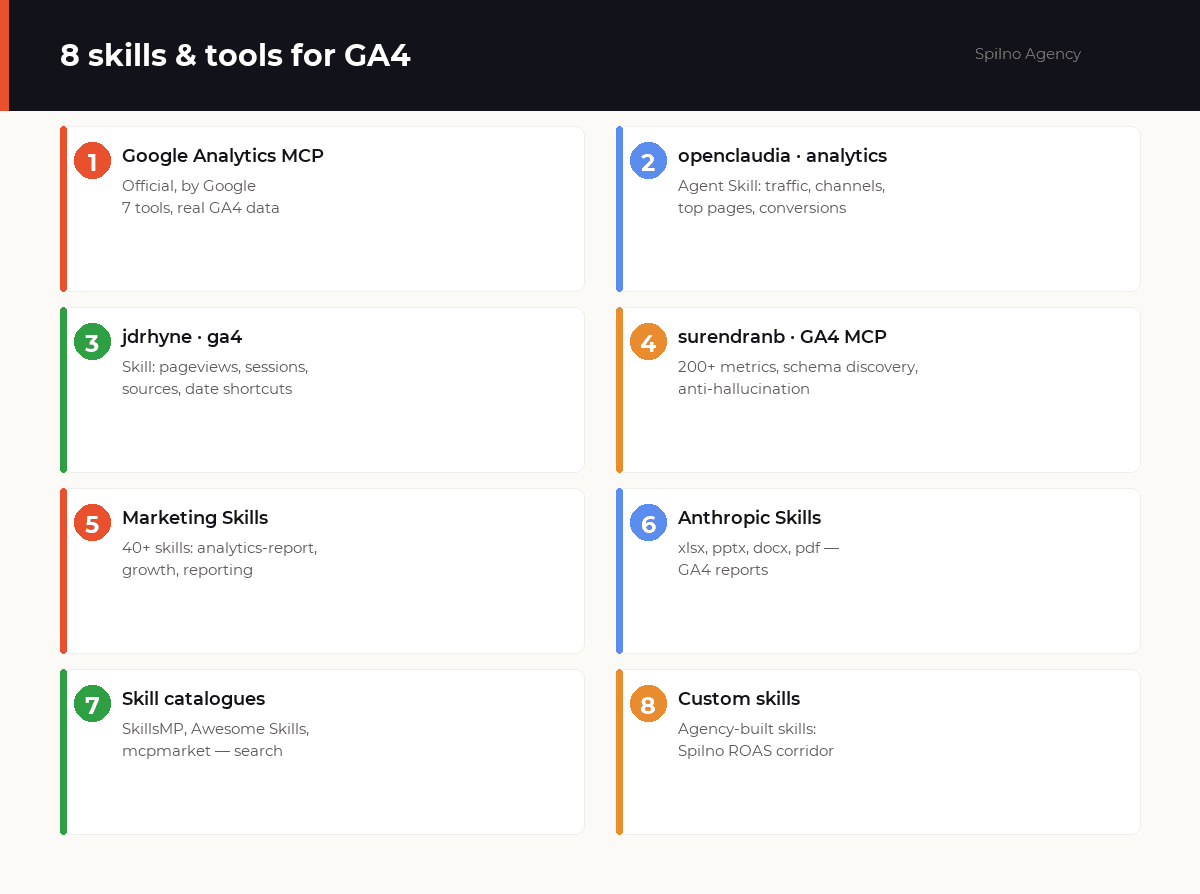
1. Google Analytics MCP — the official server by Google
What it does: the foundation of the whole list. The official MCP server from the Google Analytics team connects Claude directly to your GA4 via the Google Analytics Admin API and Data API. Claude sees the real account data and builds any report on request.
Key tools:
get_account_summaries— lists your GA4 accounts and propertiesrun_report— any Data API report (metrics × dimensions × dates)run_realtime_report— realtime datarun_funnel_report— funnel reportget_custom_dimensions_and_metrics— custom dimensions and metricslist_google_ads_links— linked Google Ads accounts
Why it stands out: it is the primary source — Apache-2.0 licence, 2.7k GitHub stars, active maintenance (v0.6.0, May 2026). Read-only by default: the server only reads data and changes nothing in the account.
Where to get it: github.com/googleanalytics/google-analytics-mcp (needs Python 3.10+ and GA4 access)
pipx run analytics-mcp2. openclaudia · google-analytics — a skill for GA4 reporting
What it does: a popular Agent Skill (446 stars) that pulls GA4 reports through the Data API: traffic overview, user acquisition by channel, top pages, engagement metrics, conversions and audience segments. Supports date shortcuts like 30daysAgo and today.
Who it’s for: marketers and analysts who need ready reports without code. The skill is read-only, so it is safe for client accounts. Output is tables by default, with JSON or CSV as options.
Where to get it: github.com/openclaudia/openclaudia-skills
npx -y skills add openclaudia/openclaudia-skills --skill google-analytics --agent claude-code3. jdrhyne · ga4 — a lightweight skill for quick queries
What it does: a compact skill that pulls GA4 data through the Analytics Data API without the web UI: pageviews, sessions, traffic sources and conversions with custom date ranges and filters. Output as tables, JSON or CSV.
Why it’s handy: minimal setup — you only need OAuth credentials and a Property ID as environment variables. A good option for quickly checking a hypothesis without opening the GA4 interface.
Where to get it: github.com/jdrhyne/agent-skills
npx -y skills add jdrhyne/agent-skills --skill ga4 --agent claude-code4. surendranb · google-analytics-mcp — 200+ metrics and error protection
What it does: a powerful alternative to the official MCP. It supports 200+ GA4 dimensions and metrics, has live schema discovery (Claude learns the available fields itself), server-side aggregation and protection against context overflow on large result sets.
Why it stands out: built-in self-healing defenses guide the model to correct field names and fix schema hallucinations — rare but very useful for complex reports. It works not only in Claude but also in ChatGPT, Gemini, Cursor and VS Code. Apache-2.0, 226 stars.
Where to get it: github.com/surendranb/google-analytics-mcp
npx -y google-analytics-mcp5. Marketing Skills by Corey Haines — analytics in a marketing context
What it does: the most popular marketing skill library — 40+ skills across the whole funnel. For analytics work, the reporting and growth skills are useful: they take GA4 data and turn it into conclusions and recommendations (what is growing, where conversions dip, which channels are underrated).
Who it’s for: specialists at the intersection of analytics and marketing, and founders who run analytics themselves and want interpretation, not just numbers.
Where to get it: github.com/coreyhaines31/marketingskills
npx skillkit install coreyhaines31/marketingskills6. Anthropic official skills — GA4 reports in Excel, PowerPoint and PDF
What it does: Anthropic’s official repository of document skills. For an analyst it closes the “last mile” — formatting the output: a monthly report in xlsx with tabs and formulas, a results deck in pptx, a client report in pdf, a write-up in docx.
How it works together: MCP brings the GA4 data → a reporting skill structures it → Anthropic’s official skill turns it into a finished file. One request — a ready report.
Where to get it: github.com/anthropics/skills
/plugin marketplace add anthropics/skills
/plugin install document-skills@anthropic-agent-skills
7. Skill catalogues — where to find new GA4 tools
The niche is growing fast, so instead of memorising names it pays to know where to look. These catalogues help you find a skill for a narrow task (for example, matching GA4 with Google Ads or detecting traffic anomalies):
- SkillsMP — a search engine indexing 1.7M+ skills for Claude Code, Codex and ChatGPT.
- Awesome Agent Skills — a curated catalogue of 1000+ community and official skills.
- mcpmarket.com and claudemarketplaces.com — skill and MCP marketplaces with descriptions and installs.
8. Custom agency skills — when off-the-shelf isn’t enough
What it does: the most valuable GA4 skills are often built around a specific methodology. One example is Spilno Agency’s own “ROAS corridor” skill: it takes the actual revenue variance over six months from GA4, measures Google Ads efficiency and forecasts the revenue uplift from a budget change — all in a branded report format.
Why a custom skill: public skills give generic reports, while a custom one encodes your logic — attribution, KPIs, client format. If the process repeats every month across dozens of projects, the skill saves hours of manual work and removes human error.
You can build such a skill yourself using the open SKILL.md specification, or commission one from an agency that already works with GA4 and Claude.
Comparison of Claude skills and tools for GA4
A quick cheat sheet to pick the right one for your task:
| Tool | Type | Cost | Best for |
|---|---|---|---|
| Google Analytics MCP | MCP (official) | Free | Base: real GA4 data in Claude |
| openclaudia · analytics | Agent Skill | Free | Ready reports without code |
| jdrhyne · ga4 | Agent Skill | Free | Quick queries, testing hypotheses |
| surendranb · GA4 MCP | MCP | Free | Complex reports, 200+ metrics |
| Marketing Skills | Skill set | Free | Analytics + marketing insight |
| Anthropic Skills | Document skills | Free | Report formatting (xlsx/pdf/pptx) |
| Skill catalogues | Search engines | Free | Finding new task-specific skills |
| Custom skills | Bespoke build | Per project | A unique agency methodology |
How to connect Google Analytics to Claude, step by step
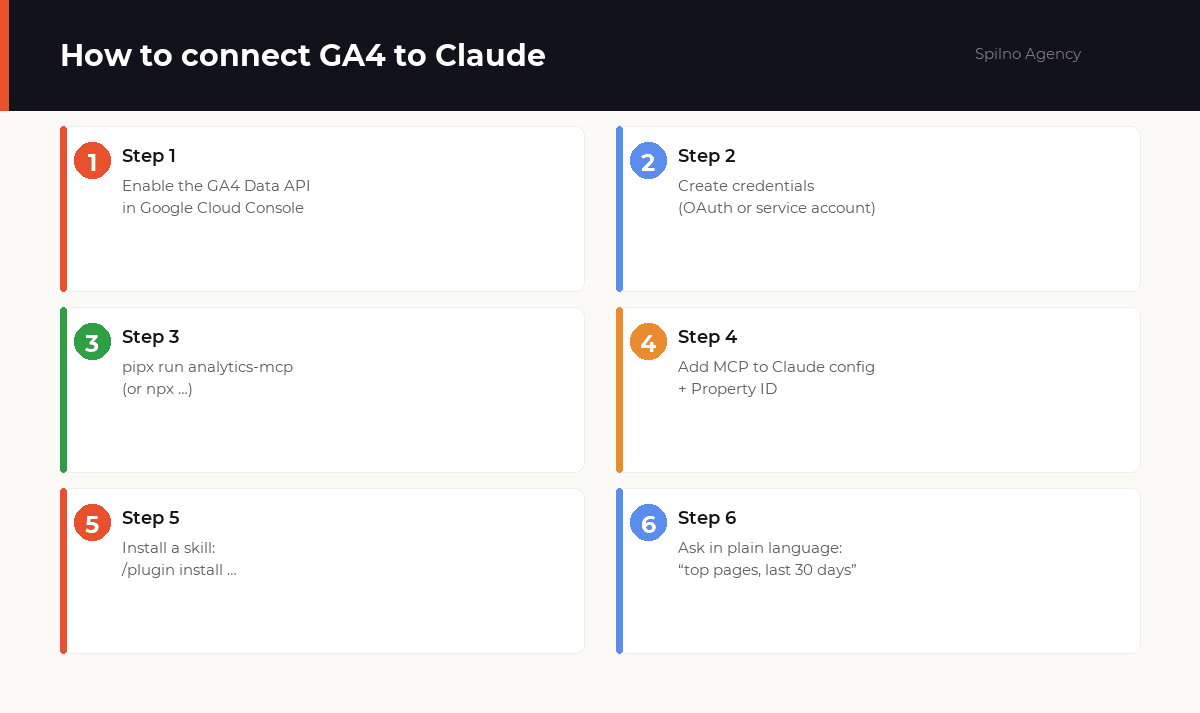
The base connection is a one-time job that takes 10–15 minutes. After that every skill works with your GA4 data. Here is the sequence using the official MCP:
- Enable the APIs. In Google Cloud Console, enable the
Google Analytics Data APIandAdmin APIfor your project. - Create credentials. Generate an OAuth key or a service account with the
analytics.readonlyscope and save the JSON file. - Run the MCP server. Install it with a single command (below).
- Add the server to Claude’s config and point it to the credentials and Property ID.
- Install a reporting skill via
/plugin install. - Ask in plain language: “show top pages for the last 30 days” — and Claude returns a table with real data.
Example config for Claude Desktop / Claude Code:
{
  "mcpServers": {
    "analytics-mcp": {
      "command": "pipx",
      "args": ["run", "analytics-mcp"],
      "env": {
        "GOOGLE_APPLICATION_CREDENTIALS": "/path/to/credentials.json",
        "GOOGLE_PROJECT_ID": "your-project-id"
      }
    }
  }
}
How to choose a Google Analytics skill: 4 criteria
- Data source. The skill should pull data through the official Data API, not “guess”. Check that it works with an MCP server or directly with the API.
- Security (read-only). For client accounts, pick tools that only read data. The official MCP and most skills here are read-only.
- Freshness and support. Check the last update date and star count: an active project adapts faster to GA4 API changes.
- Ease of install. If you’re not a developer, choose skills with a one-line install (
npx,/plugin install).
Conclusion: where to start
Start with the foundation — the official Google Analytics MCP: it gives Claude access to real data. Then add a reporting skill (openclaudia or jdrhyne) for ready tables and Anthropic’s official skills for formatting. That is enough to build monthly GA4 reports in minutes instead of hours.
The niche is new, so the skill pool is growing fast — bookmark the catalogues and come back for new tools. And if you need a unique methodology for your KPIs, a custom skill is worth commissioning.
See also our companion round-up: The Most Popular SEO Skills for Claude — tools for audits, briefs and keyword clustering.
Frequently asked questions (FAQ)
How is a skill different from an MCP server for Google Analytics?
An MCP server gives Claude access to data — it connects to GA4 through the Data API and brings real figures (sessions, conversions, channels). A skill sets the methodology — how to analyse and present that data (for example, a monthly report to a checklist). For the full cycle they work as a pair: MCP brings the data, the skill processes it.
Is it safe to connect Claude to a client’s Google Analytics?
Yes, if you use read-only tools. The official Google Analytics MCP and most skills here work read-only with the analytics.readonly scope — they cannot change settings or delete data. Access is granted through a dedicated service account that can be revoked at any time.
Do I need to code to use GA4 skills?
No. The base MCP connection is a one-time setup by the guide (10–15 minutes), after which you talk to Claude in plain language: “show traffic sources for last week”. Skills with a one-line install (npx, /plugin install) require no development skills.
How much do Claude skills for Google Analytics cost?
All the key tools here are free and open-source: the official GA4 MCP, openclaudia, jdrhyne, surendranb, Marketing Skills and Anthropic’s skills. You only pay for a Claude subscription and, optionally, for building a custom skill for your methodology.
What GA4 data can Claude show?
Through the Data API — practically anything: sessions and users, traffic sources and channels, top pages, engagement metrics, conversions and events, funnels, realtime data, and custom dimensions and metrics. The surendranb server supports 200+ standard GA4 fields.
Do these skills work in real time?
Yes. The official Google Analytics MCP has a run_realtime_report tool that returns Realtime API data — active users and events in the last few minutes. Historical reports are built via run_report for any date range.
Does Claude replace a Google Analytics analyst?
No — it speeds up the routine. Claude is excellent at gathering data, building tables and drafting first conclusions, but it leaves task-setting, KPI choice, verifying GA4 setup and strategic decisions to the specialist. It is an assistant, not a replacement for expertise.
Want your team to analyse Google Analytics through Claude — from connecting GA4 to ready reports and custom skills for your KPIs? Spilno Agency sets up the MCP integration, builds skills around your processes and trains your team to use them.

Read also
New Features in the ChatGPT Ads Dashboard: What Changed in 2026
OpenAI updated the ChatGPT Ads dashboard: conversion-optimized campaigns, new daily budgets, geo exclusions, AppsFlyer/Adjust, bulk API and price/rating…
Google Tag Manager Workspaces: Why You Need Them and How to Use Them in 2026
A workspace in Google Tag Manager is a “draft” of a container — a place to safely edit…
How to Track Revenue, Transactions and Purchases in Google Analytics 4 from WordPress WooCommerce
Introduction WooCommerce store owners are often convinced that Google Analytics 4 already shows them revenue, transaction counts and…