Import Meta, TikTok, Pinterest, Snapchat & Reddit Ads into Google Analytics 4: Step-by-Step Guide

Google has finally given marketers what they long needed: native import of ad cost data from non-Google platforms directly in GA4. To analyze spend, clicks, and impressions from Meta Ads, TikTok Ads, Pinterest, Snapchat, and Reddit Ads you no longer need CSV exports, Apps Script workarounds, or paid connectors like Supermetrics or Improvado.
In this guide we cover how Meta Ads data import into Google Analytics 4 works, what limitations exist, and — most importantly — how to connect all five platforms to GA4 step by step, without CSV files or paid connectors.
Native Ad Cost Import in GA4: What Changed in 2026–2026
Google has incrementally added native integrations with the biggest ad platforms to GA4:
- Meta Ads (Facebook, Instagram, Audience Network, Messenger, Threads)
- TikTok Ads
- Pinterest Ads
- Snapchat Ads
- Reddit Ads
Data syncs automatically, covers up to 24 months of history, and appears directly in Acquisition and Advertising reports alongside Google Ads data. This means a real end-to-end view of paid marketing — from platform spend to on-site conversions — without third-party tools.
What Metrics Are Imported
From each platform GA4 automatically pulls three key metrics at the campaign level:
- Ads cost
- Ads clicks
- Ads impressions
This is enough to see ROAS, CPC, CPM, CTR, and CPA for each source alongside Google Ads — with no data export at all.
Prerequisites: What to Do Before Setup
Before clicking buttons in GA4, make sure three things are in order.
1. Access & Roles
- Google Analytics 4 — Editor role or higher at the property level.
- Meta Ads — access to Business Center and Ad Account.
- TikTok Ads — minimum Analyst role.
- Pinterest / Snapchat / Reddit — Administrator or Manager rights on the ad account.
2. UTM Tagging
All links in your ads must include UTM parameters. Without them, GA4 cannot match clicks to on-site traffic:
utm_source— required (e.g.:facebook,tiktok,pinterest)utm_medium— required (usuallycpcorpaid_social)utm_campaign— recommendedutm_id— recommended
Important: utm_source and utm_medium values must be identical for all campaigns on the same platform. If you simultaneously use utm_source=facebook and utm_source=fb on Facebook — the import will fail to match part of the data.
3. Currency
The currency of your ad account must match the currency of the GA4 property. If Meta Ads bills in USD but GA4 is set to UAH — costs are imported in USD without automatic conversion, and ROAS will be calculated incorrectly. In that case you need to align currencies or import via Google Sheets.
Step-by-Step: How to Connect Meta Ads to Google Analytics 4
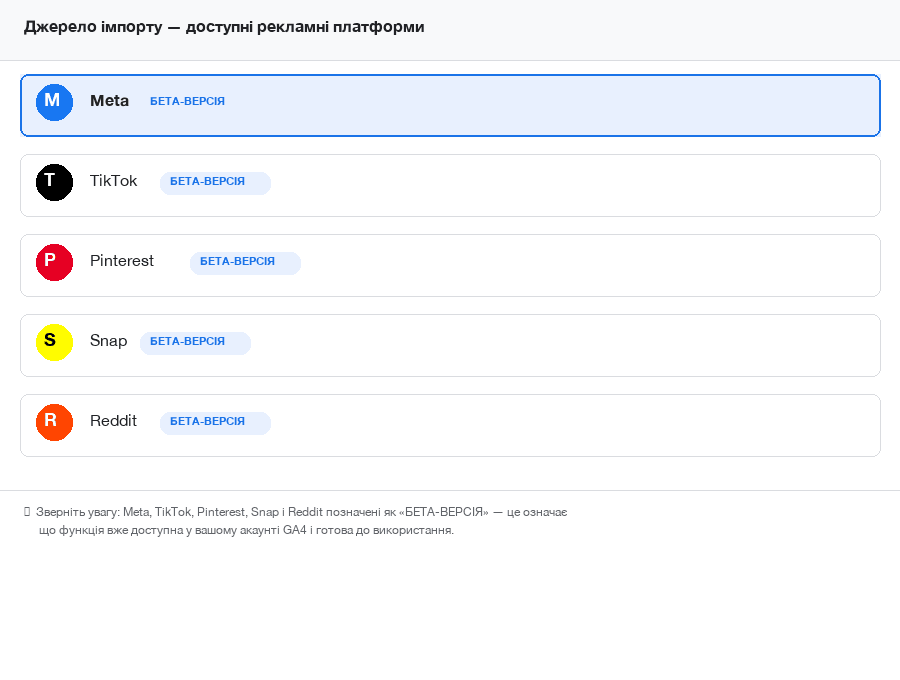
The path in GA4 is the same for all five platforms — only the source selection changes at step 4.
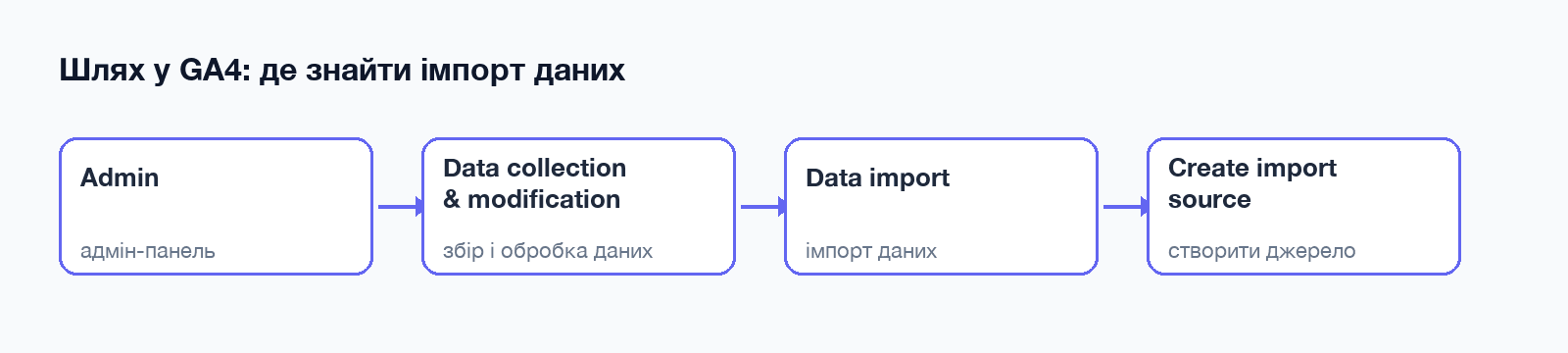
Step 1. Open the Data Import section
In your Google Analytics 4 account navigate to:
Admin → Data collection and modification → Data import
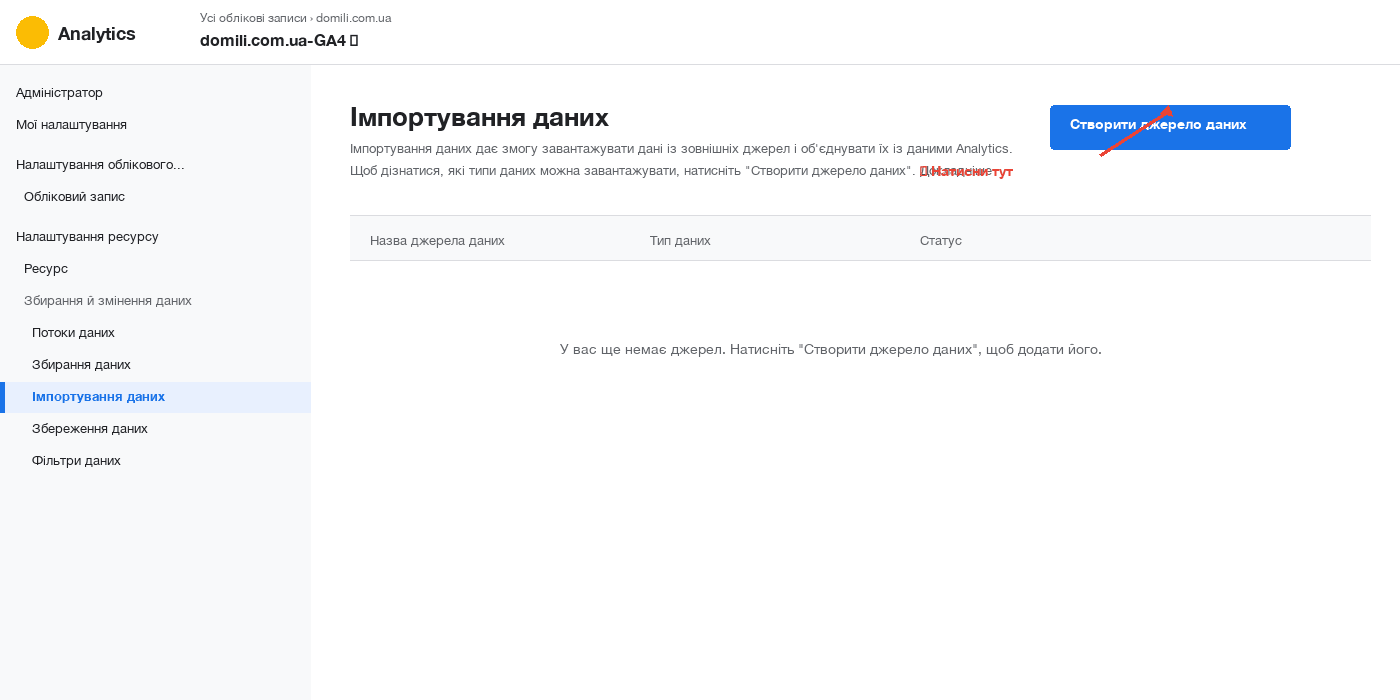
Click the Create data source button in the top right corner.
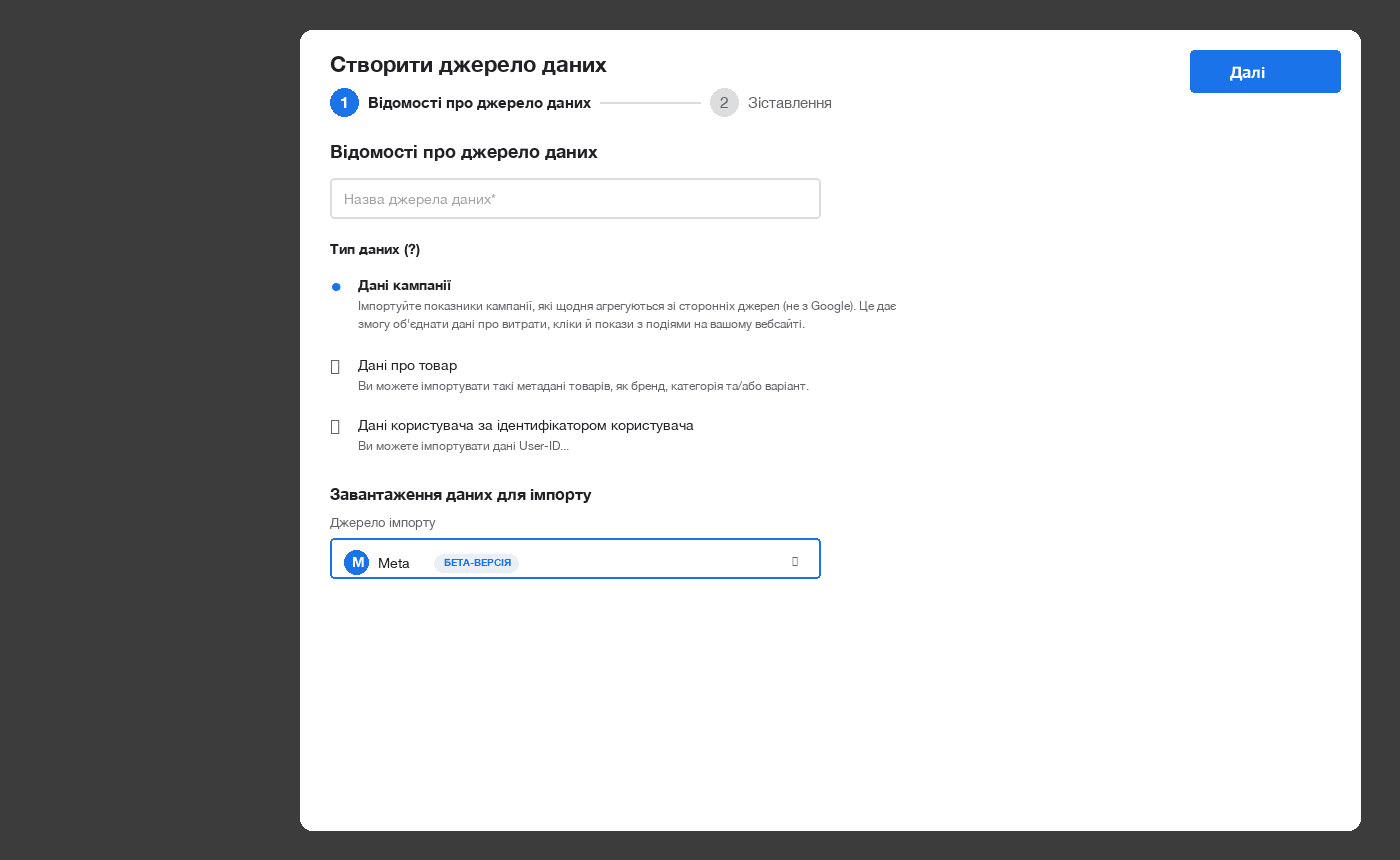
Step 2. Name the source and choose data type
- In the Data source name field enter a clear name, e.g.
Meta Ads — main account. - Under Data type select Campaign data — this is the type that supports native import from ad platforms.
- In the Import source list select the desired platform from the dropdown.
- Click Next.
Step 3. Connect your ad account
Click Connect. A pop-up window opens — log in with your platform credentials (Meta, TikTok, etc.) and grant Google Analytics access to your ad account data.
After authorization, GA4 will show dropdowns with available Business Centers and Ad Accounts. Select the ad account you want.
Step 4. Map UTM parameters
This is the most important step. In the Campaign source and Campaign medium fields enter exactly the values you use in your UTM tags:
| Platform | Typical utm_source | Typical utm_medium |
|---|---|---|
| Meta (Facebook) | facebook | cpc or paid_social |
| Meta (Instagram) | instagram | cpc or paid_social |
| TikTok | tiktok | cpc or paid_social |
pinterest | cpc or paid_social | |
| Snapchat | snapchat | cpc or paid_social |
reddit | cpc or paid_social |
For Meta, GA4 will separately ask for values for each placement: Facebook, Instagram, Audience Network, Messenger, Threads. Enter the utm_source values actually used in your ads.
Step 5. Review and launch
Review all settings and click Finish. Done.
- The import itself starts within 30 minutes.
- Data will appear in GA4 reports within 24 hours.
- Historical data pulls back automatically — up to 24 months.
Where to See Imported Ad Costs in GA4
After a successful import, data appears in standard reports:
- Reports → Acquisition → Traffic acquisition — clicks, users, conversions, revenue.
- Reports → Acquisition → User acquisition — new users by source.
- Advertising → All channels — spend, ROAS, CPA alongside Google Ads.
- Advertising → Performance → All channels — cross-platform effectiveness comparison.
Common Errors When Importing Meta Ads and TikTok Ads Data into GA4
- Doubled costs. If you previously loaded Meta or TikTok data manually via CSV — delete those imports before enabling native integration. GA4 does not deduplicate manual and automatic imports.
- Settings cannot be edited after creation. If you made a mistake with Ad Account, source, or medium — you must delete the source and recreate it.
- Currency mismatch = wrong ROAS. Check that the GA4 property currency matches the ad account currency.
- Different UTMs for the same platform break the import. If you use both
fbandfacebooksimultaneously — part of the data won’t appear in reports. - Import stuck on “In progress”. Check that your user in Meta/TikTok has sufficient permissions (Editor / Analyst) and that the Ad Account is active.
Who Needs Ad Cost Import in GA4
- E-commerce projects running ads simultaneously on Google Ads and Meta — you can finally compare ROAS across platforms in one report.
- SaaS and lead-gen businesses with multi-channel traffic — full cost picture without Looker Studio and Supermetrics.
- Agencies and freelancers — clients see everything in familiar GA4 without extra connector licenses.
FAQ
Is this free?
Yes. The integration is available in the free version of GA4. No need to pay separately for connectors.
What about historical data before the connection?
GA4 will attempt to pull up to 24 months of historical data from the ad account immediately after connection. The depth depends on how long the ad account itself has existed.
What about conversions and revenue?
Conversions and revenue are measured by GA4 itself — based on clicks arriving on the site via UTM. The import only adds costs, clicks, and impressions from the platform side. Correct attribution requires properly configured events and conversions in GA4.
Can I have multiple ad accounts for the same platform?
Yes. Create a separate Import source for each Ad Account — for example, separately for the Ukrainian and Polish markets.
Does this replace Looker Studio or Supermetrics?
For the basic task of “seeing ad costs in one report” — yes, completely. If you need complex dashboards, custom metrics, CRM integration or email platforms — Looker Studio and paid connectors remain relevant.
Conclusion
Native import of data from Meta, TikTok, Pinterest, Snapchat, and Reddit Ads into GA4 is one of the most useful changes in the past year. It removes the routine of CSV setup, eliminates dependence on paid connectors, and gives an honest comparative picture of platform effectiveness directly in the Google Analytics interface.
If you haven’t connected yet — start with your highest-budget channel. Setup takes 5–10 minutes; data will appear the next day.
Need help setting up GA4 or end-to-end analytics? The Spilno Agency team sets up GA4, GTM and Looker Studio end-to-end — get in touch and we’ll make your analytics clear and profitable.

Read also
Spilno Agency’s Experience: How We Verify Events Before Starting Work
Before launching a campaign in Google Ads or Meta Ads, or starting SEO work, Spilno Agency always checks…
GA4 DebugView: How to Verify Google Analytics Events in Real Time
DebugView is the section of Google Analytics 4 that shows your site’s events in real time, seconds after…

Top Claude Skills for TikTok Ads Specialists (2026)
9 verified Claude skills and MCP servers for TikTok Ads: Pixel/Smart+ audits, Spark Ads hook/hold rate, creator sourcing,…