What PPC Specialists Need to Know About Cookies

How cookies power PPC advertising: conversion tracking, remarketing, attribution, Consent Mode v2, third-party cookie deprecation and alternatives. A practical guide for Google Ads specialists by Spilno Agency.
Why PPC Specialists Need to Understand Cookies
Most PPC professionals launch campaigns in Google Ads or Meta Ads without thinking about how the system actually tracks clicks and conversions. Yet understanding cookies is not just a technical detail — it is the foundation for correct tracking setup, explaining data discrepancies, and adapting to new privacy rules.
Between 2024 and 2026, major changes took place: Google restricted third-party cookies in Chrome, GDPR enforcement intensified, and advertising platforms migrated to new attribution mechanisms. A PPC specialist who does not understand these changes risks losing 30–40% of conversion data and building audiences on outdated methods.
Core principle: A cookie is the link between an ad click and a conversion. Without it, Google Ads and Meta Ads are effectively blind to the results of your campaigns.
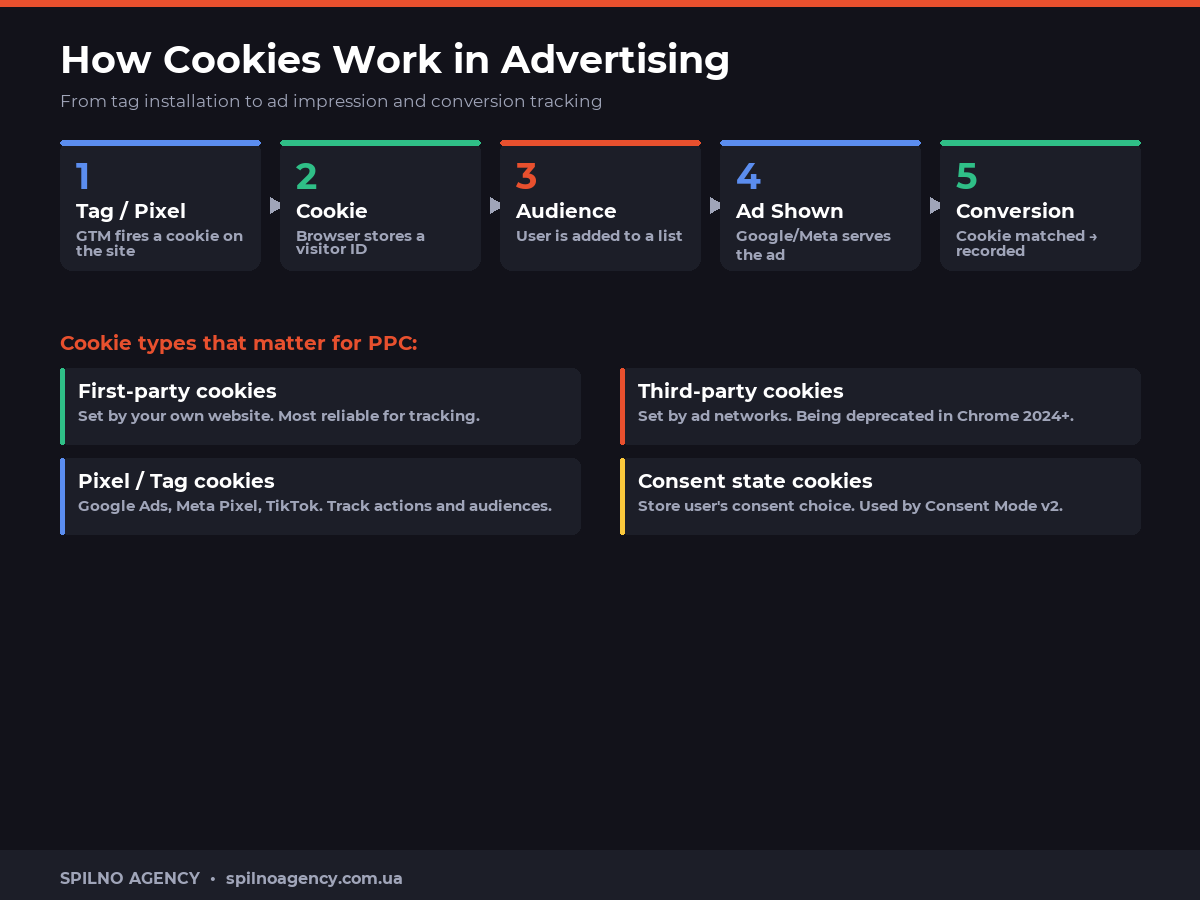
How Cookies Power Advertising Systems
When you run Google Ads, the platform sets several types of cookies:
_gcl_aw— the main Google Ads cookie storing thegclid(click ID). Lifetime: 90 days. Records that the user arrived via an ad._gac_— passes conversion data between Google Ads and Google Analytics 4. Essential for correct attribution in GA4._ga,_ga_XXXXXXX— Google Analytics cookies that identify unique users and sessions.
Meta Ads (formerly Facebook Ads) uses its own mechanism:
_fbp— the main Meta Pixel cookie for browser tracking. Lifetime: 90 days._fbc— Meta click cookie (analogous to gclid). Stores the fbclid from the URL.
Three Key Cases Where PPC Specialists Deal with Cookies
Case 1: Conversions are not recorded, or fewer than expected
One of the most common complaints: “We see 50 leads in our CRM, but Google Ads reports only 32.” The culprit is often cookies. If a user:
- Uses Safari (ITP 2.0 limits cookies to 7 days, or 24 hours after redirects)
- Blocks trackers via AdBlock or browser extensions
- Declined cookies on the consent banner (without Consent Mode v2)
- Browsed in incognito mode
— the cookie is not stored or is deleted, and the conversion “disappears” from Google Ads.
Solution: Enhanced Conversions supplements cookie tracking with hashed user data. For example, if a thank-you page contains the customer’s email address — Google hashes it and matches it against a Google account. Even without a cookie, the conversion will be recorded.
Case 2: Remarketing audiences have sharply declined
Following Chrome’s 2024 update and Safari’s ITP restrictions, audiences built with the standard Google Ads tag can shrink by 20–50%. The reason: third-party cookies that previously powered these audiences are now blocked in a significant proportion of browsers.
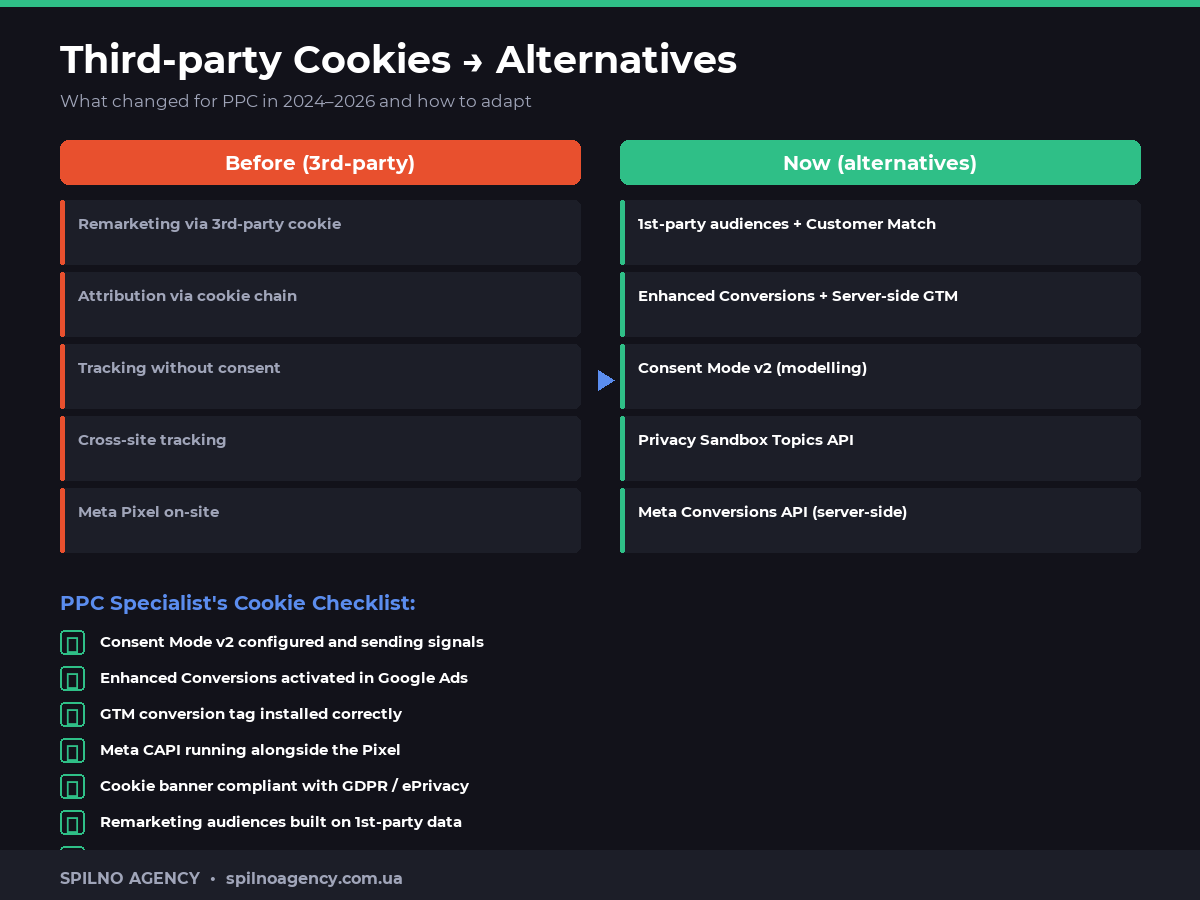
Remarketing without third-party cookies:
- Customer Match — upload a list of customer emails or phone numbers directly to Google Ads. These audiences are independent of cookies.
- 1st-party audiences via GA4 — GA4 uses a first-party cookie (
_ga), making GA4-based audiences more reliable. - Server-side GTM — tracking via your own server instead of the browser. The cookie is set as first-party, not third-party.
Case 3: Consent Mode v2 and its impact on campaign data
Since 2024, Google has required all advertisers targeting the EU to implement Consent Mode v2. Without it, when a user declines cookies, advertising tags simply do not fire.
Consent Mode v2 solves this problem as follows:
- Google tags continue to “ping” Google’s servers even when consent is declined (without identifying data)
- Google receives aggregated behavioural signals
- Machine learning “models” missed conversions based on similar patterns
- Google Ads reports display “modelled conversions” alongside observed ones
Without Consent Mode v2 in EU countries, you may lose 30–40% of conversion data from users who declined cookies.
Case 4: Attribution window vs cookie expiration
The attribution window in Google Ads (e.g. a 30-day conversion window) must align with cookie lifetime. A common mistake: the conversion window is set to 90 days, but Safari deletes cookies after 7 days. As a result, conversions from Safari are attributed only for sessions shorter than 7 days.
Solution: configure server-side GTM or Enhanced Conversions so your tracking is independent of how long browsers store cookies.
Third-party Cookie Deprecation: What Changed for PPC in 2024–2026
| Browser | Change | PPC Impact |
|---|---|---|
| Chrome 120+ | Gradual phase-out of 3rd-party cookies | Medium — mitigated by Privacy Sandbox |
| Safari (ITP) | Cookies limited to 7 days / 24 h after redirects | High — especially B2C |
| Firefox | Total Cookie Protection (partition) | Medium |
| Brave | Full blocking by default | High for tech audiences |
Alternatives to Third-party Cookies for PPC
Ad platforms have already adapted to the new environment. Here is what modern PPC specialists use in place of third-party cookies:
- Enhanced Conversions (Google Ads) — hashed user data supplements cookie tracking. Deployable via GTM in 30 minutes.
- Meta Conversions API (CAPI) — server-side conversion tracking running in parallel with Meta Pixel. Reduces losses from ITP and ad blockers.
- Server-side GTM — a GTM container running on your server. Cookies are set as first-party with up to 400-day lifetimes (vs 7 days in Safari).
- Customer Match — CRM-based audiences that do not depend on cookies.
- Privacy Sandbox Topics API — Chrome’s new targeting mechanism without cross-site cookies.
PPC Specialist’s Cookie Checklist
- ☑ Consent Mode v2 configured via GTM (Basic or Advanced mode)
- ☑ Enhanced Conversions activated in Google Ads and configured via GTM
- ☑ Google Ads conversion tag installed correctly and passing the
gclid - ☑ Meta CAPI running alongside Meta Pixel (deduplication via
event_id) - ☑ Cookie banner complies with GDPR/ePrivacy with equally prominent accept and reject buttons
- ☑ Remarketing audiences partially built on 1st-party data (Customer Match, GA4)
- ☑ Regular Diagnostics checks in Google Ads for tracking issues
Frequently Asked Questions
Why do PPC specialists need to understand cookies?
Cookies are the backbone of conversion tracking, remarketing and attribution in Google Ads and Meta Ads. Without understanding cookies a PPC specialist cannot explain data discrepancies, configure Consent Mode or migrate to cookieless solutions.
How does a cookie affect conversion tracking in Google Ads?
Google Ads sets a `_gcl_aw` cookie when a user clicks an ad. When the user converts on the site, Google matches the cookie to the click ID (gclid) and records the conversion. If the cookie is blocked or deleted the conversion is lost. Enhanced Conversions solves this using hashed user data.
What is Consent Mode v2 and how does it affect campaign data?
Consent Mode v2 is a Google framework that allows ad tags to fire in a cookieless mode when a user declines consent. Google then uses machine learning to model unobserved conversions. Without Consent Mode v2, tags simply don’t fire when consent is declined, causing significant data loss.
Why did my remarketing audiences shrink after Chrome updates?
Chrome restricted third-party cookies in 2024. This means Google Ads can no longer build remarketing audiences via third-party cookies at the same scale. Solutions: grow first-party audiences (Customer Match, site visitors), use Enhanced Conversions and the Privacy Sandbox Topics API.
What are Enhanced Conversions and why do PPC specialists need them?
Enhanced Conversions supplement standard cookie tracking with hashed user data (email, phone number). When a cookie is unavailable, Google matches the hash against its own account data to credit the conversion. This improves attribution accuracy by 10–30% in cookie-restricted browsers.
What is cookie expiration and why does it matter for PPC?
Cookie expiration is how long a browser stores a conversion cookie. Google Ads sets a conversion window (e.g. 30 days). If the cookie expires or is deleted before the conversion, attribution breaks. PPC specialists should ensure the conversion window matches the expected cookie lifetime in campaign settings.
Need help with Consent Mode v2, Enhanced Conversions or server-side tracking? Spilno Agency’s team will set up complete, loss-free tracking even in a cookie-restricted environment.

Read also
Spilno Agency’s Experience: How We Verify Events Before Starting Work
Before launching a campaign in Google Ads or Meta Ads, or starting SEO work, Spilno Agency always checks…
GA4 DebugView: How to Verify Google Analytics Events in Real Time
DebugView is the section of Google Analytics 4 that shows your site’s events in real time, seconds after…
Top Claude Skills for TikTok Ads Specialists (2026)
9 verified Claude skills and MCP servers for TikTok Ads: Pixel/Smart+ audits, Spark Ads hook/hold rate, creator sourcing,…