Why GSC Data Differs from GA4: 7 Reasons and Practical Checklists

You open Google Search Console and see 1,200 clicks for the week. Then you check GA4 and find only 850 sessions from organic search. The natural reaction is to assume something is broken. In reality, both tools are working exactly as intended — they simply measure different things in fundamentally different ways.
The discrepancy between GSC and GA4 is not an error — it is a structural feature of two tools built on different architectures. Google Search Console captures what happens before the click: impressions, positions, CTR — all measured on Google’s side before the user ever reaches your site. Google Analytics 4 activates after the click and tracks user behavior via a JavaScript tag running directly on your pages. If the script fails to load, the user has an ad blocker, they declined cookies, or they closed the tab before the page fully loaded — GA4 never sees it. GSC already counted it.
This guide covers the 7 main reasons for data discrepancies between GSC and GA4, explains the growing impact of Consent Mode v2 on European businesses in 2025–2026, and provides two practical checklists: one for diagnosing discrepancies and one for configuring both tools for maximum accuracy.
GSC vs GA4: Understanding the Core Difference

Before diving into specific reasons, it is essential to understand what each tool is actually measuring:
- Google Search Console is a search visibility tool. It collects data on Google’s infrastructure: how often your site appeared in search results, how often users clicked, and what your average ranking position was. GSC has no dependency on the user’s browser, JavaScript execution, or cookie preferences.
- Google Analytics 4 is a behavioral analytics tool. It collects data after the user has already landed on your site, via a JavaScript tag deployed directly or through Google Tag Manager. GA4 is fully dependent on the user’s browser environment, Consent Mode settings, ad blockers, and correct tag implementation.
Put simply: GSC measures what happens in Google Search; GA4 measures what happens on your website. They represent two different perspectives on the same user journey, and they will never match perfectly — nor should they be expected to.
7 Reasons Why GSC and GA4 Data Differs
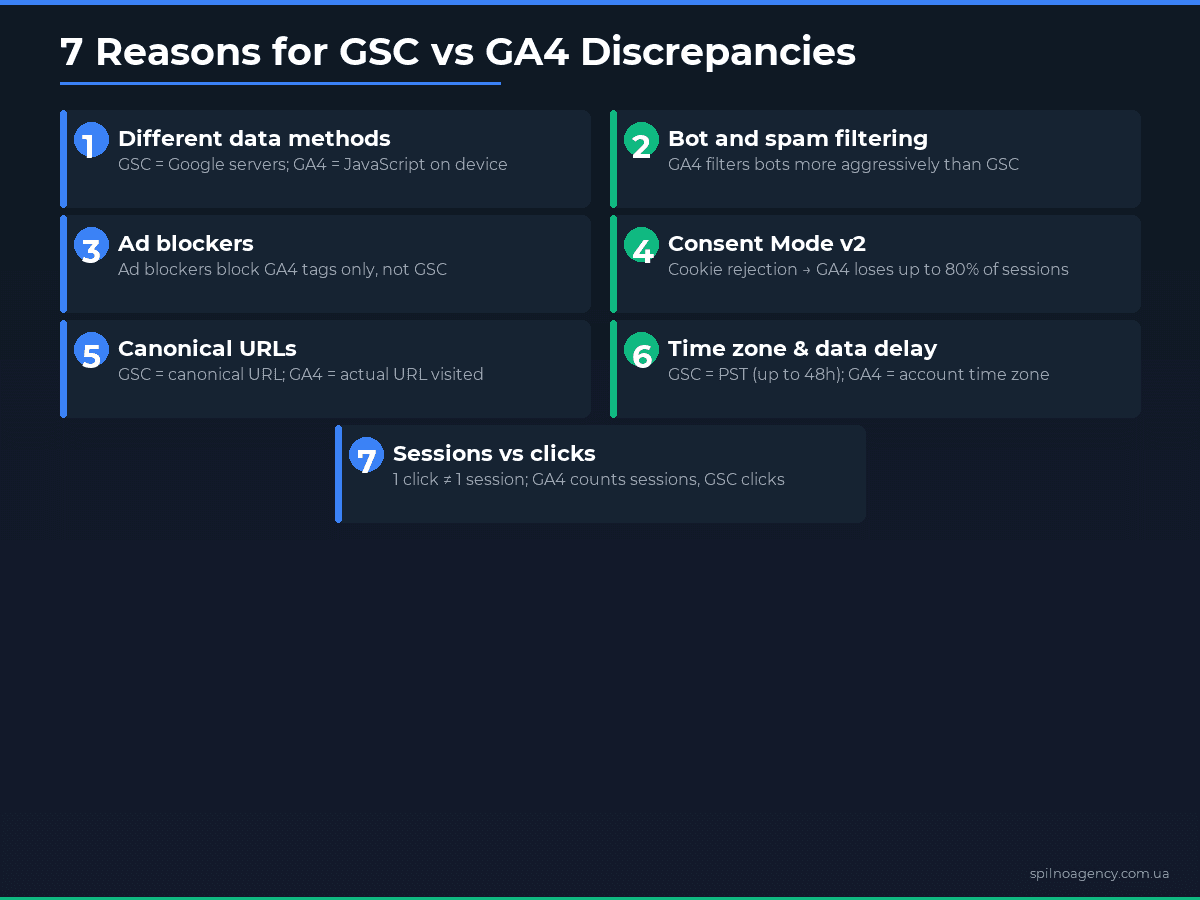
1. Different Data Collection Methods
GSC collects data at the Google server level — independently of the user’s device, browser, or settings. GA4 depends on JavaScript execution in the user’s browser. If the tag fails to load due to slow connectivity, a script error, or a missing tag on a specific page template — GA4 records nothing. GSC already logged the click the moment the user left the search results page.
2. Bot and Spam Filtering
GA4 applies aggressive filtering for known bots and crawlers, automatically excluding traffic that matches known bot signatures. GSC also filters technical crawlers, but uses different criteria. Some borderline automated requests may appear as clicks in GSC while being filtered out by GA4, or vice versa — contributing to a baseline discrepancy.
3. Ad Blockers and JavaScript Blockers
Across European markets, estimates suggest that 15–30% of desktop users run some form of ad blocking extension (uBlock Origin, AdBlock Plus, Brave’s built-in blocker, etc.). These tools frequently block Google Analytics alongside advertising scripts. The result: real traffic exists and GSC records the click, but GA4 never receives the hit. This is one of the most impactful but often overlooked sources of discrepancy.
4. Consent Mode v2 Impact
Since early 2024, Consent Mode v2 has been mandatory for all websites using Google products in the European Economic Area. When a user declines the cookie consent banner, GA4 does not receive direct session data. GA4 can attempt to model this lost data using machine learning, but modeled data is inherently less accurate than direct measurement. GSC is completely unaffected by user consent choices.
5. Canonical URLs vs Actual URLs
GSC aggregates data by canonical URL — even if users arrived via a non-canonical variant (HTTP version, www variant, URL with or without a trailing slash). GA4 tracks the actual URL loaded in the browser. If you have redirect chains or incorrect canonical tags, your GA4 data may be fragmented across multiple URL variants while GSC shows a consolidated figure for the canonical page.
6. Time Zones and Data Processing Delays
GSC uses Pacific Standard Time (PST/PDT) by default. GA4 uses the time zone configured in the property settings. If your GA4 property is set to a European time zone but you are comparing with GSC’s PST-based day boundaries, you may see apparent discrepancies in day-level data. Additionally, GSC can delay data by 24–48 hours, making real-time comparisons unreliable.
7. Session Counting vs Click Counting
This is one of the most common sources of confusion. GSC counts clicks: how many times users clicked on your site in search results. GA4 counts sessions: a single session can span multiple page views, and one user may generate multiple sessions from multiple clicks. A click in GSC does not map one-to-one to a session in GA4. One user clicking your result, navigating away, and returning via another search generates two GSC clicks but may count differently in GA4 depending on session timeout settings.
Consent Mode v2 and Data Modeling in GA4 (2025–2026)
The enforcement of Consent Mode v2 across the European Economic Area has become one of the primary drivers of increased discrepancy between GSC and GA4 in 2025–2026. For businesses operating across European markets, this is now a critical consideration in data strategy.
When a user declines or dismisses the consent banner, GA4 receives only a minimal “ping” without any personal or session data. In response, GA4 applies Behavioral Modeling — a machine learning approach that estimates the number of visits and conversions from non-consenting users based on patterns from consenting users with similar characteristics. This modeled data is incorporated into GA4 reports, but the accuracy depends heavily on your traffic volume (modeling requires a minimum threshold of consenting users to work reliably).
The practical impact: for sites with strong European audiences — particularly in markets with high consent-decline rates like France, Germany, and the Netherlands — the gap between GSC and GA4 can reach 40–80%. Even with behavioral modeling enabled, GA4 cannot fully recover what is lost when the majority of users decline consent. Server-side tagging (GTM Server-Side) is increasingly used by European businesses to reduce the impact of ad blockers and improve consent-compliant data collection.
Canonical URLs and Redirects: A Closer Look
GSC consolidates data for all URL variants it considers duplicates of a canonical. For example, if both http://site.com/page and https://site.com/page/ exist with a redirect, GSC will attribute data to the canonical HTTPS version. GA4 records the actual final URL loaded in the browser — but if the redirect chain is misconfigured, the GA4 tag may fire on an intermediate URL or not fire at all.
Common problem patterns: HTTP to HTTPS redirects where the GA4 tag is only on the HTTPS version; www to non-www redirects; pages with and without trailing slashes treated as separate URLs; UTM parameters creating URL variants that GA4 counts as separate landing pages. Audit your redirect chains regularly using a crawl tool and ensure all canonical tags point to the intended definitive URL.
Practical Checklist: How to Diagnose Discrepancies
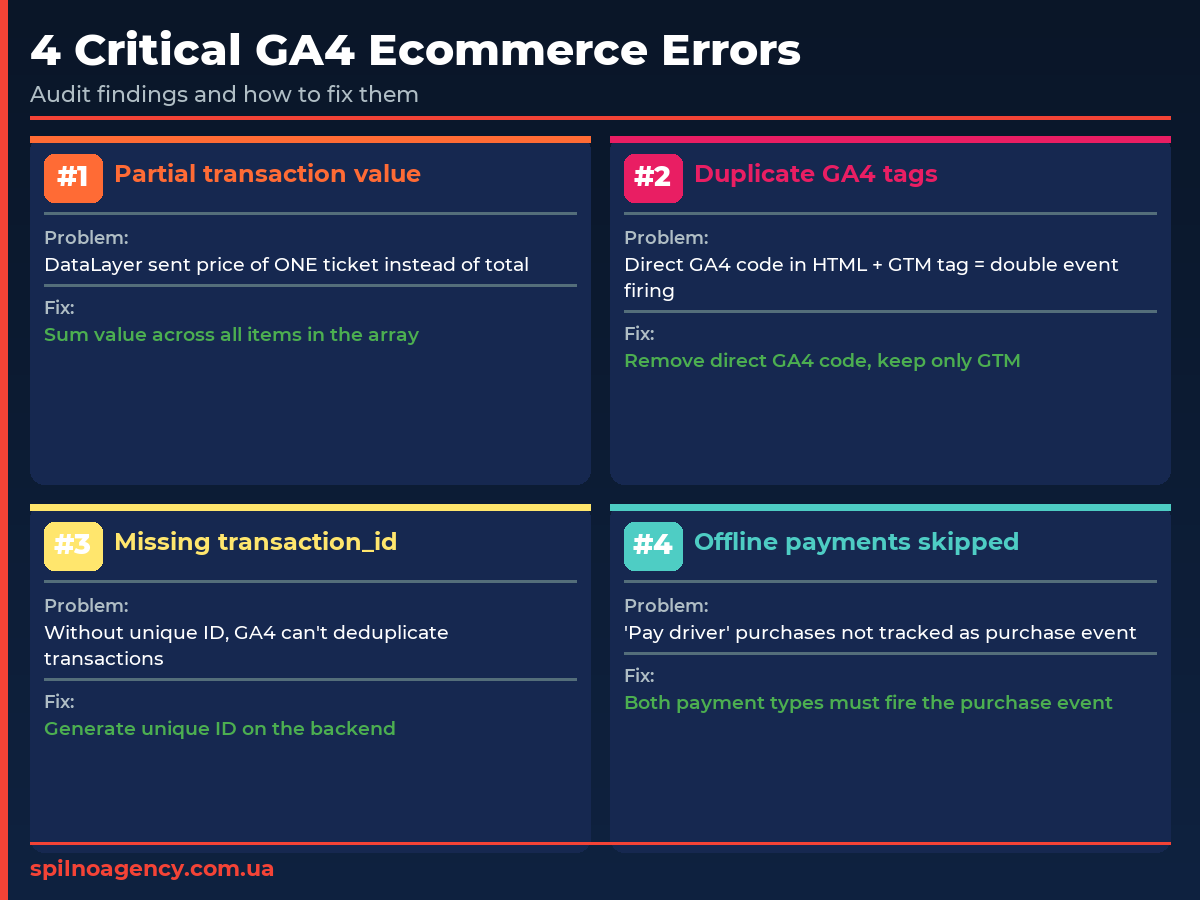
If you have identified a significant gap between GSC and GA4, work through this checklist to locate the cause:
- ✓ Compare the exact same date range in both tools, accounting for GSC’s up to 48-hour data delay
- ✓ Filter GA4 to organic traffic only: Session source / medium = google / organic
- ✓ Confirm GSC integration is active in GA4 (Admin → Product Links → Search Console Links)
- ✓ Verify time zones match: GA4 property settings vs GSC’s default PST/PDT
- ✓ Confirm internal IP addresses are excluded in GA4 (Admin → Data Filters → Internal Traffic)
- ✓ Verify the GA4 tag fires on all page templates using GTM Preview mode or GA4 DebugView
- ✓ Check the browser console for JavaScript errors on key landing pages
- ✓ Verify robots.txt is not unintentionally blocking Googlebot on any pages
- ✓ Audit canonical tags — confirm they point to the correct, indexable URLs
- ✓ Check for redirect chains: HTTP→HTTPS, www→non-www, trailing slash variants
- ✓ Review Consent Mode v2 configuration — confirm behavioral modeling is enabled
- ✓ Segment branded vs non-branded queries separately — the discrepancy pattern may differ
- ✓ In GSC, check the “Search type” filter is set to “Web” (not Image or Video)
- ✓ Verify cross-domain tracking is configured in GA4 if your conversion funnel spans multiple domains
- ✓ Assess ad blocker impact — consider implementing server-side GA4 tagging to reduce data loss
Configuration Checklist for Accurate Data
To minimise discrepancies and achieve the most accurate data possible across both tools, verify the following configuration steps:
- ✓ Link GSC to GA4: Admin → Product Links → Search Console Links → Link
- ✓ Set the correct time zone in GA4: Admin → Property Settings → Time Zone → your local timezone
- ✓ Enable Consent Mode v2 with behavioral modeling: configure your CMP integration in GTM and enable Behavioral Modeling in GA4
- ✓ Implement server-side GA4 tagging: reduces ad blocker impact and improves data quality significantly
- ✓ Exclude internal traffic: Admin → Data Filters → Internal Traffic → add your office and developer IP ranges
- ✓ Configure cross-domain tracking: if your site includes subdomains or partner domains in the conversion path
- ✓ Audit canonical tags on all key pages: use Screaming Frog or a similar crawl tool
- ✓ Resolve redirect chains: all redirects should be direct 301s with no intermediate hops
- ✓ Avoid sampling for large date ranges: use GA4 Explorations (Explore) for unsampled data on high-traffic properties
- ✓ Validate the Search Console report in GA4: confirm it is populating data after linking (allow 24–48 hours for initial sync)
How to Use GSC and GA4 Together
The most effective approach is to treat GSC and GA4 not as competing tools but as complementary lenses on the same user journey. At Spilno Agency, we recommend a clear division of roles: GSC for search visibility analysis and keyword strategy, GA4 for post-click behaviour analysis and conversion funnel optimisation.
A practical workflow for European businesses: use GSC to identify queries where your pages rank in positions 5–15 with high impression volume but below-average CTR — these are your quick-win optimisation opportunities. Then move into GA4 to examine user behaviour on those landing pages: bounce rate, engagement time, scroll depth, and conversion events. Optimise based on both data sets simultaneously for the strongest results.
GA4’s built-in Search Console report (Reports → Acquisition → Google Search Console) brings both data sources into one view, allowing you to see which queries drive not just clicks but actual conversions. This report is one of the most underused features in GA4 and is invaluable for understanding the full organic search performance picture. Enable it as soon as you link your GSC property.
Conclusion
The discrepancy between GSC and GA4 is not a bug — it is a feature of how two fundamentally different measurement systems work. GSC shows what happens in Google Search; GA4 shows what happens on your website. Understanding this distinction allows you to use both tools correctly rather than trying to reconcile numbers that were never meant to match exactly.
If your discrepancy remains above 30% after working through the checklists above, a full analytics audit is warranted. At Spilno Agency, we help European businesses configure GA4, Consent Mode v2, server-side tagging, and GSC integration to ensure you have the most complete and accurate data available for making informed marketing decisions.
FAQ
How much can GSC and GA4 data differ in percentage?
A discrepancy of 10–30% is considered normal. In projects with Consent Mode v2 but without behavioral modeling, the gap can reach 40–80% in markets with strong GDPR consent enforcement. If the gap exceeds 30%, it is a signal to audit your tracking setup.
Why does GA4 show fewer sessions than clicks in GSC?
GSC counts every click on your site in search results, while GA4 counts sessions — one user can generate multiple sessions from multiple clicks. GA4 also does not record visits where JavaScript is blocked or the tag failed to fire, while GSC records all clicks regardless of what happens in the browser afterward.
How does Consent Mode v2 affect data discrepancies between GSC and GA4?
When a user declines cookies, GA4 does not receive direct session data and instead applies ML-based behavioral modeling. GSC is completely unaffected by user consent — it collects data on Google’s side before the click happens. This is why GA4 often shows significantly less traffic than GSC after Consent Mode v2 is implemented.
How to connect GSC to GA4?
In GA4 go to: Admin → Product Links → Search Console Links. Click ‘Link’ and select the relevant GSC property. After linking, data appears in the ‘Google Search Console’ report under Reports → Acquisition. The sync takes 24–48 hours to populate.
What level of discrepancy between GSC and GA4 is considered normal?
Up to 15–20% discrepancy is normal due to the fundamental technical differences between the tools. A gap of 20–40% warrants a review of Consent Mode and GA4 tag implementation. More than 40% is a strong signal of a technical issue or misconfiguration that needs to be investigated and resolved.
This article is part of a free course:
Google Analytics Course
To unlock the quiz after this article and track your progress, sign up (or sign in) and start the course in your personal dashboard.
Knowledge Test
You get only 1 attempt at this quiz — read every question carefully before answering. You need at least 80% correct answers to pass.

Read also
Spilno Agency’s Experience: How We Verify Events Before Starting Work
Before launching a campaign in Google Ads or Meta Ads, or starting SEO work, Spilno Agency always checks…
GA4 DebugView: How to Verify Google Analytics Events in Real Time
DebugView is the section of Google Analytics 4 that shows your site’s events in real time, seconds after…
Top Claude Skills for TikTok Ads Specialists (2026)
9 verified Claude skills and MCP servers for TikTok Ads: Pixel/Smart+ audits, Spark Ads hook/hold rate, creator sourcing,…