Yoast SEO: WordPress Plugin Review 2026

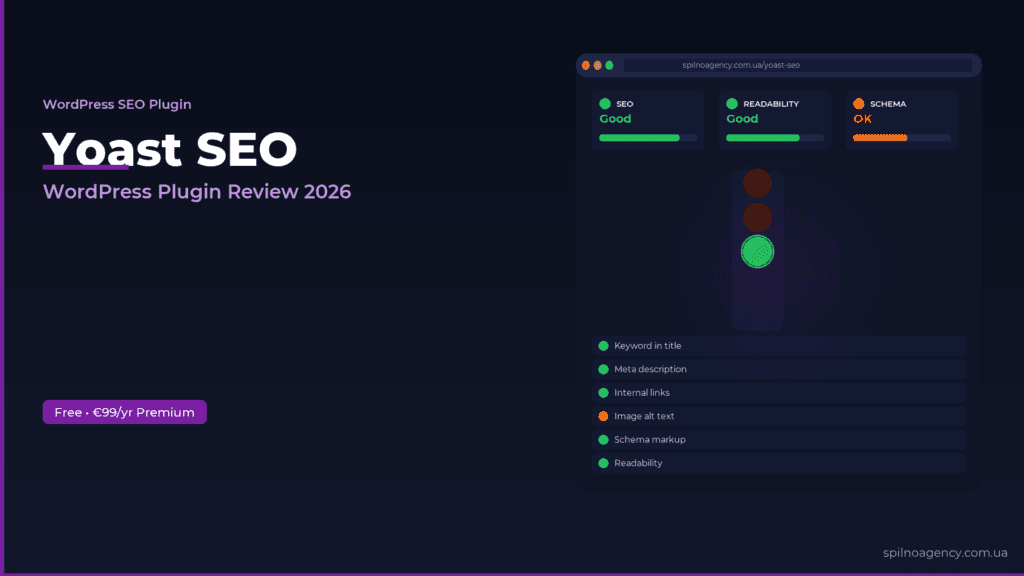
Yoast SEO is the world’s most popular WordPress SEO plugin: installed on 13+ million sites. In 2026, it gained a built-in AI assistant, LLMs.txt management for AI system access control, and Schema Aggregation for enhanced indexing. Full feature review, setup guide, and comparison with Rank Math — in this article.
What is Yoast SEO?
Yoast SEO is a WordPress SEO plugin developed by the Dutch company Yoast in 2010. As of 2026, it is actively installed on more than 13 million sites worldwide. Official website: yoast.com.
How to Install Yoast SEO
- WordPress admin → Plugins → Add New
- Search for
Yoast SEO - Click Install Now, then Activate
- Run the Configuration Wizard from the SEO menu
- Set site type, company name, and connect Google Search Console
The Traffic Light System — Reading Yoast SEO Scores

- 🟢 Green — all key SEO conditions met. Page is well-optimized
- 🟠 Orange — some conditions met, improvements possible
- 🔴 Red — critical SEO elements missing. Urgent fixes required
Key Yoast SEO Features
1. SEO Content Analysis
Checks keyword presence in Title, H1, first paragraph and meta description; keyword density (0.5–3%); text length (min. 300 words); internal links; and image alt texts.
2. Readability Analysis
Evaluates sentence length (≤20 words), paragraph length (≤150 words), active voice usage, transition words, and H2–H4 heading hierarchy.
3. Meta Title and Meta Description
Customize meta tags for every page with a live Google SERP snippet preview. Supports dynamic variables: %%title%%, %%sitename%%, %%sep%%.
4. XML Sitemap and Canonical URL
Auto-generates and maintains an XML sitemap. Automatically adds canonical URLs to all pages, preventing duplicate content penalties.
5. Schema Markup
Adds Schema.org markup: WebSite, Organization, Article, BreadcrumbList. Separate schema types for products, recipes, events, and FAQ.
New Yoast SEO Features in 2026
Built-in AI Assistant
Yoast SEO Premium includes a real-time AI assistant that analyzes content as you write and suggests titles, meta descriptions, and optimization improvements.
LLMs.txt — AI System Access Management
LLMs.txt is a new standard (similar to robots.txt) for large language models. Yoast SEO Premium 2026 manages it directly from WordPress — essential for GEO (Generative Engine Optimization) across European markets.
Schema Aggregation and Site Kit by Google
Schema Aggregation creates a centralized structured description of your entire site for search engines and AI agents. Since January 2026, all users have direct Google Site Kit integration in the Yoast dashboard.
Yoast SEO Free vs Premium

The free version covers most European business websites. Premium at €99/year unlocks: AI assistant, LLMs.txt, Schema Aggregation, multiple keywords, redirects, and internal linking suggestions.
Yoast SEO vs Rank Math vs AIOSEO — 2026

- Yoast SEO — most stable, largest community, unique Schema Aggregation and LLMs.txt for European enterprise sites
- Rank Math — more free features, lower premium (€59/yr)
- AIOSEO — cheapest premium (€49/yr), built-in analytics
Yoast SEO FAQ
Is Yoast SEO free?
Yes — SEO analysis, meta tags, XML sitemap, canonical URL. Premium (€99/yr) adds AI assistant, LLMs.txt, redirects, multiple keywords.
Yoast SEO vs Rank Math in 2026?
Rank Math offers more for free. Yoast uniquely supports AI traffic via Schema Aggregation and LLMs.txt — critical for European businesses targeting AI-generated traffic.
How to install Yoast SEO?
WordPress admin → Plugins → Add New → “Yoast SEO” → Install → Activate. Complete Configuration Wizard from the SEO menu.
What is LLMs.txt?
A file telling AI systems how to interact with your content. Yoast SEO Premium 2026 manages it from WordPress for GEO optimization.
What is Schema Aggregation?
A 2026 Yoast feature creating a centralized structured data summary for search engines and AI agents — improving Rich Snippets and AI Overview visibility.
How much is Yoast SEO Premium?
€99/year per site license, including all premium features, priority support, and Yoast SEO Academy.

Read also
Spilno Agency’s Experience: How We Verify Events Before Starting Work
Before launching a campaign in Google Ads or Meta Ads, or starting SEO work, Spilno Agency always checks…
GA4 DebugView: How to Verify Google Analytics Events in Real Time
DebugView is the section of Google Analytics 4 that shows your site’s events in real time, seconds after…
Top Claude Skills for TikTok Ads Specialists (2026)
9 verified Claude skills and MCP servers for TikTok Ads: Pixel/Smart+ audits, Spark Ads hook/hold rate, creator sourcing,…