404 Error: What It Is and the SEO Standard Explained

A 404 error is an HTTP status meaning “page not found.” From an SEO standpoint, a properly configured 404 page does not hurt your site — what hurts is soft 404s, missing redirects, and thousands of broken links in your link profile. Here is the standard and a checklist.
What is a 404 error
In plain terms: a 404 error is the server’s answer that “this page does not exist”.
People see it when they follow an outdated link, mistype an address, or when a page has been removed from the site.
Why this matters to your business: on its own it is a normal thing. But if there are many such pages and links from ads, directories or old newsletters point to them, you are losing ready customers every day.
A 404 Not Found error is the HTTP response code a server sends to the browser when the requested page does not exist. It belongs to the 4xx group — “client errors” — meaning the problem is on the request side, not the server side.
This can happen for several reasons:
- A page was deleted but its URL remains in external links or the search index.
- A page URL changed (e.g. /blog/post-1 → /articles/post-1) without a redirect.
- A link was typed with a typo in the URL.
- A page is temporarily unavailable due to technical issues.
It is important to understand the difference between two types of 404:
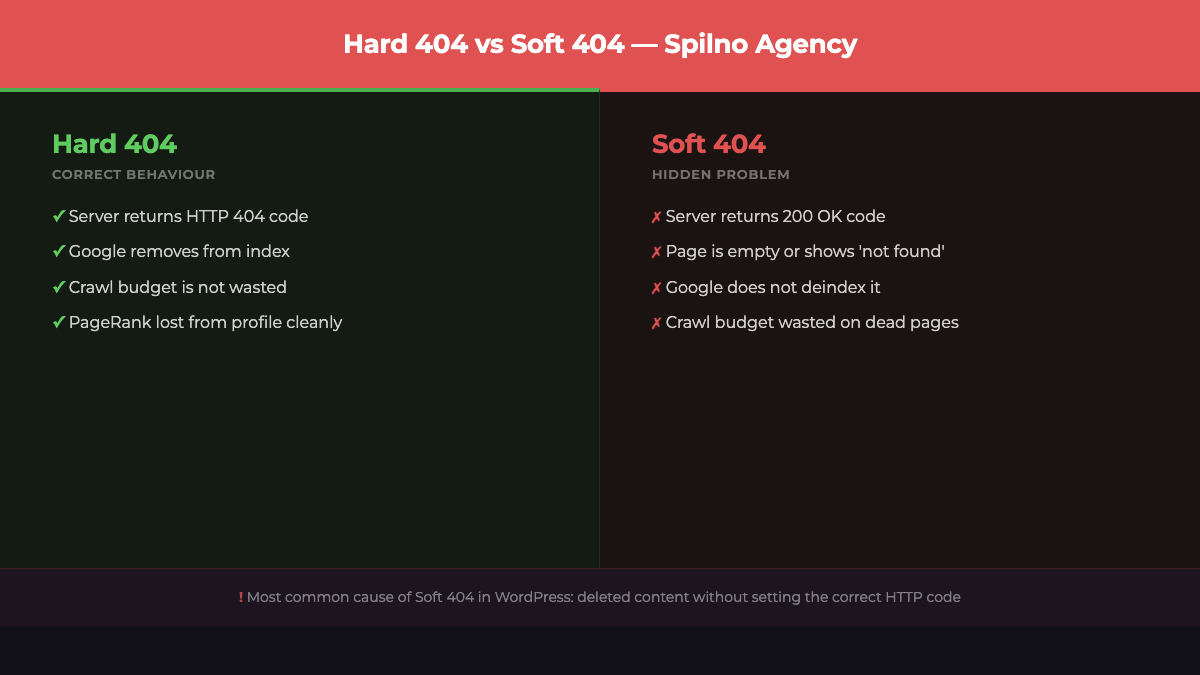
Hard 404 — the correct error
A hard 404 is when the server returns an actual HTTP 404 status code. Google sees it, understands the page no longer exists, and eventually removes it from the index. This is correct behaviour.
Soft 404 — the hidden problem
A soft 404 is when the server returns a 200 OK code, but the page is actually empty or contains a “not found” message. Google does not understand that the page is gone, keeps spending crawl budget on it, and may drag down the overall site quality. This is a typical CMS issue, especially in WordPress.
How a 404 error affects SEO
Google is relaxed about individual 404s: pages get removed, that is a natural process.
Problems start when addresses that used to bring visitors begin returning 404, or when many internal links from your own site point at pages that no longer exist.
Why this matters to your business: the check takes a few minutes in Search Console and finds lost traffic you have already paid for once — with work or with ad budget.
The direct question: does a 404 lower rankings? Google’s answer: isolated 404s do not reduce rankings. But there are important nuances:
- Lost link equity. If external sites link to a page returning 404, those links pass no PageRank. If the page had valuable backlinks, their authority simply disappears.
- Crawl budget waste. If Googlebot constantly hits hundreds or thousands of 404 pages, it spends its budget on them instead of useful pages. Critical for large sites (10k+ pages).
- Poor UX. A user landing on a 404 is likely to leave the site immediately. This worsens behavioural metrics and E-E-A-T signals.
- Internal links pointing to 404. If your own content links to non-existent pages, this is a direct SEO problem and a signal of low-quality content.
SEO standard: what a proper 404 page must include
A proper error page does not leave the visitor at a dead end: it explains what happened and immediately offers a way out — site search, a link to the homepage, popular sections.
Why this matters to your business: the difference between a blank page saying “404” and a proper one is dozens of visitors a month who continue through the site instead of closing the tab.
404 is not the end. A well-designed 404 page brings the user back to the site and minimises SEO losses. Here is what it must include:
- Correct HTTP 404 code. The server must return exactly
404, not200or302. Check in DevTools → Network or via Google Search Console. - A clear message. In plain language: “Page not found. It may have been deleted or you followed an outdated link.”
- A link back to the homepage. A “Go to homepage” button is mandatory.
- Site search. A search field helps the user find what they were looking for.
- Popular or related content. A list of 3–5 current articles or site sections.
- Brand and style. The 404 page is part of the site. It must match the overall design.
- No canonical pointing elsewhere. Never add a
canonicalfrom the 404 page to the homepage — this can cause duplication issues.
404 vs 301 — when to redirect and when to leave a 404
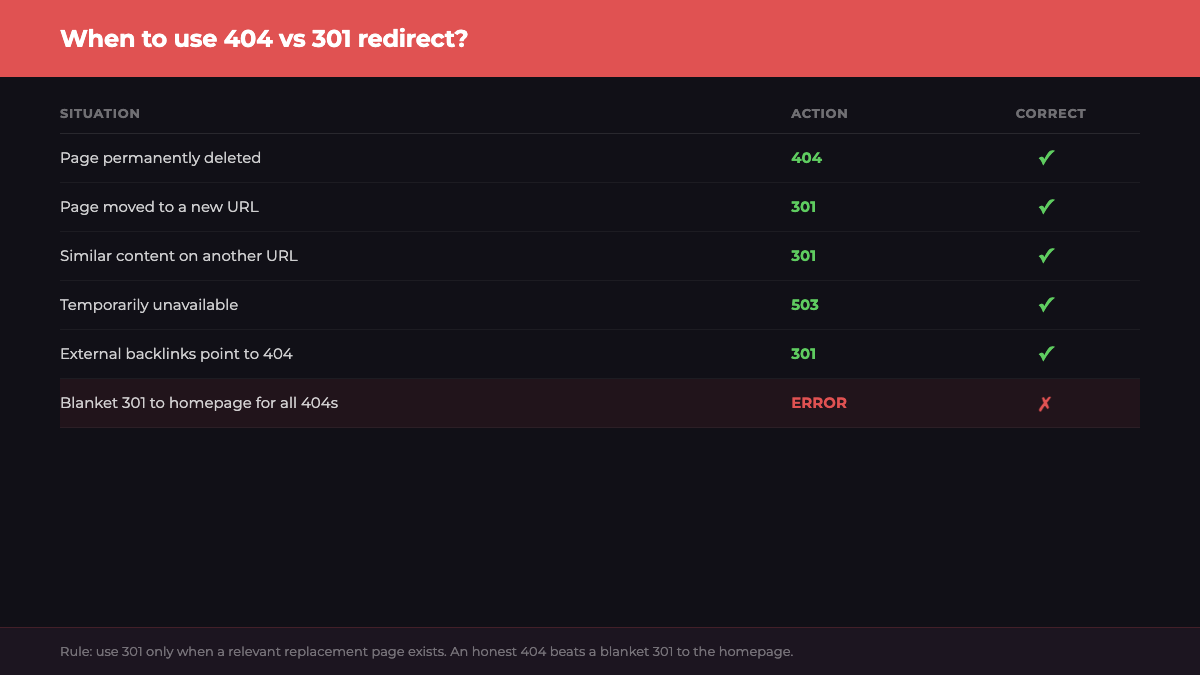
This is one of the most common questions — and one that is often answered incorrectly:
| Situation | Correct action | Why |
|---|---|---|
| Page deleted, content no longer relevant | 404 (hard) | Honestly signals to Google that the page is gone |
| Page moved to a new URL | 301 redirect | Preserves PageRank and link equity |
| Old URL with similar content available | 301 to the nearest topic match | Avoids traffic and backlink loss |
| Page temporarily unavailable | 503 Service Unavailable | Google waits rather than deindexing |
| External backlinks pointing to a 404 | 301 to a relevant page | Recovers link equity |
Rule of thumb: if there is a relevant replacement page to redirect to — use a 301. If the content is truly gone and there is no substitute — leave it as 404.
How to find 404 errors on your site
- Google Search Console. Go to Coverage → filter by Errors → “Not found (404)”. This shows all 404 pages Googlebot encountered during crawling. The most important source.
- Screaming Frog SEO Spider. Crawls your entire site and collects all URLs returning 404. Free version handles up to 500 URLs.
- Ahrefs or Serpstat. Site Audit highlights broken links and 4xx errors in your link profile.
- Broken Link Checker plugin (WordPress). Scans content and finds broken internal and external links directly in the admin panel.
- Server logs. If you have access to Apache/Nginx logs, grep for
" 404 "to get a complete list of requests to non-existent pages for any time period.
5 common 404 mistakes in SEO
- Redirecting all 404s to the homepage. A blanket 301 from all broken URLs to the homepage is wrong. Google treats this as a soft 404 and stops passing PageRank.
- Ignoring 404s in GSC. If you have 500+ 404 errors in Search Console, that is a signal. Do not ignore the list.
- A 404 page with no navigation. A blank page with a 404 code and “Not Found” text is the worst option. Always add navigation.
- Soft 404 after removing content. If you deleted a product or article but WordPress returns
200with an empty template — that is a soft 404. Set up a plugin or hook to return the correct code. - Canonical from a 404 to another page. Never place a
<link rel="canonical">from a 404 page — it confuses the crawler.
Checklist: SEO standard for a 404 page
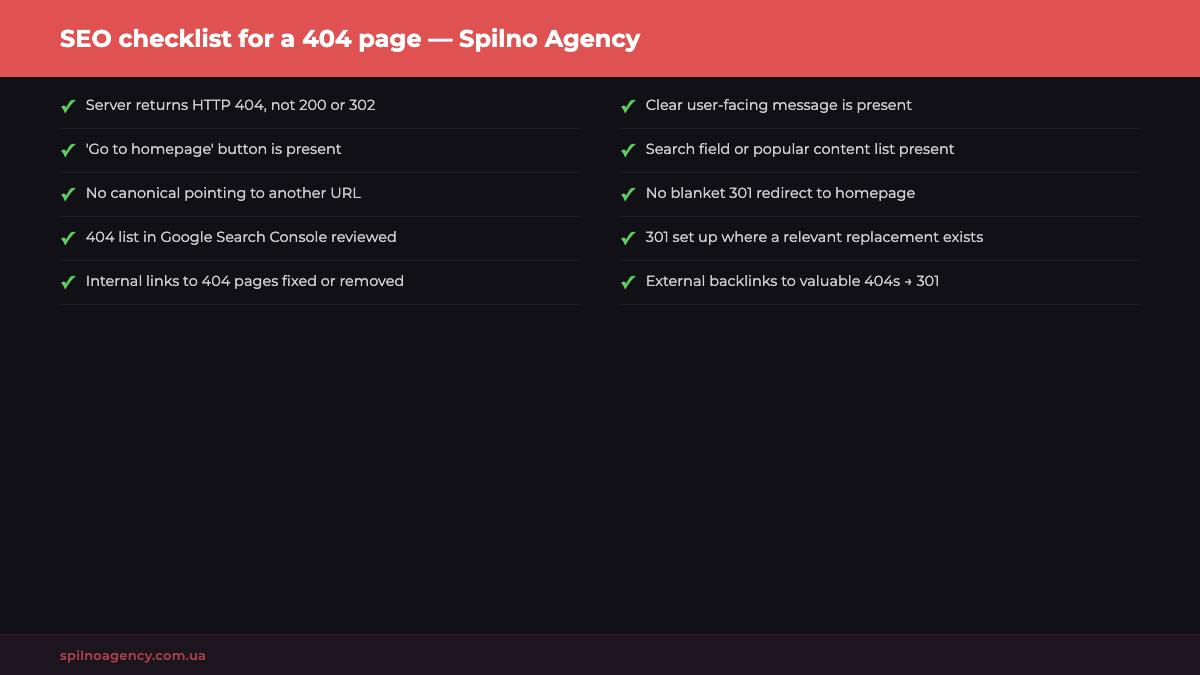
- ☑ Page returns HTTP code
404(verify in DevTools or GSC) - ☑ Clear user-facing message is present
- ☑ “Go to homepage” button is present
- ☑ Search field or list of popular content is present
- ☑ No
canonicalpointing to another URL - ☑ No blanket 301 redirect to homepage for all 404s
- ☑ 404 list in Google Search Console reviewed
- ☑ 301 set up where a relevant replacement page exists
- ☑ Internal links pointing to 404s fixed or removed
- ☑ External backlinks on high-value 404s redirected via 301
FAQ
Does a 404 page hurt Google rankings?
A single 404 page — no. Google explicitly states that returning 404 for missing pages is correct behaviour. The problem arises when you have hundreds or thousands of 404 pages eating crawl budget and, if they carry external backlinks, destroying link equity.
How long does Google take to deindex a 404 page?
Usually from a few days to several months, depending on the site’s authority and crawl frequency. To speed up the process, request re-crawling via Google Search Console → URL Inspection → Request Indexing.
What is a soft 404 and why is it dangerous?
A soft 404 is when a page technically returns a 200 OK status but is actually empty or shows a “not found” message. Google does not realise the page is dead and continues crawling and indexing it. This degrades overall site quality in the eyes of the search engine.
Should I 301 redirect every 404?
No. Only set up a 301 when there is a genuinely similar or relevant replacement page. A blanket 301 to the homepage is worse than an honest 404. Google interprets the “404 → 301 to homepage” chain as a soft 404 and stops passing PageRank.
How do I verify a page actually returns 404 and not 200?
Open DevTools (F12) → Network tab → navigate to the URL → find the first request for the page → check the Status Code. You can also use GSC → URL Inspection or an online HTTP Status Checker tool.
Conclusion
404 is a normal part of any website, and Google treats it calmly. The issue is not the error itself but how you handle it: whether the correct HTTP code is returned, whether navigation is provided for the user, whether internal links are fixed, and whether 301s are set up where needed.
If you need a technical SEO audit of your site — including a review of 4xx errors, redirect profiles, and crawl budget — the Spilno Agency team is here to help. Learn more about us or reach out via the contact form.

Read also
Meta Ads Library: How to Find Your Competitors’ Facebook & Instagram Ads (2026)
How to use the Meta Ads Library to see any competitor's Facebook, Instagram and Threads ads for free…

New Features in the ChatGPT Ads Manager: A Step-by-Step Setup Guide
oCPC for product feeds, URL macros, pixel diagnostics, Triple Whale and Hightouch, AAM from 17 August 2026. A…

How to See Your Competitors’ Ads in Google Ads (2026 Guide)
Step by step: find competitor ads in the Google Ads Transparency Center — filters, ad detail cards, archive…