Meta Ads Library: How to Find Your Competitors’ Facebook & Instagram Ads (2026)


The Meta Ads Library (facebook.com/ads/library) is a free public archive of ads running on Facebook, Instagram, Messenger and Threads. Search by brand name or keyword and you see a competitor’s creatives, serving dates, platforms, and even their pages in other markets. No login required. Below: how to find a competitor’s ads in five steps, which filters actually matter, what the tool shows (and what it will never show), and the limits worth knowing about.
What the Meta Ads Library is
The Ad Library is a public archive of ads currently or recently running through Meta’s advertising technologies. It covers four platforms: Facebook, Instagram, Messenger and Threads. Meta built it as a transparency tool, and anyone can use it for free — no account, no sign-in.
For a marketer that is a ready-made competitor-research tool: not a third-party scraper’s estimate, but what Meta itself recorded. A new ad lands in the archive roughly within 24 hours of its first impression.
There are two distinct categories inside the library, and the difference matters:
- Regular commercial ads — products, services, brands. Visible while running; after a campaign stops, the ad stays archived for some time longer (in practice, weeks to months — Meta does not publish a fixed public retention window).
- Political and social-issue ads — a separate category with stricter rules: advertiser verification, mandatory spend and impression ranges, and 7-year archive retention. Inside the European Union, Meta stopped running this category of ads entirely on 6 October 2025 under the DSA.
For e-commerce and service-business competitor research, the first category is the one that matters — and this whole guide is built around it.
How to see your competitors’ ads in the Meta Ads Library: 5 steps
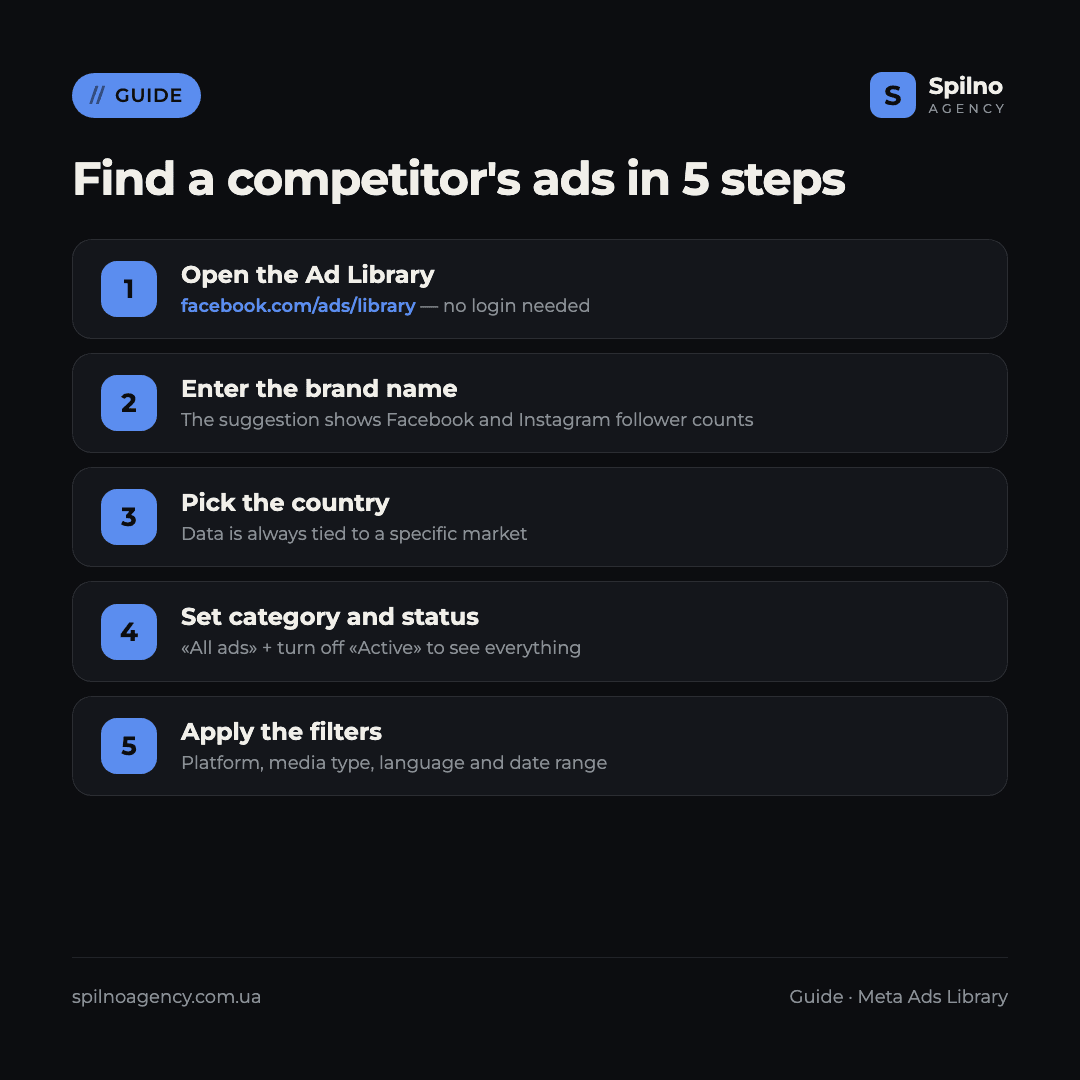
Step 1. Open the Ad Library
Go to facebook.com/ads/library. No Facebook account is needed — the tool is fully public, and it works identically in an anonymous browser session as it does when signed in.
The interface opens with three fields at the top: country, ad category, and the search box. All three matter for an accurate result.
Step 2. Find the competitor by brand name
Type the brand, company name, or domain into the search box. As you type, an autocomplete suggestion appears under an «Advertisers» heading:
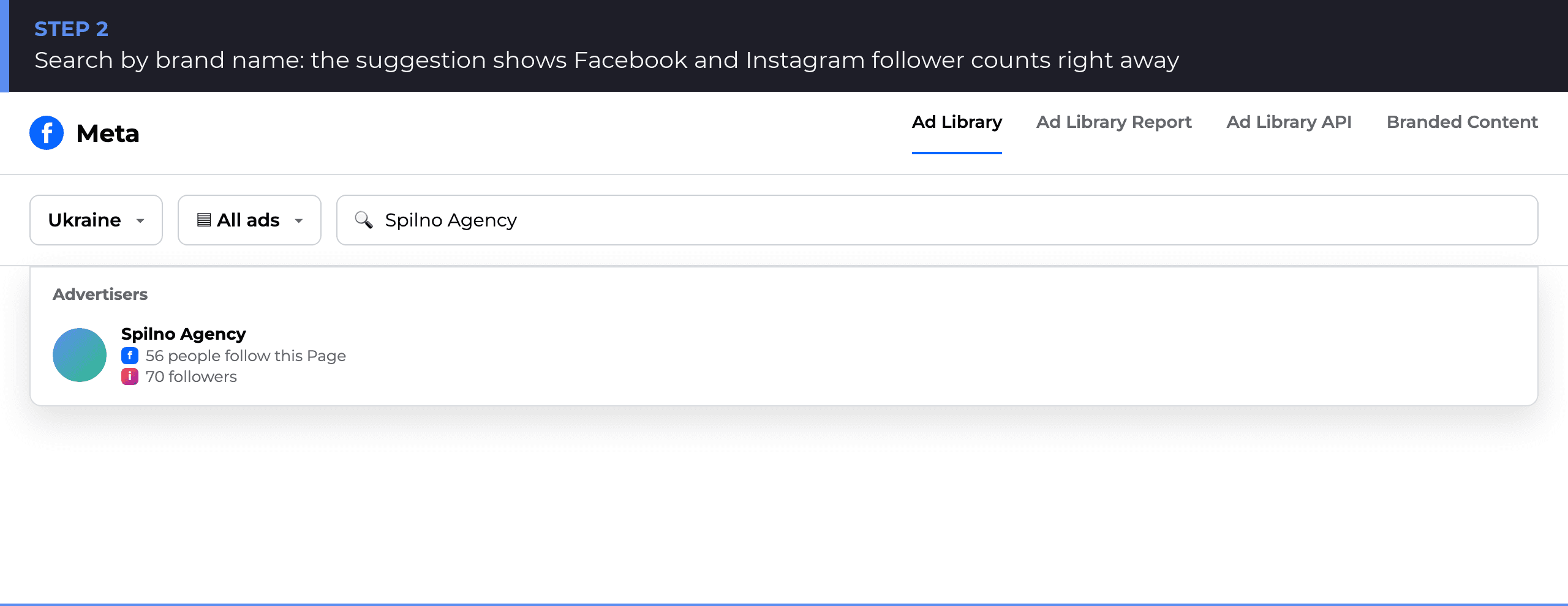
The suggestion shows Facebook and Instagram icons with the follower count on each platform — a quick way to confirm it is the right brand before opening the full ad list. If a competitor runs several pages for different markets or product lines, each one shows up separately here.
Step 3. Pick the country
The country filter sits top-left, next to the ad-category filter. Data is always tied to a specific market: the same ad may run in one European country and not appear in another.
That same field is useful for the opposite question — checking whether a competitor has already expanded into a new market. Clicking the advertiser name opens their page with every active ad plus a «Similar regional ads» block — other pages of the same brand in other countries. Testing the query «rozetka» surfaced separate brand pages for Moldova and Poland straight away, alongside the main Ukrainian one.
Step 4. Set the ad category and status
By default, «All ads» and «Active ads» status are on — the most common setup when you want to see what a competitor is running right now. To also see ads no longer running, together with their full serving period, turn off the status filter.
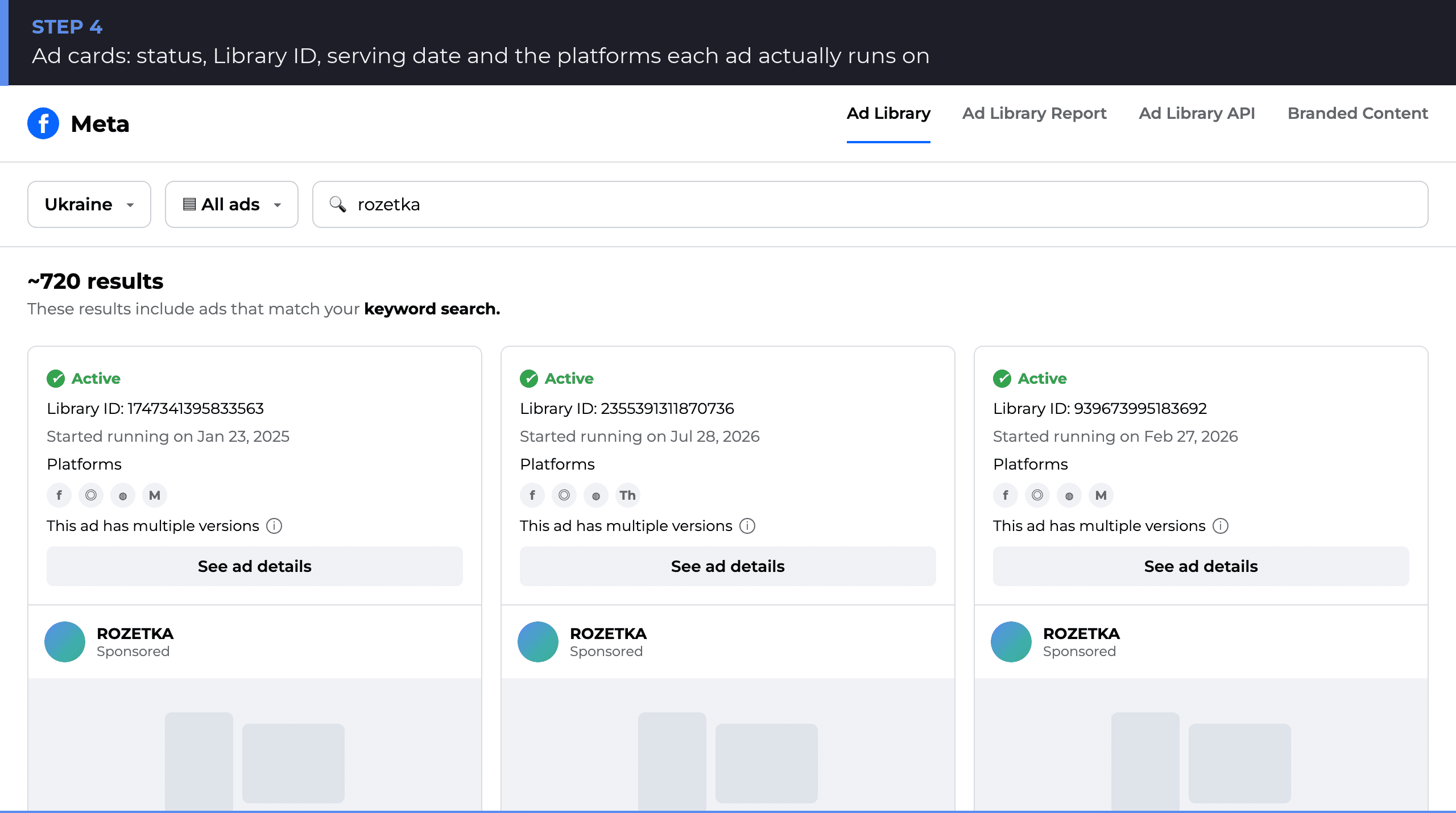
On an inactive ad, the card no longer shows a single start date — it shows the full range, e.g. «8 Jan 2025 – 28 Feb 2026». That is a direct signal of how long a competitor actually kept a specific creative in rotation.
Step 5. Apply the extra filters
The «Filters» button opens a panel with five parameters:
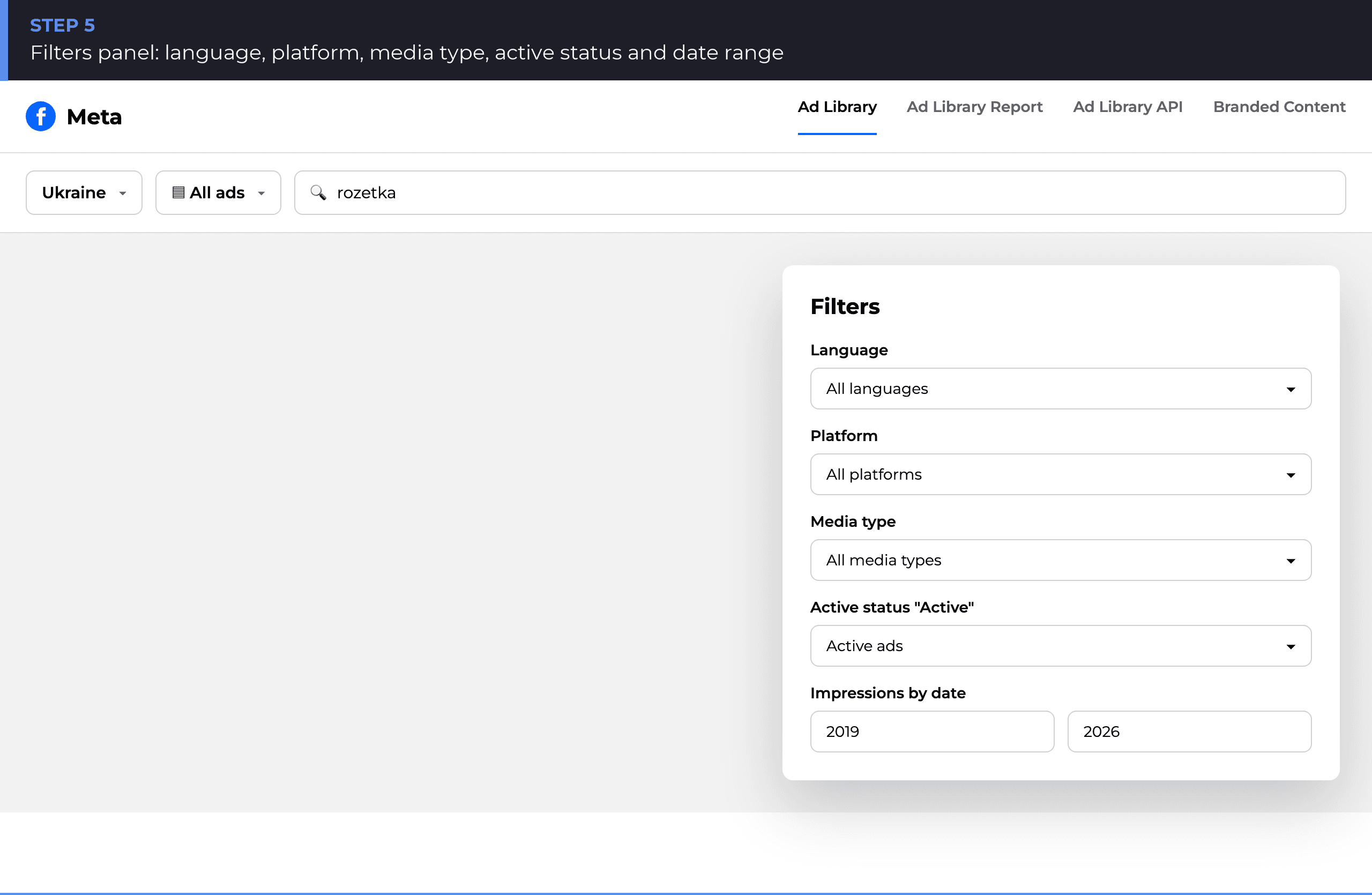
- Language — the ad copy’s language.
- Platform — Facebook, Instagram, Messenger, Threads, individually or combined.
- Media type — image, video, carousel, and so on.
- Active status — active / inactive / all ads.
- Date range — any custom period; defaults to the full history of the library.
Combining «Instagram only» with «last 30 days» answers, in under a minute, whether a competitor is genuinely active in Reels or their presence there is mostly nominal.
What a single ad card shows
Every card in the results list already is the full picture — there is barely anything extra to find on a separate detail page. The core fields:
- Status — «Active» or «Inactive» with a colour badge.
- Library ID — a unique ad number you can use to build a direct link:
facebook.com/ads/library/?id=<ID>. - Serving date — a start date (active ads) or the full period (ads no longer running).
- Platforms — icons of the four networks where that specific ad actually runs.
- «This ad has multiple versions» note — the advertiser is testing several copy or image variants within the same campaign.
- «EU transparency» link — a direct consequence of the Digital Services Act.
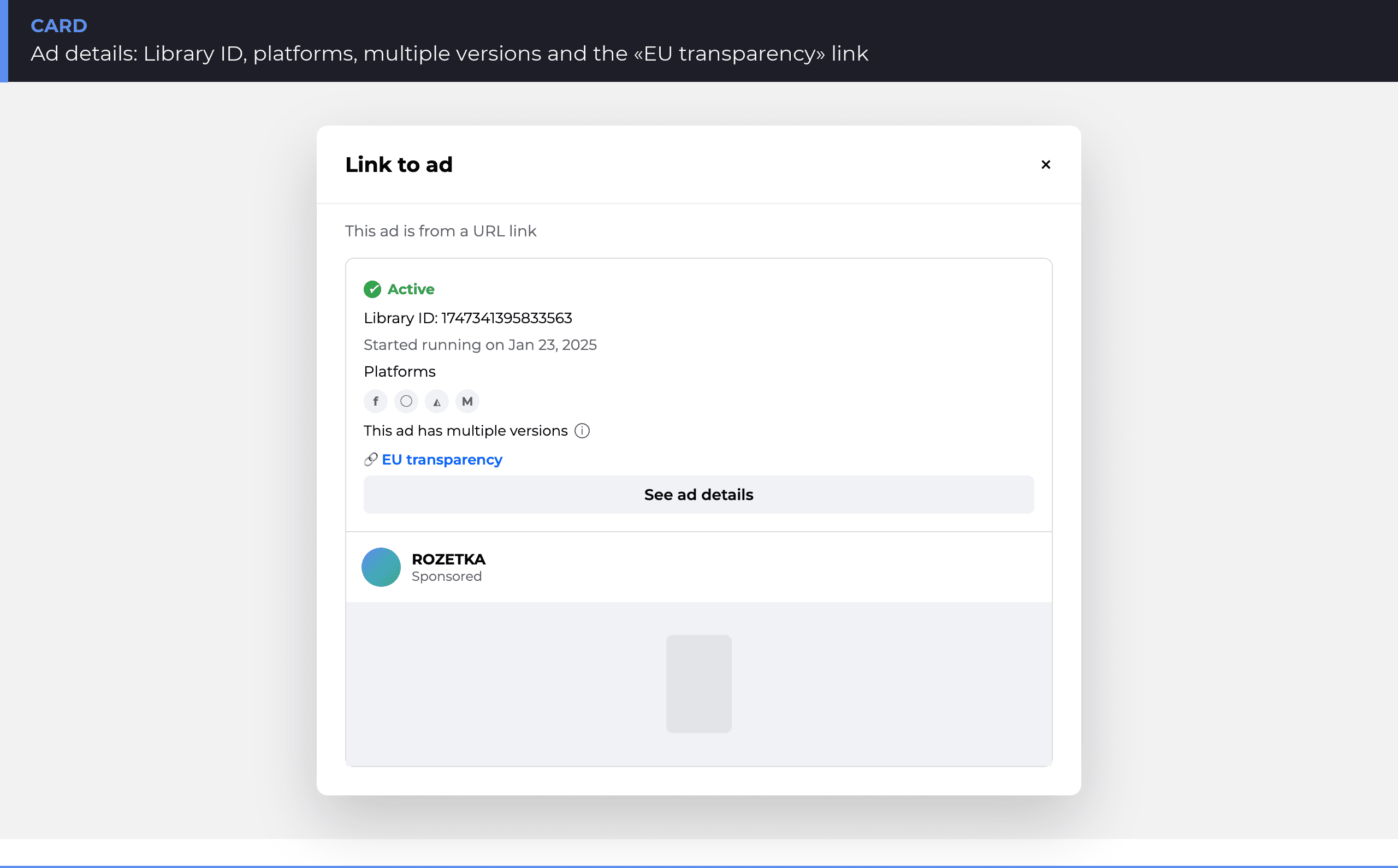
«EU transparency» deserves its own explanation, because it is the biggest difference from Google’s equivalent tool. Meta publishes reach and spend ranges only for ads served to users inside the European Union — that is a DSA requirement, not a courtesy. Outside the EU, for regular commercial ads, Meta publishes no budget and no impression figures at all — not an exact number, not a range. If a competitor only advertises in a non-EU market, that data simply does not exist, not because it is hidden.
The advertiser page: ads in other markets
Clicking a brand name under any ad opens the advertiser page — a summary of their total active ads and, most usefully, a «Similar regional ads» block.
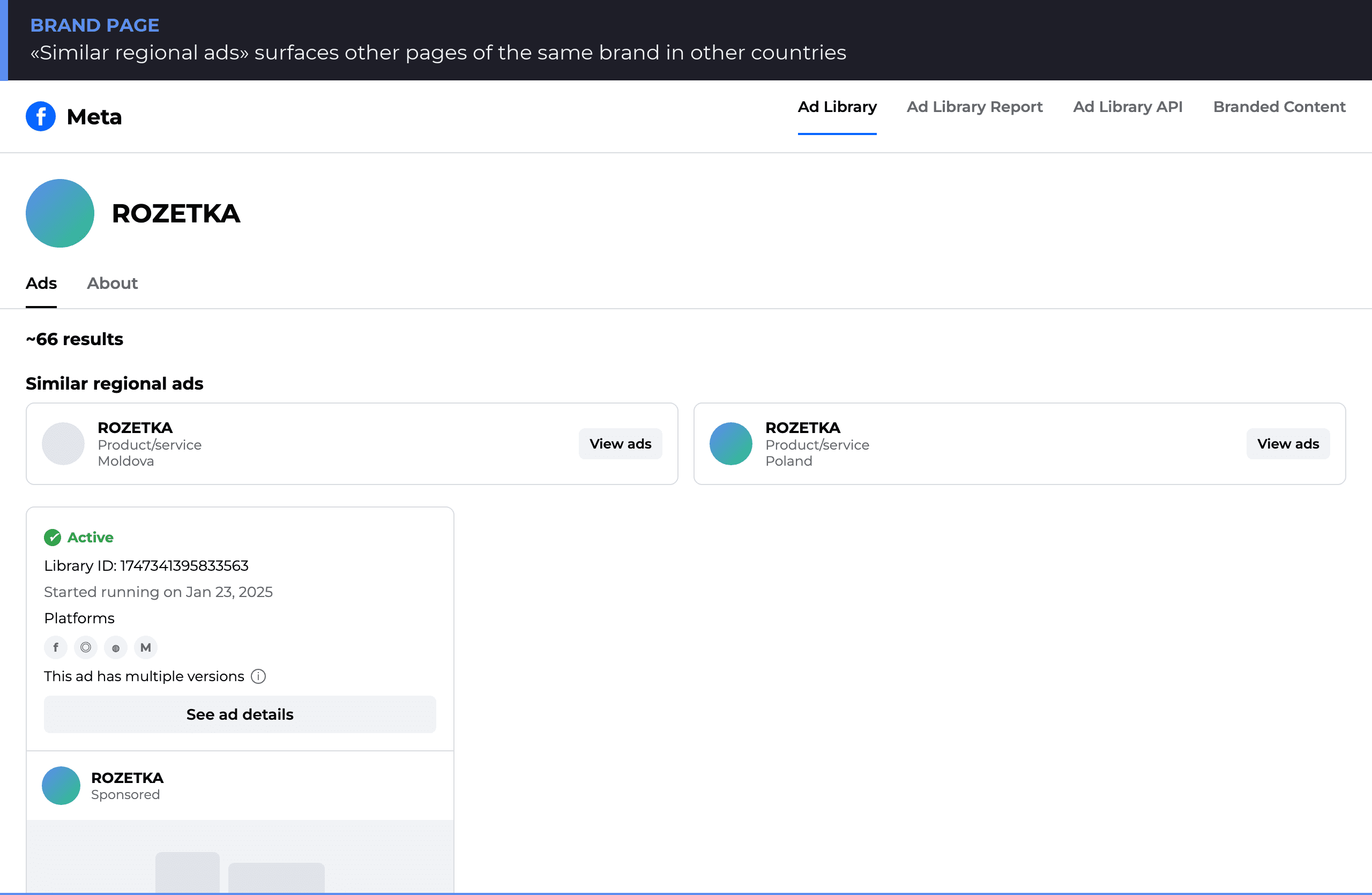
This block surfaces other pages carrying the same brand name in other countries — separate legal entities or regional accounts that Meta automatically matches by name and business type. It is a fast way to catch a competitor testing a new market before it becomes visible anywhere else.
Meta Ads Library filters: summary table
| Filter | Value | Why it matters for competitor research |
|---|---|---|
| Country | Market where the ad runs | Compare a competitor’s activity across markets |
| Ad category | All ads / Political and social-issue ads | Filter out ads irrelevant to e-commerce research |
| Status | Active / inactive / all | See only what a competitor is running right now |
| Platform | Facebook, Instagram, Messenger, Threads | Check the real media mix, not the stated one |
| Media type | Image, video, carousel | Gauge how much production a competitor invests |
| Language | Ad copy language | Separate local campaigns from international ones |
| Date range | Any custom period | Spot seasonal spikes in activity |
What you can learn about a competitor — and what the tool will never show
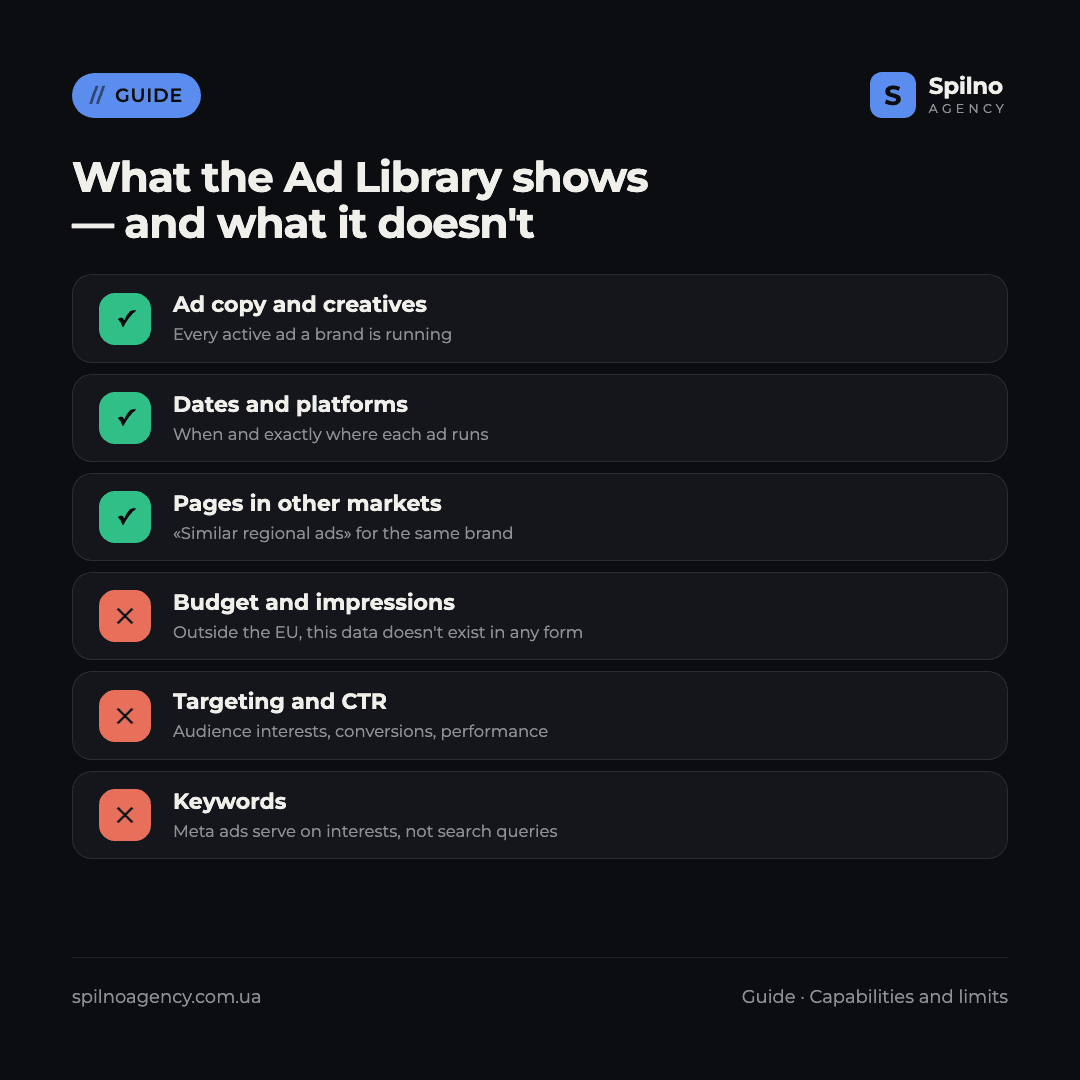
The Ad Library answers «what is this competitor telling the market». It does not answer «how much does it cost and does it work». Mixing up those two questions is the most common mistake when working with the archive.
The tool shows: the copy and creative of every active ad, serving dates, platforms, how many ads an advertiser is running, whether an ad has multiple variants, and the brand’s pages in other markets.
The tool does not show (outside the EU): budget and spend, impressions or reach, interest- and demographic-based targeting, CTR and conversions, or the keywords that trigger an ad — Meta ads serve on interests and behaviour, not search queries, so that field simply does not exist here.
Limits that make the picture look incomplete
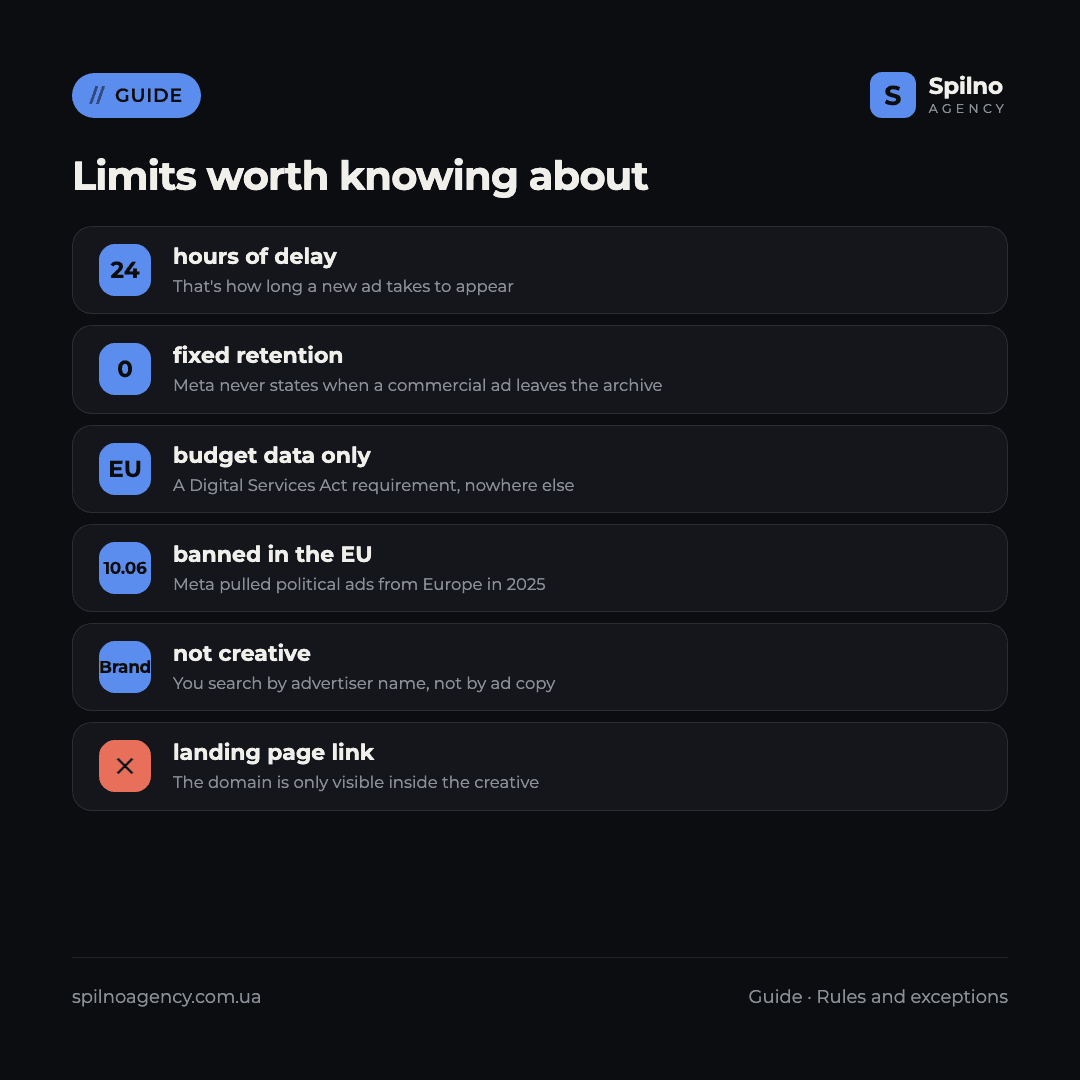
Before drawing conclusions about a competitor’s strategy, factor in six limits of the tool:
- ~24-hour delay before an ad appears. A campaign launched this morning may not show up in the archive for another day.
- No fixed retention window for commercial ads. Meta does not publish how long an ad stays archived after a campaign stops — unlike Google’s explicit «365 days» rule.
- Budget and impressions only for EU-served ads. Outside the EU, this data does not exist in any form.
- Political ads banned in the EU since 6 October 2025. If a competitor previously ran that category of ads in Europe, they are no longer in the archive.
- You search by brand, not by creative. Unlike search ads, you cannot find an ad by a phrase in its copy unless you already know the advertiser.
- No click-through to the landing page. The domain is only visible inside the creative itself — you open it manually.
How to put this data to work
The archive is only as useful as the question you bring to it. Five scenarios that pay off fastest:
- Reverse-engineer the offer. Filter active ads from the last month and list the recurring promises: discounts, free shipping, instalments. Whatever a competitor keeps in rotation for weeks has already been tested and works.
- Catch market expansion early. Open the advertiser page and check «Similar regional ads» — new countries show up here before a competitor announces anything publicly.
- Audit the media mix. The platform filter answers, in under a minute, whether a competitor is genuinely active in Reels and Stories or mostly present on the Facebook feed.
- Build a bank of creative hypotheses. Not to copy verbatim, but as a reference: formats that stay in rotation for months have survived a competitor’s real-world testing.
- Check for brand misuse. Search your own company name to confirm no one is running ads impersonating your brand or copying your creatives verbatim.
Verify these findings against your own account rather than guessing. If you want to compare what you found in competitors’ ads with what is actually happening on your side, start with a free Meta Ads account audit — it shows campaign structure and real performance figures that no public archive will ever have.
What the Ad Library doesn’t replace
This is a single-purpose tool — seeing what a competitor’s creatives look like. For the full competitive picture, you need two more sources.
Ads Manager for your own account. Real bids, budgets, reach and performance for your own campaigns live only in Ads Manager. Meta has no public auction-insights equivalent to Google Ads — you cannot directly benchmark auction competition.
Third-party SEO/SMM tools (Serpstat, Semrush and similar) provide estimated budget and reach figures for social pages — that is modelled data, not Meta’s own reporting, so treat it as a reference point rather than fact.
The working formula: take creatives and media mix from the Ad Library, budget estimates from third-party tools, and real performance of your own campaigns from Ads Manager. If you are still getting familiar with targeted advertising in general, start with what targeted advertising is and how it differs from search ads, and to understand who on a team should own this work, read who a targetologist is and what they are responsible for.
Frequently asked questions
Is it legal to look at competitors’ ads in the Meta Ads Library?
Yes. It is a public tool that Meta built specifically so anyone can check who is advertising and what they are running. No registration is required and there are no viewing restrictions. Copying creatives verbatim is a bad idea, but analysing them and building your own hypotheses is entirely legitimate.
Do I need a Facebook account to use the Ad Library?
No. The tool is fully public and behaves the same in an anonymous browser session as when you are signed in. Being logged in unlocks no extra data.
Can I see competitors’ budgets and impressions?
Only for ads served to users inside the European Union — a Digital Services Act requirement. Outside the EU, Meta publishes neither budget nor impression data for regular commercial ads, in any form.
Why can’t I find a specific competitor?
Most often, the competitor simply isn’t running any ads in the country you selected right now — try turning off the status filter to include inactive ads, or search under a different spelling of the brand name.
Can I see the keywords an ad targets?
No. Meta ads serve based on interests and behaviour rather than search queries, so that field does not exist in the library at all — unlike search-engine ad transparency tools.
How quickly does a new ad appear in the library?
Roughly within 24 hours of its first impression. The tool is not suited to real-time monitoring of a competitor’s campaign launches — there is always at least a several-hour lag.
Can I click through from an ad to the competitor’s website?
No. The Ad Library is a creative archive, not a way to check landing pages. The domain is usually visible in the ad’s own copy or image — you need to open it manually.
Picked apart your competitors’ creatives and want to know which of it is worth testing on your own account? Spilno Agency sets up and runs Meta Ads for European businesses with transparent reporting. Get in touch — we start with a free audit of your ad account.

Read also
New Features in the ChatGPT Ads Manager: A Step-by-Step Setup Guide
oCPC for product feeds, URL macros, pixel diagnostics, Triple Whale and Hightouch, AAM from 17 August 2026. A…
How to See Your Competitors’ Ads in Google Ads (2026 Guide)
Step by step: find competitor ads in the Google Ads Transparency Center — filters, ad detail cards, archive…
Cloudflare Web Analytics in 2026: Full Feature Overview vs GA4 and Clarity
Cloudflare Web Analytics is a free web analytics tool with no cookies and no consent banner, built right…