How to See Your Competitors’ Ads in Google Ads (2026 Guide)

The Google Ads Transparency Center (adstransparency.google.com) is a free public archive of ads where a domain or company name reveals a competitor’s creatives, serving dates, formats and platforms. No account required. Below: how to find a competitor’s ads in five steps, which filters actually matter, what the service shows (and what it will never show), and the limits that make the picture look incomplete.
What the Google Ads Transparency Center is
The Ads Transparency Center is an archive of ads that ran on Google platforms. Google built it so anyone can check who is advertising to them: the advertiser’s name, the country where that advertiser is registered, and every ad they have served. In its own FAQ Google states plainly that it earns no revenue from these pages — this is a transparency tool, not an advertising product.
For a marketer that produces a useful side effect: the same archive doubles as a free competitor-research tool for paid search. What you see is not a scraper’s estimate — it is what Google itself recorded.
It matters whose ads end up in there:
- Verified advertisers — worldwide. These are advertisers who completed identity or business verification in Google Ads. Their name carries a “Verified” label.
- All advertisers — but only in Europe and Türkiye. Regulatory requirements there are stricter, so ads from unverified accounts are archived too.
- The advertiser’s name, not the agency’s. If an agency runs the campaigns, the card still shows the client’s legal entity. A separate payer name may appear when it differs from the advertiser.
The practical consequence: a competitor who never completed verification and advertises outside the EEA simply will not appear in the archive. That is not a broken search — it is how the service is designed.
How to see your competitors’ ads in Google Ads: 5 steps
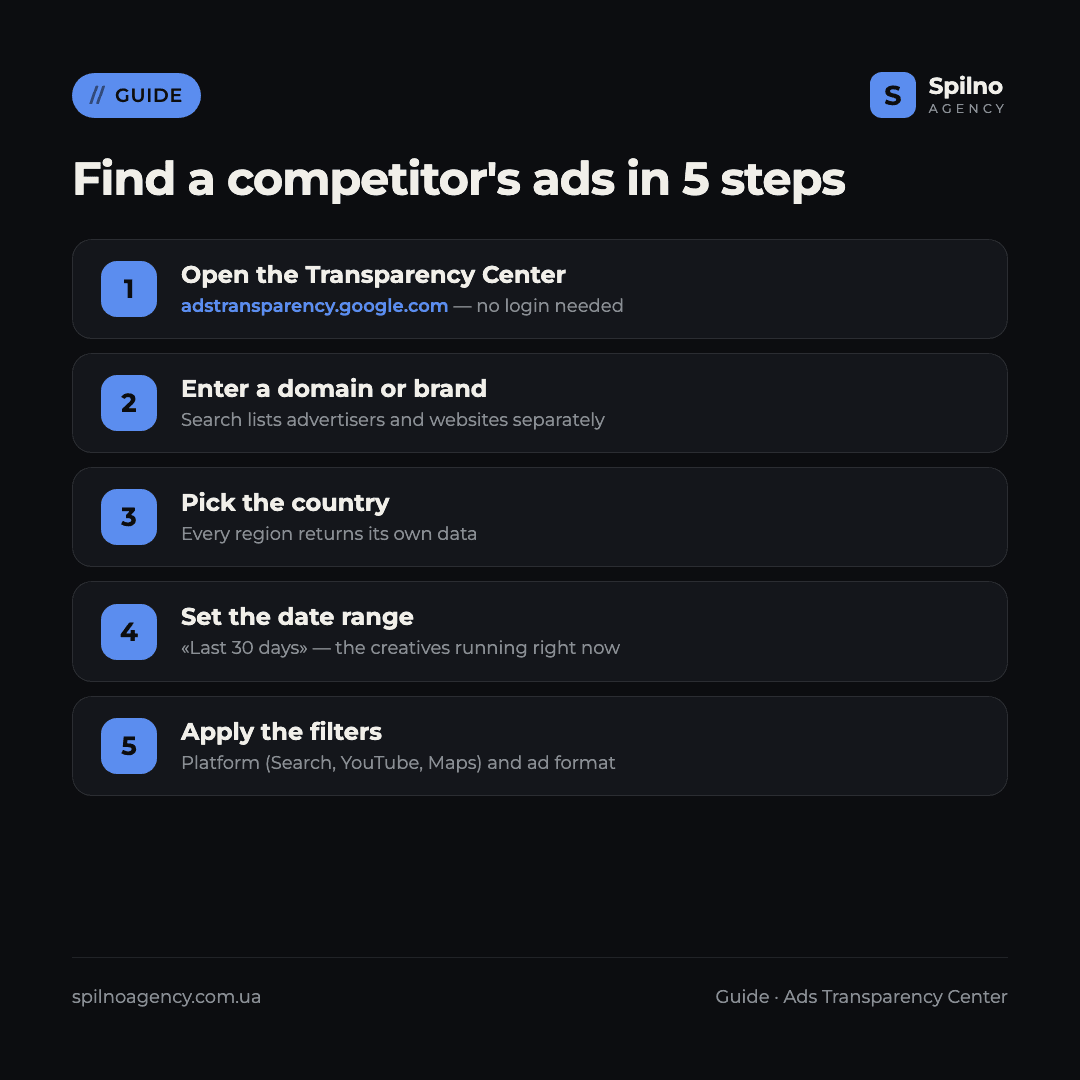
Step 1. Open the Transparency Center
Go to adstransparency.google.com. You do not need to sign in to a Google account — the service is public. Signing in is required in one case only: to view age-restricted ads.
If you already know the competitor’s domain, the fastest route is to open the domain page directly through URL parameters: ?region=PL&domain=example.com. That lands you on the domain summary, with every ad collected below and the approximate ad count above.
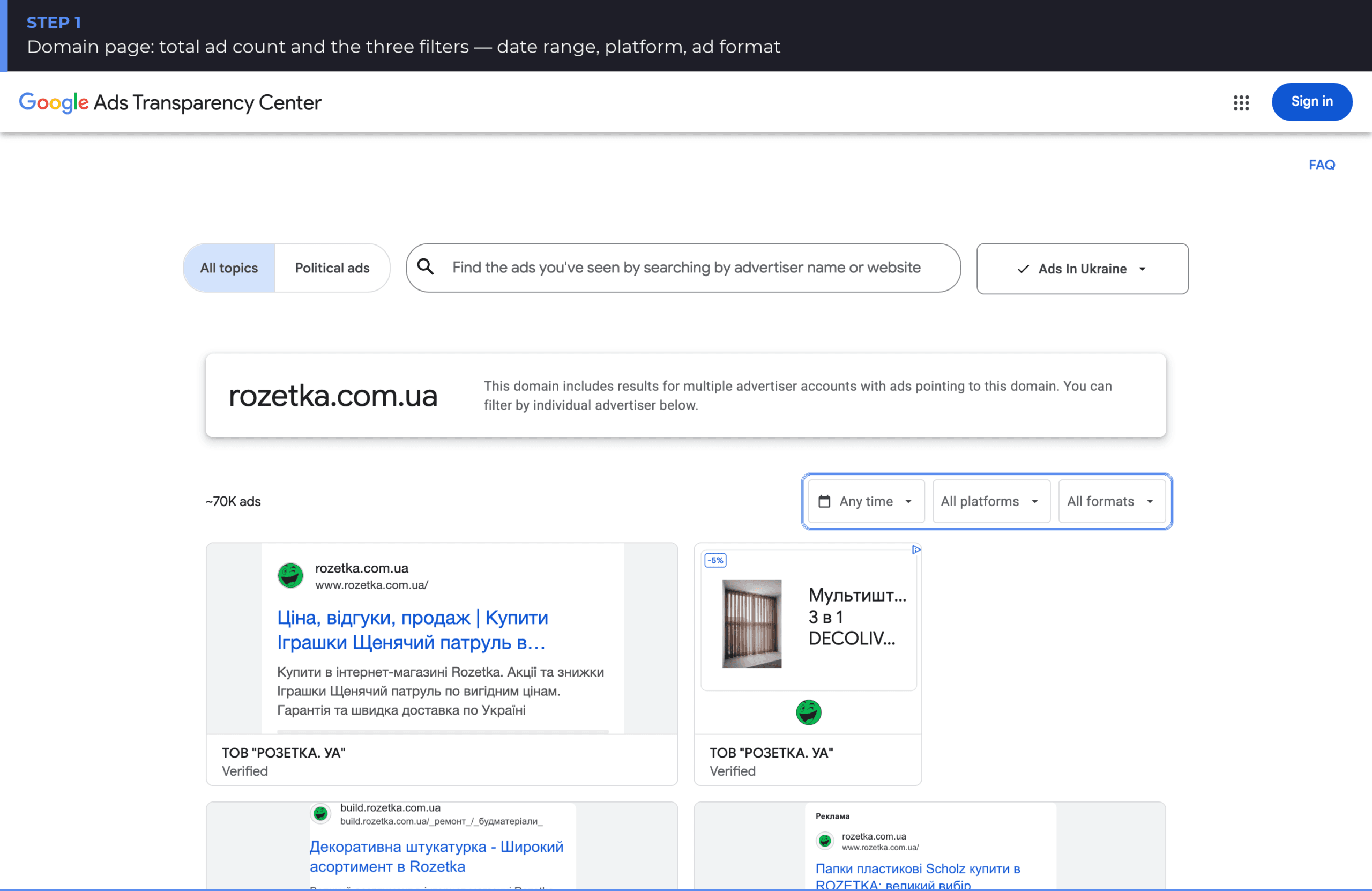
Note the line at the top of the domain page: a single domain can be served by several separate advertiser accounts. That is normal for larger companies with regional entities or multiple agencies — below, the data can be filtered by each advertiser individually.
Step 2. Find the competitor by domain or brand name
Type a domain (example.com) or a company name into the search box. The autocomplete splits results into two groups, and that split matters:
- Advertisers — legal entities. You see the country of registration and an approximate ad count next to each. One brand often runs several entities for different markets.
- Websites — domains. A single domain can be used by several advertisers at once.
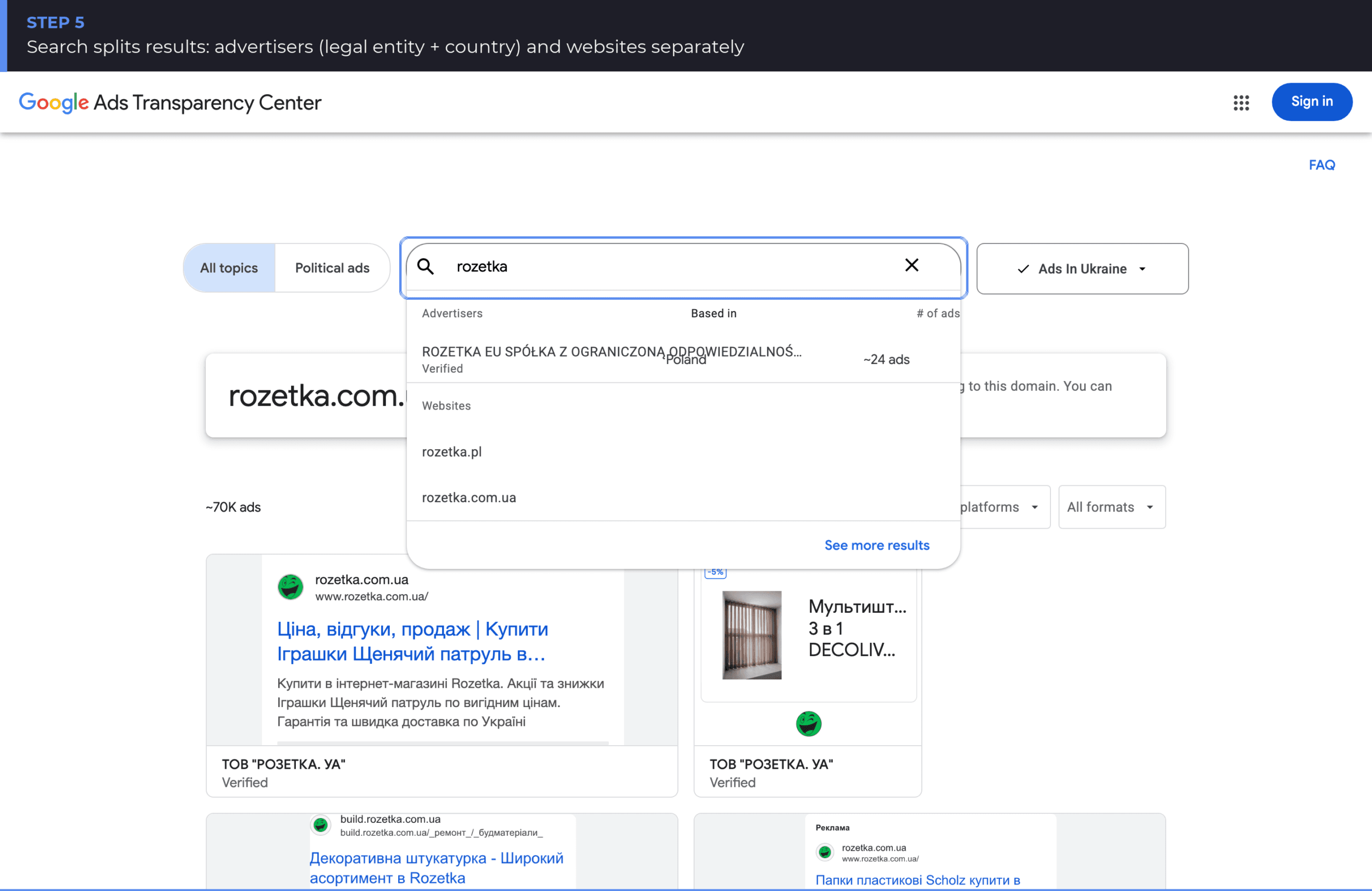
The screenshot shows both groups: for the query “rozetka” the service offers the Polish entity ROZETKA EU SP. Z O.O. with its ad count on one side, and the domains rozetka.pl and rozetka.com.ua on the other. When a competitor operates across several European markets, search by advertiser: you immediately see which legal entity runs the ads and where it is registered.
Step 3. Pick the country of delivery
The region filter sits in the top right. This is not a cosmetic setting: every country returns its own dataset. The same ad may run in Poland and never appear in Spain, and the volume of information available inside the EEA is wider than outside it — more on that below.
When analysing a competitor expanding across Europe, step through the regions one by one. It often turns out they have tens of thousands of ads in their home market and only a few dozen being tested in a new one.
Step 4. Narrow the date range
The default is “Any time” — the entire year-long archive. For competitor research the “Last 30 days” preset is far more useful: it drops retired creatives and leaves what the competitor is running right now.
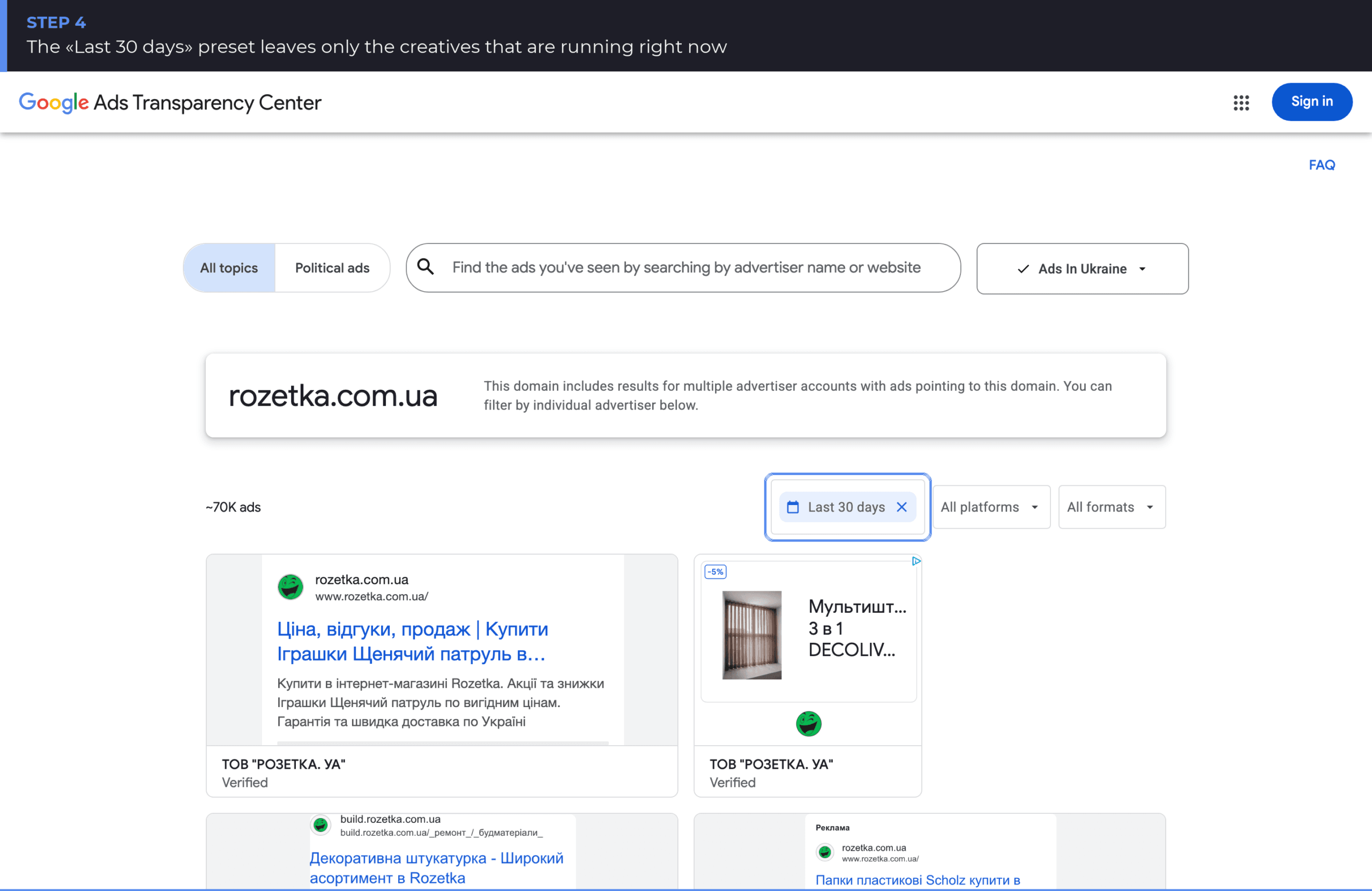
The difference can be dramatic. In the screenshot the approximate ad count falls from ~70K across the full period to ~40K over the last 30 days — meaning more than a third of the archive is already inactive. Analyse without a date filter and you can easily draw conclusions about a strategy the competitor abandoned six months ago.
Dates in the service run on Pacific Time, not your local zone. At the edges of a period that creates a few hours of drift — irrelevant for trend analysis, worth knowing if you are pinning a creative to the exact launch date of a promotion.
Step 5. Filter by platform and ad format
The last two filters are the most revealing about a competitor’s media mix. The Platform filter shows where the ads actually run:
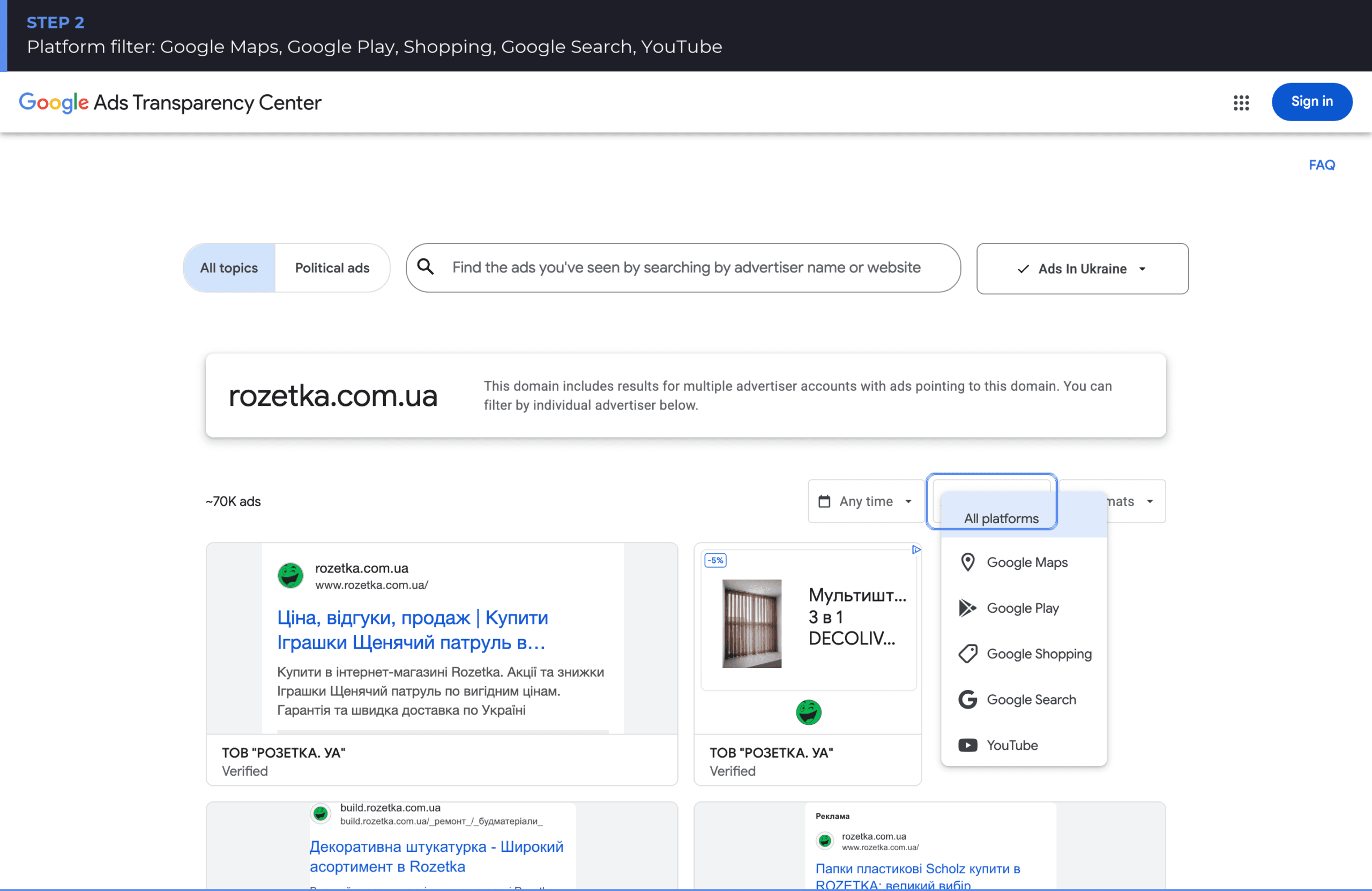
Five platforms are available: Google Search, YouTube, Google Maps, Google Shopping and Google Play. Toggling through them answers in a couple of minutes whether a competitor genuinely runs video, or whether their “YouTube strategy” only exists in slide decks.
The Ad format filter splits creatives into three types — image, text and video:
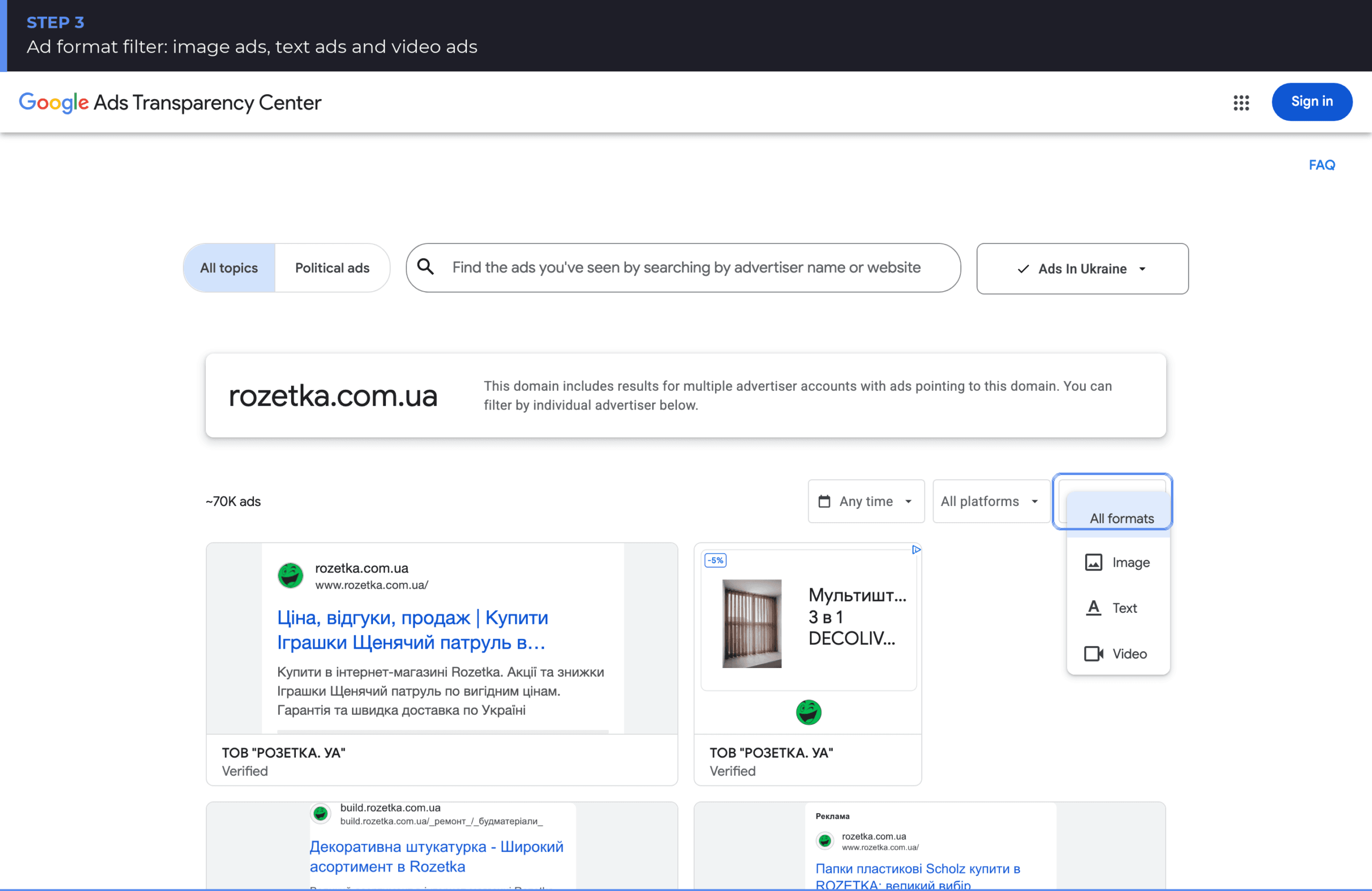
The combination “Last 30 days + Google Search + Text” gives the cleanest read on an active search campaign: headlines, descriptions, assets and landing domains. That is the slice worth starting from when you rework your own ads.
What an individual ad card shows
Clicking any creative opens its detail card. The baseline set of fields is the same in every region:
- The advertiser’s legal entity and the “Verified” label.
- Where it ran — the country the card is opened for.
- Last shown date — which tells you whether the creative is still alive.
- Format — text, image or video ad.
- Variations — a “1 of N variations” navigator. One ad usually exists as several combinations of headlines and images.
Inside the European Economic Area and Türkiye, though, the card is substantially richer — regulation obliges Google to disclose more:
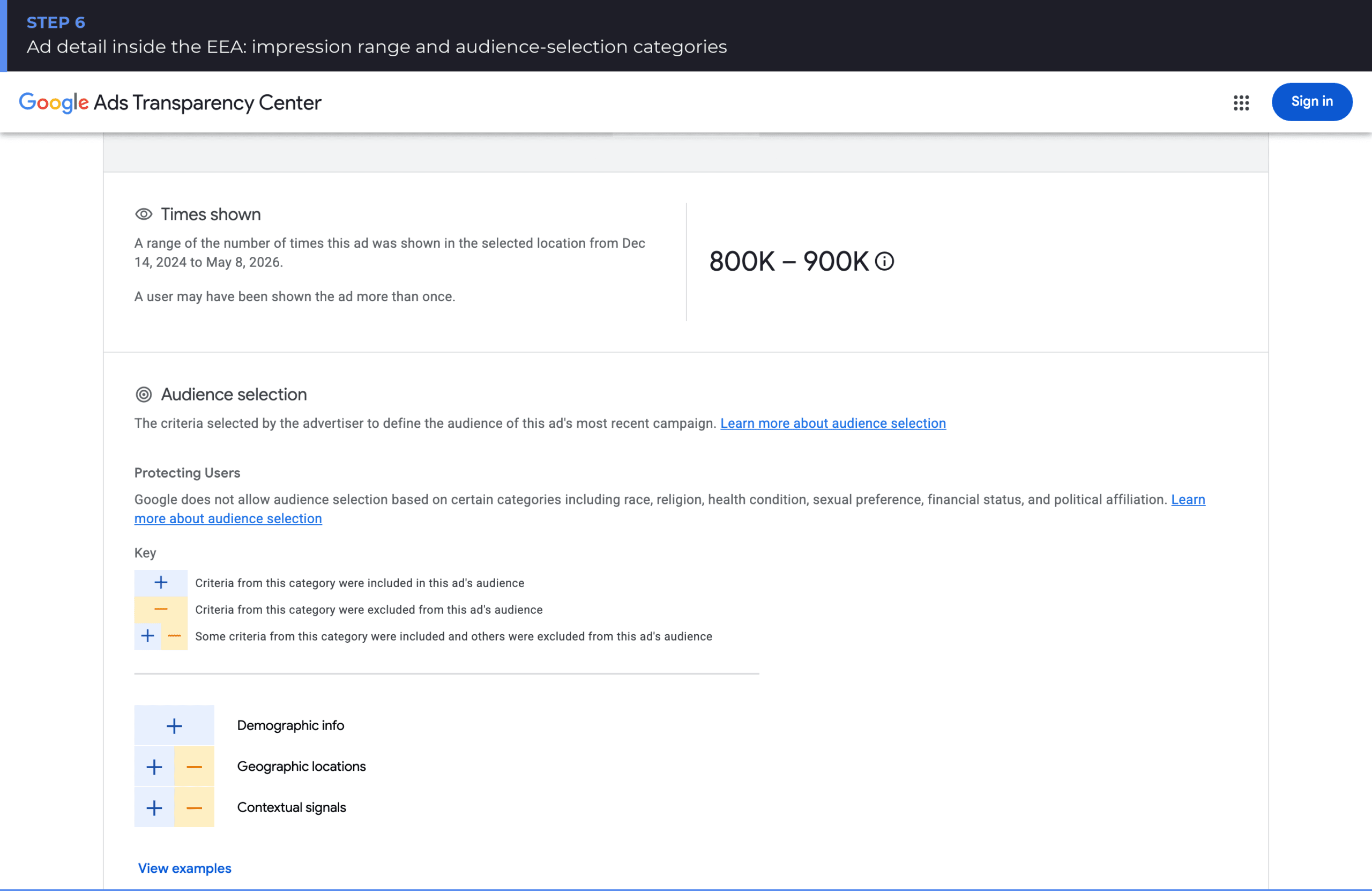
The screenshot shows a Polish advertiser’s card. Alongside the baseline fields it carries the first shown date, the ad topic (a label Google assigns itself), the impression range for the selected period, and an Audience selection block listing targeting categories: demographics, geographic locations and contextual signals, split into included and excluded criteria.
This is the most valuable data in the whole service, and it exists only for the EEA and Türkiye. If your competitor advertises in Poland, Germany or Lithuania, you get the order of magnitude of their reach and the logic of their targeting. If they only run ads outside the EEA, those blocks are simply absent.
One more thing worth knowing upfront: you cannot click through from a card to the ad’s landing page. Some creatives used to be clickable because of a bug in the rendering technology, but Google is deliberately removing that and moving to static, non-clickable screenshots. Its FAQ states outright that the capability will not come back. Landing pages have to be opened manually.
Transparency Center filters at a glance
| Filter | Values | Why it matters in competitor analysis |
|---|---|---|
| Topic | All topics / Political ads | Separates commercial advertising from election ads |
| Region | Country of delivery | Compares a competitor’s activity across markets |
| Date range | Any time / presets / custom period | “Last 30 days” = creatives running right now |
| Platform | Search, YouTube, Maps, Shopping, Google Play | Reveals the real media mix, not the claimed one |
| Ad format | Image, text, video | Shows where production budget actually goes |
What you can learn about a competitor — and what you can’t
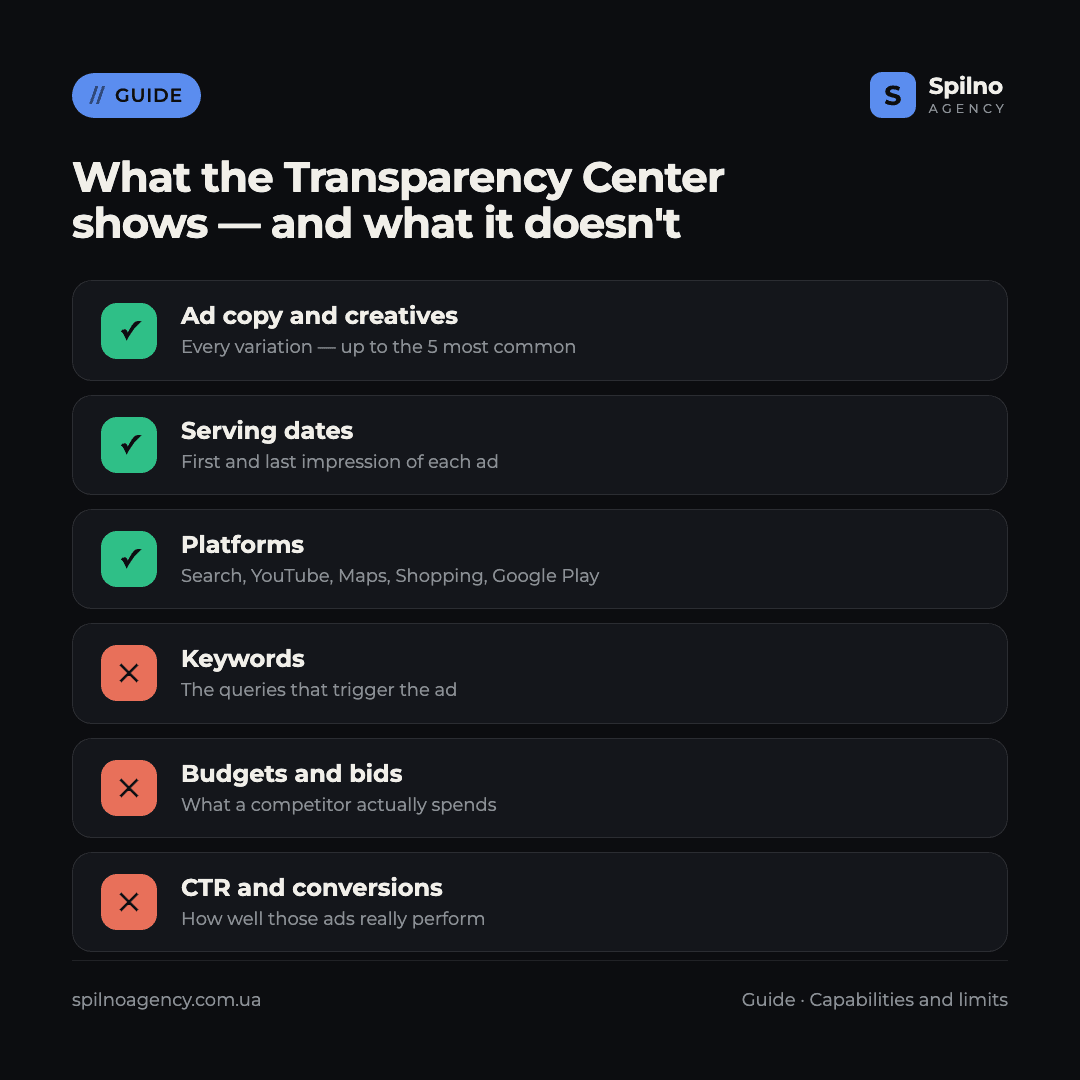
The Transparency Center answers “what exactly is this competitor telling the market”. It does not answer “what does that cost and does it work”. Keeping those two planes apart is critical, otherwise the archive leads straight to wrong conclusions.
The service shows: all ad copy and creatives (up to the five most common variations of a single ad), first and last serving dates, formats, delivery platforms, the advertiser’s legal entity and country of registration. Inside the EEA and Türkiye it adds the impression range and targeting categories.
The service does not show: keywords and search terms, bids and budgets, CTR, conversions or cost per lead, campaign and ad-group structure, or quality metrics. There is no “competitor spend” figure here and there never will be — Google does not publish advertisers’ commercial data.
Limits that make the data look incomplete
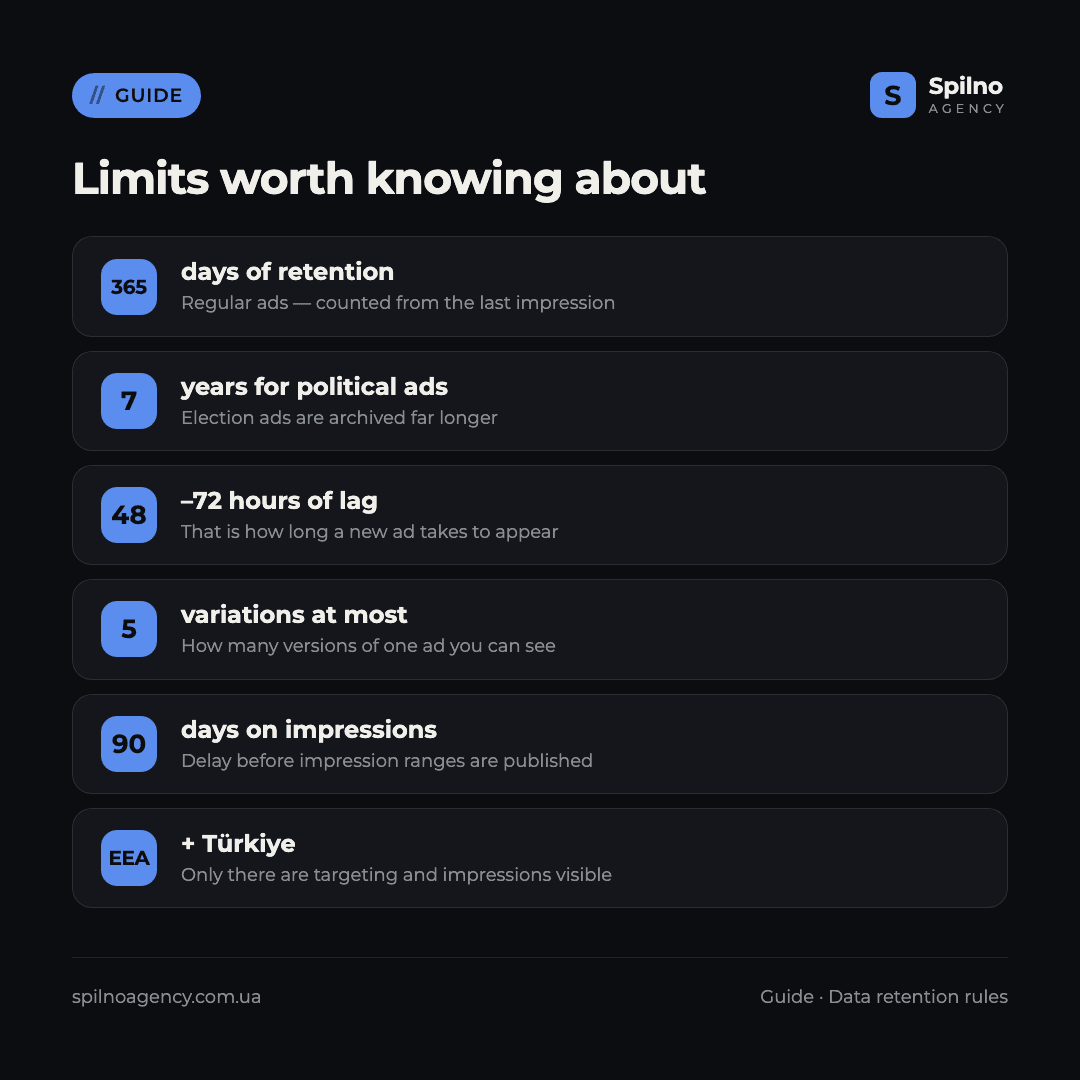
The most common mistake is assuming that “if the ad isn’t there, the competitor never ran it”. There are at least six reasons an ad can be missing:
- 365 days of retention. Regular ads stay in the archive for a year from their last impression. Election ads are kept for seven years.
- A 48–72 hour lag. A new creative does not appear immediately. A campaign launched yesterday will not be visible today.
- Up to 5 variations per ad. If a competitor runs a responsive search ad with dozens of combinations, only the most common ones are shown.
- Blocked ads are removed. Creatives taken down for policy violations disappear from the archive.
- A 90-day delay on impressions. Impression ranges are published on a lag, so recent figures are absent by design.
- Unverified advertisers outside the EEA. If a competitor never verified and operates outside Europe, no advertiser page exists for them at all.
There is one more caveat: historical figures can change. Google warns that totals are recalculated as individual ads are removed across regions. A snapshot taken today and the same slice a month later may not match — record the numbers at the moment of analysis.
How to put this data to work
The archive is only as useful as the questions you bring to it. Five scenarios pay off faster than the rest.
- Break down the competitor’s offer. Filter text ads on Search over the last 30 days and write out the promises that repeat: free delivery, warranty, instalments, turnaround time. Anything appearing across dozens of creatives has already been tested.
- Spot seasonality. Compare the ad count for “Last 30 days” against the full period. Sharp dips and spikes indicate when the competitor scales budget up.
- Verify the media mix. The platform filter answers in a minute whether a competitor genuinely runs YouTube and Shopping or sticks to Search.
- Build a headline bank for testing. Not to copy, but as hypotheses: phrasings a competitor keeps in rotation for months are the ones that survived their own tests.
- Check branded ads on your own name. Search your own domain and brand — you will see who advertises alongside you and whether anyone uses your brand in their copy.
These conclusions are best closed with a look at your own account rather than by eye. To compare what you found against what is happening in your campaigns, start with a free Google Ads account audit — that surfaces both campaign structure and the real performance figures no public archive contains.
What the Transparency Center does not replace
It is a tool for one specific job — looking at creatives. A full view of the competitive landscape needs two more sources.
Auction Insights inside your own Google Ads account. The Auction Insights report shows exactly who you overlap with in the auction, at what impression share, and how often a competitor outranks you. It is the only official source of auction-level competitive data — and it only ever covers your own campaigns.
Third-party SEO/PPC platforms (Serpstat, Semrush, Ahrefs and similar). They collect the keywords ads appear on and estimate budgets. Those numbers are always estimates — the product of scraping search results, not Google reporting. But they cover exactly the part the Transparency Center leaves out.
The working split is straightforward: creatives and targeting from the Transparency Center, keywords from third-party tools, real auction competition from your own account. If you are still getting to grips with how paid search works, start with the fundamentals — what contextual advertising is, its types and how it works — and to work out who on the team should own this, see what a PPC specialist does and what they are responsible for.
Frequently asked questions
Is it legal to look at competitors’ ads in the Transparency Center?
Yes. It is a public service Google built precisely so anyone can check an advertiser and their ads. No registration, no viewing limits. Copying someone else’s creative word for word is a different matter — but viewing, analysing and forming your own hypotheses is entirely legitimate.
Why can’t I find a specific competitor?
Two main reasons: the advertiser never completed verification in Google Ads (in which case no page exists for them, except where ads ran in Europe or Türkiye), or they have served no ads in the last 365 days. It is also worth searching both by domain and by legal entity name — the two often differ.
Can I see competitors’ budgets and bids?
No. Google does not publish advertisers’ commercial data. Inside the EEA and Türkiye you get an impression range for an ad, but that is neither spend nor bids. Budget estimates come only from third-party tools, and always approximately.
Can I see which keywords trigger an ad?
Not in the Transparency Center. Competitor keyword sets are gathered through Serpstat, Semrush, Ahrefs and similar tools. The ad copy itself is a partial clue: headlines usually contain the queries a competitor prioritises.
How quickly does a new ad appear in the archive?
Within 48–72 hours of being served, according to Google. Freshly launched competitor campaigns show up with a one-to-three-day lag, so the service is not suitable for monitoring launches in real time.
Why is there no impression count on an ad card?
Impression ranges are published only for ads served in the EEA and Türkiye, and they arrive on a 90-day delay. Google also only began collecting this data on 1 March 2023, so earlier periods have no figures at all.
Can I click through from an ad to the competitor’s site?
No. The Transparency Center is an archive, not a way to inspect landing pages. Some creatives were previously clickable because of a technical fault, and Google is removing that for good in favour of static screenshots. The landing domain is usually visible in the creative itself — open it manually.
Picked apart your competitors’ creatives and want to know which of it is worth testing on your own account? Spilno Agency sets up and runs Google Ads for European businesses with transparent reporting. Get in touch — we start with a free audit of your account.

Read also
Meta Ads Library: How to Find Your Competitors’ Facebook & Instagram Ads (2026)
How to use the Meta Ads Library to see any competitor's Facebook, Instagram and Threads ads for free…
New Features in the ChatGPT Ads Manager: A Step-by-Step Setup Guide
oCPC for product feeds, URL macros, pixel diagnostics, Triple Whale and Hightouch, AAM from 17 August 2026. A…
Cloudflare Web Analytics in 2026: Full Feature Overview vs GA4 and Clarity
Cloudflare Web Analytics is a free web analytics tool with no cookies and no consent banner, built right…