Google Keyword Planner: What It Is and How It Works

Google Keyword Planner is a free keyword research tool inside Google Ads that helps you discover new keywords, check their monthly search volume, competition level, and forecast bid prices for paid campaigns.
What Is Google Keyword Planner
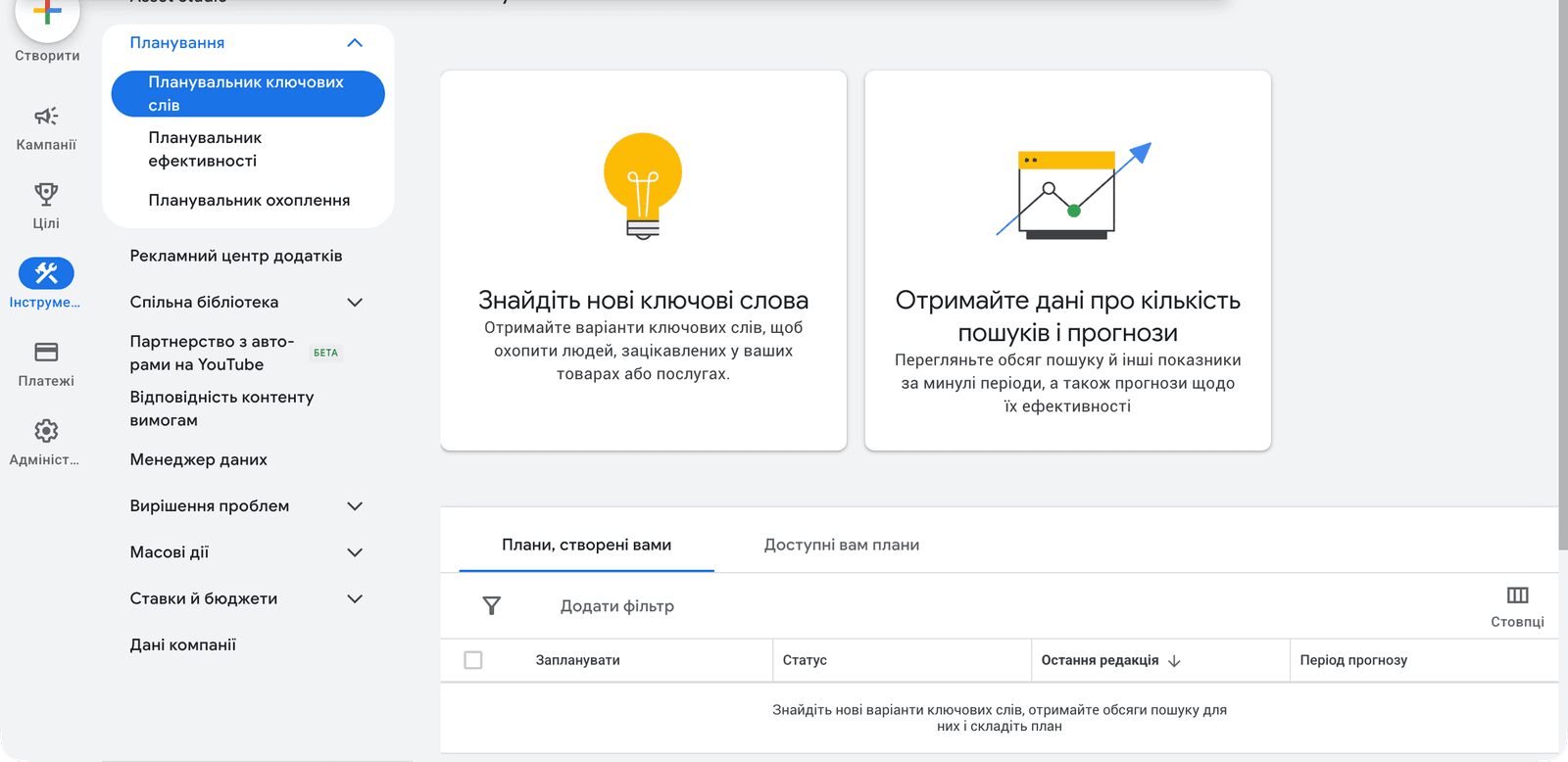
Google Keyword Planner is Google’s official, free keyword research tool built into Google Ads. It lets you find new keyword ideas based on a topic, product, or website URL — along with monthly search volume, competition level, and estimated cost-per-click (CPC) data.
Although designed primarily for advertisers, Keyword Planner is widely used by SEO professionals, content marketers, and business owners to understand what their target audience is searching for on Google.
The key advantage: data comes directly from Google’s search engine. You see real search statistics, not extrapolations by third-party tools. This makes it the most authoritative starting point for any keyword research project.
How to Access Google Keyword Planner
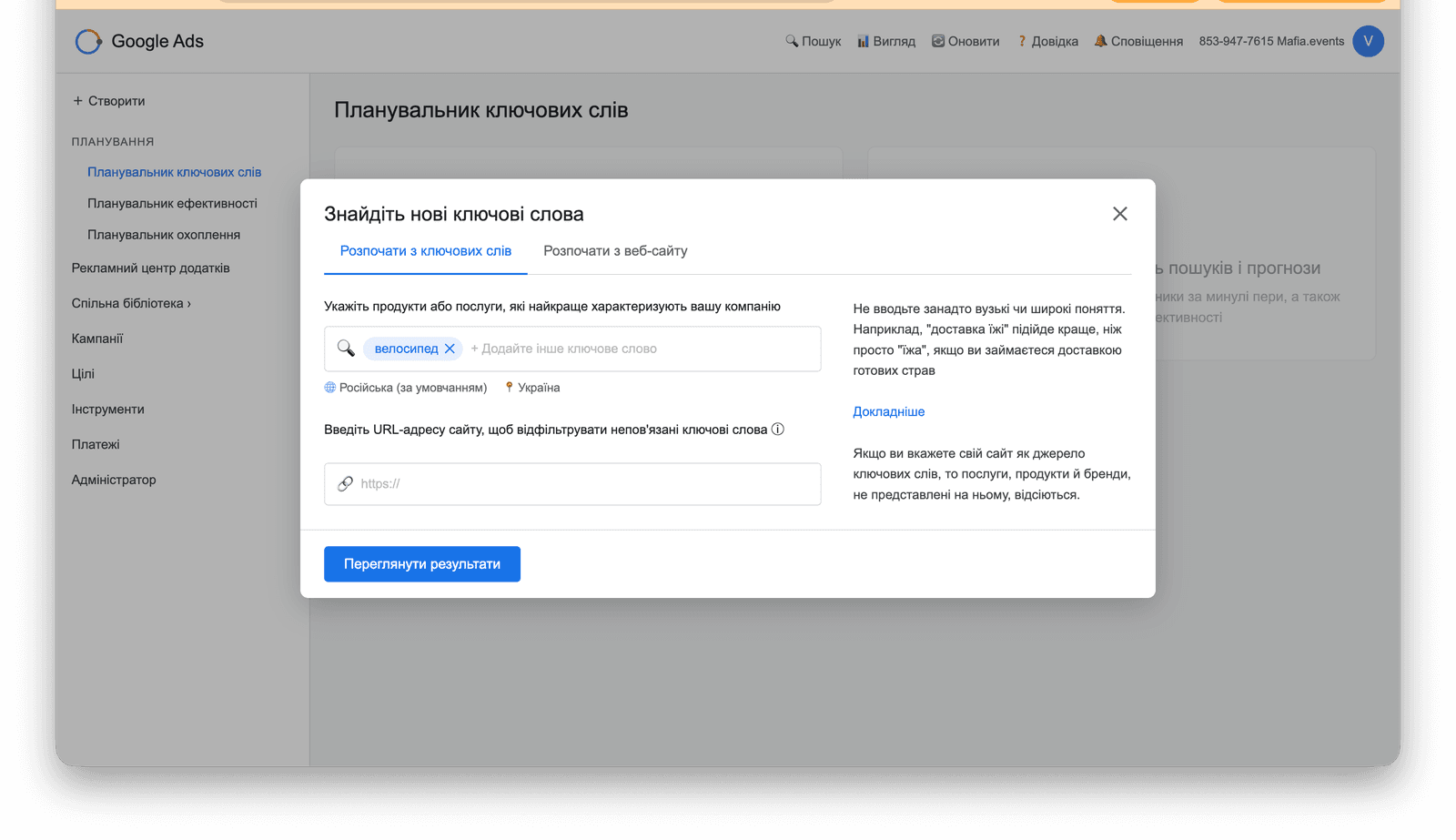
Keyword Planner is free for anyone with a Google Ads account — you don’t need active campaigns or a funded account. Simply register and navigate to the tool.
- Create a Google Ads account. Go to ads.google.com and sign up. During the initial setup, you can skip the campaign creation wizard by choosing ‘Switch to Expert Mode’ and then ‘Create an account without a campaign’.
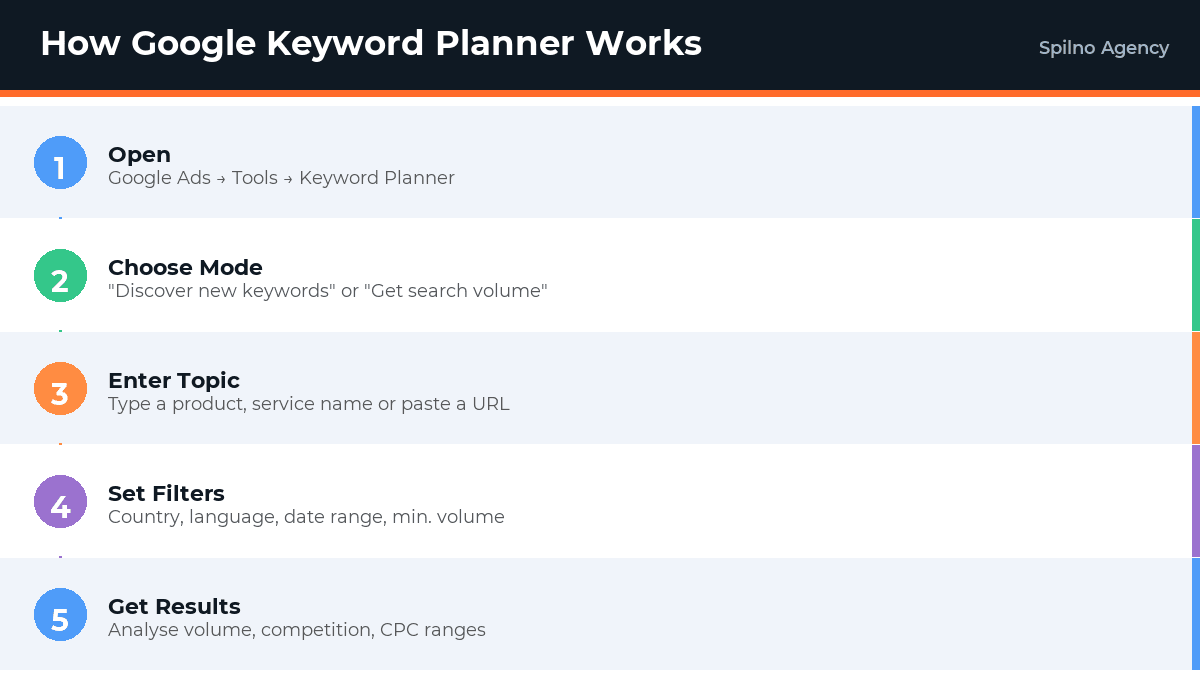
- Open the Tool. Click the wrench icon (Tools & Settings) in the top navigation → Planning section → Keyword Planner.
- Choose a mode. Two options are available: ‘Discover new keywords’ (start here for fresh research) and ‘Get search volume and forecasts’ (for an existing keyword list).
If you’ve never run a campaign, the tool may show volume ranges instead of exact numbers (e.g. ‘1K–10K’ instead of ‘8,100’). To unlock exact figures, either run a small test campaign or make a minimal deposit to your account.
Core Features of Google Keyword Planner
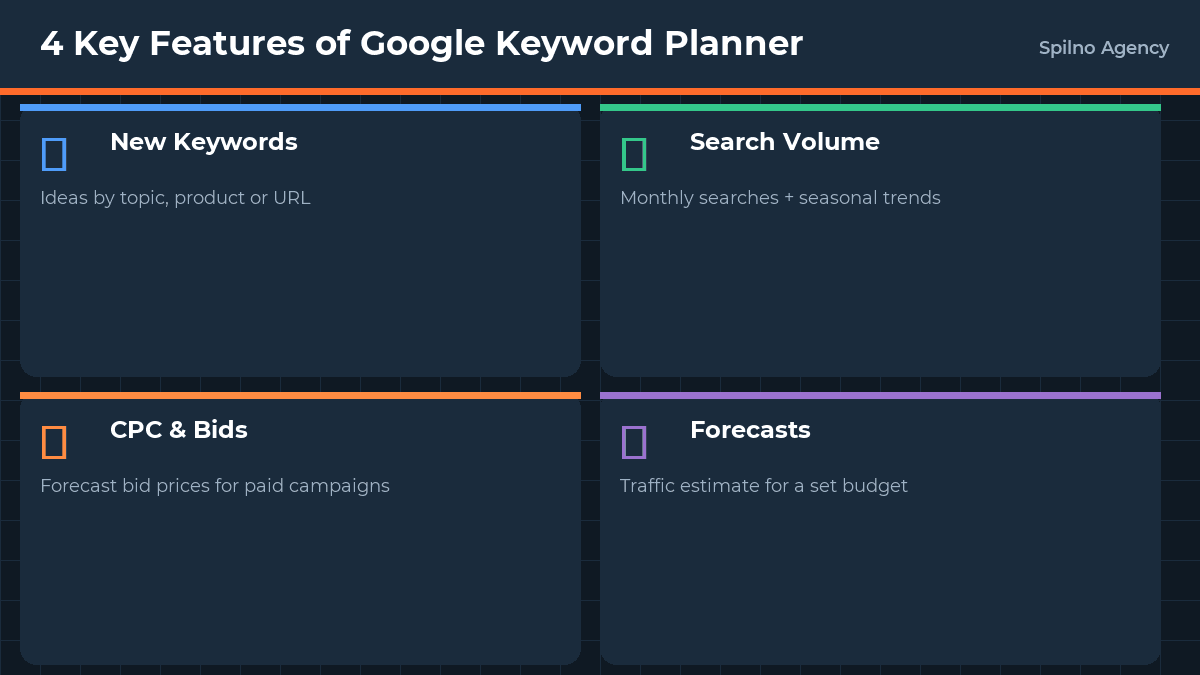
1. Discover New Keywords
The most-used feature. Enter up to 10 seed keywords or a website URL, and Google returns hundreds of related keyword ideas with their metrics. It’s the fastest way to build a keyword universe for a new product, service, or content piece.
2. Get Search Volume and Forecasts
Have an existing keyword list? Paste it here to instantly check search volume, competition, and CPC forecasts. Useful for auditing existing keyword lists or evaluating a competitor’s keyword strategy.
3. Filtering and Sorting
After getting results, refine them by: location (country, region, city), language, date range (up to 4 years of historical data), minimum and maximum search volume, competition level (Low / Medium / High), and keyword text filters (include/exclude specific words).
4. Campaign Performance Forecasting
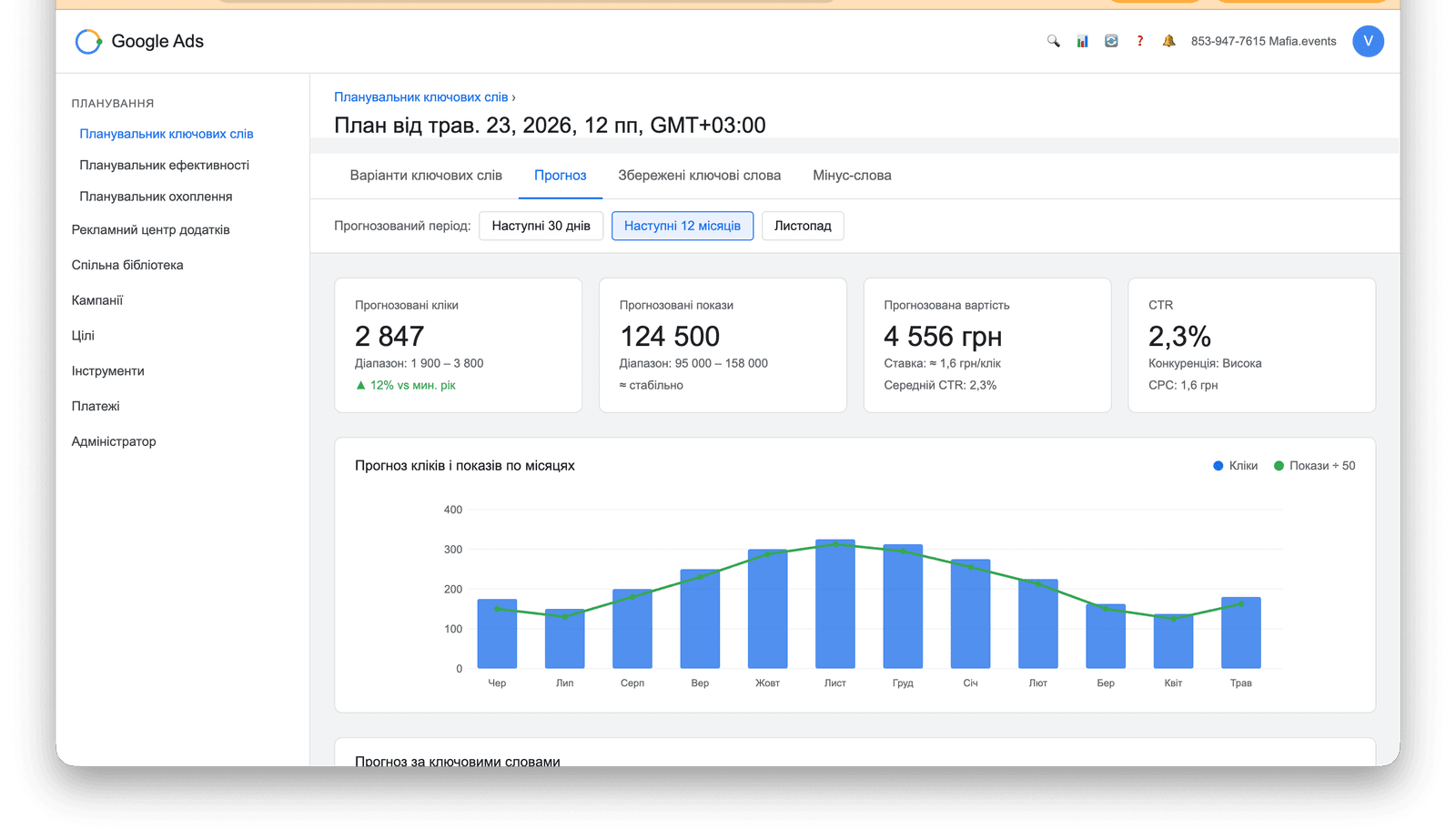
Add selected keywords to your Plan and view detailed forecasts: estimated clicks, impressions, average CPC, and total spend at different budget levels. This lets you estimate ROI before spending a single penny on ads.
Key Metrics Explained
- Average Monthly Searches — How many times per month users search for this keyword on Google. Data is averaged over 12 months.
- Competition — The level of advertiser competition for ad placements on this keyword: Low / Medium / High. This reflects paid competition, not organic SEO difficulty.
- Top of Page Bid (Low Range) — The minimum bid required for your ad to appear on the first page of search results.
- Top of Page Bid (High Range) — The estimated bid for top-of-page placement on the first page.
- Impression Share — Available for existing campaigns — the percentage of auctions where your ad was eligible to show.
Practical Example: Keyword Research for a Bicycle Online Store
What parameters you can extract from Google Keyword Planner
Google Keyword Planner provides seven key metrics for every keyword. Here is what each one means and how to use it when building your keyword list.
- Average monthly searches — Shows how many times per month users searched for this query on Google. Data is averaged over 12 months. Without active ad campaigns, the tool displays ranges (e.g., ‘1K – 10K’) instead of exact figures. Exact numbers become available once you have an active campaign or have added funds to your account.
- 3-month change — Percentage change in search volume over the last 3 months compared to the previous equivalent period. A value of +900 % signals a sharp seasonal spike — for example, bicycles in spring. A negative value indicates declining interest. Use this metric to spot queries with current momentum.
- Year-over-year change — YoY change in search volume. Shows whether overall demand in the niche is growing. A zero or positive YoY alongside a zero 3-month change indicates stable, evergreen demand — the most reliable queries for the core of your keyword list.
- Competition — The level of advertiser competition for this query: Low / Medium / High. Important: this metric reflects advertising competition (how many advertisers bid for the keyword), NOT SEO ranking difficulty. A query marked ‘High’ in GKP may still be relatively easy to rank for organically.
- Impression share — The percentage of auctions in which your ad was eligible to show for this query. Only visible for accounts with active campaigns. A low figure means your ad wins fewer auctions — possibly due to a low bid or poor Quality Score.
- Top-of-page bid (low range) — The estimated minimum CPC bid for your ad to appear at the top of the first search results page. This is the lower bound of a competitive bid. For example, for ‘велосипед’ — from 1.6 UAH per click. Your actual CPC with good optimisation may be lower.
- Top-of-page bid (high range) — The upper bound of the bid needed to reach the top positions. A large spread between low and high (e.g., 1.6 – 12 UAH) indicates some advertisers are willing to pay much more for priority placement.
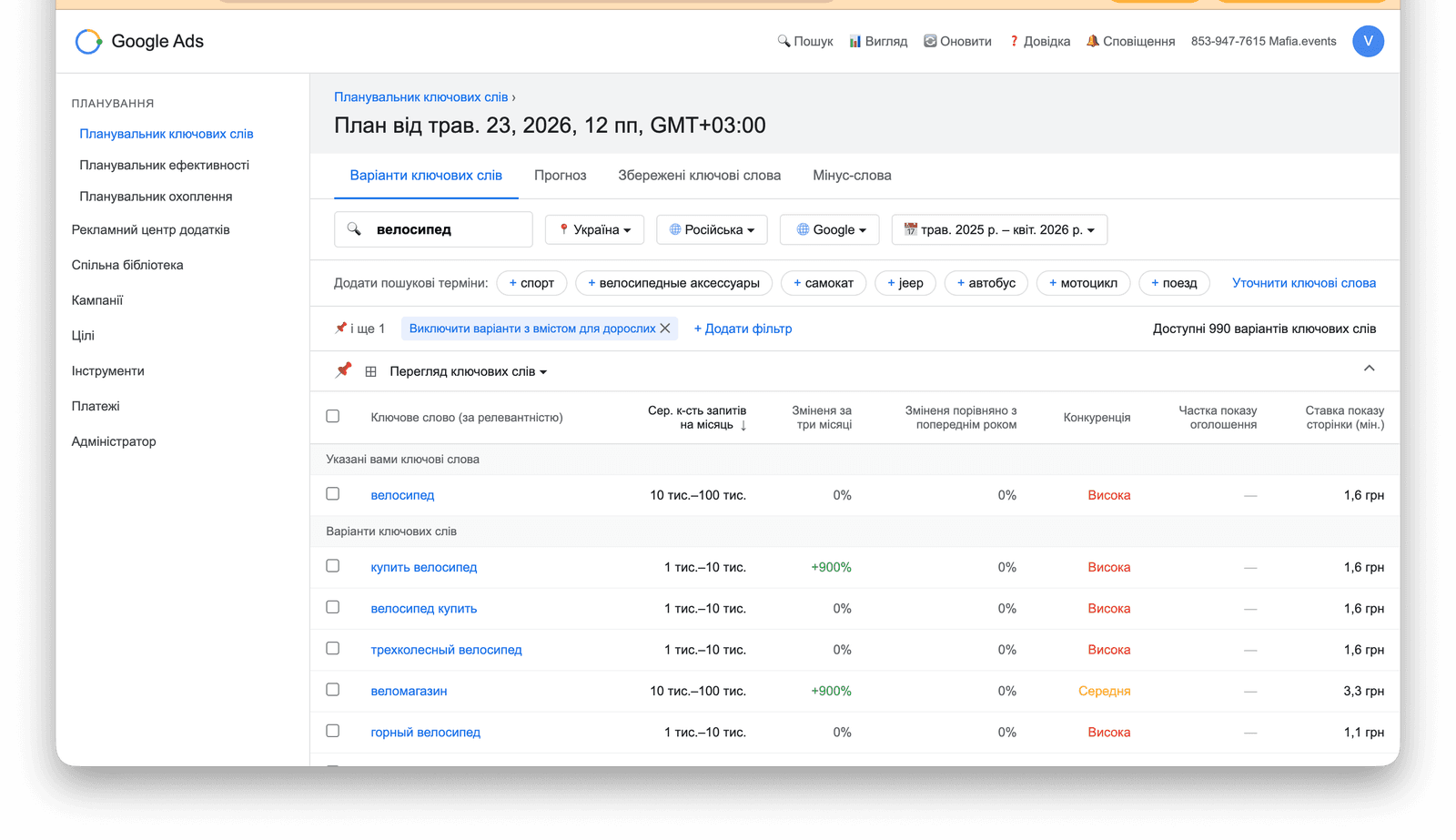
Below are real results from a Google Keyword Planner search for ‘велосипед’ (bicycle) on the Ukrainian market (May 2025 – April 2026). The planner returned 990 keyword variants — we show the top 10 most relevant.
| Keyword | Monthly searches | 3-month change | YoY change | Competition | Min. bid, UAH |
|---|---|---|---|---|---|
| велосипед (bicycle) | 10K – 100K | 0 % | 0 % | High | 1.6 |
| купить велосипед (buy bicycle) | 1K – 10K | +900 % | 0 % | High | 1.6 |
| велосипед купить (bicycle buy) | 1K – 10K | 0 % | 0 % | High | 1.6 |
| веломагазин (bike shop) | 10K – 100K | +900 % | 0 % | Medium | 3.3 |
| трехколесный велосипед (tricycle) | 1K – 10K | 0 % | 0 % | High | 1.6 |
| горный велосипед (mountain bike) | 1K – 10K | 0 % | 0 % | High | 1.1 |
| складной велосипед (folding bike) | 1K – 10K | 0 % | 0 % | High | 1.2 |
| детский велосипед (kids bicycle) | 1K – 10K | 0 % | 0 % | High | 1.8 |
| электровелосипед (e-bike) | 1K – 10K | 0 % | 0 % | High | 2.4 |
| продажа велосипедов (bicycles for sale) | 1K – 10K | 0 % | 0 % | Medium | 2.1 |
Key takeaways from the results
- The niche is stable with a seasonal spike. Most queries show 0 % YoY change — demand is predictable. At the same time, ‘купить велосипед’ and ‘веломагазин’ jumped +900 % over the quarter, reflecting the spring selling season.
- Two volume clusters. Broad queries (‘велосипед’, ‘веломагазин’) see 10K – 100K searches/month and are competitive entry points. Specific queries (‘mountain bike’, ‘children’s bike’, ‘e-bike’) deliver 1K – 10K/month — less competition, clearer buyer intent.
- Competition is high almost everywhere, but CPC is moderate. Most queries are flagged as ‘High competition’, yet the minimum bid sits at 1.1 – 2.4 UAH/click — reasonable for the niche. ‘Веломагазин’ costs more (3.3 UAH) but delivers 10K – 100K impressions/month.
- For SEO: focus on ‘Medium’ competition keywords. ‘Веломагазин’ and ‘продажа велосипедов’ have medium advertising competition, which often correlates with lower SEO difficulty — good targets for organic content.
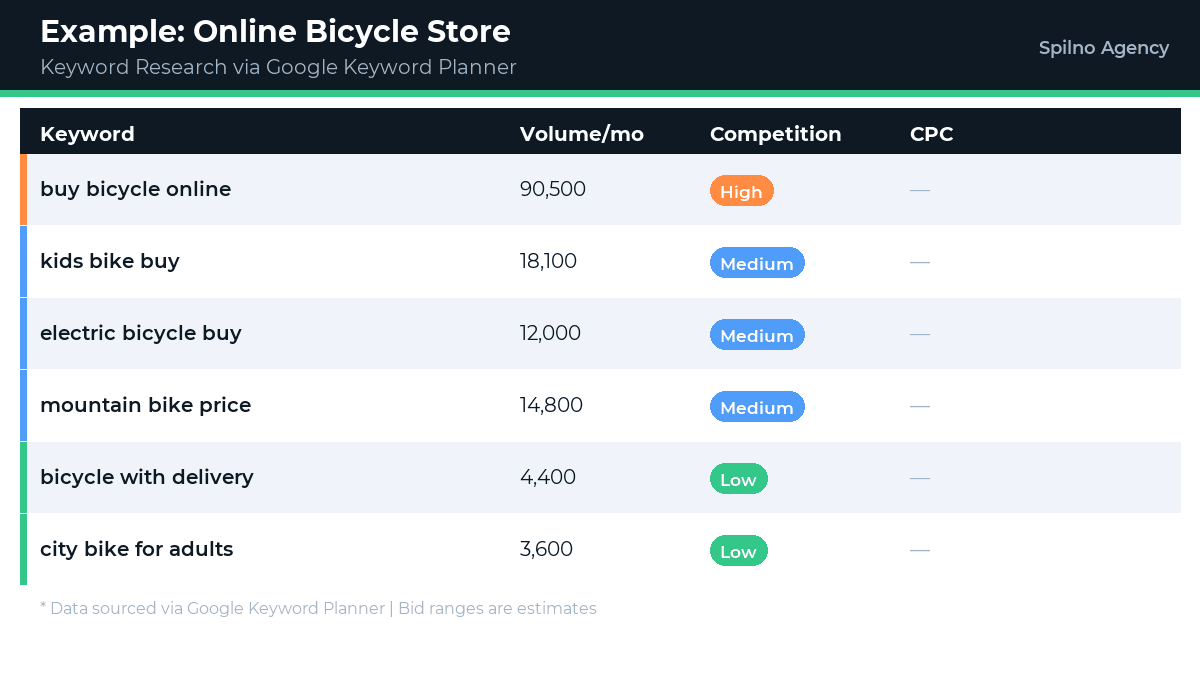
Let’s walk through a real Google Keyword Planner workflow for an online bicycle store. Goal: build a keyword list for Google Ads campaigns and organic SEO.
- Step 1. Enter Seed Keywords. In the ‘Enter words, phrases or a URL’ field, type: ‘bicycle’, ‘buy bicycle online’, ‘bicycle shop’, ‘kids bike’. Click ‘Get results’.
- Step 2. Set Location and Language. Since the store serves the European market, set Location to target countries (e.g. Germany, France, Poland). Set Language to the relevant languages.
- Step 3. Analyse the Results. Google returns hundreds of keyword ideas. Sort by search volume (high to low) and identify clusters: generic (bicycle, bike), type (mountain bike, electric bike, kids bike), intent (buy, price, review, best), brand (Trek, Giant, Specialized).
- Step 4. Filter Out Irrelevant Terms. Exclude: used bikes, repair, spare parts (if selling new bikes only). Set a minimum volume threshold of 10 searches/month.
- Step 5. Add to Plan and Export. Select your target keywords → ‘Add to plan’ → Download as CSV for use in Google Ads or your SEO tool.
Pro Tips for Getting the Most from Keyword Planner
- Use competitor URLs — paste a competitor’s site or landing page URL to see what keywords they’re targeting.
- Combine both modes — use ‘Discover new keywords’ to brainstorm, then ‘Get search volume’ to validate a curated shortlist.
- Check seasonality — view 12 months of data to spot peak demand periods (e.g. bicycles surge in spring and early summer).
- Don’t overlook long-tail keywords — ‘buy 26-inch mountain bike online’ may have 10 searches/month but converts at 5× the rate of generic ‘bicycle’.
- Cross-reference with Google Trends — Keyword Planner shows absolute volume; Trends shows relative trajectory. Use both for a complete picture.
Common Mistakes When Using Keyword Planner
- Chasing only high-volume keywords. High-volume terms have fierce competition. For most businesses, mid-tail and long-tail keywords with clear commercial intent drive more cost-effective results.
- Ignoring geographic targeting. Volume for ‘entire country’ vs. ‘specific city’ can differ by 10×. Always align location settings to your actual business geography.
- Treating competition as an SEO metric. The ‘Competition’ metric reflects advertiser competition for paid ads, not how hard it is to rank organically. Use dedicated SEO tools for organic difficulty analysis.
- Skipping search intent analysis. A keyword like ‘bicycle’ could be informational or transactional. Always check the actual Google SERP to understand what type of content ranks — and what Google thinks the user wants.
Frequently Asked Questions About Google Keyword Planner
Is Google Keyword Planner really free?
Yes — completely free for any Google Ads account holder. You don’t need active campaigns or a funded account to use it. The only limitation: without active campaigns, volume data is shown as ranges rather than exact numbers.
What’s the difference between Google Keyword Planner and Google Trends?
Keyword Planner shows absolute monthly search volumes and advertising metrics (CPC, competition). Google Trends shows relative search popularity over time and comparisons between keywords. Use them together for a full picture.
Can I use Google Keyword Planner for SEO (not just ads)?
Absolutely. Keyword Planner data is widely used for organic keyword research, content planning, and niche analysis. For deeper SEO insights (organic difficulty, SERP analysis, backlink data), supplement it with Ahrefs, Semrush, or Serpstat.
How accurate is the search volume data?
It comes directly from Google — the most authoritative source available. However, without active campaigns, data appears as ranges. Advertisers with active campaigns get exact numbers.
Can I research keywords for another country?
Yes. Change the location setting to any country, and all metrics update accordingly. This makes it ideal for international market analysis or planning campaigns in a new region before investing.
Can Google Keyword Planner forecast the cost per click (CPC) or cost per lead (CPL)?
Yes, Google Keyword Planner lets you estimate the approximate cost per click (CPC). The keyword results table includes two columns: ‘Top of page bid (low range)’ and ‘Top of page bid (high range)’ — these reflect the actual CPC range advertisers pay to appear in the top ad positions. For example, for the keyword ‘bicycle’ the low bid might be UAH 1.6 and the high bid UAH 12.86. The actual CPC depends on ad quality, auction competition, and campaign settings. CPL (cost per lead) is not shown directly — you can calculate it yourself: if your site converts at 2% and CPC is UAH 5, then CPL ≈ UAH 250. For a more precise forecast use the ‘Forecasts’ tab in GKP — it shows projected clicks, impressions, and total campaign cost for your chosen budget.
Conclusion
Google Keyword Planner is the foundation of any keyword research workflow — whether you’re running Google Ads or building an SEO strategy. It provides first-party data directly from Google, making it the most reliable starting point for understanding real search demand. For advertisers, it’s the essential tool for building campaign keyword lists and forecasting budget. For SEO professionals, it’s the first step in building a keyword universe. And for businesses, it’s a free way to validate product-market fit through search data before investing in paid promotion.

Read also
Google Tag Manager Workspaces: Why You Need Them and How to Use Them in 2026
A workspace in Google Tag Manager is a “draft” of a container — a place to safely edit…
How to Track Revenue, Transactions and Purchases in Google Analytics 4 from WordPress WooCommerce
Introduction WooCommerce store owners are often convinced that Google Analytics 4 already shows them revenue, transaction counts and…
How to Analyze Hourly Statistics in Google Analytics 4
Google Analytics 4 has no dedicated “hourly statistics” menu item, but you can get that exact breakdown in…