Google Shopping setup: step-by-step instruction

Google Shopping in 2026 means free product listings and paid Shopping campaigns across Search, YouTube and Discover. Launch takes up to 1 hour: create a Google Merchant Center Next account, upload a product feed (XML/CSV/Sheets — or let Google auto-crawl your site), verify the domain in Search Console, link Merchant Center to Google Ads, and launch a Performance Max or Standard Shopping campaign.
🛒 Launch Google Shopping in 1 hour
- Register a Google Merchant Center Next account at merchants.google.com
- Verify domain ownership through Google Search Console
- Upload a product feed (XML/CSV/Sheets) — or let Google auto-crawl your store
- Link Merchant Center to Google Ads and launch Performance Max
Full step-by-step guide with screenshots below ↓
Successful online sales take more than just listing products on a website. You need to deliver that information efficiently to shoppers — and that’s exactly what Google Shopping is built for. It doesn’t just display products, it routes them to people who are already ready to buy. To make the most of it, you need to understand the platform’s capabilities, advantages, and step-by-step configuration. This guide walks you through the full setup with real screenshots of the Merchant Center Next and Google Ads interfaces, plus the most important updates from 2025–2026.
Table of contents:
- Google Shopping: what it is and how it works
- Why you need Google Shopping
- What’s new in Google Shopping in 2025–2026
- Site requirements for Google Shopping
- Detailed Google Shopping setup
- Step 1. Creating a Merchant Center Next account
- Step 2. The Products section — adding and validating
- Step 3. Setting up the product feed (data sources)
- Step 4. Linking Google Ads
- Step 5. Marketing methods — Free listings + Ads
- Step 6. Launching Performance Max in Google Ads
- Universal product-advertising strategy
- Where to order Google Shopping setup
- FAQ
Google Shopping: what it is and how it works
Google built a powerful platform that aggregates offers from a massive number of online stores. The service is convenient for both store owners and shoppers.
Google Shopping lets online sellers launch effective ad campaigns and display product ads not just in search results, but also on partner sites, YouTube, Discover, and Gmail.
Shoppers can find and compare products across a wide range of merchants. The service systematically organizes every offer — and thanks to Google Shopping Product Categories, you can find products and place ads easily.
When a user enters a buying query, a dedicated block appears at the top of the page with offers from different stores. The shopper doesn’t need to open every site — that saves a lot of time. The block displays product images, prices, and short descriptions. On desktop, it sits above the search results or to the right; a horizontal carousel appears below as the user scrolls.
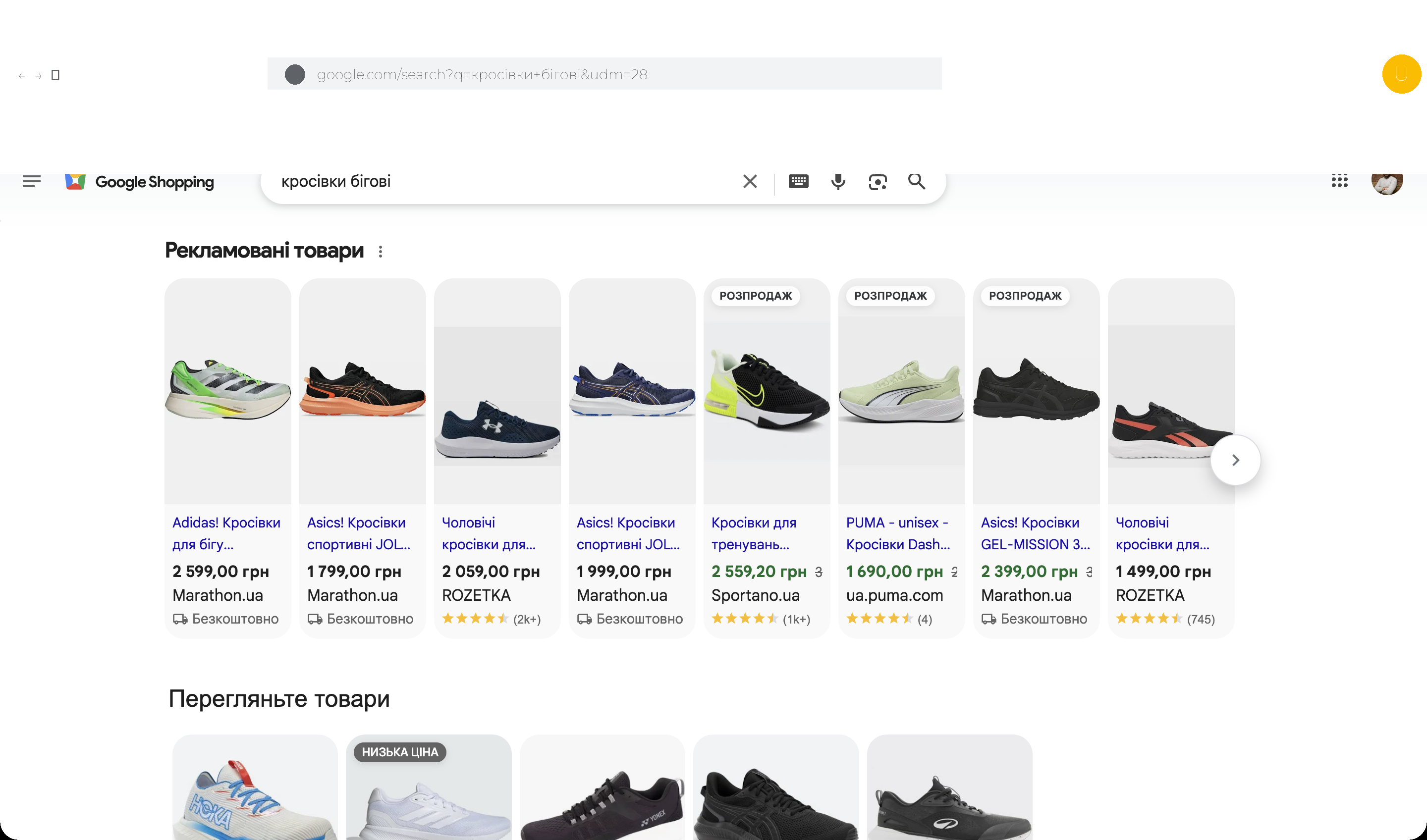
This style of search gives users far more information than a plain link. They can quickly tell which product is right for them. The output is clear and simple for both sides. Google Shopping has become an indispensable e-commerce tool for any commercial site owner — it lets you showcase your products attractively and boost conversion.
Where Google Shopping ads appear:
- main search results page, to the right of organic listings;
- the dedicated Shopping tab (shopping.google.com);
- price-comparison aggregators;
- YouTube — product shelves in videos and Shorts;
- Google Discover — the recommendations feed in the mobile app;
- Gmail Promotions — the “Promotions” inbox tab;
- AI Overviews — Google’s new generative answers with product cards;
- Display Network partner sites.
Why you need Google Shopping
The service makes products much easier to find, which directly benefits the store owner. Visitors get every relevant piece of information on a single page — especially valuable on mobile, where switching tabs is awkward.
Google Shopping is practical and profitable for businesses. Key benefits:
- Cards have an attractive layout — photos, prices, and descriptions are visible right in the SERP.
- Shoppers don’t need to open the site to see the essentials — they qualify themselves before clicking.
- Products are shown to people who are ready to buy now or in the near future (high commercial intent).
- The platform helps you build brand recognition and stand out from competitors.
- Ad budget is spent more efficiently — CTR and conversions on product ads are typically 2–3× higher than standard text ads.
- Prices and stock levels can be updated automatically.
- Free listings — your feed works even without any advertising budget.
The platform also lets you analyze visitor and buyer behaviour. The built-in tools give a clear picture of intent and interests.
Approach the setup and management professionally and you’ll see excellent results. The service opens up countless opportunities for targeted promotion.
What’s new in Google Shopping in 2025–2026
Over the past 18 months Google has substantially refreshed its product-ads ecosystem — from the Merchant Center interface to AI features inside Performance Max. If you haven’t touched your settings since 2023, here are the changes that matter.
Merchant Center Next — the new interface
In September 2024 Google began mass-migrating all accounts to Merchant Center Next. The classic version will be turned off completely by the end of 2026. The key changes:
- Simplified navigation — instead of dozens of sections there are now 4 blocks: “Products and store”, “Creative content”, “Marketing”, “Analytics”.
- Automatic website crawling — Google can pull products from your pages on its own, no XML/CSV feed required (great for small Shopify/WooCommerce/Tilda stores).
- AI-driven product optimization — Gemini auto-completes descriptions, fixes attributes, and suggests image improvements.
- Unified analytics — paid and free impressions are now in one dashboard.
- Shop quality — a new metric covering shipping, returns, prices and reviews. It affects ranking in Shopping results.
AI-Powered Performance Max and Demand Gen
In 2025 Google brought Gemini into Performance Max and launched a new campaign type — Demand Gen (replacing Discovery Ads). What that gives advertisers:
- AI creative generation in PMax — headlines, descriptions and even images are produced automatically from your feed and website.
- Seasonality forecasting — the campaign raises bids automatically on days when the algorithm expects demand spikes.
- Brand exclusions — you can finally exclude competitor brand terms from PMax search queries (long-time pain point).
- Demand Gen — a campaign for stimulating demand on YouTube Shorts, Discover and Gmail using your product feed. Ideal for new products and brands.
- Search Themes — algorithm hints for which query clusters to target (very useful for new accounts without conversion history).
Free listings, Shopping Graph and AI Overviews
Free reach inside Google Shopping has expanded significantly:
- Shopping Graph — Google’s internal index of 45+ billion product cards. Your feed lands in it automatically and starts showing in Images, Lens, YouTube and Maps.
- AI Overviews shopping — Google’s generative answers now include product cards pulled from your feed (Free listings work here at no cost).
- Virtual Try-On — for apparel and footwear, Google shows the product on models of varying body size and skin tone (live in the US, rolling out further).
- 3D models and AR preview — feed support for 3D attributes on furniture, electronics and accessories.
- Price insights — Merchant Center now shows how your price compares to competitors in the same category.
Site requirements for Google Shopping
For ads to perform well, your store must meet Google’s requirements:
- Serve the site over HTTPS to protect customer data.
- The language version must match the target country. Feed and product descriptions in the shopper’s language.
- The currency must match the country (UAH for Ukraine, EUR for the EU, etc.).
- Shipping terms with specific delivery times and prices are clearly written out.
- Payment methods are described in detail; ideally highlight benefits of each option.
- Refund and return policy is published (minimum 14 days — Google’s baseline).
- On-page promo banners must not block critical purchase information.
- Contact details are correct: phone, email, legal address.
- Site is optimized for fast loading. Core Web Vitals in the green zone.
- Schema.org markup (Product, Offer, AggregateRating) is in place — Merchant Center uses it during auto-crawling.
Prohibited products (smuggled goods, weapons, tobacco, unlicensed pharmaceuticals, etc.) cannot be advertised. If a buyer adds a product to cart, it must be in stock — keep inventory in sync.
These items aren’t just for moderation. They make your store look trustworthy to Google and noticeably improve conversion. The store becomes more attractive to visitors and buyers alike.
Detailed Google Shopping setup
Below we walk the full path — from Merchant Center Next sign-up to launching the first Performance Max campaign in Google Ads. Every step has a screenshot of the real interface.
Step 1. Creating a Merchant Center Next account
Go to merchants.google.com and sign in with a working Google account (a corporate account is preferable to a personal one). The setup wizard will ask for:
- Store name — appears in your ads, so use the brand name.
- Business country — the country your business is registered in.
- Time zone — for Ukraine, Europe/Kyiv.
- Website URL — the main HTTPS domain.
- Verification method — easiest via Google Search Console (if already verified) or an HTML meta tag.
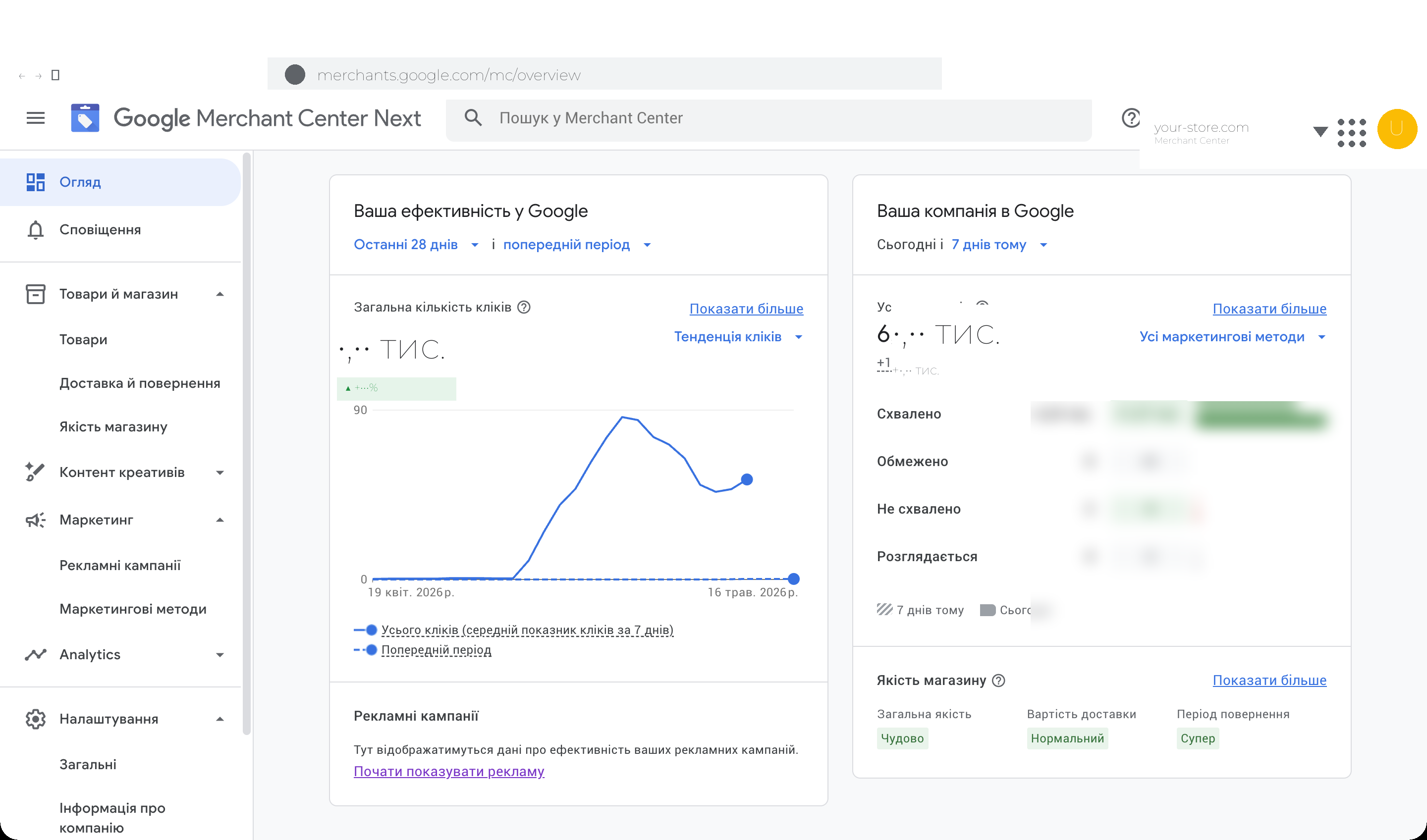
After verification you land on the “Overview” dashboard. On the left — total clicks (paid + free) versus the previous period. On the right — product statuses: approved, limited, disapproved, pending. Below — the Shop Quality block with scores for shipping, prices and returns.
Step 2. The Products section — adding and validating
In the side menu expand “Products and store” → “Products”. You’ll see the whole catalog: status, price, distribution channel (Free listings and/or Ads), moderation errors.
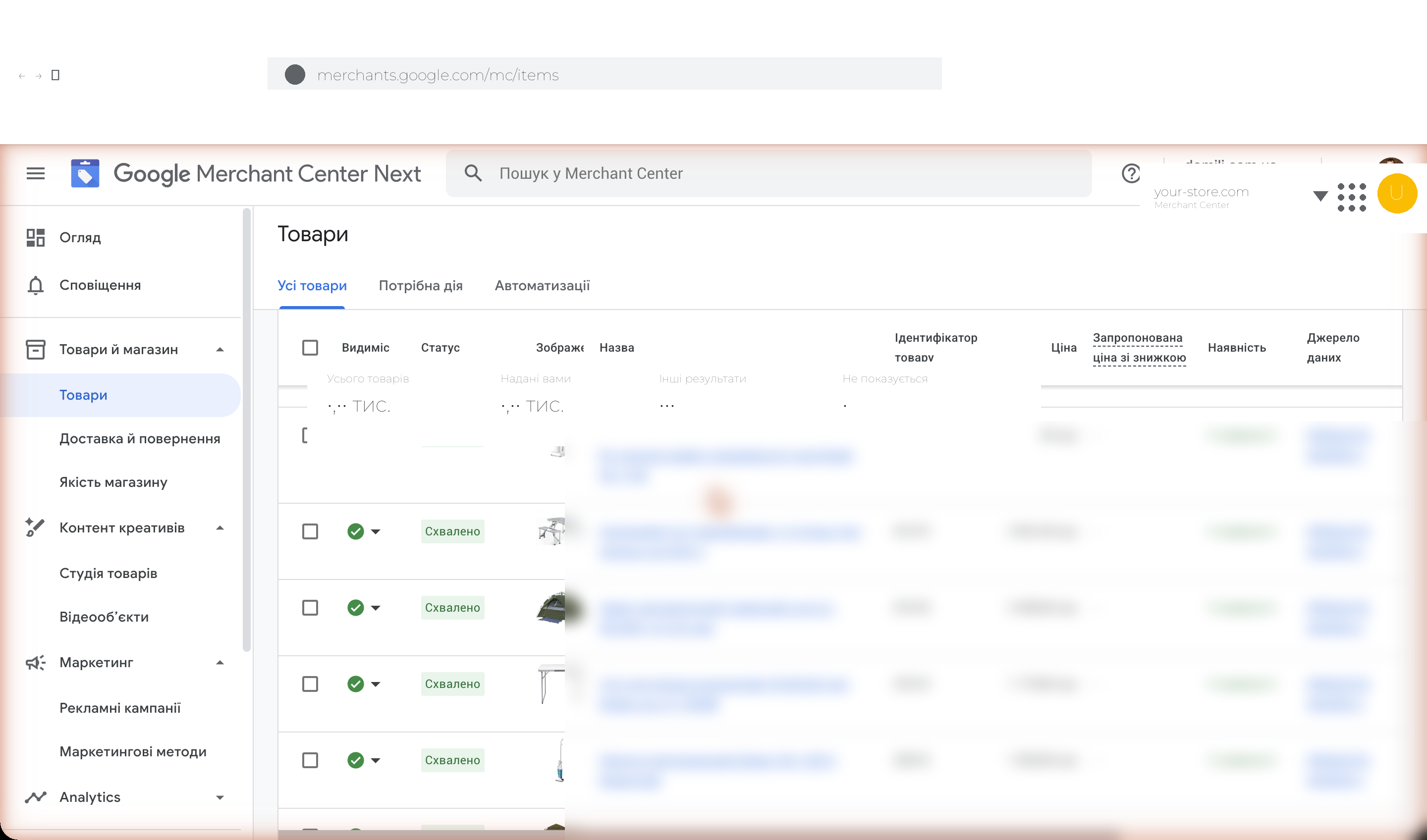
Section tabs:
- All products — the complete catalog.
- Needs action — only products with errors blocking distribution.
- Automations — rules you (or Google) set up for bulk optimization (auto-fill GTIN, category remapping, etc.).
You can open any product to preview how it will appear in search, see which attributes are filled in and which aren’t. The most critical attributes: id, title, description, link, image_link, availability, price, brand, gtin or mpn, google_product_category.
Step 3. Setting up the product feed (data sources)
Merchant Center Next supports several ways to send products to Google:
- Scheduled feed — a URL to an XML/CSV/TSV file that Google fetches daily or weekly. The most common option.
- Manual upload — for testing or one-off updates.
- Google Sheets — feed lives in your spreadsheet, Google syncs automatically.
- Content API — API integration for large catalogs and CMS plugins.
- Automatic website crawling — Google crawls your store and pulls products by itself (new in Merchant Center Next).
- Supplemental feeds — separate files for updating prices, stock, sizes, promotions.
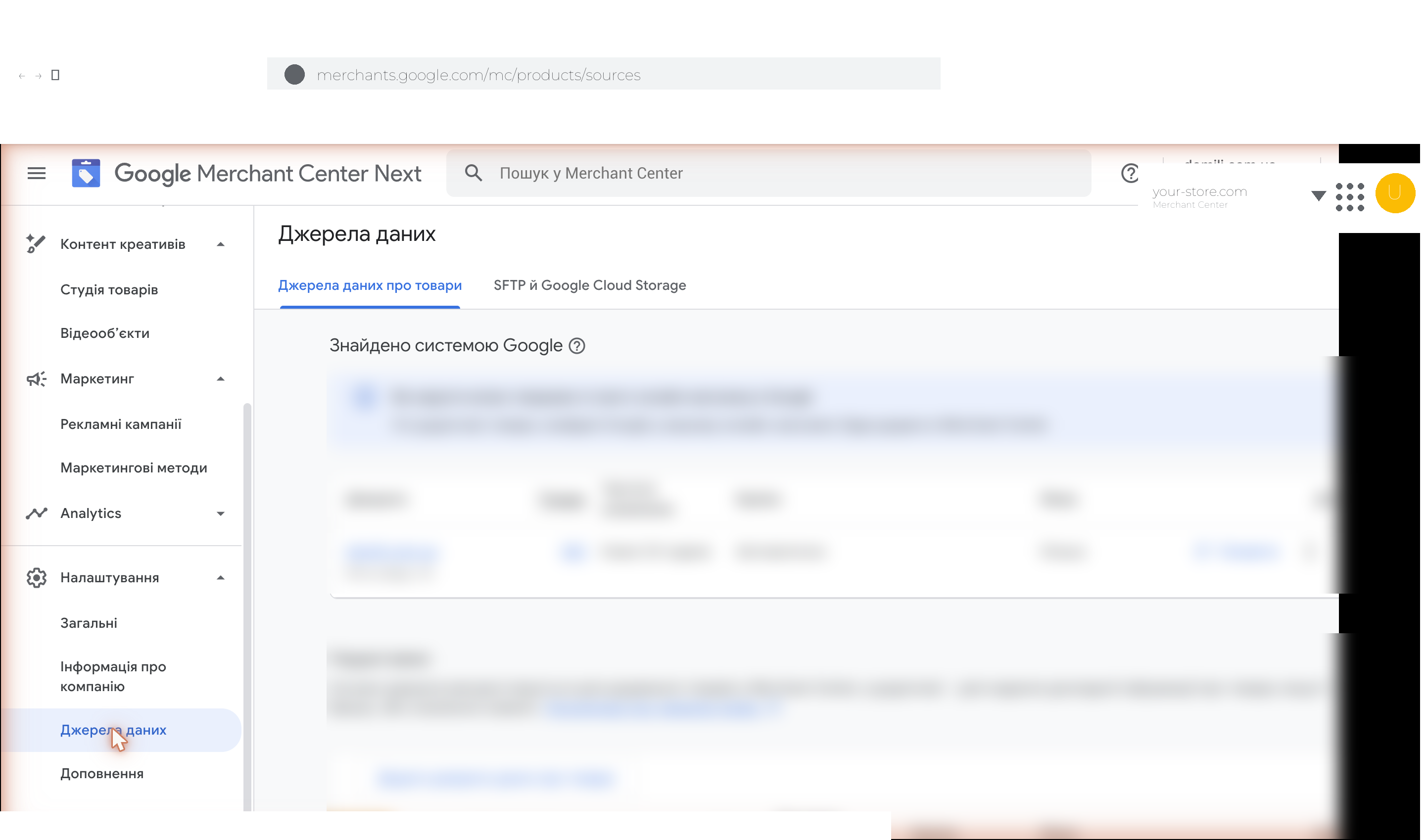
Supported feed formats: .xml, .csv, .tsv, .txt, .gz, .zip, .bz2. Always include id, attributes, title, brand, full price with currency. Pay special attention to the description field — algorithms scan it for keyword matches, so unique and detailed descriptions improve visibility.
If your inventory changes often, set up a supplemental feed for automatic price and stock updates. Include 4–5 attributes and refresh every 1–4 hours — this prevents being blocked for stale data.
Upload errors are visible in the “Diagnostics” section — Google points to the exact attribute, file row, and the recommended fix.
Step 4. Linking Google Ads
To run paid Shopping and Performance Max campaigns, link Merchant Center to Google Ads. Go to “Marketing” → “Ad campaigns”. If you haven’t linked accounts yet, Google offers a two-click flow (assuming you’re signed in with a Google account that has Ads access).
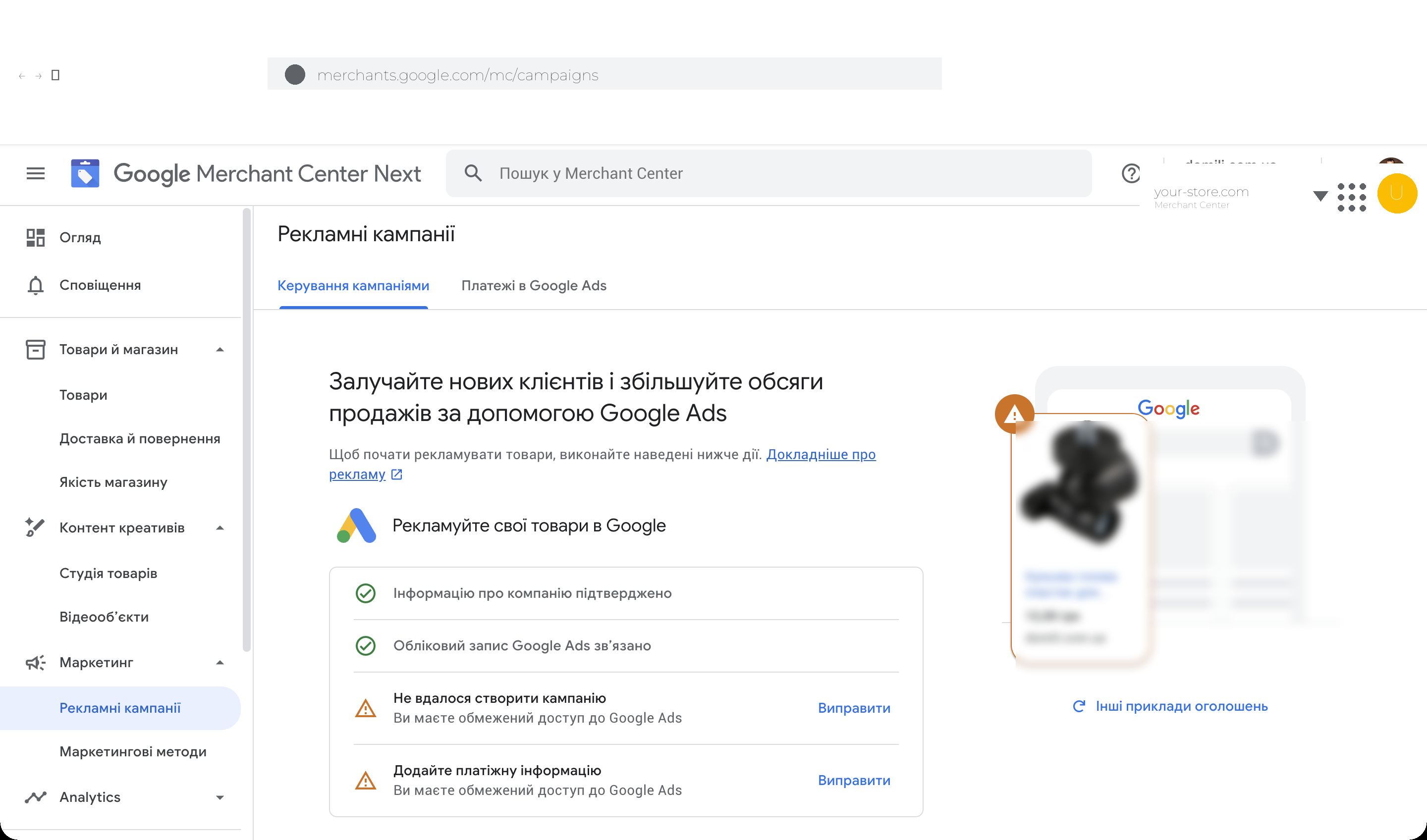
On the page you’ll see a readiness checklist:
- ✅ Business information confirmed;
- ✅ Google Ads account linked;
- ⚠️ Create your first campaign;
- ⚠️ Add billing information.
Google previews your future product ad on the right — handy for a quick check of image and title quality.
Step 5. Marketing methods — Free listings + Ads
In “Marketing” → “Marketing methods” you see two parallel distribution channels: product ads (paid) and free product listings.
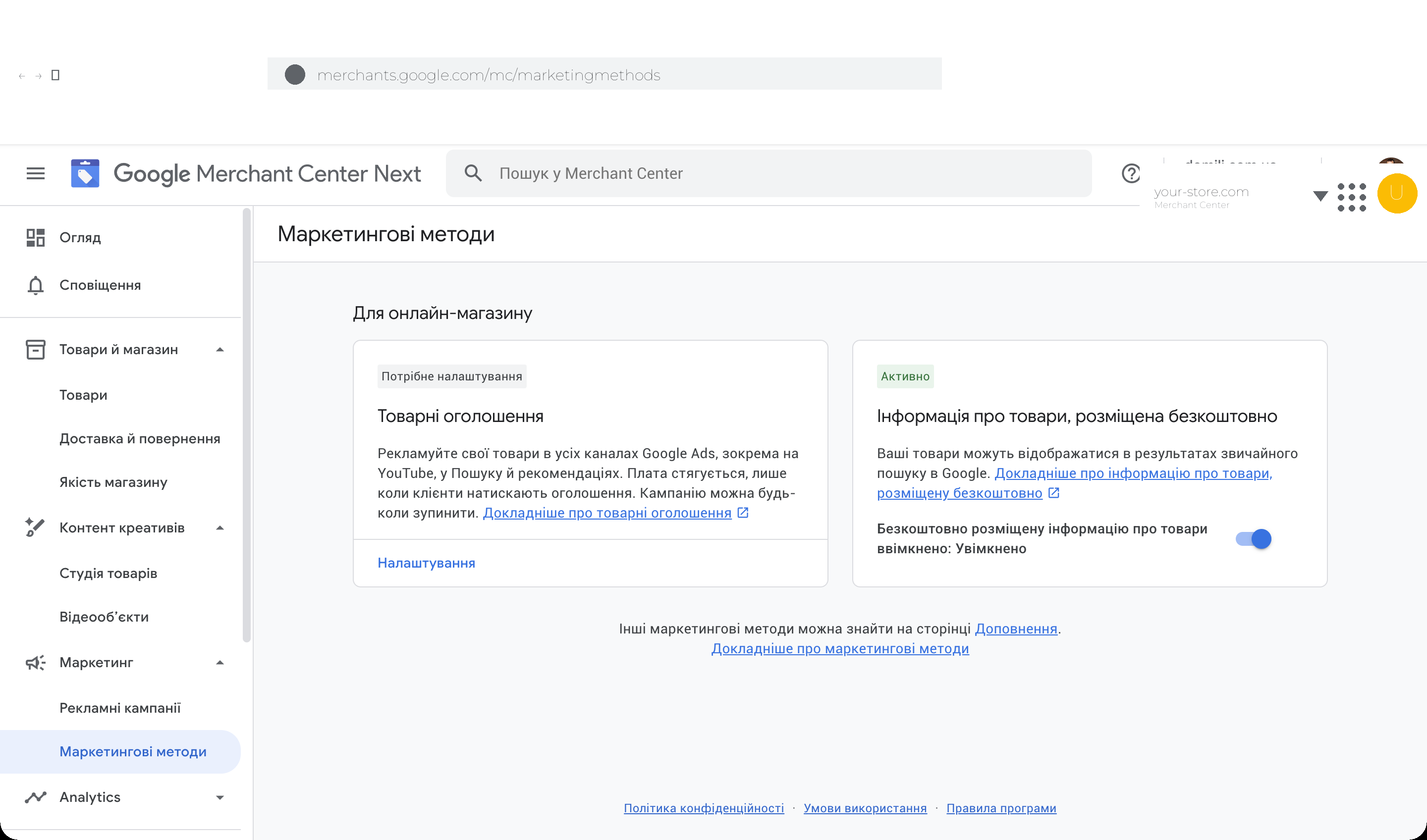
Free listings are on by default — confirm the toggle is set to “On”. Your products will appear in the Shopping tab, Google Images, Lens, YouTube product shelves and AI Overviews with no advertising cost.
Product ads require launching a paid campaign in Google Ads — covered in Step 6.
Step 6. Launching Performance Max in Google Ads
Open ads.google.com → “New campaign”. Choose the goal “Sales”, then a campaign type.
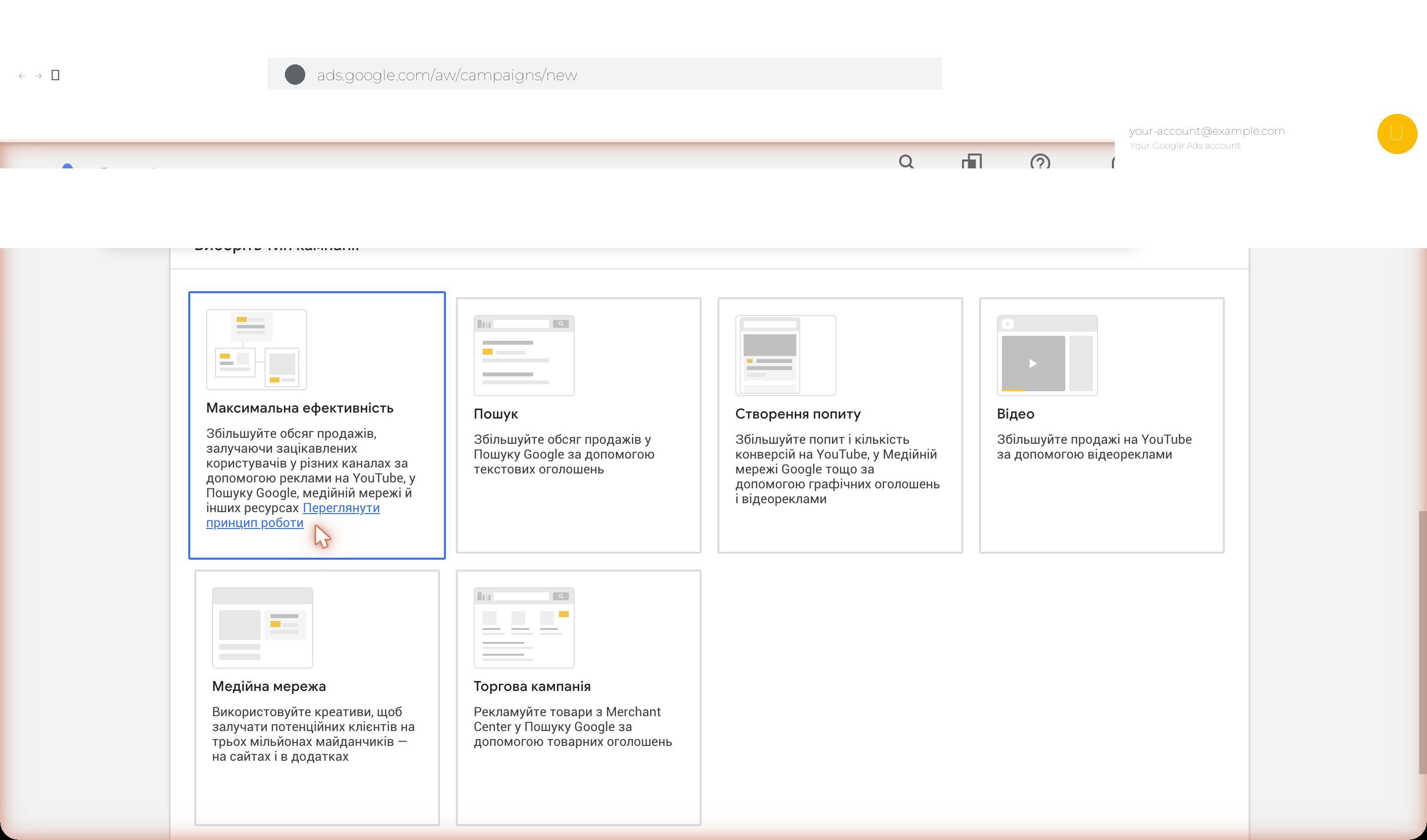
Campaign types that use the product feed:
- Performance Max — the universal AI campaign, recommended for most cases. Best for brands with mature product pages, a clean feed and conversion tracking in place.
- Standard Shopping — classic, with manual bid control per product group. Better for new accounts without conversion history or narrow niches.
- Demand Gen — for YouTube Shorts, Discover and Gmail. Works on the upper funnel (awareness + interest).
On the next steps you’ll specify:
- Linked Merchant Center account and target geo (country or specific regions);
- Daily budget (minimum $10–15 / 300–500 UAH for testing);
- Bidding strategy — for Performance Max we recommend “Maximize conversions” with a target CPA after 2–3 weeks of learning;
- Asset group — headlines, descriptions, images, videos, logos. More variety helps the AI generate better creatives;
- Audience signals — hints about your target customer (interests, demographics, custom segments).
Universal product-advertising strategy
The most common mistake is launching only Performance Max from day one. With a fresh account and no conversion data, the AI has nothing to learn from and burns the budget inefficiently.
Recommended sequence for an e-commerce launch:
- Weeks 1–3: launch a Standard Shopping campaign across the whole catalog with manual CPC and an average bid for the niche.
- Weeks 4–6: once you have 30+ conversions, switch the same Shopping campaign to the “Maximize conversions” automated strategy.
- Weeks 7+: launch a parallel Performance Max for your top 100 products. PMax will gradually take traffic from the Standard campaign — that’s expected.
- Regularly review Search Themes in PMax — add themes that drive conversions, exclude competitor brands via Brand Exclusions.
Segment products by category, margin, and seasonality. Set a lower target ROAS for low-margin items and a higher one for premium products.
Run regular ad audits: check which landing pages visitors hit, look at the “Insights” report inside Performance Max — Google surfaces the search themes and audiences that worked best. Keep improving feeds — add extra attributes (color, size, material, gender, age_group) because they directly affect query-matching quality.
Following these tips lets you use Google Shopping properly — a tool that meets shoppers exactly when they’re ready to decide. It plays well with every other channel, which boosts overall sales.
Where to order Google Shopping setup
To get the most out of the platform you need a deep understanding of how it works. Mistakes lead to wasted budget, time and attention. If you’d like Google Shopping configured so your offers attract real buyers, reach out to the Spilno Agency team. We work with Merchant Center Next, Performance Max and Free listings every day — for e-commerce stores of every scale. Fill in the form and get a free marketing consultation.
Marketing consultation
FAQ
What is Merchant Center Next and how is it different from the classic Merchant Center?
Merchant Center Next is the updated version of Google Merchant Center. Google is gradually migrating every account to it through 2024–2026. It has simplified navigation, AI features for product card optimization, and automatic website crawling instead of mandatory feeds. The interface is split into “Products and store”, “Creative content”, “Marketing”, and “Analytics”.
What is Performance Max and why does Google recommend it?
Performance Max (PMax) is a universal Google Ads campaign type that runs ads simultaneously in Search, YouTube, Discover, Gmail, and the Display Network. Google’s AI distributes the budget across channels to maximize conversions. In 2025 Google integrated Gemini into PMax for creative generation and demand forecasting.
Do I need Google Merchant Center to launch Google Shopping?
Yes, Merchant Center is mandatory. It serves as the central data store (product feed) that is then handed to Google Ads to create and serve ads. In 2026 you can also use automatic website crawling instead of manually uploading a feed.
What are free product listings (Free listings)?
Free listings are unpaid placements of your products in the Shopping tab, regular Google Search, Google Images, and AI Overviews. You only need a valid feed in Merchant Center and the “Free product listings” toggle enabled in “Marketing methods”.
How much does launching Google Shopping cost?
Merchant Center registration and Free listings are free. Shopping campaigns use a CPC (cost-per-click) model. Average CPC for e-commerce ranges from $0.10 to $2 depending on the niche. Recommended starting budget — $10–15 / 300+ UAH per day for testing.
How fast do products appear in search after launch?
After uploading the feed Google reviews products for 1–3 business days. Free listings start showing as soon as items are approved. Paid Shopping campaigns need 7–14 days of algorithm learning before stabilizing. For Performance Max, plan for 4–6 weeks until full optimization.
How do I optimize my product ads for better visibility?
A high-quality, complete feed with accurate data is the foundation. Use high-resolution images (minimum 800×800 px, no watermarks), detailed and relevant titles, and the correct Google Product Categories taxonomy. Regular bid monitoring, extra attributes (size, color, material, gender, age_group) and active use of Search Themes in Performance Max are equally critical.

Read also
Spilno Agency’s Experience: How We Verify Events Before Starting Work
Before launching a campaign in Google Ads or Meta Ads, or starting SEO work, Spilno Agency always checks…
GA4 DebugView: How to Verify Google Analytics Events in Real Time
DebugView is the section of Google Analytics 4 that shows your site’s events in real time, seconds after…
Top Claude Skills for TikTok Ads Specialists (2026)
9 verified Claude skills and MCP servers for TikTok Ads: Pixel/Smart+ audits, Spark Ads hook/hold rate, creator sourcing,…