How to add a card to your Facebook ad account

Adding a card to your Facebook ad account takes under two minutes — but card rejections, billing limits, and payment method errors can block your campaigns from running. This guide covers everything you need to know about Meta Ads payment setup.
What payment methods are available in Meta Ads
Meta Ads Manager supports several payment methods depending on your country and account currency. Knowing which options are available helps you choose the most reliable one for your fb ads payment method setup.
Credit and debit cards
Visa and Mastercard (both credit and debit) are the most widely supported options across all European markets. American Express is accepted in some countries. Cards must be enabled for online and international payments — check with your bank if you are unsure.
PayPal
PayPal is available as a facebook ads payment method in most European countries, including Germany, France, Poland, the Netherlands, and others. It works as both a primary and a backup payment method. Once linked, Meta will charge your PayPal balance or the card connected to your PayPal account.
Prepaid cards
Prepaid Visa and Mastercard cards are sometimes accepted, but their success rate is lower. Meta may decline them if the billing name does not match the account name, or if the card issuer blocks automatic charges. For stable billing, a standard debit or credit card is preferred.
BLIK (Poland)
BLIK is not directly supported as a Meta Ads payment method. Polish advertisers typically use a Visa/Mastercard debit card issued by their bank, or PayPal (which can be funded via BLIK through some Polish banks).
Ukrainian bank cards
Cards from Ukrainian banks (Monobank, PrivatBank, Sense Bank, etc.) can be used to pay for Facebook ads when the card currency is EUR or USD and the card is enabled for international online payments. Monobank virtual EUR cards are widely used by Ukrainian advertisers operating campaigns in European markets. Make sure your card supports 3D Secure authentication.
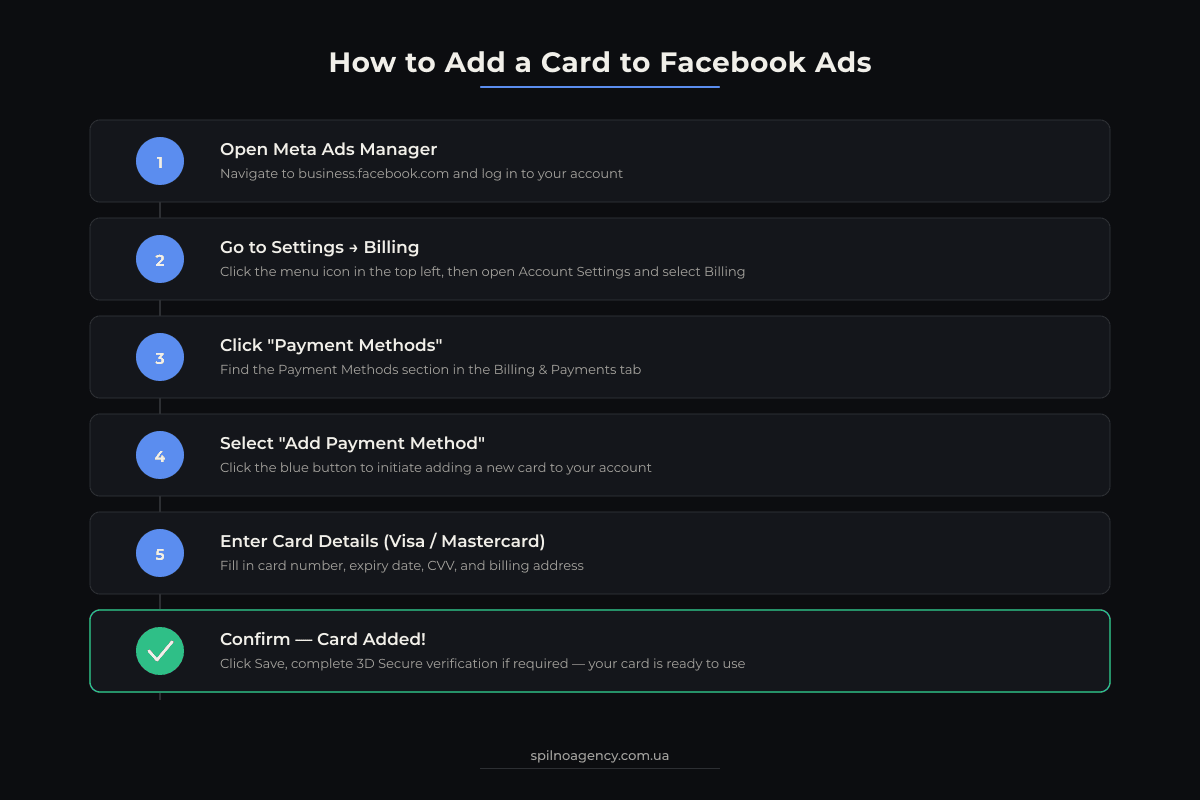
Step-by-step: How to add a card to Facebook ad account via Meta Ads Manager
This is the most direct path to add a credit card to your Facebook ads account. Follow these steps exactly to avoid common setup errors.
Step 1: Open Meta Ads Manager
Go to adsmanager.facebook.com and make sure you are logged in with the Facebook account that has admin access to the ad account. If you manage multiple ad accounts, verify you are in the correct one using the account selector at the top of the page.
Step 2: Open the Billing section
Click the three-line menu icon in the upper left corner, then select Billing & Payments. You can also navigate directly to adsmanager.facebook.com/billing. This is the main meta ads billing hub where all payment methods are managed.
Step 3: Open Payment Methods
In the Billing & Payments page, click on the Payment Methods tab (sometimes labeled Payment settings). You will see all currently saved payment methods and the option to add a new one.
Step 4: Click “Add payment method”
Click the blue Add payment method button. A dialog will appear with payment type options: Credit or debit card, PayPal, and potentially other options depending on your country. Select Credit or debit card.
Step 5: Enter your card details
Fill in all required fields:
- Card number — 16-digit number on the front of the card
- Expiry date — month and year (MM/YY)
- CVV/CVC — 3-digit code on the back of the card
- Name on card — exactly as it appears on the card
- Billing address — must match the address registered with your bank
Step 6: Save and verify
Click Continue or Save. Meta may perform a small authorization charge (typically €0–€1) to verify the card, which is refunded automatically. Once the card is verified, it will appear in your Payment Methods list. If this is your first payment method, it becomes the primary card automatically.
Step-by-step: How to add a card via Meta Business Manager or Business Suite
If you manage ads through Meta Business Suite or Business Manager, the path to add your facebook ads payment method is slightly different.
- Go to
business.facebook.comand log in with your Business Manager account. - In the left sidebar, click
Business settings(the gear icon). - Under the Payments section in the left menu, click
Payment methods. - Select the ad account you want to update from the dropdown on the right side of the page.
- Click
Add payment method, choose your payment type, and enter the card details. - Confirm and save. The card will now be linked to the selected ad account.
Note: only users with the Finance editor or Admin role in Business Manager can add or modify payment methods. If you do not see the option, ask your Business Manager admin to grant you the correct permissions.
How to change or remove a payment method
You can update your facebook ads payment methods at any time from the same Billing & Payments section.
Change the primary payment method
Navigate to Ads Manager → Billing & Payments → Payment Methods. Click the three-dot icon (⋯) next to the card you want to make primary, then select Make primary. The new primary method will be used for all future charges.
Update card details
Meta does not allow editing card numbers directly. If your card has been replaced or reissued, you need to remove the old card and add the new one. To add a card to your Facebook ad account with updated details, follow the same steps from the section above.
Remove a payment method
Click the three-dot icon next to the card and select Remove. You cannot remove a card that is set as the primary payment method unless you have another payment method to take its place. Assign a different primary card first, then remove the old one.
Payment limits in Facebook / Meta Ads
Understanding meta ads billing limits helps you avoid unexpected campaign pauses and manage your ad spend budget effectively.
Billing threshold
A billing threshold is the maximum amount Meta will charge to your payment method before your regular billing date. New accounts start with a low threshold (typically €25 or €50). Each time you pay on time, Meta may automatically increase the threshold. The progression commonly looks like: €25 → €50 → €100 → €250 → €500 → €750.
When your spend reaches the current threshold, Meta charges your card immediately and resets the counter. If your card is declined at this point, your ads are paused until you resolve the payment issue.
Monthly spending limit
The monthly spending limit (also called account spending limit or ASL) is an optional cap you can set to control total monthly ad spend. Unlike the billing threshold, this is a voluntary limit you configure yourself. Find it under Billing & Payments → Account spending limit. When the limit is reached, all ads in the account pause automatically until you either reset or raise the limit.
Ad account spending limit
Separate from the monthly limit, you can set a lifetime spending limit on individual campaigns or ad sets. This is managed at the campaign level inside Ads Manager, not in the billing settings.
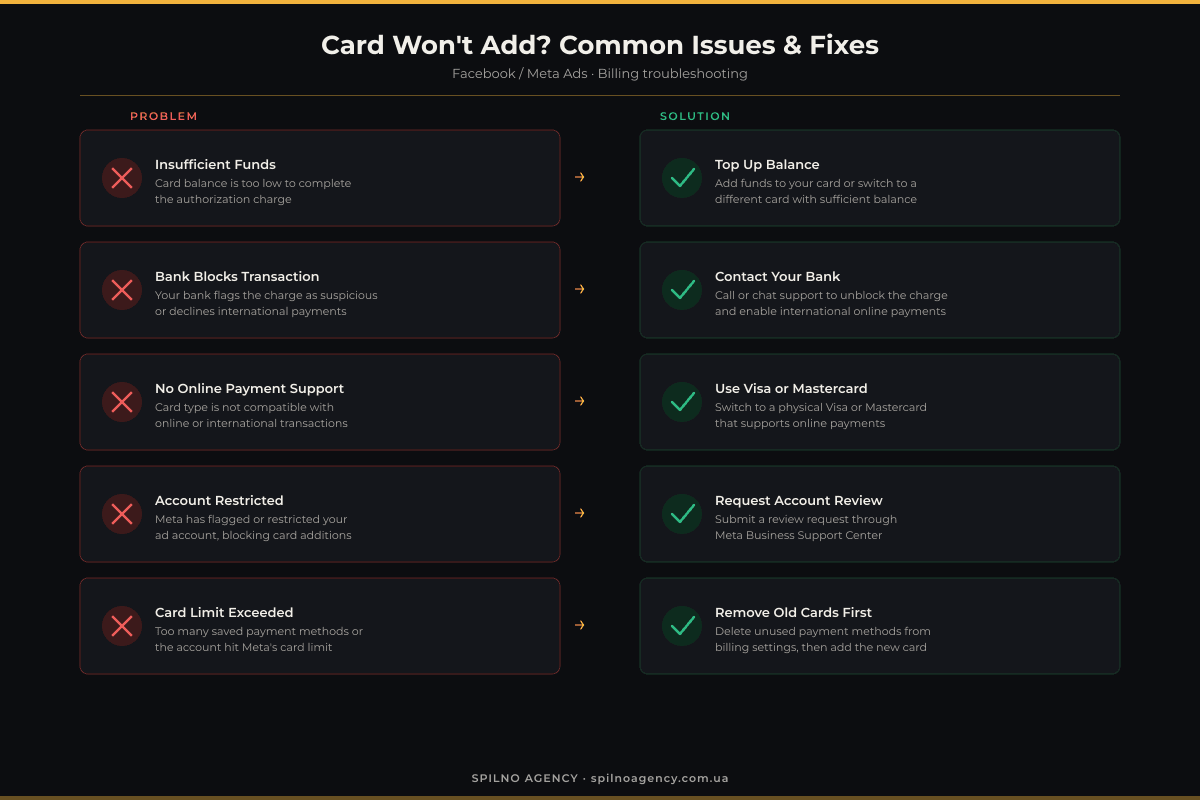
Common issues and solutions when adding a card to Facebook ad account
Card is rejected or declined
The most frequent reason is that the card is not authorized for online or international transactions. Call your bank to enable these features. Also double-check that the billing name and address you entered match your bank records exactly.
Virtual card not accepted
Some single-use virtual cards are blocked by Meta because they cannot be charged more than once. Use a multi-use virtual card (e.g., from Revolut, Wise, or Monobank) and make sure the card has a sufficient balance to cover the initial authorization charge.
Country or currency restrictions
If your ad account is set to a country where certain payment methods are not available, you will not see those options. The account country is set when the ad account is created and cannot be changed later. If you are running European campaigns, make sure your account country is set to an EU country.
Billing threshold hit and ads paused
If your billing threshold is reached and the charge fails, Meta pauses all active campaigns. To resume: go to Billing & Payments, click Pay now to settle the outstanding balance manually, then review why the charge failed (insufficient funds, card expired, bank block). Once the balance is cleared, campaigns resume automatically.
Ad account is disabled
If your account was disabled due to a billing issue, paying the outstanding balance is usually enough to restore it. Go to the Billing section and click Pay now. If the account was disabled for a policy violation (not a payment issue), you need to submit an appeal through Meta’s Account Quality page at business.facebook.com/accountquality.
“Payment method not supported” error
This usually means the card type is not available for your account’s billing country, or you are trying to add a card that belongs to a different currency zone than your ad account. Try adding a PayPal account instead, or contact Meta support to verify which payment methods are available for your specific account.
Tips for stable Meta Ads billing
- Add a backup payment method. Always have at least two payment methods saved. If the primary card fails, Meta automatically charges the backup, preventing campaign interruptions.
- Use a dedicated card for ad spend. Keep a separate debit card or virtual card exclusively for Facebook ads. This makes it easier to track spend, manage limits, and avoid accidental declines when the card is used elsewhere.
- Monitor billing threshold progression. Check your current threshold in
Billing & Payments → Billing summary. If you plan to scale spend, make sure your card limit can cover a full threshold cycle before you increase daily budgets significantly. - Enable 3D Secure on your card. Meta supports 3D Secure authentication. Having it enabled reduces the chance of your bank blocking charges as suspicious.
- Keep card details up to date. If your card is about to expire, add the new card before the old one expires. Expired cards will cause billing failures and campaign pauses.
- Set an account spending limit. If you are testing new campaigns or working with a fixed monthly budget, set an account spending limit to prevent overspending during the learning phase.
- Pay outstanding balances promptly. Paying on time builds billing trust with Meta, which in turn raises your billing threshold faster — giving you more flexibility to run larger campaigns without interruptions.
Frequently asked questions
Can I add a virtual card to my Facebook ad account?
Yes, most virtual Visa and Mastercard cards work with Meta Ads, but some single-use virtual cards may be declined. Use a multi-use virtual card from a trusted European bank or fintech like Revolut or Wise for best results.
Why is my card being rejected by Facebook Ads?
Common reasons include incorrect billing address, insufficient funds, card not enabled for online or international payments, or Meta’s fraud prevention flagging the card. Contact your bank to confirm the card is authorized for online transactions, then retry adding it.
Can I use PayPal to pay for Facebook ads in Europe?
Yes. PayPal is supported as a payment method for Meta Ads in most European countries. You can add it as a primary or backup payment method in the Meta Ads Manager billing settings.
What is a billing threshold in Meta Ads?
A billing threshold is the amount of ad spend that triggers an automatic charge to your payment method before your monthly billing date. It starts low (for example €25) and increases automatically as you consistently pay on time.
How do I change my primary payment method in Meta Ads?
Go to Meta Ads Manager → Billing & Payments → Payment Methods. Click the three-dot menu next to the card or account you want to make primary, select Make primary, and confirm. Your new primary method will be charged for all future billing.

Read also

What Is an API: What It Means and How to Work With It in 2026
An API (Application Programming Interface) is a set of rules that lets one program request data or an…

Site Kit by Google: Overview and Setup Guide for WordPress
Site Kit by Google is the official WordPress plugin that brings Search Console, Analytics 4, PageSpeed Insights, Ads,…

Lawyer Lead Cost in 2026: Why Prices Vary So Much
How much does a lead really cost for law firms running Google Ads and Meta Ads in 2026?…