HTTP Redirects: The Complete SEO Guide (301, 302, 307, 308)

Redirects are a cornerstone of technical SEO — and one of the most commonly misconfigured elements on any website. Choosing the wrong redirect type can cost you link equity, confuse crawlers, or silently duplicate your content. This guide covers every HTTP redirect type — 301, 302, 307, 308, and meta refresh — explaining when to use each, how to implement them correctly, and what mistakes to avoid.
A 301 redirect passes 90–99% of link equity — but only if it is set up correctly and does not create redirect chains.
What Is an HTTP Redirect?
An HTTP redirect is a server instruction that tells a browser or search crawler: “this resource has moved to a different address.” The server responds with a 3xx status code and the new URL in the Location header. The browser or bot automatically follows the new address.
Redirects are used when: changing URL structure, migrating to a new domain, removing outdated pages, switching from HTTP to HTTPS, or merging two sites after a rebrand.
301 Redirect — Permanent
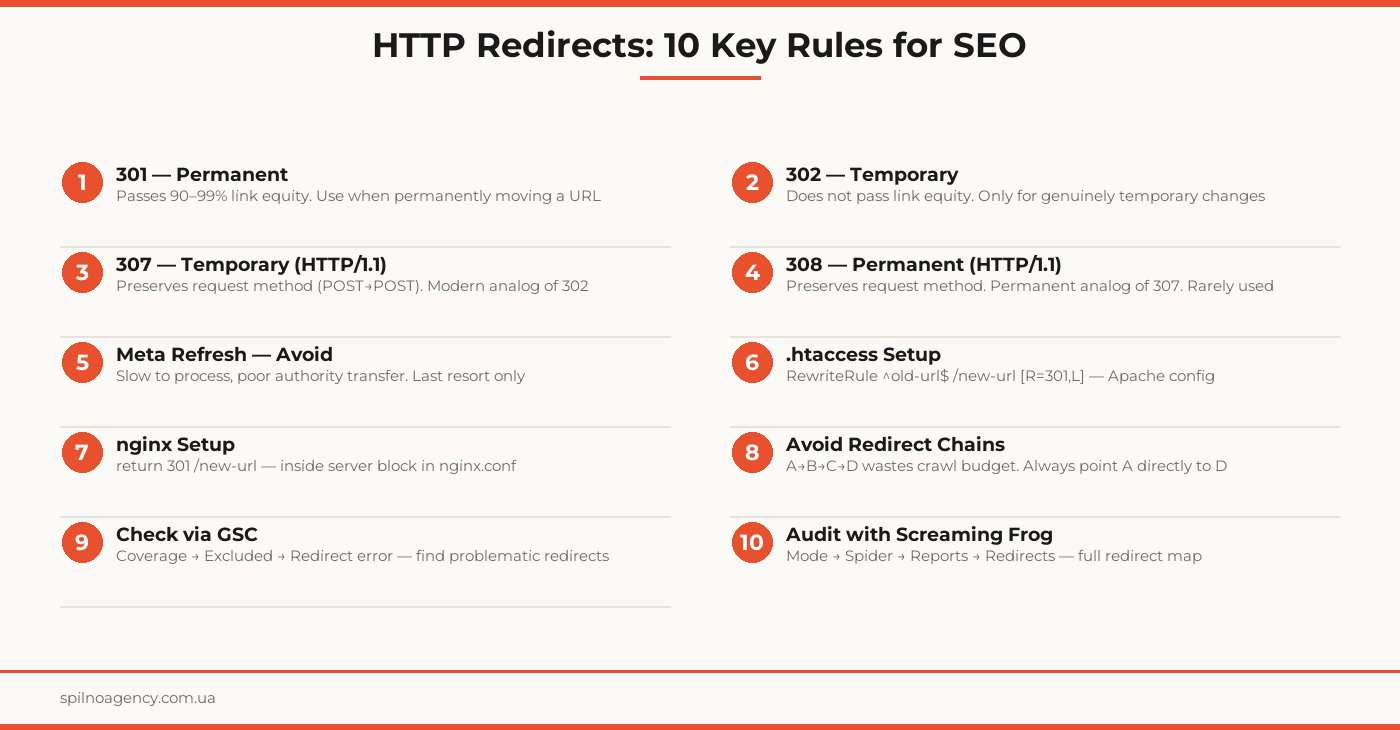
301 is the most important redirect type for SEO. It signals that a resource has moved permanently. When Google receives this signal, it:
- Updates its index — replaces the old URL with the new one
- Transfers accumulated link equity (PageRank) to the new page
- Stops crawling the old URL after some time
Link equity transfer: per Google — between 90% and 99%. Losses are minimal. That is why 301 is the standard for any permanent URL migration.
302 Redirect — Temporary
302 signals a temporary move. Google interprets this as: “the original URL is still valid, it just temporarily points elsewhere.” Consequences:
- The old URL stays in Google’s index
- Link equity is not transferred to the new URL
- External backlink anchor texts remain tied to the old URL
When 302 is appropriate: A/B testing (Google Optimize, VWO), temporary maintenance redirects, temporary geo-targeting (showing a different version temporarily).
307 and 308 Redirects
307 — Temporary Redirect (HTTP/1.1)
Functionally equivalent to 302, with one important difference: it preserves the HTTP request method. If a client sent a POST request, after a 307 it sends POST again (not GET as with 302). Relevant for APIs and forms. From an SEO perspective, it is equivalent to 302.
308 — Permanent Redirect (HTTP/1.1)
The permanent counterpart of 307. Preserves the request method and transfers link equity like 301. Supported by modern browsers but less common. For ordinary web pages, 301 remains the better choice.
Meta Refresh — Why to Avoid It
Meta refresh is an HTML tag in the <head>: <meta http-equiv="refresh" content="0; url=/new-url">. Technically it is not an HTTP redirect — it is a browser instruction at the HTML level. SEO problems:
- Slow processing by search crawlers
- Poor link equity transfer (significantly worse than 301)
- Visible delay for users (if content > 0)
- Not all bots handle it correctly
Use meta refresh only when you have no access to server configuration.
When to Use Each Redirect Type
- 301 — permanent URL change, domain migration, HTTPS switch, page consolidation, structural redesign
- 302 — temporary unavailability, A/B test, temporary geo-targeting
- 307 — temporary redirect requiring HTTP method preservation (API use cases)
- 308 — permanent redirect requiring HTTP method preservation (rare)
- Meta refresh — only when no server access is available
How to Set Up a 301 Redirect
Apache (.htaccess)
The most common approach on Apache-based hosting:
RewriteEngine On
RewriteRule ^old-page/?$ /new-page/ [R=301,L]
For an entire domain (domain migration):
RewriteCond %{HTTP_HOST} ^old-domain\.com [NC]
RewriteRule ^(.*)$ https://new-domain.com/$1 [R=301,L]
nginx
In the server block of nginx.conf:
location = /old-page/ {
    return 301 /new-page/;
}
WordPress (Without a Plugin)
Add to functions.php:
add_action('template_redirect', function() {
    if (is_page('old-page')) {
        wp_redirect('/new-page/', 301);
        exit;
    }
});
WordPress (With a Plugin)
The Redirection plugin (free, 2M+ installs) lets you manage redirects from the WordPress admin without server file access. Supports regex, 301/302/307/308, and keeps a request log.
Common Redirect Mistakes
Redirect Chains
Occur when URL-A → URL-B → URL-C → URL-D. Each additional hop:
- Increases load time (~200–300ms per hop)
- Wastes crawl budget
- Can reduce link equity at each step
Solution: always redirect directly from A to the final URL-D. During audits, check all chains with Screaming Frog.
Redirect Loops
URL-A → URL-B → URL-A — an infinite loop. Browsers return “Too Many Redirects” (ERR_TOO_MANY_REDIRECTS). Typical causes: conflicting .htaccess rules or plugin conflicts in WordPress.
Using 302 Instead of 301
The most common mistake. If a page is permanently removed and a 302 is set — Google continues keeping the old URL in its index and the new URL receives no link equity. Check redirect type using curl:
curl -I https://yoursite.com/old-page/How Redirects Affect SEO
PageRank Transfer
A 301 redirect transfers accumulated PageRank almost entirely. The key word is “accumulated.” If the old URL had no backlinks — the redirect will not create authority for the new URL. It only preserves what already exists.
Crawl Budget
Googlebot spends resources following redirect chains. On large sites (10,000+ URLs), incorrect chains can significantly reduce the crawl frequency of important pages. Simplify chains and remove outdated redirects.
Time to Indexation
After setting a 301, Google can update its index from 2 days to 6 weeks depending on the domain’s crawl frequency. Speed it up via Google Search Console: URL Inspection → Request Indexing.
Redirect Audit
- Google Search Console: Coverage → Excluded → find “Redirect error” and “Excluded by noindex”
- Screaming Frog SEO Spider: free up to 500 URLs. Reports → Redirects → Full Redirect Chain shows all chains
- Ahrefs Site Audit: automatically detects 3xx chains and loops
- httpstatus.io: online tool for checking a single URL without installing software
- curl:
curl -I --location URLshows all hops in the chain
Redirect Setup Checklist
- Redirect type determined for each URL (permanent vs. temporary)
- 301 used for permanent moves (not 302)
- No redirect chains confirmed (A→B→C — fixed to A→C)
- No redirect loops confirmed (ERR_TOO_MANY_REDIRECTS)
- HTTPS redirect configured at server level (not via meta refresh)
- All old URLs after migration have 301 to new URLs
- sitemap.xml updated — contains only final URLs (no redirected URLs)
- Internal links updated — point directly to final URLs
- Google Search Console: Coverage → redirect errors reviewed
- Screaming Frog: full chain audit completed
- HTTP status of each redirect verified via curl or httpstatus.io
- Position monitoring scheduled post-migration (weeks 2, 4, 8)
Frequently Asked Questions
What is the difference between a 301 and 302 redirect?
A 301 redirect is permanent — it passes 90–99% of link equity to the new URL and tells Google to update its index. A 302 redirect is temporary — Google keeps the original URL in its index and does not transfer link equity. If you are permanently moving content, always use 301.
How much link equity does a 301 redirect pass?
According to Google and independent research, a 301 redirect passes between 90% and 99% of link equity. The loss is minimal compared to a direct URL. 302 redirects and meta refresh pass significantly less, making 301 the standard for permanent URL changes.
What is a redirect chain and why is it harmful?
A redirect chain occurs when URL-A redirects to URL-B, which redirects to URL-C, and so on. Each additional hop increases load time, wastes crawl budget, and can reduce link equity at each step. Google recommends no more than 1–2 redirects in a chain. The best practice is always redirecting directly to the final destination URL.
How do I check redirects on my site?
The fastest method is Google Search Console: Coverage → Excluded → look for redirect errors. For a full audit, use Screaming Frog SEO Spider (free up to 500 URLs): Reports → Redirects → Full Redirect Chain. You can also use httpstatus.io online or the curl -I command in terminal.
Can I use a 302 redirect instead of a 301?
Only if the URL change is genuinely temporary — for example, during maintenance or an A/B test. In all other cases, use 301. Misusing 302 for a permanent migration causes Google to keep the old URL in its index and prevents the new URL from inheriting any link equity.
Need a redirect audit or technical SEO support for a site migration? Spilno Agency identifies redirect chain issues and implements clean technical SEO.

Read also
Google Tag Manager Workspaces: Why You Need Them and How to Use Them in 2026
A workspace in Google Tag Manager is a “draft” of a container — a place to safely edit…
How to Track Revenue, Transactions and Purchases in Google Analytics 4 from WordPress WooCommerce
Introduction WooCommerce store owners are often convinced that Google Analytics 4 already shows them revenue, transaction counts and…
How to Analyze Hourly Statistics in Google Analytics 4
Google Analytics 4 has no dedicated “hourly statistics” menu item, but you can get that exact breakdown in…