Open Graph Tags: What They Are and How to Use Them in 2026

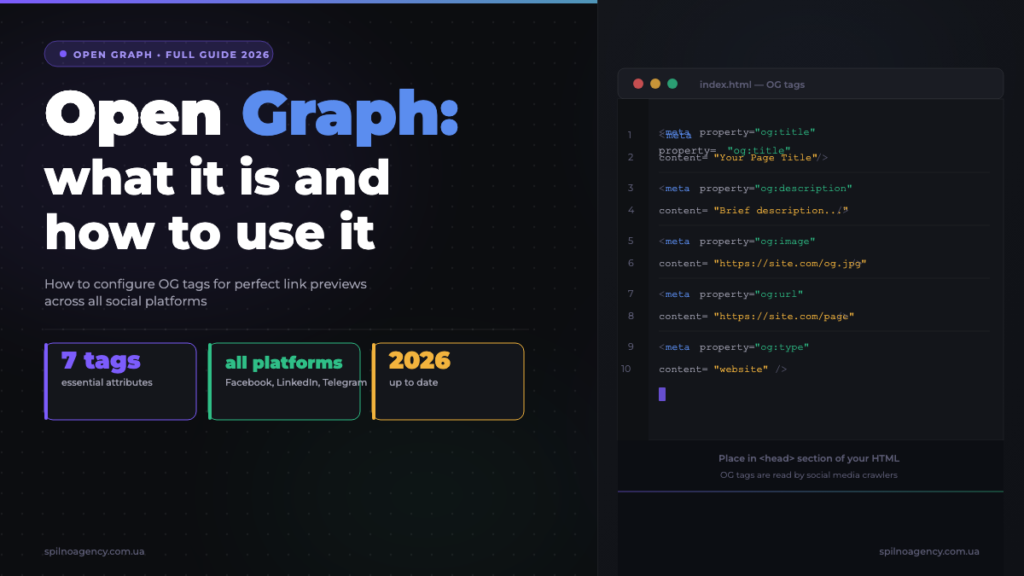
Open Graph tags are HTML meta tags that control how your pages appear when shared on Facebook, LinkedIn, Telegram, and other platforms — a well-configured OG setup can dramatically increase click-through rates from social media by making every shared link visually compelling and informative.
What Is Open Graph? Definition and History
Open Graph is a metadata protocol originally developed by Facebook and officially announced at the f8 developer conference in 2010. Its core purpose is to give webmasters a standardised way to tell social platforms exactly how a webpage should be represented when shared — including the title, description, thumbnail image, and content type.
The open graph protocol borrows its conceptual foundation from the semantic web movement: by embedding structured metadata directly in the HTML <head>, any page can become a rich object in a social graph. Today, the protocol is documented at ogp.me and is used by virtually every major social and messaging platform in the world, from Facebook and LinkedIn to Telegram, Viber, Slack, and WhatsApp.
From a practical SEO and marketing perspective, og tags are the difference between a bare URL that looks like noise in a news feed and a visually rich card that draws the eye, communicates value at a glance, and earns the click. For European businesses investing in content marketing and social distribution, the open graph protocol is not optional infrastructure — it is table stakes.
How OG Link Previews Actually Work
When a user pastes a URL into Facebook, LinkedIn, or Telegram, the platform does not simply display the raw link. Instead, it sends its own crawler (a bot) to fetch the target page and read the Open Graph meta tags in the HTML <head>. This process happens server-side, meaning the crawler reads the static HTML — not JavaScript-rendered content.
The fetched data — title, description, image URL, content type — is then cached by the platform. This is a critical point: if you change your OG tags after a URL has already been shared, the old preview may persist until the cache expires or you manually force a refresh. Facebook and LinkedIn both provide tools specifically for cache-busting, which we cover in the debugging section below.
The general flow looks like this:
- User pastes or shares a URL on the platform
- Platform’s crawler (e.g.
facebookexternalhit,LinkedInBot,TelegramBot) fetches the page HTML - Crawler parses
<meta property="og:...">tags from<head> - Platform stores the result in its cache (TTL varies: 24h–30 days)
- Link preview is rendered using cached data
Because crawlers read static HTML, single-page applications (SPAs) built on React, Vue, or Angular often fail to render OG previews correctly unless they implement server-side rendering (SSR) or static pre-rendering. This is a common technical issue for European SaaS businesses running modern frontend stacks.
The 7 Core Open Graph Meta Tags
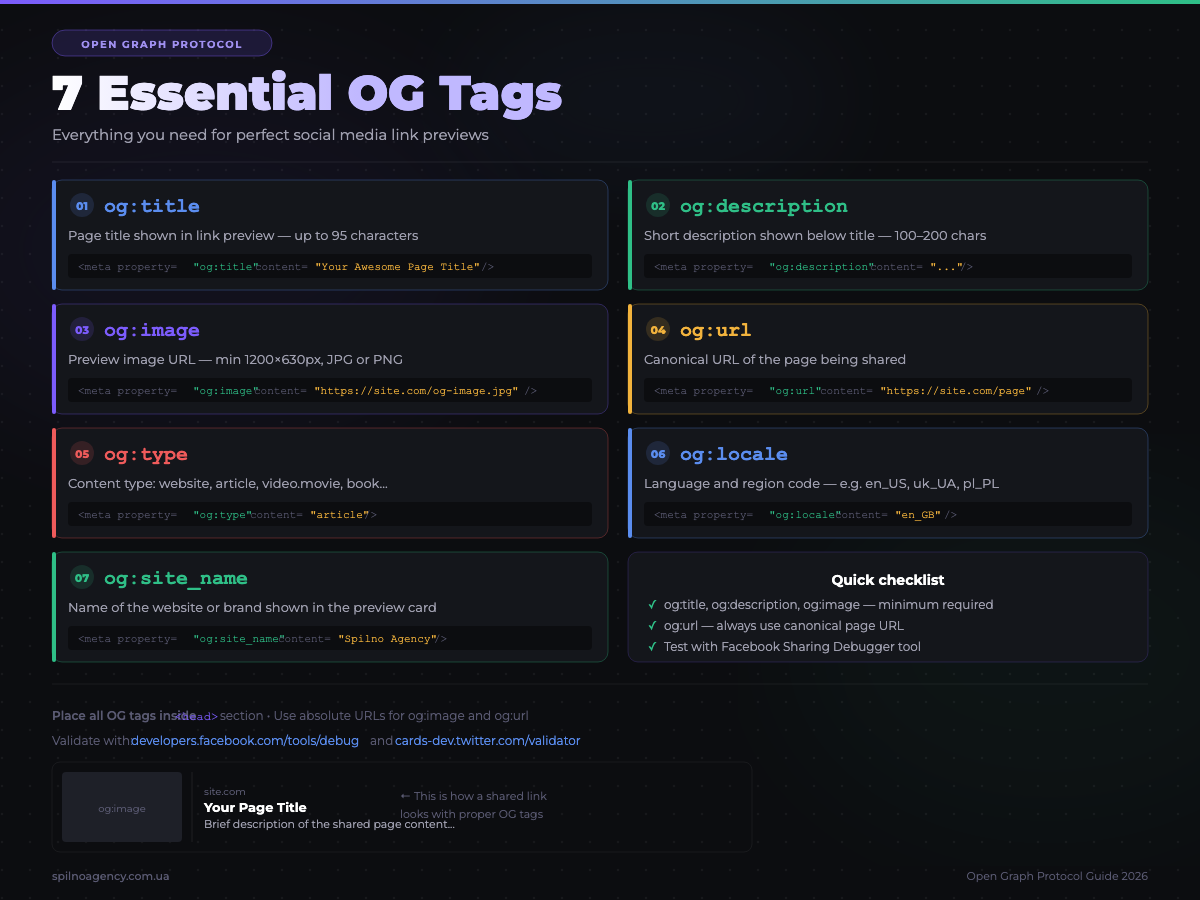
The Open Graph protocol defines a set of properties using the property attribute on <meta> tags. Four tags are required for any page; the rest are strongly recommended. Here are the seven you must know:
1. og:title
The title of your page as it should appear in the link preview. This does not need to match your SEO <title> tag exactly — you can write it for social context, often shorter and more punchy. Recommended length: up to 70 characters.
<meta property="og:title" content="Open Graph Tags: Complete 2026 Guide for Marketers" />2. og:description
A short summary of the page content. Displayed beneath the title in most previews. Aim for 100–200 characters. Platforms truncate at different lengths, so put the most important information first.
<meta property="og:description" content="Learn how Open Graph tags control your link previews on Facebook, LinkedIn, and Telegram — with code examples and WordPress setup instructions." />3. og:image
The URL of the image shown in the preview card. This single tag has the biggest impact on click-through rate. Use an absolute URL (not a relative path). The recommended minimum size is 1200×630 px.
<meta property="og:image" content="https://spilnoagency.com.ua/wp-content/uploads/2026/06/open-graph-guide-cover.jpg" />
<meta property="og:image:width" content="1200" />
<meta property="og:image:height" content="630" />
<meta property="og:image:alt" content="Open Graph tags guide — Spilno Agency" />
4. og:url
The canonical URL of the page. This tells crawlers which URL to use as the definitive reference, preventing duplicate previews when the same content is accessible via multiple URLs (e.g. with UTM parameters).
<meta property="og:url" content="https://spilnoagency.com.ua/en/open-graph-what-it-is-and-how-to-use-it-2026/" />5. og:type
Defines the type of content. For most pages use website; for articles use article; for products use product. The article type unlocks additional properties like article:published_time and article:author.
<meta property="og:type" content="article" />
<meta property="article:published_time" content="2026-06-08T10:00:00+03:00" />
<meta property="article:author" content="https://www.linkedin.com/in/anastasiya-zakharina-b41093389" />
6. og:site_name
The name of your website as a brand entity. Displayed alongside the preview on many platforms. Helps users immediately recognise the source.
<meta property="og:site_name" content="Spilno Agency" />7. og:locale
Specifies the language and territory of the content using the format language_TERRITORY. Essential for multilingual sites. Use og:locale:alternate to declare alternative language versions.
<meta property="og:locale" content="en_GB" />
<meta property="og:locale:alternate" content="uk_UA" />
<meta property="og:locale:alternate" content="pl_PL" />
OG Image Requirements: Sizes, Formats, and Safe Zones
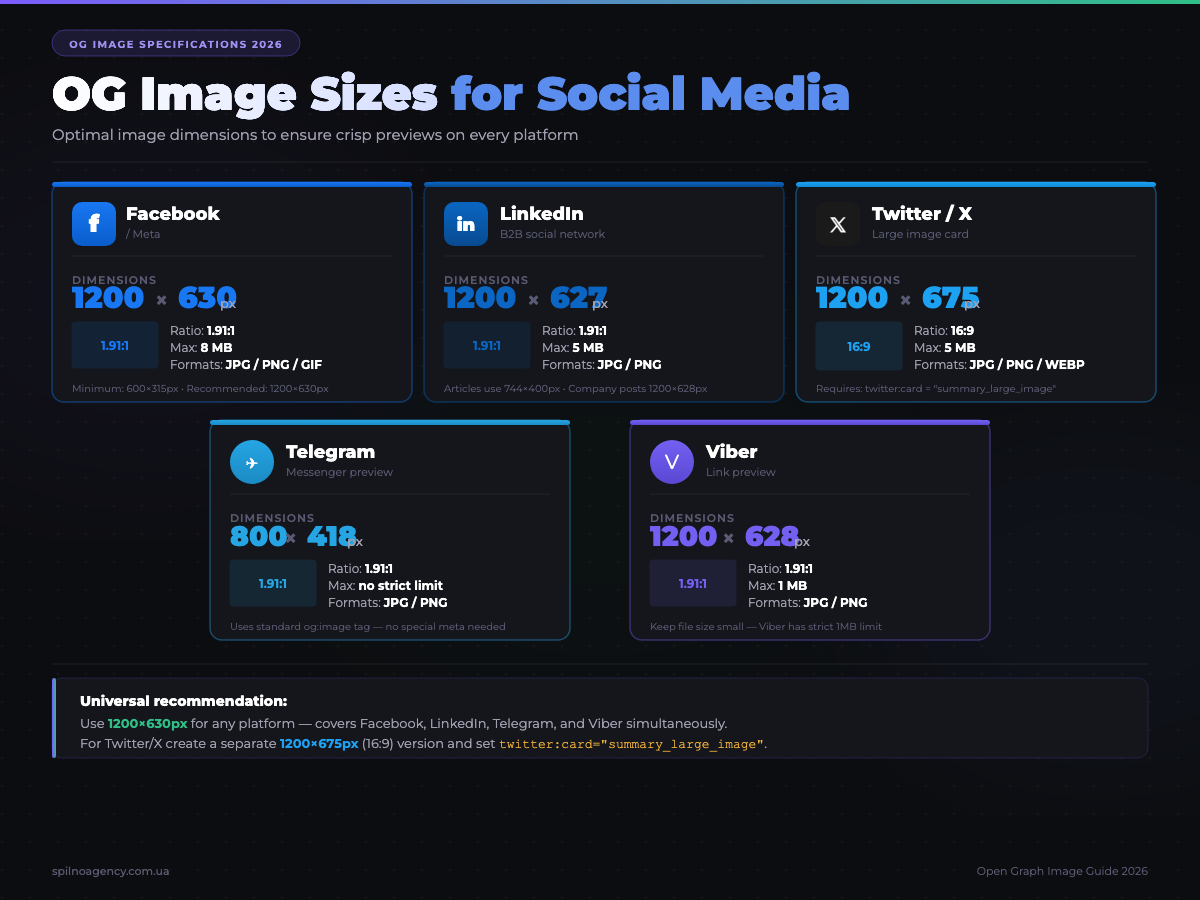
The og:image tag is the single most powerful element in your Open Graph setup — it is what people see first in the feed. Getting the specifications wrong means your image gets cropped, distorted, or rejected entirely. Here are the definitive requirements for 2026:
Universal Recommended Specification
- Dimensions: 1200×630 px (aspect ratio 1.91:1)
- Minimum size: 600×315 px (below this, no large card is generated)
- Format: JPG or PNG preferred; WebP is supported by most platforms but verify for each; GIFs are generally ignored or treated as static
- File size: Under 8 MB (Facebook limit); under 5 MB for broadest compatibility
- Safe zone: Keep critical text and logos within the central 80% of the image, as some platforms crop edges for mobile cards
- Text on image: Facebook limits text overlay to approximately 20% of image area for ad previews (organic posts have no hard limit, but excessive text reduces engagement)
Platform-Specific Crop Behaviour
- Facebook / Meta: Displays 1200×630 as a full-width card on desktop; on mobile may crop to approximately 600×315 centre-crop
- LinkedIn: Preferred 1200×627 px; displays as a wide card below the post text
- Twitter/X: Summary Card with Large Image crops to 2:1 ratio (600×300 minimum); circular crop for small summary cards
- Telegram: Generates a compact preview with thumbnail on the left; very large images may be scaled down significantly
- Slack / Discord: Shows a compact card with title and description; image is shown as a small thumbnail
Always use HTTPS URLs for your og:image. Platforms will refuse to fetch images served over HTTP or from URLs with SSL errors, resulting in a missing preview image.
Platform-Specific Open Graph Behaviour
Facebook / Meta
Facebook was the birthplace of the Open Graph protocol and remains the most strict about implementation. The facebookexternalhit crawler visits your page when a URL is first shared. Facebook caches the result aggressively — links shared millions of times may be cached for up to 30 days. If you update your OG tags, use the Sharing Debugger (developers.facebook.com/tools/debug) to scrape fresh data and flush the cache.
Facebook also reads fb:app_id for pages connected to a Facebook App, enabling additional analytics and social plugins. While not strictly required for link previews, it is recommended for business pages running Facebook Pixel and Meta Ads.
<meta property="fb:app_id" content="YOUR_APP_ID" />LinkedIn reads standard Open Graph tags and has its own caching system. The Post Inspector (linkedin.com/post-inspector) lets you scrape and preview how your URL will appear. LinkedIn is particularly important for B2B European businesses: a well-optimised OG card on a LinkedIn post can significantly increase organic reach and impressions without any ad spend.
LinkedIn is known to be slower at updating its cache than Facebook. Always use the Post Inspector to force a refresh before any major content promotion campaign.
Telegram and Viber
Telegram uses a lightweight bot (TelegramBot) to fetch OG data when users send links in chats and channels. Telegram displays a compact preview including og:title, og:description, and a small version of og:image. Viber follows a similar pattern. Both platforms cache aggressively and do not provide public cache-clearing tools, so getting it right before first distribution is critical.
For Ukrainian and Eastern European businesses, Telegram is often the primary distribution channel — meaning OG optimisation directly impacts reach in your most important organic channel.
WhatsApp and iMessage
WhatsApp reads OG tags to generate link previews inside conversations. iMessage (iOS/macOS) also fetches OG metadata for links. These are read-only previews — users cannot engage beyond tapping through — making the og:image and og:title the only conversion tools available.
Twitter Cards and Open Graph: How They Work Together
Twitter (now X) introduced its own metadata system called Twitter Cards, which uses name attribute meta tags (e.g. <meta name="twitter:card">) rather than the property attribute used by Open Graph. However, Twitter/X will fall back to Open Graph tags if Twitter Card tags are absent.
The recommended approach is to implement both sets of tags. Twitter Card tags take priority on X; OG tags serve all other platforms. The four essential Twitter Card tags:
<!-- Twitter Card tags -->
<meta name="twitter:card" content="summary_large_image" />
<meta name="twitter:site" content="@spilnoagency" />
<meta name="twitter:title" content="Open Graph Tags: Complete 2026 Guide" />
<meta name="twitter:description" content="How OG tags control link previews on every social platform — with code examples and WordPress setup." />
<meta name="twitter:image" content="https://spilnoagency.com.ua/wp-content/uploads/2026/06/open-graph-guide-cover.jpg" />
<meta name="twitter:image:alt" content="Open Graph guide infographic by Spilno Agency" />
The summary_large_image card type generates the large image preview that dominates the X feed. The alternative summary type shows a small thumbnail on the left — far less visually prominent and generally less effective for content marketing.
Note: as of 2023, X removed the requirement to validate your Twitter Card via its developer portal. Cards are now rendered automatically based on the meta tags present in the HTML.
How to Set Up Open Graph in WordPress
WordPress does not output Open Graph tags by default. You need either an SEO plugin or a manual implementation in your theme. Here are the two most common approaches for European businesses using WordPress.
Method 1: Yoast SEO (Recommended)
Yoast SEO is the most widely used SEO plugin for WordPress and handles Open Graph output automatically once configured. Steps:
- Go to Yoast SEO → Social in your WordPress admin
- Under the Facebook tab, enable Add Open Graph meta data
- Upload a default OG image (used when a post has no featured image)
- Under the Twitter tab, enable Twitter Card data and select Summary with large image
- On each post or page, scroll to the Yoast SEO meta box → Social tab to override the OG title, description, and image individually
Yoast automatically outputs og:title, og:description, og:image, og:url, og:type, og:site_name, and og:locale for every post and page. It also adds article:published_time and article:modified_time for posts.
Method 2: RankMath SEO
RankMath is a popular Yoast alternative with Open Graph support built in. To enable it:
- Go to RankMath → Titles & Meta → Global Meta
- Enable Open Graph Markup
- Set a Default Thumbnail for pages without a featured image
- On individual posts, use the Social tab in the RankMath meta box to set custom OG title, description, and image per platform (Facebook vs Twitter)
Both Yoast and RankMath automatically pull the post’s featured image as the og:image value. This is why setting a correctly-sized featured image (1200×630 px) for every post is essential — it directly controls how your content appears when shared.
Manual HTML Implementation
If you are not using WordPress or prefer direct control, add Open Graph tags manually inside the <head> element of your HTML. Here is a complete, production-ready template:
<!-- Open Graph / Facebook -->
<meta property="og:type" content="article" />
<meta property="og:url" content="https://example.com/your-page-url/" />
<meta property="og:title" content="Your Page Title — Brand Name" />
<meta property="og:description" content="A concise description of what this page is about, written for a social media audience." />
<meta property="og:image" content="https://example.com/images/your-og-image.jpg" />
<meta property="og:image:width" content="1200" />
<meta property="og:image:height" content="630" />
<meta property="og:image:alt" content="Descriptive alt text for the OG image" />
<meta property="og:site_name" content="Brand Name" />
<meta property="og:locale" content="en_GB" />

<!-- Article-specific (remove for non-article pages) -->
<meta property="article:published_time" content="2026-06-08T10:00:00+03:00" />
<meta property="article:modified_time" content="2026-06-08T10:00:00+03:00" />
<meta property="article:author" content="https://www.linkedin.com/in/your-author" />
<meta property="article:section" content="Digital Marketing" />

<!-- Twitter Card -->
<meta name="twitter:card" content="summary_large_image" />
<meta name="twitter:site" content="@yourbrand" />
<meta name="twitter:title" content="Your Page Title" />
<meta name="twitter:description" content="A concise description for Twitter/X." />
<meta name="twitter:image" content="https://example.com/images/your-og-image.jpg" />
<meta name="twitter:image:alt" content="Descriptive alt text" />
For multilingual sites (e.g. using a subfolder structure like /en/, /pl/), always set og:locale to match the language of the specific page, not the site’s default language. Pair this with correct hreflang tags for full multilingual SEO compliance.
Tools to Test and Debug OG Tags
Always validate your Open Graph implementation after changes and before any major content promotion. These are the tools used by professional marketers and developers in 2026:
Facebook Sharing Debugger
URL: developers.facebook.com/tools/debug — The gold standard for OG debugging. Shows exactly what Facebook’s crawler reads from your page, any errors or warnings, the cached preview, and allows you to force a cache refresh (“Scrape Again”). Essential before any campaign involving Facebook or Instagram sharing.
LinkedIn Post Inspector
URL: linkedin.com/post-inspector — LinkedIn’s official tool for inspecting and refreshing link previews. Shows the rendered card exactly as it would appear in the LinkedIn feed, with warnings for missing or incorrectly-sized images.
Twitter Card Validator
URL: cards-dev.twitter.com/validator — Shows how your URL renders as a Twitter Card on X. Note: as of 2024, the tool has limited availability and X has reduced its public-facing developer tools. Testing directly by pasting a URL into an X post draft remains the most reliable method.
OpenGraph.xyz
URL: opengraph.xyz — A third-party tool that previews how your URL appears across multiple platforms simultaneously: Facebook, Twitter, LinkedIn, Slack, and others. Ideal for a quick multi-platform check without needing separate accounts.
Metatags.io
URL: metatags.io — Allows you to preview and generate OG tags in a visual interface. Particularly useful for non-technical marketers who need to validate tag output or generate a template for developers to implement.
Telegram Preview
There is no official Telegram OG debugging tool. The simplest method: paste your URL in a private Telegram conversation (e.g. “Saved Messages”) and observe the preview that appears. If the wrong image or title shows, it is a caching issue — Telegram’s cache TTL is typically 24–48 hours and cannot be manually cleared.
Common Open Graph Mistakes and How to Avoid Them
After auditing dozens of European business websites, these are the most frequent OG implementation errors we encounter:
- Missing og:image entirely — The most common and costly mistake. Without a defined image, platforms generate a plain text card or pull a random image from the page, resulting in unprofessional, low-engagement previews. Always set
og:imageon every page. - Image too small — Images smaller than 600×315 px result in no large card preview on Facebook. Use 1200×630 px as your standard.
- Relative image URL — Writing
og:image content="/images/cover.jpg"instead of the full absolute URL. Platform crawlers cannot resolve relative paths. Always usehttps://yourdomain.com/images/cover.jpg. - Serving images over HTTP — Mixed content (HTTP image URL on an HTTPS page) causes crawlers to refuse the image. All asset URLs must use HTTPS.
- OG tags inside JavaScript — Dynamic meta tag injection via JavaScript is invisible to social media crawlers, which read static HTML only. OG tags must be in the server-rendered HTML
<head>. - Stale cached preview after updates — Changing your OG image or title and expecting the update to appear immediately. Always use platform-specific debugging tools to flush the cache after significant changes.
- One image for all platforms — Using a portrait or square image that gets harshly cropped by Facebook and LinkedIn. Stick to 1.91:1 landscape as the default; consider generating a separate square 1:1 image for Instagram Stories sharing.
- og:description duplicating meta description word-for-word — While not a hard error, the OG description is a social context, not an SEO description. Write it to be compelling in a feed environment, not to rank in a SERP.
Open Graph in 2026: Trends and the AI Layer
The relevance of Open Graph tags has expanded beyond traditional social media sharing. In 2026, three developments make OG implementation more important than ever for European digital marketers:
AI Assistants Reading OG Metadata
When AI tools like ChatGPT, Perplexity, or Claude browse the web to answer user queries, they read page metadata — including Open Graph tags — to understand content context and page identity. A well-structured og:title and og:description that clearly communicates the page’s topic and author entity can influence how your brand is represented in AI-generated answers (GEO — Generative Engine Optimisation). Think of OG tags as part of your entity disambiguation layer for AI systems.
Social Signals and Indirect SEO Impact
While Google officially states that social signals are not direct ranking factors, the indirect relationship is well-documented: better OG tags → more compelling link previews → more clicks and shares → more inbound links from content creators who discover the page via social → stronger backlink profile → improved organic rankings. For content-heavy businesses, optimising OG tags is therefore an indirect SEO investment with compounding returns.
Structured Data and OG: Complementary, Not Redundant
Open Graph and Schema.org structured data serve different audiences: OG tags are read by social media crawlers; Schema.org JSON-LD is read by search engines and AI scrapers. In 2026, the best practice is to implement both in parallel, ensuring consistent metadata across the entire distribution ecosystem. The og:title and Schema.org name should match; the og:image and Schema.org image should reference the same asset.
Video OG Tags for Reels and Short-Form Content
As video content dominates social feeds, the og:video tag is gaining importance. When implemented correctly, it enables embedded video previews in Facebook posts rather than static image cards. For businesses distributing video content via social channels, this is a significant engagement uplift opportunity:
<meta property="og:video" content="https://example.com/video/your-video.mp4" />
<meta property="og:video:type" content="video/mp4" />
<meta property="og:video:width" content="1280" />
<meta property="og:video:height" content="720" />
FAQ: Open Graph Tags
What is the difference between OG tags and meta tags?
Standard HTML meta tags (such as <meta name="description">) are read primarily by search engine crawlers and browser systems. Open Graph tags use the property attribute (e.g. <meta property="og:title">) and are specifically designed for social media crawlers. They are both HTML meta tags, but they serve different systems and should be implemented in parallel, not as alternatives to each other.
Do Open Graph tags affect Google SEO rankings?
OG tags do not directly influence Google rankings — Google’s crawler ignores them. However, they have a significant indirect impact: better OG previews drive more social shares and clicks, increasing content visibility, brand mentions, and the likelihood of earning editorial backlinks. These downstream effects do influence organic search performance over time. Additionally, as AI crawlers like those used by Perplexity and SearchGPT increasingly read page metadata, OG tags contribute to how your brand is represented in generative search results.
Why is my OG image not showing when I share my page?
The four most common causes are: (1) the og:image tag is missing from the page; (2) the image URL is relative rather than absolute (e.g. /images/cover.jpg instead of https://yourdomain.com/images/cover.jpg); (3) the image is served over HTTP instead of HTTPS; (4) the image dimensions are below the platform’s minimum (600×315 px for Facebook). Use the Facebook Sharing Debugger to identify the specific error.
How do I update an OG image that has already been cached by Facebook?
Visit developers.facebook.com/tools/debug, enter your URL, and click “Scrape Again”. This forces Facebook’s crawler to re-fetch the page and update its cache with the new OG data. For LinkedIn, use the Post Inspector at linkedin.com/post-inspector. Note that existing posts and messages that were already shared cannot be retroactively updated — only future shares will use the refreshed data.
What is the ideal OG image size in 2026?
The universally recommended OG image size in 2026 remains 1200×630 px at a 1.91:1 aspect ratio. This works across Facebook, LinkedIn, Twitter/X, Telegram, WhatsApp, and Slack. Keep critical visual elements (logos, text, faces) within the central 80% of the image to avoid cropping on mobile previews. File size should be under 5 MB; JPEG and PNG are the safest format choices for maximum platform compatibility.
Can I use different OG images for Facebook and Twitter/X?
Yes. Twitter Card tags take priority over Open Graph tags on X. You can specify a different image via <meta name="twitter:image"> while keeping a separate <meta property="og:image"> for other platforms. This is useful if you want to use a 2:1 ratio image optimised for X’s large card format while using the standard 1.91:1 image everywhere else. Most SEO plugins (Yoast, RankMath) let you set separate social images per platform in their meta boxes.
Does Open Graph work on JavaScript-heavy websites (React, Vue, Next.js)?
Standard client-side rendered SPAs (React, Vue) will fail to deliver OG tags to social crawlers, because the crawlers do not execute JavaScript — they only read static HTML. The solution is server-side rendering (SSR) or static site generation (SSG) using frameworks like Next.js, Nuxt.js, or SvelteKit. With SSR/SSG, OG tags are rendered in the initial HTML response that crawlers receive. If migrating to SSR is not feasible, a prerendering service (e.g. Prerender.io) can serve a static HTML snapshot specifically to recognised crawler user-agents.

Read also
How to Build a LinkedIn Ads Strategy: A Step-by-Step Plan Based on a Real Case
How to build a LinkedIn Ads strategy for B2B: ICP brief, audiences, Campaign Manager forecast, budget and funnel.…

How Long Does Google Take to See Changes on Your Website: Google’s Data on Crawling, Indexing and Serving
We break down Google's slides from Search Central Live: how long crawling, indexing and serving of changes take,…
How to Transfer (Move) a Google Analytics 4 Property to Another Account: Step-by-Step Guide
A step-by-step guide with screenshots: how to move a Google Analytics 4 property to another account without losing…