Call Tracking — What It Is and How It Works

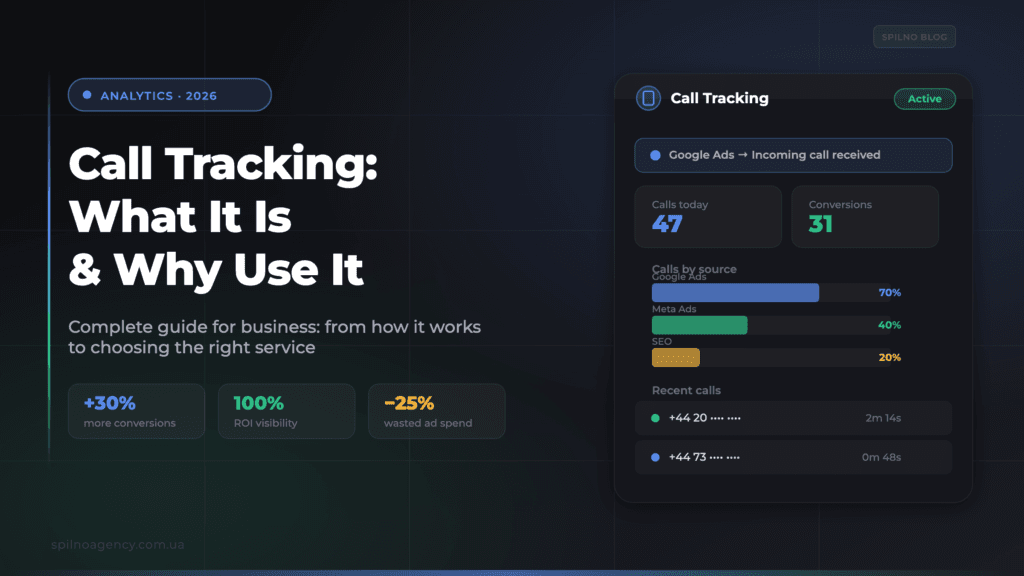
Call tracking is a technology for tracking phone calls that lets you pinpoint exactly which advertising channel, campaign, or keyword each call came from. Without it, a significant share of your conversions stays invisible to analytics.
What is call tracking
Call tracking is a technology that links every inbound phone call to a specific traffic source: an ad campaign, an ad group, a keyword, or an individual user session on your website.
It works by swapping phone numbers: every website visitor or piece of advertising sees a unique number. When a customer calls, the system records exactly who called and links that call to the matching traffic source.
For any business that gets orders or leads by phone, call tracking isn’t optional — it’s a core tool for managing advertising effectively.
How call tracking works: the number-swapping principle
Tracking a call runs through 6 sequential steps:
- A user arrives from an ad (Google Ads, Meta Ads) or organic search — the system records UTM parameters and the traffic source.
- The number on the site is swapped — each unique visitor sees a separate number from a pool.
- The customer calls the swapped number — the call is automatically forwarded to the business’s real number.
- The system logs the data: source, keyword, duration, status (answered/missed), call recording.
- The data flows into analytics — GA4, Google Ads, CRM — linking the call to ad spend.
- Decisions get made on the data — budget shifts toward the channels producing the highest-quality calls.
Why set up call tracking during an ad campaign
1. The full conversion picture
Without call tracking, Google Analytics and Google Ads only see online conversions: submitted forms and cart purchases. But if a visitor comes from an ad and calls instead, that conversion disappears. Call tracking brings these “invisible” leads back into analytics.
2. Accurate ROI per channel
If a large share of sales happens over the phone, you can’t calculate real ad ROI without call tracking. With it, you know exactly: Google Ads drove 47 calls, 31 of which became customers. Meta Ads — 12 calls, 4 customers.
3. Ad budget optimization
With data down to the keyword level, you can raise bids on search terms that generate qualified calls and pause the ones burning budget without results. This typically cuts wasted spend by 25% or more.
4. Sales team quality control
Call recordings let you listen to how reps handle inbound calls, spot weak points in sales scripts, and improve the overall call-to-deal conversion rate.
5. Catching missed calls
Every missed call is a potentially lost customer. Call tracking logs every missed call and shows how they break down by time of day and source, helping you optimize call-center staffing.
What data call tracking collects
- Traffic source — which platform or channel the call came from;
- Campaign and keyword — for dynamic call tracking: the exact campaign and search phrase;
- Caller’s phone number — for follow-up and CRM;
- Date, time, and call duration — for load analysis;
- Call status — answered, missed, busy;
- Call recording — for quality control and training;
- Device type and location — for geo-targeting.
Types of call tracking: dynamic and static
Dynamic call tracking
Dynamic call tracking swaps the number shown on the site for every unique visitor. Each session gets its own number from a pool. This lets you trace a call back to a specific keyword in Google Ads or a specific ad in Meta Ads.
How it works, step by step:
- A number is assigned to the visitor — when someone lands on the site, the system pulls a unique number from the pool and swaps it in for that session.
- The source is logged — campaign, ad group, keyword, device, location, and referral channel are recorded at the same time.
- The call is forwarded — calling the swapped number automatically routes the call to the business’s main number or virtual PBX.
- The source is linked — the system ties the call to everything already logged about that session, so you can see exactly which keyword or ad drove the call.
When to use it: for online advertising — Google Ads, Meta Ads, SEO traffic, email marketing. It lets you optimize campaigns down to the keyword level.
Static call tracking
Static call tracking assigns one fixed, unique number to each advertising channel or medium. For example: one number for Google Ads, another for Meta Ads, a third for a billboard, a fourth for a Google Business Profile listing.
How it works, step by step:
- A number is assigned to the source — every channel or medium you want to track gets its own fixed number.
- The number is placed — on the specific medium: a billboard, print ad, business card, or a Google Business Profile listing.
- The call is logged — calling that number instantly attributes the call to whichever source the number is assigned to.
- The call is forwarded — to the business’s main number or virtual PBX.
When to use it: for offline advertising (billboards, flyers, TV) or simply separating large channels from each other. Less granular, but considerably cheaper.
Integrating call tracking with GA4 and Google Ads
- Google Analytics 4 — calls are passed in as conversion events, giving you the full customer journey from first touch;
- Google Ads — importing call conversions lets Smart Bidding and Performance Max optimize toward real sales;
- CRM — automatically creates a deal on an inbound call, tagged with its ad source;
- Meta Ads (CAPI) — passing offline conversions through the Conversions API improves audience training quality.
Choosing a call tracking provider
Providers vary widely in functionality, pricing, and integration depth. When comparing options, look for:
- Both dynamic and static tracking in one platform, so you’re not locked into a single method;
- Native GA4 and Google Ads integration — call conversions should flow into your existing reporting without manual work;
- CRM connectors for the systems you already use, so calls attach to deals automatically;
- Call recording and transcription for sales-quality control;
- A number pool large enough for your traffic volume — undersized pools cause number reuse and misattributed calls.
Who needs call tracking: a checklist
- you’re spending on Google Ads or Meta Ads and receiving calls;
- more than 20% of orders come in by phone;
- you can’t say which campaign drove more sales;
- you run a sales team and want to monitor call quality;
- you’re running several ad channels at once;
- you run offline advertising and want to measure its return.
Call tracking works the same way regardless of market or city — it’s tied to the advertising source, not to a physical location.
Conclusion
Call tracking turns phone calls into a metric as measurable as clicks and impressions. It lets you make advertising decisions based on real data: cut ineffective spend, scale what’s working, and control sales quality.
Want to set up call tracking correctly and connect it to Google Ads and GA4? Get in touch with Spilno Agency.
Frequently asked questions
What is call tracking in simple terms?
Call tracking is a system that answers the question “where did this call come from?”. It swaps the phone number shown on your website or ad creative so every traffic source gets its own unique number. When a customer calls, the system records exactly where they came from.
Does a small business need call tracking?
Yes, if the business advertises online and receives phone calls. Even with a small ad budget, it matters which channel actually drives orders. Static call tracking is enough to start with.
What’s the difference between dynamic and static call tracking?
Dynamic — each website visitor sees a different number, which lets you trace a call back to a specific keyword or ad. Static — one fixed number per channel (for example, one number for all of your Google Ads traffic).
How much does call tracking cost?
Cost depends on the provider’s plan and traffic volume: dynamic tracking is more expensive than static because it requires a larger pool of numbers. Compare providers by number of tracking lines and the integrations you actually need.
Does call tracking work the same way across different markets?
Yes — call tracking is tied to the advertising source, not to a physical location, so it works the same way regardless of which market or city you’re running campaigns in.
Do I need to integrate call tracking with a CRM?
It’s not required, but strongly recommended: without a CRM you see the call and its source, but not whether it turned into a deal. The integration closes the loop from ad click to sale.

Read also
Spilno Agency’s Experience: How We Verify Events Before Starting Work
Before launching a campaign in Google Ads or Meta Ads, or starting SEO work, Spilno Agency always checks…
GA4 DebugView: How to Verify Google Analytics Events in Real Time
DebugView is the section of Google Analytics 4 that shows your site’s events in real time, seconds after…

Top Claude Skills for TikTok Ads Specialists (2026)
9 verified Claude skills and MCP servers for TikTok Ads: Pixel/Smart+ audits, Spark Ads hook/hold rate, creator sourcing,…