New Features: Google Analytics + Google Business Profile Integration

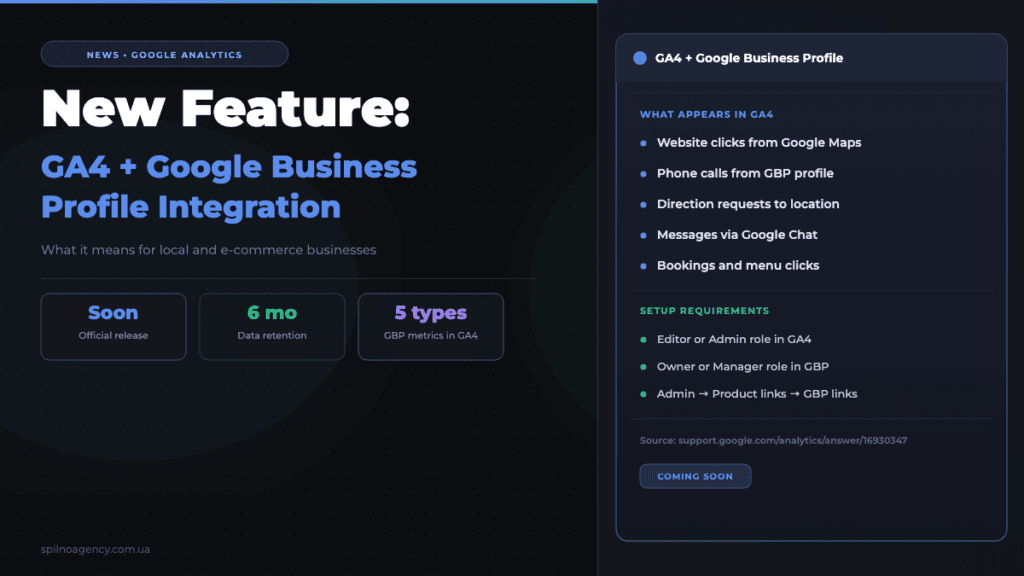
Google has added a setup page for a new integration to the Analytics Help Center — linking GA4 with Google Business Profile. The official release date has not yet been announced, but business owners will soon be able to see profile metrics (clicks, calls, direction requests) directly inside GA4.
Google Analytics and Google Business Profile Integration: What Is It
Google has added a setup page for a new integration to the Analytics Help Center — linking Google Analytics 4 with Google Business Profile. The official release date has not yet been announced, but the infrastructure is already in place.
Once activated, you will be able to see your Google profile data — website clicks, calls, direction requests — alongside your website and app data in a single GA4 interface. This is especially valuable for local businesses across Europe: cafes, clinics, auto services, beauty salons, and anyone who acquires customers through Google Maps and Search.
Source: Google Analytics Help — Google Business Profile Links
What Data Will Be Available After Integration
After linking Google Business Profile to GA4, reports will include aggregated metrics on user interactions with your profile:
- Website clicks — how many people visited your website from GBP
- Calls — clicks on your phone number in the profile
- Direction requests — how many people searched for directions to your location
- Messages — contacts through Google Chat
- Bookings and menus — clicks on the relevant buttons (for restaurants and services)
Data will be retained for the last 6 months and displayed in aggregated form — without breakdown by individual locations if you have multiple. The data cannot be used in custom Explorations reports or comparisons.
Requirements and Limitations
To set up the GA4 and Google Business Profile integration, you need the appropriate permissions in both systems:
- In Google Analytics — Editor or Administrator role at the property level
- In Google Business Profile — Owner or Manager role
Key limitations:
- Integration is not supported for GA4 subproperties
- Data cannot be used in Explorations or comparisons
- Aggregated data only — no breakdown by individual profiles
- Data retention limited to 6 months maximum
How to Set Up GA4 and Google Business Profile Integration
Setup takes just a few minutes. Here is a step-by-step guide (will become active after the official release):
- Open Google Analytics and go to the Admin section (gear icon at the bottom left)
- In the property column, find the Product links section
- Select Google Business Profile links
- Click Link and choose the relevant business profile
- Confirm the data sharing terms — the integration will activate
After activation, GBP data will start appearing in GA4 within 24–48 hours.
FAQ: Frequently Asked Questions
When will the GA4 and Google Business Profile integration be available?
The official release date has not yet been announced. Google has already added a setup page to the Help Center, which indicates the feature is coming soon. We recommend checking for the “Google Business Profile links” option under “Product links” in your GA4 property settings.
Does the GA4 and Google Business Profile integration cost anything?
No. The feature is included in standard GA4 and requires no paid subscriptions. The only requirement is having GA4 and GBP accounts with appropriate access permissions.
Does the integration support multiple GBP locations?
Data is displayed in aggregated form across all linked profiles — without a breakdown by individual location. If you manage a multi-location business, you will see an overall picture rather than per-location statistics.
This article is part of a free course:
Google Analytics Course
To unlock the quiz after this article and track your progress, sign up (or sign in) and start the course in your personal dashboard.
Knowledge Test
You get only 1 attempt at this quiz — read every question carefully before answering. You need at least 80% correct answers to pass.

Read also

How Long Does Google Take to See Changes on Your Website: Google’s Data on Crawling, Indexing and Serving
We break down Google's slides from Search Central Live: how long crawling, indexing and serving of changes take,…
How to Transfer (Move) a Google Analytics 4 Property to Another Account: Step-by-Step Guide
A step-by-step guide with screenshots: how to move a Google Analytics 4 property to another account without losing…
Meta Updates the Messages Section in Meta Business Suite: Leads View, Stages and Bulk Actions
The Messages section of Meta Business Suite gets a Leads view: a Stage column, bulk actions, chat beside…