TikTok Ads: Campaign Restart Coupon Offers Bonus Ad Credits Up to 250,000 UAH


TikTok Ads Manager is increasingly showing advertisers a Campaign Restart Coupon — bonus ad credits TikTok matches against your ad spend, capped in our case at 250,000 UAH. We found one in our own Spilno Agency account and broke down how it actually works: which spend counts, when the credits land, when they expire, and where to even find the coupon in your account.
What is a Campaign Restart Coupon
A Campaign Restart Coupon is a promo code TikTok Ads issues to individual ad accounts to encourage them to resume or scale up active campaigns. The mechanic is simple: the advertiser spends budget on ads, and TikTok tops it up with ad credits — effectively refunding part of the spend as a balance that can pay for future campaigns. This isn’t a public offer open to everyone; it’s a personalized coupon tied to one specific ad account ID (aadvid) with a unique code, so you can only see it inside your own TikTok Ads Manager.
In our example the coupon is named Campaign Restart Coupon with the code GKHEBOCHFEAIKEFB — we’re sharing it to illustrate the mechanic, not as a code other accounts can use: it isn’t transferable and only works for the account it was issued to. Note also that the amount is denominated in the account’s billing currency; ours happens to be Ukrainian hryvnia (UAH), but if you spot a similar coupon in your own European account, expect it in your local billing currency instead.
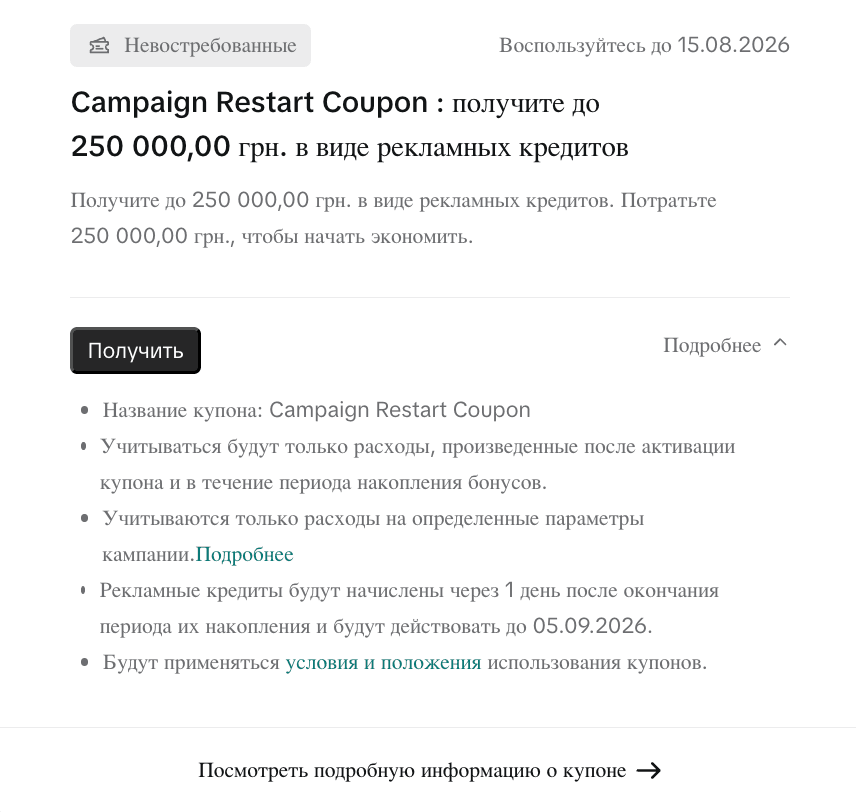
How much you can get and how credits accrue
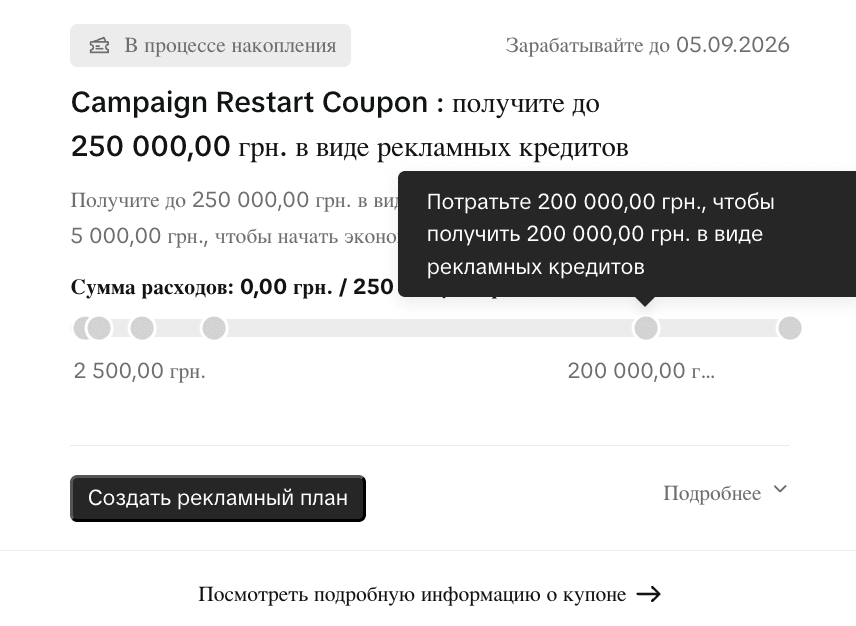
The maximum payout on this coupon is up to 250,000 UAH in ad credits. The mechanic is a match tied to actual spend: the more an advertiser spends on campaigns after activating the coupon, the more credits TikTok adds, up to the set cap. Ads Manager shows this as an interactive slider calculator: drag it to see how many credits a given spend amount would earn — for example, 200,000 UAH in spend earns 200,000 UAH in credits.
There’s also a floor: the coupon only starts accruing credits once spend crosses a minimum threshold — around 2,500–5,000 UAH in our account. Check this threshold in your own account rather than trusting it blindly: TikTok’s interface shows inconsistent figures depending on the coupon’s state (before activation, our coupon card displayed 250,000 UAH instead of the real threshold), so rely on the numbers shown after activation, not the preview.
One important detail: not every dollar of ad spend counts — only spend that falls under specific campaign parameters TikTok defines (objective types, placement formats, and so on) qualifies. TikTok publishes the full list of conditions in its official coupon terms and conditions article — check it against the specific campaigns you plan to fund before budgeting around the coupon.
Coupon timeline
Our coupon involves four distinct dates, and it’s easy to mix them up. Here’s how they line up:
| Event | Date and time |
|---|---|
| Deadline to activate the coupon (click “Claim”) | by 15.08.2026 |
| Spend-accrual window opens | 06.08.2026, 07:00 (Etc/GMT-2) |
| Spend-accrual window closes | 05.09.2026, 07:00 (Etc/GMT-2) |
| Ad credits land on the balance | 1 day after the accrual window closes |
| Credits are valid until | 31.10.2026 |
The Etc/GMT-2 timezone TikTok uses in its terms is a fixed UTC+2 with no daylight-saving shift. During European summer, most of the continent runs an hour ahead of that, so double-check the activation deadline and the accrual window’s end against this specific timezone rather than your local clock.
One discrepancy worth flagging: the coupon card inside TikTok Ads Manager itself shows the “credits valid until” date as 05.09.2026 — which is identical to the accrual window’s end date. The coupon’s written terms state a different date — 31.10.2026. This looks like a TikTok interface glitch, where the card appears to display the accrual end date instead of the actual credit expiry date. Treat the written terms as authoritative, not just the number on the card — and confirm the date in your own account once you receive a coupon.
Coupon terms and conditions
- Only spend made after the coupon is activated and within the accrual window counts.
- TikTok reimburses spend as ad credits 30 days after the coupon is used (within the 06.08.2026, 07:00 — 05.09.2026, 07:00 Etc/GMT-2 window).
- Only spend on specific campaign parameters counts — TikTok lists the exact conditions on the coupon’s terms page in Ads Manager.
- Ad credits land 1 day after the accrual window closes and remain valid until the date stated in the terms.
- General TikTok Ads coupon terms and conditions apply.
Where to find the coupon in your account
Coupons and bonuses don’t show up on the main dashboard — they live behind a dedicated icon in the TikTok Ads Manager header, a ticket-shaped icon next to your ad account name in the top-right corner. Clicking it opens a dropdown with active coupons: status, amount, deadline, and a button to view details or create an ad plan around the coupon’s budget.
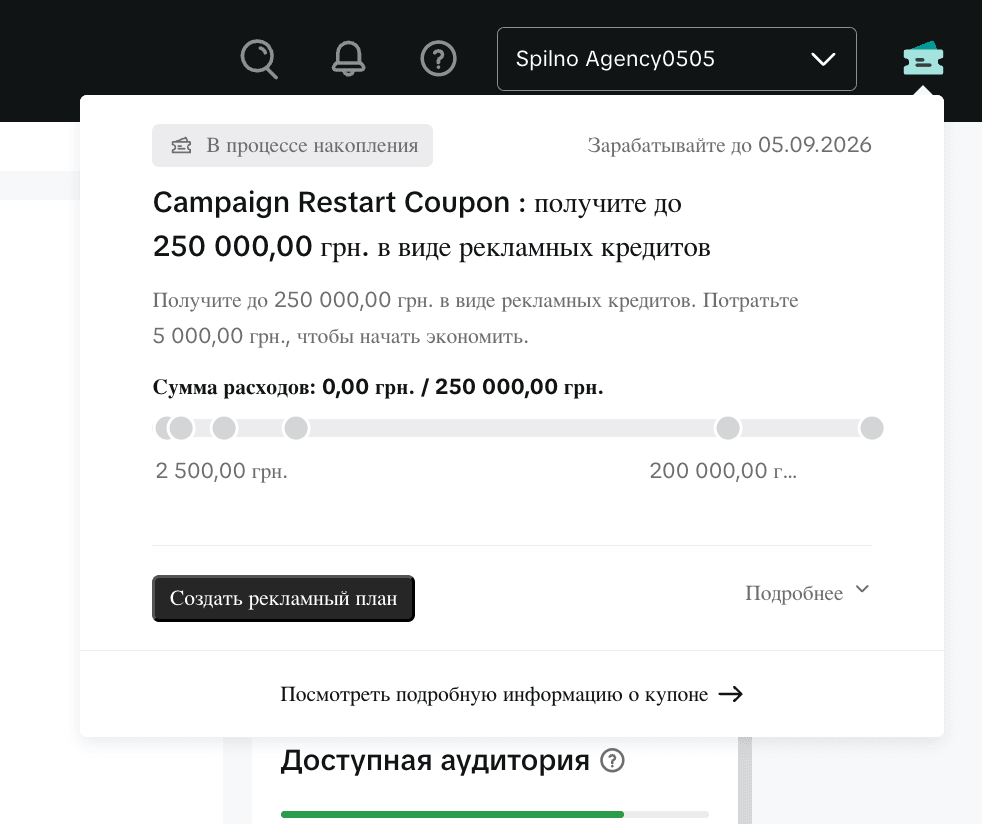
If a coupon hasn’t been activated yet, its card shows a “Claim” button and an “Unclaimed” label. Once activated, the status changes to “In progress,” a spend progress bar appears, along with the slider calculator that shows how much credit a given spend amount earns.
What to watch out for
- This isn’t a public promotion. The coupon is issued to a specific ad account, and every account holder may see a different amount, dates, and conditions — the figures in this article illustrate the mechanic, not a guaranteed offer in your own account.
- Check the activation deadline separately from the accrual window. In our case, the coupon had to be activated by 15.08.2026, while spend tracking already started earlier, on 06.08.2026.
- Don’t rely solely on the date shown on the coupon card. As shown above, the “valid until” date in the interface and the date in the written terms can differ — verify against the official terms.
- Plan spend around the qualifying parameters. Spend on campaigns outside the list TikTok defines won’t count toward the accrual.
Spilno Agency’s take
Coupons like this tend to go to accounts that paused activity or could meaningfully scale up spend — it’s a retention tool, not a mass promotion. The one practical piece of advice worth repeating: don’t lose the coupon over a missed activation deadline (in our example, a separate date that lands before the accrual window even opens), and cross-check the coupon’s terms in your account against TikTok’s official rules page rather than trusting the coupon card alone. If you’re planning to restart or scale campaigns on TikTok Ads, it’s worth checking your own account first — a similar offer might already be waiting there.
Planning to restart or scale TikTok Ads campaigns and don’t want to lose bonus credits over misread coupon terms? Spilno Agency will review your ad account, map out a spend plan that fits the coupon’s conditions, and run campaigns to make the most of the bonus. Get in touch — we start with a free consultation.
Frequently Asked Questions
What is a Campaign Restart Coupon in TikTok Ads?
It’s a bonus ad-credit coupon TikTok Ads issues to individual ad accounts to encourage them to restart or scale up campaign activity. Credits accrue in proportion to ad spend after the coupon is activated, up to a cap — 250,000 UAH in our example.
Can any advertiser get a coupon like this?
No. The coupon is personalized and tied to a specific ad account and its unique code. To check whether your account has one, look for the coupon icon in the TikTok Ads Manager header.
How do the ad credits accrue?
Credits accrue in proportion to spend made after activating the coupon within the accrual window, and only for spend on TikTok-defined campaign parameters. Credits land on the balance 1 day after the accrual window closes.
Is there a minimum spend to start earning credits?
Yes — in the example we reviewed, the minimum threshold was around 2,500–5,000 UAH in spend. Check the exact threshold in your own account after activating the coupon, since TikTok can show inconsistent figures before activation.
Why do the credit expiry dates in the interface and the terms differ?
In our example, the coupon card in Ads Manager showed 05.09.2026 (matching the accrual window’s close date), while the written terms stated 31.10.2026. This looks like a TikTok interface inaccuracy. We recommend relying on the official written terms and verifying the date directly in your own account.

Read also

New Features in the ChatGPT Ads Manager: A Step-by-Step Setup Guide
oCPC for product feeds, URL macros, pixel diagnostics, Triple Whale and Hightouch, AAM from 17 August 2026. A…

Shopify Will Send More Events to Google Analytics from August 17, 2026
From August 17, 2026 the Google & YouTube app sends four new Shopify events to GA4 plus a…

OpenAI Is Changing How Daily Budgets Work in ChatGPT Ads: What Advertisers Need to Know
OpenAI is changing daily budgets in ChatGPT Ads from a hard cap to a 7-day rolling average, with…