Pinterest Ads Creative Sizes in 2026: The Complete Guide

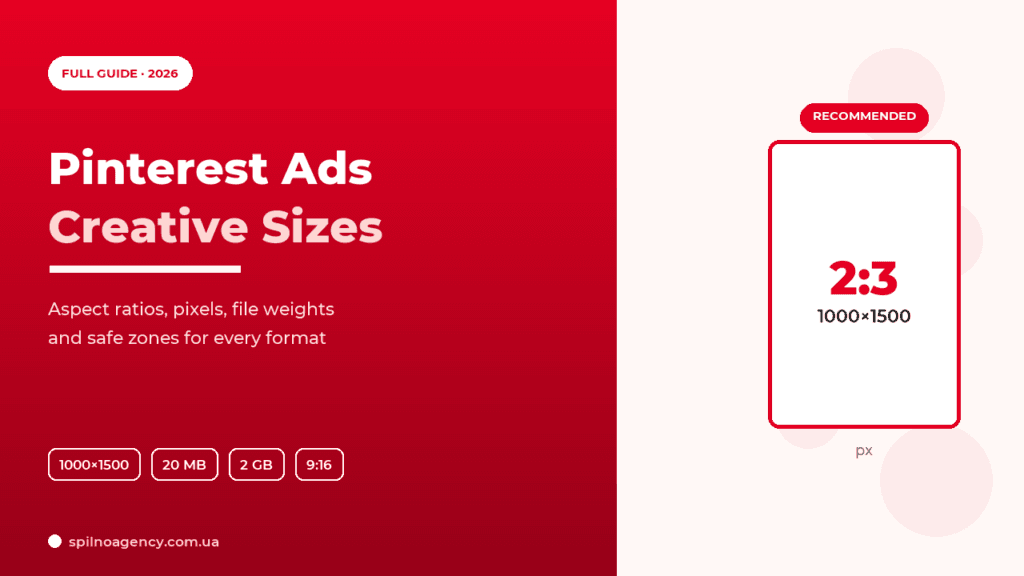
Creative size decides more than budget on Pinterest: a vertical 2:3 pin (1000×1500 px) takes up twice the feed space of a square one and delivers a 20–40% higher CTR. This guide covers every Pinterest Ads creative size in 2026 — aspect ratios, pixel dimensions, file types and weight limits, character limits and safe zones for each format, with a cheat-sheet table.
Why creative size is everything on Pinterest
Pinterest is a vertical visual feed. The more screen space your pin occupies on a phone, the more attention it gets. So the right aspect ratio isn’t aesthetics — it’s a direct budget saving: correct size = higher CTR = lower CPC.
- 2:3 (1000×1500 px) — the Pinterest gold standard. Takes maximum vertical space without being cropped.
- Creatives taller than 2:3 (e.g. 9:16 for static) get cropped in the feed, and you lose part of the message.
- Square 1:1 — allowed, but loses feed area to vertical.
- Low resolution (under 1000 px wide) looks blurry and erodes trust.

Cheat sheet: all Pinterest Ads creative sizes 2026
Save this table — it lists the recommended sizes for every Pinterest ad format.
| Format | Aspect ratio | Size, px | File type | Max weight |
|---|---|---|---|---|
| Standard Pin (image) | 2:3 | 1000×1500 | PNG, JPEG | 20 MB |
| Square Pin | 1:1 | 1000×1000 | PNG, JPEG | 20 MB |
| Standard Video | 1:1 / 2:3 / 9:16 | 1080×1080 / 1080×1620 / 1080×1920 | MP4, MOV, M4V | 2 GB |
| Max Width Video | 1:1 / 16:9 | 1080×1080 / 1920×1080 | MP4, MOV, M4V | 2 GB |
| Carousel (2–5 cards) | 1:1 or 2:3 | 1000×1000 / 1000×1500 | PNG, JPEG | 20 MB / card |
| Idea Ad (up to 20 pages) | 9:16 | 1080×1920 | PNG, JPEG, MP4 | video ≤ 60 s/page |
| Collections | hero 2:3 + 3 cards 1:1 | 1000×1500 + 1000×1000 | PNG, JPEG, MP4 | 20 MB |
| Showcase | 1:1 | 1000×1000 | PNG, JPEG, MP4 | 20 MB |
| Shopping (Product Pin) | 2:3 | 1000×1500 | from catalog | — |
| Premiere Spotlight | 1:1 / 16:9 | 1080×1080 / 1920×1080 | MP4, MOV | 2 GB |
Image sizes (static pins)
A static image is the most common Pinterest ad format. Size recommendations:
- Aspect ratio:
2:3— priority #1. Accepted range is2:3to1:2.1; anything taller than1:2.1is cropped in the feed. - Size:
1000×1500 pxminimum, ideally2000×3000 pxfor Retina screens. - Square:
1:1(1000×1000 px) — for Collections cards and Showcase. - File type:
PNGorJPEG. - Max weight:
20 MB.
Spilno Agency tip: upload in 2:3 even when the source photo is square — pad it with brand-colour borders. The pin then claims more feed space without breaking the composition.
Video creative sizes
Video autoplays without sound, so the message must read visually. Specs:
- Aspect ratio:
1:1,2:3,9:16(Standard Video);1:1or16:9for Max Width Video. - Size:
1080×1080(1:1),1080×1620(2:3),1080×1920(9:16). - Length: 4 seconds to 15 minutes; optimal 6–15 seconds.
- File type:
.mp4,.mov,.m4v(H.264 or H.265 codec). - Max weight:
2 GB. - The first 2 seconds matter most — show the product or hook immediately.
Carousel Pin: card sizes
A Carousel holds 2 to 5 swipeable images. Key rule: all cards must share the same aspect ratio — either all 1:1 or all 2:3. Each card is 1000×1000 or 1000×1500 px, type PNG/JPEG, up to 20 MB per card. Every card can carry its own URL.
Idea Ads and vertical 9:16 formats
Idea Ads (a multi-page, Stories-like format) and Max Width Video use the full-screen vertical 9:16 — 1080×1920 px. Up to 20 pages, video per page up to 60 seconds. Safe zones are critical here: keep the top and bottom ~15% of the screen clear of text and logo, because the Pinterest interface (avatar, title, buttons) overlays them.
Collections, Showcase, Shopping and Premiere Spotlight
- Collections Ads: one hero visual (
1:1or2:3) + at least 3 product cards1:1(1000×1000). Mobile-only format. - Showcase Ads: interactive cards
1:1(1000×1000), up to 5 cards, each with subtiles. - Shopping Ads (Product Pins): the image is pulled from the catalog; recommended
2:3(1000×1500). A light, plain background works best. - Premiere Spotlight: premium max-width video
1:1or16:9(1920×1080), up to 2 GB.

Text limits: title and description
Size isn’t just pixels — it’s character count too. Pinterest Ads creative text limits:
| Element | Limit | Visible in feed |
|---|---|---|
| Title | up to 100 characters | ≈ 40 characters |
| Description | up to 500 characters | often hidden; matters for search |
| Text on the image itself | up to 20–40% of area | fully |
Put the key message in the first 40 characters of the title — that’s what shows in the feed. Use the description for keywords: Pinterest is a search engine, and the description helps the pin rank.
Safe zones and text on the creative
- Top and bottom of 9:16 — leave ~15% (≈ 270 px top/bottom) clear: that’s where UI elements sit.
- Text overlay — no more than 20–40% of the area; large, high-contrast font (Pinterest is viewed on phones).
- Logo — in a corner, not centred, no full-frame branding.
- Contrast — light text on a dark plate or vice versa; avoid text laid directly over busy photos.
Technical file requirements
- Images:
PNGorJPEG, up to20 MB, at least 1000 px on the short side. - Video:
.mp4,.mov,.m4v;H.264/H.265codec; up to2 GB; 4 s – 15 min. - Carousel: 2–5 images, same aspect ratio, up to 20 MB each.
- Idea Ad: up to 20 pages; video per page up to 60 s.
5 creative-size mistakes
- Square 1:1 instead of 2:3 — the most common mistake. Loses up to 40% of feed area and CTR.
- Pin too tall (above 1:2.1) — Pinterest crops it and the CTA “disappears” off-frame.
- Text inside the 9:16 safe zone — the UI covers the title or button.
- Low resolution (<1000 px) — a blurry pin, lower trust and conversion.
- Mixed aspect ratios in one Carousel — the system rejects the creative or crops some cards.
Pre-upload creative checklist
- ☑ Aspect ratio 2:3 (static) or 9:16 (vertical video)
- ☑ Resolution at least 1000 px wide
- ☑ Weight: images ≤ 20 MB, video ≤ 2 GB
- ☑ File type: PNG/JPEG or MP4/MOV/M4V
- ☑ Title ≤ 100 characters, key point in the first 40
- ☑ Text overlay ≤ 40% of area, outside safe zones
- ☑ Logo in a corner, high contrast
Why it pays to produce the maximum number of creatives
The more distinct creatives you feed the Pinterest Ads system, the larger the share of the audience your campaign can reach. Each creative hooks its own segment — different pain points, visual styles and messages resonate with different people. Broader reach of a relevant audience feeds straight into the auction: the system finds more cheap, high-quality impressions and the average cost per click drops.
The second reason is the trigger itself. It’s the creative that decides whether a user stops and reacts to the offer, so its idea and execution directly determine campaign performance. One or two layouts give the algorithm no room to optimize — there’s nothing to pick a winner from. With many creatives, the system quickly discards the weak ones and scales those with the lowest cost per action. So the rule is simple: prepare as many variants as you can in every required size — and refresh them regularly to avoid creative fatigue.
FAQ
What is the best creative size for Pinterest Ads?
For a static pin — a 2:3 aspect ratio at 1000×1500 px (ideally 2000×3000 px). Pinterest recommends this as the primary format: it takes maximum vertical space in the feed and delivers the highest CTR.
What is the maximum file size for Pinterest ads?
Images — up to 20 MB (PNG or JPEG). Video — up to 2 GB (.mp4, .mov, .m4v). Exceeding the limit causes the creative to be rejected on upload.
Which aspect ratios does Pinterest video support?
Standard Video — 1:1, 2:3 and 9:16. Max Width Video and Premiere Spotlight — 1:1 or 16:9. Recommended length is 6–15 seconds, .mp4 with the H.264 codec.
How many characters fit in a pin title and description?
Title — up to 100 characters (≈ 40 visible in the feed); description — up to 500 characters. The description is often hidden in the feed but matters for Pinterest search, so put keywords there.
Can I use a single 1:1 creative for every format?
Technically yes, but it’s a losing strategy. Square fits Collections cards and Showcase, but for the feed always prepare a vertical 2:3 or 9:16 — otherwise you lose up to 40% of screen area and CTR.
How Spilno Agency builds Pinterest creatives
We design and test Pinterest ad creatives for e-commerce, fashion, beauty and interior brands across European markets — from correct sizes and safe zones to format A/B tests and the ROAS corridor. If you need a full set of creatives for every Pinterest format, or an audit of existing campaigns, get in touch.

Order Pinterest Ads advertising
Spilno Agency produces creatives in every format and runs Pinterest Ads campaigns for European brands — from concept and layout production to targeting, bid optimization and reporting. Get in touch — let’s sort it out together.

Read also
cPanel SEO: How to Optimize Your Hosting for Search in 2026 (Enable & Disable)
cPanel is a hosting control panel that packs dozens of features with a direct impact on SEO: HTTPS…

Cloudflare for SEO: How to Configure It to Improve Search Performance in 2026
Cloudflare works as a proxy and CDN between the visitor and your website, and it can noticeably affect…

How Spilno Agency Does On-Page SEO Optimization with Claude
Spilno Agency runs on-page SEO optimization together with the AI agent Claude — following one document standard that…