Telegram Lead Tracking in GA4 — Spilno Agency Case Study

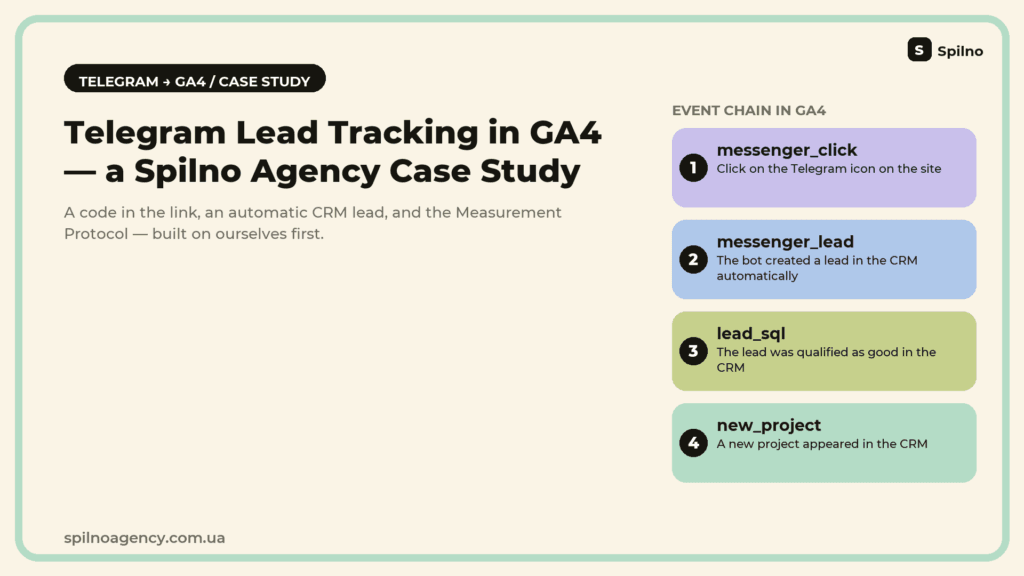
Messengers are analytics’ blind spot: a click on a Telegram link leaves no trace in GA4, and a lead a manager handles by hand gets lost between the chat and the CRM. We built this case study on ourselves: our own bot @spilno_agency_bot, a unique code in every link, automatic lead creation in our CRM, and events pushed to GA4 through the Measurement Protocol — from the first click all the way to a “Deal won” status. Here’s how it’s built technically, from the code inside a Telegram link to a full funnel in GA4.
The problem: a messenger is a black box for GA4
A classic GA4 funnel sees the website: pages, forms, buttons. But the moment a visitor taps the Telegram icon and leaves for the app, the connection breaks. In 99% of cases, “messenger tracking” on a website stops right there: GTM fires an event on the click to the Telegram button — and considers the job done. But a button click isn’t an inquiry yet: the person could change their mind and never write a word, close the chat, or never get a reply. GA4 only sees the click itself (if it’s tagged at all), and after that — silence. What the bot replied, whether a manager wrote back, whether it ever turned into a deal — all of that happens off-site and off the record.
For most businesses that handle clients through Telegram, Viber or WhatsApp, this part of the funnel simply doesn’t exist in reports. Ad spend keeps optimising for the events GA4 can see (views, clicks) rather than for what actually brings in revenue — an inquiry inside a messenger.
We ran into this on our own website: some of the leads in our CRM were coming from Telegram, yet GA4 showed nothing for them. The traffic source that actually brought the client was lost for good.
Why we fixed it on ourselves first, not on a client
Before offering this to clients, we built the system on our own website, spilnoagency.com.ua. The reason is simple: here we can experiment without risking someone else’s budget, and the outcome — whether it works or not — becomes a ready methodology.
Ready-made solutions for messenger tracking already exist on the market — for example, Ringostat offers its own functionality for this, and we’ve written about that approach ourselves in the guide “How to Track Messenger Inquiries in Google Analytics 4“. But we were curious about something else: can this be solved in-house, with no external service and no extra monthly subscription — on our own bot, our own CRM integration, and the GA4 Measurement Protocol. Here’s what came out of it.
The brief
Make sure every Telegram inquiry:
- carries a unique code before the person types a single word;
- automatically creates a lead in the CRM, with no manual copying;
- is recorded in GA4 as an event — on the way in (click/inquiry) and on the way out (lead won, a new project appears).
Challenge one: a click on a t.me link is invisible to GA4
A standard Telegram link looks like https://t.me/spilno_agency_bot — a static string, identical for every visitor. Even if you tag the click as an event in GTM, the link itself carries no information beyond that: which page, which visitor, which session. Everything that happens after the click is cut off.
Challenge two: the CRM and GA4 don’t see each other
A lead a manager picks up on Telegram lives inside the CRM. The lead_sql event (a lead qualified as good) or a “deal won” status is just a status inside the CRM, not an event on the website. Without an integration, GA4 will never learn that a messenger click eventually turned into a client.
What we built
1. An A/B test: bot vs. the manager’s personal account
The first decision had to be tested, not guessed: does an automated bot convert better than a direct line to a manager? We ran the messenger_channel experiment on our own in-house A/B engine:
- Variant A — the link goes to the bot:
t.me/spilno_agency_bot?start={{code}}; - Variant B — the link goes to a personal account:
t.me/valerii_krasko?text=Code {{code}}.
Both variants are placed in the footer and header blocks across all locales of the site.
2. A unique code in every link — that’s the tracking itself
Instead of a bare t.me link, every impression substitutes a session code into the link. For the bot, the code arrives automatically in the very first message via Telegram’s standard start deep-link parameter — the bot reads it right in the /start handler. For the personal-account variant, the code is embedded in the message text, and the manager sees it right in the incoming chat — for example, “Impression code: 08E0CE”.
That’s the bridge between an anonymous click on the website and a specific conversation in Telegram: the code is the one shared identifier across the GA4 session, the Telegram chat, and the future lead in the CRM.
3. The bot handles the first routine step: language and greeting
When someone taps “Start” in the bot, /start {{code}} immediately offers a language choice (UA/EN), shows a short greeting, and a button to reach a manager. All of this happens without any human involvement at the first step, so the lead isn’t lost while waiting for someone to notice a notification.
4. Automatic lead creation in the CRM
Right after /start, the bot creates a lead in the CRM through its API — with no manual copying of chat data. It automatically fills in:
- the contact (created, or matched to an existing one);
- the source — “Website -> Telegram”;
- the communication language — as picked in the bot;
- the assigned manager — based on the language of the inquiry.
Within seconds of /start, the team’s working chat shows “✅ Lead in CRM” with a direct link to the task. For Variant B (the personal account), the same effect is triggered manually by the manager typing /lead CODE in the working chat — a deliberate architectural choice, and one that immediately exposed Variant B’s weak spot: a human step is easy to forget.
What this looks like in the team’s Telegram chat. The whole chain is visible right in the team’s service chat — no switching between the website, the bot and the CRM:
- The bot posts “✉️ New Telegram inquiry” with the session data: the contact’s name, the experiment variant (bot/personal account), the landing page, the UTM source, and the impression code itself.
- A second message shows the communication language the person picked in the bot, matched to that impression code.
- A third message confirms “✅ Lead in CRM (code…)” with a direct link to the task the bot just created automatically.

The screenshot shows the real “MQL / Spilno Agency” service chat on 1 and 2 September 2026. Both inquiries came through variant A — the Telegram bot with ?start=code. The first came from the homepage: impression code 08E0CE, support language English, the CRM lead created at 07:33 — the same minute as the first message. The second came from the free Meta Ads audit page: code 3A5E3C, language Ukrainian, CRM lead at 13:55. Notably, the UTM source in both cases is chatgpt.com: without the impression code these visits would have landed in GA4 as direct / (not set), whereas here the source, landing page and CRM lead are stitched into a single chain. Contact usernames and CRM task links are blurred in the screenshot.
All three messages arrive within seconds of each other, so the manager sees a lead already logged in the CRM before they’ve even had time to open the task list.
5. The GA4 event fires immediately, with no wait for client-side JS
The key technical detail: the GA4 event isn’t sent from the user’s browser (they’ve already left for Telegram) — it’s sent server-side, through the Measurement Protocol, with the same client_id/session_id the website session had. A simplified request looks like this:
POST https://www.google-analytics.com/mp/collect?measurement_id=G-XXXXXXXXXX&api_secret=***
{
  "client_id": "1234567890.1234567890",
  "events": [{
    "name": "messenger_lead",
    "params": {
      "session_id": "1234567890",
      "messenger_variant": "bot",
      "engagement_time_msec": "1"
    }
  }]
}
Thanks to this, the conversion attaches to the exact same session in which the person clicked the Telegram icon — traffic source, campaign and landing page are preserved, as if the lead had come through an ordinary website form.
6. The full chain: from click to a won deal
One event on click is only half the job. The other half is linking what happens later in the CRM back to GA4. For that, a separate module checks the lead registry every 12 hours (cron):
- a lead’s CRM status changes to “Deal won” → GA4 fires a
lead_sqlevent; - a new project appears for the same counterparty → a
new_projectevent fires.
That produces a complete chain of events: messenger_click (icon click) → messenger_lead (lead created) → lead_sql (lead qualified) → new_project (new project won). Every event carries the same session_id, so in GA4 and in Looker Studio the whole customer journey shows up as one funnel, not scattered points.
7. Making sure no lead is ever lost: a retry queue
Any integration with an external API has its own failure mode: a temporary outage. If the CRM doesn’t respond (network, rate limit, a 500), a lead shouldn’t simply vanish. So we built the retry queue as its own layer:
- a failed send is retried on a schedule of 5 min → 30 min → 2 h → 12 h (up to 5 attempts);
- the queue entry is created before the first send attempt — that protects against loss even if the
cronevent meant to process the lead itself fails to fire; - an hourly watchdog checks the queue independently of the main flow;
- once all attempts are exhausted, an email goes to the admin with the inquiry’s content, so the lead can be entered manually;
- the admin panel has a “Retry queue” section with “Send now” / “Remove” buttons, and a log that shows both skips (e.g. an inquiry with no phone or email) and the attempt number.
Comment from a Spilno Agency specialist

Results
The main outcome of this case isn’t a single metric — it’s a working end-to-end system that used to require manually collecting data from chats and spreadsheets:
| Before | After |
|---|---|
| A Telegram click was an event with no session data attached, and the traffic source was lost | The click carries a unique code → the GA4 session stays attached all the way to the lead |
| A lead was copied into the CRM by hand, with delays and a risk of errors | A lead is created in the CRM automatically within seconds of /start |
| A deal’s status in the CRM never fed back into analytics | A cron job every 12 h pushes lead_sql and new_project to GA4 based on CRM statuses |
| An API failure meant a lost lead | A 5-attempt retry queue (5 min → 30 min → 2 h → 12 h) plus an admin email once exhausted |
Key takeaways
- A bare
t.melink can’t be measured. Without a unique code in the link, a Telegram click disappears from analytics for good — GA4 sees the outbound click but nothing that happens after it. - Don’t guess whether a bot or a manager converts better — test it. The “bot vs. personal account” A/B experiment immediately exposed the weak spot of the manual variant: a step a human has to remember to do (
/lead CODE) is easy to skip. - A lead should land in the CRM automatically, not get copied by hand. Every manual step is a chance to lose the lead or its data.
- Analytics is dead without feedback from the CRM. A “lead arrived” event is only half the journey. GA4 also needs to learn when a lead became a deal.
- An external API will fail at some point — and that’s fine. A retry queue with an admin alert costs far less than one lost lead.
What’s next
- Rotating the Telegram bot’s token (a known piece of technical debt, tracked and under control).
- A final decision on the Telegram Business “Chat with client” feature, to natively stitch client conversations to a lead.
- Marking
lead_sql,new_project,messenger_leadandmessenger_clickas Key Events in the GA4 interface. - Extending the same approach to other inquiry channels for businesses that run several messengers at once.
Conclusion
Messengers have long become the main inquiry channel for many niches — yet most websites’ analytics still see only the website itself, not what happens after a click on the Telegram icon. The fix doesn’t require complex infrastructure: a unique code in the link, a server-side GA4 event through the Measurement Protocol, and feedback from CRM statuses close this blind spot completely. The one thing to double-check is that tracking genuinely covers every entry point, not just the one you added last. If your business gets inquiries through Telegram, Viber or WhatsApp and you can’t see it in GA4 — get in touch with us, and we’ll review your current setup and suggest how to build the same system for you.
FAQ — common questions about tracking Telegram inquiries in GA4
Can you track a Telegram inquiry as a conversion in Google Analytics 4?
Yes. You need a unique identifier (code) in every Telegram link and a server-side event sent to GA4 via Measurement Protocol, using the same client_id/session_id as the website session. A plain t.me/… link with no code can’t be measured — it’s identical for every visitor.
What generates better leads — a Telegram bot or a manager’s personal account?
There’s no universal answer — test it with an A/B experiment instead of guessing. In our case the bot won on reliability: it creates a lead in the CRM automatically right after /start, while the personal-account variant depends on a manual action a human can easily forget.
How do you push a Telegram lead into a CRM automatically?
Through the CRM’s API: right after /start, the bot creates the contact and the lead, filling in the source, the communication language and the assigned manager — with no manual copying from the chat.
What happens if the CRM’s external API is temporarily unavailable while creating a lead?
You need a retry queue with a growing interval (for example, 5 min → 30 min → 2 h → 12 h) and an admin notification once all attempts are exhausted. That guarantees a temporary API outage never costs you a lead.


Read also
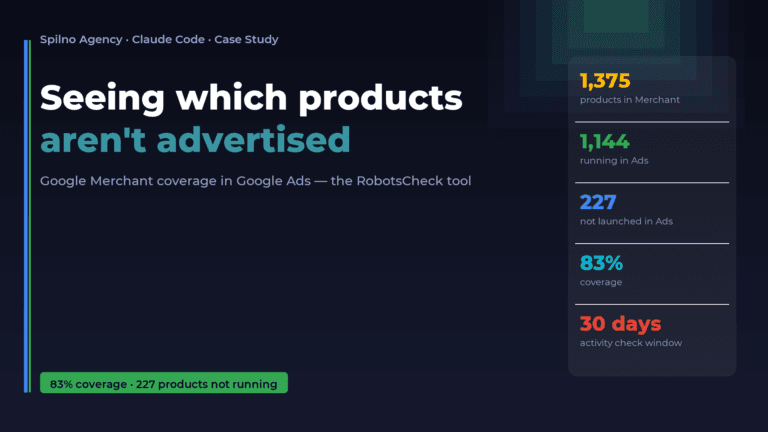
How Claude Helps Spilno Agency: Google Merchant Coverage in Google Ads
An online store lists 1,375 products in Google Merchant — but how many of them are actually running…

Google Ads Case Study for a Car Service: +63% Leads in Summer, Cost per Lead −31%
Google Ads case study for Route 66 car service, summer 2026: leads +63% on +12.9% spend, cost per…
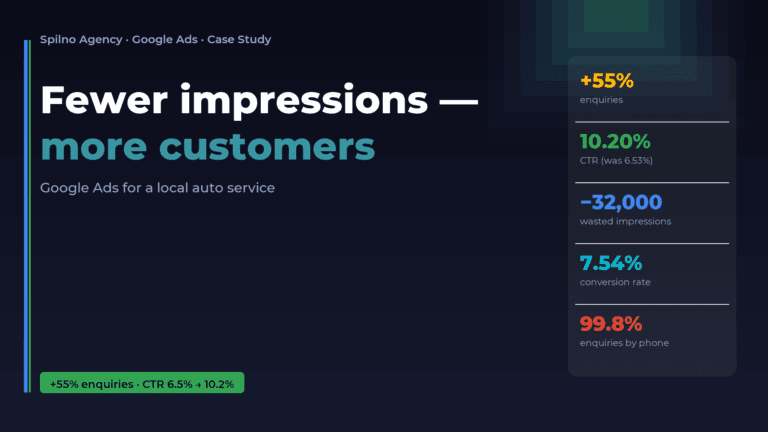
Google Ads for a Local Auto Service: Fewer Impressions, More Customers (Case Study)
A local auto service was spending its ad budget on tens of thousands of cheap impressions that barely…

Google Ads Case Study for a Health & Home Online Store: Leads +35%, Cost per Lead −9%
Spilno Agency case study: Google Ads for a health & home online store, summer 2026. Leads +35.4% on…

Promoting an English Language School — Google Ads Case Study
How we reduced cost per lead for a children's English school by 45% in 2 months using Google…
Promotion of Car service with Google Ads and Meta Ads
Objective: Generate 250 leads per month for an auto service in a small town. Solution: Results: Additional Tips:…