llms.txt: What It Is, How to Fill It, and What It Affects in 2026

Google has officially stated that it does not recognize llms.txt as a standard and does not require it to appear in generative AI search results. From Google’s official guidance: “You don’t need to create new machine readable files, AI text files, markup, or Markdown to appear in generative AI search.” llms.txt remains valuable for ChatGPT, Perplexity, and Claude — but is not a priority for Google AI Overviews optimization. Source: Google AI Optimization Guide. Full breakdown — our review of Google’s official GEO guide.
Google has added a new “Agentic Browsing” score to PageSpeed Insights (Lighthouse) that, among other checks, looks for the presence and validity of the
llms.txt file. In other words, llms.txt now feeds into an official score of how ready your site is for AI agents. Read more in our news piece: PageSpeed Insights Update: the New “Agentic Browsing” Score.In 2026, AI search has changed the rules of the game: ChatGPT, Perplexity, and Google AI Overviews answer user queries without sending them to your website. To appear in those answers, AI needs to understand your site. That’s exactly what llms.txt is for.
llms.txt is not a technical requirement — it’s a strategic advantage: websites that explain themselves to AI receive more citations in generative responses and more organic traffic from new AI channels.
What Is llms.txt?
llms.txt is a proposed standard developed by Jeremy Howard (fast.ai) in 2024. It is a simple Markdown text file placed at the root of a website at /llms.txt. Its purpose is to provide large language models (LLMs) with a concise, structured description of the site: what it is, who it’s for, what it contains, and how to use it.
Unlike robots.txt, which manages crawler access, llms.txt neither blocks nor grants access — it explains context. That’s exactly what AI systems need to accurately cite your content.
Why llms.txt Matters in 2026
In 2026, the share of search queries answered by AI assistants (ChatGPT, Gemini, Perplexity, Claude) has exceeded 40% in some niches. Users get comprehensive answers directly in chat — without visiting a website. For brands, this means one thing: if AI doesn’t know about you, you don’t exist for that audience.
llms.txt solves this problem: it gives AI a clear description of your website, your expertise, and your unique content. A properly filled file increases the likelihood that an AI assistant will cite you — not a competitor.
The Structure of llms.txt
llms.txt is written in Markdown format. Here is the minimum structure:
# Site Name

> Brief description: what this site is, who the audience is, what value it provides.

## Key Sections

- [Section Name](https://example.com/section/): description of the section (1-2 sentences)
- [Blog](https://example.com/blog/): articles and guides on SEO, GEO, and digital marketing

## Restrictions

Do not quote pricing proposals or commercial terms without prior agreement.

## Additional Information

For detailed analysis: [llms-full.txt](https://example.com/llms-full.txt)
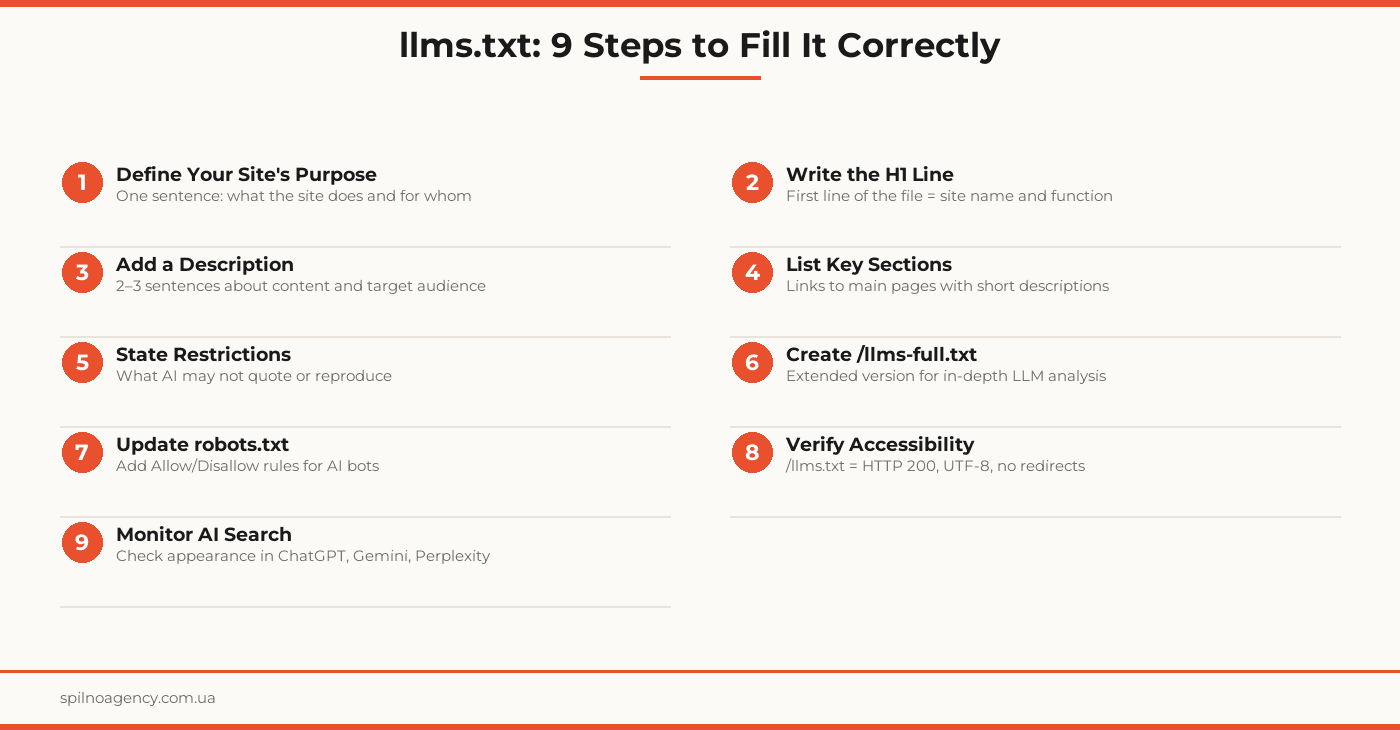
Required elements: H1 heading (site name), brief description (> block), list of sections with links. Everything else is optional.
How to Fill llms.txt Correctly
Step 1: H1 Heading
The first line of the file is the name of your business or site. Write clearly and without marketing clichés. Not “The Best Digital Marketing Agency” — but “Spilno Agency — SEO and GEO Agency.”
Step 2: Description Block
The line starting with > is your “elevator pitch” for AI. Describe: what you do, for whom, and what makes you different. Optimal length: 2–4 sentences.
Step 3: Sections and Links
List the key sections of your site with links and a brief description of each. This helps AI understand your navigation structure. Include only the most important pages — no more than 10–15.
Step 4: Restrictions
If there is content that AI should not quote (contract terms, personal data, commercial proposals) — state this explicitly in the “Restrictions” section.
Step 5: Link to /llms-full.txt
llms.txt is the compact version. If you have a lot of content, create an extended file /llms-full.txt with detailed descriptions of all pages and reference it in the main file.
What Should Be in robots.txt for AI Bots
robots.txt and llms.txt solve different problems but work together. While llms.txt explains context, robots.txt controls which crawlers have access to your site. In 2026, the key AI bots crawling the web are:
- GPTBot — OpenAI crawler (ChatGPT)
- ClaudeBot — Anthropic crawler (Claude)
- PerplexityBot — Perplexity AI crawler
- Google-Extended — Google crawler for AI model training
- YouBot — You.com crawler
- Meta-ExternalAgent — Meta AI crawler
Example robots.txt with AI bot rules:
User-agent: *
Disallow: /admin/
Disallow: /private/

# AI bots — allow access to public content
User-agent: GPTBot
Allow: /

User-agent: ClaudeBot
Allow: /

User-agent: PerplexityBot
Allow: /

User-agent: Google-Extended
Allow: /

# Reference to llms.txt
# Llms-Txt: https://example.com/llms.txt
If you want to block AI bots from crawling (e.g., to protect exclusive content), change Allow: / to Disallow: /. Keep in mind: blocking AI bots means your content won’t appear in their responses.
Where to Place llms.txt
Place llms.txt at the domain root: https://yourdomain.com/llms.txt. It must:
- Return HTTP status 200 (not 301, not 404)
- Be accessible without authentication
- Be UTF-8 encoded
- Have the correct Content-Type:
text/plainortext/markdown
The extended /llms-full.txt file goes in the same location and can be larger — it’s designed for AI agents performing deep content analysis.
What llms.txt Affects
GEO: Visibility in Generative Responses
The primary impact is on Generative Engine Optimization (GEO). Websites with a properly filled llms.txt are cited more frequently in AI responses. AI systems better understand who you are and why your content is relevant to a specific query.
Citation Quality
Without llms.txt, AI may cite your content incorrectly or incompletely. With proper context, citation accuracy improves: AI better understands the boundaries of your expertise and phrases responses more accurately.
Brand Visibility in AI Channels
In 2026, brand awareness is increasingly built through AI responses. If your brand is regularly mentioned in relevant answers from ChatGPT, Perplexity, or Gemini — that’s a direct impact on recognition and conversion.
Indirect SEO Impact
llms.txt is not a direct ranking signal for Google Search. But improvements in brand signals, citations, and AI traffic indirectly affect E-E-A-T and site authority.
Tools for Verifying llms.txt
- curl:
curl -I https://yourdomain.com/llms.txt— checks HTTP status and headers - llmstxt.cloud — validator and directory of llms.txt files
- Browser: open
https://yourdomain.com/llms.txt— the file should display as plain text - Perplexity AI: ask “What is [yourdomain.com]?” — if the site appears in the response, the file is being read
Real-World llms.txt Examples
Let’s look at how llms.txt files appear on real websites.
Spilno Agency (spilnoagency.com.ua)
The file is available at https://spilnoagency.com.ua/llms.txt (HTTP 200). The structure is minimalist: an H1 heading, description block, list of services and blog posts. A notable feature — a section with links to language-specific file versions for a multilingual site:
# Spilno Agency

> Spilno Agency — Ukrainian digital agency: SEO, GEO optimization, and AI search visibility.

## Services

- [SEO Promotion](https://spilnoagency.com.ua/seo/): comprehensive Google search optimization
- [GEO Optimization](https://spilnoagency.com.ua/geo/): visibility in ChatGPT, Perplexity, Gemini

## Blog

- [Guides & Instructions](https://spilnoagency.com.ua/instructions/): practical articles on SEO and GEO

## Other Language Versions

- EN: https://spilnoagency.com.ua/en/llms.txt
- PL: https://spilnoagency.com.ua/pl/llms.txt
- RU: https://spilnoagency.com.ua/ru/llms.txt
Note: the language-specific files (/en/llms.txt, /pl/llms.txt) also returned HTTP 200 — this is the right approach for a multilingual site.
Epicentr (epicentrk.ua)
One of Ukraine’s largest marketplaces. The file at https://epicentrk.ua/llms.txt is accessible (HTTP 200) and describes the broad product structure — catalog categories and key sections:
# Epicentr (epicentrk.ua)

> Epicentr — one of the largest retailers and marketplaces in Ukraine. We sell home improvement goods, electronics, furniture, and more.

## Main Categories

- [Building Materials](https://epicentrk.ua/ua/shop/budivelnyi-material/): cement, blocks, insulation
- [Power Tools](https://epicentrk.ua/ua/shop/elektroinstrumenty/): drills, angle grinders, screwdrivers
- [Furniture](https://epicentrk.ua/ua/shop/mebli/): for home, office, and kitchen
Rozetka (rozetka.com.ua)
At the time of writing (May 2026), rozetka.com.ua/llms.txt returns HTTP 403 — access is blocked via WAF/Cloudflare. This is a clear reminder: having a file ≠ it being accessible to AI. Always verify HTTP status after deployment with curl -I https://yourdomain.com/llms.txt.
llms.txt Setup Checklist
- H1 heading written: business/site name clearly, without clichés
- Description block (> line) — 2–4 sentences about the site’s purpose and audience
- Key sections listed (max 15) with links and descriptions
- Restrictions stated (if any content is not to be quoted)
- Link to /llms-full.txt added (if extended version exists)
- File accessible at https://yourdomain.com/llms.txt (HTTP 200)
- File encoding is UTF-8
- Content-Type: text/plain or text/markdown
- robots.txt updated: rules for GPTBot, ClaudeBot, PerplexityBot, Google-Extended
- AI bots allowed or blocked — according to your strategy
- File verified via curl or browser
- Citation checked in Perplexity or ChatGPT
- AI brand visibility monitoring launched
Frequently Asked Questions
Is llms.txt a standard or a recommendation?
llms.txt is a recommendation, not an official standard. The file was proposed by Jeremy Howard (fast.ai) in 2024 as an informal specification and has not been ratified by any standards body (W3C, IETF, etc.). However, it has gained wide adoption: Anthropic (Claude), OpenAI (ChatGPT), Perplexity, and other AI systems support or actively test reading it. In practice, the distinction between ‘recommendation’ and ‘de facto standard’ blurs — if the leading AI platforms read the file, it works regardless of formal status. Google’s position (May 15, 2026): the search engine officially stated it does not grant llms.txt any special status and does not require it for AI search. For ChatGPT, Perplexity, and Claude the file retains its value.
What is llms.txt and who created it?
llms.txt is a proposed standard developed by Jeremy Howard (fast.ai) in 2024. It is a simple Markdown text file placed at the root of a website (/llms.txt) that describes the site, its structure, and content in a format optimized for large language models (LLMs). Unlike robots.txt, which blocks or allows access, llms.txt explains to AI what the site contains and how to understand it.
Is llms.txt mandatory for all websites?
llms.txt is not a mandatory technical standard — it is a voluntary format. However, in 2026, when AI search accounts for a significant share of user traffic, having it becomes a competitive advantage. Websites with a properly filled llms.txt are more frequently cited by AI assistants and have better representation in generative answers.
What is the difference between llms.txt and robots.txt?
robots.txt contains directives for web crawlers: allow or block access to pages. llms.txt is a contextual document for AI: it doesn’t block — it explains. robots.txt controls indexing; llms.txt influences understanding and citation. These files complement each other and should be used together.
Which AI systems read llms.txt?
In 2026, llms.txt is supported or actively tested by: ChatGPT (OpenAI), Perplexity AI, Claude (Anthropic), Google Gemini, and several others. Additionally, AI agents and automated systems that scan websites for RAG (retrieval-augmented generation) also rely on this file.
Can llms.txt replace SEO optimization?
No. llms.txt is a GEO (Generative Engine Optimization) tool, not a replacement for traditional SEO. Classic ranking factors (backlinks, structure, speed, E-E-A-T) remain important for Google Search. llms.txt complements SEO by helping AI systems correctly understand and cite your site’s content in generative responses.
If a site is multilingual — does each language need its own llms.txt, or is one file enough?
A single /llms.txt at the domain root is sufficient — that’s the minimum required. However, for multilingual sites it’s recommended to create separate files for each language version: /en/llms.txt, /pl/llms.txt, etc. Spilno Agency does exactly this: the root file references language variants via an ‘Other Language Versions’ section, allowing AI systems to read context in the appropriate language. This approach improves citation accuracy in AI responses for each market and enhances GEO visibility across different languages.
Want to set up llms.txt and boost your site’s AI visibility? Spilno Agency performs GEO audits and prepares all necessary files for AI optimization.

Read also

How Long Does Google Take to See Changes on Your Website: Google’s Data on Crawling, Indexing and Serving
We break down Google's slides from Search Central Live: how long crawling, indexing and serving of changes take,…
How to Transfer (Move) a Google Analytics 4 Property to Another Account: Step-by-Step Guide
A step-by-step guide with screenshots: how to move a Google Analytics 4 property to another account without losing…

How Long Does the Meta Ads Learning Phase Last: 50 Results and 7 Days
The official answer from Meta's Help Centre: ads keep learning until an ad set collects about 50 results,…